



This blog talks about Azure DevOps release gates and how you can use them to check Azure policy compliance.
The technologies that are covered in this blog are a part of the Azure DevOps environment. If it’s something in which you have an interest or you want to learn, then you can visit our previous blog to know more about the [AZ-400] Microsoft Azure DevOps certification.
Note: You Can Check Our Blog on Azure Pipelines.
Azure Policy helps you manage and prevent IT issues by using policy definitions that enforce rules and effects for your resources.
When you use Azure Policy, resources stay compliant with your corporate standards and service level agreements. Policies can be applied to an entire subscription, a management group, or a resource group.
Note: Check Our Blog on DevSecOps Git Scanning
Step 1: Create an Azure Policy in the Azure portal. There are several pre-defined sample policies that can be applied to a management group, subscription, and resource group.
Step 2: In Azure DevOps create a release pipeline that contains at least one stage, or open an existing release pipeline.
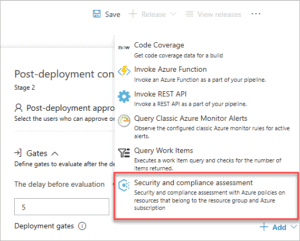
Step 3: Add a pre-or post-deployment condition that includes the Security and compliance assessment task as a gate.
Step 4: Navigate to your team project in Azure DevOps.
Step 5: In the Pipelines section, open the Releases page and create a new release.
Step 6: Choose the In progress link in the release view to open the live logs page.
Check Out: Azure DevOps Engineer Roles and Responsibilities. Click here
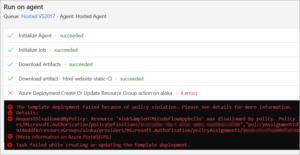
Step 7: When the release is in progress and attempts to perform an action disallowed by the defined policy, the deployment is marked as Failed. The error message contains a link to view the policy violations.
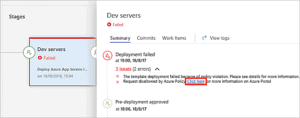
Step 8: An error message is written to the logs and displayed in the stage status panel on the releases page of Azure Pipelines.
Check out: Azure Support Plans to know all the options available
Step 9: When the policy compliance gate passes the release, a Succeeded status is displayed.
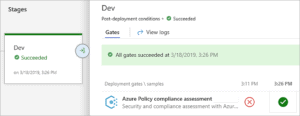
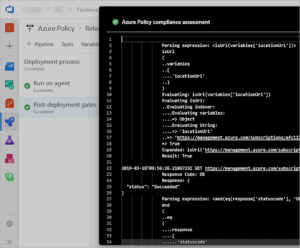
Step 10: Choose the successful deployment to view the detailed logs.
Also read: A basic overview of how Git Branching Strategy DevOps can be used to implement a Branching Strategy in an Azure Environment.
Related/References
- [AZ-400] Microsoft Azure DevOps Certification Exam: Everything You Need To Know
- [AZ-400] Azure DevOps Certification Path
- [AZ-400] Roles And Responsibilities As An Azure DevOps Engineer
- [AZ-400] Microsoft Azure DevOps Training: Step By Step Activity Guides/Hands-On Lab Exercise
- [AZ-400] Azure DevOps Services for Beginners
- [AZ-400] Designing and Implementing Microsoft DevOps Solutions [Official Page]
- Azure DevOps Service Hooks | Subscription Of Service Hooks | Release Approvals
- SonarCloud Azure DevOps | Integrating SonarCloud In Azure
- Azure DevOps Environments | How To Setup DevOps Environment | Approval Checks | Azure DevOps Pipeline
- Branching Strategy DevOps | Git Branching Model | Git Branch Policy | Restoring A Deleted Branch
Next Task For You
Begin your journey toward Mastering Azure Cloud and landing high-paying jobs. Just click on the register now button on the below image to register for a Free Class on Mastering Azure Cloud: How to Build In-Demand Skills and Land High-Paying Jobs. This class will help you understand better, so you can choose the right career path and get a higher paying job.


![Microsoft Agentic AI Business Solutions Architect [AB-100] | K21 Academy](https://test.k21academy.com/wp-content/uploads/2025/11/Microsoft-Agentic-AI-Business-Solutions-Architect-AB-100-Exam-Overview1.png)


