





This post introduces you to AWS Elastic File System (EFS), what it is, its features, and how it can be helpful.
AWS Storage Services: AWS provides a variety of storage services that may be provided based on your project’s needs and use case. AWS storage services include varied provisions for highly secret data, often accessed data, and seldom accessed data. You can pick between object storage, file storage, block storage services, backups, and data migration choices. All of these are included in the AWS Storage Services list.
If you are new to AWS, check our previous blog on AWS Storage type
Topics Covered in this blog:
- What Is Amazon EFS?
- Step 1: Create Your Amazon EFS File System
- Step 2: Create EC2 Resources And Launch EC2 Instance
- Step 3: Transfer File Data To AWS EFS Using AWS DataSync
- AWS Elastic File System (EFS) limitations
- What Is A Mount Target?
- Conclusion
What Is Amazon EFS?
- A fully managed file system for Amazon EC2 instances
- Exposes a file system interface that works with standard operating system APIs
- Provides file system access semantics (consistency, locking)
- Sharable across thousands of instances
- Designed to grow elastically to petabyte-scale
- Built for performance across a wide variety of workloads
- Highly available and durable
Amazon EFS is beneficial even for access from one EC2 instance
- Multi-AZ availability/durability
- Elastically grows—create it and forget about it
- You can later access it from multiple Amazon EC2 instances if needed
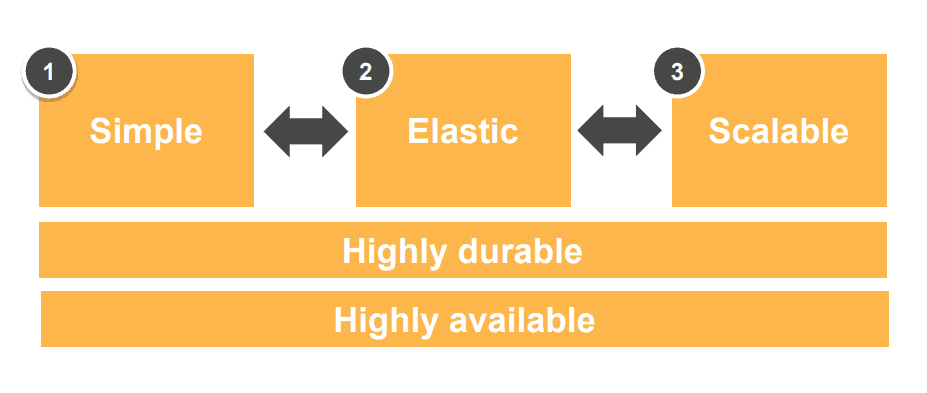
- Amazon EFS is simple: Fully managed, with no need for hardware, network, or file layer. It’s easy to Create a scalable file system in seconds with Seamless integration with existing tools and apps.
- Amazon EFS is elastic: File systems grow and shrink automatically as you add and take away files. No one has to provision storage capacity or performance. You pay just for the space to store your employees, with no minimum fee.
- Amazon EFS is scalable: File systems can grow to petabyte-scale. Throughput and IOPS scale automatically as file systems grow, which provides consistently low latencies no matter the file system size and support for thousands of concurrent NFS connections.
- Highly durable and highly available: Designed to sustain AZ offline conditions Superior to traditional NAS availability models and appropriate for production and tier applications.
Read about AWS Elastic Beanstalk
Step 1: Create Your Amazon EFS File System
- To create your Amazon EFS file system, Open the Amazon EFS Management Console and click here.
- Click on Create file system and open the Create file system dialogue box.

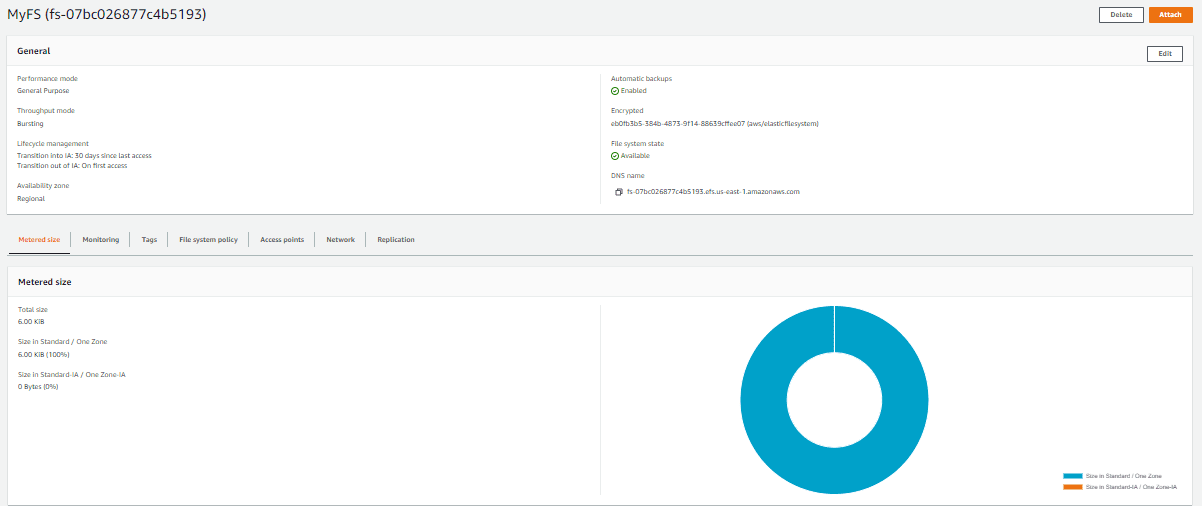
- Provide a Name for your file system, choose your VPC, or set it to your default VPC, then click “Create” to create a file system that uses default settings. After you create the file system, you can customize the file system’s settings.
- The File Systems page displays a banner across the top showing the current status of the file system you created.
A link to access the file system details page appears in the banner when the file system becomes available.
Check out: AWS Free Tier Account Services
Step 2: Create EC2 Resources And Launch EC2 Instance
Note: We can’t use Amazon EFS with Microsoft Windows-based EC2 instances.
To launch the EC2 instance and mount an EFS file system
- Open the Amazon EC2 console at Amazon EC2 and Click on Launch Instance.
- In the Name and Tags step, you can add tags to an instance.
- Choose an Amazon Machine Image (AMI), and find an Amazon Linux AMI.
- Scroll down. Select the t2.micro instance type.
- Select an existing key pair or create a new one
- In Network Settings, Choose the default security group to make sure that it can access your EFS file system
Type: SSH
Protocol: TCP
Source: Anywhere 0.0.0.0/0
Port Range: 22 - Click on Review and Launch. Now that you have created a functioning Amazon EFS file system,.
Step 3: Transfer File Data To AWS EFS Using AWS DataSync
AWS Elastic File System (EFS) limitations:
- EFS can only be mounted and accessed by devices that support the Network File System (NFS) protocol.
- The maximum file size allowed by EFS is 47.9 TB.
- EFS can handle up to 16,000 IOPS and 1000 MB/s of throughput per file system, respectively.
- The size of the file system determines the maximum number of files and directories that can be generated using EFS on a single file system. A 1 TB file system, for instance, can accommodate up to 20 million files and directories.
- Data migration is not feasible between regions, and EFS is only accessible in specific areas.
- Hard and symbolic linkages are not supported by EFS.
What Is A Mount Target?
To access your file system from instances in a VPC, you create mount targets in the VPC. A mount target is an NFS v4 endpoint in your VPC. A mount target has an IP address and a DNS name that you use in your mount command
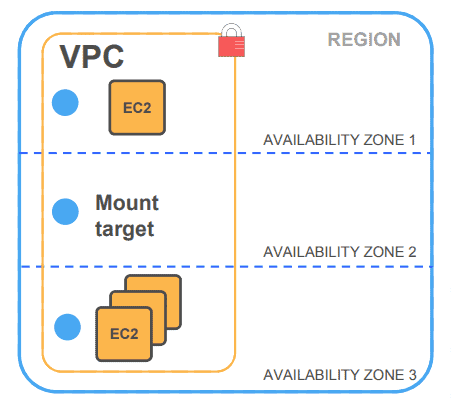
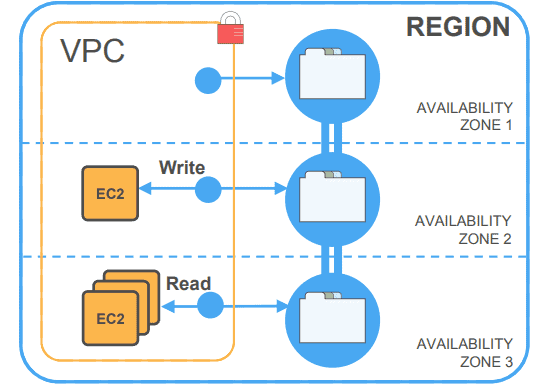
Data can be accessed from any AZ in the region while maintaining full consistency
Your EC2 instances can connect to your EFS file system from any AZ in a region. All reads will be fully consistent in all AZs—that is, a read in one AZ is guaranteed to have the latest data, even if the data is being written in another AZ
Amazon EFS is designed for a wide spectrum of use cases
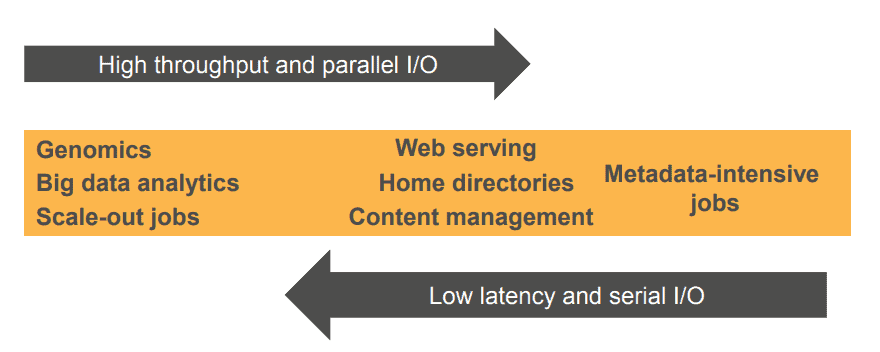
Two performance modes designed to support a broad spectrum of use cases:
- General-purpose mode: Optimized for latency-sensitive applications and general-purpose file-based workloads, this mode is the best option for the majority of use cases
- Max I/O mode: Optimized for large-scale and data-heavy applications where tens, hundreds, or thousands of EC2 instances are accessing the file system, it scales to higher levels of aggregate throughput and ops per second with a tradeoff of slightly higher latencies for file operations
Simple and predictable pricing
With EFS, you pay only for the storage space you use. There are no minimum commitments or up-front fees; there is no need to provision storage in advance, and there are no other fees, charges, or billing dimensions
EFS price: $0.0315/GB/month
Conclusion
In conclusion, Amazon EFS is a fully managed file system service for use with Amazon EC2 instances. It offers scalability, elasticity, high availability, and durability. EFS is a good option for a variety of use cases, including general-purpose file sharing, content management systems, and backup and archive. To learn more about Amazon EFS, visit the AWS documentation or sign up for our free informative class on Amazon Cloud.
Related Links/References:
- Overview of Amazon Web Services & Concepts
- AWS Certified Solutions Architect Associate SAA-C03 Exam
- AWS Management Console Walkthrough
- How do I create and activate a new Amazon Web Services account?
- AWS Elastic File System User Guide
Frequently Asked Questions
How does Amazon EFS differ from Amazon S3 and Amazon EBS?
Amazon EFS is a file storage service for EC2 instances, providing a shared file system. Amazon S3 is object storage for storing and retrieving large amounts of data from anywhere. Amazon EBS provides block storage for use with a single EC2 instance, suitable for high-performance applications.
What is the performance mode in Amazon EFS, and how do I choose the right one?
Amazon EFS offers two performance modes: General Purpose and Max I/O. General Purpose is suitable for latency-sensitive use cases, while Max I/O is designed for applications that require high levels of throughput and can tolerate slightly higher latencies.
How does Amazon EFS handle data durability and availability?
Amazon EFS automatically replicates your data across multiple Availability Zones within a region, ensuring high durability and availability.
What is the pricing model for Amazon EFS?
Amazon EFS pricing is based on the amount of data stored in your file system and any additional features you use, such as provisioned throughput or data transfer.
Next Task For You
Begin your journey towards an AWS Cloud by joining our FREE Informative Class on Amazon Cloud Free Class by clicking on the below image.


![Microsoft Agentic AI Business Solutions Architect [AB-100] | K21 Academy](https://test.k21academy.com/wp-content/uploads/2025/11/Microsoft-Agentic-AI-Business-Solutions-Architect-AB-100-Exam-Overview1.png)



