
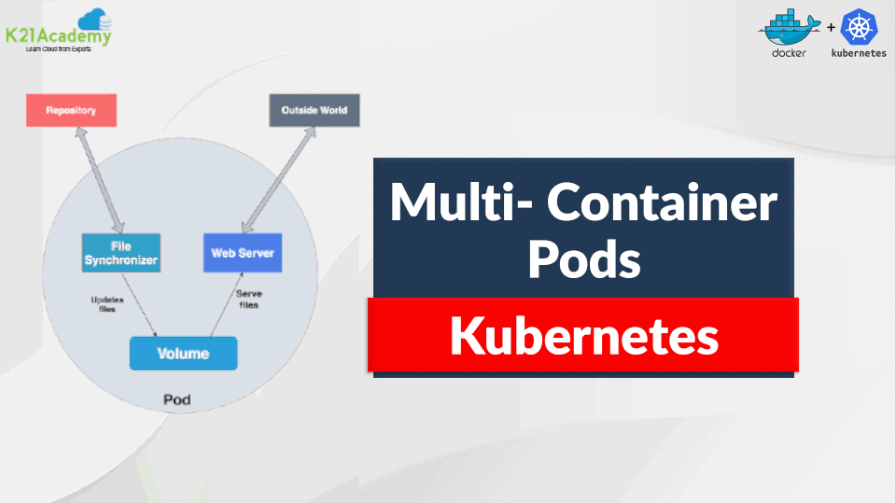





As the world increasingly embraces the power of containers, Kubernetes has become a focal point for many. Kubernetes is an open-source container orchestration engine designed to streamline the deployment, scaling, and management of containerized applications. At its core, Kubernetes operates with the concept of Pods as the fundamental unit for deployment and management. The two types of Pods are Single Container pods & Multi Container Pods Kubernetes.
In this blog, we are going to cover:
- Kubernetes Pods
- Multi-Container Pods
- Design-patterns of Multi Container Pods
- Communication Inside a Multi Container Pod
- How to Deploy a Multi Container Pod
- Why Use Multi Container Pods
If you are new to Kubernetes, check out our blog on Kubernetes for beginners.
What Is A Kubernetes Pod?
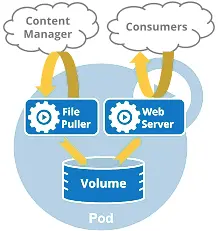
Pod Architecture
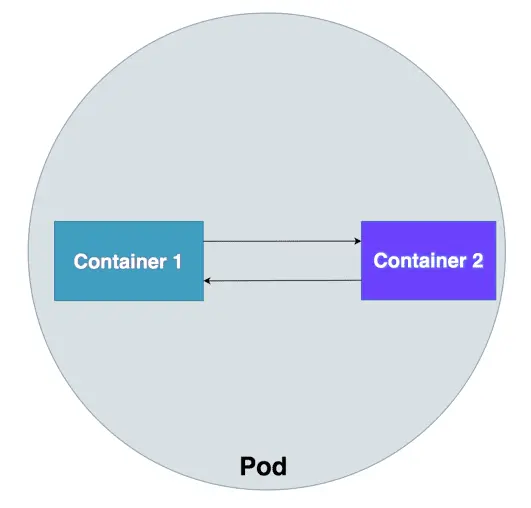
Kubernetes doesn’t run containers directly; alternatively, it wraps one or more containers into a higher-level structure called Pod. A pod is a group of one or more containers that are deployed together on the same host. The pod is deployed with a shared storage/network, and a specification for how to run the containers.Containers can easily communicate with other containers in the same pod as though they are on the same machine.
If you need to run a single container in Kubernetes, then you have to create a pod for it which is nothing but Single Container Pod. If you have to run two or more containers in a pod, then the pod created to place these containers is called a Multi Container Pod.
Know in detail about Pods, from our detailed blog on Kubernetes Pods, creating, deleting and the best practices.
Kubernetes Multiple Containers in a POD
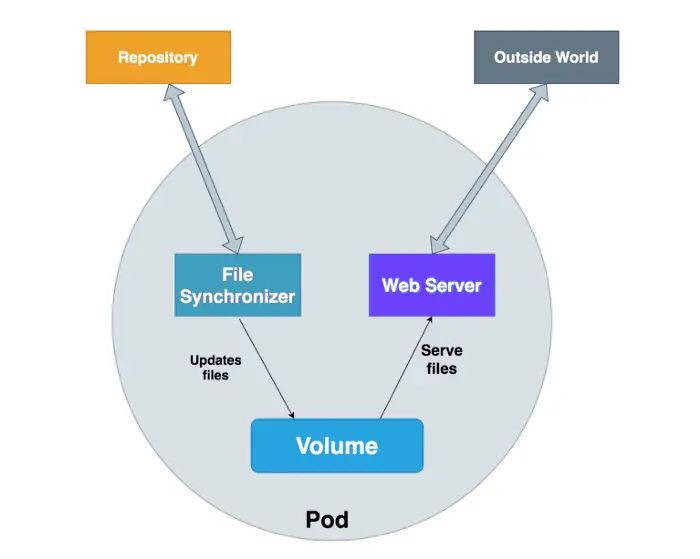
Multi-Container Pod
Since containers should not be deployed directly to save ourselves from inevitable disasters, we use pods to deploy them as discussed before. But what if there are tightly-coupled containers, for e.g, a database container and a data container, should we place them in two different pods or a single one?
This is where a Multi Container Pod comes in. Thus, when an application needs several containers running on the same host, the best option is to make a Multi Container (Pod) with everything you need for the deployment of the application. But wouldn’t that break the “One process per container” rule?! Yes, it does and definitely gives a hard time in troubleshooting. Above all, there are more pros than cons to this, for instance, more granular containers can be reused between the team.
Also check: The difference between CKAD vs CKA
Design-patterns Of Multi Container Pods Kubernetes
Design patterns and the use-cases are for combining multiple containers into a single pod. There are 3 common ways of doing it, the sidecar pattern, the adapter pattern, and the ambassador pattern, we will go through all of this.
| Pattern | Purpose | Description |
|---|---|---|
| Sidecar | Enhances or extends the main container functionality | A sidecar container complements the primary container within a deployment, operating in tandem and utilizing the same resources. Its role encompasses crucial but auxiliary tasks essential for the main container’s functionality, such as logging, monitoring, or configuration management. Essentially, it serves as a supportive module that handles peripheral functions vital for the seamless operation of the main container. For example, a logging sidecar might undertake the responsibility of collecting, processing, and forwarding logs generated by the main container to a designated logging backend. |
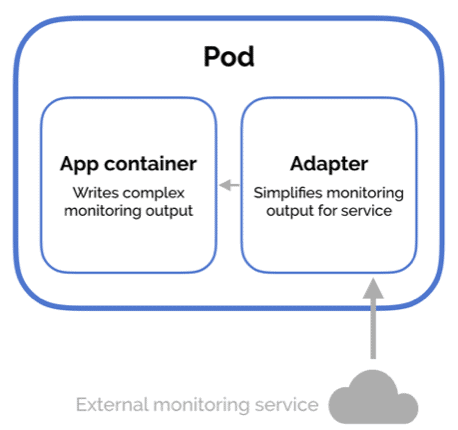
| Adapter | Standardizes and adapts output for external systems | An adapter container serves the purpose of harmonizing the output or interface of one or more containers to conform to a standardized format required by external systems. This involves translating diverse data formats, metrics, or other outputs into a uniform structure expected by external monitoring or logging tools. In essence, it acts as a bridge, enabling seamless integration and communication between the containerized application and external systems or services. |
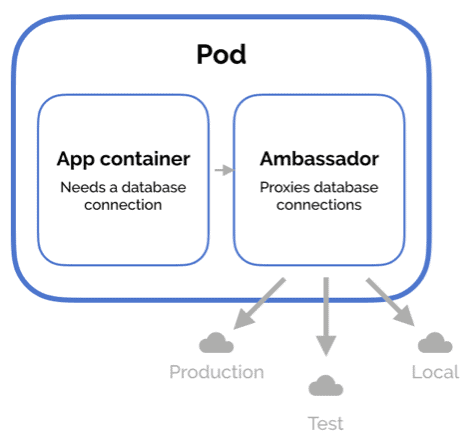
| Ambassador | Acts as a proxy to external systems | The ambassador container plays a pivotal role in managing communications between the primary container and external services within a deployment environment. Serving as a proxy, it abstracts away the intricate details involved in interfacing with external services, thereby providing a simplified and standardized interface for the main container. This pattern proves invaluable for encapsulating complex service connection logic, including tasks such as service discovery, monitoring, and ensuring security measures such as authentication and encryption are seamlessly applied. |
Sidecar Design Pattern
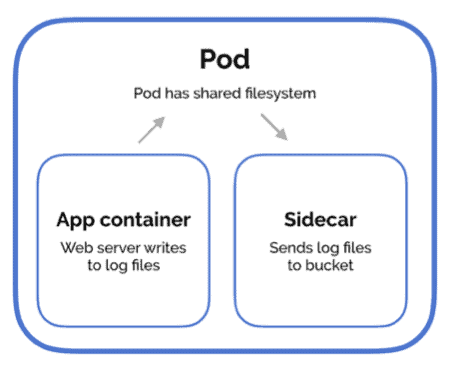
Imagine a container having a use-case, where there is a web server with a log processor, the sidecar design pattern aims to resolve this kind of exact problem. The sidecar pattern consists of the main application, i.e. the web application, and a helper container with a responsibility that is vital for your application but is not necessarily a part of the application and might not be needed for the main container to work.
Also check: our blog on Kubernetes Install
Adapter Design Pattern
The adapter pattern is used to standardize the output by the primary container. Standardizing refers to format the output in a specific manner that fits the standards across your applications. For instance, an adapter container could expose a standardized monitoring interface to the application even though the application does not implement it in a standard way. The adapter container takes care of transforming the output into what is acceptable at the cluster level.
Also Read: Kubernetes Persistent Storage.
Ambassador Design Pattern
The ambassador design pattern is used to connect containers with the outside world. In this design pattern, the helper container can send network requests on behalf of the main application. It is nothing but a proxy that allows other containers to connect to a port on the localhost. This is a pretty useful pattern especially when you are migrating your legacy application into the cloud. For instance, some legacy applications that are very difficult to modify, and can be migrated by using ambassador patterns to handle the request on behalf of the main application.
Check out: Difference between Docker vs VM
Communication Inside A Kubernetes Multi Container Pod ^
There are three ways that containers in the pod communicate with each other. Namely, Shared Network Namespace, Shared Storage Volumes, and Shared Process Namespace.
Shared Network Namespace
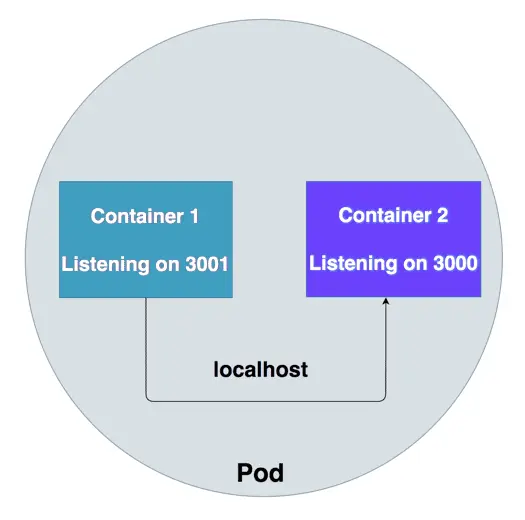
All the containers in the pod share the same network namespace, therefore all containers can communicate with each other on the localhost. For instance, We have two containers in the same pod listening on ports 8080 and 8081 respectively. Container 1 can talk to container 2 on localhost:8080.
Check Out: How to Use Configmap Kubernetes.
Shared Storage Volumes
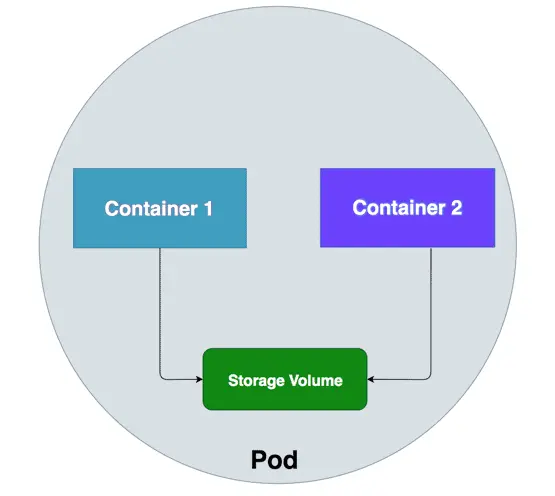
All the containers can have the same volume mounted so that they can communicate with each other by reading and modifying files in the storage volume.
Click here to get detailed information on the Shared Volume way of communication.
To know more about Scheduler Kubernetes.
Shared Process Namespace
Another way for the containers to communicate is with the Shared Process Namespace. With this, the containers inside the pod can signal each other. For this to be enabled, we need to have this setting shareProcessNamespace to true in the pod spec.
Click here to get detailed information on the Shared Process Namespace way of communication.
Learn with us: Join our Kubernetes training and understand Kubernetes in an easy way.
How To Deploy A Multi Container Pod? ^
Prerequisites:
The only thing you need to deploy a multi-container pod is a running Kubernetes cluster! If you don’t have a cluster up and running, check out: How to deploy a Kubernetes cluster on an Ubuntu server. Once you spin up your cluster, you are ready to deploy a multi-container pod.
Defining a multi-container pod:
As with every file definition in Kubernetes, we define our multi-container pod in a YAML file. So, the first step is to create a new file with the command:
vim multi-pod.yml
Paste the following code in the file:
apiVersion: v1
kind: Pod
metadata:
  name: multi-pod  # This is the name of the Kubernetes Pod.

spec:
  restartPolicy: Never  # Specifies that containers in the Pod should not be restarted automatically.

  volumes:
    - name: shared-data  # Defines an emptyDir volume named 'shared-data' for sharing data between containers.
      emptyDir: {}  # An empty directory that containers can use to share data.

  containers:
    - name: nginx-container  # Nginx container for serving web content.
      image: nginx  # The Docker image to use for the Nginx container.
      volumeMounts:
        - name: shared-data  # Mounts the 'shared-data' volume inside the Nginx container.
          mountPath: /usr/share/nginx/html  # The path where Nginx serves content.

    - name: ubuntu-container  # Ubuntu container for data manipulation.
      image: ubuntu  # The Docker image to use for the Ubuntu container.
      volumeMounts:
        - name: shared-data  # Mounts the 'shared-data' volume inside the Ubuntu container.
          mountPath: /pod-data  # The path within the Ubuntu container for working with shared data.
      command: ["/bin/sh"]  # Specifies the command to run within the Ubuntu container.
      args: ["-c", "echo 'Hello, World!!!' > /pod-data/index.html"]  # Command arguments to create an HTML file.
In the above YAML file, you will see that we have deployed a container based on the Nginx image, as our web server. The second container is named ubuntu-container, is deployed based on the Ubuntu image, and writes the text “Hello, World!!!” to the index.html file served up by the first container.
Also Read: Kubernetes ckad exam, Everything you need to know before giving this exam.
How To Deploy A Multi Container Pod:
To deploy a multi-container command we use the kubectl command given below:
kubectl apply -f multi-pod.yml
Once the pod is deployed, the containers a bit to actually change to the running state (even though the first container will continue running) and then you have to access the Nginx-container with the command:
kubectl exec -it multi-pod -c nginx-container -- /bin/bash
By executing the above command you will find yourself at the bash prompt of the Nginx container. To make sure the second container has done its job or not, issue the following command:
curl localhost
You should see “Hello, World!!!” printed out.
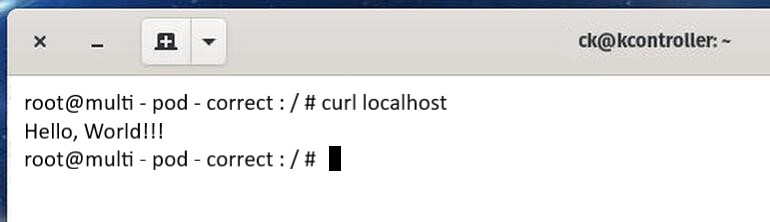
Ubuntu-container successfully wrote the required text to the NGINX index.html file
Hurray! We have successfully deployed a multi-container pod in a Kubernetes cluster. Even though this is a very basic example, it shows how do containers interact with in the same pod.
Also Check: Our blog post on Kubernetes Architecture Components, to understand how it works.
Why Use Multi Container Pods
Well there are many good reasons why to use them rather than not to use them; here are some of them:
- Efficient Collaboration: They support multiple containers working closely together, making them ideal for applications with interconnected components.
- Streamlined Management: All containers within a Pod start, stop, and update together, simplifying operational tasks.
- Shared Resources: Resource allocation is collective, ensuring a balanced distribution among containers.
- Effective Communication: Containers in the same Pod can efficiently exchange data, reducing network overhead.
- Consistency in Updates: Updates are synchronized across all containers in the Pod, reducing version conflicts.
Frequently Asked Questions
What is a multi-container pod in Kubernetes?
A multi-container pod is a pod in Kubernetes that can run multiple containers together as a single unit. These containers share the same network namespace, storage volumes, and can communicate with each other.
Why would I want to use multi-container pods?
Multi-container pods are useful for scenarios where you have tightly coupled processes or need containers to share resources, such as storage or network, within the same pod. Examples include a sidecar pattern for logging, monitoring, or proxy containers.
How do containers in a multi-container pod communicate with each other?
Containers in the same pod can communicate with each other using localhost (127.0.0.1). They can also share files in the same volumes or use Kubernetes services to communicate over the network.
How do you define multi-container pods in a Kubernetes manifest file?
You define multi-container pods by specifying multiple container definitions in the spec.containers section of the pod manifest. Each container has its own configuration, including image, resources, and volume mounts.
Can containers in a multi-container pod be restarted independently?
No, all containers in a pod share the same lifecycle. If one container fails or is restarted, it affects all the containers in the same pod.
Related / References
-
- Visit our YouTube channel on “Docker & Kubernetes”
- Pods in Kubernetes: A complete guide
- Certified Kubernetes Administrator (CKA) Certification Exam
- (CKA) Certification: Step By Step Activity Guides/Hands-On Lab Exercise & Learning Path
- Certified Kubernetes Application Developer (CKAD) Certification Exam
- Certified Kubernetes Application Developer [CKAD]: Step-by-Step Activity Guide
- CKA/CKAD Exam Questions & Answers 2022
- Kubernetes Monitoring: Prometheus Kubernetes & Grafana Overview
- Etcd Backup And Restore In Kubernetes: Step By Step Guide
Join FREE Masterclass
Discover the Power of Kubernetes, Docker & DevOps – Join Our Free Masterclass. Unlock the secrets of Kubernetes, Docker, and DevOps in our exclusive, no-cost masterclass. Take the first step towards building highly sought-after skills and securing lucrative job opportunities. Click on the below image to Register Our FREE Masterclass Now!


![Microsoft Agentic AI Business Solutions Architect [AB-100] | K21 Academy](https://test.k21academy.com/wp-content/uploads/2025/11/Microsoft-Agentic-AI-Business-Solutions-Architect-AB-100-Exam-Overview1.png)



