




Machine learning is a subset of Artificial Intelligence. It is the process of training a machine with specific data to make inferences. In this post, we are going to cover everything about Automated Machine Learning in Azure. This topic is covered in [AI-900] Microsoft Certified Azure AI Fundamentals Course.
Overview Of Automated Machine Learning
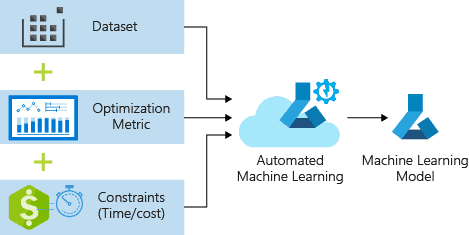
Automated machine learning, also called Automated ML or AutoML is the process of creating a Machine Learning model. It automates the time-consuming and iterative tasks of creating a model.
Traditional machine learning model development requires a good knowledge of various machine learning algorithms and it takes time to build an efficient model for predictions. Using Azure Automated ML we can build an efficient model without spending much time.
Read More: About machine learning models. Click here
Where To Use Automated Machine Learning
We use Azure Automated ML where we want to train and deploy a model based on the target metric we specify. This is used in various scenarios like:
- Implement ML solutions without extensive programming knowledge
- Save time and resources
- Leverage data science best practices
- Provide agile problem-solving
Also, Read Our previous blog post on Microsoft Azure Object Detection. Click here
Why Automated Machine Learning Important
Manually constructing a machine learning model is a multistep process and it requires expertise in various domains like statistics, calculus, Coding platforms like python & R, and computer science skills. This will also increase the chances of errors and bugs which will directly affect the accuracy of the model.
Azure Automated ML enables organizations to deploy ML models with a baked-in knowledge of Data Science. Using Automated ML a non-technical background person can also implement models with a little knowledge of Data Science. This approach of deploying models will decrease efforts, risk, and time.
Azure Automated ML makes it possible for a business in every industry like healthcare, financial market, banking, etc to leverage ML & AI technologies.
To Know More About Azure Cognitive Services click here
Pros & Cons Of Automated Machine Learning
Benefits:
- Automatic prediction of the best pipeline for the labeled data.
- Automates various iterative ML-related tasks (like model selection, and featurization)
- Doesn’t require expertise in Data Science or a technical background.
- Low development cost, less time-consuming.
Drawbacks:
- Non-optimal performance (sometimes very good sometimes bad)
- Not suitable for complex data structure and issues.
- Performance issues if the Dataset is too small.
Also Read: Our Previous Post on Microsoft Azure AI
How Automated ML Works In Azure
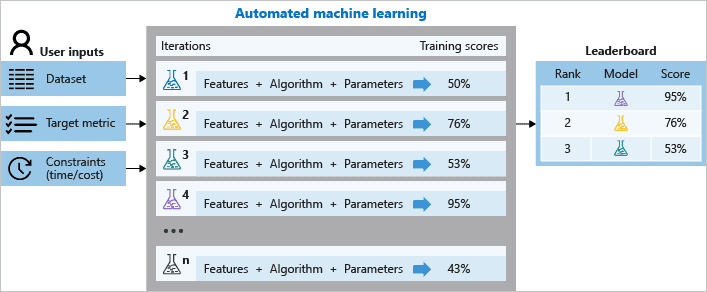
During the training process, Azure Machine Learning creates several pipelines simultaneously to predict which ML algorithm is best to suit the underlying data. It also does the feature selection and all the pre-processing required.
Note: Do Check Our Blog Post On the DP 100 Exam for an overview.
Note: Azure ML pipeline is like a flowchart that specifies and performs the data flow from one phase to another in building a model.
Steps to design & run automated ml in the Azure workspace:
- Identify which algorithm best suits the underlying problem.
- Choose what you want to use for deploying a model between Python SDK & Azure ML studio.
- Specify the source and format of the training data (Numpy or pandas)
- Configure Compute Targets for model training such as local compute, Azure ML computes, remote VMs, or Azure data bricks.
- Configure Auto ML parameters. It involves all the pre-processing, featurization, and number of iterations over different models.
- Submit the trained model
- Review and analyze the score.
To Know More About Azure Machine Learning Studio click here
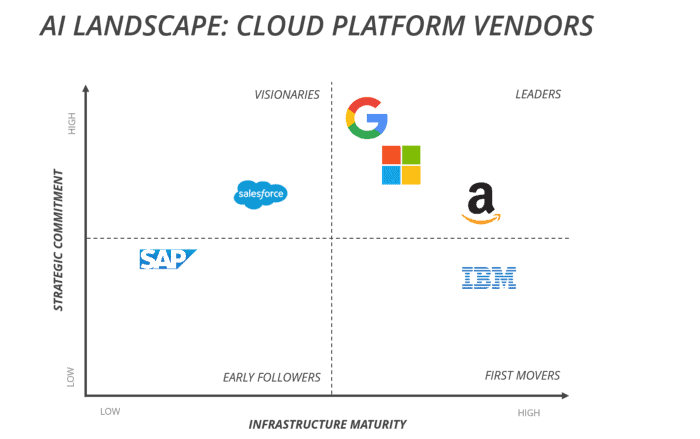
Cloud Vendors Providing Automated ML
- Google Cloud
- Microsoft Azure
- Amazon AWS
- IBS
- Salesforce Cloud Service
- SAP Cloud Platform
Read more: MLOps is based on DevOps principles and practices that increase the efficiency of workflows and improve the quality and consistency of machine learning solutions.
What is Azure Machine Learning Studio ?
Azure Machine Learning Studio is a cloud-based platform that enables data scientists and developers to build, train, and deploy machine learning models efficiently. It provides a user-friendly interface for managing the entire ML lifecycle, from data preparation and model training to deployment and monitoring. With features like drag-and-drop modules, AutoML, and integration with Python SDKs, Azure ML Studio supports both beginners and advanced users. It simplifies collaboration, scalability, and operationalization of models, making it ideal for real-world AI solutions across industries. Its seamless integration with Azure services ensures robust, end-to-end machine learning workflows in a secure environment.
Automated Machine Learning Examples
Automated Machine Learning (AutoML) simplifies the process of building machine learning models by automating tasks like data preprocessing, model selection, and hyperparameter tuning. Examples include Azure AutoML, which enables developers to build classification, regression, and time series forecasting models without deep ML expertise. Similarly, Google AutoML provides tools for image classification and natural language processing. AutoML is widely used in fraud detection, customer churn prediction, sales forecasting, and personalized recommendations. By automating repetitive tasks, AutoML allows businesses to deploy accurate models faster, making AI accessible to non-experts while improving productivity in data science workflows.
Automated Machine Learning Azure
Automated Machine Learning (AutoML) in Azure simplifies the process of building, training, and deploying machine learning models. It automates tasks like data preprocessing, algorithm selection, hyperparameter tuning, and model evaluation. With Azure Machine Learning Studio, users can easily configure AutoML experiments via an intuitive interface or code-based approach. AutoML supports classification, regression, and time-series forecasting, making it ideal for a wide range of use cases. By handling repetitive tasks, it allows data scientists and developers to focus on solving business problems, accelerating development, and ensuring efficient deployment of high-performing models with minimal effort.
FAQs
How can you determine the importance of different features in a machine learning model?
Feature importance in machine learning can be determined using techniques like permutation importance, SHAP values, or model-specific methods such as feature weights in linear models or decision tree splits.
How do different machine learning algorithms compare in terms of accuracy, training time, linearity, and parameters?
Machine learning algorithms vary in accuracy, training time, and complexity. For example, linear models are faster but assume linearity, while decision trees handle non-linearity well but may overfit without pruning.
Why is the number of features important in machine learning, and how can it impact training time?
The number of features in machine learning affects model complexity and training time. Too many features can increase computational cost and risk overfitting, while too few may miss critical information.
How can you evaluate the accuracy of a machine learning model?
To evaluate a machine learning model's accuracy, use metrics like accuracy, precision, recall, F1-score, or AUC-ROC, depending on the task, and validate with cross-validation or test datasets.
What factors should be considered when comparing machine learning algorithms?
When comparing machine learning algorithms, consider factors like accuracy, training time, scalability, complexity, data requirements, interpretability, and compatibility with the specific problem or dataset you are working on.
How do the number of parameters affect the performance of a machine learning algorithm?
The number of parameters in a machine learning algorithm affects its complexity and capacity. While more parameters can improve model accuracy, they may also increase overfitting risk and computational requirements.
What are the steps involved in training a machine learning model using supervised learning?
Training a machine learning model using supervised learning involves collecting labeled data, preprocessing it, selecting a suitable algorithm, splitting data into training/testing sets, training the model, and evaluating performance.
What types of machine learning algorithms are supported for predictive analytics solutions?
Predictive analytics supports various machine learning algorithms, including regression (linear, logistic), classification (SVM, decision trees), clustering (k-means), and ensemble methods (random forests, gradient boosting) for diverse data-driven solutions.
Related/References:
- Join Our Generative AI Whatsapp Community
- Azure AI/ML Certifications: Everything You Need to Know
- Azure GenAI/ML : Step-by-Step Activity Guide (Hands-on Lab) & Project Work
- [DP-100] Microsoft Certified Azure Data Scientist Associate: Everything You Must Know
- [AI-900] Microsoft Certified Azure AI Fundamentals Course: Everything You Must Know
- Exam DP-100: Designing and Implementing a Data Science Solution on Azure
- Microsoft Certified Azure Data Scientist Associate | DP 100 | Step By Step Activity Guides (Hands-On Labs)
- Certified Kubernetes Administrator (CKA) Certification Exam: Everything You Must Know
- [DP-100] Designing and Implementing a Data Science Solution on Azure
- Microsoft Azure Data Scientist DP-100 FAQ
- Datastores And Datasets In Azure
- Overview of Hyperparameter Tuning In Azure
Next Task: Enhance Your Azure AI/ML Skills


![Microsoft Agentic AI Business Solutions Architect [AB-100] | K21 Academy](https://test.k21academy.com/wp-content/uploads/2025/11/Microsoft-Agentic-AI-Business-Solutions-Architect-AB-100-Exam-Overview1.png)