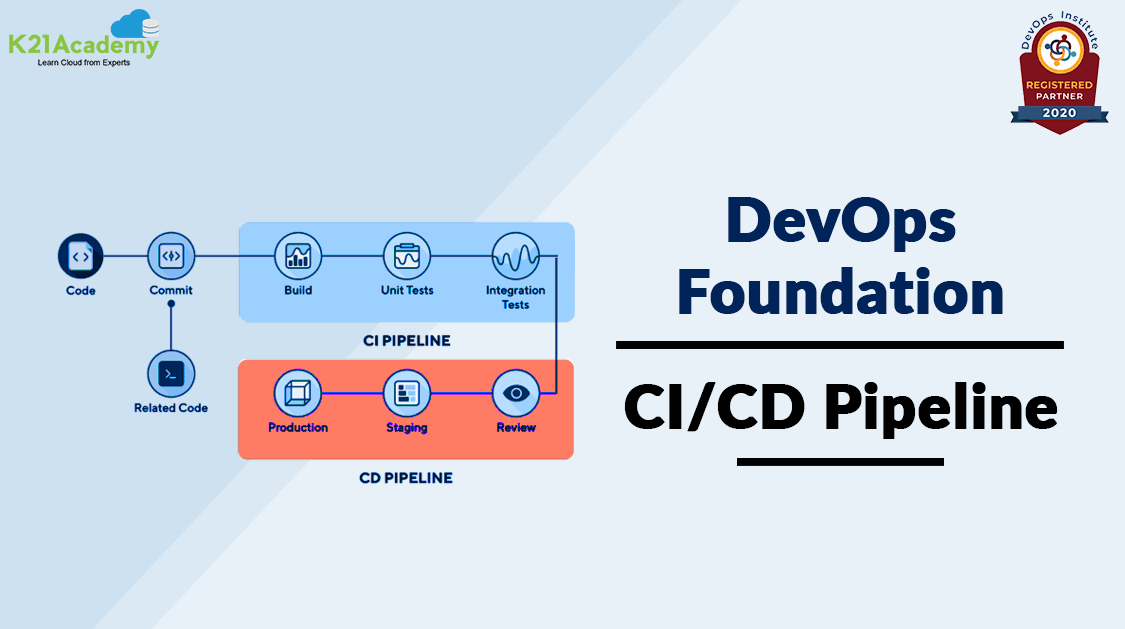





A CI/CD Pipeline, or Continuous Integration and Continuous Deployment, is the backbone of the modern DevOps environment. It bridges the gap between development and operations teams by automating the building, testing, and deployment of applications.
In this blog, we are going to cover the terminologies of a CI/CD pipeline such as Continuous Integration, Continuous Testing, Continuous Delivery/Deployment, and also the benefits of a CI/CD pipeline.
If you want to know more about DevOps certification please go through our previous blog on [DOFD] DevOps Foundation Certification Exam and everything you need to know about it.
Index:
Continuous Integration
CI or Continuous Integration is a development practice requiring developers to check their code into a shared repository at least daily. What happens is, that developers check in, that is, save their code in a shared version control system such as Git, multiple times a day. Every check-in triggers an automated build-and-test sequence.
The entire process is automated and hence, minimizes human error. Any number of people can check in their code, any number of times in a day, without waiting for others to complete their coding, hence it also removes dependency.
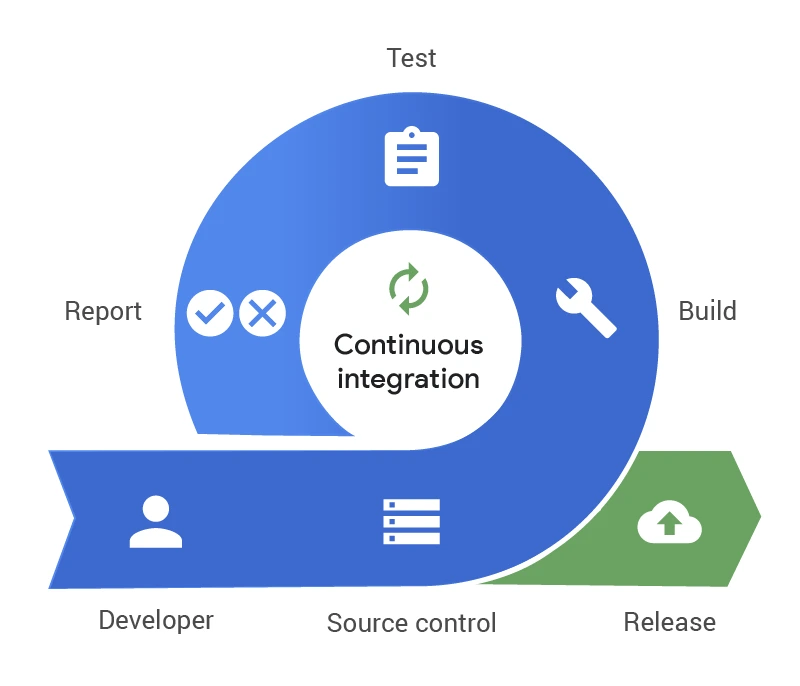
A brief overview of the steps of Continuous Integration:
- Developers check out code from the repository to their local machine. Ideally, they create a new branch for every feature/change they want to implement.
- The tests are run locally in their development environments for every new branch.
- Once all tests pass, they push the commits to the single-source repository or a version control system.
- Whenever there are changes in the repository, a CI server checks those changes and performs a “build and test.” A build and test is when the CI server builds the entire system on the developer’s feature branch and runs all the unit and integration tests.
- The CI server notifies the team of the integration result.
- If there’s a failure, the team is notified.
- The entire process is repeated whenever there is a new code or a change in the existing code.
Continuous Testing
Continuous testing is the process of executing automated tests, continuously and repeatedly as part of the deployment pipeline. In Continuous Testing, the test scripts are written before the coding begins. Mainly, unit tests, static code analysis, security code analysis, integration tests, load, and performance tests as part of continuous testing are run in a continuous testing pipeline.
When the developer checks the code in, it triggers an automated set of unit tests that are executed. If the test fails, the build is rejected and the developer is notified. If the build passes the test, then it is deployed into the QA environment, that is, a testing environment.
Continuous Delivery/Deployment
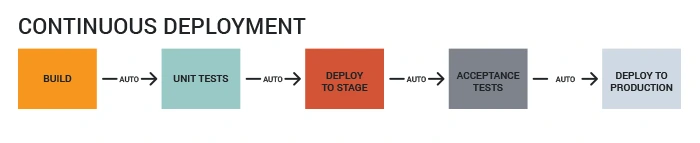
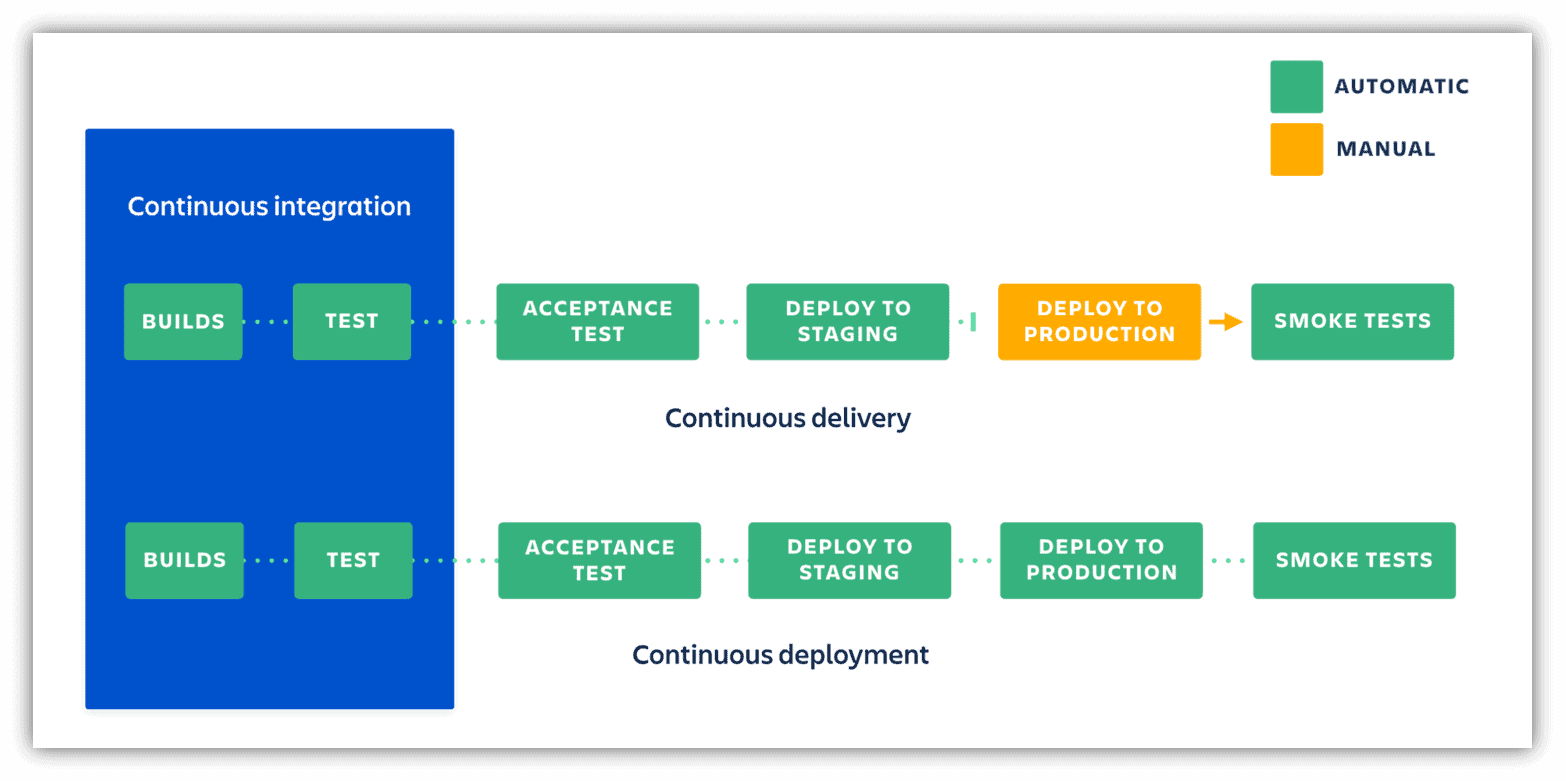
Continuous delivery is about ensuring that every good build is potentially ready for production release, whereas Continuous deployment is about automating the release of a good build to the production environment. Let’s understand this in more detail.
Continuous Delivery is a software development practice where you build software in such a way that the software can be released to production at any time. The benefit of continuous delivery is that the code is ready to deploy at all times. The Quality Assurance team tests if each feature is working or not, and then they manually deploy it to production on demand. So, every change is not deployed onto the production.
Continuous deployment means that every change that you make goes through the pipeline, and if it passes all the tests, it automatically gets released or deployed into production.
Also Read: CloudOps vs DevOps, Know their major differences!
Benefits of CI CD Pipeline
There are numerous advantages to implementing a CI/CD pipeline in your software development process. Here are some of the key benefits:
- Faster feedback loops: Developers receive immediate feedback on their code changes, allowing them to identify and fix bugs early on. This reduces the time it takes to get new features to users.
- Improved software quality: By automating testing, CI/CD pipelines help ensure that only high-quality code is deployed to production. This leads to fewer bugs and a more stable software product.
- Reduced risk of errors: Manual deployments are prone to human error. CI/CD pipelines automate the deployment process, eliminating this risk.
- Increased developer productivity: By automating repetitive tasks, CI/CD pipelines free up developers’ time to focus on writing new code and features.
- More frequent deployments: With a CI/CD pipeline in place, teams can deploy new features and updates more frequently, which helps them stay ahead of the competition.
FAQs
How does a CI/CD pipeline work?
A CI/CD pipeline typically consists of several stages, such as code compilation, automated testing, and deployment. When a developer commits code to the version control system, the pipeline is triggered, and each stage is executed automatically in sequence.
Which tools are commonly used in CI/CD pipelines?
Popular CI/CD tools include Jenkins, GitLab CI/CD, Travis CI, CircleCI, and GitHub Actions. These tools automate various aspects of the pipeline, such as building, testing, and deployment.
What is the role of version control in CI/CD pipelines?
Version control systems (e.g., Git, SVN) play a crucial role in CI/CD pipelines by keeping track of code changes and enabling seamless collaboration among developers. They trigger pipeline executions whenever code changes are pushed to the repository.
Can CI/CD pipelines be used for both web applications and mobile apps?
Yes, CI/CD pipelines can be used for any software application, including web applications, mobile apps (iOS and Android), and even desktop applications. The pipeline setup may vary depending on the platform and technology stack.
How can I set up a CI/CD pipeline for my project?
Setting up a CI/CD pipeline involves defining the pipeline stages and steps, configuring integration with version control, setting up automated tests, and configuring deployment to target environments. Tools like Jenkins and GitLab CI/CD offer detailed documentation to guide you through the setup.
What are the challenges of implementing CI/CD pipelines?
Common challenges include handling complex deployment scenarios, managing infrastructure scalability, ensuring proper test coverage, and ensuring security during the automated deployment process.
Is it possible to roll back changes after a deployment in a CI/CD pipeline?
Yes, CI/CD pipelines can include rollback mechanisms that revert to the previous version in case of issues after deployment. Automated testing and proper monitoring help detect problems early and allow quick rollbacks.
Can I integrate third-party services and external tools into my CI/CD pipeline?
Yes, CI/CD tools usually offer integrations with various third-party services and tools. You can use these integrations to enhance your pipeline with features like code analysis, security scanning, and notification services.
Related/References
- [DOFD] DevOps Foundation Certification Exam: Everything You Need To Know
- What Is DevOps | DevOps Principles | Advantages Of DevOps | Why DevOps?
- Agile Methodology and DevOps | DevOps and Agile Relationship
- DevOps Best Practices
- Certified Kubernetes Administrator (CKA) Certification Exam: Everything You Must Know
Next Task For You
Begin your journey towards becoming a DevOps Expert and earn a lot more by landing a high-paying job.
Join FREE CLASS to learn more about the DevOps Roles and Responsibilities, Job opportunities related to DevOps in the market, and what to study Including Hands-On labs and projects you must perform to get your Dream job.
Click on the below image to Register for Our FREE Class on Mastering DevOps on Cloud: How to Build In-Demand Skills and Land High-Paying Jobs


![Microsoft Agentic AI Business Solutions Architect [AB-100] | K21 Academy](https://test.k21academy.com/wp-content/uploads/2025/11/Microsoft-Agentic-AI-Business-Solutions-Architect-AB-100-Exam-Overview1.png)