



Nowadays, organizations must keep track of Billing and Cost Management of various services(Compute, Database, Storage, Networking, IAM) in OCI.
Oracle Cloud Infrastructure provides Cost Analysis, Budgets, and Usage Reports through which you can analyze your spending on different services, keep track of services used, and set a threshold for your spending.
In this blog, we will discuss a suite of tools Oracle provides to help you understand spending patterns, monitor consumption, analyze your bill, and, ultimately, reduce spending.
Topics Covered in the blog:
- Pricing models
- Benefits of cost management
- Prerequisites
- Steps to Configure:
1. Cost Analysis
2. OCI Budgets
3. OCI Usage Reports - Service Limits and Usage
- Compartment Quotas
- Oracle Cloud Workload Estimator
- Cost management best practices
Pricing Models
Oracle offers several pricing models to help you maximize the potential of cloud services while optimizing the cost at the same time.

- Usage-Based Billing: You’re charged for the resources and services you use, like computing, storage, and networking.
- Hourly Billing: Charges are calculated per hour of usage, giving you the flexibility to adjust resources without long-term commitments.
- Resource Pricing: Each service has its pricing based on factors like region and instance type.
- Discounts: OCI offers discounts for reserved instances, volume usage, and flexible pricing plans.
- Transparent Billing: Detailed reports help you track spending and understand where your money goes.
Benefits of Cost Management
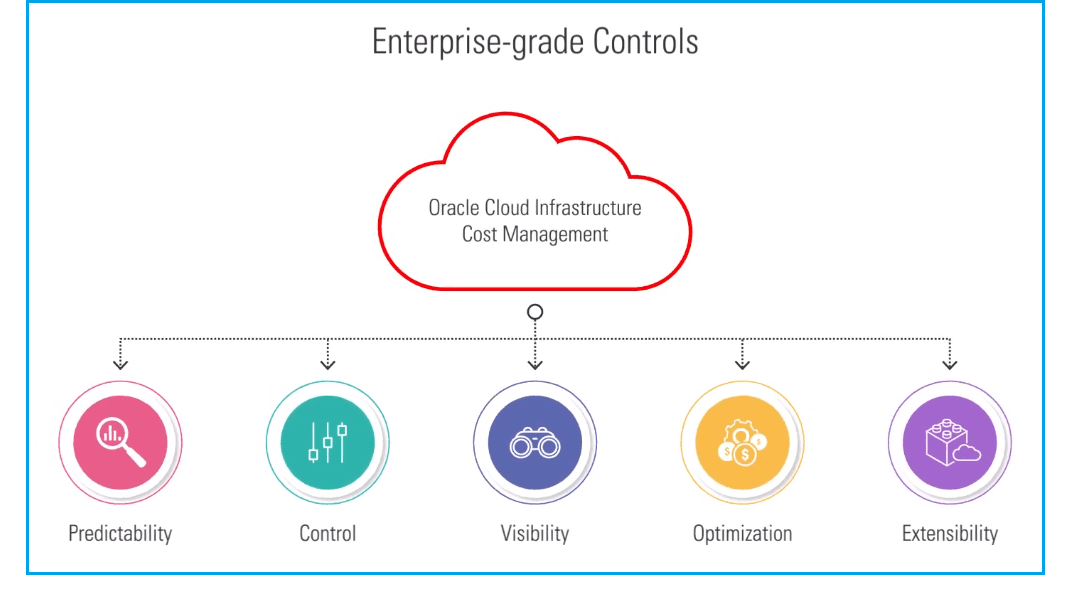
Oracle Cost Management offers powerful tools to control cloud spending effectively:
- Cost Optimization: Manage spending wisely to pay only for what’s needed, avoiding unnecessary expenses.
- Budget Control: Set and monitor budgets to stay within financial limits and prevent unexpected costs.
- Resource Efficiency: Identify and optimize underutilized resources to maximize efficiency.
- Strategic Decision-Making: Analyze costs to make informed decisions on resource allocation and scaling strategies.
- Enhanced ROI: Maximize return on cloud investments by reducing wastage and optimizing spending.
Pre-requisites
- Oracle Cloud Account: You need an Oracle Cloud Infrastructure (OCI) account to access cost management features.
- Access OCI Console: Log in to the OCI Console using your account credentials.
- Ensure User Permissions: Ensure that you have the necessary permissions granted through policies to access cost management tools. This typically involves being part of the admin group or having specific permissions assigned.
Steps To Configure
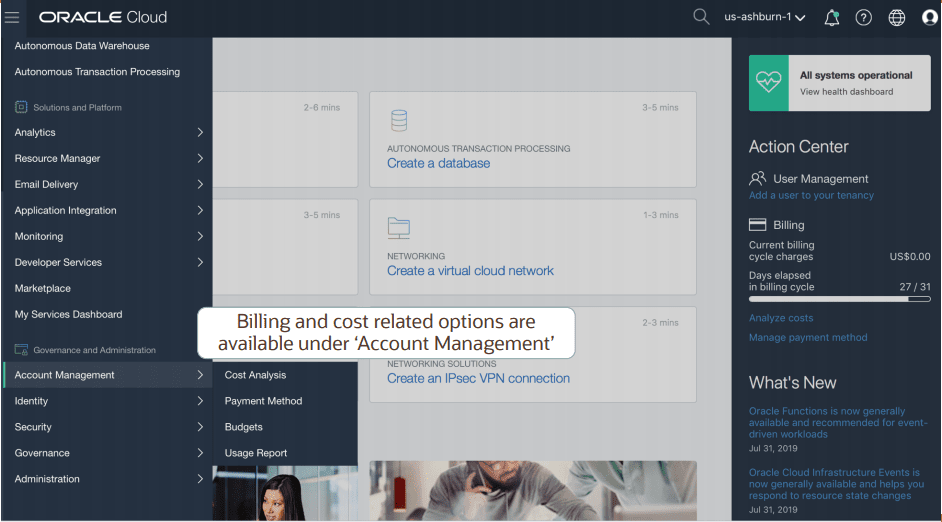
OCI Cost Analysis
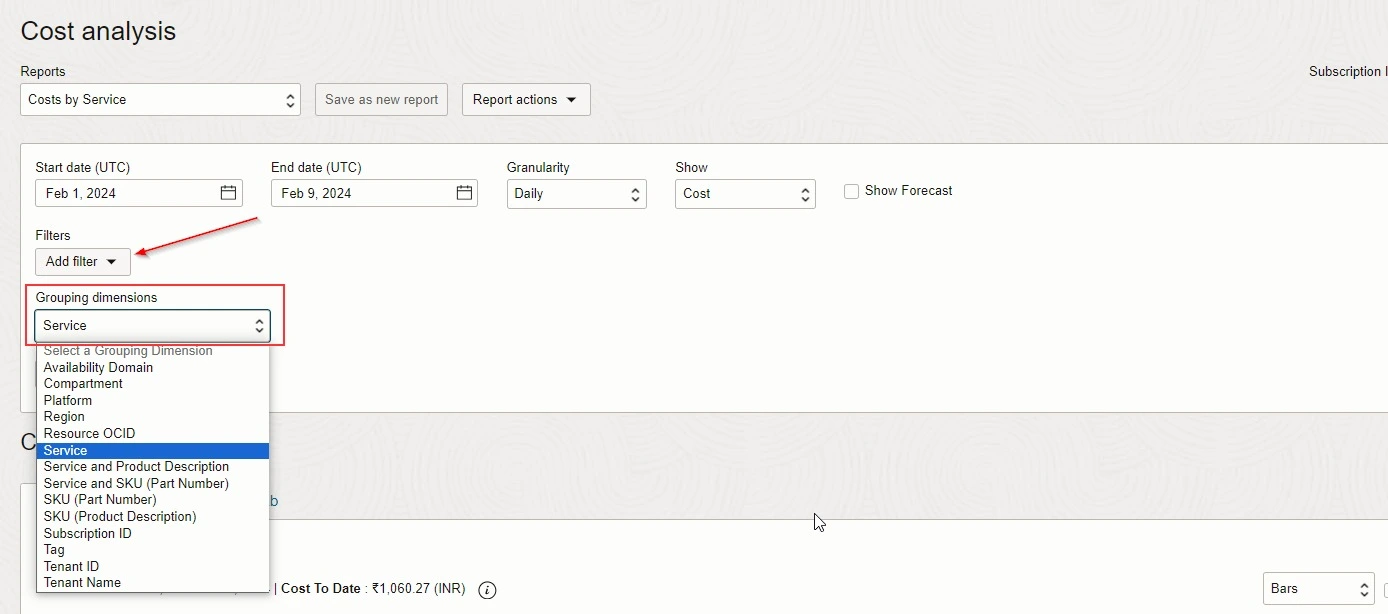
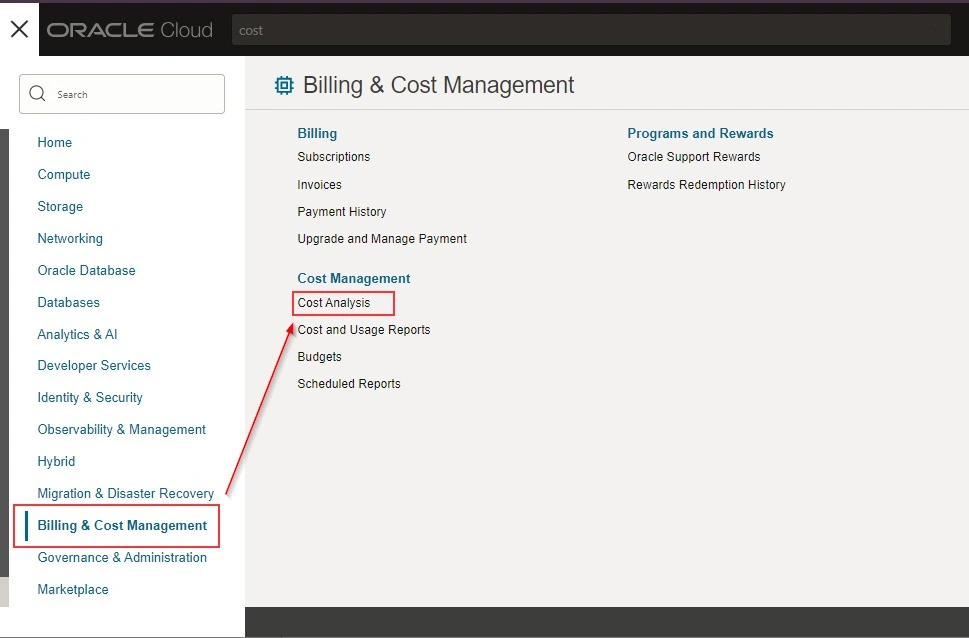
Cost Analysis is a visualization tool that helps understand spending patterns at a glance. To use this tool, the user must be a member of the Administrators group. Cost Analysis filters cost by Date, Tags, and Compartments.
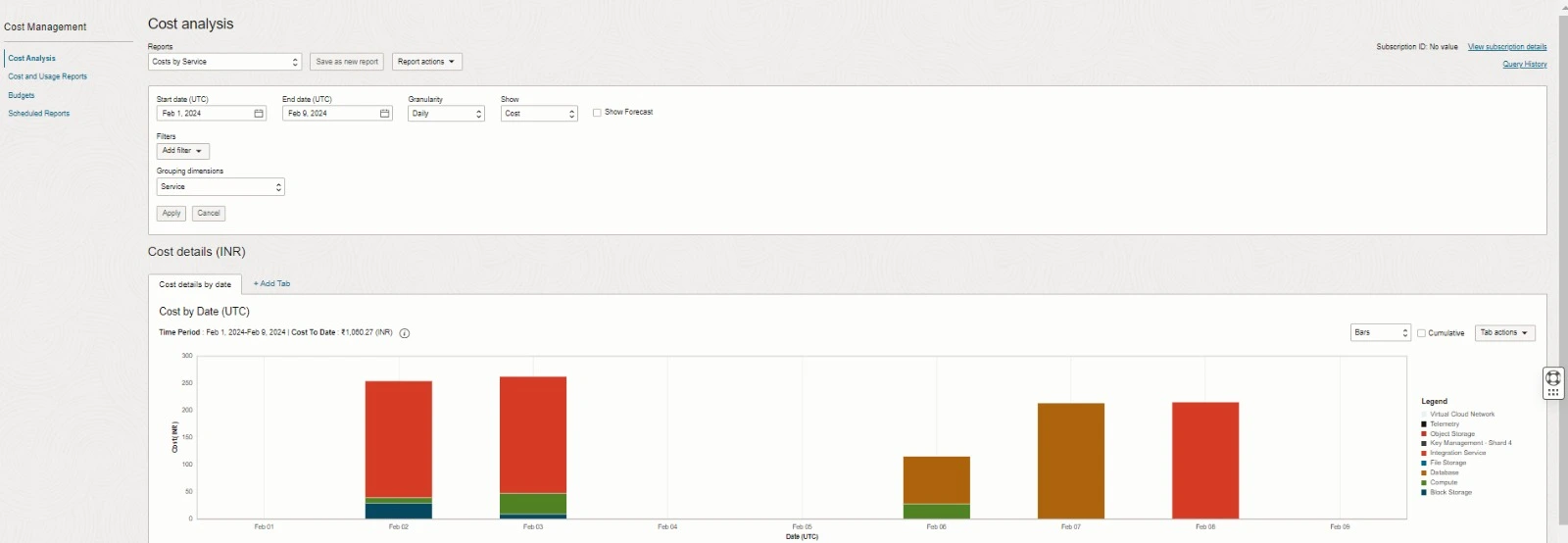
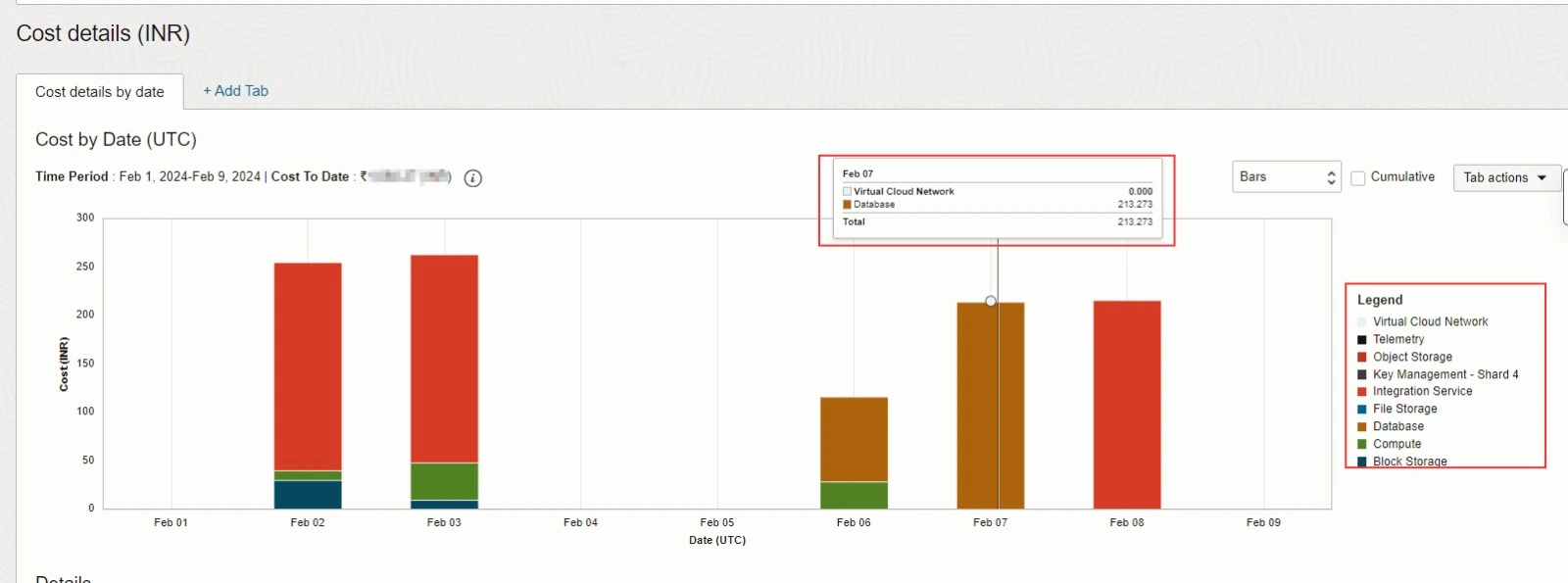
Use the Cost Analysis dashboard to view your spending by service or by department, compartment, or cost tracking tag.
1) In Start Date, select a date. In End Date, select a date (within six months of the start date). Click Apply Filters
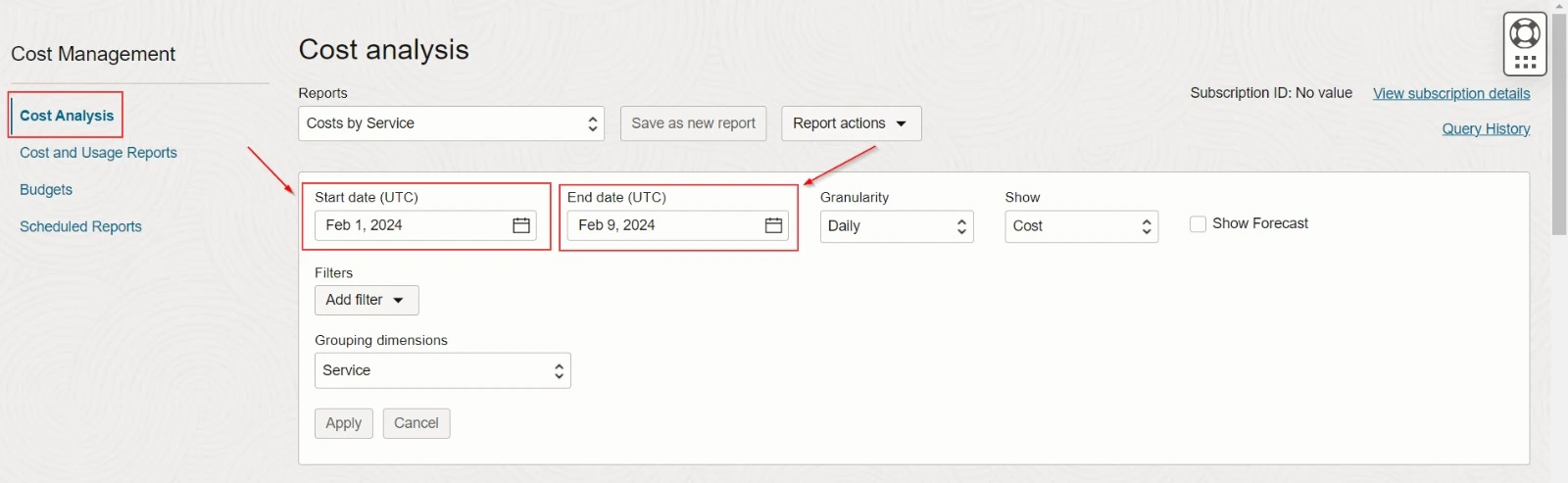
2) From the Tag Key, select a tag. Click Apply Filters
3) In the OCI Console, locate the “Cost Analysis” section. This may be found in the “Billing” or “Cost Management” section, depending on your OCI setup.
4. Assess the cost implications of user trends. Determine how user activity correlates with cost changes and identify any areas where costs can be optimized.
OCI Budgets
The budget is used to track actual spending for the whole tenancy or per compartment.
- Budget: A monthly threshold you define for your cloud spending.
- Alert: Email alerts that get sent out for your budget.
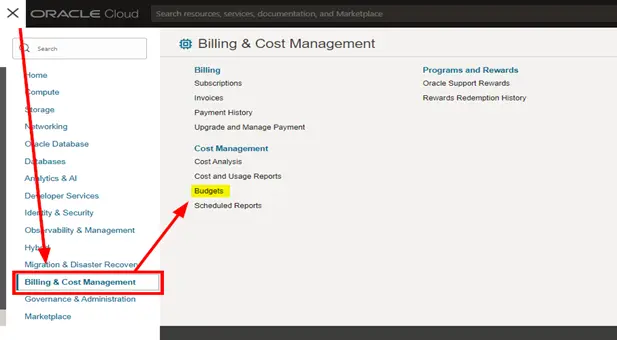
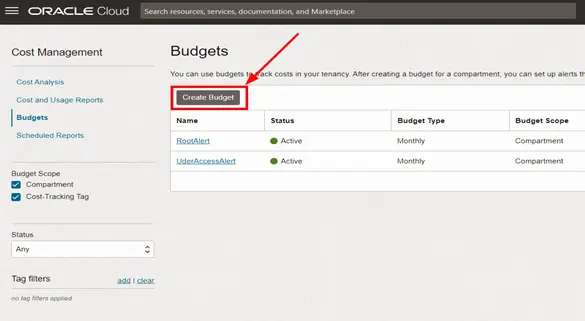
2. On the Budgets page, click Create Budget.
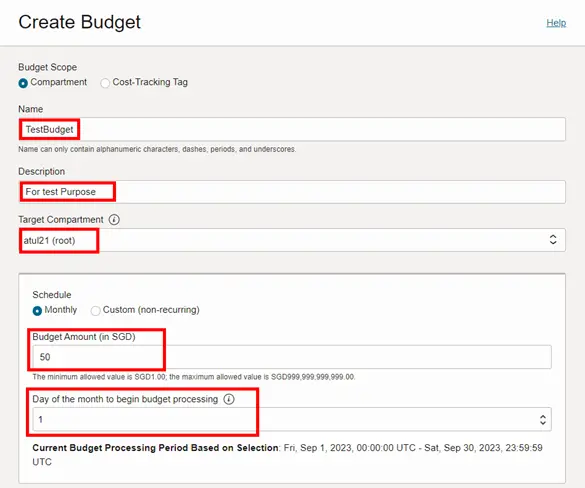
3. Once Clicked it will ask you to fill in the details for the budget.
- Choose a name (alphanumeric characters, dashes, underscore, no numbers at the start).
- Add a description (avoid confidential info).
- Select target: either tenancy or compartment.
- Choose a schedule: Monthly (recurring) or Custom (non-recurring).
- Monthly: Pick the start day for processing.
- Custom: Set start and end dates (up to one year).
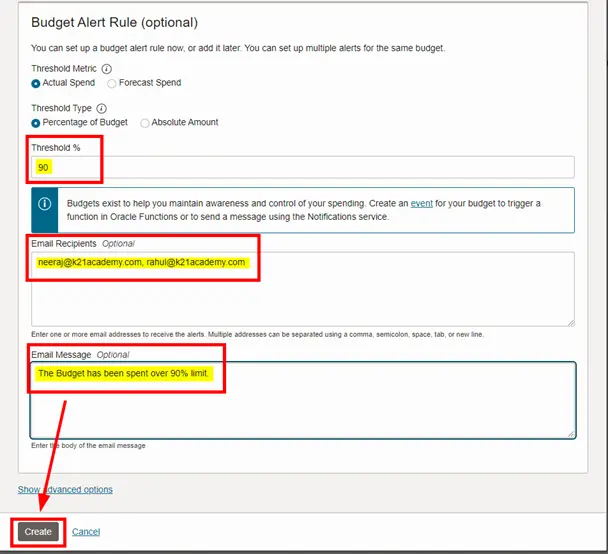
4. Now when you scroll down, You can optionally create an alert for the budget by creating a “Budget Alert Rule”. In Budget Alert Rule (optional), configure the alert rule:
- Choose a threshold metric: Actual Spend or Forecast Spend.
- Select a threshold type: Percentage of Budget or Absolute Amount.
- Enter a value for the threshold.
- Add email recipients for alerts.
- Enter the email message (max 1000 characters).
- Click “Create” when finished.
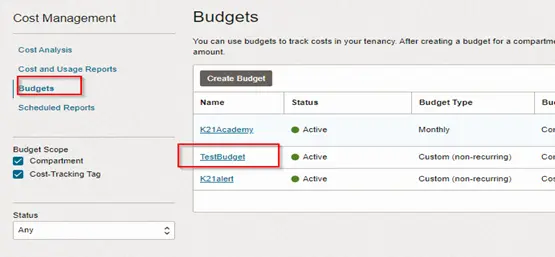
Our Budget has been created.
OCI Usage Reports
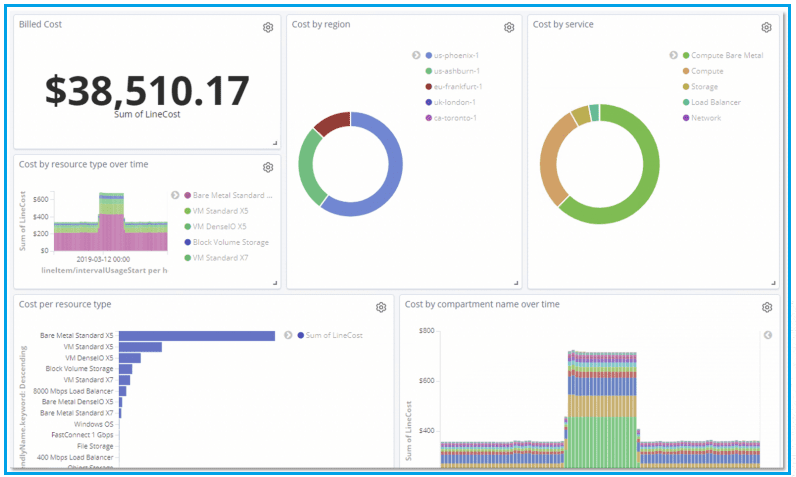
A usage report is a comma-separated value (CSV) file containing detailed information about your OCI resources consumption. It is generated daily and stored in an object storage bucket.
It can be used in conjunction with your rate card for:
- Access: View usage and costs in OCI Console.
- Detailed Data: See usage details for computing, storage, networking, and more.
- Customization: Tailor reports by time, services, compartments, regions, and tags.
- Analysis: Understand usage trends and cost drivers for better resource management.
- Budgeting: Plan spending with insights into projected costs.
- Export: Easily export data for deeper analysis or integration with other systems.
Sample Dashboard from a Usage Report
Service Limits and Usage
The service limit is the quota or allowance limit on a resource. Your tenancy’s limits, quotas, and usage can be seen in the Console. Service limits can be increased from within the Console after submitting a request.
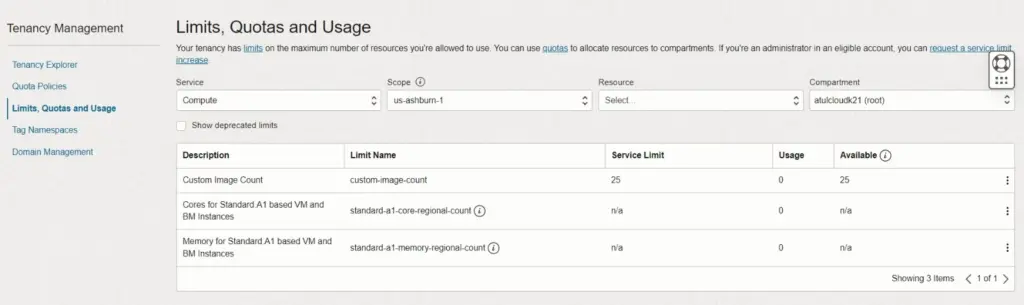
Compartment Quotas
- Compartment quotas in Oracle Cloud Infrastructure (OCI) refer to the limits or restrictions placed on resources within a compartment.
- These quotas help in managing resource usage and preventing overutilization. Compartment quotas set the maximum limits for different types of resources available within a compartment.
- These quotas apply to various OCI resources such as compute instances, storage volumes, network resources, and more.
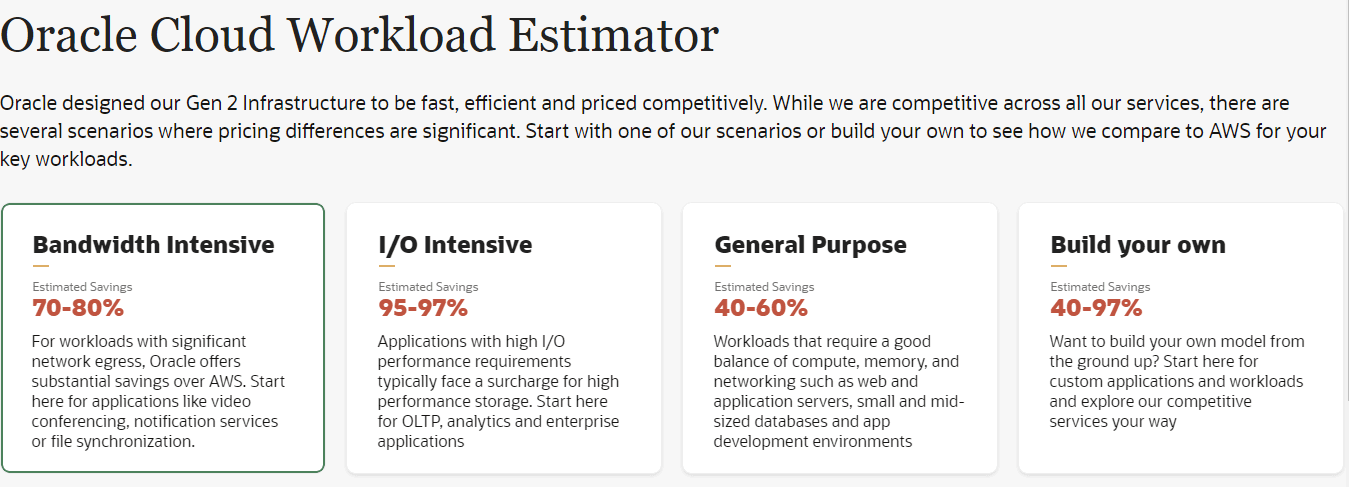
Oracle launched Oracle Cloud Workload Estimator last month which shows a drastic difference between the computing scenarios of Oracle Cloud Infrastructure and AWS.
This tool offers an apples-to-apples comparison of key workloads between Oracle Cloud infrastructure and that of AWS. You’ll be pleasantly surprised by the results, demonstrating that “Oracle is a cost-efficient choice for numerous high-performance applications.”
Cost Management Best Practices
Let’s take a look at some best practices for cost management:
- Set Budgets: Establish budgets for your OCI resources to control spending and avoid unexpected costs. Regularly review and adjust budgets as needed.
- Monitor Spending: Continuously monitor your OCI usage and spending through the Cost Analysis feature to stay informed about where your money is going.
- Optimize Data Transfer: Minimize data transfer costs by optimizing network traffic and utilizing OCI features like FastConnect and VPN.
- Analyze Cost Patterns: Use OCI’s cost analysis tools to analyze spending patterns, identify cost drivers, and uncover opportunities for cost optimization.
- Regular Review and Optimization: Regularly review your OCI resources, usage patterns, and spending to identify areas for optimization and cost savings.
References
- Secret Management In Oracle Cloud (OCI)
- Health Checks In Oracle Cloud (OCI)
- Key Management System in OCI
- Functions & Events In Oracle Cloud (OCI)
- Secret Management In Oracle Cloud (OCI)
Frequently Asked Questions
What are the benefits of cost management in OCI?
Cost management in OCI helps organizations optimize spending, control expenses, and maximize the value of their cloud investments.
What is the Oracle Cloud Workload Estimator?
The Oracle Cloud Workload Estimator is a tool provided by Oracle to help estimate the cost of running workloads in OCI based on various factors such as compute, storage, and networking requirements.
How can I optimize costs in OCI while ensuring performance and reliability?
By rightsizing resources, leveraging automation, implementing lifecycle policies, and continuously analyzing usage patterns, organizations can optimize costs without compromising performance or reliability.
How are service limits and compartment quotas managed in OCI?
Service limits and compartment quotas help manage resource usage within OCI. They can be adjusted as needed to accommodate changing requirements.
Begin Your Cloud Journey
Begin your journey towards becoming a Certified Oracle Cloud Infrastructure Architect and earning a lot more in 2024 by joining our FREE CLASS. You will also know more about the Roles and Responsibilities, Job opportunities for OCI Architects in the market, and what to study Including Hands-On labs you must perform to clear the Oracle Cloud Architect Associate Certification (OCI) certification exam by registering for our FREE Masterclass.
Click on the below image to Register for Our FREE Class on Master Oracle Cloud (OCI) and Get a Higher paying Job!


![Microsoft Agentic AI Business Solutions Architect [AB-100] | K21 Academy](https://test.k21academy.com/wp-content/uploads/2025/11/Microsoft-Agentic-AI-Business-Solutions-Architect-AB-100-Exam-Overview1.png)


