



In this blog post, I will be covering some of the essential tools that are used in DevOps.
The technologies we talk about in this blog are part of DevOps. If it’s something in which you have an interest or you want to learn it then you can visit our previous blog to know more about the [DOFD] DevOps Foundation Certification.
Configuration Management DevOps Tools
Configuration management solutions model infrastructure, continually monitor and enforce desired configurations, and automatically remediate any unexpected changes or configuration drift by enabling you to deliver better software faster.
It helps lay the foundation for DevOps and focuses on establishing and maintaining consistency of a product’s performance, and its functional and physical attributes with its requirements, design, and operational information throughout its life.
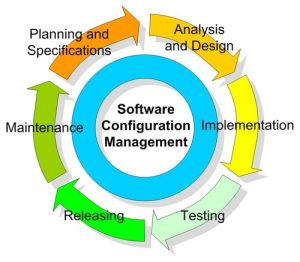
Importance of Configuration Management in DevOps
Configuration management plays a pivotal role in the DevOps lifecycle. It involves the tracking and control of software changes, ensuring that systems are configured and maintained consistently. This is crucial for maintaining stability, reducing errors, and enabling quick recovery in case of failures.
Significance of Efficient Configuration Management
Efficient configuration management is the cornerstone of successful DevOps practices. It enables teams to deploy applications faster, scale infrastructure seamlessly, and maintain a high level of reliability. Without proper configuration management, the DevOps pipeline can become chaotic and error-prone.
Ansible
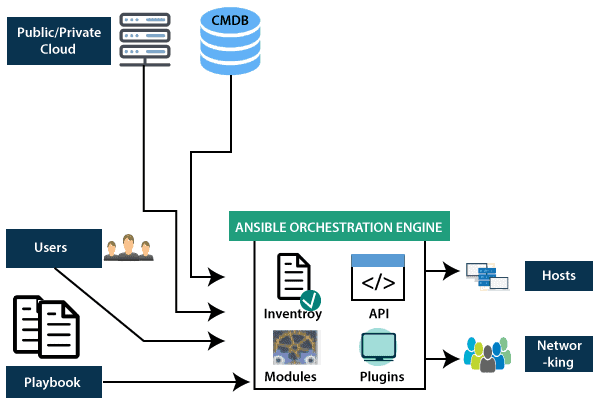
Ansible is an open-source IT Configuration Management, Deployment, and orchestration tool. It aims to provide large productivity gains to a wide variety of automation challenges.
How Ansible Streamlines Configuration Management
Ansible uses declarative language to define system configurations, making it easy to understand and write automation scripts. With Ansible, DevOps teams can automate repetitive tasks, ensuring consistency across different environments.
Benefits of Using Ansible in DevOps
- Simplicity: Ansible’s YAML syntax is easy to read and write, reducing the learning curve for teams.
- Scalability: Ansible is suitable for both small projects and large-scale enterprise environments.
- Community Support: A vibrant community contributes to Ansible’s modules and playbooks, providing a wealth of resources.
Docker
Docker is an open-source platform based on Linux containers for developing, shipping, and running applications inside containers. Containers are software packaged into an invisible box with everything that the application needs to run, they generally include the operating system, application code, runtime, system tools, system libraries, etc.
Role of Docker in DevOps
Docker streamlines the deployment process, making it faster and more efficient. Containers encapsulate everything needed for an application to run, ensuring consistency from development through testing to production.
Advantages of Containerization with Docker
- Isolation: Containers encapsulate applications and dependencies, preventing conflicts and ensuring a clean environment.
- Scalability: Docker enables the easy scaling of applications by running multiple instances of containers.
- Resource Efficiency: Containers share the host OS kernel, reducing resource overhead compared to traditional virtualization.
Docker Architecture
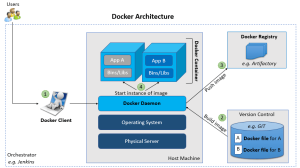
There are five major components in the Docker architecture:
- Docker Daemon: listens to Docker API requests and manages Docker objects such as images, containers, networks, and volumes.
- Docker Clients: With the help of Docker Clients, users can interact with Docker.
- Docker Host: provides a complete environment to execute and run applications. It comprises of the Docker daemon, Images, Containers, Networks, and Storage.
- Docker Registry: stores Docker images.
- Docker Image: read-only templates that you build from a set of instructions written in Dockerfile.
Git
Git is a fast, scalable, distributed version control system with an unusually rich command set that provides both high-level operations and full access to internals.
Version Control System (VCS) is software that helps software developers to work together and maintain a complete history of their work.
- Listed below are the functions of a VCS:
- It allows developers to work simultaneously.
- It does not allow overwriting each other’s changes.
- Maintains a history of every version.
Version control systems are of the two following types:
- Centralized version control systems (CVCS) that use a central server to store all files and enables team collaboration. But the major drawback of CVCS is its single point of failure, i.e., failure of the central server.
- Distributed version control clients (Git) check out the latest snapshot of the directory and also fully mirror the repository. If the server goes down, then the repo from any client can be copied back to the server to restore it. Every checkout is a full backup of the repository.
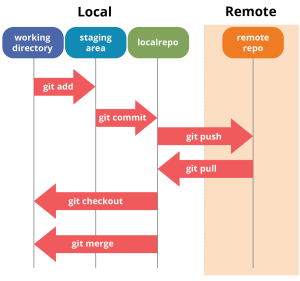 In addition to providing a highly robust backup system, Git provides the following advantages as well:
- Free and open-source ( free license and can be used anywhere)
- Fast and small ( local fast and remote no need to sync often, store size is small)
- Implicit backup (multiple copies for backup)
- Security ( SHA1 algorithm)
- Easy branching
- powerful hardware is not needed
What Is Jenkins?
Jenkins is an open-source automation tool written in Java with plugins built for Continuous Integration purposes. Jenkins is used for building and testing your software projects continuously making it easier for developers to integrate changes to the project, and making it easier for users to obtain a fresh build. It also allows you to continuously deliver your software by integrating with a large number of testing and deployment technologies.

With Jenkins, organizations can accelerate the software development process through automation. Jenkins integrates development life-cycle processes of all kinds, including build, document, test, package, stage, deploy, static analysis, and much more.
Jenkins achieves Continuous Integration with the help of plugins. Plugins allow the integration of Various DevOps stages. If you want to integrate a particular tool, plugins will be needed for that tool. For example Git, Maven 2 project, Amazon EC2, HTML publisher, etc.
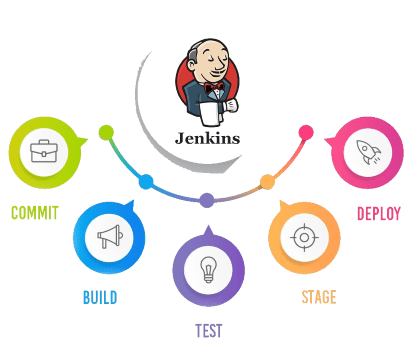
Advantages of Jenkins include:
- It is an open-source tool with great community support.
- It is easy to install.
- It has 1000+ plugins to make your work easier. If a plugin does not exist, you can code it and share it with the community.
- It is free of cost.
- It is built with Java and hence, it is portable to all the major platforms.
Choosing the Right DevOps Tools
Considerations for Tool Selection
When selecting DevOps tools, organizations must consider factors such as ease of integration, scalability, community support, and alignment with specific project requirements.
Compatibility and Integration
The selected tools should seamlessly integrate with existing systems and other DevOps tools, fostering a cohesive and efficient workflow.
Scalability and Future-Proofing
As organizations grow, DevOps tools must scale accordingly. Choosing tools with scalability and future-proofing in mind ensures long-term success.
Challenges in Implementing DevOps Tools
Common Challenges Faced in Integrating DevOps Tools
Implementing DevOps tools comes with its set of challenges, including resistance to change, skill gaps, and the need for cultural shifts within the organization.
Strategies to Overcome Implementation Challenges
Addressing challenges requires a combination of training, cultural adaptation, and effective communication. Organizations should invest in educating teams and fostering a collaborative DevOps culture.
Real-world Examples of DevOps Tool Implementations
Case Studies Highlighting Successful DevOps Tool Implementations
Examining real-world examples provides valuable insights into successful DevOps tool implementations. Case studies showcase how organizations overcame challenges and achieved positive outcomes.
Lessons Learned from Practical Experiences
Learning from the experiences of others helps organizations avoid common pitfalls and adopt best practices in DevOps tool implementation.
Future Trends in DevOps Tools
Emerging Technologies in DevOps
The landscape of DevOps tools is ever-evolving. Emerging technologies, such as artificial intelligence and machine learning, are likely to play a significant role in shaping the future of DevOps.
Predictions for the Future of DevOps Tools
Experts predict that future DevOps tools will focus on enhanced automation, improved analytics, and increased collaboration across the entire software development lifecycle.
Conclusion
Recap of the Significance of DevOps Tools
DevOps tools are integral to achieving agility, speed, and reliability in software development. The combination of efficient configuration management and tools like Ansible, Docker, Git, and Jenkins empowers organizations to thrive in the competitive digital landscape.
Encouragement for Organizations to Embrace DevOps Methodologies
The adoption of DevOps methodologies and tools is not just a trend but a necessity for organizations aiming to stay competitive. Embracing a DevOps culture leads to faster time-to-market, higher-quality software, and improved collaboration between development and operations teams.
FAQs
What Are the Key Benefits of Using Ansible in DevOps?
Ansible offers simplicity, scalability, and strong community support. Its YAML syntax makes automation scripts easy to understand, making it an ideal choice for configuration management in DevOps.
How Does Docker Contribute to Efficient DevOps Practices?
Docker's containerization ensures consistent deployment across different environments, promoting scalability, isolation, and resource efficiency in DevOps practices.
Why Is Version Control Important, and How Does Git Address It in DevOps?
Version control, facilitated by Git, ensures collaborative development, code tracking, and efficient management of changes. Git's branching model enhances collaboration, code review, and continuous integration.
Can Jenkins Be Used for Both Small and Large-Scale Projects?
Yes, Jenkins is versatile and suitable for both small and large-scale projects. Its automation capabilities, including build automation, testing, and deployment, make it adaptable to various project sizes.
Related/References
- [DOFD] DevOps Foundation Certification Exam: Everything You Need To Know
- [AZ-400] Microsoft Azure DevOps Certification Exam: Everything You Need To Know
- Check out the official DevOps Institute page for [DOFD] DevOps Foundation here
- Certified Kubernetes Administrator (CKA) Certification Exam: Everything You Must Know
Next Task For You
Begin your journey towards becoming a DevOps Expert and earn a lot more by landing a high-paying job.
Join FREE CLASS to learn more about the DevOps Roles and Responsibilities, Job opportunities related to DevOps in the market, and what to study Including Hands-On labs and projects you must perform to get your Dream job.
Click on the below image to Register for Our FREE Class on Mastering DevOps on Cloud: How to Build In-Demand Skills and Land High-Paying Jobs


![Microsoft Agentic AI Business Solutions Architect [AB-100] | K21 Academy](https://test.k21academy.com/wp-content/uploads/2025/11/Microsoft-Agentic-AI-Business-Solutions-Architect-AB-100-Exam-Overview1.png)


