



This blog-post will cover the main features of Microsoft Azure DevOps services.
What Is DevOps?
DevOps is a set of practices that increases an organization’s ability to deliver software at high velocity and reduce the development life cycle by combining software development and technological operations.
Azure DevOps Services
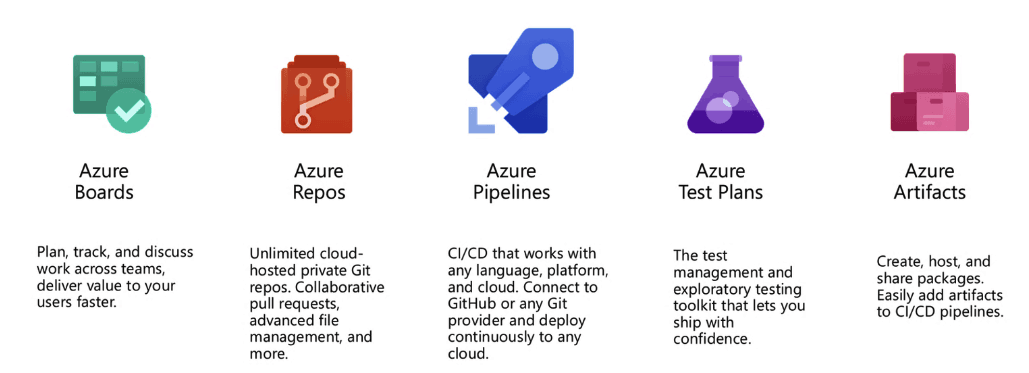
Microsoft Azure DevOps offers developer services that enable teams to plan work, collaborate on code, and deploy applications. Azure DevOps provides the following five services which span the entire life of the development cycle
Also Check: Our blog post on AZ 400. Click here
Let’s see one by one what each of these services has to offer.
Azure Boards
Azure boards help you track tasks, bugs, and features at every development stage. It also integrates with well-established tools present today like Kanban boards, Slack, Microsoft Teams, backlogs, dashboards, and scrum boards. You can customize your dashboard to have the data represented in such a way that makes sense to you. It offers three types of work items :
- Epic – Tracks requirements and features.
- Issue – Tracks bugs or smaller changes.
- Task – Tracks work done.
Azure boards make adding and managing work very simple. You can also make use of the drag and drop feature to prioritize your work.
Also check: Overview of AZ-300 Exam
Azure Repos
 With Azure Repos, you can create unlimited, private Git repositories. Git is a distributed version control system to keep track of changes in the source code while developing software. It lets you securely connect with and push code onto your Git repositories. Microsoft has enhanced Git to scale to enterprise-level and invested in Git Virtual File System (GVFS) which helps in managing huge enterprise-level repositories.
Also check: our blog on Azure DevOps For Beginners
Azure Pipelines
 Azure Pipelines allow you to automate your builds and deployments. It works with all languages and platforms like Python, Java, Ruby, iOS apps, while running in parallel on macOS, Windows, and Linux. You can make use of Azure Pipelines to easily build and push images to containers registries like Docker Hub and Azure Container Registry. It even gives you the ability to integrate with popular services like Slack and SonarCloud. It lest you implement continuous delivery (CD) of your software to any cloud. For open-source projects, you get ten free parallel jobs with unlimited build munites. There are many advanced features that you can make use of like test integration, release gates, and many more.
Also read: Comparison between Azure Pipelines vs Jenkins
Azure Test Plans
 With Azure Test Plans you can run manual tests and log defects for your web and desktop applications. It improves your code quality by letting you track and access quality throughout your testing lifecycle that helps you to get end to end traceability. Azure Teat Plans can help you test your application across desktop and web apps.
Azure Artifacts
 Azure Artifacts helps to make your workflow seamless with deeply integrated package management and lets you create and share Maven, npm, NuGet, and Python package feeds from public and private sources. Your packages are protected as Azure Artifacts keeps all your public packages safe in your feed.
Related/References
- [AZ-400] Microsoft Azure DevOps Certification Exam: Everything You Need To Know
- [AZ-400] Microsoft Azure DevOps Training: Step By Step Activity Guides/Hands-On Lab Exercise
- [AZ-400] Roles and Responsibilities as an Azure DevOps Engineer
- [AZ-400] Azure DevOps Certification Path
Next Task For You
Begin your journey toward Mastering Azure Cloud and landing high-paying jobs. Just click on the register now button on the below image to register for a Free Class on Mastering Azure Cloud: How to Build In-Demand Skills and Land High-Paying Jobs. This class will help you understand better, so you can choose the right career path and get a higher paying job.


![Microsoft Agentic AI Business Solutions Architect [AB-100] | K21 Academy](https://test.k21academy.com/wp-content/uploads/2025/11/Microsoft-Agentic-AI-Business-Solutions-Architect-AB-100-Exam-Overview1.png)


