


No-Code AI Agent Development: Comparing AWS, Azure & GCP for 2025

Agentic AI

Share Post Now :

HOW TO GET HIGH PAYING JOBS IN AWS CLOUD

Even as a beginner with NO Experience Coding Language

Explore Free course Now

Table of Contents

Loading

The need for AI agents is expanding as businesses seek automation solutions to streamline workflows and improve customer experiences. With the rise of no-code AI platforms, it’s now easier than ever to build and deploy sophisticated No-Code AI Agents without writing a single line of code. Leading cloud platforms such as Amazon Web Services (AWS), Microsoft Azure, and Google Cloud Platform (GCP) offer robust services for building no-code AI agents, each with its own strengths. But which one is the best for your no-code AI agent development? Let’s dive into the comparison of AWS, Azure, and GCP for building these No-Code AI Agents.

What defines a no-code AI platform

  • No-code AI platforms are game-changers in the tech world. They’re exactly what they sound like – solutions that let you build AI applications without writing a single line of code. Think of them as sophisticated drag-and-drop interfaces where you can create complex AI models just by connecting visual components.
  • These platforms typically offer pre-built templates, intuitive interfaces, and automated workflows that handle the complex stuff behind the scenes. You’re essentially getting all the power of AI without needing a Ph.D. in computer science or years of programming experience to create No-Code AI Agents.
  • The real magic happens when these platforms run on major cloud providers like AWS, Azure, and GCP. They leverage the massive computing resources and specialized AI services that these clouds offer, but package everything in user-friendly wrappers for No-Code AI Agents.
No-Code AI Agent Development

No-Code AI Agent Development; Source – DeepLobe

Benefits of no-code approaches for businesses

No-code AI isn’t just convenient—it’s transformative for your business operations and essential for building No-Code AI Agents:

Many businesses report 70-80% reductions in development time when using no-code AI platforms compared to traditional development approaches, especially when creating No-Code AI Agents.

  • Speed to market: You can go from idea to working AI solution in days or weeks, not months or years
  • Cost reduction: You’ll save on specialized AI talent (which is expensive and hard to find)
  • Democratized innovation: Your marketing, sales, and operations teams can build their own AI solutions
  • Experimentation freedom: Try out AI ideas without major resource commitments
  • Reduced technical debt: Less custom code means fewer maintenance headaches down the road

Key features to evaluate when comparing cloud platforms

When you’re shopping around for a No-Code AI Agent platform across the major clouds, pay attention to these critical factors:

The right platform for your No-Code AI Agents might not be the most feature-rich, but the one that best aligns with your specific use cases and technical environment.

Feature Why It Matters
Available AI services More pre-built AI capabilities = more possibilities
Visual interface quality Determines how intuitive the building will be
Integration capabilities How easily it connects with your existing systems
Scalability Will it handle growing data and user volumes?
Pricing model Some charge by usage, others by user seats
Security features Critical for protecting sensitive data
Community & support Bigger communities mean more templates and help

The right platform for your needs might not be the most feature-rich, but the one that best aligns with your specific use cases and technical environment.

The growing importance of democratized AI development

    • AI is no longer just for tech giants and specialized teams. The democratization of AI development is reshaping how organizations approach innovation.
    • When you put AI tools in the hands of your entire workforce, something incredible happens. The people closest to business problems—not just your tech team—can create solutions. Your marketing manager understands customer engagement challenges better than anyone, so why not empower them to build AI solutions addressing those exact pain points?
    • Industry trends show organizations embracing democratized AI development are seeing 3-5x more AI-powered innovations than those limiting AI work to specialized teams.
    • This shift is especially crucial as AI becomes essential across industries. With talent shortages in AI development (over 300,000 unfilled positions globally), no-code platforms aren’t just convenient—they’re necessary for staying competitive.

This shift is especially crucial as AI becomes essential across industries. With talent shortages in AI development (over 300,000 unfilled positions globally), no-code platforms for No-Code AI Agents aren’t just convenient—they’re necessary for staying competitive.

  • The future belongs to companies that make AI accessible throughout their organization. No-code platforms running on major cloud providers are your fastest path to becoming that kind of company.
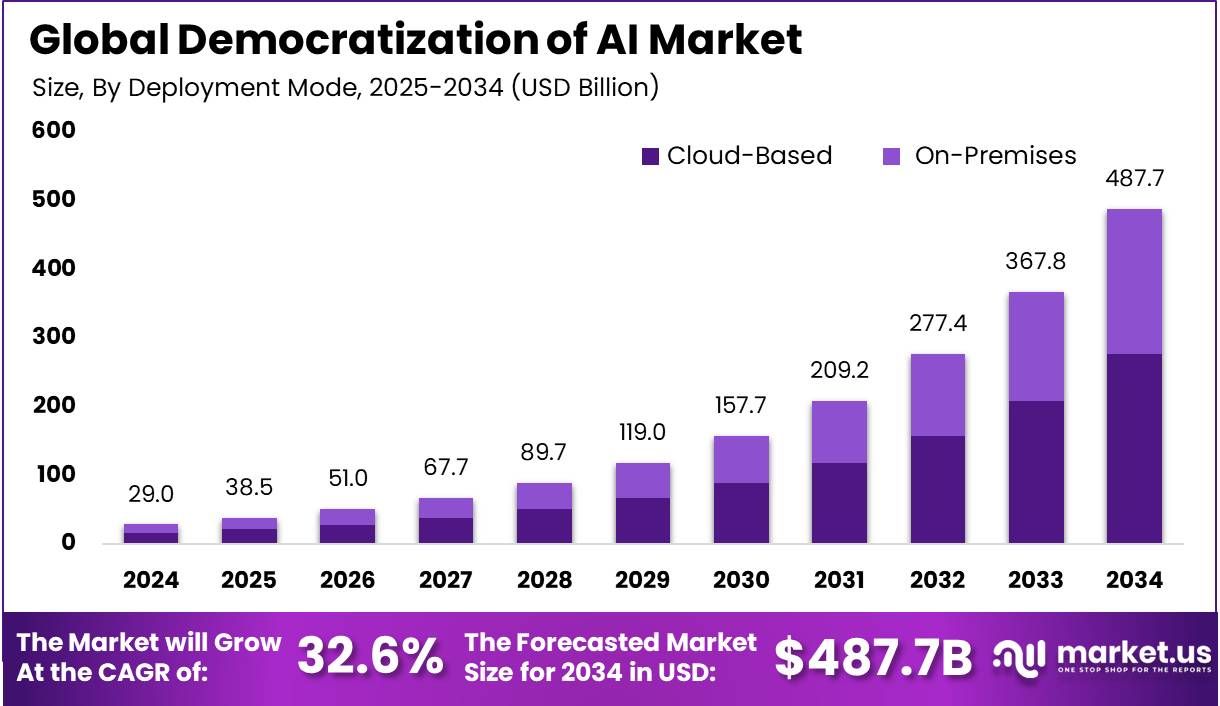
Democratization of AI Market Size | CAGR of 32%

Democratization of AI Market Size; Source – Makret.us

AWS No-Code AI Solutions Overview

1. Amazon SageMaker Canvas capabilities and limitations

  • When you’re looking to build ML models without coding, Amazon SageMaker Canvas is your go-to AWS solution. You can create accurate predictions through a visual interface that handles the complex ML processes behind the scenes. Drop your data in, and Canvas can automatically clean it, suggest the right model type, and train it for you.
  • But Canvas isn’t perfect. You’ll find it works great for common use cases like regression and classification, but struggles with more specialized needs. And while it’s “no-code,” you’ll still need some data knowledge to use it effectively.

AWS SageMaker usecase for No AI Agent

AWS SageMaker use case for No AI Agent; Source – AWS Blog

2. AWS Amplify for AI-powered applications

  • Amplify makes adding AI to your apps surprisingly simple. You don’t need to be an AI expert – just use the pre-built UI components and connect them to services like Rekognition or Comprehend.
  • Want to add image recognition to your app? AWS Amplify has that covered with just a few clicks. Need text analysis? Same deal. The library of components keeps growing, making it easier to build sophisticated apps without diving into complex code.

GenASL - Architecture Digram AWS Amplify

GenASL – Architecture Diagram AWS Amplify; Source – AWS Blog

3. Amazon Recognition and Lex for turnkey AI features

  • These services are basically plug-and-play AI for your projects. With Rekognition, you can add image and video analysis to apps without understanding the neural networks behind it. Just send your media to the API, and you’ll get back a detailed analysis – faces, objects, text, inappropriate content, all identified automatically.
  • Lex brings the same technology behind Alexa to your apps. Building a chatbot or voice interface becomes as simple as defining the user intents and sample phrases. No need to wrestle with natural language processing algorithms.

4. Integration with existing AWS services

  • The real power of AWS no-code AI comes from how easily it connects with everything else in the AWS ecosystem. Your SageMaker models can trigger Lambda functions when predictions meet certain thresholds. Rekognition can automatically tag images uploaded to S3 buckets.
  • You can pipe data from DynamoDB into your no-code AI workflows, or have Comprehend analyze text from your databases. These integrations mean you’re not building isolated AI features – you’re creating comprehensive solutions that leverage all your AWS resources
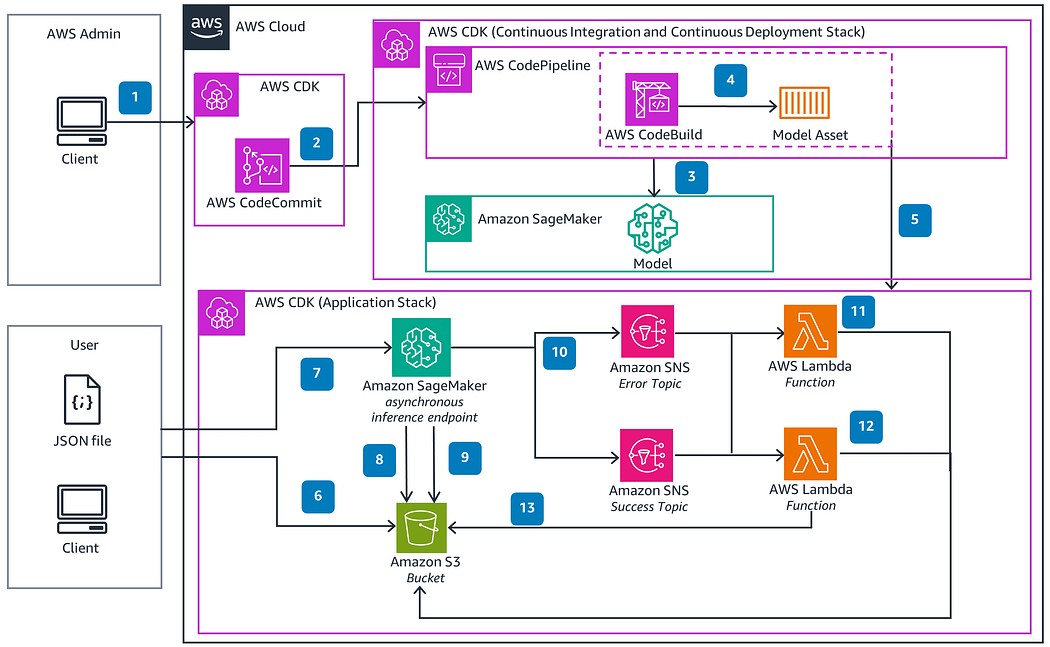
Integration with AWS Services

Integration with AWS Services; Source – Medium by Timothy Ugbaja
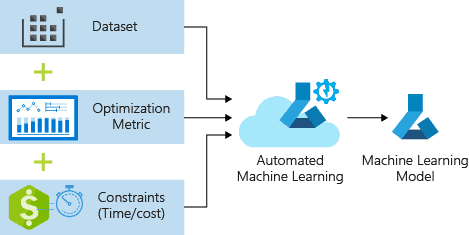
Microsoft Azure’s No-Code AI Ecosystem

1. Azure ML Studio and Automated ML Features

  • Azure ML Studio puts powerful AI tools right at your fingertips without requiring you to code. You can build, train, and deploy machine learning models through a drag-and-drop interface. With Automated ML, you simply upload your data, specify what you want to predict, and the system automatically tries different algorithms and hyperparameters to find the best model for your needs.
  • The beauty of Azure’s approach? You can focus on solving business problems rather than wrestling with technical details. Visual workflows let you connect data sources, transformations, and model training components with simple clicks.

Microsoft Azure's No-Code AI Ecosystem

Microsoft Azure’s No-Code AI Ecosystem; Source – K21Academy

2. Power Platform AI Builder Capabilities

  • AI Builder integrates directly with your Power Apps, Power Automate, and Power BI workflows. Want to add text recognition to your app? Object detection in your automation flow? You can implement these features in minutes without writing a line of code.
  • What really sets AI Builder apart is how it fits into tools you might already use. You can create prediction models from your business data, then embed those predictions directly into your apps and flows. The pre-built components for common scenarios like receipt processing or sentiment analysis save you tons of time.

3. Azure Cognitive Services Accessibility

  • Need to add vision, speech, language, or decision-making capabilities to your applications? Azure Cognitive Services packages these as API calls you can integrate without deep AI expertise.
  • The standout feature is how easily you can test these capabilities through simple portals. Try language translation, text analysis, or image recognition with your own data before committing to implementation. This lets you validate your ideas quickly before building them into your workflows.

Building Intelligent Applications with Azure Cognitive Services

Building Intelligent Applications with Azure Cognitive Services; Source – AgileIT

4. Enterprise Integration Advantages

  • Azure’s no-code AI tools truly shine in enterprise environments. Your existing Microsoft investments integrate seamlessly with these AI capabilities. Already using Dynamics 365? Power BI? SharePoint? You can enhance all of them with AI capabilities through familiar interfaces.
  • Security and compliance features built into the Azure ecosystem mean your AI projects inherit the same robust protections as your other cloud workloads. Role-based access control ensures the right people have access to AI models and data.
  • The enterprise-grade scalability means your no-code AI solutions can grow from departmental experiments to organization-wide deployments without painful migrations or rewrites.

Google Cloud Platform’s No-Code AI Tools

Google’s No-Code AI Agent platform makes it super easy. You don’t need a PhD in machine learning to get started – just bring your data and business problem.

Google's AI Product Strategy

Google’s AI Product Strategy; Source – ai-supremacy

1. Vertex AI and AutoML simplicity

  • With Vertex AI, you can train custom models through a point-and-click interface for your No-Code AI Agents. Need an image classifier? Just upload your labeled images and let AutoML handle the complex stuff.
  • Ever wanted to build AI models without diving into code? Google’s Vertex AI and AutoML make this super easy. You don’t need a PhD in machine learning to get started – just bring your data and business problem.
  • With Vertex AI, you can train custom models through a point-and-click interface. Need an image classifier? Just upload your labeled images and let AutoML handle the complex stuff. Working with text data? Same deal – AutoML will build a model that understands your specific language needs.
  • The beauty is in the simplicity. You focus on your business challenge while Google’s tools handle the technical heavy lifting.

Vertex AI and AutoML

Vertex AI and AutoML; Source – K21Academy

2. AppSheet’s AI capabilities

AppSheet takes no-code AI even further by letting you build entire applications with built-in intelligence. Think of it as your secret weapon for creating smart business apps without writing a single line of code.

You can add No-Code AI Agent features like:

  • Intelligent document processing that extracts data from forms
  • Smart predictions based on your business data
  • Image recognition capabilities in your custom apps
  • Automated workflows triggered by AI insights

The best part? You’re building these apps through a visual interface where you can drag, drop, and configure rather than program.

3. Pre-trained API services for quick implementation

Why reinvent the wheel when Google’s already built powerful AI services ready for you to use? Their pre-trained APIs let you add sophisticated AI capabilities to your projects immediately:

API What it does for you
Vision AI Analyzes images, detects objects, and reads text
Natural Language Understands text sentiment and extracts entities
Translation Supports 100+ languages with near-human quality
Speech-to-Text Converts spoken words to written text accurately
Text-to-Speech Creates natural-sounding voice outputs

Connect these APIs to your applications, and you’re instantly AI-powered without the hassle of model training.

4. Pricing and scalability considerations

  • Google Cloud’s pricing model works in your favor if you’re just getting started. You’ll typically pay only for what you use, with many services offering generous free tiers.
  • For small projects, you might not pay anything at all. As your needs grow, the costs scale with your usage. The pay-as-you-go model means you’re not locked into expensive commitments.
  • Scalability is where GCP really shines. Your applications can handle sudden traffic spikes without you reconfiguring anything. When your AI solution takes off, Google’s infrastructure grows with you seamlessly.

5. Integration with Google Workspace

Already using Google Docs, Sheets, or Gmail? GCP’s no-code AI tools integrate smoothly with these services.

You can build AI applications that:

  • Pull data directly from your Google Sheets
  • Process documents stored in Google Drive
  • Send intelligent notifications through Gmail
  • Enhance Google Forms with prediction capabilities

This native integration saves you tons of time. No more building complex connectors or worrying about data transfer between systems. Your AI solutions become natural extensions of the tools you already use daily.

This native integration saves you tons of time for your No-Code AI Agents. No more building complex connectors or worrying about data transfer between systems.

Comparative Analysis of Platform Strengths

User Interface and Experience Comparison

Looking for the easiest cloud platform to build your no-code AI solution? The user interface can make or break your development experience.

  • AWS SageMaker Canvas offers a clean, drag-and-drop interface that feels familiar if you’ve used other AWS services. You’ll appreciate the wizard-like approach, though navigating between different AI services can sometimes feel disconnected.
  • Azure ML Studio shines with its intuitive, visual interface that many consider the most user-friendly of the three. You’ll find yourself productive quickly with its cohesive design and thoughtful workflow organization. The integration with other Microsoft products is seamless if you’re already in that ecosystem.
  • Google Cloud’s Vertex AI provides a minimalist, straightforward UI that prioritizes function over form. While not as polished as Azure’s offering, you might prefer its no-nonsense approach that gets straight to the point.

Comparing Cloud Platforms for No-Code AI Agent Development: AWS vs Azure vs GCP

Comparing Cloud Platforms for No-Code AI Agent Development: AWS vs Azure vs GCP; Source – LinkedIn by Rabi Parsad Padhy

AI Model Performance and Accuracy Benchmarks

Platform Image Recognition NLP Tasks Tabular Data Inference Speed
AWS 94% accuracy Very good Excellent Fast
Azure 93% accuracy Excellent Good Medium
GCP 95% accuracy Excellent Very good Very fast

These numbers matter when you’re building production-ready AI applications. Google’s Vertex AI typically edges out the competition in raw performance, especially for computer vision tasks. AWS excels with structured data analysis, while Azure delivers consistently strong results across most use cases.

Available Pre-built Models and Customization Options

Your development speed depends heavily on what’s available out of the box.

  • AWS offers 15+ pre-built AI services covering everything from text analysis to forecasting. You’ll find good customization options, though they sometimes require more technical knowledge.
  • Azure boasts 25+ cognitive services with excellent domain-specific models for healthcare, retail, and manufacturing. The customization process feels more guided and accessible for non-technical users.
  • Google provides fewer pre-packaged solutions but compensates with superior customization capabilities through AutoML. You’ll get more control over model architecture and training parameters without writing code.

Conclusion

Choosing the right cloud platform for no-code AI development requires careful consideration of your specific needs and goals. AWS offers robust machine learning services with SageMaker Canvas, while Azure provides an intuitive AI ecosystem through its AI Builder and Power Platform. Google Cloud Platform stands out with its user-friendly AutoML solutions and specialized AI tools. Each platform brings unique strengths – AWS excels in scalability, Azure in Microsoft ecosystem integration, and GCP in natural language and vision capabilities.

Regardless of which platform you choose, the democratization of AI through No-Code AI Agent tools means your team can start building intelligent solutions today without extensive programming knowledge, allowing you to focus on solving business problems rather than technical implementation details.

When making your decision, assess your organization’s existing cloud investments, technical expertise, and the specific AI use cases you need to address. Consider factors like pricing models, available integrations, and long-term support requirements. Regardless of which platform you choose, the democratization of AI through no-code tools means your team can start building intelligent solutions today without extensive programming knowledge, allowing you to focus on solving business problems rather than technical implementation details.

Next Task: Enhance Your Agentic AI Skills

Ready to master Agentic AI & generative AI? Join K21 Academy’s Agentic AI FREE class and take the first step toward a career in Agentic AI and GenAI—even if you’re a beginner! Secure your spot now!

Agentic AI Beginner Roadmap CU

Picture of mike

mike

I started my IT career in 2000 as an Oracle DBA/Apps DBA. The first few years were tough (<$100/month), with very little growth. In 2004, I moved to the UK. After working really hard, I landed a job that paid me £2700 per month. In February 2005, I saw a job that was £450 per day, which was nearly 4 times of my then salary.


