





In this post of oracle service cloud integration let’s discuss key design options based on your file size, content format and delivery (outbound) particularly files above 10MB.
The integration cloud offers several designs and modeling options to process large files. The Download file option allows the loading of files up to 1GB in Integration Cloud local file system.
The file can be received in OIC from File Transfer Protocol (sFTP) server or through REST/SOAP APIs. This file then read in segments using the stage activity.
If you are new to Oracle Integration Cloud (OIC), then check out our blogs below:
- Oracle Integration Cloud (OIC) For Beginners Overview
- Create Oracle Integration Cloud Instance: Step-by-Step
- Console Walkthrough of Oracle Integration Cloud (OIC) Service
Handling Files less Than 1MB
If your File size is less than 1 MB, you can use Any Adapters for Inbound Interfaces with no limitation for Runtime Considerations.
Handling Files Greater Than 1MB But Less Than 10MB
File greater than 1MB but less than 10MB, you can use Any Adapters for Inbound Interfaces with some limitations at Runtime.
File Processing Limitations: Only XML or CSV format supported, Read Entire File in one go is not supported so you need to use Read File in Segments in Stage File Action.
For Outbound, you can use any Adapters that support both BASE64 encoding and file attachment.
Handling Files Greater Than 10MB
For Files greater than 10MB, we have to use FTP, REST and SOAP adapters, with some limitations at Runtime.
File Processing Limitations: Only XML or CSV format supported, Read Entire File in one go is not supported so you need to use Read File in Segments in Stage File Action.
For Outbound, you can use only use adapter that supports file attachment like FTP, REST and SOAP.
Check Out : New Homepage Of Oracle Integration Cloud.
Large File Handling
Integration Cloud does not allow loading files larger than 10MB for performance reasons.
If you need to read larger files, there is an option to “Download file”. This option handles files up to the size of 1 GB and allows files to be directly downloaded into OIC local file system without reading into memory.
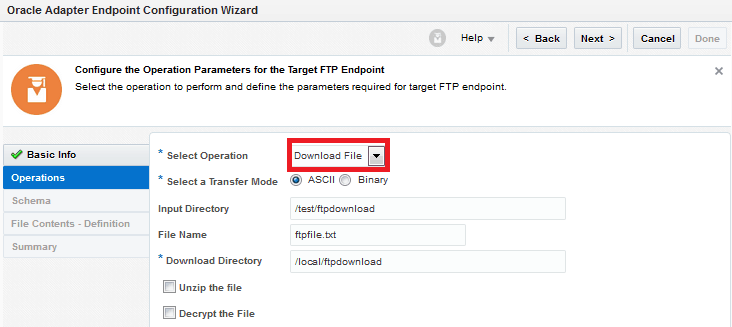
The Downloaded files are accessed with the help of Stage Activity. It provides simple access to the Integration Cloud local file system.
Stage Activity provides options to list, read, write, zip and unzip files from logical directory paths used to download the file in the underlying file system.
Read More : About Invoking One Integration From Another
There is also a specialized operation for reading files in segments which is useful when files are larger (up to 1 GB).
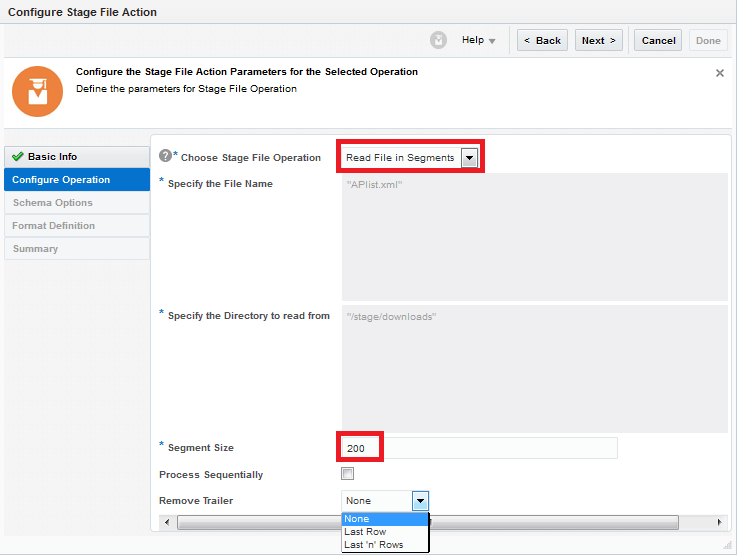
Stage File Action ‘Read file in Segments’ allows us to specify the segment size, in numbers.
This number specifies the parts of the file per reading cycle. The stage activity along with a sequential process provides a parallel processing option that further enhanced performance.
File Adapter
The File adapter allows integrating with remote file servers for reading and writing files. You can use the File adapter with connectivity agent in scenarios where it is not possible to open up the FTP server to the Integration cloud.
The remote file is read using the File adapter trigger. Writing to remote files can be configured using the file adapter as invoke.
FTP Adapter
The FTP Adapter enables the integration of FTP servers (FTP/sFTP protocols) to integration cloud. It does not require a connectivity agent and the remote FTP server should be made accessible from the Integration cloud.
FTP Adapter cannot be used as a trigger but you can use Scheduled orchestration and add FTP as invoke for modeling trigger type integrations.
SOAP Adapter
Service can be passed as payload to an external SOAP endpoint by the SOAP Adapter. Any response received from the endpoint can be sent to the next action in the integration for further processing.
In the context of file handling, the SOAP adapter supports Message Transmission Optimization Mechanism (MTOM) attachments and inline attachments.
MTOM and inline attachments are often used together with File contents in integration flows. SOAP adapter allows inline attachments for files up to 10MB and MTOM attachments for files upto 1GB.
REST Adapter
Representational State Transfer (REST) adapter enables you to exchange messages between remote clients or web service servers and the Oracle Integration Cloud Service(OIC). It supports dynamic URLs, REST API polling, multiple operations per channel as well as XML and JSON data formats.
REST adapter provides supports for multipart message attachments and unstructured payloads for both inbound and outbound directions for files up to 1GB. The attachment contents are usually used along with file processing requirements in integration flows.
Conclusion
In this post, we have discussed how to process large files in OIC, Download file in OIC local file system and reading file in segments.
We also discussed the Adapter that will be used for Achieving this and what they offer.
If you find this post useful and have further related questions then comment below.
Related Links/References:
- 1z0-1042-20
- Oracle Integration Cloud (OIC) Instance Edition, Message Pricing, and License Types
- Oracle Cloud Documentation Links: OIC | SOA-CS | OCI
- SOAP Adapter Capabilities
- REST Adapter Capabilities
- Oracle Documentation: Clone an Integration
- How to exporting Business Data and Visual Builder Cloud Service (VBCS)
- How Import Business Data in Visual Builder Cloud Service (VBCS)
- Oracle Integration: ICS to OIC Migration
Next Task For You
Do you want to learn more about Oracle and confuse where to start or which certification is right for you? Then, click on the register now button below to register for a Free Masterclass on Oracle [1Z0-1042] Certified Cloud Integration Expert, which will help you better understand and choose the right path and clear the certification exam.


![Microsoft Agentic AI Business Solutions Architect [AB-100] | K21 Academy](https://test.k21academy.com/wp-content/uploads/2025/11/Microsoft-Agentic-AI-Business-Solutions-Architect-AB-100-Exam-Overview1.png)



