





In the world of machine learning and artificial intelligence, one of the major challenges is managing the entire ML lifecycle—from data preparation to model deployment and monitoring. Google Cloud Vertex AI is designed to simplify this process, enabling you to build, deploy, and scale machine learning models easily.
What’s inside the blog
- What is Google Cloud Vertex AI?
- Why Choose Vertex AI?
- How Vertex AI Helps You Build Faster
- Key Tools in Google Cloud Vertex AI
- Real-World Use Cases for Vertex AI
- Comparison: Vertex AI vs. AWS SageMaker vs. Azure ML
- Conclusion
- Frequently Asked Questions (FAQs)
What is Google Cloud Vertex AI?
Google Cloud Vertex AI is a fully managed machine learning platform that unifies all the tools required for developing and deploying ML models. It streamlines the entire machine learning pipeline, offering integrated services for:
- Data preparation
- Model training
- Model deployment
- Monitoring and managing models in production
With Vertex AI, businesses can focus on building intelligent applications without worrying about the underlying infrastructure complexities.
Why Choose Vertex AI?
- Unified Workflow: From data preparation to model deployment, everything can be managed in one place.
- AutoML Capabilities: For those with limited machine learning knowledge, AutoML allows you to create high-quality models without writing code.
- Scalability: As your data and model complexity grow, Vertex AI automatically scales resources to meet your needs.
- Cost Efficiency: You only pay for what you use, and can optimize resources based on model performance.
How Vertex AI Helps You Build Faster
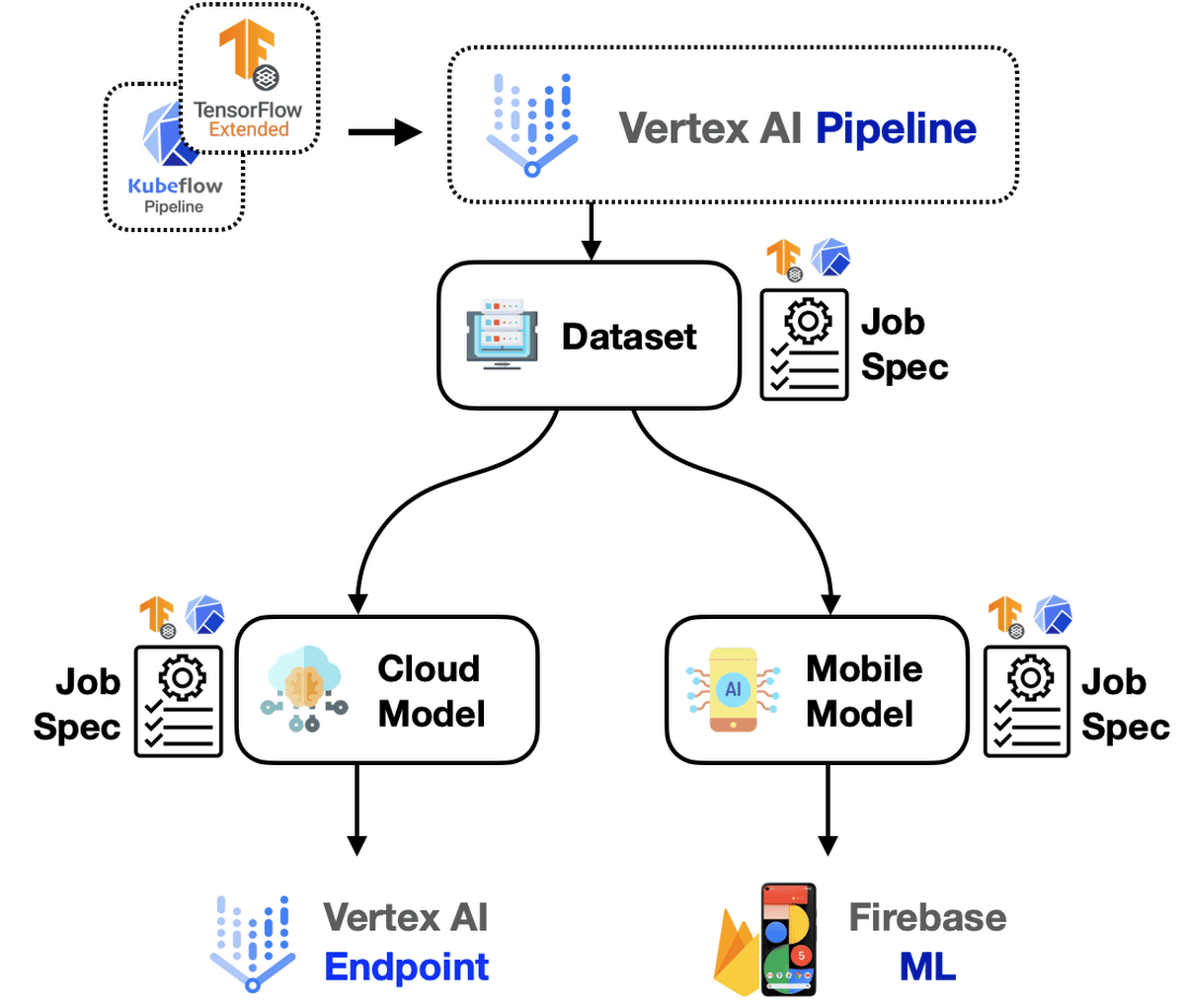
1. Build, Train, and Deploy Models
Vertex AI simplifies building and deploying models with integrated tools like:
- AutoML for automated model development.
- Custom Training for advanced users who need full control.
- ML Pipelines to automate workflows and make them repeatable and scalable.
2. Integrate Advanced Frameworks
Vertex AI supports popular ML frameworks, including:
- TensorFlow
- PyTorch
This ensures that developers can continue working with familiar tools while leveraging the power of Google Cloud.
3. Create Generative AI Agents
Vertex AI’s Agent Builder allows businesses to create generative AI applications tailored for enterprise use cases, such as:
- Intelligent chatbots for customer support.
- AI-powered recommendation systems.
- Automated data analysis tools.
Key Tools in Google Cloud Vertex AI
Google Cloud Vertex AI offers a comprehensive suite of tools to simplify the machine learning lifecycle. Below is a list of the key tools available in Vertex AI:
- Model Garden
- Pipelines
- Notebooks
- Vertex AI Studio
- Build with Gen AI
- Data
- Model Development
- Deploy and Use

1) Model Garden
The Model Garden is like a marketplace where you can browse pre-built machine-learning models from both Google and open-source communities. These models are ready to be deployed or fine-tuned based on your specific needs. This tool is especially useful if you want to start quickly with proven models and don’t want to build everything from scratch.
2) Pipelines
Pipelines allow you to automate machine learning workflows. You can create a sequence of steps for everything from data preparation to model training and deployment. This tool is essential for making your ML workflows repeatable and scalable.
3)Notebooks
- Colab Enterprise: This tool provides Jupyter notebooks with enterprise-level security and privacy features, ideal for collaborative machine learning development in a secure environment.
- Workbench: A managed environment that lets you run Jupyter notebooks, which are widely used for experimenting, training models, and working with data.
4)Vertex AI Studio
Vertex AI Studio offers several tools for working with AI models, particularly focused on generative AI:
- Overview: The general entry point for Vertex AI Studio, showing the available tools and options.
- Freeform: A flexible space for working with AI without predefined templates, allowing custom workflows.
- Chat: A specialized tool for creating AI-driven chat applications or dialogue-based systems.
- Vision: Provides tools for building and deploying models for image recognition, object detection, and more.
- Translation: Helps you develop language translation models using machine learning.
- Speech: Focuses on speech-to-text and text-to-speech models, useful for applications like virtual assistants.
- Prompt Gallery: A library of pre-made prompts you can use to quickly build and test AI models.
- Prompt Management: A tool for organizing and managing the prompts used in your AI models.
- Tuning: Allows you to fine-tune existing models for improved performance on specific tasks.
5)Build with Gen AI
- Extensions: Here, you can add more tools and functionality to your generative AI projects, allowing you to extend the capabilities of the platform with additional integrations.
6)Data
- Feature Store: A centralized place for storing and managing machine learning features, which are data attributes used in model training.
- Datasets: This tool is where you store and manage your datasets, which are essential for training and testing models.
- Labeling Tasks: Enables you to manage labeling tasks, which are necessary for supervised learning, where the data must be labeled with the correct output.
7) Model Development
- Training: The section where you train your machine learning models, either using AutoML (for less experienced users) or custom code for more control.
- Experiments: Allows you to compare different versions of models and experiments to find the best-performing ones.
- Metadata: Helps you track metadata associated with datasets, models, and experiments to ensure traceability and compliance.
8) Deploy and Use
- Model Registry: This is where you manage and keep track of different versions of your trained models. It’s like a version control system but for models.
- Online Prediction: Allows you to deploy models for real-time predictions, useful for apps that require instant responses.
- Batch Predictions: Useful for running predictions on large datasets all at once, typically used in scenarios where you have to process large volumes of data periodically.
- Monitoring: Helps you keep an eye on your deployed models, detecting issues like performance degradation or data drift (when the input data changes over time).
- Vector Search: A tool for finding similar items based on vector embeddings, which is often used in recommendation systems or AI-driven searches.
Real-World Use Cases for Vertex AI
- Retail: Retailers can use Vertex AI for demand forecasting, inventory management, and personalized marketing recommendations. By leveraging AutoML, retailers without deep ML expertise can build predictive models quickly.
- Healthcare: Healthcare organizations can use Vertex AI to predict patient outcomes, optimize treatments, and streamline administrative processes. Vertex AI’s explainability features are especially useful in ensuring transparent decision-making.
- Financial Services: In the financial industry, Vertex AI helps detect fraudulent transactions, assess credit risk, and automate customer service tasks through AI-powered chatbots.
- Manufacturing: Manufacturers use Vertex AI to predict equipment failures, optimize supply chains, and improve production efficiency by analyzing large sets of IoT sensor data.

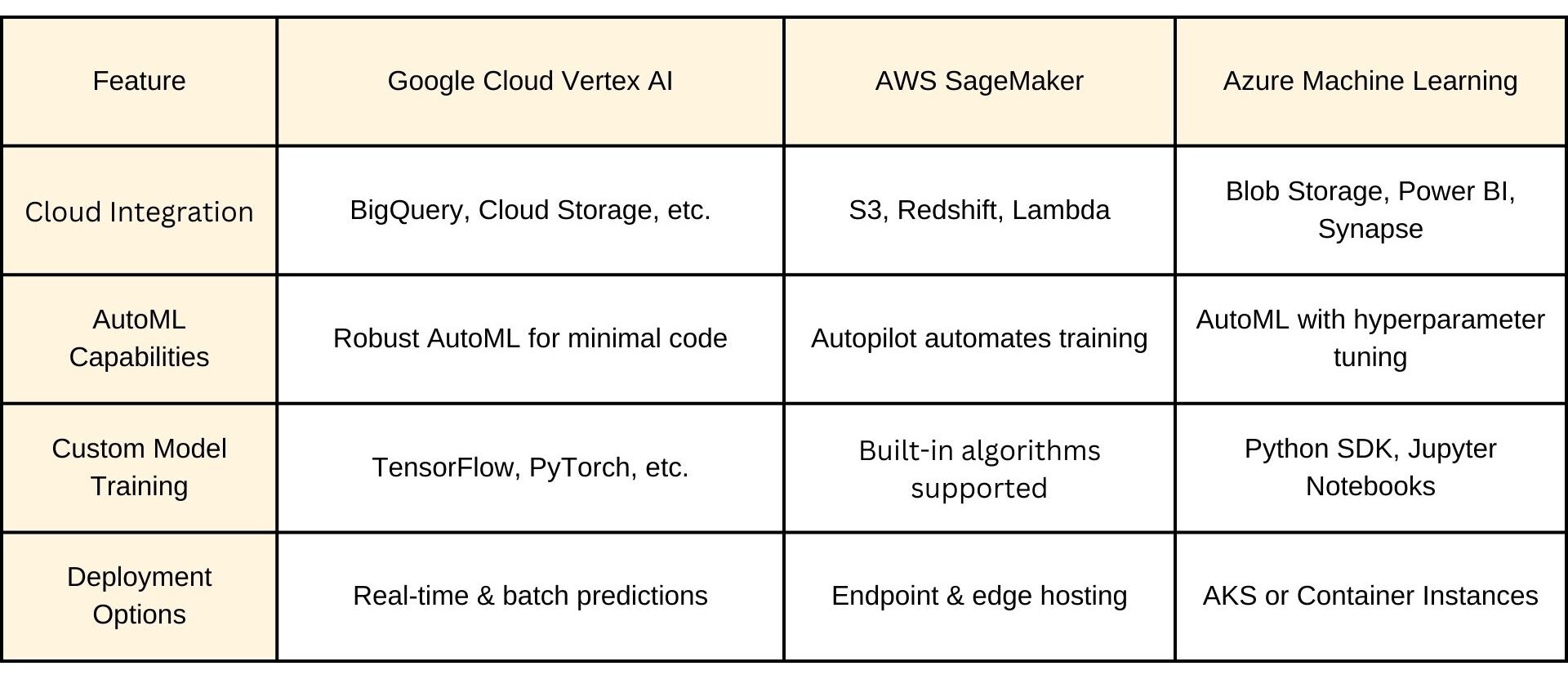
Comparison: Vertex AI vs. AWS SageMaker vs. Azure ML
Conclusion
Google Cloud Vertex AI is a powerful platform designed to simplify the end-to-end ML workflow. Whether you’re a beginner or an expert, Vertex AI offers tools for both AutoML and custom models, scalable infrastructure, and seamless integration with Google Cloud services.
With Vertex AI, you can focus more on building intelligent applications and less on managing the complexity of machine learning systems
Frequently Asked Questions
What is Vertex AI?
Vertex AI is a managed machine learning platform on Google Cloud that brings together all the tools needed to build, train, and deploy machine learning models. It simplifies the ML lifecycle by providing integrated services like AutoML, custom training, and model monitoring.
What are the main features of Vertex AI?
Vertex AI offers key features like AutoML for building models with minimal coding, Custom Model Training using frameworks like TensorFlow, and Vertex AI Workbench for developing models in a Jupyter notebook. It also includes Pipelines to automate workflows and Model Monitoring to track performance and detect data drift.
Who should use VertexAI?
VertexAI is designed for data scientists, ML engineers, and developers. It is useful for both beginners (through AutoML) and experts who want to have full control over their custom model development.
Can I use my own data in VertexAI?
Yes, you can upload and manage your own datasets using VertexAI's Datasets tool. It integrates seamlessly with BigQuery and Cloud Storage for data handling.
How do I monitor models in production using VertexAI?
VertexAI includes Model Monitoring tools that help you track key metrics such as accuracy, latency, and data drift. You can set up automated alerts if the model's performance starts to degrade.
Related References
- Join Our Generative AI Whatsapp Community
- Introduction to Generative AI and Its Mechanisms
- Mastering Generative Adversarial Networks (GANs)
- Generative AI (GenAI) vs Traditional AI vs Machine Learning (ML) vs Deep Learning (DL)
- Google Cloud Professional ML Engineer: Certification Guide
Next Task For You
Don’t miss our Exclusive Free Training on Mastering Google AI/ML and Generative AI. Gain expertise in advanced AI and Machine Learning technologies using Google’s powerful tools. Join a thriving community of learners and take the next step in advancing your career. Click the image below to reserve your spot!


![Microsoft Agentic AI Business Solutions Architect [AB-100] | K21 Academy](https://test.k21academy.com/wp-content/uploads/2025/11/Microsoft-Agentic-AI-Business-Solutions-Architect-AB-100-Exam-Overview1.png)


