



Installing & Configuring of Oracle EBS R12 on Oracle Cloud (OCI) become very easy due to the availability of EBS R12 Image on Oracle Cloud Marketplace.
This Blogpost covers steps to Provision EBS R12 from Oracle Cloud Marketplace. This topic of provisioning of Oracle EBS R12 from Cloud Marketplace or from EBS Cloud Manager is covered in our training (Build, Manage & Migrate EBS (R12) On Oracle Cloud (OCI).
Provisioning Oracle EBS R12 On Oracle Cloud (OCI)
Oracle EBS R12 On Oracle Cloud can be provisioned in different ways:
1) Using Oracle EBS Cloud Manager
- One-Click Provisioning-Everything is on single Compute (ie Database & Application)
- Advanced Provisioning-Application on compute & database on DB System (PaaS)
- To know more about Installing Oracle EBS R12 On Oracle Cloud (OCI) using EBS Cloud Manager check here
2) Using Oracle EBS R12 Image available on Cloud Marketplace (OCI)
3) Normal installation as you do on-premise
Also Read: Our Blog Post on OCI Migration.
Overview of Oracle Cloud Marketplace OCI
- Oracle Cloud Marketplace is an online store that offers solutions specifically for customers of Oracle Cloud Infrastructure.
- In the Oracle Cloud Infrastructure Marketplace catalog, you can find listings for two types of solutions from Oracle and trusted partners: images and stacks.
- These listing types include different categories of applications. Also, some listings are free and others belong to certain pricing models.
- Images are templates of virtual hard drives that determine the operating system and software to run on an instance.
- You can deploy image listings on an Oracle Cloud Infrastructure Compute instance.
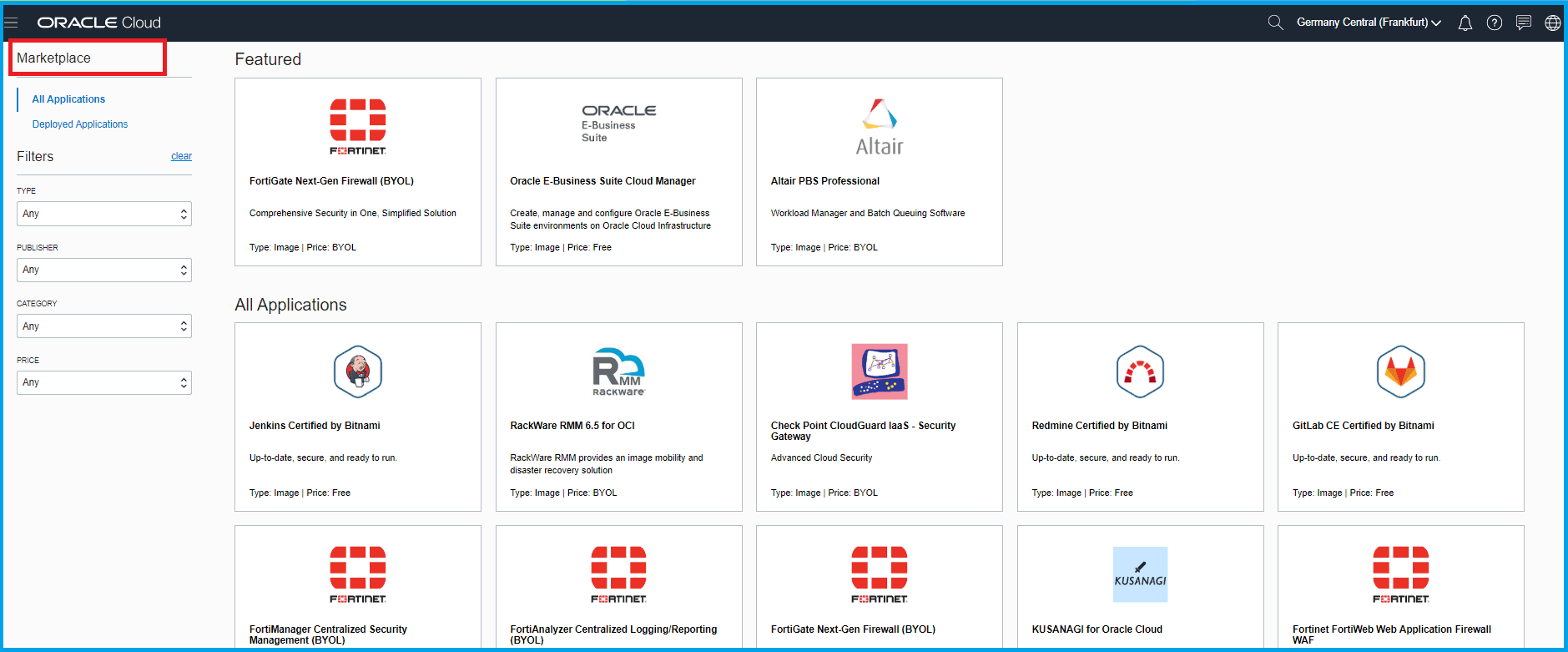
Note: From 11th Jan 2020 Oracle E-Business Suite 12.2.9 Demo Install Image & Oracle E-Business Suite 12.2.8 Demo Install Image is available in Oracle Cloud Marketplace.
Also Read: Our blog post on EBS R12 Database Upgrade. Click here
Prerequisite
- Make Sure you have already Signed up for free Oracle Cloud Account, to know how to create a new one check here
- A Compartment where you will be deploying your Oracle EBS R12 from cloud Marketplace. To know more about compartment click here
- A user who is either your tenancy administrator or who has privileges to manage all resources in the compartment. To know more about Tenancy click here
- A Virtual Cloud Network (VCN) and an associated subnet that will be associated with the Oracle E-Business Suite instance. To know more about VCN in Oracle Cloud Infrastructure (OCI) check here.
Also Check: Our blog post on EBS Cloud Manager OCI. Click here
Steps to Provision EBS R12 On Oracle Cloud (OCI)
- Login to OCI Console & go to cloud Marketplace
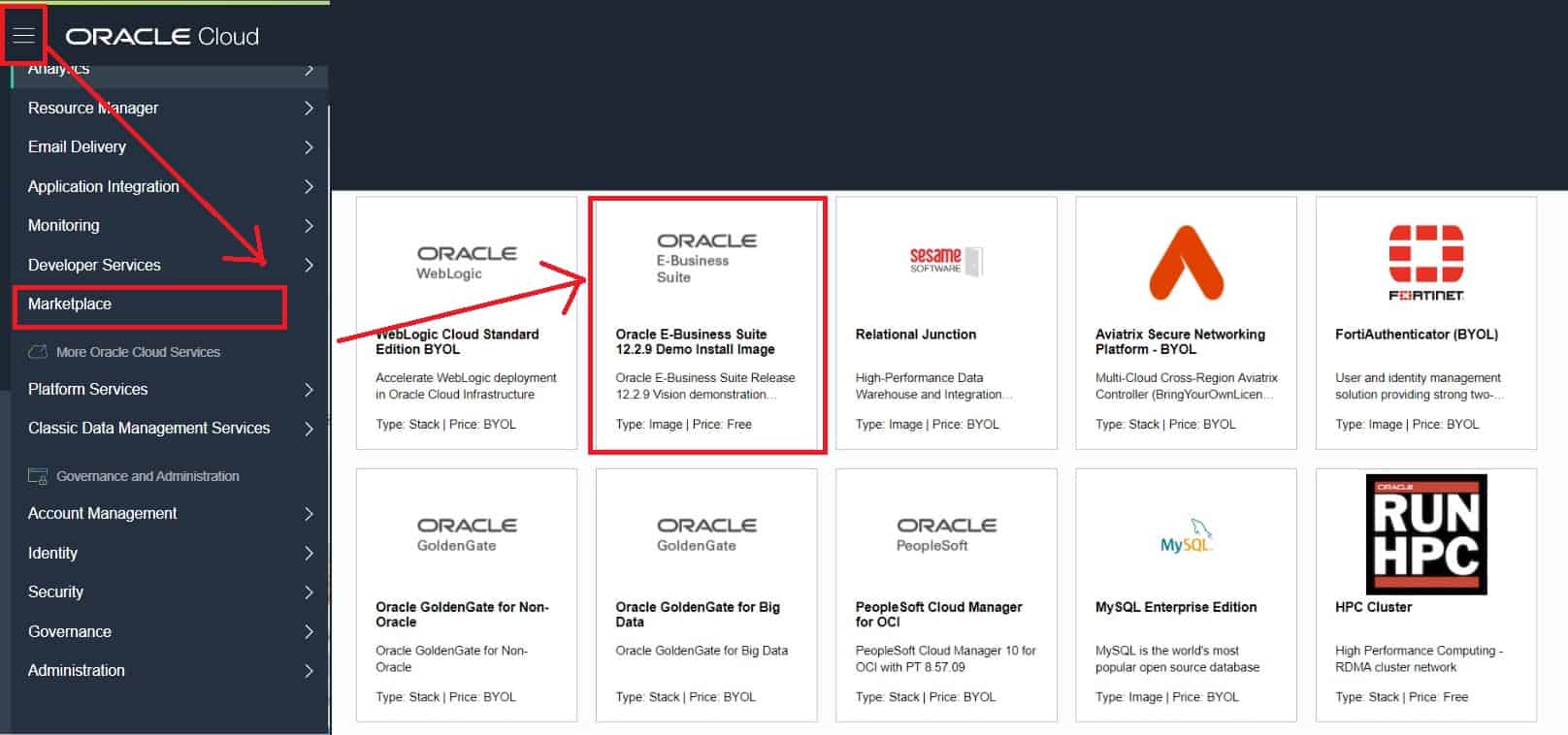
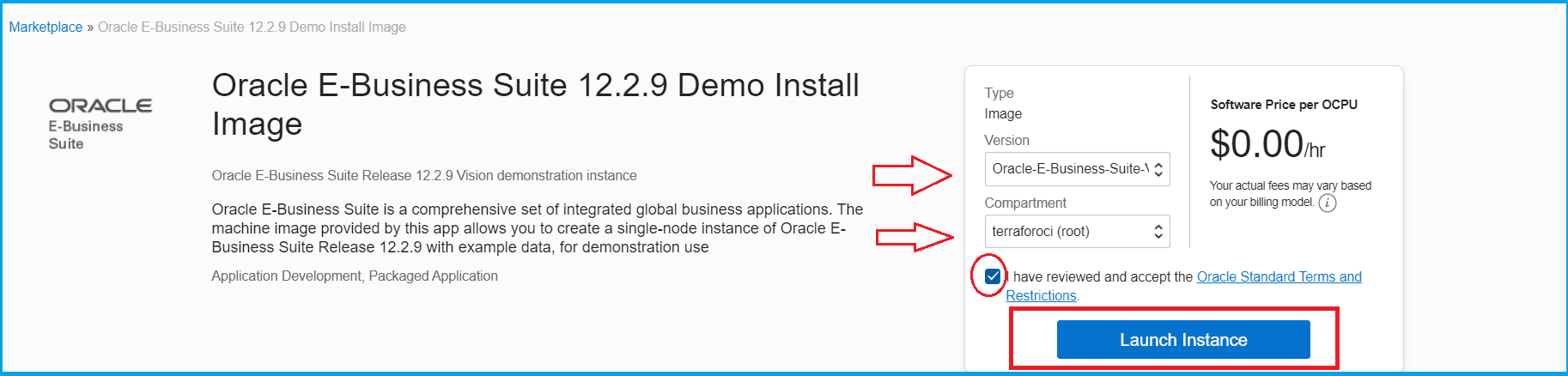
2. Click on the Oracle E-Business 12.2.9 or 12.2.8 image whichever you want and then select the compartment and click on Launch Instance
Also Check: Our blog post on OCI Load Balancer 502 Bad Gateway. Click here
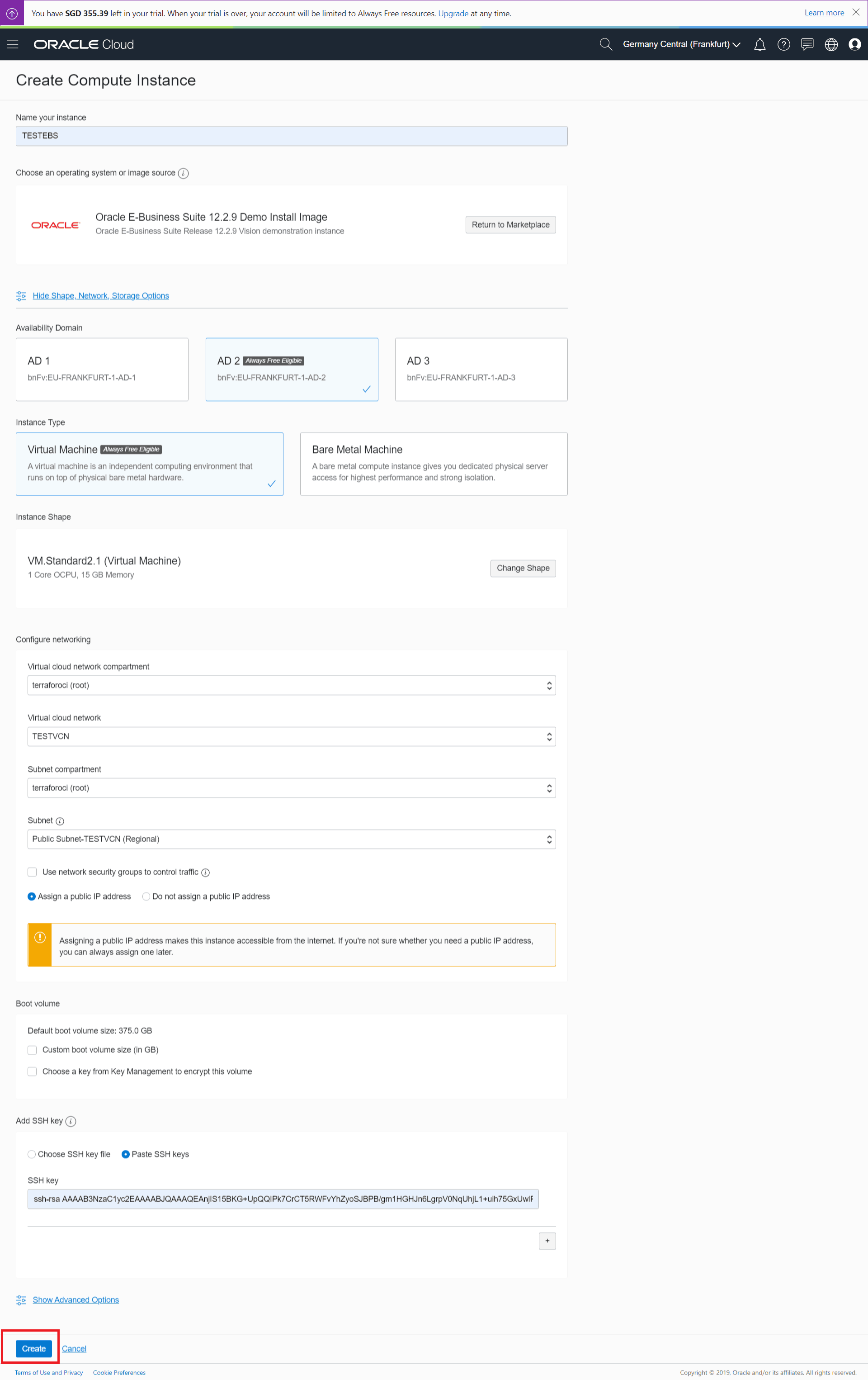
3. In the Create Compute Instance screen, specify the following:
- Instance Name
- Compute Shape
- VCN
- Subnet
- SSH Keys
Once you have entered all details, click on create
Check Out: Our previous blog post on Zero Downtime Migration. Click here
Performing Post-Install Steps
Once Oracle EBS R12 Instance is successfully provisioned, please perform the below post-provisioning task:
- update the host using updatehosts.sh from root (# /u01/install/scripts/updatehosts.sh)
- Update Operating System ( # yum udpate)
- Update Host Name. (# hostname apps.example.com)
- Change the password of sysadmin from oracle user ($ sh /u01/install/APPS/scripts/enableSYSADMIN.sh)
- Start the Database & Application services
- Open Port 8000 from security list
- Update your localhost to access EBS URL in your local browser
- the default password of Weblogic is welcome1 (w in small)
Also Read: Our blog post on Oracle Clone. Click here
Note: Installing EBS R122 from Cloud Marketplace lets you install application & database in a single compute
If you find this blog useful in provisioning EBS R12 from Oracle Cloud Marketplace, please do share & comment and also let me know if you face any challenges while doing the same by posting your doubts in the comment section!
Related/References
- Provision a New Oracle E-Business Suite Installation on a Single Node on Oracle Cloud Infrastructure
- [Video] Oracle EBS R12 on Cloud For Beginners: 7 Things You Must Know
- Oracle EBS Cloud Manager: New Release (19.3.1) Is Now Available
- April 2019 EBS Cloud Manager Updates(19.1.1)
- Oracle EBS (R12) on Cloud (OCI) Beginners: 15 Things Apps DBAs Must Know
- [Video] Role of Oracle Apps DBA (EBS) R12 On Cloud
Next Task For You
Join our FREE Masterclass on Build, manage & Migrate EBS R12 to Cloud For Beginners. Click on the image below to register for FREE


![Microsoft Agentic AI Business Solutions Architect [AB-100] | K21 Academy](https://test.k21academy.com/wp-content/uploads/2025/11/Microsoft-Agentic-AI-Business-Solutions-Architect-AB-100-Exam-Overview1.png)


