



In this post, I will cover how to Make Connection from Autonomous Database (ADB) to Object Storage using the SQL Developer Web.
One can connect to Autonomous Database, using various Database tool options available like SQL Developer Web, SQL Developer Client, SQL*Plus, and SQLcl, etc.
Here, we are discussing the SQL Developer Web because it is a browser-based application that provides many administration features of desktop-based Oracle SQL Developer.
To check how to Connect Autonomous Database with SQL Developer Web click here
Oracle Autonomous Database
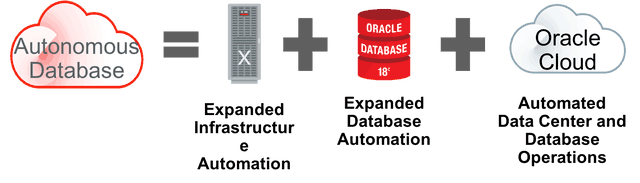
Oracle Autonomous Database is a combination of Exadata with database and Infrastructure Automation running on Oracle Gen 2 Cloud i.e Oracle Cloud Infrastructure (OCI).
It is a Cloud database that uses machine learning to automate database tuning, security, backups, updates, and other routine management tasks traditionally performed by database administrators (DBAs). It is self-driving, self-securing, self-repairing database service.
SQL Developer Web
To Connect to Autonomous Database there are various Database tools options available like SQL Developer Web, SQL Developer Client, SQL*Plus, and SQLcl, etc.
Prerequisites
Before making Connection from Autonomous Database (ADB) to Object Storage using SQL Developer Web, make sure you have followed the Prerequisites as mentioned.
- Create and Access to an instance of Autonomous Database (how to create an Autonomous data warehouse click here)
- Connect SQL Developer web to the database in Oracle Autonomous Database (How to Connect Autonomous Database with SQL Developer Web)
Once Prerequisites are done successfully, follow the below steps to make a connection from ADB to Object Storage.
Steps To Create Connection From ADB to Object Storage
- Create a User, add User to Group and Generate Auth Token for User in OCI
- Create Bucket & Identify Object Storage URL
- Set Credentials in Autonomous Database (ADB)
- Test Connection
Read More: Oracle Enterprise Manager(OEM) 13c for beginners, what is OEM, high-level steps to deploy OEM on Oracle cloud infrastructure (OCI), OEM architecture components, OEM HA/DR overview.
Step 1: Generate Auth Token for User in OCI
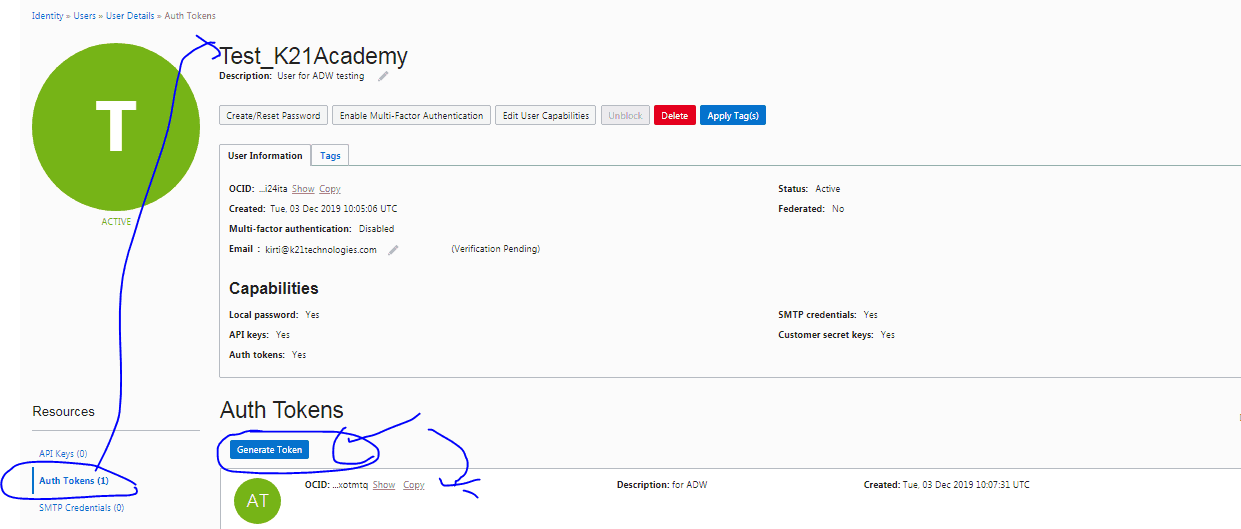
- In OCI Console, Create a user “Test_K21Academy“. Once this is done add User to “Administrator” Group and generate Auth Token. (make sure you copy that token in your notepad)
Step 2: Create Bucket & Identify Object Storage URL
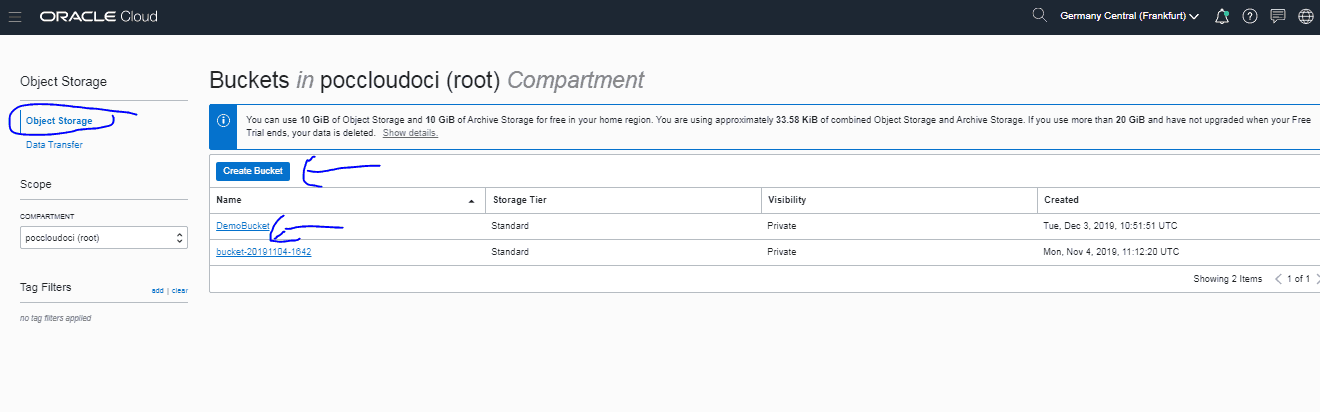
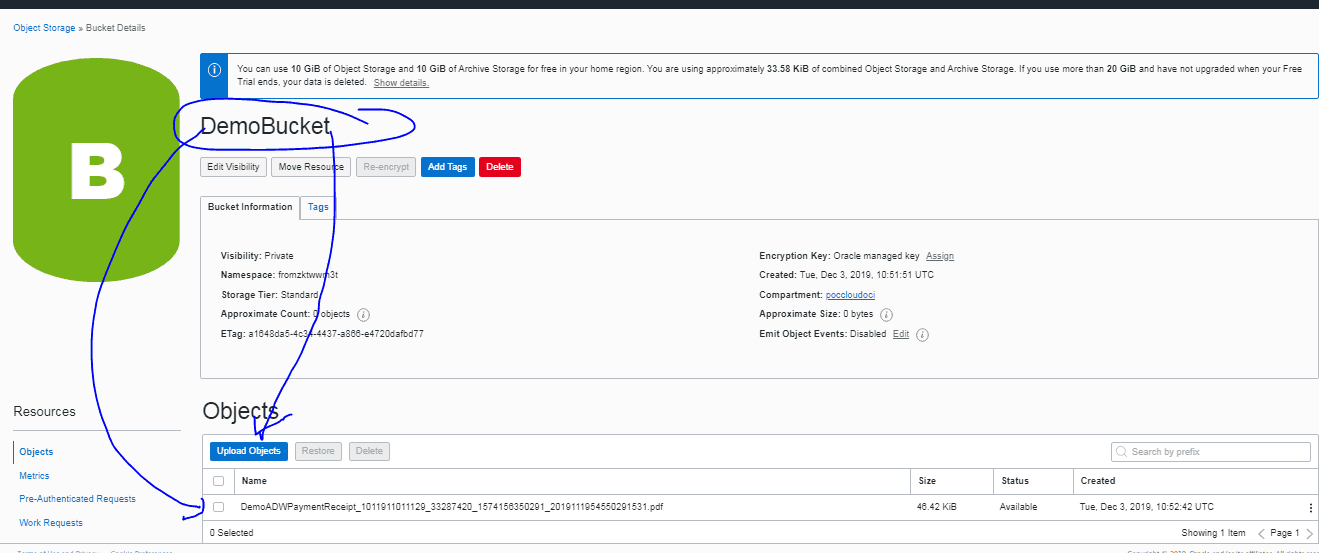
- Once you have successfully generated Auth Token, Create a Bucket under Object Storage in OCI and Upload any Object inside that Bucket.
(we have uploaded a file “DemoADWPaymentReceipt_1011911011129_33287420_1574156350291_2019111954550291531.pdf”)
Set Credentials In Autonomous Database (ADB)
Store your Cloud Object Storage credential using DBMS_CLOUD.CREATE_CREDENTIAL
- Enter the below PL/SQL procedure in your SQL Developer, and you will get the output as a PL/SQL procedure successfully completed.
BEGIN
DBMS_CLOUD.CREATE_CREDENTIAL(
credential_name => ‘DEF_CRED_NAME‘,
username => ‘adwc_user@example.com‘,
password => ‘Auth Token password‘
);
END;
/
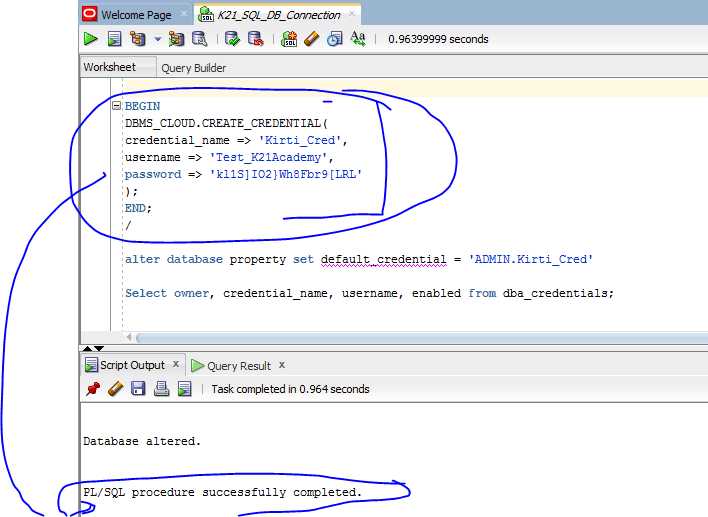
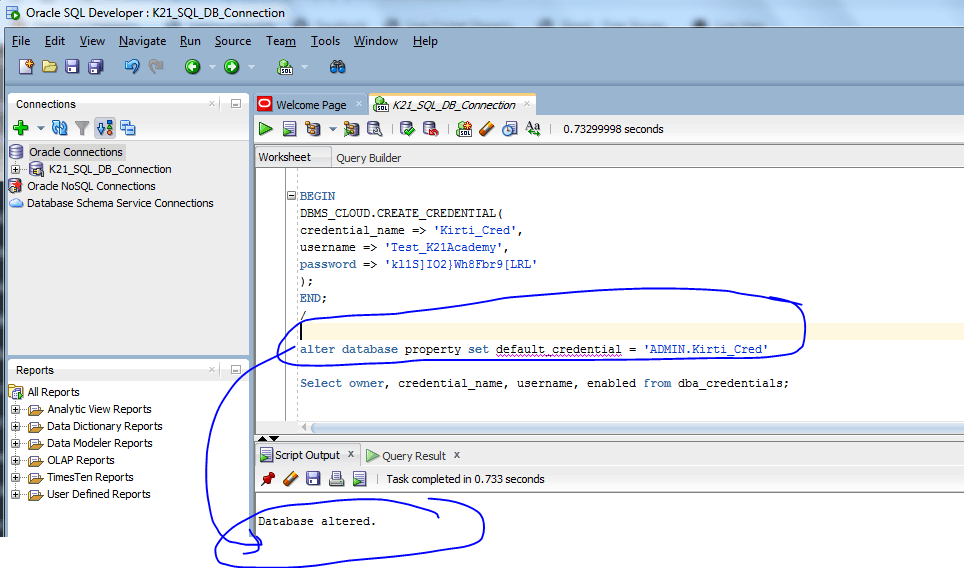
2. Set the credential as the default credential for your Autonomous Data Warehouse, as the ADMIN user.
alter database property set default_credential = ‘ADMIN.DEF_CRED_NAME’
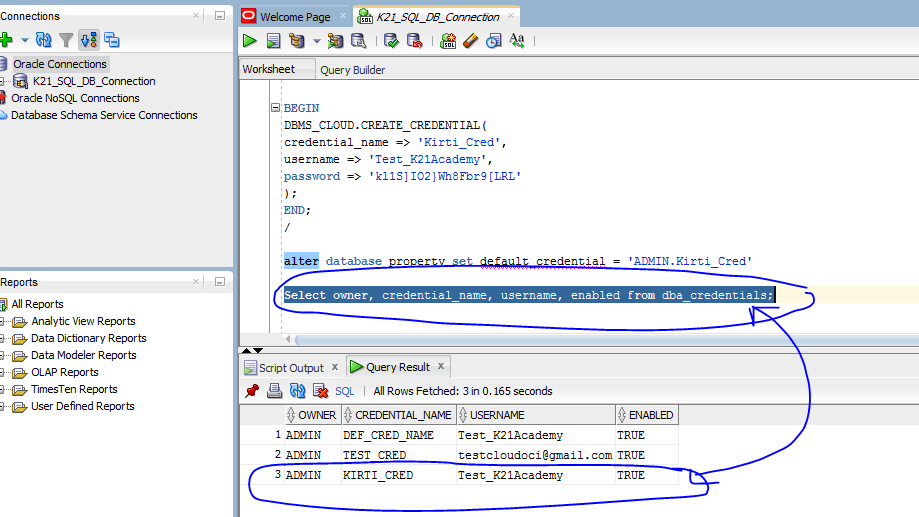
3. Validate that credentials are created
Select owner, credential_name, username, enabled from dba_credentials;
Read this post for an overview of Autonomous Database, Types of Autonomous database (Autonomous data warehouse & Autonomous Transaction Processing), and Autonomous offering as Serverless & Dedicated Infrastructure.
Test Connection: ADW To Object Storage
select object_name, bytes from (dbms_cloud.list_objects(‘<Credential_Name>’,’https://swiftobjectstorage.eu-frankfurt-1.oraclecloud.com/v1/<Object Storage Namespace>/<BucketName>/’));
To get Object Storage Namespace: go to Tenancy Name and check OSN
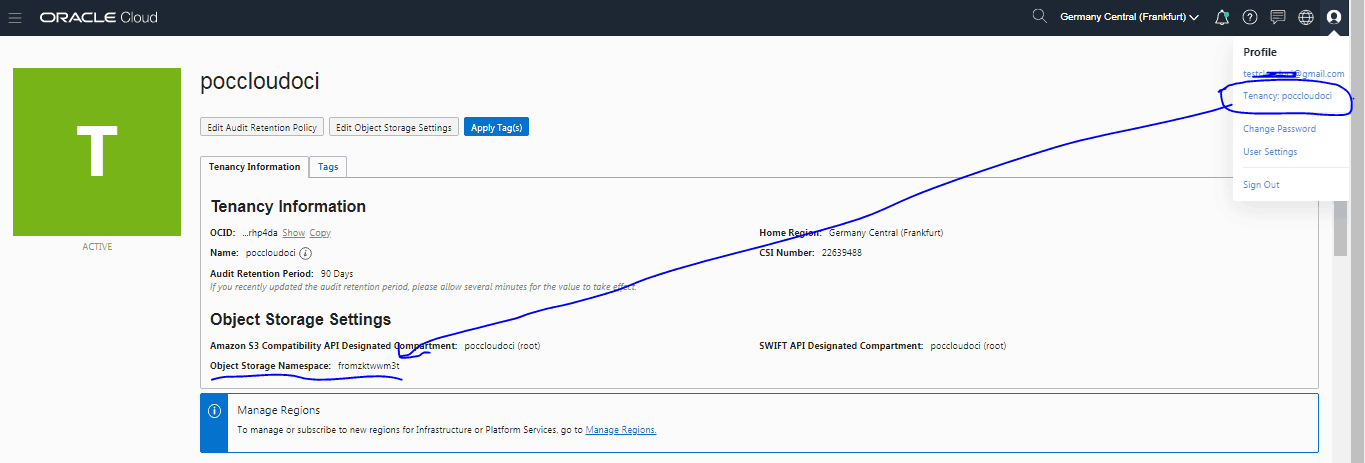
select object_name, bytes from (dbms_cloud.list_objects(‘Kirti_Cred’,’https://swiftobjectstorage.eu-frankfurt-1.oraclecloud.com/v1/fromzktwwm3t/DemoBucket/’))
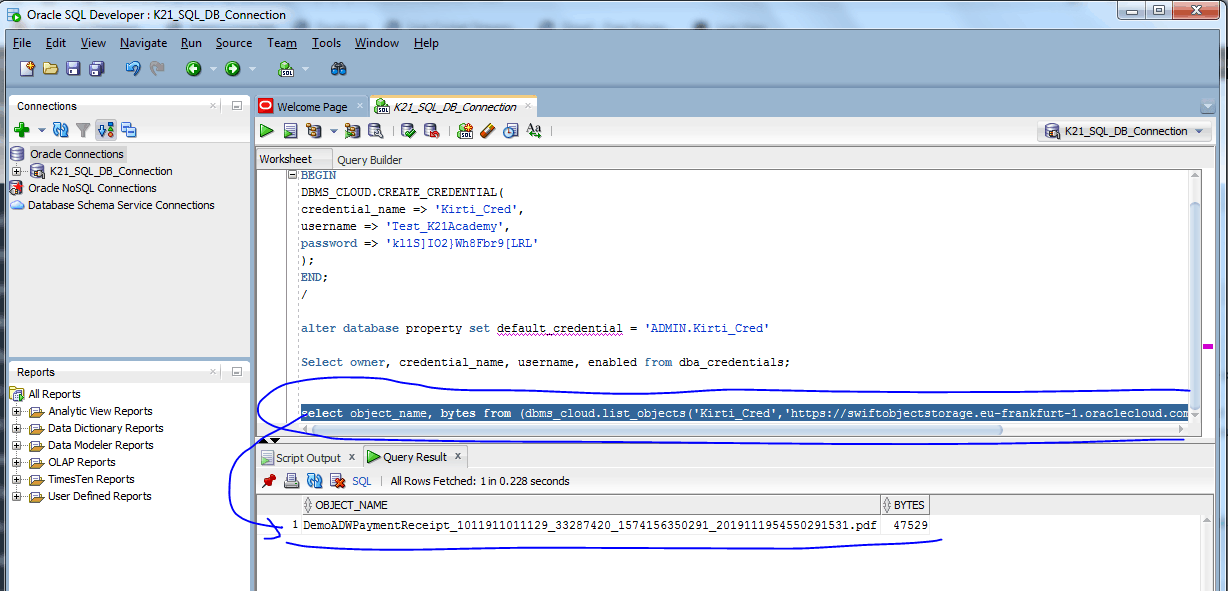
We have successfully made connection from ADW to Object Srorage using SQL Developer Web.
(Now it’s your turn to post your doubts in the comment section and let us know where you are facing challenges while making a connection from ADW to Object Storage using SQL Developer Web.)
Related/Further Readings
- [Video] Overview of Autonomous Databases – Oracle Serverless Database
- [Video] Oracle Cloud Database Deployment Options (VMDB, BMDB, ExaCC, ExaCS & Autonomous (ADW, ATP)
- Right Choice for DBA b/w Amazon AWS | Microsoft AZURE | Oracle
- NoSQL Cloud Database Service in Oracle Cloud
- MySQL Database as a Service in Oracle Cloud
- Introduction to Oracle Database 21c New Update Now Available On Oracle Cloud
Next Task For You
If you want to upgrade your career from an Oracle DBA to Oracle Cloud DBA, and wants to clear Oracle Cloud Database Service Specialist[1Z0-1093-21] & Oracle Cloud Autonomous Database Certification[1Z0-931-21] with 18 Hands-On labs, then register for a FREE class, and don’t miss an opportunity to gain a plethora of insights on becoming a certified Oracle Cloud DBA.


![Microsoft Agentic AI Business Solutions Architect [AB-100] | K21 Academy](https://test.k21academy.com/wp-content/uploads/2025/11/Microsoft-Agentic-AI-Business-Solutions-Architect-AB-100-Exam-Overview1.png)


