




In the ever-evolving landscape of cloud infrastructure management, Terraform Cloud has emerged as a powerful tool, revolutionizing the way organizations handle their infrastructure. Defined as a service provided by HashiCorp, Terraform Cloud facilitates Infrastructure as Code (IaC), offering a centralized platform for managing and deploying infrastructure resources. Let’s delve into the key features and benefits that make Terraform Cloud a game-changer.
In this article, we will cover about:
- Terraform Cloud
- Key Features of Terraform Cloud
- Benefits of Using Terraform Cloud
- Getting Started with Terraform Cloud
- Terraform Cloud Workflow
- Best Practices for Terraform Cloud
- Challenges and Solutions
- Future Developments in Terraform Cloud
- Conclusion
- Frequently Asked Questions
Terraform Cloud
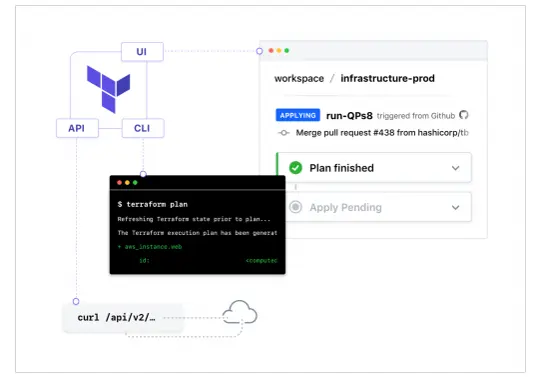
Terraform Cloud is a free-to-use SaaS application that provides the best workflow for writing and building infrastructure as code with Terraform. It provides
- State storage and management
- Web UI for viewing and approving Terraform runs
- Private module registry
- Version Control System (VCS) integration
- CLI, API or GUI-driven actions
- Notifications for run events
- Full HTTP API for automation
Key Features of Terraform Cloud
1. Remote State Management
- Terraform Cloud provides a secure, centralised repository to store and manage state files, making it easier for teams to collaborate on infrastructure projects while preventing state file conflicts and protecting sensitive data.
2. Version Control System (VCS) Integration
- Integrations with GitHub, GitLab, Bitbucket, and other VCS platforms allow users to connect repositories directly to Terraform Cloud. This feature automates the infrastructure workflow by triggering plans and applies with each code change, fostering a seamless GitOps approach.
3. Cost Estimation
- Before deploying changes, Terraform Cloud provides cost estimates based on resource configuration, allowing teams to forecast expenses and optimise costs proactively. This feature is particularly useful for managing budgets across large-scale infrastructure deployments.
4. Policy as Code with Sentinel
- Terraform Cloud includes Sentinel, HashiCorp’s policy-as-code framework, which enforces compliance and governance policies. Sentinel allows users to set rules for infrastructure deployments, ensuring alignment with organisational standards and regulatory requirements.
5. Collaborative Workspace Management
- Workspaces in Terraform Cloud allow teams to group related infrastructure and manage configurations independently. Each workspace maintains its own state and variable configuration, making it easy to separate environments (e.g., production, staging) and manage permissions on a per-workspace basis.
6. Run Triggers and Notifications
- Run triggers enable dependencies between workspaces, automating the re-provisioning of downstream workspaces when upstream changes are detected. Notifications via email or webhooks alert users of critical events, enhancing awareness and response times.
7. Private Module Registry
- Terraform Cloud offers a private module registry, allowing teams to create, share, and version their own Terraform modules. This helps standardise reusable configurations across the organisation, improving consistency and reducing configuration time.
8. Collaboration and Access Control
- Teams can collaborate effectively with role-based access controls, user permissions, and approval workflows. This feature ensures that infrastructure modifications are only made by authorised personnel and provides visibility into the change history.
Benefits of Using Terraform Cloud
1. Simplified Infrastructure Management
- Terraform Cloud offers a centralized interface to manage and collaborate on infrastructure as code (IaC). This streamlines the process of version control, plan execution, and state management, helping teams work seamlessly across different environments.
2. Enhanced Team Collaboration
- With Terraform Cloud, teams can collaborate effectively by sharing configurations, managing access controls, and using shared state files. This feature allows teams to work in parallel, reduce bottlenecks, and increase deployment speed, which is particularly useful in a multi-developer environment.
3. Automated and Consistent Workflows
- Terraform Cloud automates workflows with features like policy as code, cost estimation, and real-time monitoring. Automated workflows ensure consistency, allowing teams to detect and prevent configuration drift and policy violations early.
4. Built-in Security and Compliance
- The platform enables organizations to enforce compliance policies and governance standards. By integrating with Sentinel, Terraform Cloud enforces security policies across deployments, ensuring infrastructure is compliant without slowing down the delivery process.
5. Centralised State Management
- Managing state files centrally in Terraform Cloud eliminates the risk of local state file corruption and enhances the security and reliability of infrastructure management. This also improves collaboration by keeping the state files accessible to all authorised users.
6. Scalable and Cost-Effective Solution
- Terraform Cloud supports scaling according to the organization’s needs. It offers a flexible pricing model, making it accessible for smaller teams while accommodating the needs of larger enterprises as they grow.
7. Seamless Integrations with DevOps Tools
- Terraform Cloud integrates well with popular CI/CD, version control, and observability tools, such as GitHub, GitLab, and Jenkins, creating a smooth and cohesive workflow from code to deployment.
Getting Started with Terraform Cloud
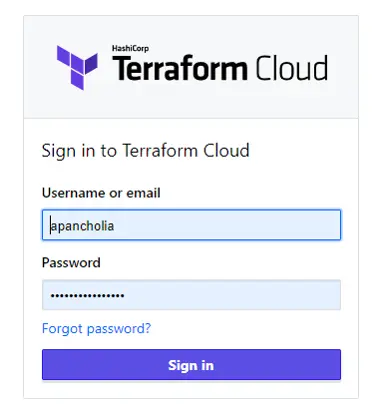
Sign-up and Onboarding: Getting started with Terraform Cloud is a straightforward process. Users can sign up for an account, and the onboarding process guides them through setting up their organization and workspaces.
Creating and Managing Workspaces: Workspaces in Terraform Cloud are environments where infrastructure code is applied. Users can create and manage workspaces for different projects, ensuring a well-organized and modular approach to infrastructure management.
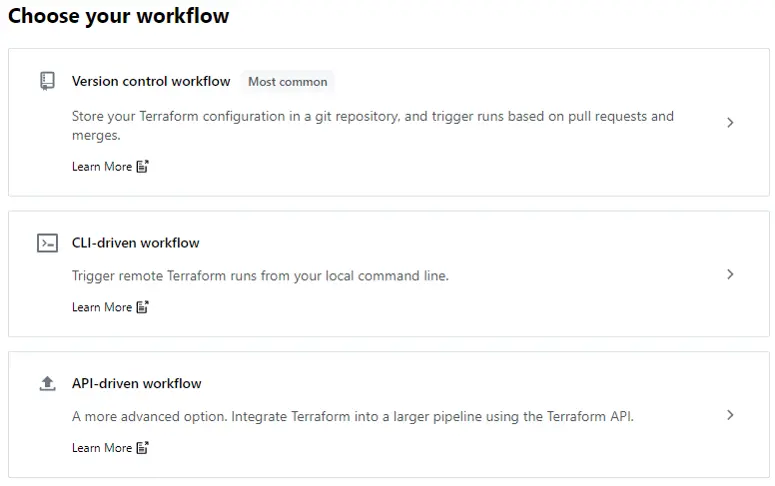
Writing Infrastructure Code: Writing infrastructure code with Terraform is a declarative process. Users define the desired state of their infrastructure, and Terraform takes care of the rest. This approach simplifies the management of complex infrastructure configurations.
Terraform Cloud Workflow
- Author – Create or update the configuration file in HCL based on the scoped parameters
- Select workspace – Create or select a workspace for your resources
- Version Control – Check your configuration files into a version control system (VCS) as a central source of truth where your changes can be managed
- Configure Variables – Define your workspace’s Terraform variables and environment variables
- Plan & Apply – Execute Terraform Cloud runs (plans and applies) to manage your infrastructure
Best Practices for Terraform Cloud
- Code Organization: Organizing Terraform code into modular and reusable components promotes maintainability and collaboration. Following best practices for code organization ensures that changes are easily traceable and understandable.
- Module Usage: Utilizing Terraform modules facilitates the reuse of infrastructure components across different projects. This modular approach simplifies the management of complex infrastructures and encourages code-sharing within the organization.
- Monitoring and Auditing: Implementing robust monitoring and auditing practices is essential for ensuring the security and stability of infrastructure managed by Terraform Cloud. Regularly review logs and audit trails to identify and address potential issues proactively.
Challenges and Solutions
- Learning Curve: While Terraform Cloud offers immense benefits, the initial learning curve can be steep. Organizations can overcome this challenge by providing comprehensive training resources and encouraging hands-on practice.
- Security Concerns: Security is a paramount concern in any infrastructure management tool. it addresses security concerns through features like access controls, encryption, and regular security updates. Organizations should follow security best practices to enhance their overall posture.
- Overcoming Common Pitfalls: Avoiding common pitfalls, such as misconfigurations or improper use of modules, requires a thorough understanding of Terraform’s best practices. Regular code reviews, automated testing, and continuous education can help teams overcome these challenges.
Future Developments in Terraform Cloud
- Community Contributions: The strength of Terraform lies in its vibrant community. Ongoing community contributions play a vital role in enhancing Terraform Cloud’s capabilities. The continuous influx of ideas and improvements ensures that the tool stays relevant in a dynamic technological landscape.
- Integration with Emerging Technologies: As technology evolves, it will likely integrate with emerging technologies. This includes enhanced compatibility with new cloud services, improved automation capabilities, and support for emerging infrastructure trends.
- Continuous Improvement: HashiCorp, the organization behind Terraform, is committed to continuous improvement. Regular updates and new features ensure that Terraform Cloud remains a cutting-edge solution for infrastructure management.
Conclusion
In conclusion, Terraform Cloud stands out as a versatile and powerful tool for organizations looking to streamline their infrastructure management. From key features like remote state management to the myriad benefits of scalability and cost-efficiency, it offers a holistic solution for Infrastructure as Code. Embracing best practices, addressing challenges, and staying attuned to future developments will maximize the value derived from Terraform Cloud.
Frequently Asked Questions
Is Terraform Cloud suitable for small businesses?
Terraform Cloud caters to businesses of all sizes, offering scalable solutions that can be tailored to the specific needs of small organizations.
How does Terraform Cloud ensure the security of infrastructure code?
Terraform Cloud employs access controls, encryption, and regular security updates to safeguard infrastructure code and sensitive information.
Can Terraform Cloud be used with multiple cloud providers simultaneously?
Yes, Terraform Cloud supports the management of resources across various cloud providers, providing flexibility in multi-cloud environments.
What is the role of Terraform modules, and why are they important?
Terraform modules allow users to create reusable infrastructure components, promoting code sharing, and simplifying the management of complex configurations.
How frequently does HashiCorp release updates for Terraform Cloud?
HashiCorp follows a regular release schedule, providing updates and new features to Terraform Cloud to ensure continuous improvement and compatibility with evolving technologies.
Related/References
- HashiCorp Infrastructure Automation Certification: Terraform Associate
- HashiCorp Certified Terraform Associate-Step By Step Activity Guides
- Install Terraform in Linux, Mac, Windows
- Why Terraform? Not Chef, Ansible, Puppet, CloudFormation?
- Terraform Providers Overview
- Terraform Variables – Terraform Variable Types
Join FREE Class
🚀 Master Terraform & DevOps to get High-Paying Jobs! 🔥 Join our EXCLUSIVE Free class! 🚀
Get your hands dirty with lots of projects and labs based on Terraform and DevOps in our Program.
Click on the below image to Register for Our FREE Class Now!


![Microsoft Agentic AI Business Solutions Architect [AB-100] | K21 Academy](https://test.k21academy.com/wp-content/uploads/2025/11/Microsoft-Agentic-AI-Business-Solutions-Architect-AB-100-Exam-Overview1.png)