




Terraform, a powerful infrastructure as code (IaC) tool, has revolutionized the way we manage and deploy infrastructure. In this digital era, where efficiency is paramount, understanding every facet of Terraform becomes crucial. One such essential component is Terraform data sources.
In this blog, we will cover:
- What are Terraform Data Sources?
- How to Use Terraform Data Sources?
- Benefits of Utilizing Data Sources
- Common Mistakes to Avoid
- Real-world Use Cases
- Keeping Data Sources Secure
- Data Sources: Interview Questions
- Data Sources: Exam Questions
- Conclusion
- FAQs
What are Terraform Data Sources?
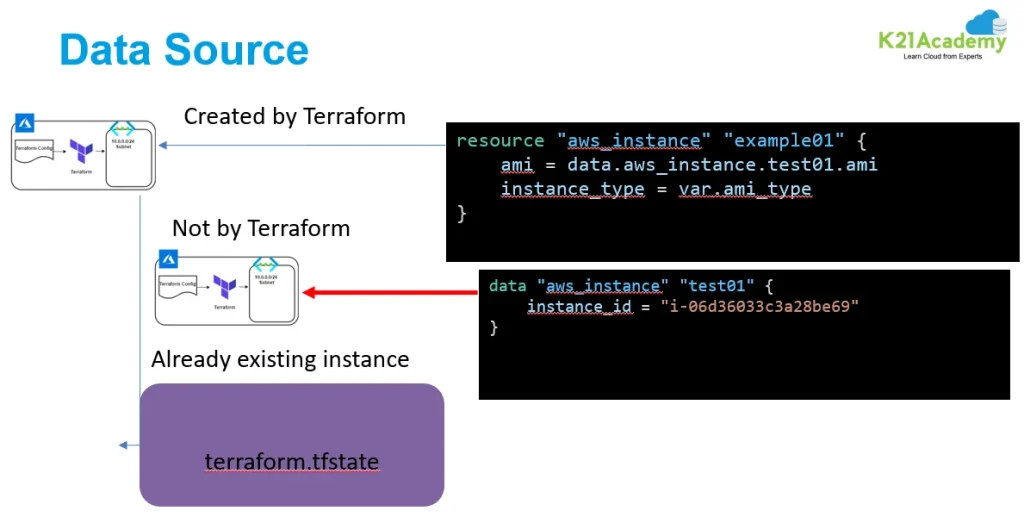
It serves as a bridge between your infrastructure code and external data. Unlike variables or outputs, data sources enable you to fetch information from existing resources, such as AWS S3 buckets or Azure databases. They play a pivotal role in integrating external data seamlessly into your Terraform configuration.
How to Use Terraform Data Sources?
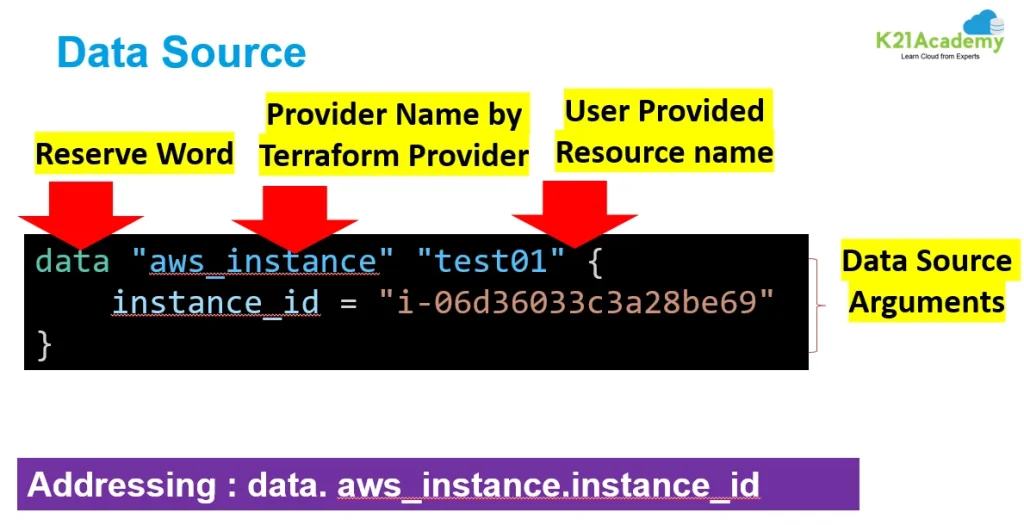
Implementing data sources is a straightforward process. The syntax involves specifying the data source type, name, and any required arguments. For a clearer understanding, let’s delve into a practical example.
Consider the scenario of fetching information about an AWS AMI (Amazon Machine Image) using Terraform data sources:
# main.tf
data "aws_ami" "latest_amazon_linux" {
  most_recent = true

  owners = ["amazon"]

  filter {
    name   = "name"
    values = ["amzn2-ami-hvm-*-x86_64-gp2"]
  }
}
In this example, we’re using the aws_ami data source to fetch the latest Amazon Linux AMI. The fetched data can then be utilized in the rest of the Terraform configuration.
Validating Inputs in Terraform Configurations with Data Sources
When working with Terraform, ensuring that your configuration inputs are valid before applying them is crucial. Without validation, you might proceed with configurations that could lead to errors later in the deployment process. Data sources offer an effective way to verify these inputs during the planning phase.
Understanding the Role of Data Sources
Data sources in Terraform allow you to fetch information from your cloud provider and use it within your configuration. This can be particularly useful for validating inputs, such as checking if a specific Amazon Machine Image (AMI) ID exists in a given region before creating an EC2 instance.
Why Use Data Sources for Validation?
- Error Prevention: By validating inputs early, you can catch potential errors before resources are provisioned.
- Feedback During Planning: Identify issues during the
terraform planphase, allowing for quicker fixes. - Efficiency: Saves time and resources by preventing invalid configurations from advancing to the application stage.
Benefits of Utilizing Data Sources
The incorporation of Terraform data sources brings forth several advantages. One notable benefit is enhanced code reusability. By pulling information from existing resources, you reduce redundancy and create more maintainable and efficient code.
Efficiency in handling external data is another major advantage. It enables you to seamlessly integrate information from various sources, promoting a holistic and dynamic approach to infrastructure management.
Common Mistakes to Avoid
While data sources offer immense flexibility, they come with their set of pitfalls. One common mistake is overlooking the need for proper error handling. Failing to anticipate and address potential issues in data source queries can lead to deployment failures.
To avoid such pitfalls, adhere to best practices such as validating data source outputs, implementing conditional logic, and thoroughly testing your configurations.
Real-world Use Cases
Understanding the practical applications of Terraform data sources is crucial for mastering their usage. Consider scenarios where fetching external data is paramount, such as obtaining information about existing networking components or pulling in data from a configuration management database.
Real-world use cases highlight the versatility of data sources in diverse infrastructure setups, providing a clearer picture of their significance in complex environments.
Keeping Data Sources Secure
Security considerations should be at the forefront of your Terraform data source implementation. Avoid exposing sensitive information in your configurations, and leverage encryption and access controls to safeguard your infrastructure.
Implementing best practices for data protection ensures that your Terraform configurations maintain a high level of security, even when interacting with external data sources.
Data Sources: Interview Questions
Here are five interview questions for Terraform data sources along with their answers:
- What are Terraform data sources, and how do they differ from resources?
Answer: Terraform data sources allow you to import existing information from outside your Terraform configuration, such as AWS S3 bucket details or Azure resource group information. Unlike resources, which create and manage infrastructure, data sources retrieve existing data for reference within Terraform configurations. - How do you declare and use a data source in Terraform?
Answer: To declare a data source in Terraform, you use thedatablock followed by the data source type and configuration. For example:data "aws_vpc" "example" { id = "vpc-12345678" }To use this data source elsewhere in your configuration, you can reference it using interpolation syntax, like
${data.aws_vpc.example.id}. - What are some common use cases for Terraform data sources?
Answer: Common use cases for Terraform data sources include fetching details about existing infrastructure, such as VPCs, subnets, security groups, or IAM roles. They can also be used to retrieve information needed for dynamic configurations, such as the latest AMI ID for an EC2 instance. - How can you handle errors when using Terraform data sources?
Answer: Terraform provides error-handling mechanisms through theignore_errorsattribute. By settingignore_errorstotrue, Terraform will ignore errors from a data source if it fails to retrieve data, allowing the plan and apply phases to continue without interruption. - Can you explain the difference between
for_eachandforconcerning iterating over data sources?
Answer:for_eachandforare both iteration constructs in Terraform, but they serve different purposes.for_eachis used to create multiple instances of a resource or module based on a map or set of strings. On the other hand,foris used to iterate over elements in a list, such as when iterating over data sources to perform operations or extract specific information.
Data Sources: Exam Questions
Conclusion
In conclusion, mastering Terraform data sources opens up a world of possibilities for efficient and dynamic infrastructure management. From practical applications to advanced techniques, this article has provided a comprehensive guide to everything you should know about Terraform data sources.
Keep exploring, learning from the community, and staying abreast of Terraform updates to ensure your infrastructure code remains robust and future-proof.
FAQs
Can I use multiple data sources in a single Terraform configuration?
Yes, you can use multiple data sources to fetch information from different external resources within the same configuration.
How do I handle errors in Terraform data source queries?
Implement proper error handling mechanisms, validate data source outputs, and use conditional logic to address potential issues.
Are data sources only applicable to cloud providers?
No, while commonly used with cloud providers, Terraform data sources can fetch information from various external sources, including on-premises systems and databases.
What is the difference between variables and data sources in Terraform?
Variables are user-defined values, while data sources fetch information from existing resources, providing dynamic inputs to your Terraform configuration.
Can I use data sources to fetch information from APIs?
Yes, Terraform data sources can be utilized to fetch information from APIs, enabling seamless integration with external services.
Related/References
- HashiCorp Infrastructure Automation Certification: Terraform Associate
- HashiCorp Certified Terraform Associate-Step By Step Activity Guides
- Install Terraform in Linux, Mac, Windows
- Why Terraform? Not Chef, Ansible, Puppet, CloudFormation?
- Terraform Providers Overview
- Terraform Variables – Terraform Variable Types
Join FREE Class
🚀 Master Terraform & DevOps to get High-Paying Jobs! 🔥 Join our EXCLUSIVE Free class! 🚀
Get your hands dirty with lots of projects and labs based on Terraform and DevOps in our Program. Click on the below image to Register for Our FREE Class Now!


![Microsoft Agentic AI Business Solutions Architect [AB-100] | K21 Academy](https://test.k21academy.com/wp-content/uploads/2025/11/Microsoft-Agentic-AI-Business-Solutions-Architect-AB-100-Exam-Overview1.png)