





This blog post is your gateway to unlocking a rewarding career as a Docker and Kubernetes expert. Dive into our engaging Step-By-Step Activity Guides and Real-time Projects, meticulously designed not just to enhance your CV but to land you that dream job. Gain the skills employers crave, create an impressive CV, and set yourself up for success in job interviews. Plus, these resources are tailored to help you confidently conquer certification exams such as DCA, KCNA, CKA, CKAD, and CKS. Your journey to a fulfilling job in the dynamic world of containerization and orchestration starts here!
Table of Contents:
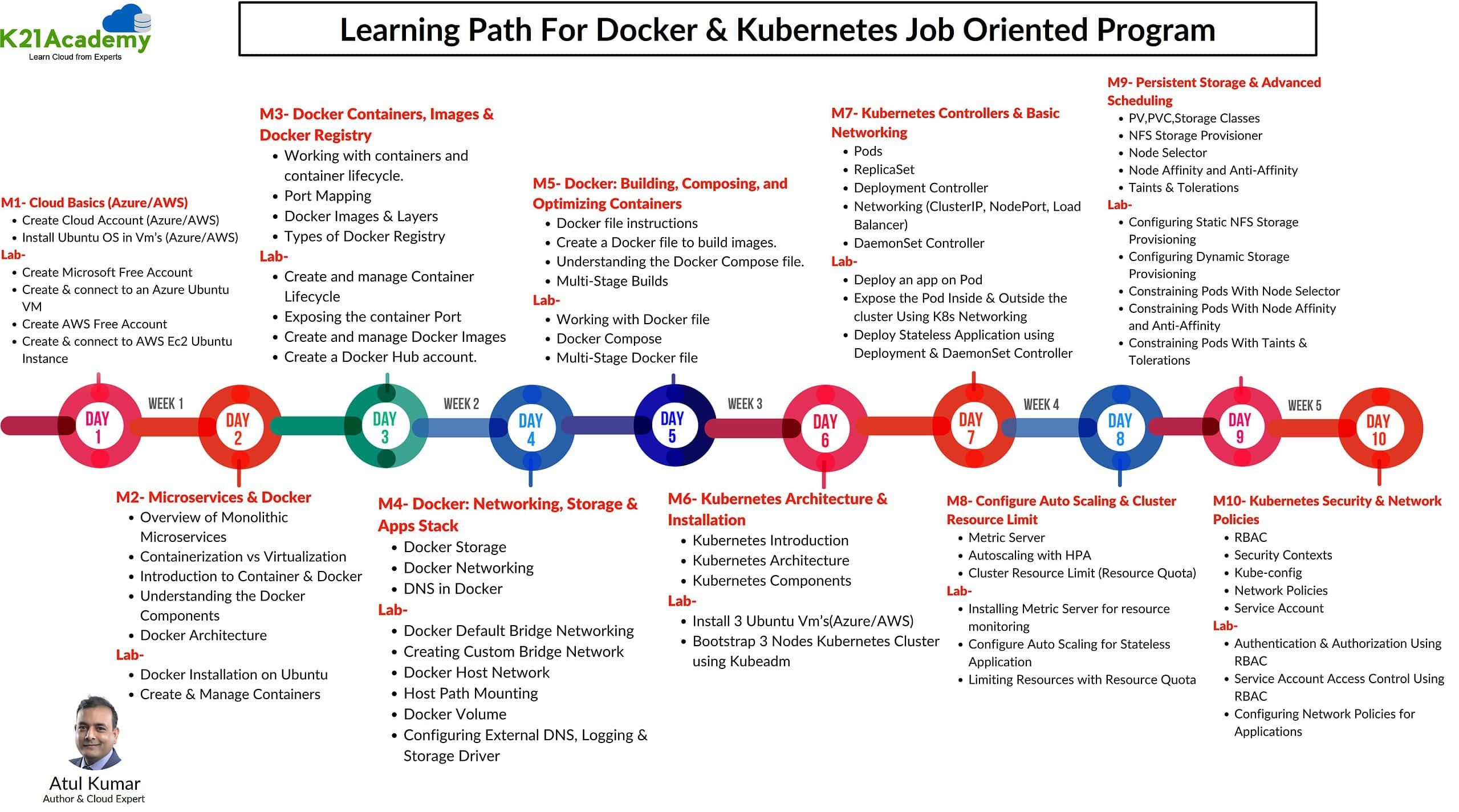
- Cloud Basics
- Docker installation, Images & Containers
- Docker Networking & Storage
- Dockerfile & Docker Compose
- Kubernetes Installation & Configuration
- K8s Pods, Replicaset, Deployment, HPA & Services
- K8s Resource Management & Storage
- Kubernetes Scheduling & HA Cluster
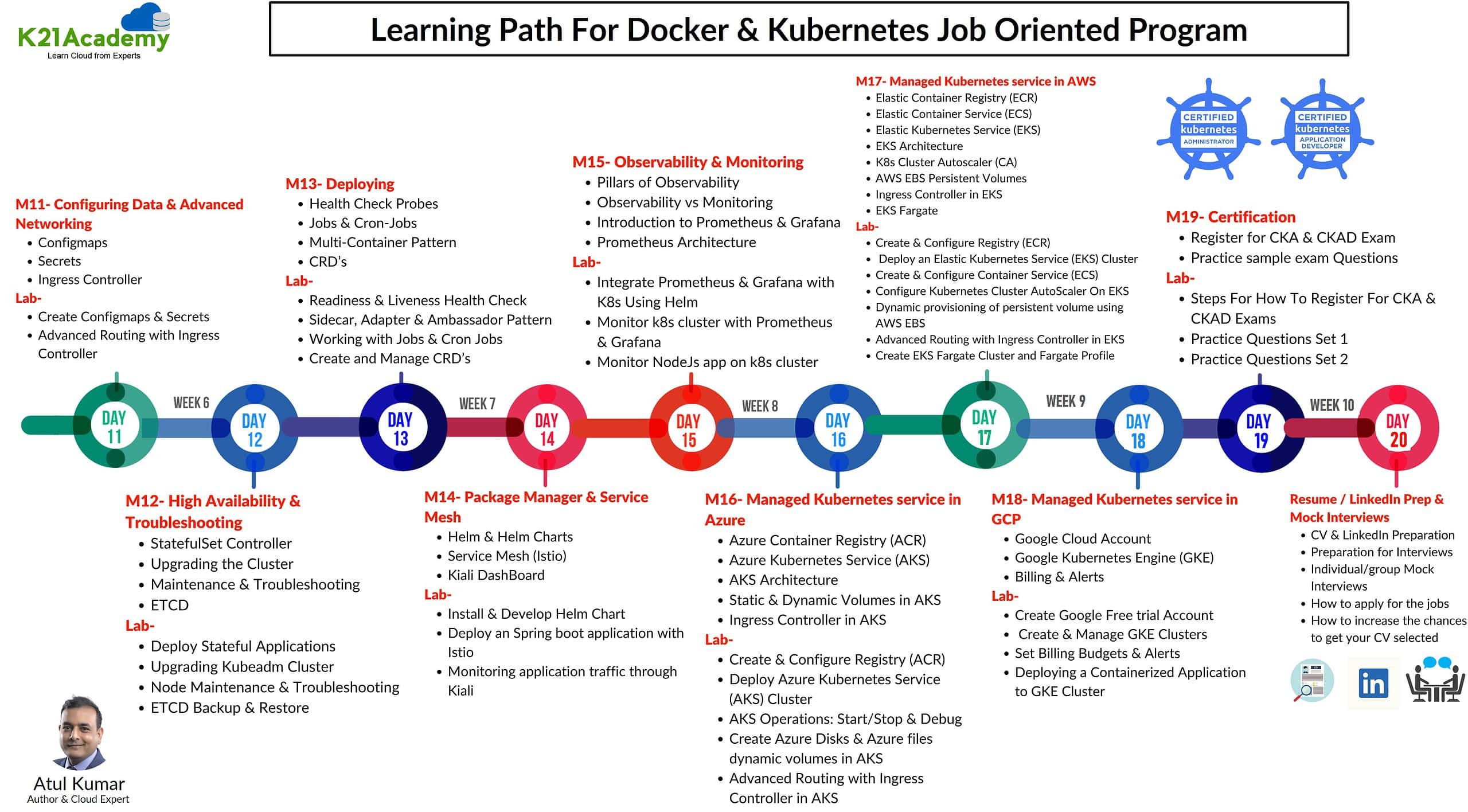
- Kubernetes Security and Advanced Networking
- Kubernetes Health Checks and Multi-Container Patterns
- Helm & Helm Charts, Custom Resource Definitions (CRDs), Service Mesh (Istio)
- Docker & Kubernetes on AWS
- Docker & Kubernetes on Azure
- Docker & Kubernetes on Google Cloud
- Real-Time Projects: These consist of various projects
- Certifications
Cloud Basics
In this section of lab guides, you will create free cloud accounts like AWS or Azure where we will create the servers (Vms, EC2 instances) that we will need for the installation of Docker & Kubernetes.
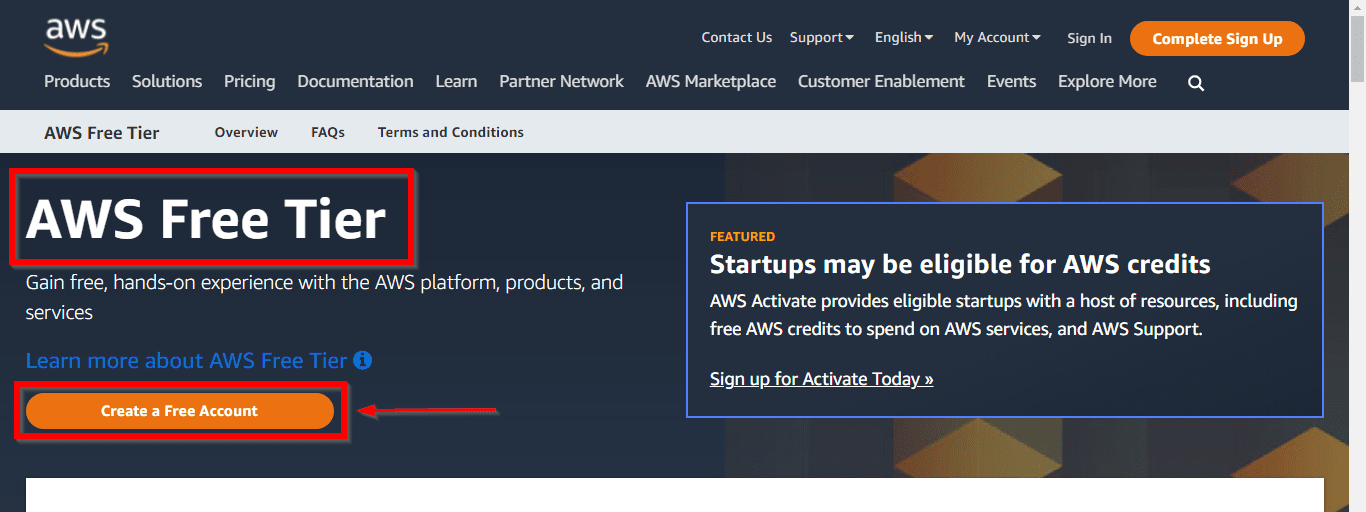
Lab01: Create an AWS Free trial account
This Lab Guide covers the AWS Free Tier Account Overview. Amazon Web Services (AWS) is providing 12 months of Free Tier accounts to new subscribers to get hands-on experience with all the AWS cloud services.
In this AWS Free Tier account, Amazon is giving no. of different services used with some of the limitations to get hands-on practice and more knowledge on AWS Cloud services as well as regular business use. The AWS Free Tier is mainly designed to give hands-on experience with AWS Cloud Services for customers free of cost for a year. With the AWS Free Tier account, all the services offered have a limit on what we can use without being charged.
Check out our blog to learn how to create a Free AWS account.
Lab02: Create an Azure Free trial account
This Guide covers how to get a Trial Account for Microsoft Azure. (You get 200 USD FREE Credit from Microsoft to practice)
Microsoft Azure is one of the top choices for any organization due to its freedom to build, manage, and deploy applications. Here, we will look at how to register for the Microsoft Azure FREE Trial Account, click here.
Check out our blog to learn how to create a Free Azure account.

Lab03: Create and connect to Ubuntu VM on Azure
The most basic task that can be performed on any cloud platform is the creation of a Virtual Machine
Azure Virtual Machines (VM) is one of several types of on-demand, scalable computing resources that Azure offers. Typically, you choose a VM when you need more control over the computing environment than the other choices offer.
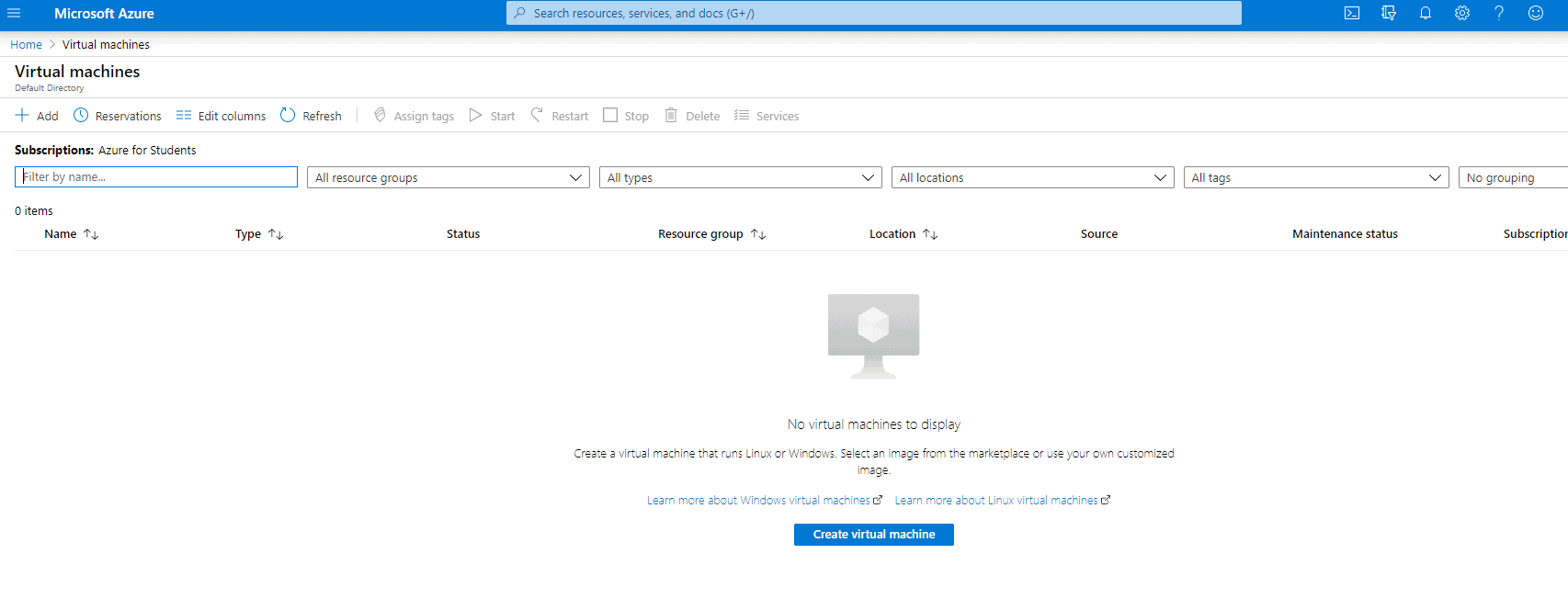
This guide gives you an insight into how to create a virtual machine and how to manage it.
Check out our blog to learn How to create and connect Ubuntu Virtual Machine in Azure.
Lab04: Create and connect to Ubuntu EC2/VM Instance on AWS
This guide gives you an insight into how to create an EC2 instance and how to manage it.
AWS Ubuntu VM is an Amazon Web Services (AWS) virtual machine (VM) that runs the Ubuntu operating system. It is a cloud-based service that allows users to launch, manage, and scale a server environment in the cloud. This provides users with the ability to run applications and services on demand, without the need to manage infrastructure.
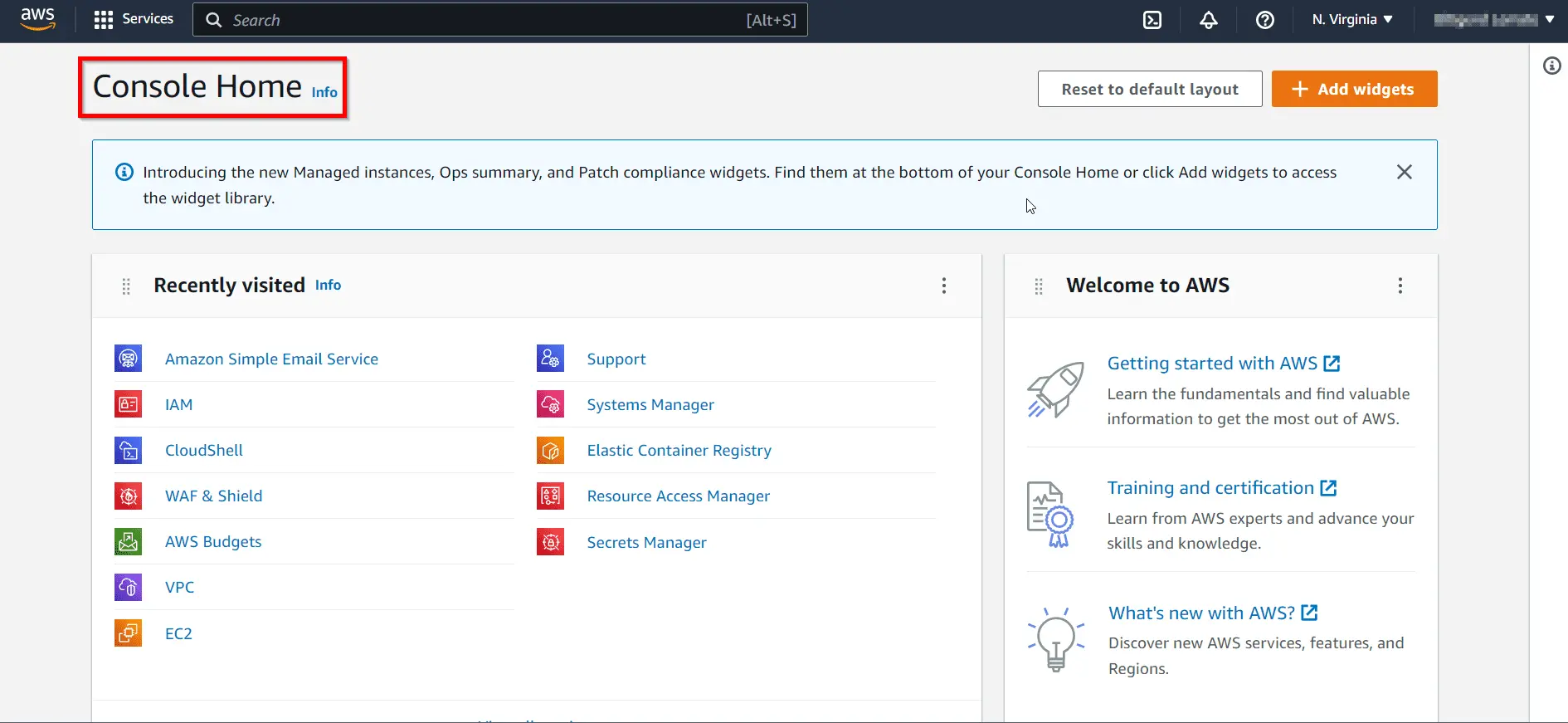
Check out our blog to learn How to create Ubuntu Virtual Machine in AWS.
Docker installation, Images & Containers
In this section of Lab Guides, we will be dealing with the installation of Docker, Image & Container management.
Lab05: Install & Configure Docker on Ubuntu Server
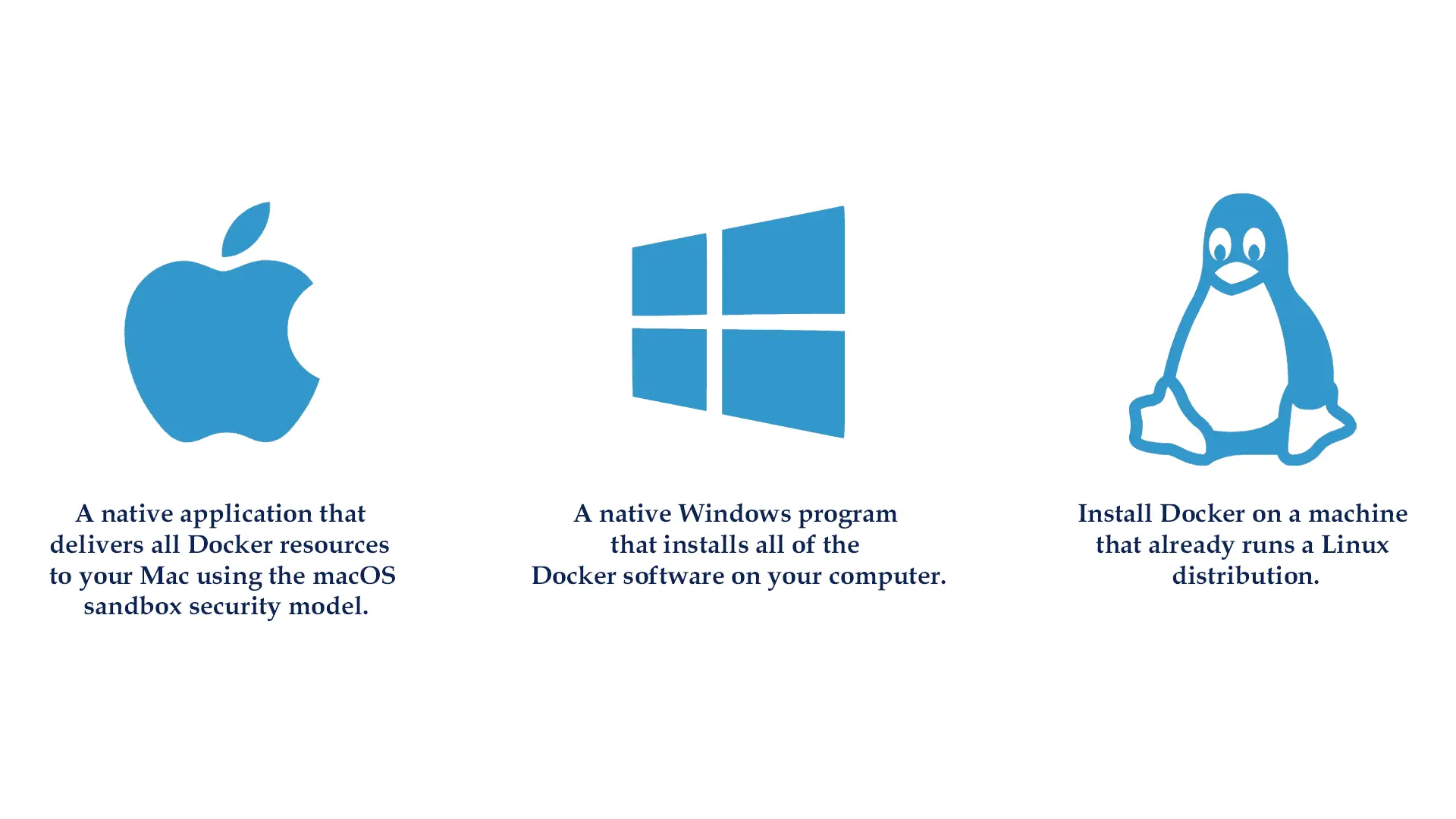
Docker is a free and open platform for building, shipping, and running apps inside the containers. Docker allows you to easily deliver apps. You can handle your infrastructure the same way you manage your applications with Docker.
Docker is available for download and installation on Windows Os, Linux, and macOS.
To know how to install Docker on your machine read our blog on Docker Installation.
Lab06: Create & Manage Containers
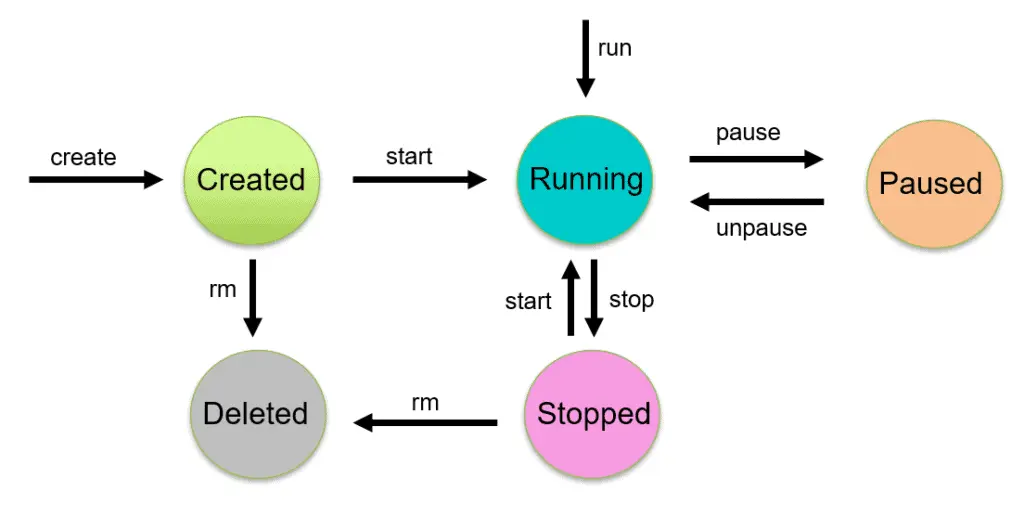
A Docker container is a version of an image that can be run. The Docker API and CLI can be used to build, start, stop, pause, and remove containers. You can mount storage to a container, link it to one or more networks, and even generate a new picture based on its current state.
In this Activity guide, we cover how to create/delete a container, the lifecycle of the container, Inspect container details, Listing containers, how to exec into a container.
Read our blog to get an idea of the Docker container.
Lab07: Create & Manager Container Images
Docker images are the template that is used to create a docker container. Images are read-only template with instructions for creating a Docker container. Docker image is a file, comprised of multiple layers, that is used to execute code in a Docker container.
In this Activity guide, we cover how to Create/Push an Image, how to Tag images, Inspect Image details, Listing out Images, Delete Images from Local repo.
Read our blog to get an idea of Docker Image

Lab08: Configure & Manager (push & pull images) Docker Private Registry
Here we will discuss the different types of Docker registries such as Docker Hub, ECR (AWS), ACR (Azure), GCR (Google), OCR (Oracle) etc and how Docker registry works.
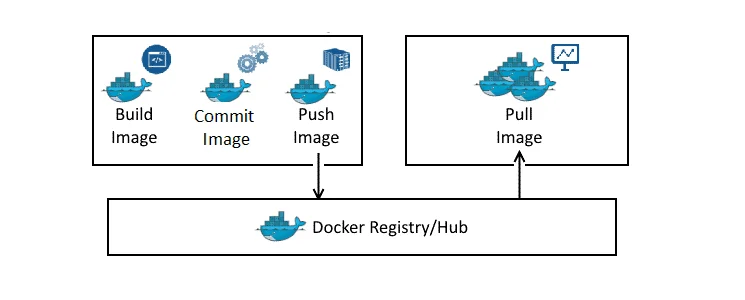
Learn more about Docker Image Registry.
Docker Networking & Storage
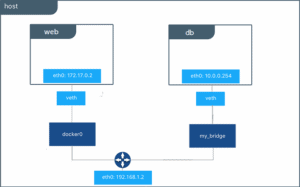
Lab09: Docker Bridge Networking
Networking in Docker is to connect the docker container to each other and the outside world so they can communicate with each other also can talk to Docker Host. The Docker bridge driver automatically installs rules in the host machine so that containers on different bridge networks cannot communicate directly with each other.
In this Activity guide, we cover the Inspect Bridge type network, Start/Stop container on default Bridge network, check network connectivity, Create Bridge type Custom network, Create containers, and connect to custom-bridge.
Read our blog to learn more about Docker Network

Lab10: Docker Host Network
When a container is in host network mode, it takes out any network isolation between the docker host and the docker containers, and it does not receive its own IP address. For example, if you use host networking and run a container that binds to port 80, the container’s application is available on port 80 on the host’s IP address.
Since it does not require network address translation (NAT). host mode networking can be useful for optimizing performance and in situations where a container must handle a large number of ports.
Read our blog to know more about Docker Network
Lab11: Docker Volume
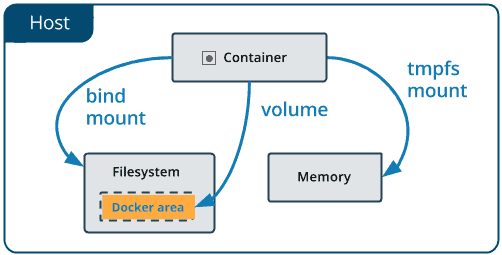
Containers are non-persistent storage when we stop a container we lose all the data to overcome this issue we need to use persistence storage so we can store data persistently. In docker we have 2 ways to store data persistently 1) Docker Volume 2) Bind Mounts. Docker volumes are completely managed by Docker while the bind mounts depend on the file structure of the host machine.
In this Activity guide, we cover Creating a docker volume, inspecting volume, Creating a file in the mounted volume path, and creating a directory on Docker Host.
Lab12: Implementing Docker Storage Bind Mount
When you use a bind mount type storage a file or directory on the docker host machine is mounted into a container. Bind mounts are very good performance type storage, but they rely on the host machine’s filesystem having a specific directory structure available.
In this Activity guide, we cover Create a container and mount the host path to the container, Customise the web page mounted to local filesystem.
Read our blog to know more about Docker Storage
Lab13: Configuring External DNS, Logging and Storage Driver
By default, a container inherits the DNS settings of the host Containers that use the default bridge network to get a copy of this file, whereas containers that use a custom network use Docker’s embedded DNS server, which forwards external DNS lookups to the DNS servers configured on the host.
In this Activity guide, we cover Verify the resolv.conf file content, Create/Update daemon.json to use external DNS for all containers, Restart Docker service, Start container with specific Logging driver, Verify present Storage driver configured.
Also checkout: Comparison between Docker vs VM, difference of both the machines you should know.
Dockerfile & Docker Compose
Lab14: Working with Dockerfile
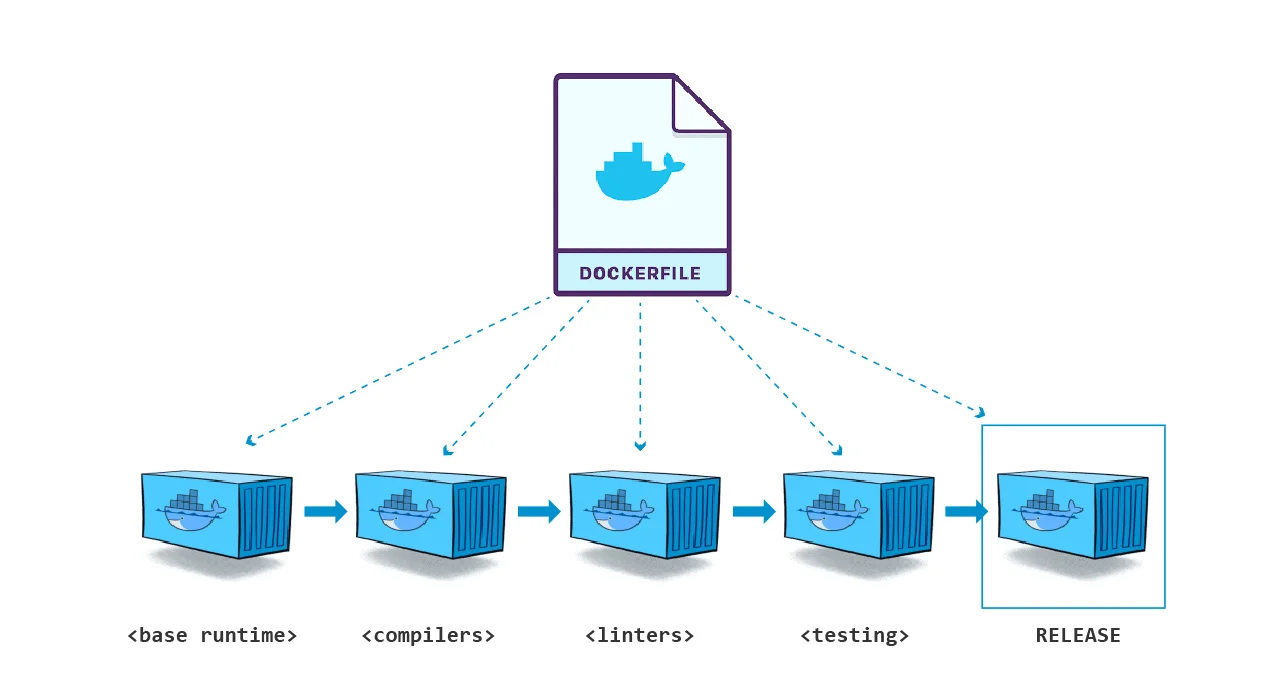
Docker can read instructions from a Dockerfile and generate images for you automatically. A Dockerfile is a text file that contains all of the commands that a user may use to assemble an image from the command line. Users can use docker build to automate a build that executes multiple command-line instructions in a row.
In this Activity guide, we cover how to write dockerfile instruction to create a docker image, how to build an image, how to use the different options in dockerfile, reducing image size using Multi-stage build, Onbuild dockerfile.
Read more about Dockerfile

Lab15 & 16: Working with Docker Compose & Application Stack
When running Docker Engine in swarm mode, we can use a docker stack to deploy a complete application stack to the swarm.
A dockerfile is a document that contains all the commands a user could call on the command line to assemble an image. The docker build command builds an image from a Dockerfile.
In this Activity guide, we cover installing docker-compose, Build and run the application with docker-compose, and Edit Compose file to add a bind mount.
Lab17: Multi-stage Dockerfile
Multi-Stage Dockerfile allows a single Dockerfile to contain multiple images.
To know More about images
Kubernetes Installation & Configuration
Lab18: Create and connect 3 Linux VM (Ubuntu) Machine for Kubernetes on
In this lab, we will create the servers(VMs) either on AWS or Azure.
1. Azure Cloud To Set Up Kubernetes Cluster
Deploying three nodes on-premises can be hard and painful, so an alternate way of doing this can be using a Cloud Platform for deploying them. You can use any Cloud Platform, here we are using Azure Cloud. Before getting on with creating a cluster make sure you have the following setup ready:
I) Create an Azure Free Account, as we will use Azure Cloud for setting up a Kubernetes Cluster.
To create an Azure Free Account, check our blog on Azure Free Trial Account.
II) Launch 3 Virtual Machines – one Master Node and 2 Worker Nodes. We are launching these VMs in different regions because in the Azure Free tier account we can’t create 3 virtual machines in a single region due to the service limit. So we are creating One Master node in US East Region and Two Worker node (worker-1, worker-2 in US Southcentral Region)
To create an Ubuntu Virtual Machine, check our blog on Create An Ubuntu VM In Azure.
III) For connecting the worker node with the master node as they are in different regions and in different Vnet, we have to do VNet Peering.
To know more about Virtual Networks, refer to our blog on azure vnet peering
2. EC2 Instances on AWS Cloud To Set Up Kubernetes Cluster
If you want to use AWS then, please you have to do the below setup:
I) Create an AWS Free Account, as we will use AWS Cloud for setting up a Kubernetes Cluster.
To create an Azure Free Account, check our blog on AWS Free Trial Account.
II) Launch 3 EC3 instances – one Master Node and 2 Worker Nodes. We are launching these VMs in any region.
To create an Ubuntu EC2 Instance, check our blog on Create An Ubuntu EC2 Instance.
Lab19: Install & Configure 3 Node Kubernetes Cluster Using Kubeadm
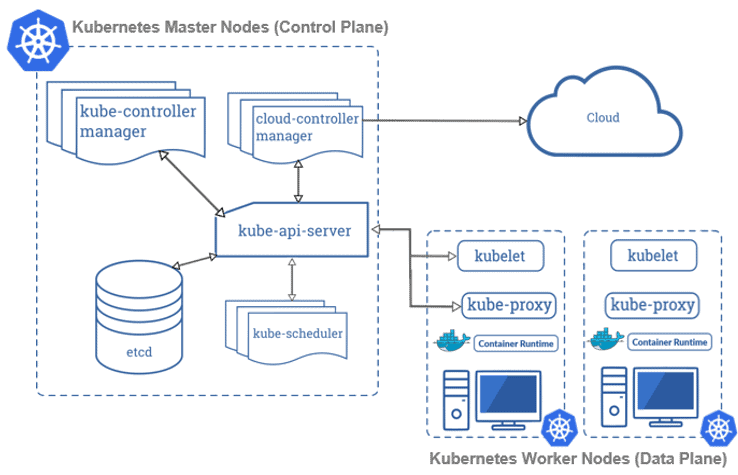
A Kubernetes cluster is a set of node machines for running containerized applications. At the highest level of Kubernetes, there exist two kinds of servers, a Master and a Worker node. These servers can be Virtual Machine(VM) or physical servers(Bare metal). Together, these servers form a Kubernetes cluster and are controlled by the services that make up the Control Plane.
In this activity guide, we cover how to bootstrap a Kubernetes cluster using Kubeadm, Installing kubeadm & kubectl packages, create cluster and join worker node to master, Install CNI plugin for networking.
To know how to install the Kubernetes cluster on your machine read our blog on Kubernetes Installation.
K8s Pods, Replicaset, Deployment, HPA & Services
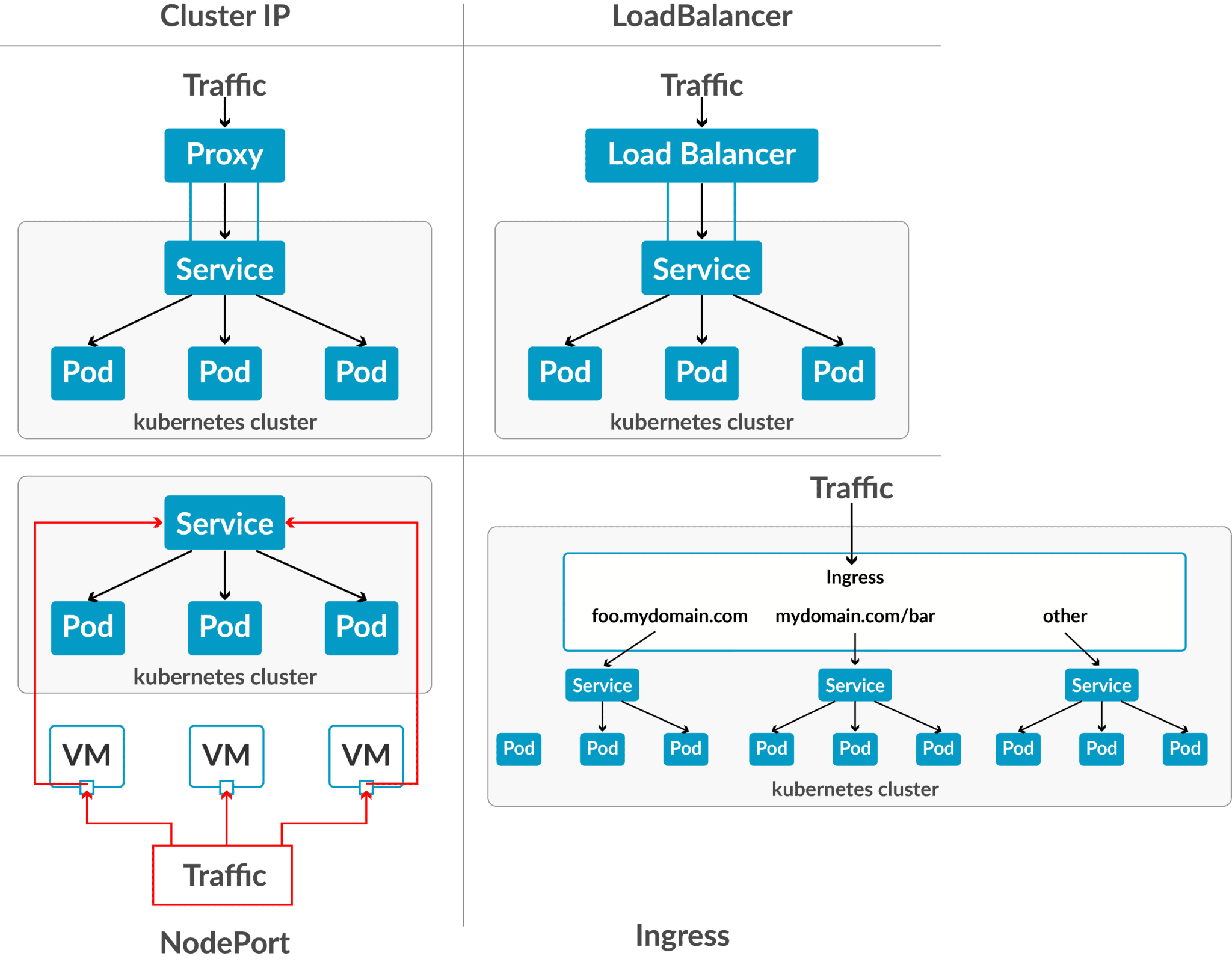
Lab20: Deploy an App on Pod & Basic Networking (Services: ClusterIP, NodePort)
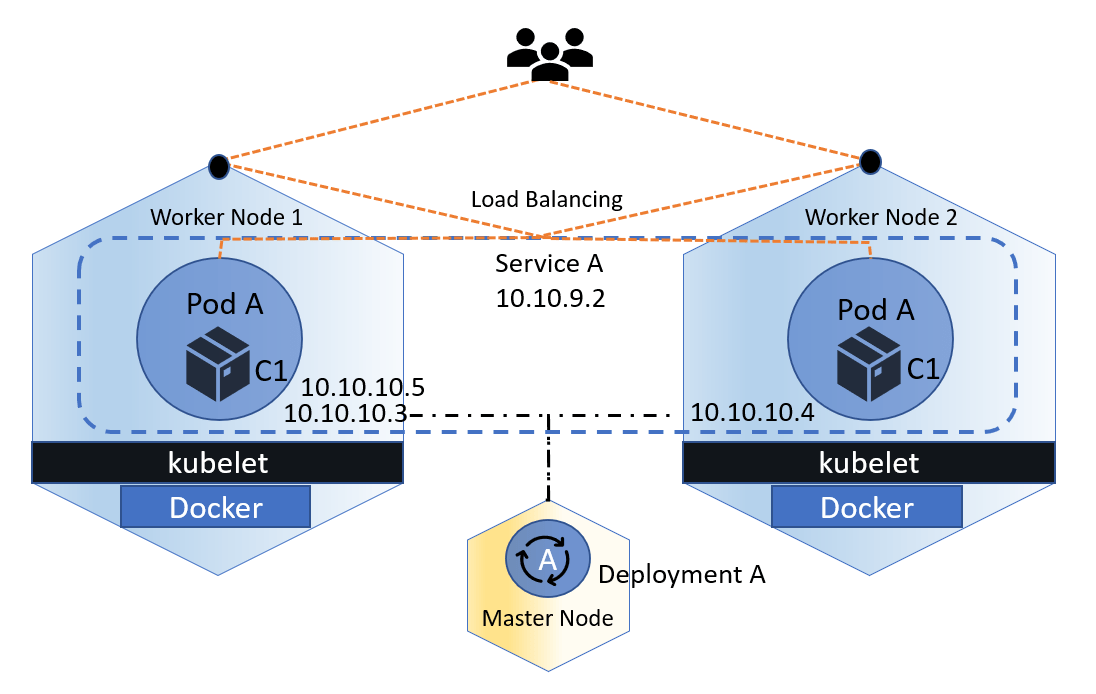
Kubernetes networking allows Kubernetes components like Pods, containers, API server, etc. to communicate with each other. The Kubernetes platform is different from other networking platforms because it is based on a flat network structure that eliminates the need to map host ports to container ports.
In this activity guide, we cover Running Nginx Server as Pod inside the Cluster, Exposing Nginx within Cluster Using ClusterIP, Exposing Nginx outside Cluster Using NodePort.
Read more about Kubernetes Networking and Services
Lab21: Autoscaling with Horizontal Pod Autoscaling (HPA)
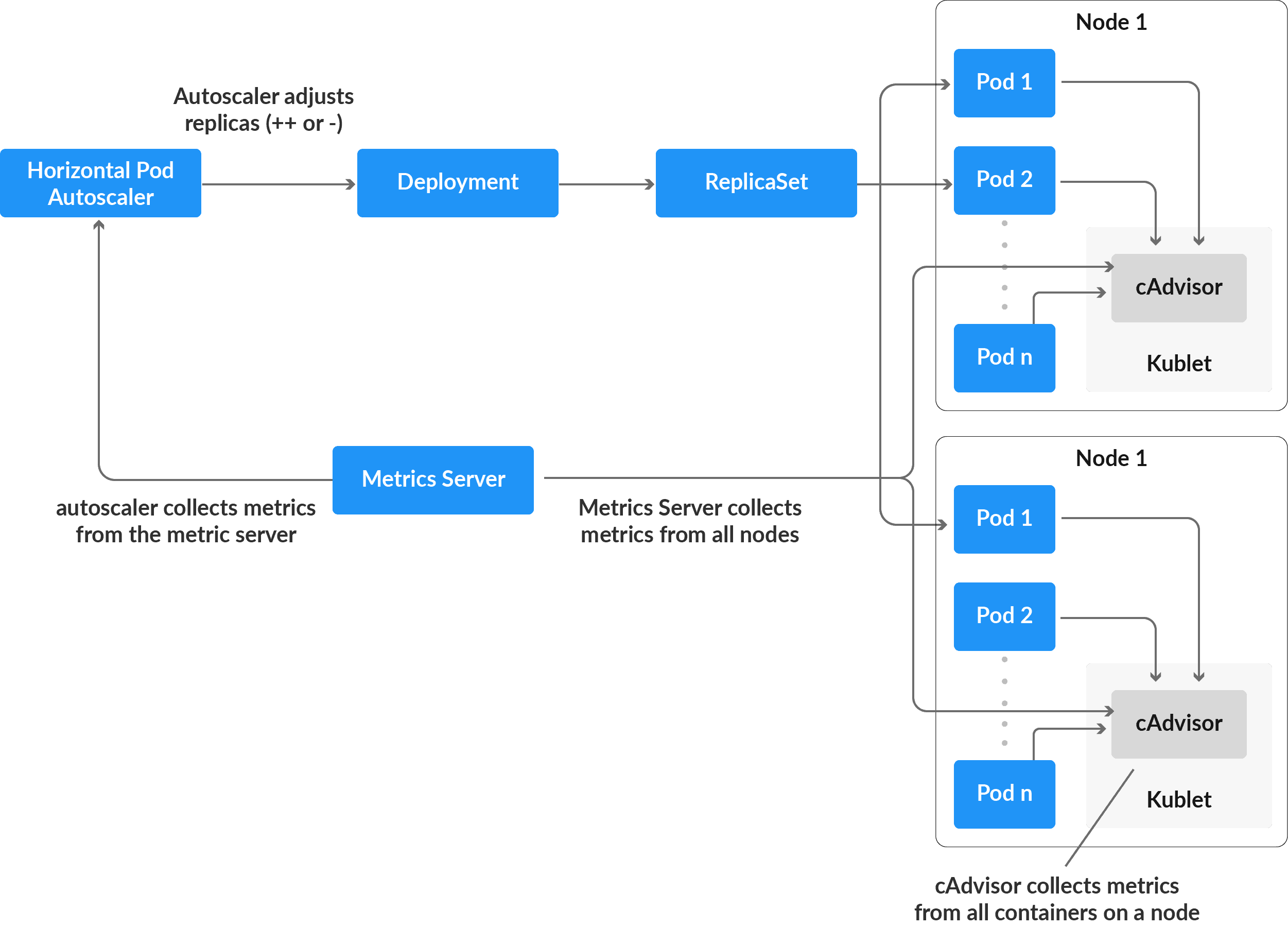
Based on observed CPU and Memory consumption, the Horizontal Pod Autoscaler automatically scales the number of Pods in a replication controller, deployment, replica group, or stateful set (or, with custom metrics support, on some other application-provided metrics). Horizontal Pod Autoscaling is not applicable to structures that cannot be scaled, such as DaemonSets.
In this activity guide, we cover Installing metrics-server in cluster, Creating Deployment with Resource Limit Defined, Verify Cluster & Pod Level Metrics By Metrics-Server, Creating Horizontal Pod Autoscaler (HPA), Demonstrating autoscaling of pod on load increase.
Lab22: Deploy Scalable Stateless Application & Configuring Autoscaling For Stateless Application
In Kubernetes, most service-style applications use Deployments to run applications on Kubernetes. Using Deployments, you can describe how to run your application container as a Pod in Kubernetes and how many replicas of the application to run. Kubernetes will then take care of running as many replicas as specified.
In this activity guide, we cover deploying NGINX server as a pod, running NGINX server as scalable deployment, Scaling Nginx Deployment Replicas Using Scale Command, Auto-Healing With Deployment Controller.
Visit our blog to know in detail about High availability and Scalable application.
K8s Resource Management & Storage
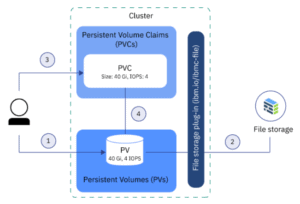
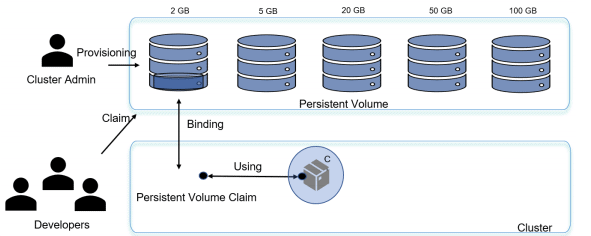
In Kubernetes Persistent Storage a PersistentVolume (PV) is a piece of storage within the cluster that has been provisioned by an administrator or dynamically provisioned using Storage Classes. PV is an abstraction for the physical storage device (such as NFS or iSCSI communication) that you have attached to the cluster. A PersistentVolumeClaim (PVC) is a request for storage by a user. The claim can include specific storage parameters required by the application.
In this activity guide, we cover Configuring NFS storage Persistence Volume, Create Persistent Volumes (PV), Create Persistence Volume Claim (PVC), Mounting NFS volume inside Pod.
Visit our blog to know in detail about Kubernetes Volume
Lab23: Configuring Static NFS Storage Persistence Volume
In static provisioning of the Kubernetes persistent Storage, the administrator has to make existing storage devices available to a cluster. To make existing storage available to a cluster, the administrator has to manually create a persistent volume after that only user can claim the storage for the pod by creating PVCs.
Lab24: Configuring Dynamic NFS Storage Provisioning Persistence Volume
Dynamic provisioning is used when we want to give developers the liberty to provision storage when they need it. This provisioning is based on StorageClasses: the PVC must request a storage class and thus the administrator must have created and configured that storage class for dynamic provisioning to occur. In order to demand storage, you must create a PVC.

Learn more about Kubernetes Persistent Storage: PV, PVC and Storage Class
Lab25: Deploy Scalable Stateful Application & Configuring Autoscaling
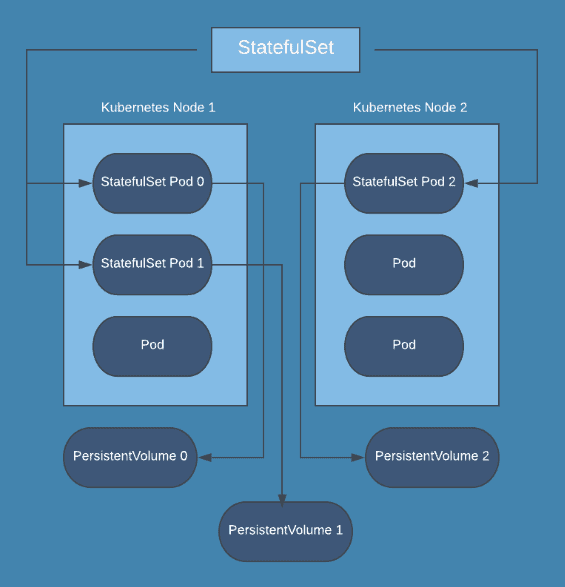
StatefulSet is the workload API object used to manage stateful applications. … Like a DeploymentManages a replicated application on your cluster. , a StatefulSet manages Pods that are based on an identical container spec.
In this activity guide, we cover Creating Logging namespace, Setting up Elasticsearch application, Pods in a StatefulSet.
Kubernetes Scheduling & HA Cluster
Lab26: Constraint Pod, Node Selector, Node Affinity & Anti Affinity, Taint & Toleration
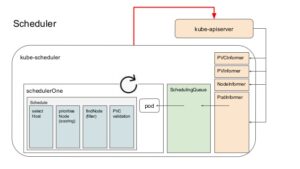
Node affinity is a set of rules used by the scheduler to determine where a pod can be placed. The rules are defined using custom labels on nodes and label selectors specified in pods. Node affinity allows a pod to specify an affinity (or anti-affinity) towards a group of nodes it can be placed on. The node does not have control over the placement.
Pod affinity and pod anti-affinity allow you to specify rules about how pods should be placed relative to other pods. The rules are defined using custom labels on nodes and label selectors specified in pods. Pod affinity/anti-affinity allows a pod to specify an affinity (or anti-affinity) towards a group of pods it can be placed with. The node does not have control over the placement.
A taint allows a node to refuse pod to be scheduled unless that pod has matching toleration. You apply taints to a node through the node specification and apply tolerations to a pod through the pod specification. A taint on a node instructs the node to repel all pods that do not tolerate the taint.
In this activity guide, we cover constraint Pod, Node Selector, Node Affinity & Anti Affinity, Taint and toleration.
Visit our blog to learn in detail about Kubernetes Scheduling
Lab27: Upgrade Kubernetes Cluster [Master & Worker Nodes]
To upgrade a Kubernetes cluster is very important to keep up with the latest security features and bug fixes, as well as benefit from new features being released on an ongoing basis. This is especially important when we have installed a really outdated version or if we want to automate the process and always be on top of the latest supported version.
In this activity guide, we cover Installing Old Version of kubernetes Cluster, Check Stable version of Kubernetes cluster, Upgrade Kubernetes master and worker node components.
Read: All you need to know on Kubernetes Cluster Upgrade[Master & Worker Nodes].
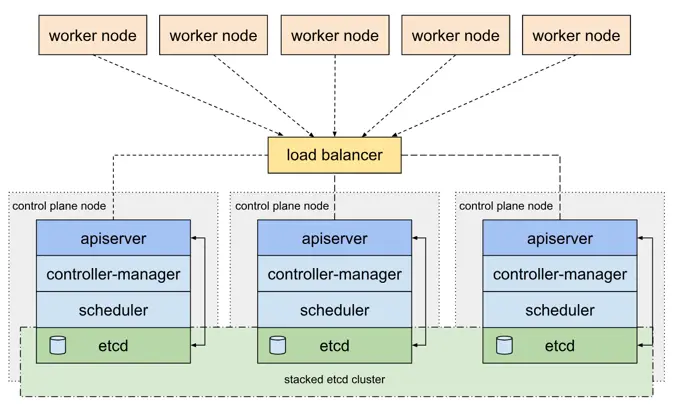
Lab28: Bootstrap Highly Available Multi-Node K8s Cluster on AWS EC2 using kubeadm
In this lab guide, we will deploy a production-ready high-available multinode cluster.
Kubernetes Security and Advanced Networking
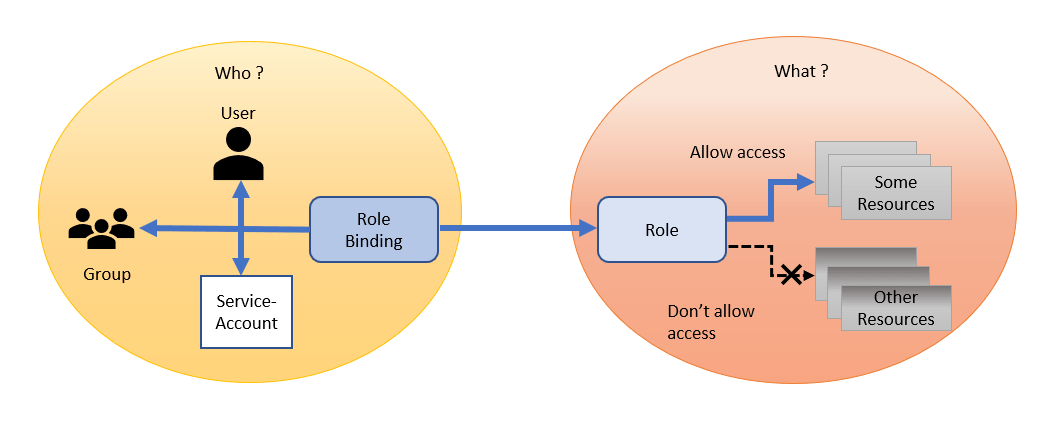
Lab28: Authentication & Authorization using RBAC
RBAC stands for Role-Based Access Control. It’s an approach that’s used for proscribing access to users and applications on the system/network. RBAC could be a security style that restricts access to valuable resources based on the role the user holds, hence the name role-based.
In this activity guide, we cover Authentication and Authorisation using RBAC, Defining Security Context with default/specific user/non-root user, Create Readonlt Pod, Create a priviledged pod, Setting Container Environment Variables using ConfigMap, Create Pod that Uses ConfigMap.
Read: All you need to know on Role Based Access Control
Lab29: Secrets & ConfigMap
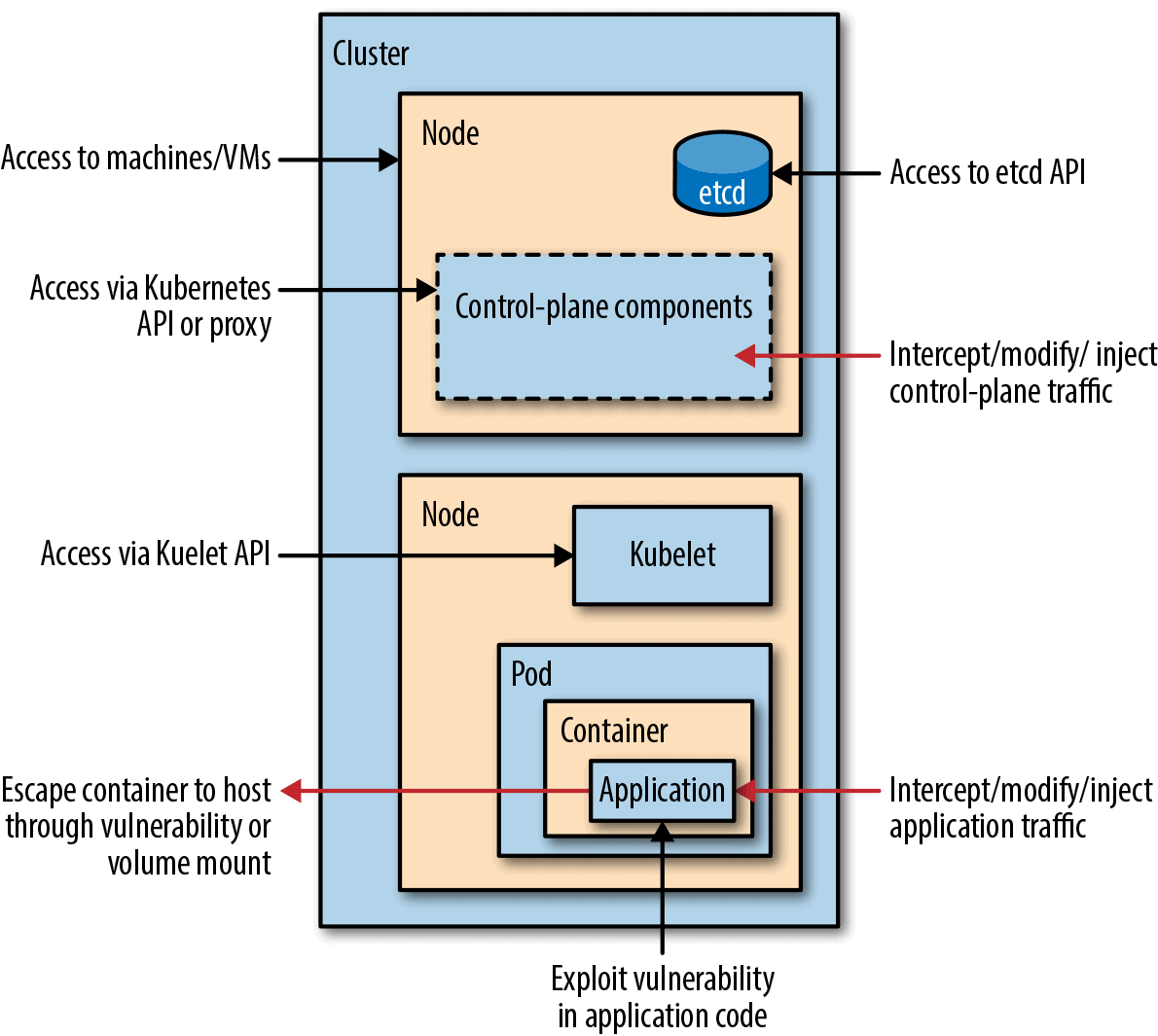
In this guide, we will be covering topics related to protecting a cluster from accidental or malicious access and provide recommendations on overall security.
Read: All you need to know on Kubernetes ConfigMaps and Secrets
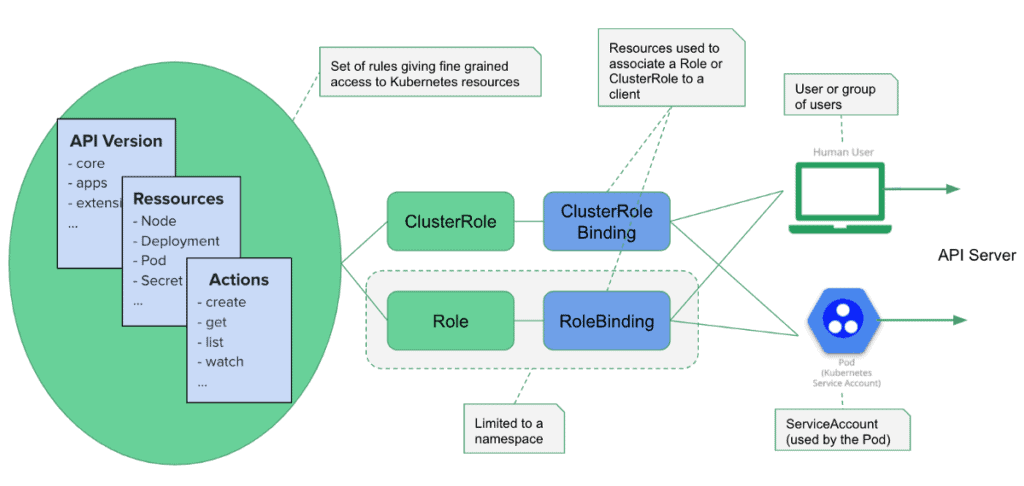
Lab30: Use Service Account Access API Inside Pod Provide Access to Service Account Using RBAC
Kubernetes has the notion of users and service accounts to access resources. A user is associated with a key and certificate to authenticate API requests. Any request originated outside of the cluster is authenticated using one of the configured schemes.
In this activity guide, we cover Manually create a service account API token, Add ImagePullSecrets to a service account, Service Account Token Volume Projection, Service Account Issuer Discovery.
Lab31: Deploy Ingress Controller
In order for the Ingress resource to work, the cluster must have an ingress controller running. Unlike other types of controllers that run as part of the Kube-controller-manager binary, Ingress controllers are not started automatically with a cluster.
In this activity guide, we cover Deploying NGINX ingress-controller using helm chart, Creating simple applications, Create ingress route to route traffic, Testing the ingress controller routes correctly to both the application and Clean up resources created in this lab exercise.
Read more about Kubernetes Networking and Services
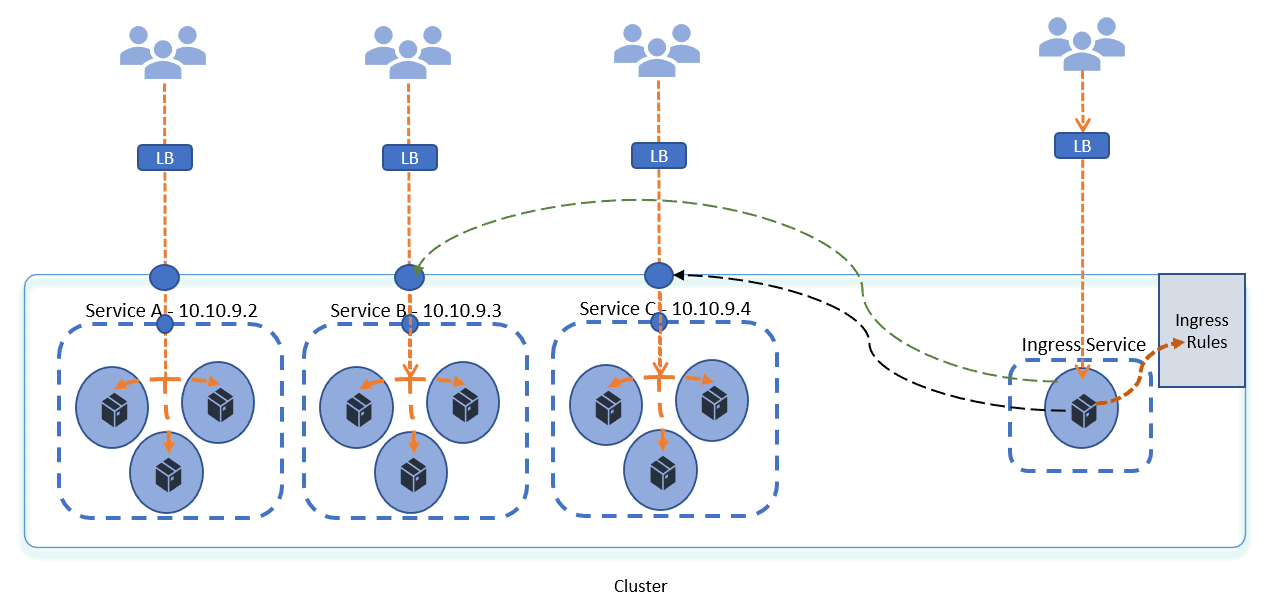
Lab32: Kubernetes Network Policy
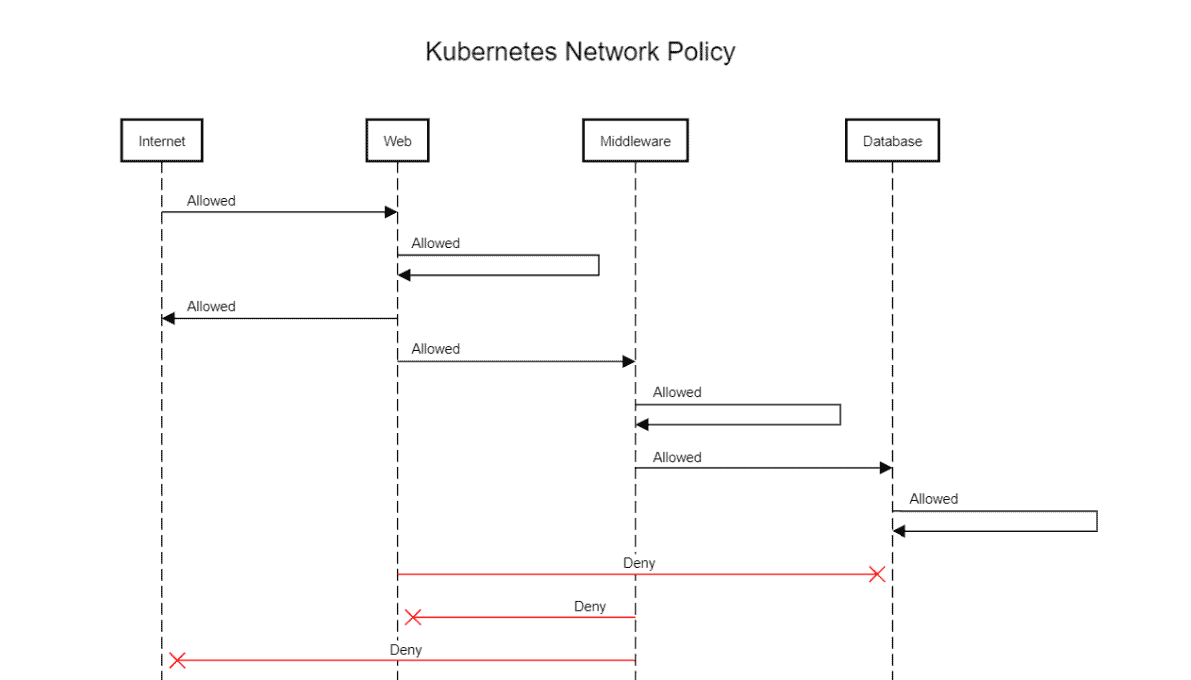
To control the traffic between pods and from the internet we use network policy. Kubernetes network policy lets developers secure access to and from their applications. This is how we can restrict a user’s access. All Pods in Kubernetes communicate with each other which are present in the cluster. By default all Pods are non-isolated however Pods become isolated by having a Kubernetes Network Policy in Kubernetes.
In this activity guide, we cover Restrict Incoming Traffic on pods, Restrict outgoing Traffic from pods, Securing Kubernetes network.
Read: All you need to know on Network policy
Kubernetes Health Checks and Multi-Container Patterns
Lab33: Kubernetes Jobs – CronJob, Jobs & Coarse Parallel Job
CronJobs in Kubernetes enable the scheduling and automation of recurring tasks based on a specified cron-like schedule. They provide a declarative way to define the schedule and parameters for executing tasks repeatedly. CronJobs are especially useful for automating periodic maintenance, data synchronization, or any task that needs to run at fixed intervals.
In this guide, we are going to cover what a job & cronjob are and how to create them.
Read: All you need to know on Kubernetes Jobs and CronJobs
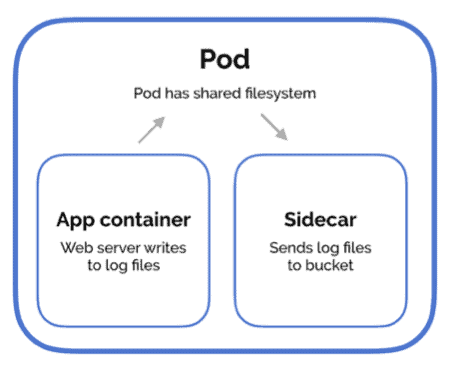
Lab34: Multi-Container Pattern – Side car, Shared IPC & Ambassador
Design patterns and the use-cases are for combining multiple containers into a single pod. There are 3 common ways of doing it, the sidecar pattern, the adapter pattern, and the ambassador pattern, we will go through all of this.
In this guide, we are going to cover the Multi-Container Pattern.
Read: All you need to know on Multi Container Pods In Kubernetes
Lab35: Readiness Health and Liveness Health
Health checks, or probes as they are called in Kubernetes, are carried out by the kubelet to determine when to restart a container and used by services and deployments to determine if a pod should receive traffic.
In this activity guide, we cover Create Pod With Readiness/Liveness Probe Health Check Configuration, Simulating Readiness/Liveness Probe Failure.
Helm & Helm Charts, Custom Resource Definitions (CRDs), Service Mesh (Istio)
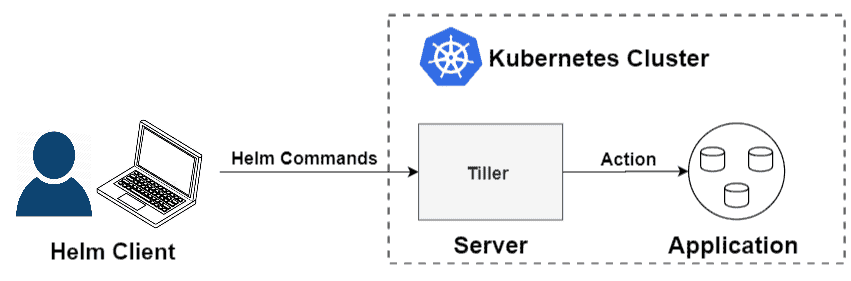
Helm is an open-source tool used for packaging and deploying applications on Kubernetes. It is often referred to as the Kubernetes Package Manager because of its similarities to any other package manager you would find on your favorite OS.
In this section of activity guides, we cover How to install Helm, Deploy applications using helm & Access the applications, Create helm charts.
Learn more: Helm in Kubernetes: An Introduction to Helm
Lab36: Installing Helm & Deploying A Simple Web Application Using Helm Chart
Lab37: Create & Develop Helm Chart

Lab38: Deploy a Book Store Application with Istio and Monitor the Traffic through Kiali Dashboard
In this lab, we will deploy a Java-based employee management application on Kubernetes with Istio.
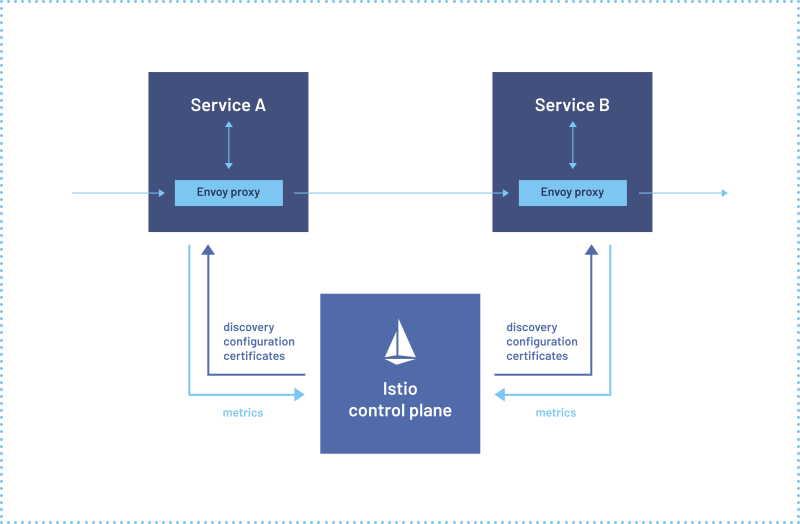
Learn more about What is Service Mesh
Lab39: Create a Simple Kubernetes Custom Resource Definition (CRD)
A Custom Resource in Kubernetes is an object that expands upon the capabilities of the Kubernetes API or enables the introduction of a new API into a cluster.
Custom resources possess the unique feature of being able to dynamically register and deregister within a running cluster. This means that they can be added or removed without requiring changes to the underlying cluster itself. Cluster administrators have the flexibility to update and modify custom resources independently.
Once a custom resource is installed, users can interact with it using familiar tools like Kubectl. They can create, access, and manage objects associated with the custom resource, similar to how they interact with built-in resources such as Pods.
In this lab, we will Create a Simple Kubernetes Custom Resource Definition (CRD).
Learn more about Kubernetes Custom Resource Definition (CRDs)
Docker & Kubernetes on AWS
In this section of Lab guides, we will learn and deploy Docker & Kubernetes on AWS
Lab40: Create and configure Registry (ECR)
This lab guide provides a detailed procedure for setting up Amazon ECR, installing Docker, creating a Docker image, and pushing it to ECR for use with Amazon EKS.

Lab41: Create & Configure Container Service (ECS)
This lab guide provides a detailed procedure for setting up Amazon ECS.
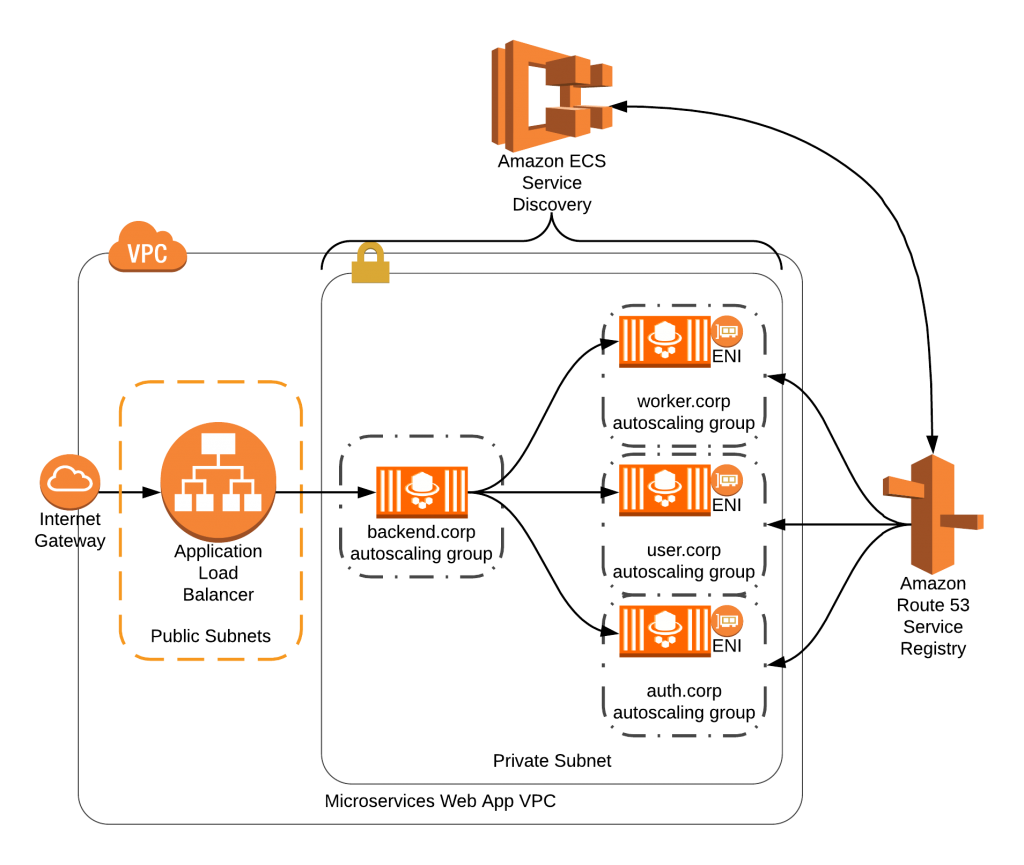
Lab42: Deploying Kubernetes Cluster with EKS
This guide explains the process of creating and managing a production-ready AWS Elastic Kubernetes Service (EKS) cluster using both GUI (AWS Console) and CLI (AWS CLI & EKSCTL).

Learn more about Amazon EKS
Lab43: Configure Kubernetes Cluster Auto Scaler On EKS
This lab involves launching Kubernetes worker nodes in an EKS cluster, ensuring the cluster has the necessary resources for deploying and running containerized applications.
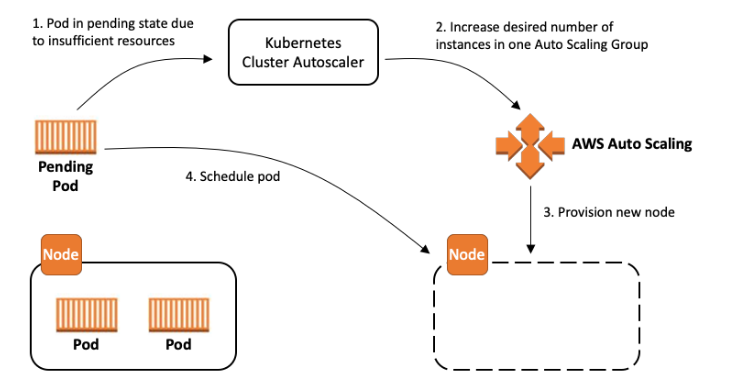
Lab44: Deploy Application to EKS
In this lab, we will deploy a containerized application onto the EKS cluster. This includes configuring Kubernetes manifests to define the application’s desired state and leveraging EKS for efficient orchestration.
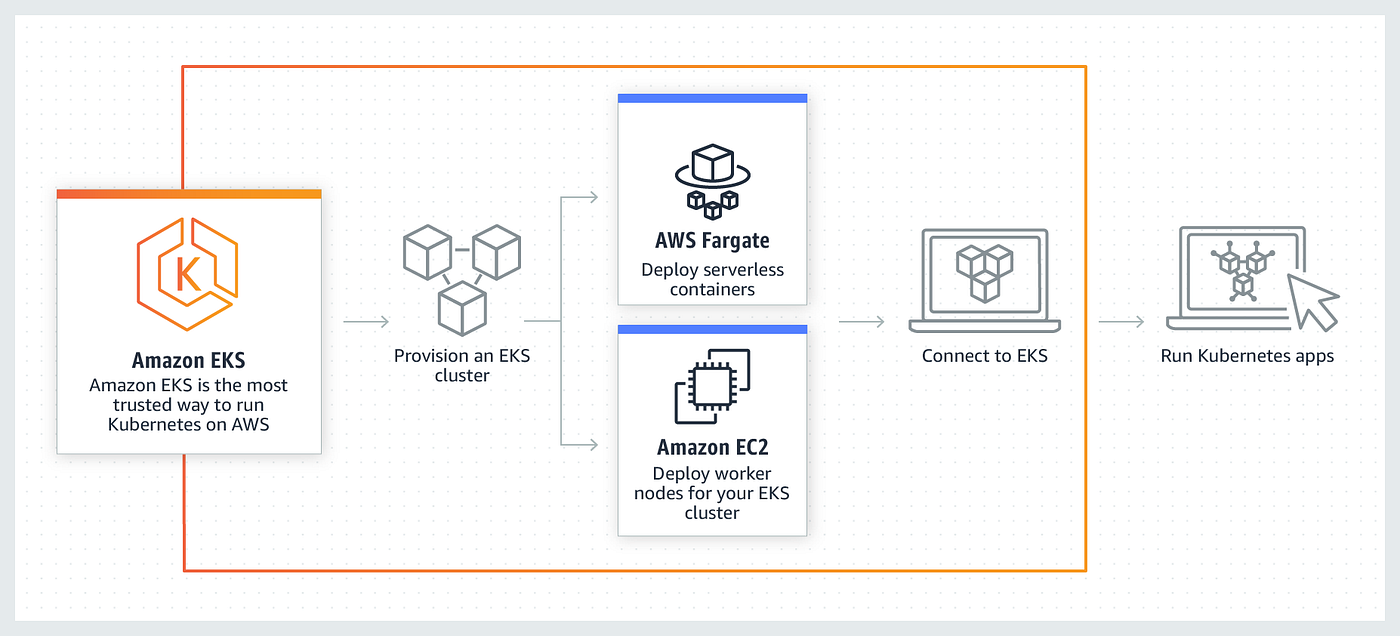
Lab45: Advance Routing with Ingress Controller
Explore advanced routing techniques by configuring an Ingress Controller in Kubernetes. This allows for sophisticated traffic routing and load balancing within the EKS cluster.

Lab46: Dynamic provisioning of persistent volume using AWS EBS
Set up dynamic provisioning of persistent volumes in Kubernetes using Amazon Elastic Block Store (EBS). This ensures efficient and scalable storage for stateful applications running on EKS.
Lab47: Create EKS Fargate Cluster
In this lab, we will create an Amazon EKS Fargate cluster, a serverless compute engine for containers. This eliminates the need to manage the underlying infrastructure and allows for efficient resource utilization.
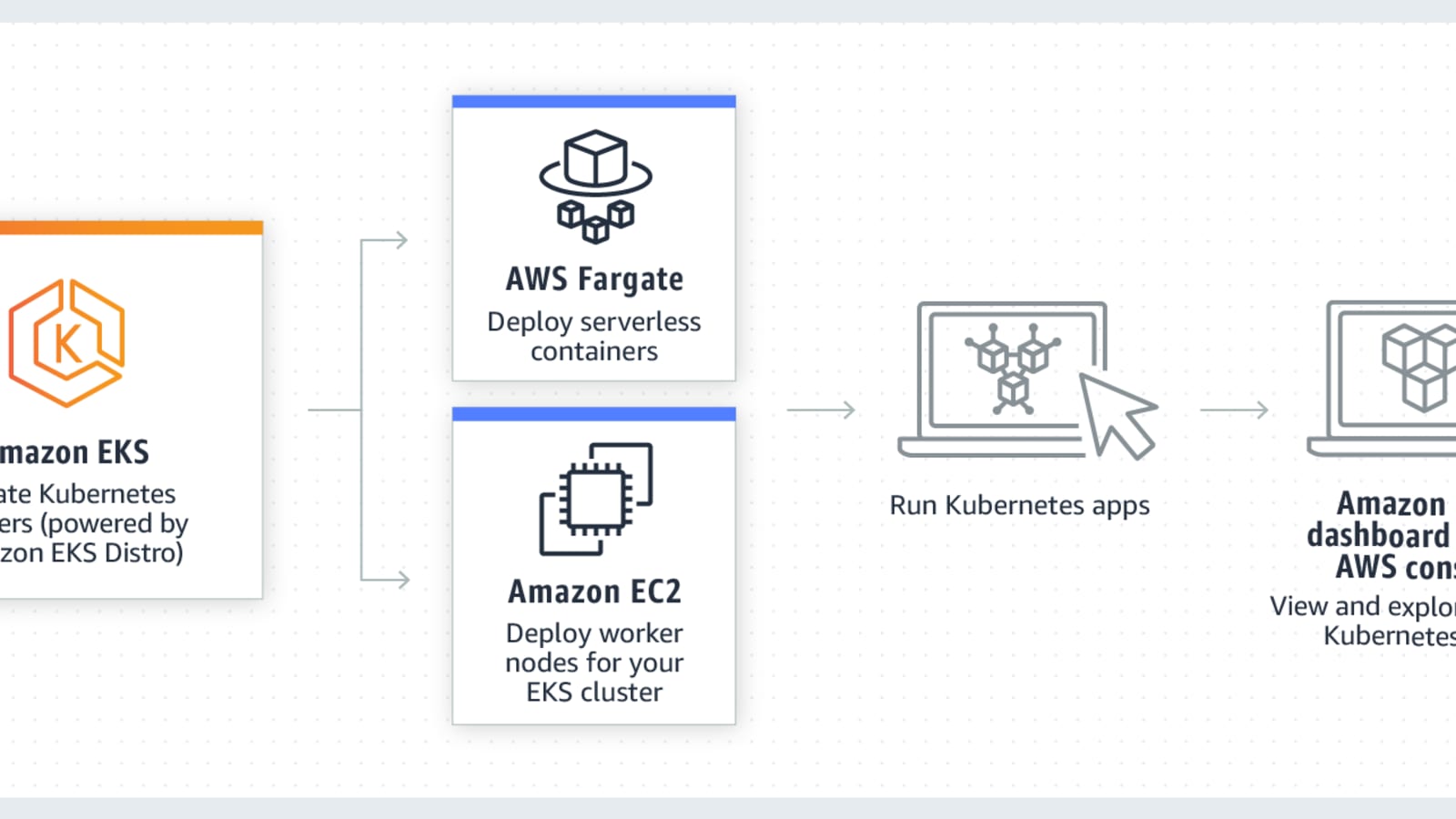
Lab48: Deploy Application on EKS Fargate Application
Deploy a containerized application on EKS Fargate, taking advantage of serverless container execution. This allows for simplified deployment and management of applications without the need to provision or manage servers.

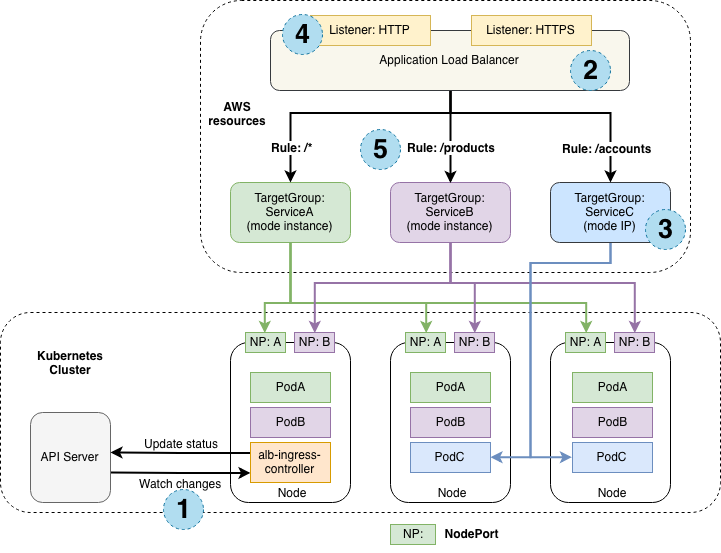
Lab49: Configure Application Load Balancer (ALB) as Ingress Controller
In this lab we will Set up an Application Load Balancer (ALB) as an Ingress Controller in Kubernetes on EKS. This provides external access to services within the cluster and allows for advanced routing and load balancing.
Docker & Kubernetes on Azure
In this section of Lab guides, we will learn and deploy Docker & Kubernetes on Azure
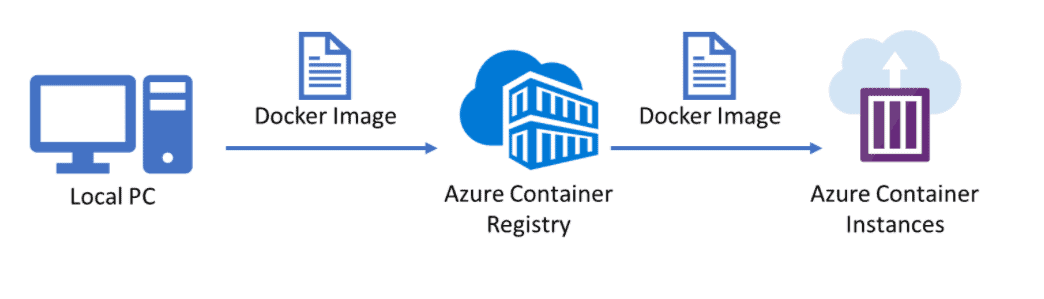
Lab50: Creation and Testing Azure Container Registry
In this guide, we will create and test an Azure Container Registry (ACR), providing a secure and scalable repository for storing and managing Docker container images in the Azure cloud environment.
Learn more about Azure Kubernetes Service
Lab51: AKS cluster creation and accessing it
This lab guide involves creating an Azure Kubernetes Service (AKS) cluster, a managed Kubernetes service on Azure. We will explore the steps to provision the cluster and access it for containerized application deployment.
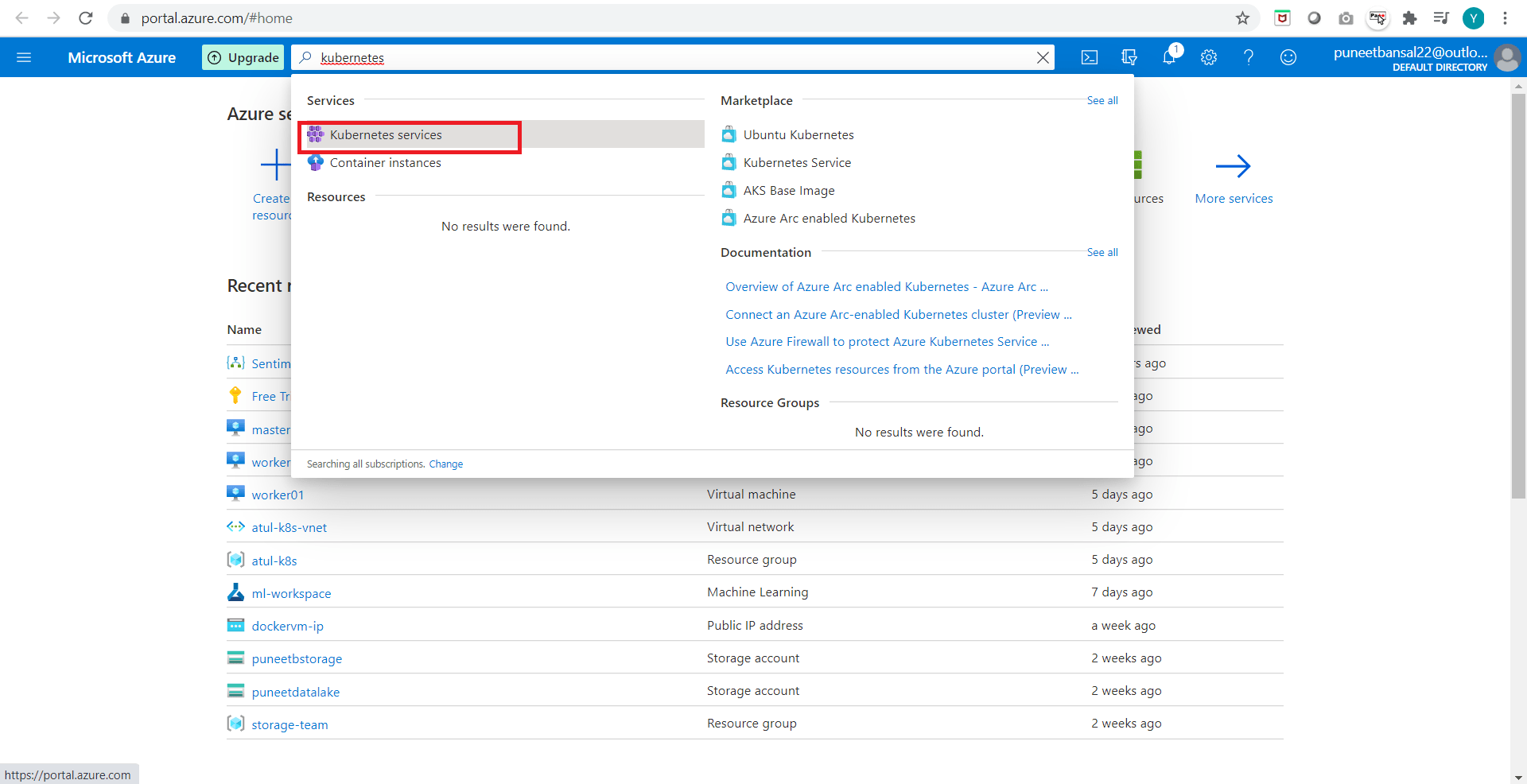
Learn more about Azure Kubernetes Service (AKS): Creating and Connecting AKS Cluster
Lab52: Run Application on Azure Kubernetes Service (AKS) with Helm
Deploy a containerized application on AKS using Helm, a package manager for Kubernetes. This guide streamlines the deployment process, leveraging Helm charts to define, install, and upgrade even complex Kubernetes applications.
Learn more about Run Application on Azure Kubernetes Service (AKS) with Helm
Lab53: Storage Volume Persistent Volume and Claim (Static & Dynamic) Volumes In AKS
Explore storage options in AKS by configuring Persistent Volumes (PVs) and Persistent Volume Claims (PVCs). This guide covers both static and dynamic provisioning of volumes, ensuring efficient storage management for applications.
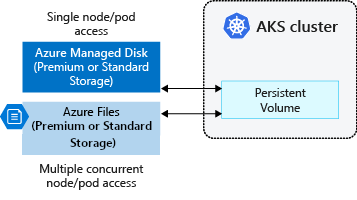
Lab54: Creation of SQL as a PAAS in AKS
Deploy a SQL database as a Platform as a Service (PaaS) in AKS, leveraging Azure’s managed services. This guide simplifies database management, ensuring scalability, security, and high availability for the application.
Lab55: Configure Github Actions to Deploy Applications On AKS
Set up GitHub Actions to automate the deployment of applications on AKS. This guide streamlines the CI/CD pipeline, allowing for seamless and efficient software delivery directly from the GitHub repository.
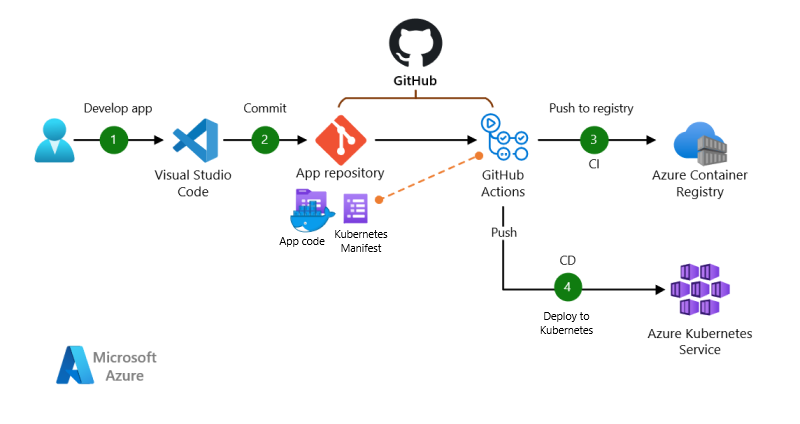
Lab56: Deploy Ingress Controller In Azure Kubernetes Service (AKS)
Implement an Ingress Controller in AKS to manage external access to services within the Kubernetes cluster. This lab guide enhances routing and load balancing, optimizing the handling of incoming traffic to applications deployed in AKS.

Docker & Kubernetes on Google Cloud
Lab57: Create and Manage GKE Clusters
In this lab, we will create and manage Google Kubernetes Engine (GKE) clusters, leveraging Google Cloud Platform’s managed Kubernetes service. This involves configuring cluster settings, node pools, and ensuring scalability and reliability for containerized applications.
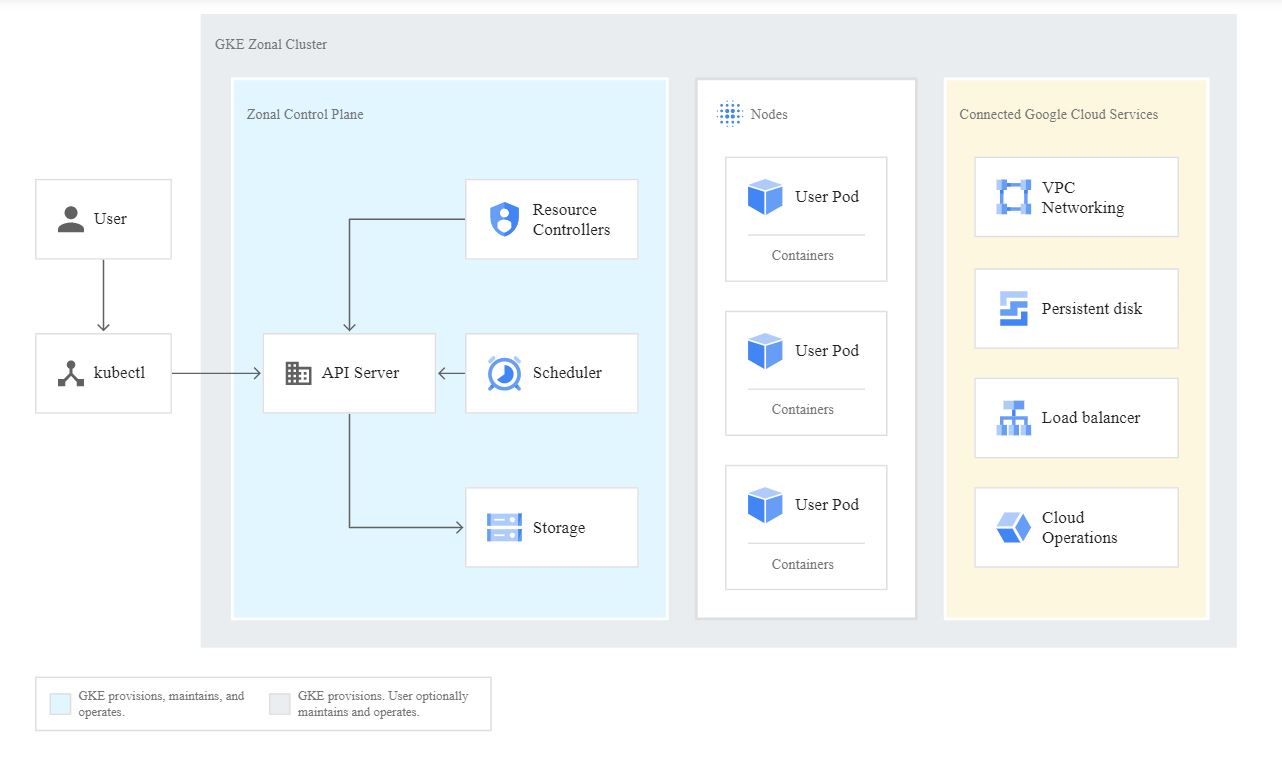
Learn more about How To Create A Google Kubernetes Engine Cluster (GKE)
Lab58: Deploying a Containerized Application to GKE Cluster
Deploy a containerized application onto a GKE cluster. This guide involves creating Kubernetes manifests, defining the application’s desired state, and utilizing GKE features for efficient orchestration, scaling, and management of containerized workloads.
Learn more about Deploying An Application To A GKE Cluster in GCP
Real-Time Projects: These consist of various projects
In this segment, we’ll delve into hands-on, real-world projects that not only enhance your skill set but also serve as impactful additions to your CV, significantly bolstering your candidacy when applying for jobs
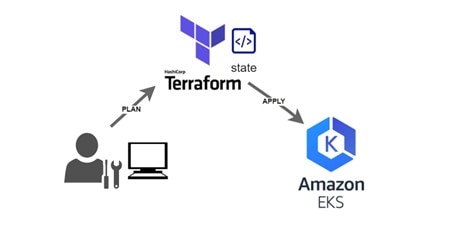
Create Elastic Kubernetes Service (EKS) Cluster on AWS Using Terraform
In this project, we will automate the setup of an EKS cluster on Amazon Web Services using Terraform. This will streamline the provisioning of Kubernetes infrastructure, providing a scalable and managed environment for deploying containerized applications.
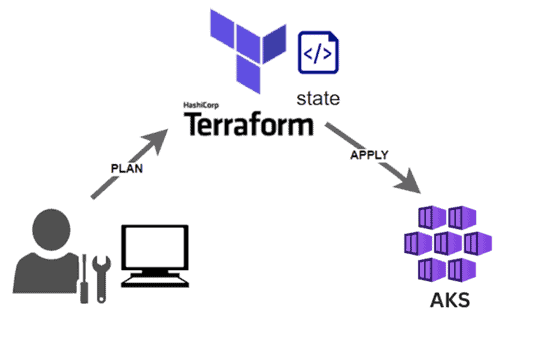
Create Azure Kubernetes Service (AKS) Cluster on Azure Using Terraform
In this project, we will leverage Terraform to orchestrate the deployment of an AKS cluster on Microsoft Azure. This automation simplifies the process of establishing a managed Kubernetes service, optimizing the management of containerized applications.
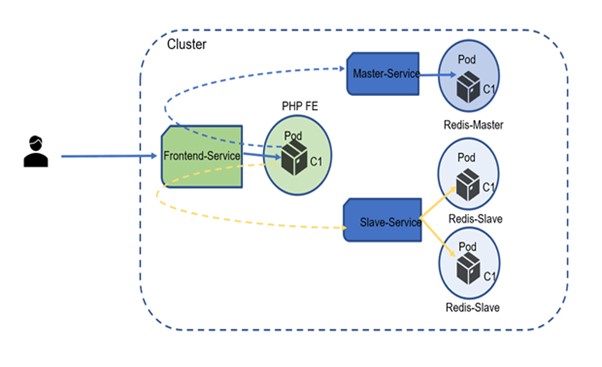
Deploy PHP & Redis App on EKS Cluster
In this project, we will develop a PHP-based web application with a Redis backend and deploy it onto an EKS cluster. This approach harnesses the power of Kubernetes for efficient scaling and resilience of containerized workloads.
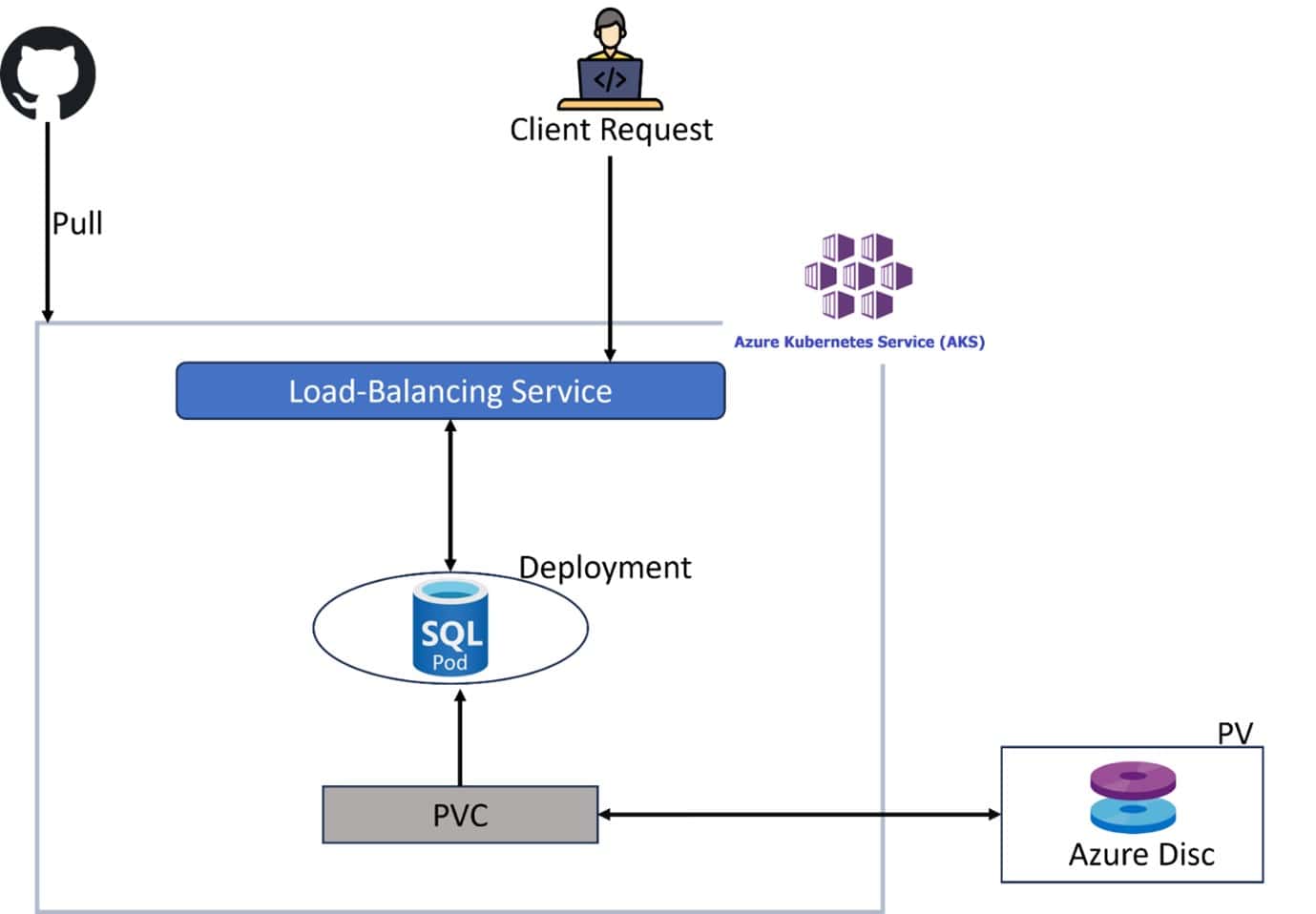
Deploy HA SQL Server on AKS Cluster
In this project, we will ensure high availability of SQL Server on an AKS cluster using Kubernetes. The focus will be on orchestrating a resilient SQL Server deployment to enhance reliability and performance.
CI/CD, Kubernetes, Google, CloudBuild
In this project, we will implement a Continuous Integration/Continuous Deployment (CI/CD) pipeline for Kubernetes applications on Google Cloud using CloudBuild. This will automate the build and deployment processes, streamlining software delivery.
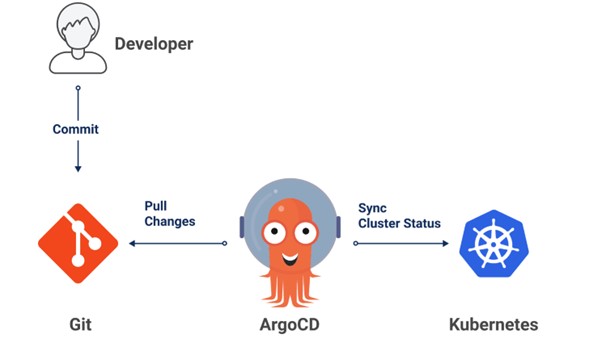
ArgoCD (GitOps CD) to Deploy App to K8s Cluster
In this project, we will employ ArgoCD, a GitOps continuous delivery tool, to automatically synchronize and deploy applications to Kubernetes clusters. This ensures consistency and traceability through version-controlled manifests.
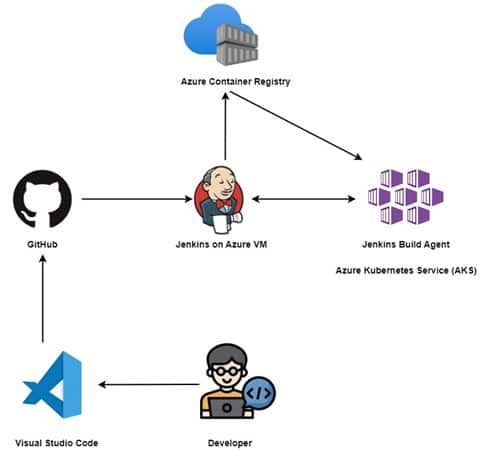
Deploy App on AKS Cluster using Jenkins (CI/CD)
In this project, we will leverage Jenkins as a CI/CD tool to automate the build and deployment of applications on an AKS cluster. This approach enhances the efficiency and reliability of the software delivery lifecycle.
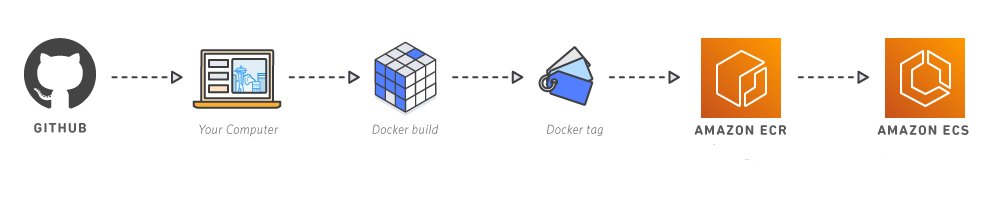
Configure GitHub Actions to Deploy App On AKS
In this project, we will integrate GitHub Actions into the development workflow to automate the deployment of applications on AKS. This enhances collaboration and ensures seamless delivery directly from the GitHub repository.

Migrate Monolithic to Microservices
In this project, we will transform a monolithic application architecture into microservices. The goal is to break down the application into smaller, independent components to improve scalability, flexibility, and maintainability.
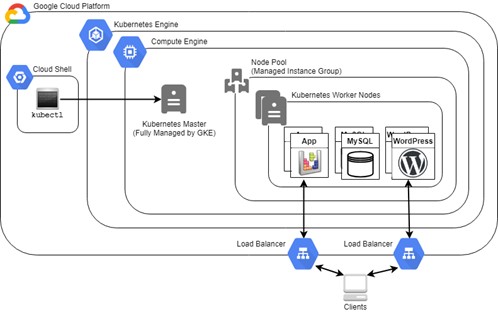
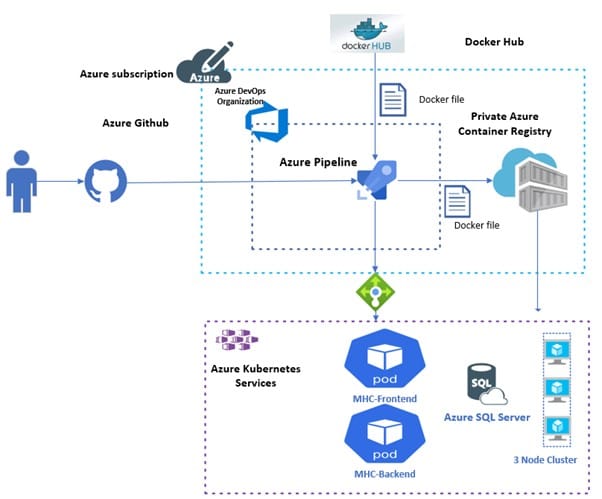
Deploy Multi-Container App To AKS
In this project, we will containerize and deploy a multi-container application on an AKS cluster. We will leverage Kubernetes to manage the orchestration of different application components for efficient scaling and resource utilization.
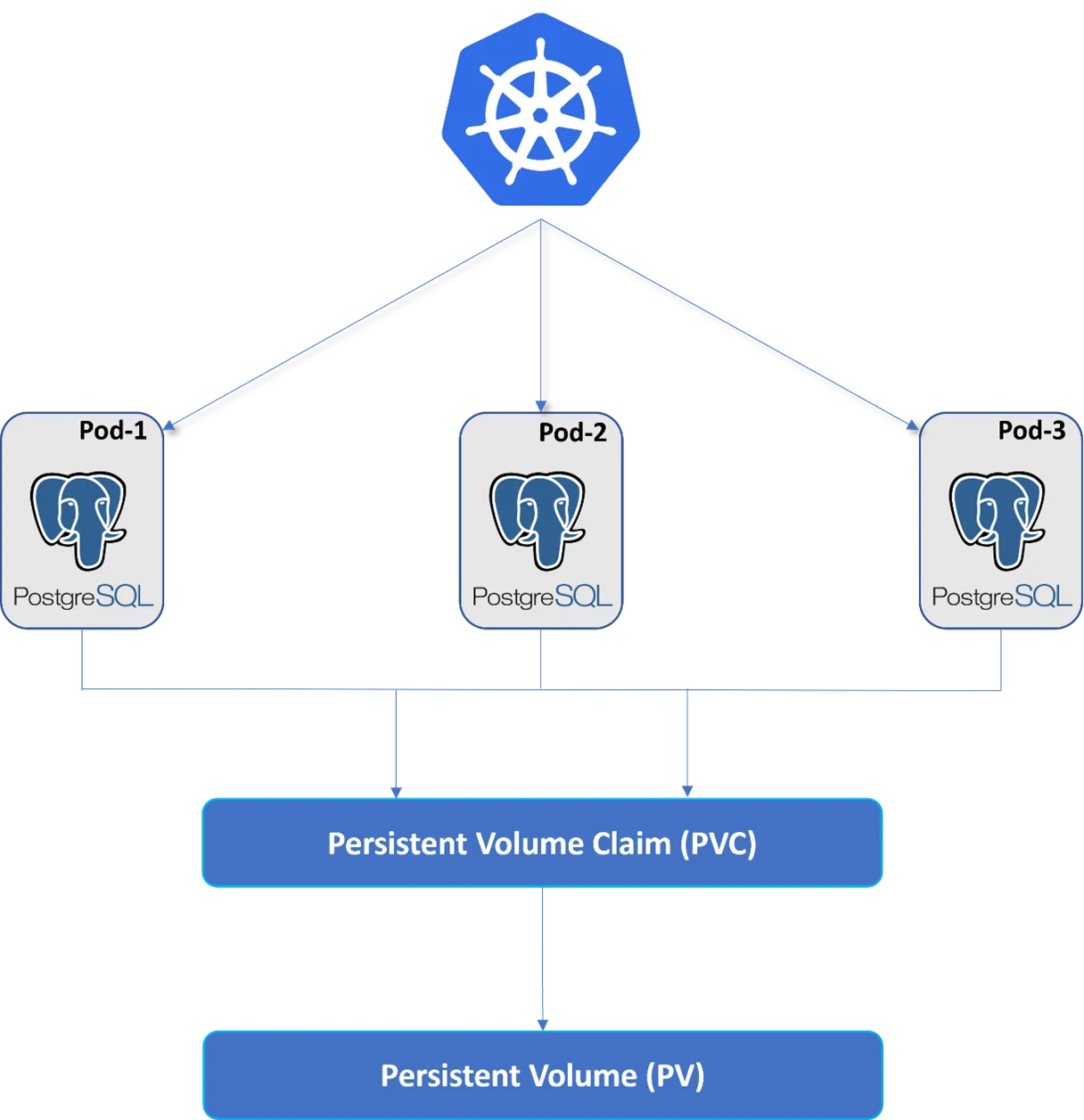
Deploy PostgreSQL Database On K8s
In this project, we will deploy a PostgreSQL database on Kubernetes. This approach utilizes container orchestration to streamline the management, scaling, and resilience of the database in a cloud-native environment.
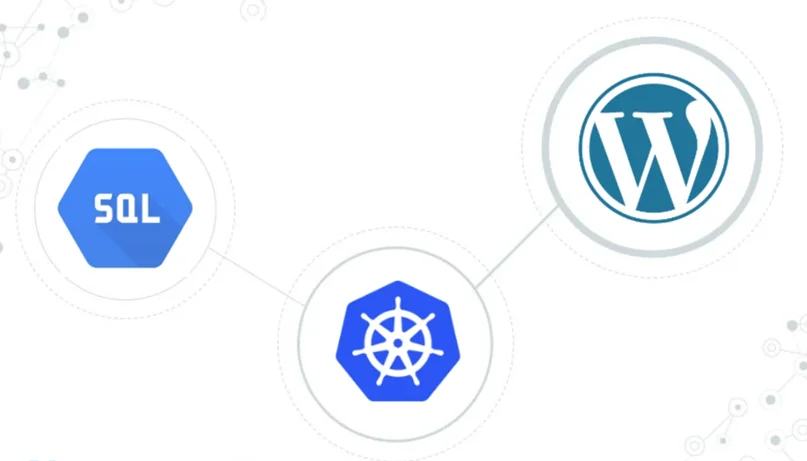
Deploy WordPress & MySQL On K8s
In this project, we will containerize and deploy a WordPress application with a MySQL database on Kubernetes. This leverages the benefits of container orchestration for efficient scaling and management of the entire application stack.
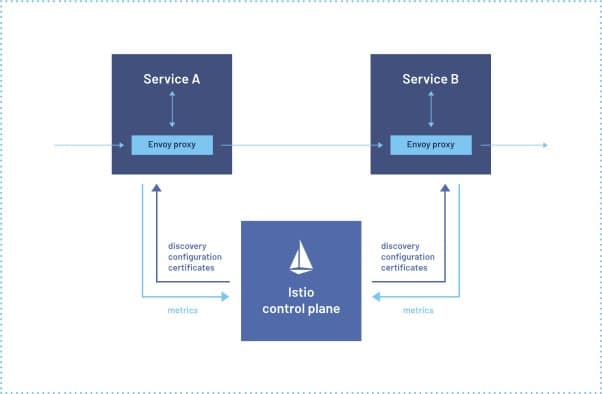
Deploy an Employee Management Java App with Istio
In this project, we will deploy a Java-based employee management application on Kubernetes with Istio. The focus is on implementing service mesh capabilities for enhanced observability, traffic management, and security within the microservices architecture.
Certifications
Docker Certified Associate (DCA)
Many organizations are adopting the cloud-native approach for effective software development. The rise in demand for highly available, super-fast applications directly generates more value for Docker. It aids in packaging applications into modules that can be easily replicated and scaled independently.
The Docker Certified Associate [DCA] exam emphasizes the essential tasks a Docker Certified Associate operates in day-to-day activities.
Kubernetes and Cloud Native Associate (KCNA)
The KCNA is a pre-professional certification aimed for applicants who want to advance to the professional level by demonstrating an understanding of the core knowledge and abilities of Kubernetes. This certification is ideal for students learning about or candidates interested in working with cloud native technologies.
Know more about KCNA
Certified Kubernetes Administrator (CKA)
Certified Kubernetes Administrator certification is to provide assurance that Kubernetes Administrators have the skills, knowledge, to perform the responsibilities of Kubernetes administrators.
Know more about Certified Kubernetes Administrator
Certified Kubernetes Application Developer (CKAD)
 The Certified Kubernetes Application Developer certification is designed to guarantee that certification holders have the knowledge, skills, and capability to design, configure, and expose cloud-native applications for Kubernetes and also perform the responsibilities of Kubernetes application developers. Hence, it also assures that the Kubernetes Application Developer can use core primitives to build, monitor, and troubleshoot scalable applications in Kubernetes.
Know more about CKAD
Certified Kubernetes Security Specialist (CKS)
 The Certified Kubernetes Security Specialist (CKS) program will consist of a performance-based certification exam and assures that a CKS has the skills, knowledge, and competence on a broad range of best practices for securing container-based applications and Kubernetes platforms during build, deployment, and runtime. This new certification is designed to enable cloud-native professionals to demonstrate security skills to current and potential employers.
Know more about CKS
Related/References
- Subscribe to our YouTube channel on “Docker & Kubernetes”
- (CKA) Certification: Step By Step Activity Guides/Hands-On Lab Exercise
- Kubernetes Architecture | An Introduction to Kubernetes Components
- Docker & Certified Kubernetes Administrator (CKA) Training
- Create AKS Cluster: A Complete Step-by-Step Guide
- [Solved] The connection to the server localhost:8080 was refused – did you specify the right host or port?
- CKA/CKAD Exam Questions & Answers 2022
- Kubernetes Monitoring: Prometheus Kubernetes & Grafana Overview
- How To Setup A Three Node Kubernetes Cluster For CKA: Step By Step
Join FREE CLASS Masterclass
Discover the Power of Kubernetes, Docker & DevOps – Join Our Free Masterclass. Unlock the secrets of Kubernetes, Docker, and DevOps in our exclusive, no-cost masterclass. Take the first step towards building highly sought-after skills and securing lucrative job opportunities. Click on the below image to Register Our FREE Masterclass Now!


![Microsoft Agentic AI Business Solutions Architect [AB-100] | K21 Academy](https://test.k21academy.com/wp-content/uploads/2025/11/Microsoft-Agentic-AI-Business-Solutions-Architect-AB-100-Exam-Overview1.png)



