






This blog post gives a walkthrough of the Step-By-Step Activity Guides and Project works of the AWS Cloud Job-Oriented training program that you must perform to learn this course. These project works are nearly real-time and will help you to gain hands-on experience with multiple AWS services.
The walkthrough of the Step-By-Step Activity Guides of the AWS Cloud Job-Oriented training program will prepare you thoroughly for the AWS Certification & Jobs
List of Labs that we include in our training AWS Job-Oriented Program.
- Create an AWS Free Trial Account
- CloudWatch – Create Billing Alarm & Service Limits
- Create And Connect To Windows EC2 Machine
- Create And Connect To Linux EC2 Machine
1.2 AWS Identity & Access Management (IAM)
- Working with AWS IAM
- Enable Multi-Factor Authentication
- IAM Power User
- Create an S3 Bucket, Upload and access Files, and Host the Website
- S3 Cross-Region Replication
- Lifecycle Management on S3 Bucket
- Deliver Content Faster via Amazon CloudFront
- Attach, Mount EBS Volume to Linux EC2 Instance
- Attach, Mount EBS Vol. to EC2 Win. Instance
- Create and mount Elastic File System (EFS) on EC2 Instances
- Create and Manage EBS Volumes & Snapshots
1.4 AWS Elastic Compute Cloud (EC2)
- Host Website On Windows EC2 Instance Using IIS
- Configure Apache Web Server on AWS Linux EC2 Machine
- Network Load Balancer
- Configure a Load Balancer And Autoscaling on EC2 Instances
- Create a Launch Template For Auto Scale Group
- Create a Custom Virtual Private Cloud
- Work with VPC Peering Connection
- AWS Elastic IP
- Establish a Client Side VPN
- Register a GoDaddy domain & Map using Route53
- Get Started with AWS X-Ray
- Configure Amazon CloudWatch to Notify of Change In EC2 CPU Utilization
- Enable Cloud Trail and Store Logs In S3
- Setting Up AWS Config to Assess, Audit & Evaluate AWS Resources
- Create & Query with Amazon DynamoDB
- Configure a MySQL DB Instance via Relational Database Service (RDS)
- Create A Redis Cache and connect it to an EC2 Instance
- Amazon Athena
- Configure AWS Glue to run the Crawler on an S3 bucket
1.8 AWS Serverless & Analytic Services
- Send An E-mail Through AWS SES
- Event-Driven Architectures Using AWS Lambda, SES, SNS and SQS
- Build an API Gateway with Lambda Integration
- Automate Start/Stop EC2 Instance using Lambda
1.9 AWS Automation & Configuration Management
- Create and Update Stacks using CloudFormation
- Create an S3 Bucket Using CloudFormation
- Create & Configure EC2 with Helper-Scripts
- Deploy An Application In Beanstalk Using Docker
- Immutable Deployment in Beanstalk Environment
- Blue-Green Deployments Using Elastic Beanstalk
- AWS Serverless Application Model
- AWS KMS Create & Use
- Block Web Traffic with WAF in AWS
- Amazon Inspector
- Build an Application with AWS CodeBuild
- Deploy Sample Application using AWS CodeDeploy
- Build an Application with AWS CodeStar
- Create a Simple Pipeline (CodePipeline) in AWS
- Create ECR, Install Docker, Create Image, and Push Image To ECR
- Create Task Definitions, schedule Tasks, configure Services, and Cluster using EC2 Launch Types
- Create an Elastic Kubernetes Service (EKS) Cluster on AWS
- Application Migration to AWS
- Database Migration To AWS
- AWS Data Transfer Acceleration
- Migrating a Monolithic Application to AWS with Docker
- Project 1: Deploy 3-Tier Architecture (Web, App, Database)
- Project 2: DevOps: End-to-End CI/CD Pipeline
- Project 3: Migration: Migrate the Monolithic App to Microservices
- Project 4: Security: SSL/TLS/Keys Certificate Management System
- Project 5: Host Static Website on AWS using S3 & Route53
- Project 6: Host a Dynamic Website on AWS: Apache, MariaDB, PHP
- Project 7: Deploy API Gateway, Application & Database
- Project 8: Migration: On-Premise to Cloud (App, Database, Data)
- Project 9: Database Migration to AWS (Oracle to AWS)
- Project 10: Deploy Super Mario on Kubernetes using Terraform
- Project 11: Deploy Netflix Clone Application on Kubernetes
- Project 12: Automate the Start/Stop of EC2 Instances using Lambda
- Project 13: AWS Automation Troubleshooting & Cost Optimization
- Project 14: AWS Backup and Recovery: End-to-End Data Integrity Restoration on AWS
- Project 15: Deploy Web App on AWS ECS with GitHub Actions
- Project 16: Secure VPC for Production Environment
- Project 17: Zomato Clone Deployment (DevSecOps)
- Project 18: AWS Cloud – Dynamic Blood Bank Management System
- Project 19: Implementing Deployment for Swiggy-Clone on EC2
- Project 20: K8s End-to-End Project on EKS
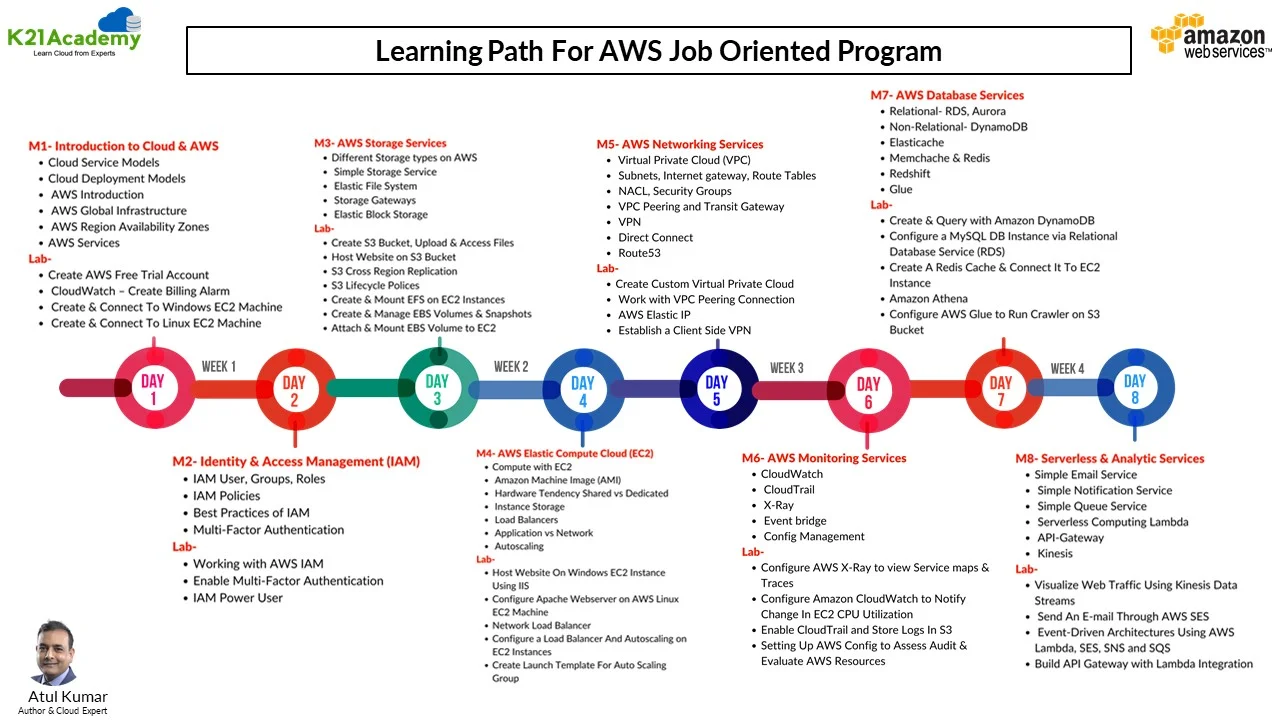
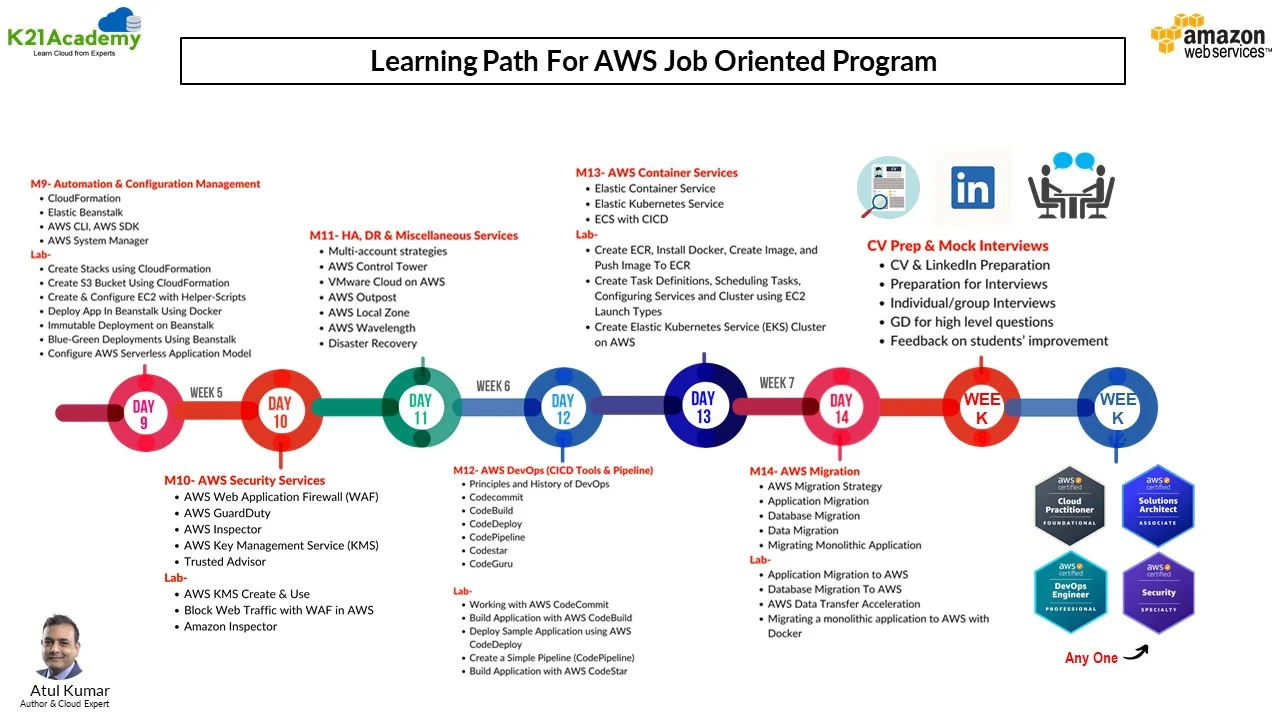
Hands-On Labs For AWS Job-Oriented
1.1 AWS Basic Labs
Lab 01: Create an AWS Free Trial Account
Embark on your AWS journey by setting up a free trial account. This hands-on lab guides you through the initial steps of creating an AWS account, giving you access to a plethora of cloud services to experiment and build with.
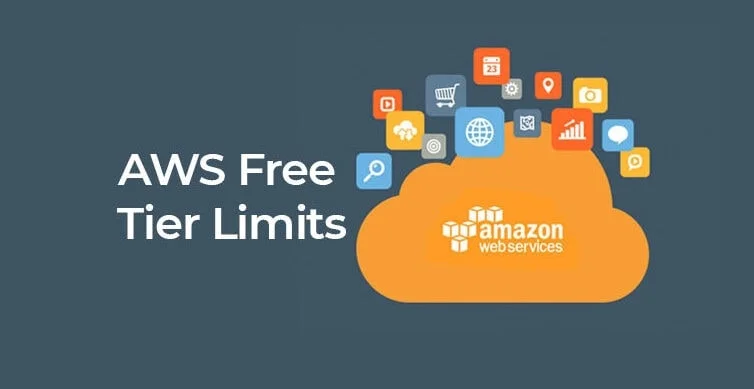
Amazon Web Services (AWS) is providing a free trial account for 12 months to new subscribers to get hands-on experience with all the services that AWS provides. Amazon is giving us a number of different services that we can use, with some limitations, to get hands-on practice and gain more knowledge on AWS Cloud services, as well as regular business use.
With the AWS Free Tier account, all the services offered have limited usage limits on what we can use without being charged. Here, we will look at how to register for an AWS FREE Tier Account.
To learn how to create a free AWS account, check our Step-by-Step blog, How to Create an AWS Free Tier Account

Lab 02: CloudWatch – Create Billing Alarm & Service Limits
Dive into CloudWatch, AWS’s monitoring service. This lab focuses on setting up billing alarms to manage costs effectively and keeping an eye on service limits to ensure your applications run smoothly within defined boundaries.
AWS billing notifications can be enabled using Amazon CloudWatch. CloudWatch is an Amazon Web Services service that monitors all of your AWS account activity. CloudWatch, in addition to billing notifications, provides infrastructure for monitoring apps, logs, metrics collection, and other service metadata, as well as detecting activity in your AWS account usage.
AWS CloudWatch offers a number of metrics through which you can set your alarms. For example, you may set an alarm to warn you when a running instance’s CPU or memory utilisation exceeds 90% or when the invoice amount exceeds $100. We get 10 alarms and 1,000 email notifications each month with an AWS free tier account.
 Lab 03: Create And Connect To Windows EC2 Machine
Get practical experience with Elastic Compute Cloud (EC2) by launching a Windows instance. Learn the nuances of instance creation and connect seamlessly to Windows-based virtual machines.
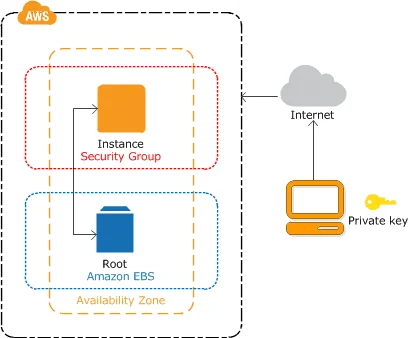
Check out this blog for more details: Steps to Connect Windows EC2 Instance
Lab 04: Create And Connect To Linux EC2 Machine
Extend your EC2 skills by spinning up a Linux instance. Discover the nuances of the Linux environment within AWS, from creation to connecting and managing instances efficiently.
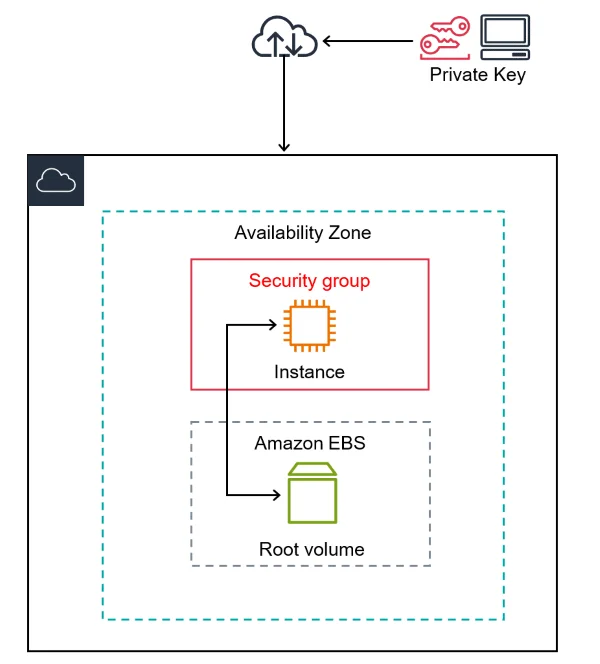
Check out this blog for more details: Steps to Connect a Linux EC2 Instance
1.2 AWS Identity & Access Management (IAM)
Lab 1: Working with AWS IAM
Unlock the power of Identity and Access Management (IAM) by navigating through user and group management. Gain insights into the foundation of AWS security, controlling who can access your resources and what actions they can perform.
Lab 2: Enable Multi-Factor Authentication
Elevate your security posture by implementing Multi-Factor Authentication (MFA) in IAM. This lab walks you through the process of adding an extra layer of authentication for enhanced account protection.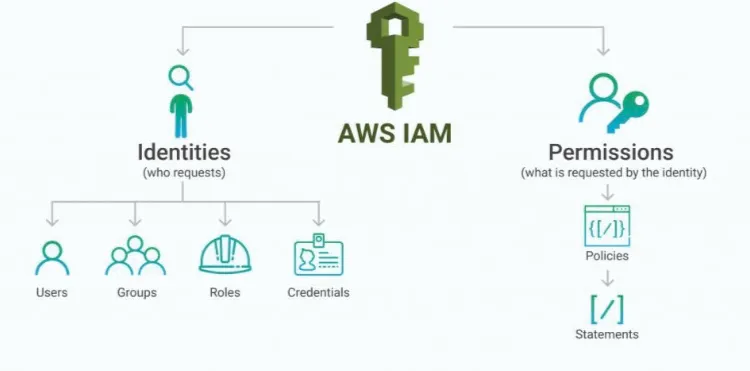
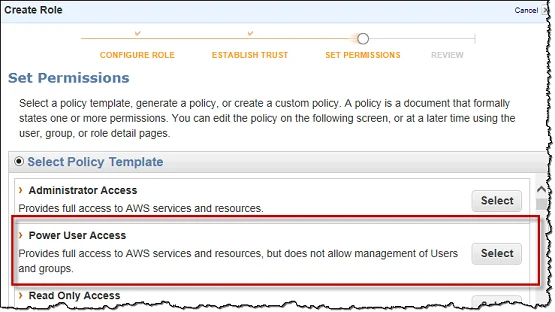
Lab 3: IAM Power User
Become an IAM power user by delving into advanced features. Learn to create and manage policies, roles, and permissions, gaining mastery over nuanced access control scenarios.
1.3 AWS Storage Services
Lab 1: Create S3 Bucket, Upload and access Files, and Host the Website
Explore the versatile Amazon Simple Storage Service (S3) by creating buckets, uploading files, and even hosting a static website. This lab provides hands-on experience in leveraging S3 for scalable and secure object storage.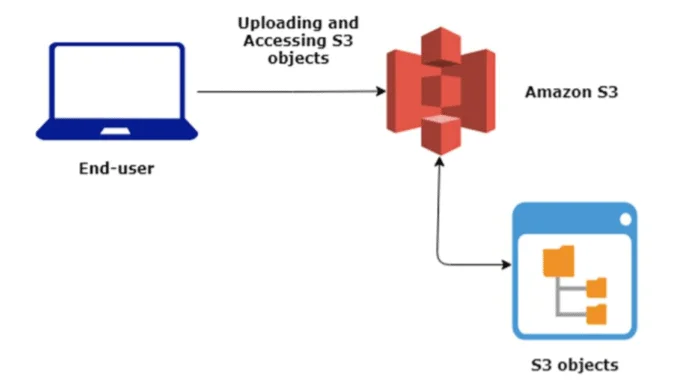
Lab 2: S3 Cross-Region Replication
Master Amazon S3 Cross-Region Replication (CRR), a crucial feature for enhancing data accessibility and disaster recovery. This lab walks you through setting up CRR between S3 buckets across different regions, ensuring data redundancy and optimized performance for global users.

Lab 3: Lifecycle Management on S3 Bucket
Explore S3 Lifecycle Management to automate data transitions and optimize costs. This lab covers setting up policies for archiving and automated deletions, ensuring efficient data management.

Lab 4: Deliver Content Faster via Amazon CloudFront
Enhance content delivery with Amazon CloudFront, a global CDN service. This lab guides you through creating an S3 bucket for hosting a static website, setting up CloudFront for fast distribution, and testing network latency for improved performance and reduced costs.

Lab 5: Attach, Mount EBS Volume to Linux EC2 Instance
Master EBS Volumes and Snapshots for EC2 instances. This lab walks you through creating, modifying, and managing EBS volumes and snapshots, including creating AMIs, moving them across regions, and safely deleting resources to ensure scalability and cost-efficiency.

Lab 6: Attach, Mount EBS Vol. to EC2 Win. Instance
Master EBS Volumes for EC2 by launching a Linux instance, attaching and mounting an EBS volume, and cleaning up resources by terminating the instance and deleting the volume to manage costs efficiently.

Lab 7: Create and mount Elastic File System (EFS) on EC2 Instances
Dive into Elastic File System (EFS) to create a scalable and shared file storage solution. Learn to mount EFS on EC2 instances, facilitating collaboration and data access across multiple compute resources.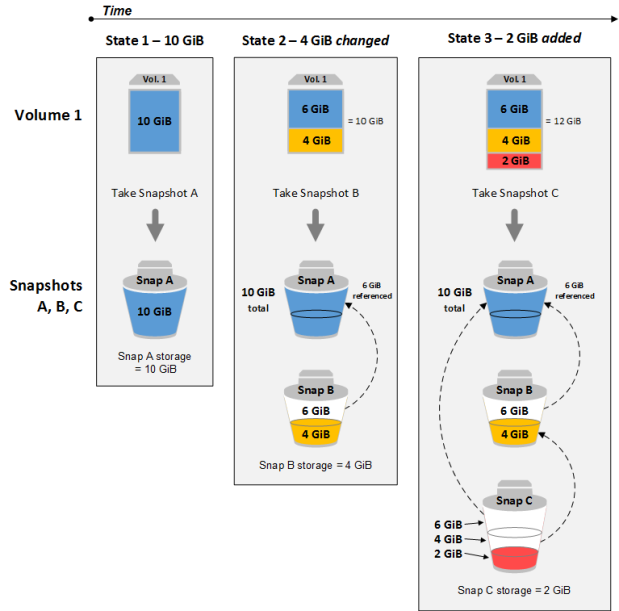
Lab 8: Create and Manage EBS Volumes & Snapshots
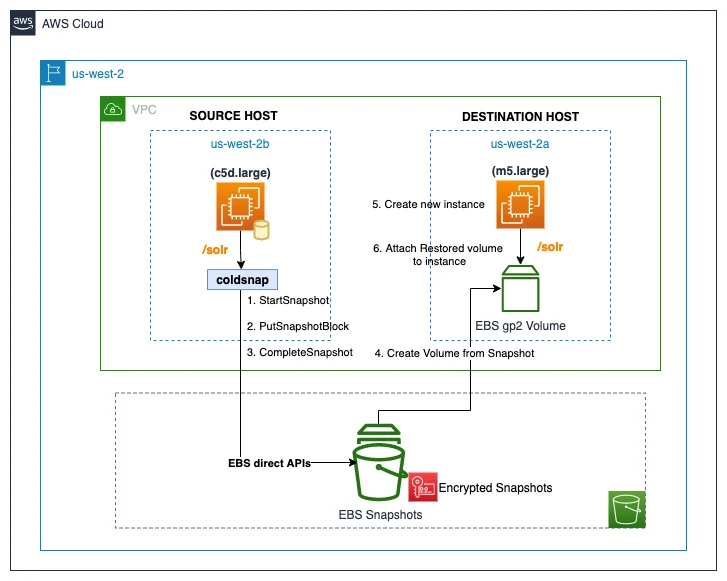
Master Elastic Block Store (EBS), a fundamental component for EC2 instances. This lab guides you through the creation and management of EBS volumes and snapshots, ensuring data durability and flexibility.
1.4 AWS Elastic Compute Cloud (EC2)
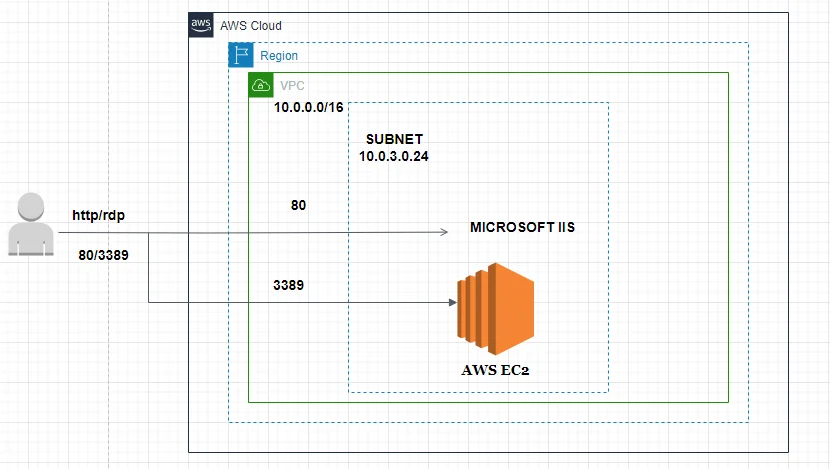
Lab 1: Host Website On Windows EC2 Instance Using IIS
Take a deeper dive into EC2 by deploying a website on a Windows instance using Internet Information Services (IIS). Gain insights into web hosting on AWS and configuring Windows-based servers.
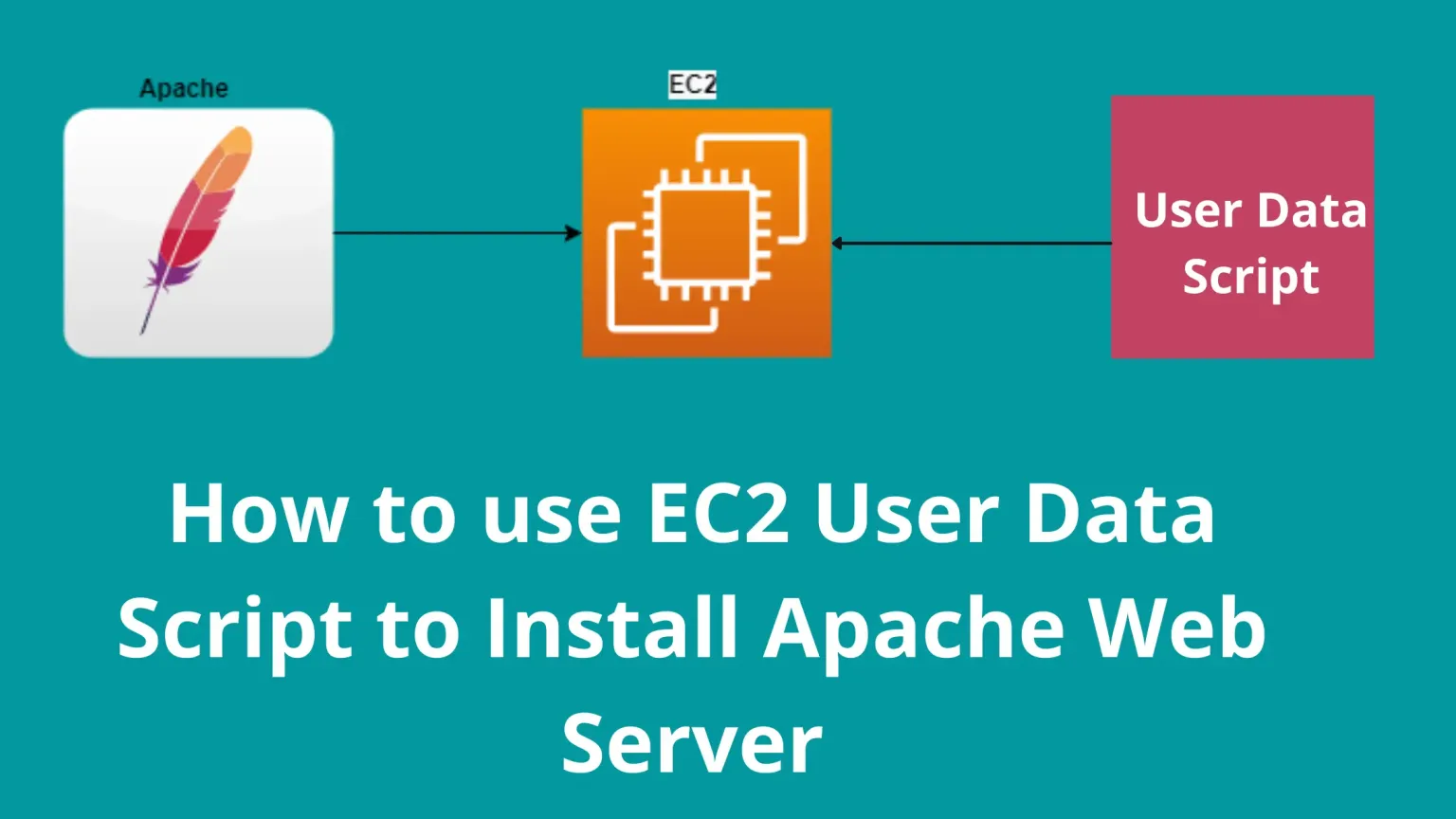
Lab 2: Configure Apache Web Server on AWS Linux EC2 Machine
Extend your web hosting knowledge by configuring an Apache web server on a Linux-based EC2 instance. Understand the intricacies of hosting applications on a Linux environment within AWS.
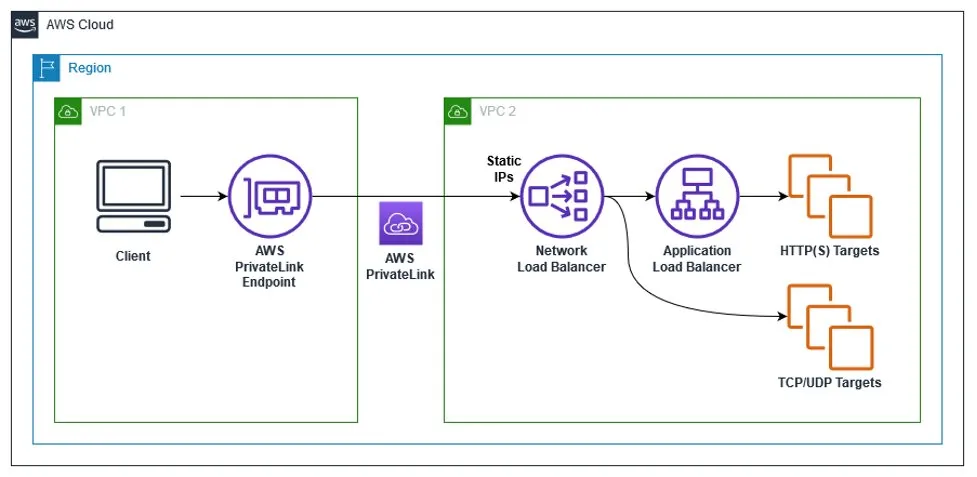
 Lab 3: Network Load Balancer
Delve into the world of load balancing with Network Load Balancer (NLB). This lab provides hands-on experience in setting up and optimizing network-based load balancing for high availability.
 Lab 4: Configure a Load Balancer And Autoscaling on EC2 Instances
Optimize your infrastructure’s performance and availability by configuring load balancers and implementing auto-scaling on EC2 instances. This lab equips you with essential skills for managing dynamic workloads.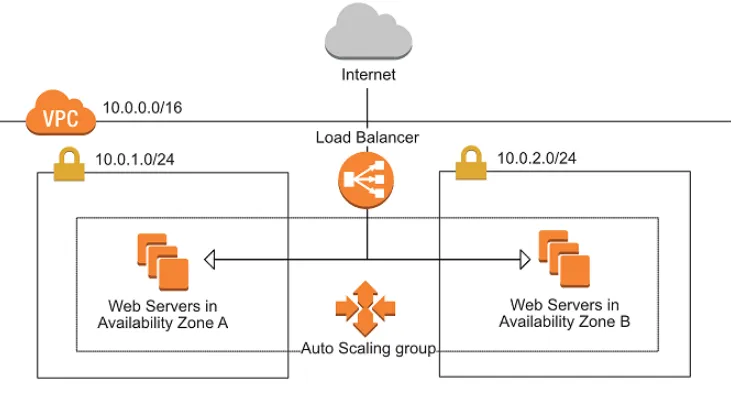
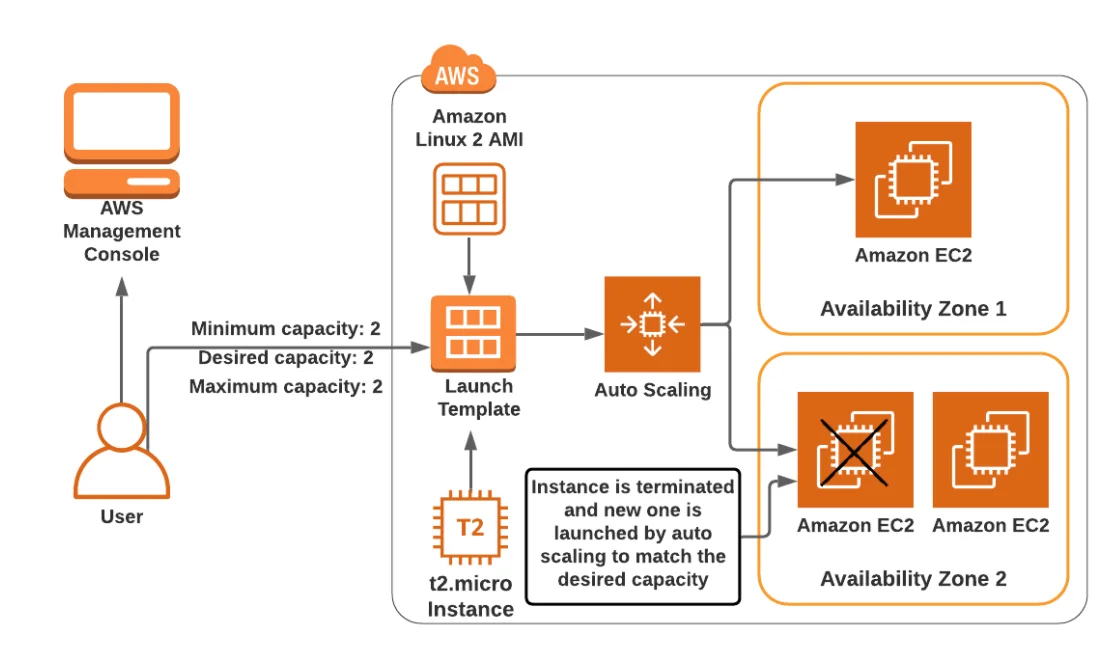
Lab 5: Create a Launch Template For an Auto Scaling Group
Streamline the process of launching and scaling EC2 instances with launch templates. This lab guides you through creating templates for efficient and consistent auto-scaling group deployments.
1.5 AWS Networking Services
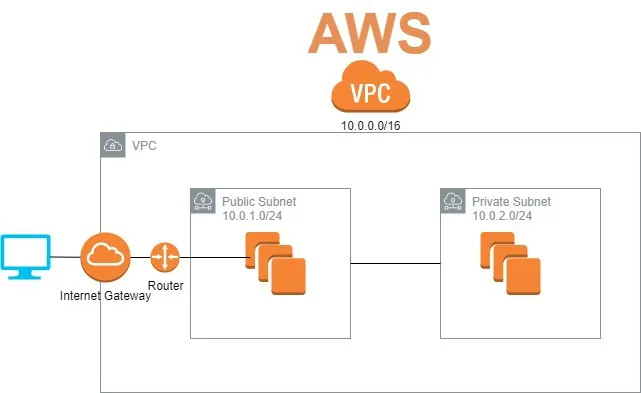
Lab 1: Create a Custom Virtual Private Cloud
Build a tailored Virtual Private Cloud (VPC) to isolate and organize your AWS resources. This lab delves into creating custom VPCs, defining subnets, and configuring routing tables for optimal network architecture.
 Lab 2: Work with VPC Peering Connection
Connect multiple VPCs seamlessly with VPC peering connections. This lab provides hands-on experience in establishing and configuring peering connections for secure and efficient communication.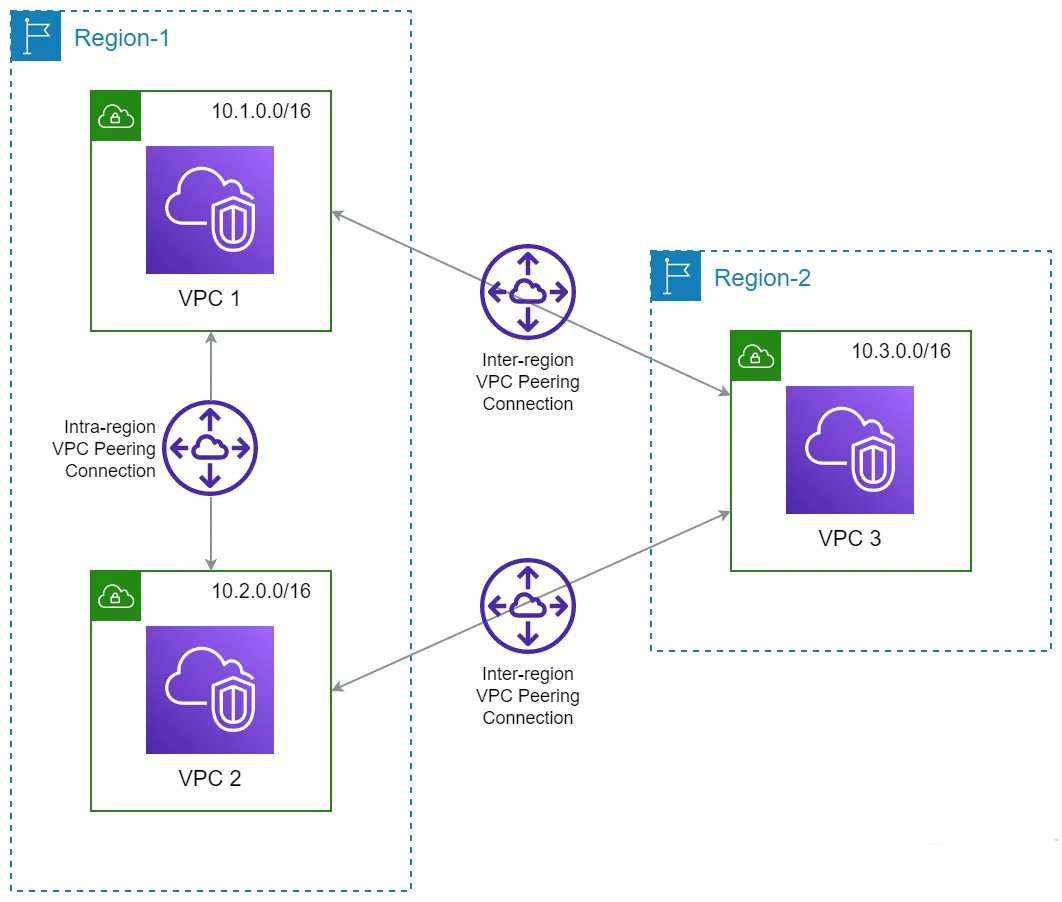
Lab 3: AWS Elastic IP
Explore the benefits of Elastic IP addresses in AWS. This lab guides you through the process of allocating and associating Elastic IPs to EC2 instances, providing static public IP addresses for dynamic cloud environments.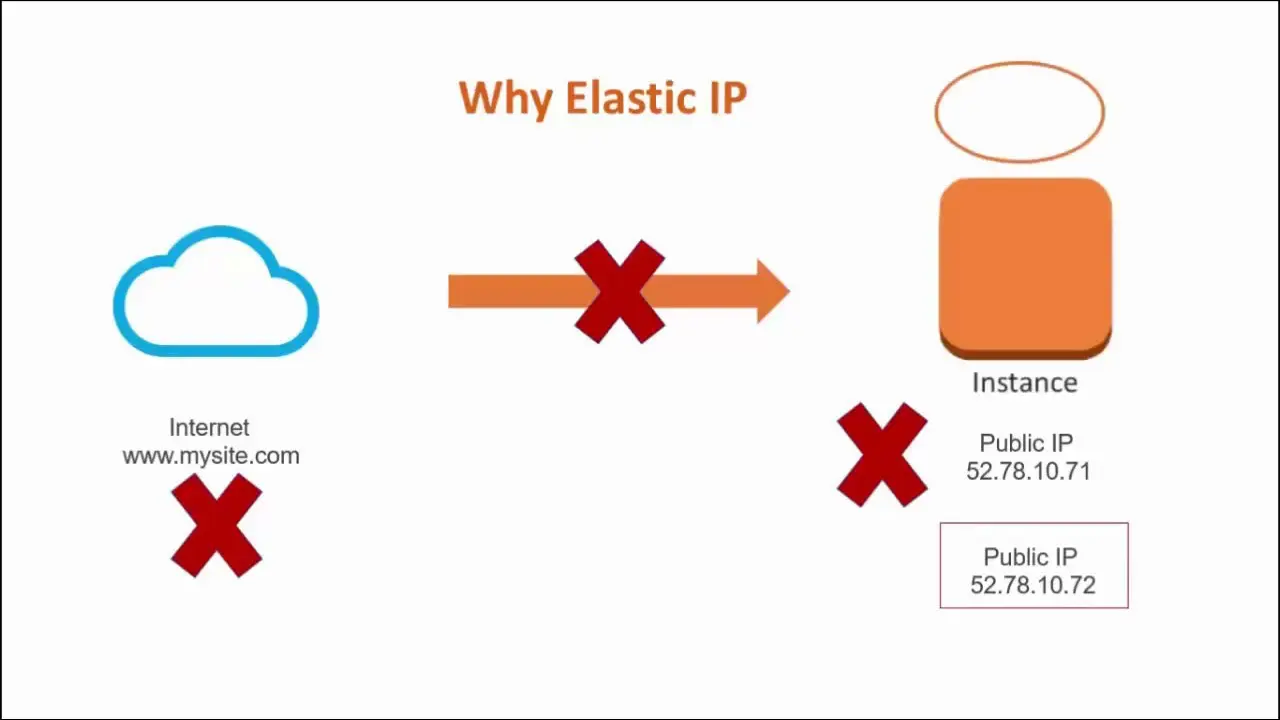
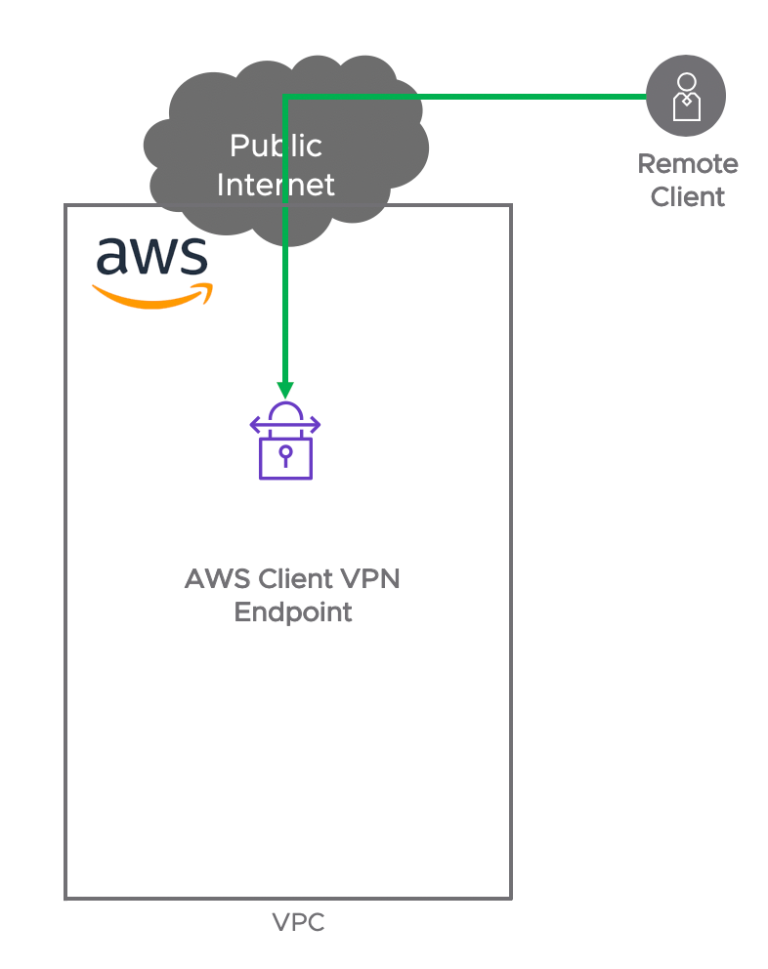
Lab 4: Establish a Client-Side VPN
Enhance your network security by establishing a client-side VPN connection to AWS. This lab walks you through the setup, configuration, and optimization of VPN connections for secure data transmission.
Lab 5: Register the GoDaddy domain & Map using Route53
Enhance your website’s availability and scalability by mapping a custom GoDaddy domain using Amazon Route 53. This lab walks you through registering a domain, configuring DNS records, and linking it to an EC2-hosted web server, ensuring a professional and robust online presence.

1.6 AWS Monitoring Services
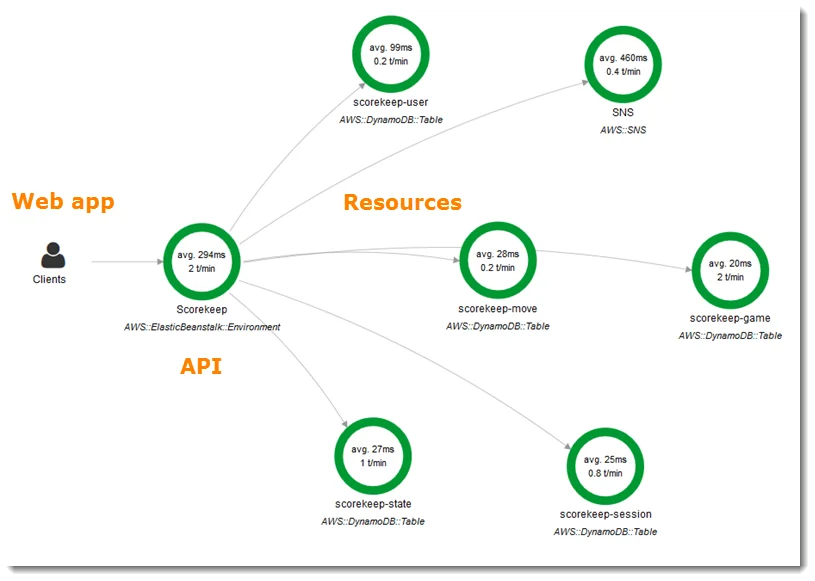
Lab 1: Get Started with AWS X-Ray
Step into the world of AWS X-Ray, a powerful tool for analyzing and debugging distributed applications. This lab provides hands-on experience in instrumenting applications and gaining insights into performance bottlenecks.
 Lab 2: Configure Amazon CloudWatch to Notify Changes in EC2 CPU Utilization
Master Amazon CloudWatch for proactive monitoring of your EC2 instances. This lab focuses on setting up notifications based on changes in CPU utilization, ensuring timely responses to performance fluctuations.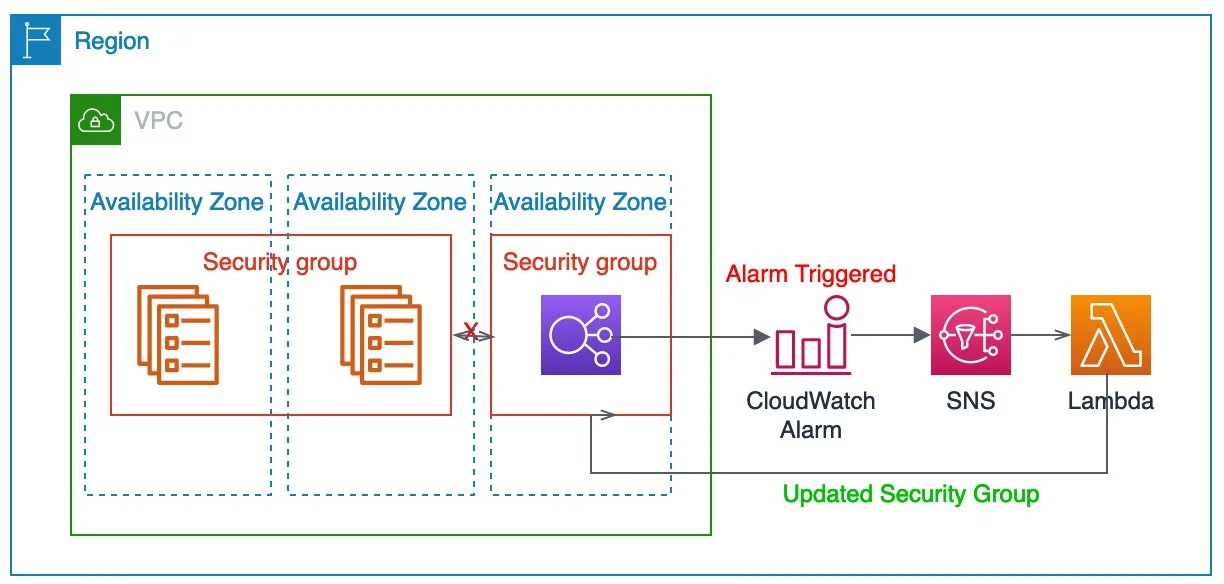
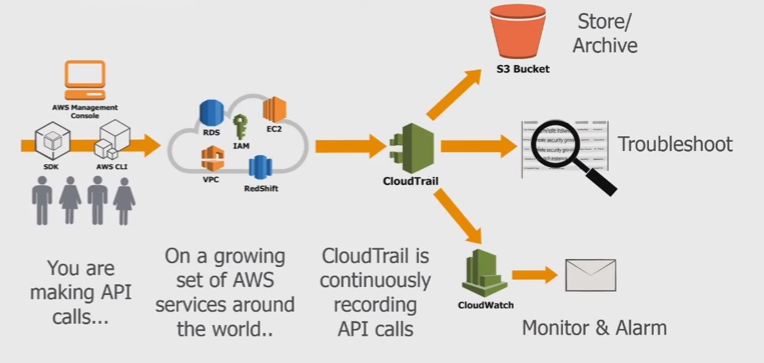
Lab 3: Enable CloudTrail and Store Logs In S3
Enhance your AWS security by enabling AWS CloudTrail. This lab guides you through the process of setting up CloudTrail and storing logs in Amazon S3 for comprehensive audit trails and compliance.
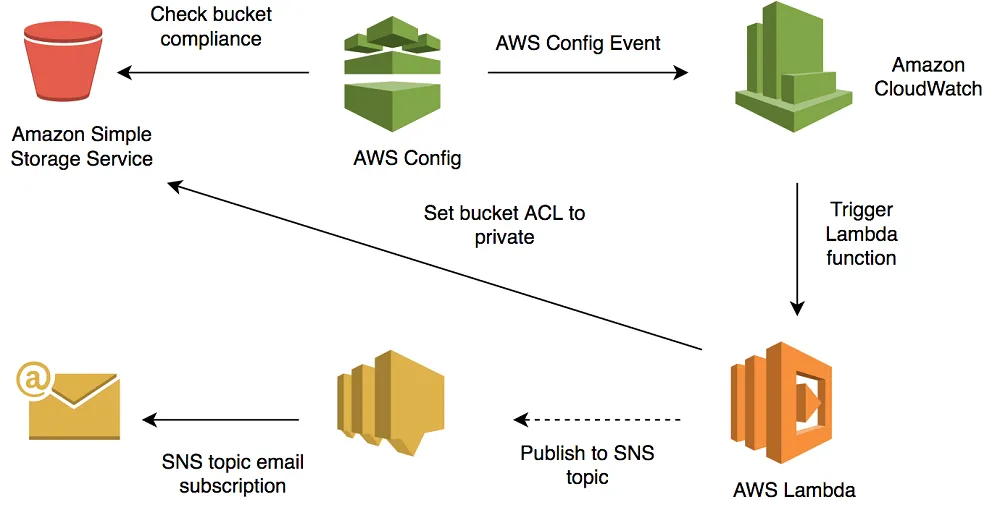
 Lab 4: Setting Up AWS Config to Assess Audit & Evaluate AWS Resources
Gain control and visibility into your AWS resource configurations with AWS Config. This lab walks you through the setup and utilization of AWS Config for continuous assessment, auditing, and evaluation of your cloud environment.
1.7 AWS Database Services
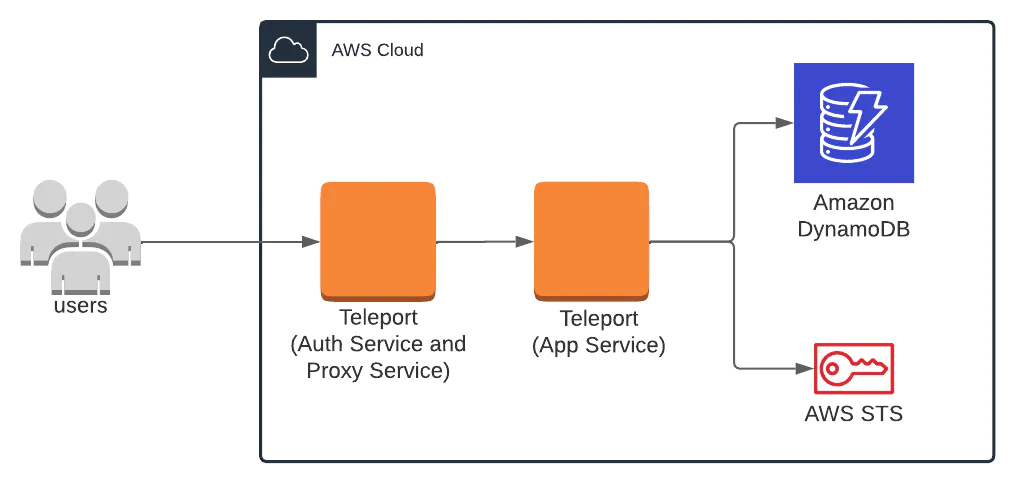
Lab 1: Create & Query with Amazon DynamoDB
Dive into Amazon DynamoDB, a fully managed NoSQL database service. This lab provides hands-on experience in creating tables and executing queries, exploring the scalability and flexibility of DynamoDB.
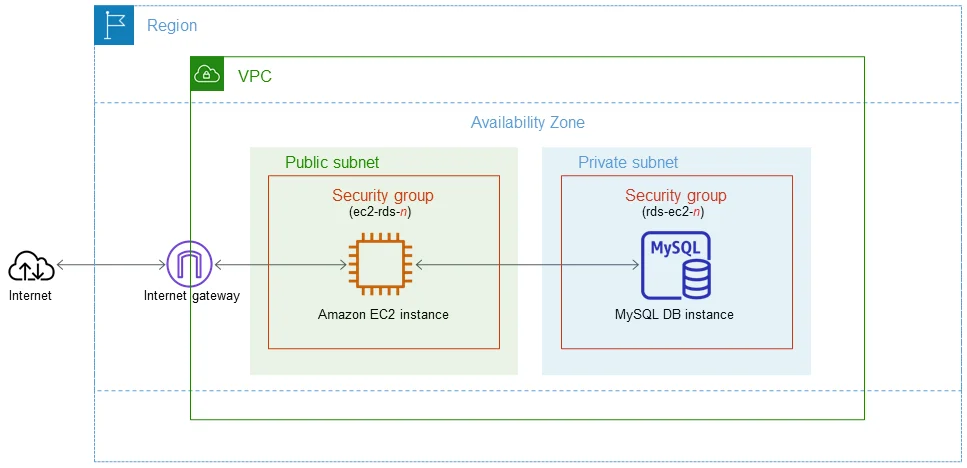
 Lab 2: Configure a MySQL DB Instance via Relational Database Service (RDS)
Navigate through Amazon Relational Database Service (RDS) to configure a MySQL database instance. This lab equips you with the skills to set up, manage, and optimize a relational database in the AWS cloud.
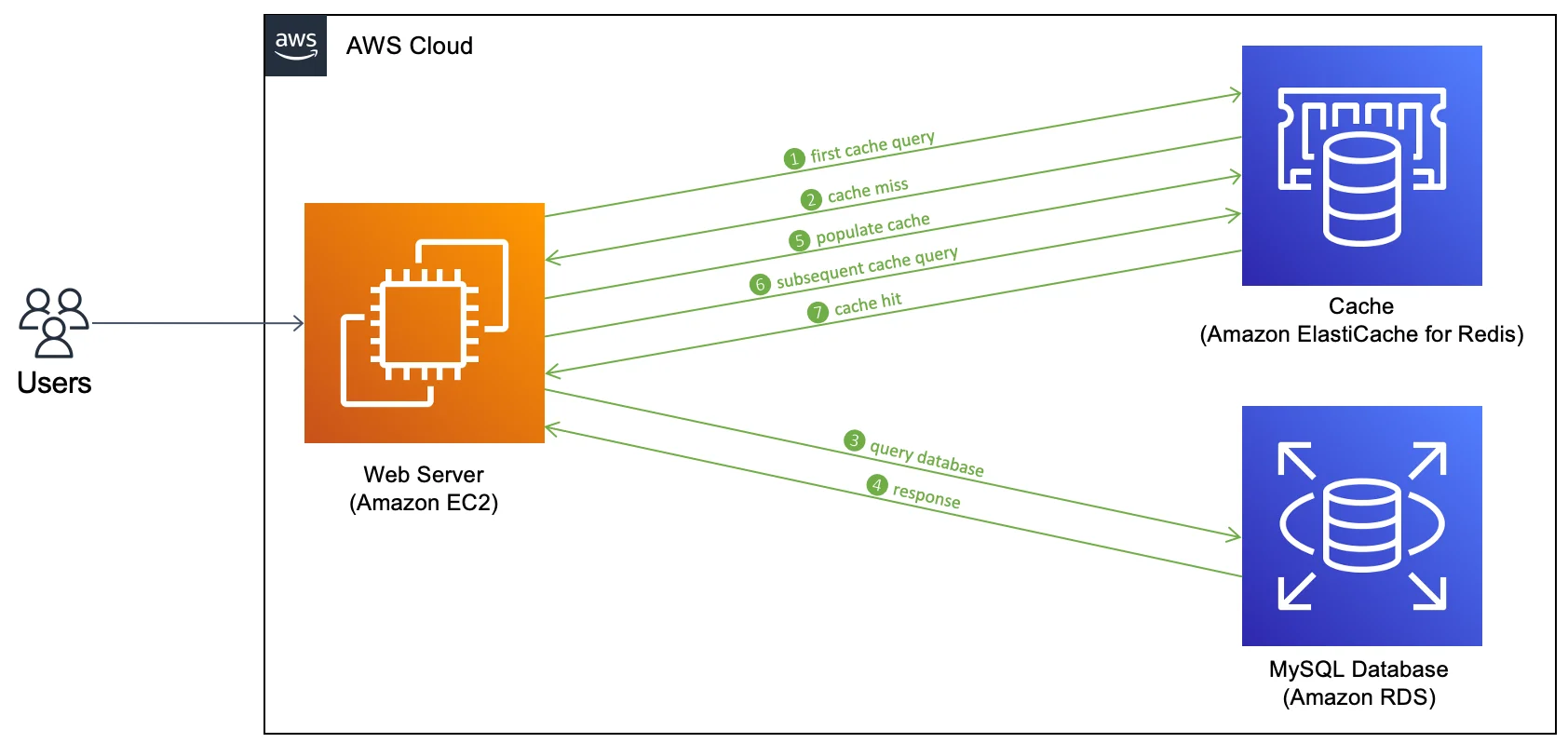
 Lab 3: Create A Redis Cache and connect It To EC2 Instance
Explore Amazon ElastiCache and its Redis caching capabilities. This lab guides you through the creation of a Redis cache cluster and connecting it to an EC2 instance, enhancing data retrieval performance.
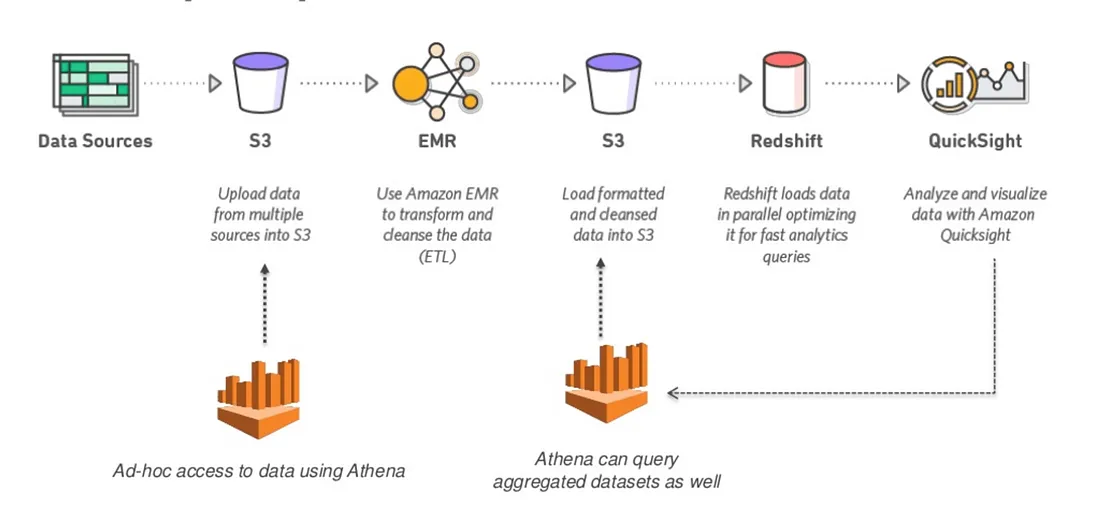
 Lab 4: Amazon Athena
Unlock the power of serverless querying with Amazon Athena. This lab introduces you to Athena’s capabilities, allowing you to run ad-hoc SQL queries on data stored in Amazon S3.
 Lab 5: Configure AWS Glue to Run Crawler on S3 Bucket
Delve into AWS Glue for data integration and transformation. This lab provides hands-on experience in discovering, cataloging, and transforming data, laying the foundation for efficient data processing.
 1.8 AWS Serverless & Analytic Services
Lab 1: Send An Email Through AWS SES
Master Amazon Simple Email Service (SES) to send emails securely and reliably. This lab explores SES’s features, from setting up email sending to configuring templates and handling bounces and complaints for robust email communication.
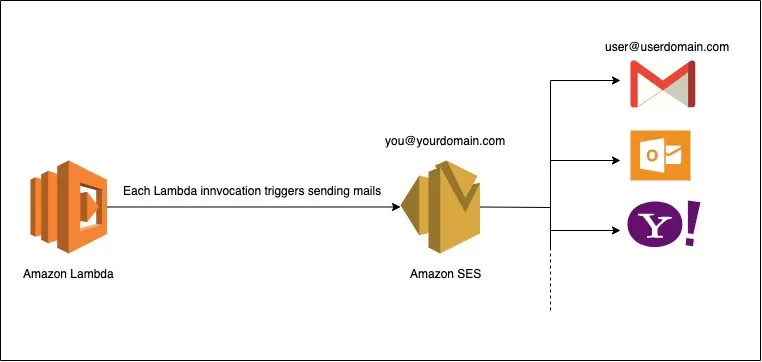 Lab 2: Event-Driven Architectures Using AWS Lambda, SES, SNS and SQS
Build dynamic and scalable event-driven architectures with AWS Lambda, Simple Email Service (SES), Simple Notification Service (SNS), and Simple Queue Service (SQS). This lab guides you through creating a seamless communication flow within your AWS environment.
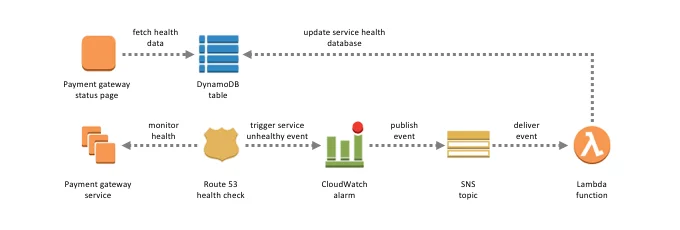 Lab 3: Build API Gateway with Lambda Integration
Create a robust API Gateway and integrate it with AWS Lambda for efficient and scalable API management. This lab equips you with the skills to build and manage APIs seamlessly.
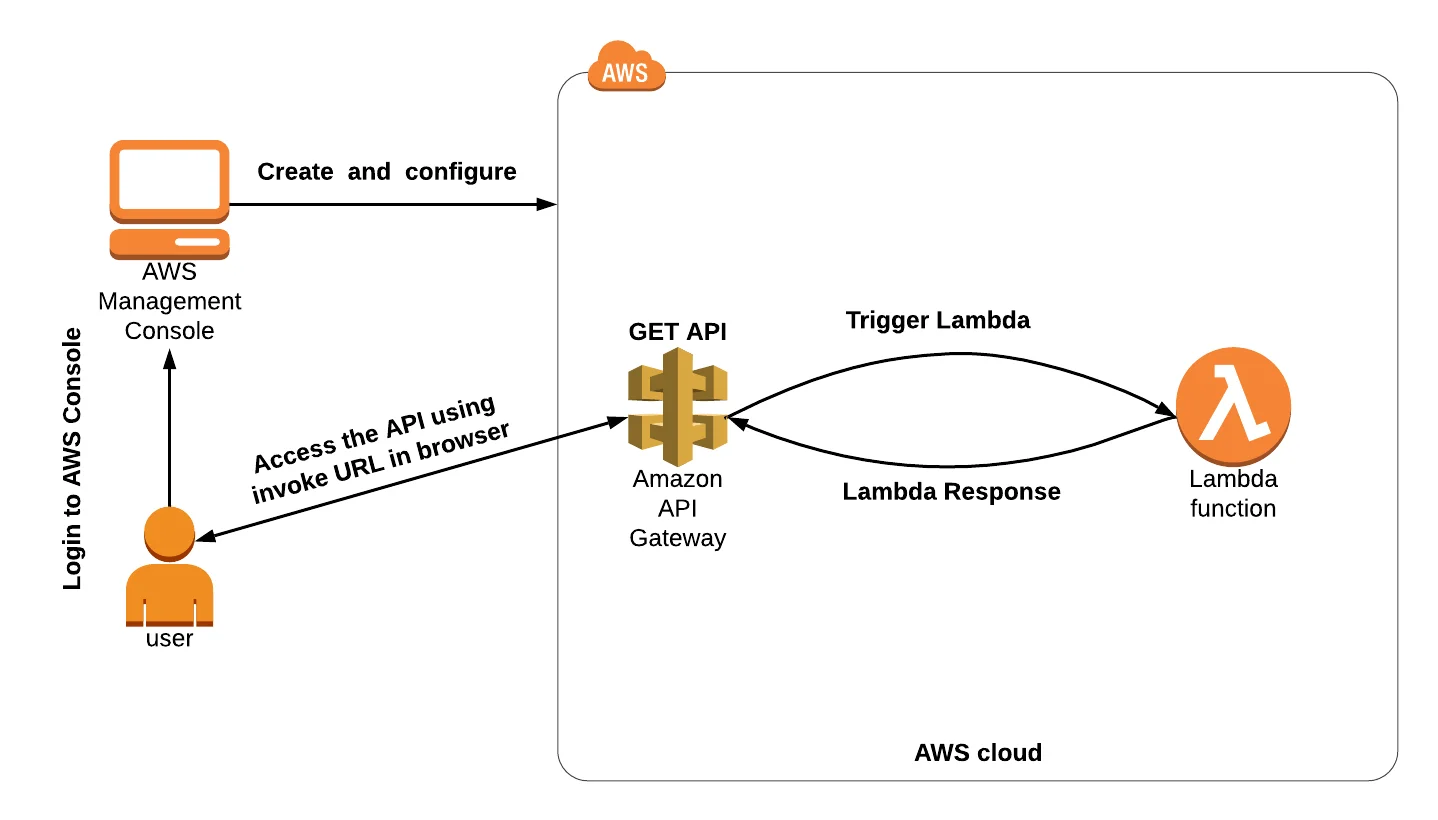
Lab 4: Automate Start/Stop EC2 Instance using Lambda

Check out this blog for more details: Blog link
1.9 AWS Automation & Configuration Management
Lab 1: Create and Update Stacks using CloudFormation
Enter the realm of Infrastructure as Code (IaC) with AWS CloudFormation. Learn to create and update stacks to provision and manage AWS resources in a repeatable and automated fashion.
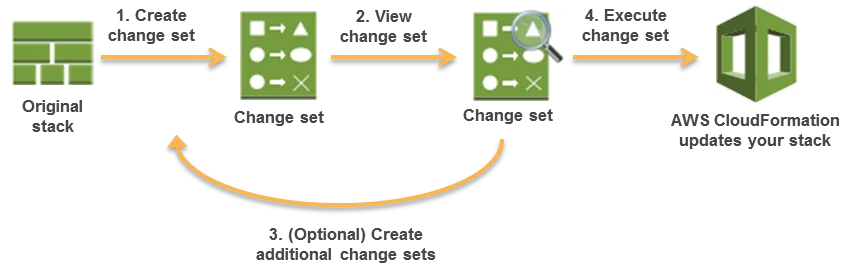 Lab 2: Create an S3 Bucket Using CloudFormation
Automate S3 bucket creation with AWS CloudFormation, streamlining your infrastructure management and ensuring consistency across deployments.
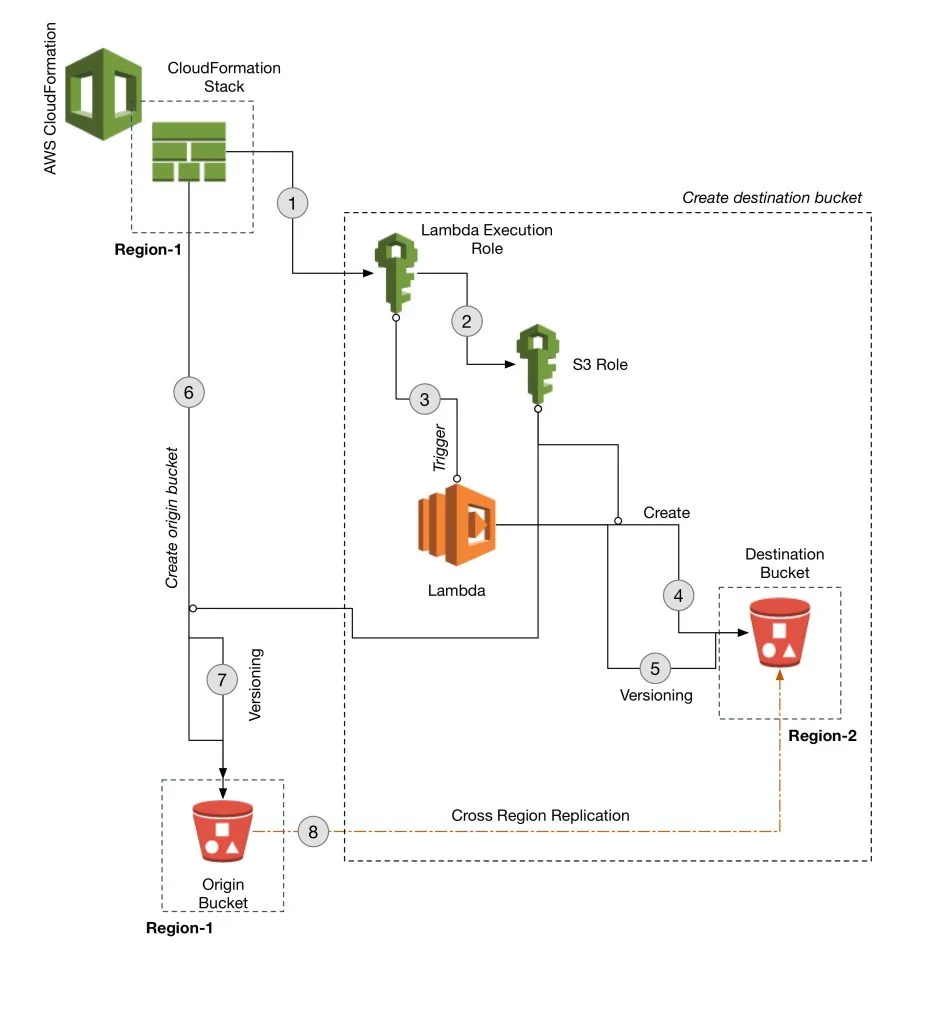 Lab 3: Create & Configure EC2 with Helper-Scripts
Leverage helper scripts to automate the creation and configuration of EC2 instances. This lab provides hands-on experience in scripting for efficient and reproducible infrastructure deployment.
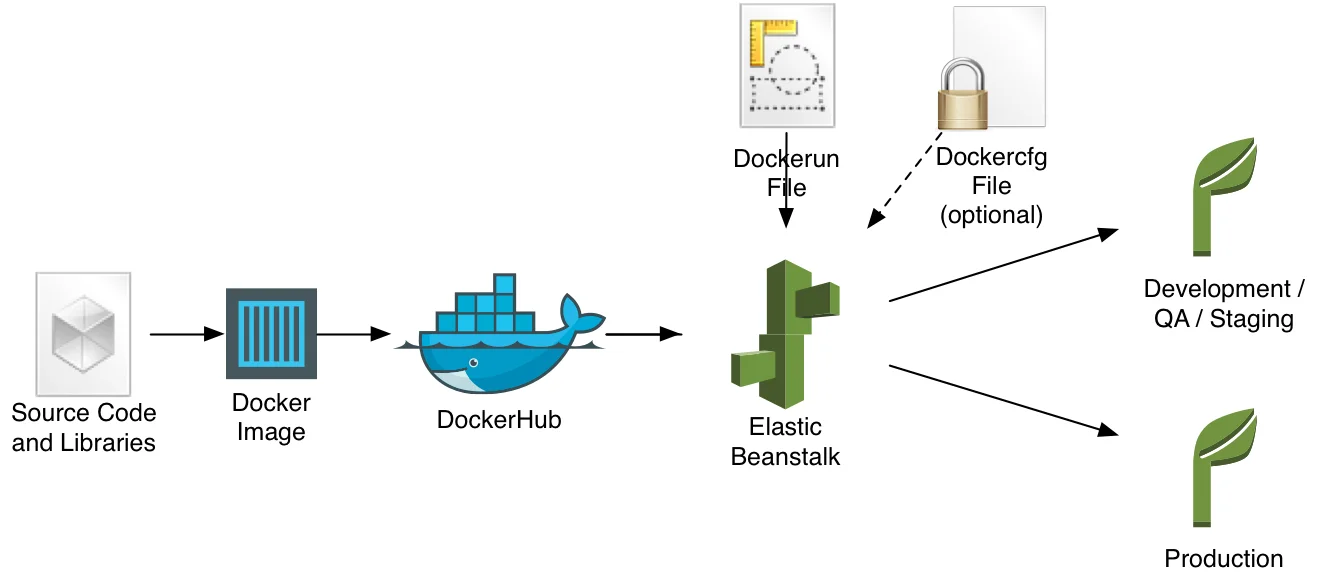
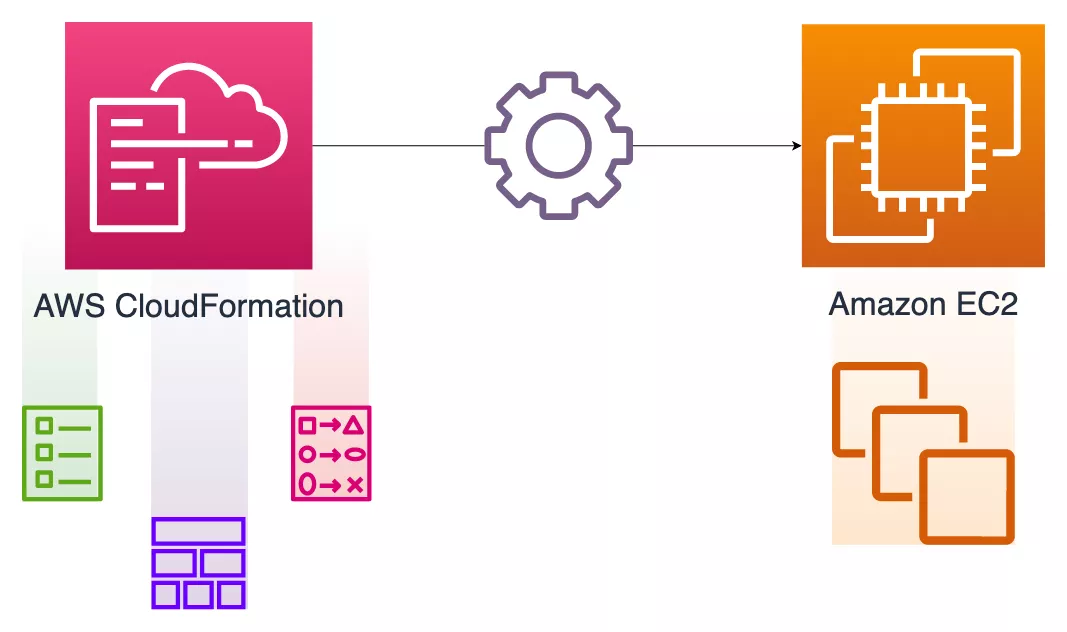 Lab 4: Deploy An Application In Beanstalk Using Docker
Explore AWS Elastic Beanstalk for simplified application deployment. This lab focuses on deploying applications using Docker containers, providing scalability and ease of management.
 Lab 5: Immutable Deployment in Beanstalk Environment
Implement immutable deployments on Elastic Beanstalk environments for enhanced reliability and consistency. This lab guides you through deploying applications with minimal downtime and risk.
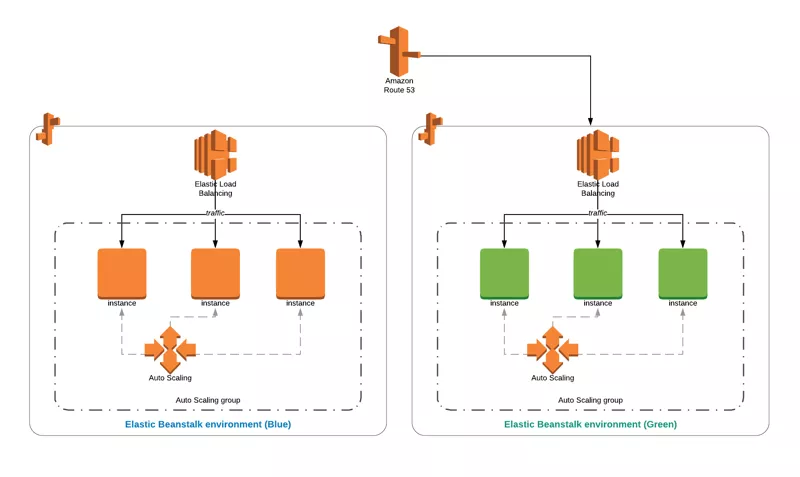
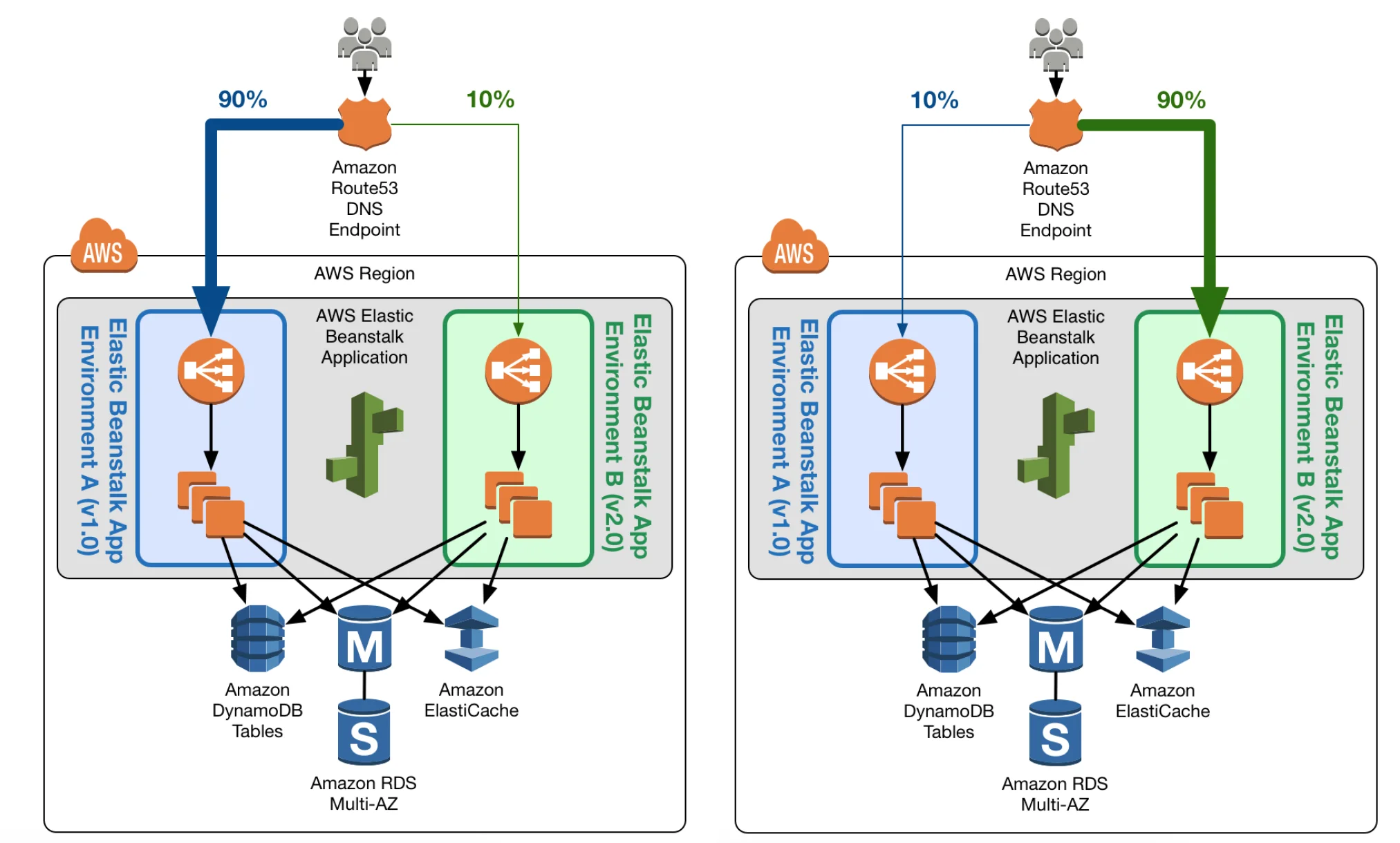
Lab 6: Blue-Green Deployments Using Elastic Beanstalk
Optimize your deployment strategies with blue-green deployments on Elastic Beanstalk. This lab explores techniques for minimizing downtime and risk during application updates.
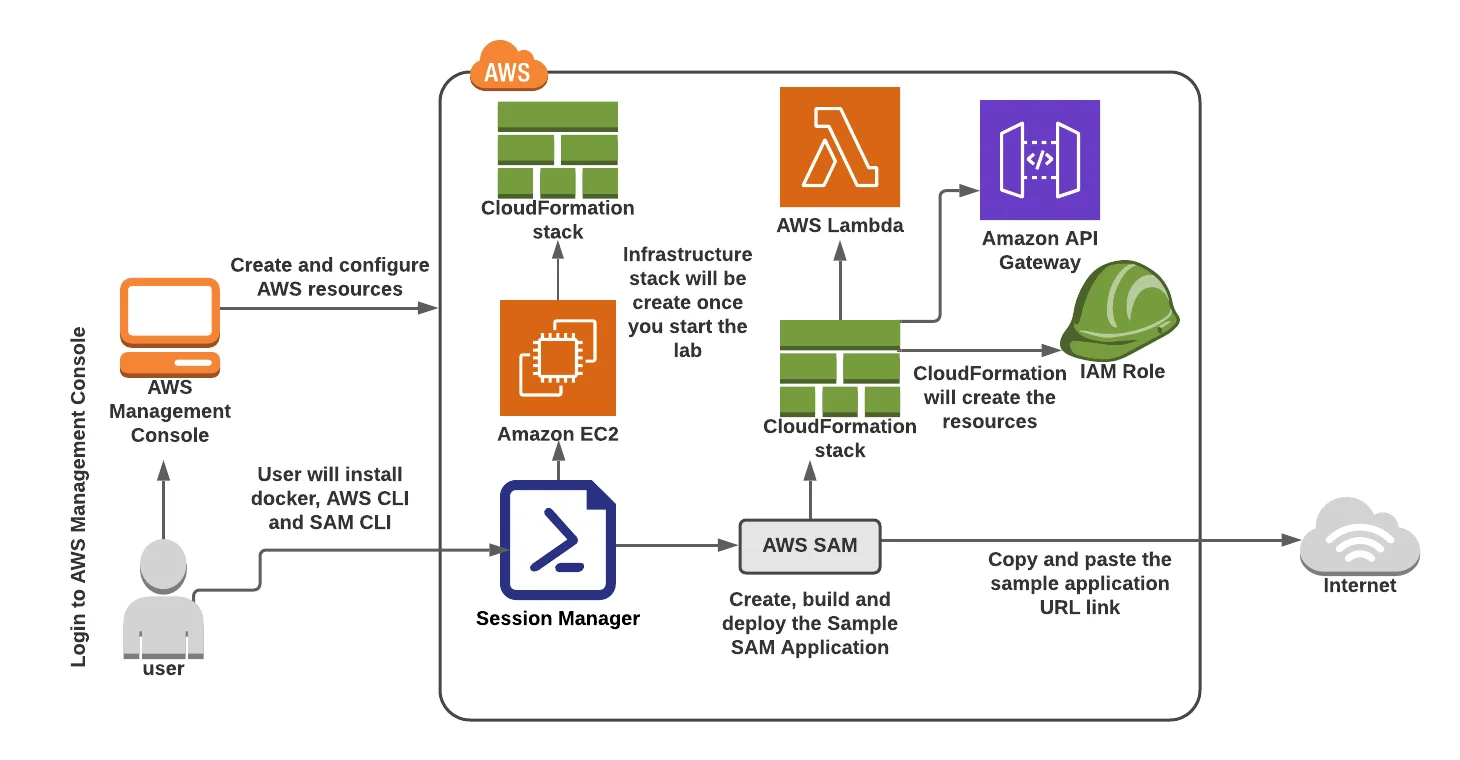
 Lab 7: AWS Serverless Application Model
Enter the world of serverless architecture with the AWS Serverless Application Model (AWS SAM). This lab provides a hands-on introduction to building and deploying serverless applications efficiently.
1.11 AWS Security Services
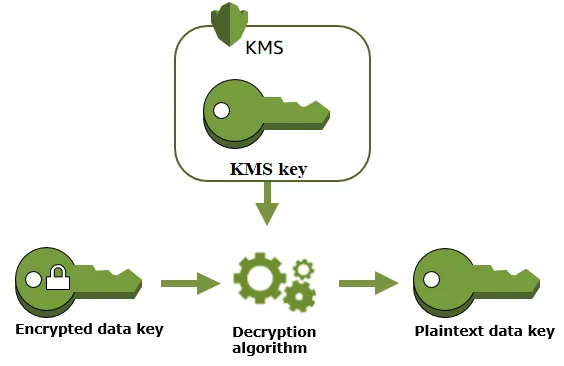
Lab 1: AWS KMS Create & Use
Explore AWS Key Management Service (KMS) for creating and using cryptographic keys to enhance data security. This lab guides you through the process of securing sensitive information with KMS.
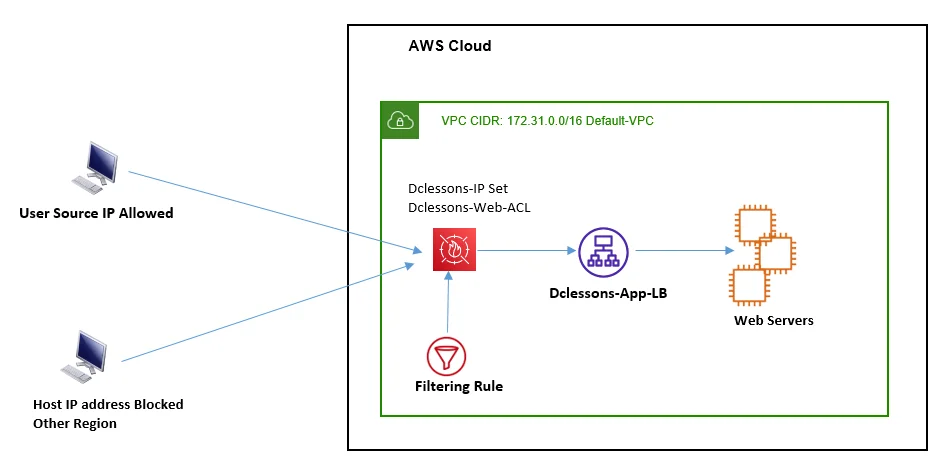
 Lab 2: Block Web Traffic with WAF in AWS
Fortify your web applications with AWS Web Application Firewall (WAF). This lab demonstrates how to block malicious web traffic and protect your applications from common security threats.
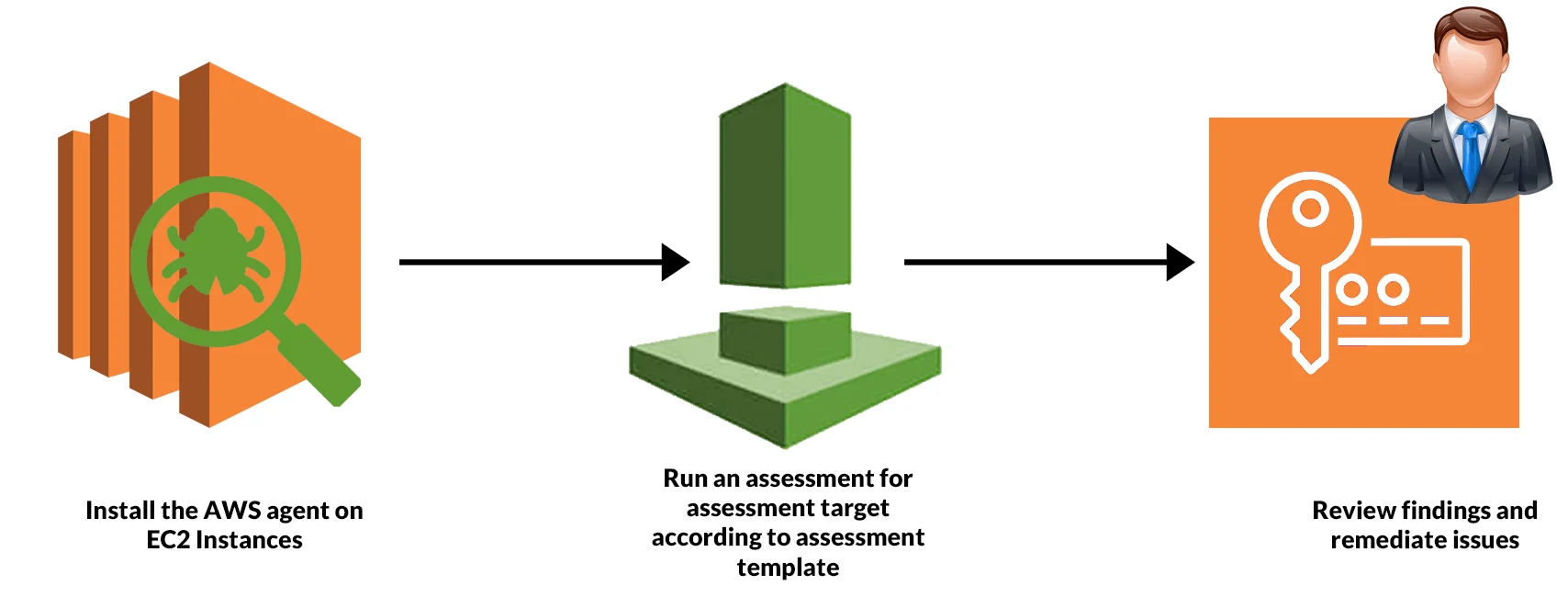
 Lab 3: Amazon Inspector
Enhance your security posture with Amazon Inspector, an automated security assessment service. This lab guides you through setting up and using Inspector to identify vulnerabilities in your AWS resources.
1.12 CICD Tools and Pipeline
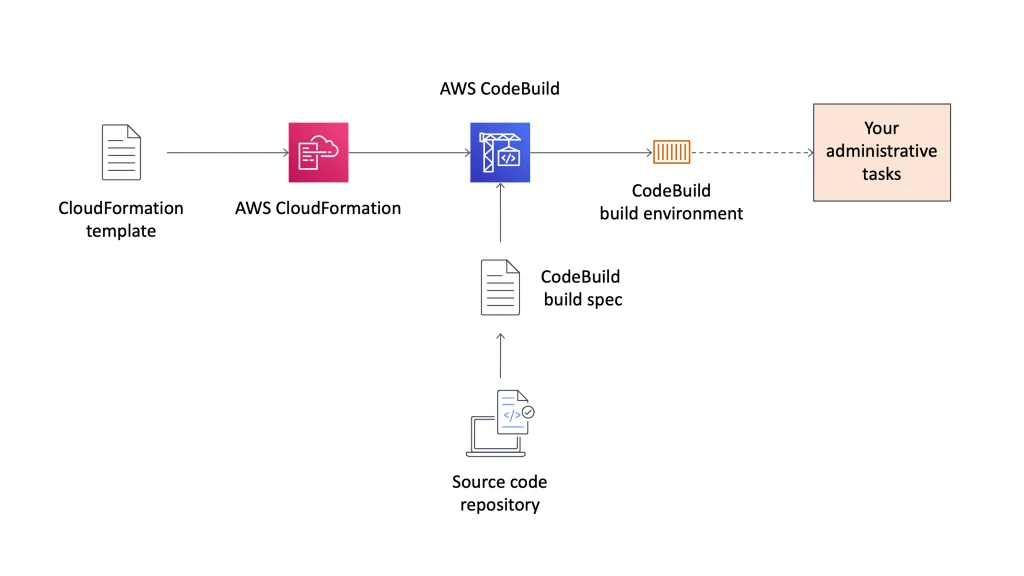
Lab 1: Build an Application with AWS CodeBuild
Automate your build processes with AWS CodeBuild. This lab guides you through setting up build projects, compiling code, and generating artifacts for deployment.
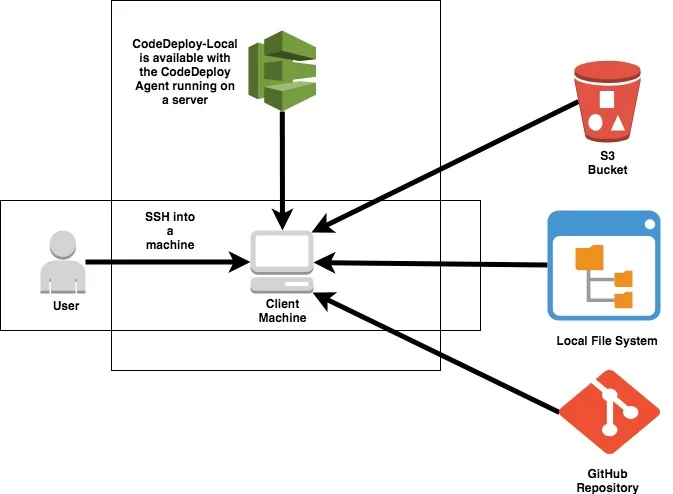
 Lab 2: Deploy Sample Application using AWS CodeDeploy
Streamline application deployment with AWS CodeDeploy. This lab demonstrates how to automate the deployment process, ensuring consistent and reliable releases.
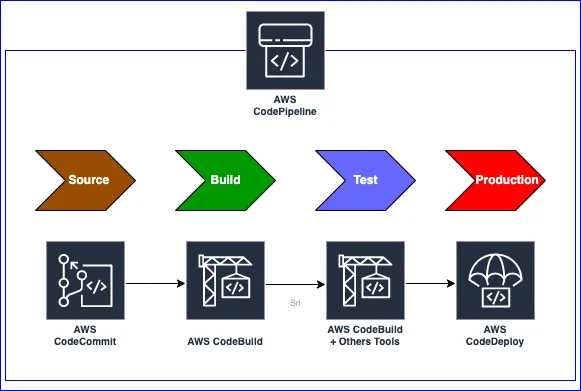
 Lab 3: Create a Simple Pipeline (CodePipeline)
Build end-to-end continuous integration and continuous deployment (CI/CD) pipelines with AWS CodePipeline. This lab provides hands-on experience in orchestrating and automating your software delivery process.
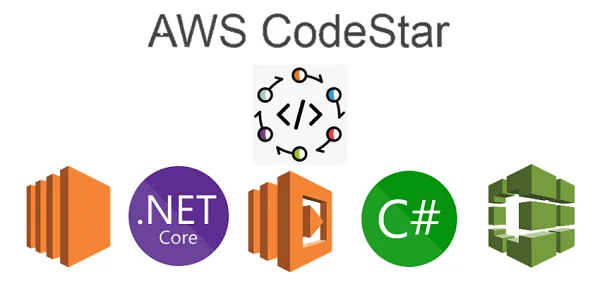
 Lab 4: Build an Application with AWS CodeStar
Accelerate your development workflow with AWS CodeStar. This lab introduces you to the benefits of CodeStar for simplifying project setup, development, and deployment.
1.13 AWS Container Services
Lab 1: Create ECR, Install Docker, Create Image, and Push Image To ECR
Dive into containerization with Amazon Elastic Container Registry (ECR). This lab covers the entire container lifecycle, from creating a repository to pushing Docker images to ECR for seamless container management.
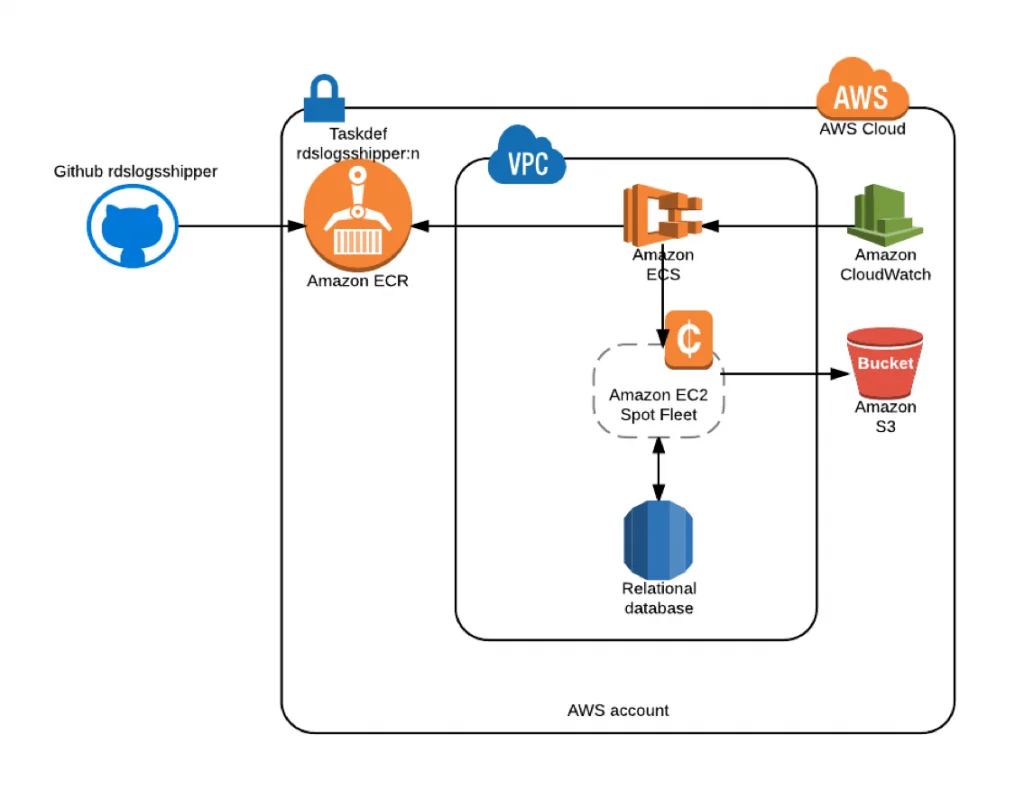
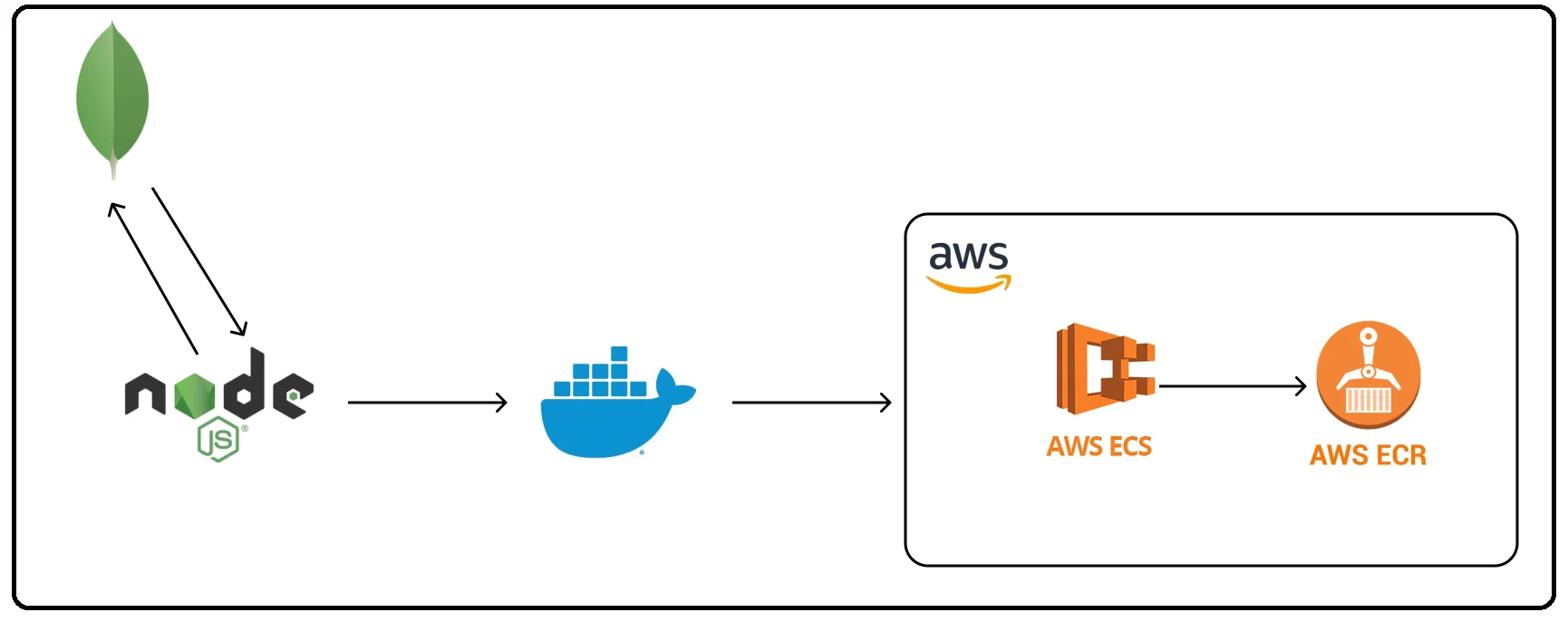 Lab 2: Create Task Definitions, Schedule Tasks, Configure Services, and Cluster using EC2 Launch Types
Explore Amazon ECS (Elastic Container Service) by creating task definitions, scheduling tasks, and configuring services and clusters. This lab provides hands-on experience in managing containerized applications using different EC2 launch types.
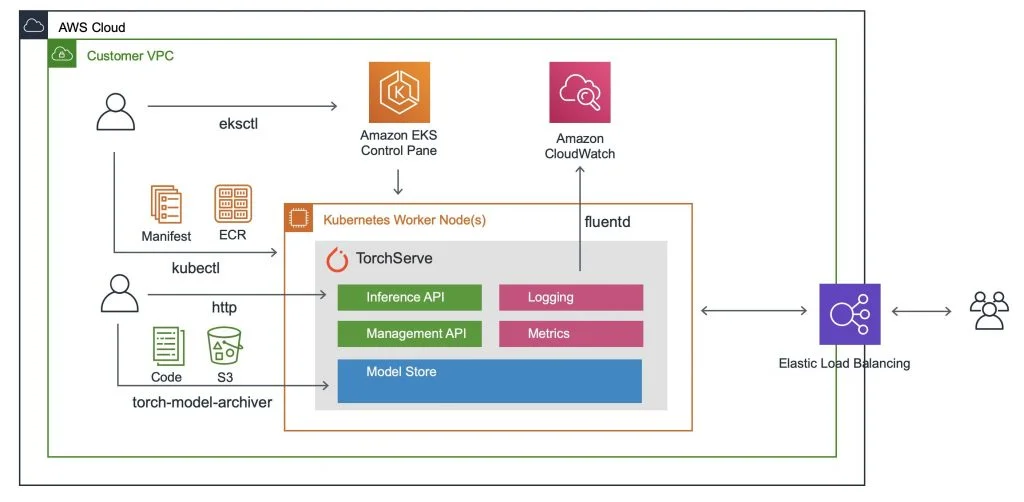
 Lab 3: Create Elastic Kubernetes Service (EKS) Cluster on AWS
Delve into Kubernetes on AWS by creating an Elastic Kubernetes Service (EKS) cluster. This lab guides you through provisioning and managing Kubernetes clusters for container orchestration.
1.14 AWS Migration
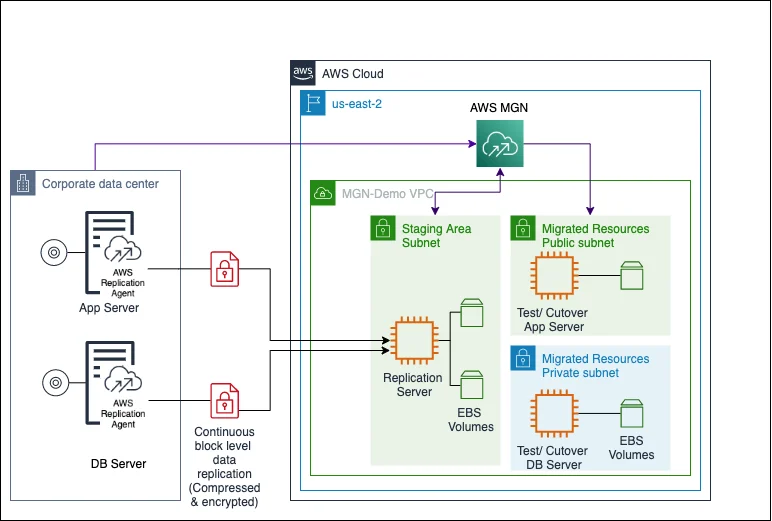
Lab 1: Application Migration to AWS
Learn the intricacies of migrating applications to AWS. This lab covers assessment, planning, and execution strategies to ensure a seamless transition to the cloud.
 Lab 2: Database Migration To AWS
Explore strategies and tools for migrating databases to AWS. This lab provides practical guidance on minimizing downtime and ensuring data consistency during database migration.
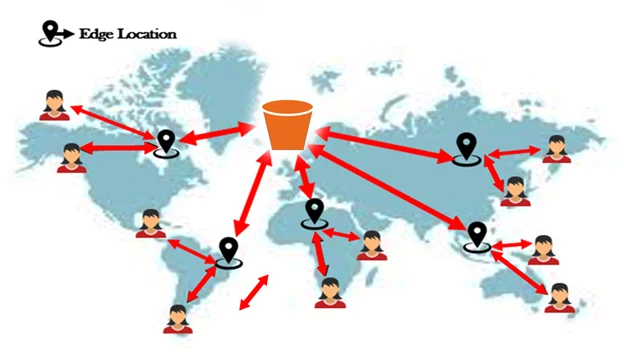
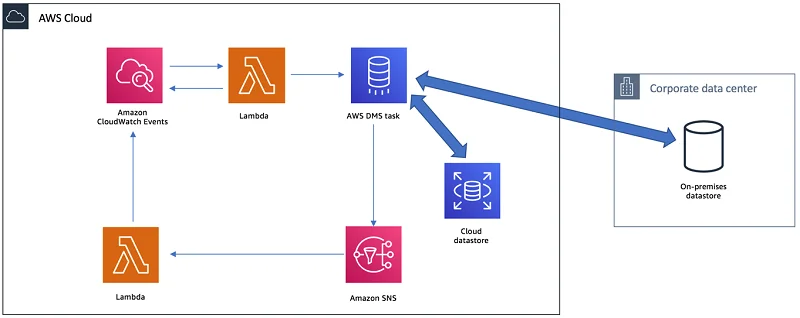 Lab 3: AWS Data Transfer Acceleration
Optimize your data transfer speed with AWS Data Transfer Acceleration. This lab introduces you to acceleration techniques for efficient data movement within the AWS infrastructure.
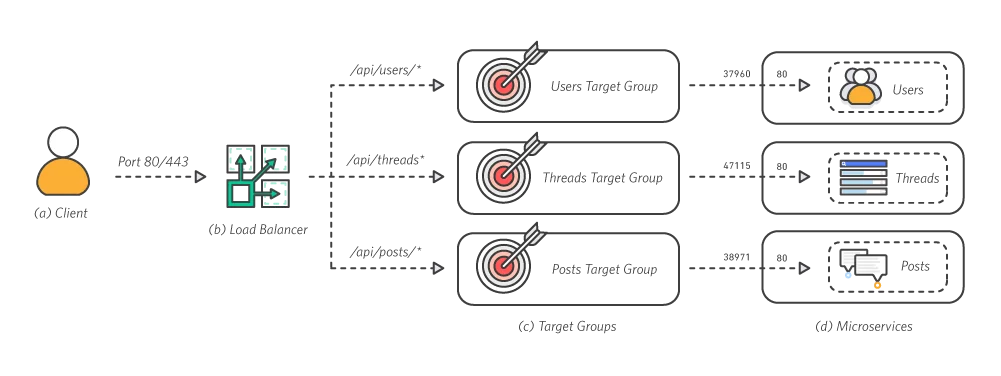
 Lab 4: Migrating a Monolithic Application to AWS with Docker
Experience the process of migrating a monolithic application to AWS using Docker containers. This lab covers containerization strategies and best practices for achieving scalability and flexibility in a cloud environment.
2 Real-time Projects

Project 1: 3-Tier Architecture Deployment (Web, App, Database)
Create a well-architected 3-tier system. The web layer serves as the user interface, the app layer processes business logic, and the database layer stores and manages data. This project ensures a scalable and modular infrastructure, fostering efficient resource utilization.
 Project 2: DevOps: End-to-End CI/CD Pipeline
Establish an end-to-end CI/CD pipeline for your development workflow. This includes automating code builds, running tests, and deploying applications seamlessly. The goal is to enhance collaboration among developers, reduce manual errors, and accelerate the release of high-quality software.

Check out this blog for more details: Click here
Project 3: Migration: On-Premise to Cloud (App, Database, Data)
Execute a comprehensive migration from on-premise infrastructure to the AWS cloud. This involves moving applications, databases, and data to the cloud, optimizing for scalability, cost efficiency, and improved reliability.
 Check out the blog for more details: Check Here

Project 4: Migration: Monolithic App to Microservices
Transform a monolithic application into a microservices architecture on AWS. Break down the application into smaller, independent services, each with its own functionality. This project aims to enhance agility, scalability, and ease of maintenance.
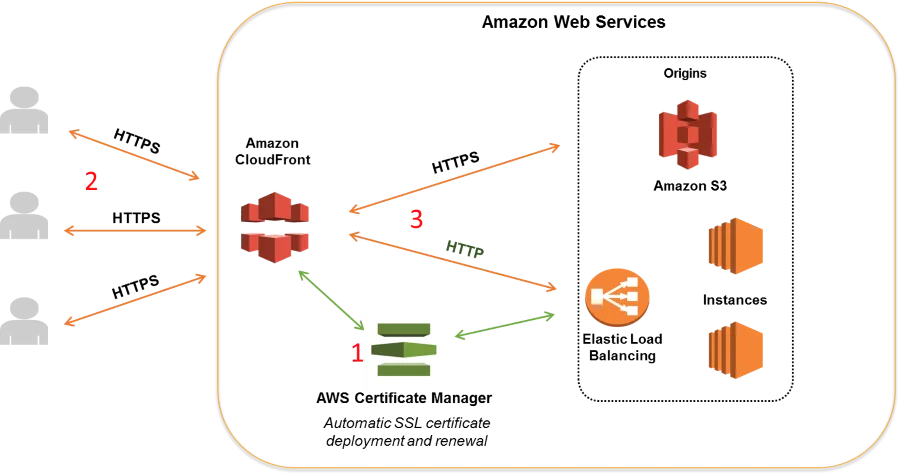
 Project 5: Security: SSL/TLS/Keys Certificate Management System
Implement a robust security system, including SSL/TLS protocols for encrypted communication and a key management system for secure key storage and access. This project ensures the confidentiality and integrity of data in transit.
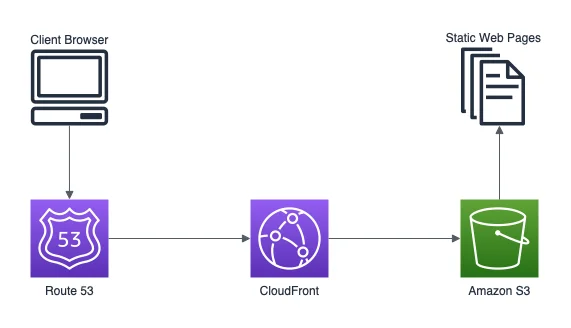
Project 6: Host Static Website on AWS using S3 & Route53
Host a static website using Amazon S3 for storage and Amazon Route 53 for domain management. This project includes setting up S3 buckets, configuring static website hosting, and managing domain routing, providing a reliable and scalable solution for static content.
 Project 7: Host a Dynamic Website on AWS: Apache, MariaDB, PHP
Deploy a dynamic website using a stack comprising an Apache web server, MariaDB database, and PHP scripting. This project involves configuring each component, ensuring seamless communication, and establishing a scalable environment for dynamic web applications.
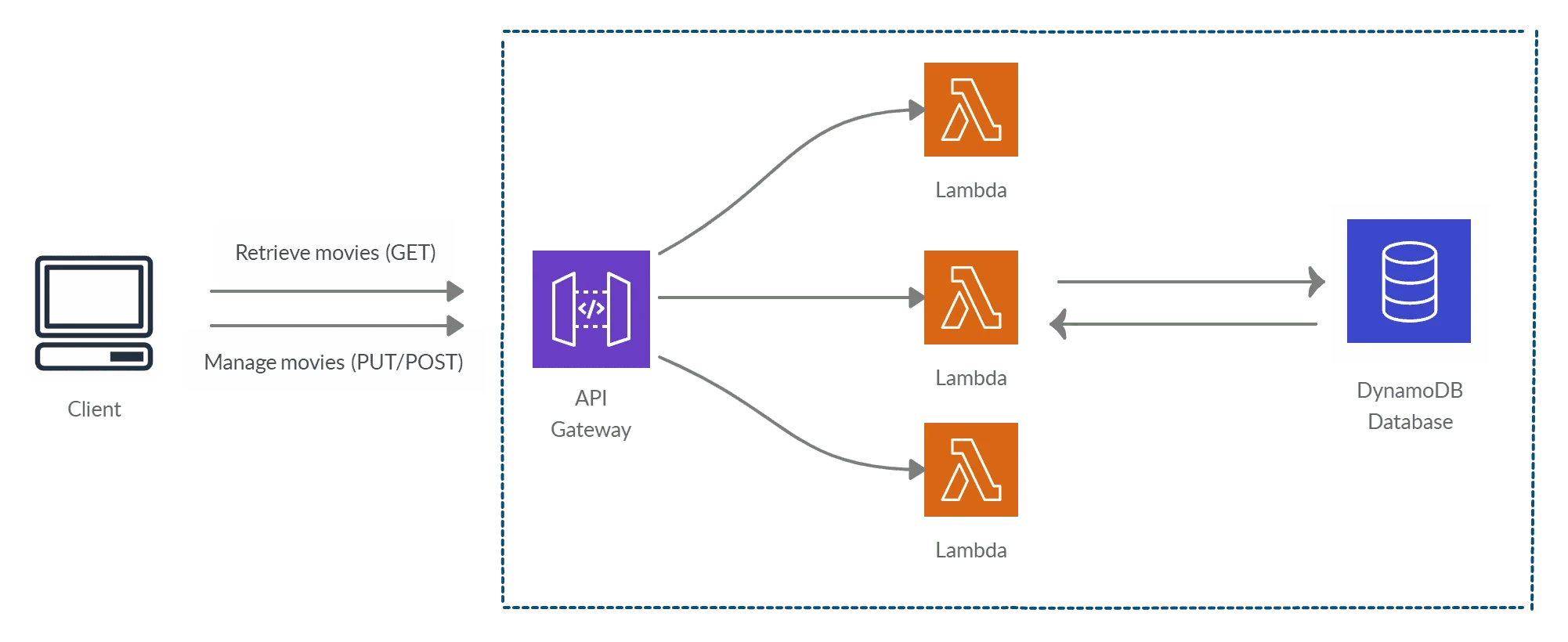
 Project 8: Deploy API Gateway, Application & Database
Build and deploy a comprehensive solution that includes an API Gateway, application layer, and database. This project focuses on designing RESTful APIs, connecting them to backend services, and managing data storage effectively.
 Project 9: Deploy React App using Amplify, Lambda & AppConfig
Develop and deploy a React.js application using AWS Amplify for hosting, AWS Lambda for serverless functions, and AppConfig for configuration management. This project showcases modern front-end development practices, serverless architecture, and efficient application configuration in the AWS cloud.
Project 10: Deploy Super Mario on Kubernetes using Terraform
Deploy the Super Mario game on Kubernetes using Terraform, combining infrastructure automation with application orchestration. Terraform provisions the required resources, while Kubernetes manages the deployment and scalability, ensuring an optimized, reliable, and scalable gaming environment for users.

Project 11: Deploy Netflix Clone Application on Kubernetes
Deploy a Netflix clone on Kubernetes using a CI/CD pipeline with Jenkins, SonarQube, and Trivy for security. This project automates builds and ensures a secure, scalable deployment of the application.

Project 12: Automate the Start/Stop of EC2 Instances using Lambda
Automate EC2 start/stop with AWS Lambda and EventBridge to optimize costs. Set up a Linux EC2 instance, IAM role, and policy, then configure Lambda and EventBridge to schedule instance management during off-hours, ensuring efficient resource usage.

Project 13: AWS Automation Troubleshooting & Cost Optimization
Investigate and resolve issues in a multi-tier Recommendation Service architecture using AWS tools like ALB, Auto Scaling, Systems Manager, and Route 53. Troubleshoot networking and service dependencies to restore full functionality. Implement Auto Scaling policies and resource right-sizing to optimize costs while maintaining high availability and performance before production deployment.

Project 14: AWS Backup and Recovery: End-to-End Data Integrity Restoration on AWS
Design and implement backup and recovery strategies using AWS Backup to ensure data integrity across EC2, EBS, and RDS resources. Perform on-demand backups, automate scheduled backups, and restore data efficiently while monitoring compliance using AWS Backup Audit Manager.

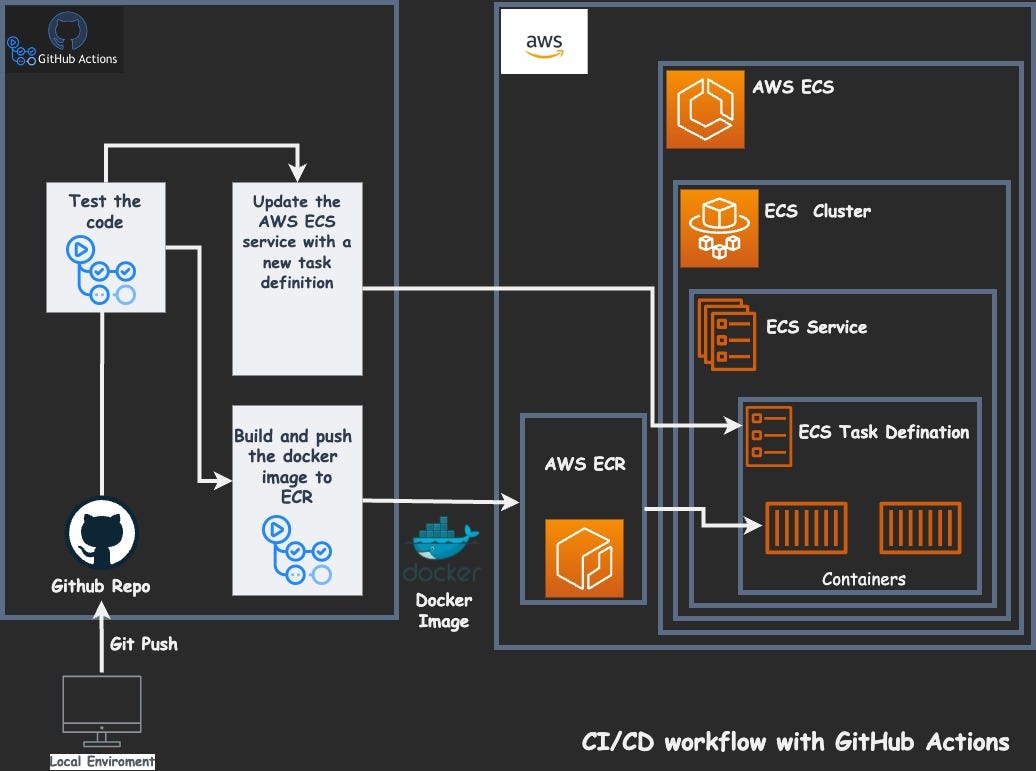
Project 15: Deploy Web App on AWS ECS with GitHub Actions
This project involves deploying a web application on AWS Elastic Container Service (ECS) using GitHub Actions for CI/CD. You learn how to automate the deployment process, integrating GitHub for source control and using ECS for scalable application hosting.
Project 16: Secure VPC for Production Environment
In this project, you design and implement a Secure Virtual Private Cloud (VPC) with public and private subnets specifically for a production environment. It involves configuring network security, routing, and ensuring high availability and fault tolerance within the VPC for secure access.

Project 17: Zomato Clone Deployment (DevSecOps)
The Zomato Clone project is based on replicating the functionality of Zomato (restaurant search and delivery) using a DevSecOps approach. You’ll focus on continuous integration, continuous deployment (CI/CD), and automated security testing, ensuring that security is integrated at every stage of the development pipeline.
Project 18: AWS Cloud – Dynamic Blood Bank Management System
This project focuses on building a Dynamic Blood Bank Management System hosted on AWS Cloud. The goal is to create an efficient system to manage blood donations, inventories, and request matching, ensuring scalability and data security using AWS services.
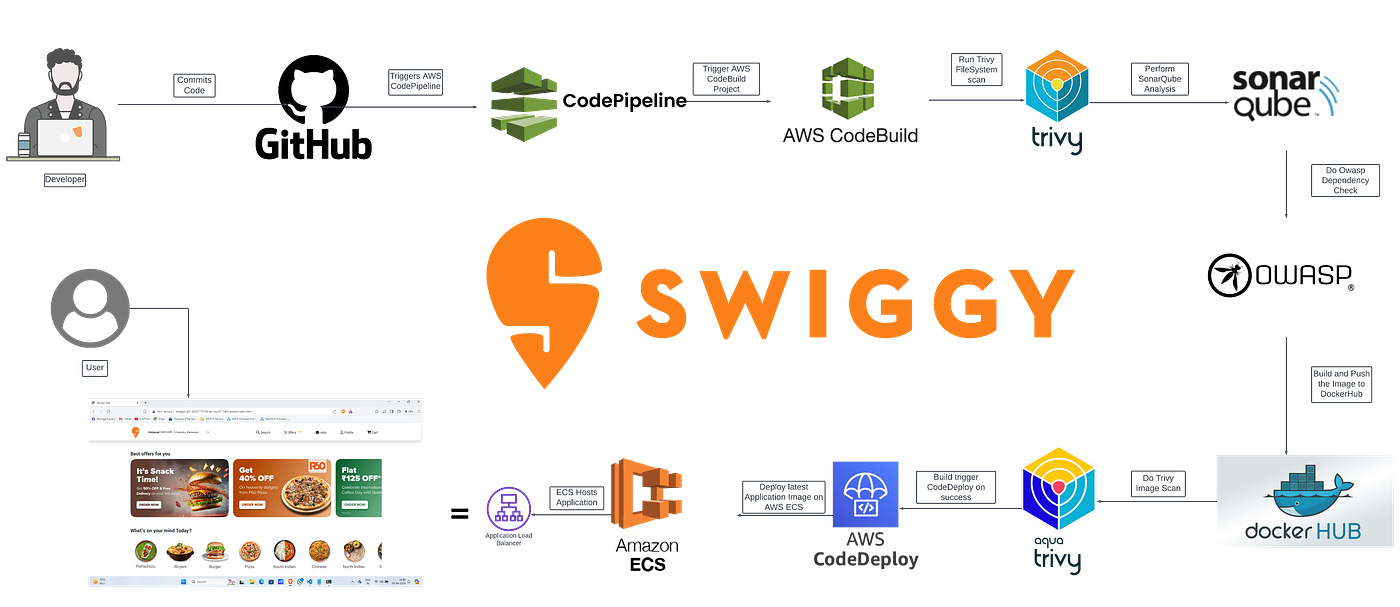
 Project 19: Implementing Deployment for Swiggy-Clone on EC2
In this project, you replicate Swiggy (a food delivery app) and deploy it on an EC2 instance. The focus is on setting up the necessary backend infrastructure, using EC2 instances for hosting, and ensuring proper scaling and security for the application.
Project 20: K8s End-to-End Project on EKS
This project involves deploying an application on Kubernetes (K8s) using Amazon EKS (Elastic Kubernetes Service). You will learn how to set up a Kubernetes cluster, deploy microservices, and ensure scalability and availability in production environments with EKS.
 Related Links/References:
- How do I create and activate a new Amazon Web Services account?
- Overview of Amazon Web Services & Concepts
- AWS Certified Solutions Architect Associate SAA-C03
- AWS Management Console Walkthrough
- AWS Certified DevOps Engineer Professional DOP-C02
- AWS CloudFormation
- Amazon Virtual Private Cloud (AWS VPC) Benefits & Components
- AWS Elastic Beanstalk
- AWS Global Infrastructure: A Comprehensive Guide
Next Task For You
Begin your journey towards an AWS Cloud by joining our FREE Informative Class on Amazon Cloud Free Class by clicking on the image below.


![Microsoft Agentic AI Business Solutions Architect [AB-100] | K21 Academy](https://test.k21academy.com/wp-content/uploads/2025/11/Microsoft-Agentic-AI-Business-Solutions-Architect-AB-100-Exam-Overview1.png)


