



This post covers one of the Q/As asked in our DBA To Cloud DBA Training live session (for free masterclass Register here) that how IP Address Space Allocation In 1-node or 2-node RAC In compute/bare metal DB system in Oracle Cloud Infrastructure (OCI)
In generic 1-node Oracle database is a single database instance working for your application & RAC (Real Application Cluster) is (more than one node) multiple databases instances supporting your application at the same time & Oracle RAC (Real Application Cluster) provides high availability and scalability for Oracle Database. To know more about RAC in Cloud Check here
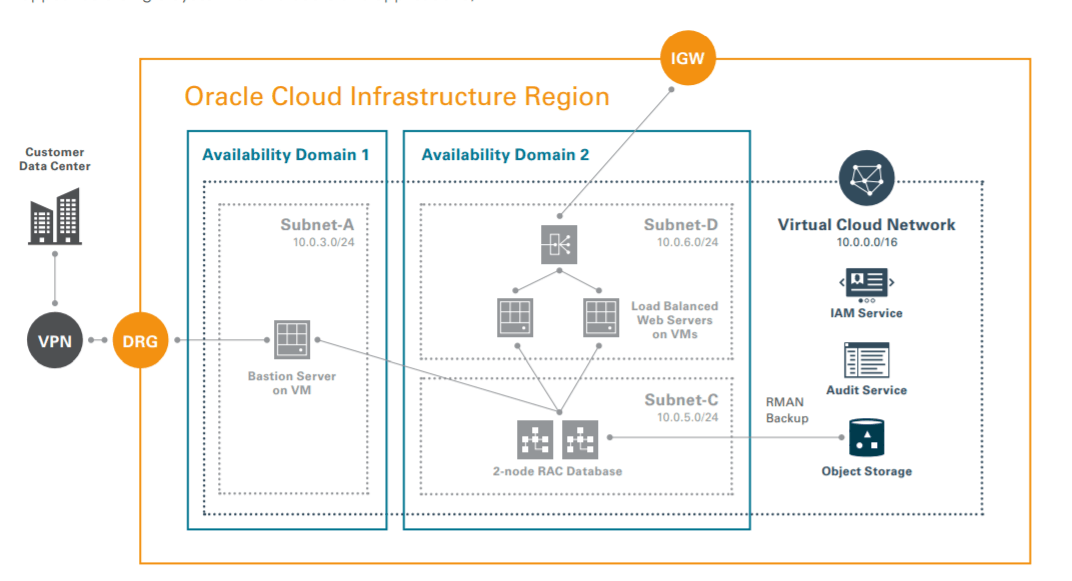
Key Points About RAC In Cloud (OCI)
- In Oracle Cloud Infrastructure User-Managed Database can be created on
1) Virtual Machine
2) Bare Metal
3) Exadata 2-node
You can create a RAC database either on VM based DB System & Exadata based DB System.
Note: RAC is not supported in Bare Metal DB System. - Database editions supported in Oracle Cloud Infrastructure are
1) Standard Edition
2) Enterprise Edition
3) Enterprise Edition – High Performance
4) Enterprise Edition – Extreme Performance supports 2-node RAC DataBase systems. - You can set up the maximum of 2-node RAC in VM DB System
- You can set up a maximum of 8-node RAC in Exadata DB System
- When you provision a 2-node RAC DataBase systems, the system assigns each node to a different fault domain. To know more about fault domain Check here
Creating RAC Database on Oracle Cloud Infrastructure (OCI)
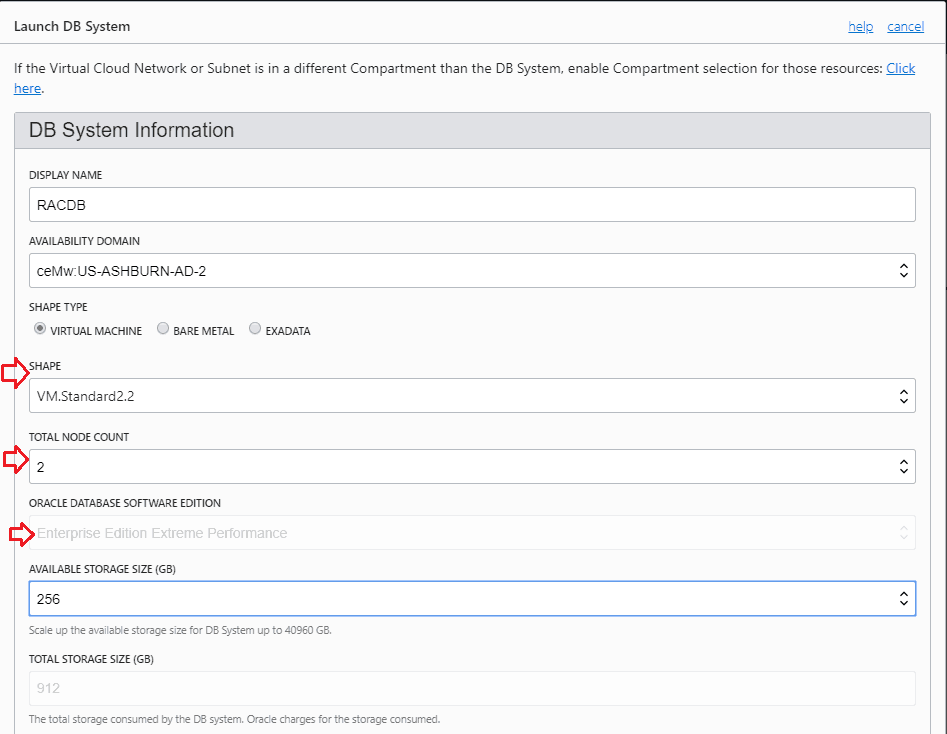
To create a 2-node DB System in Oracle Cloud Infrastructure (OCI), go to the cloud console and click on launch DB System then under Total Node Count, select 2 & Oracle Database Software Edition should be Enterprise Edition – Extreme Performance.
To know the complete the process of Creating DB System in Oracle Cloud Infrastructure Check here
Also read: Overview of Oracle Data Guard In Oracle Cloud Infrastructure
IP Address Space Allocation In 1-node or 2-node RAC DataBase system In OCI
When you create DB System in Oracle Cloud Infrastructure, the very first thing you need to create Virtual Cloud Network and within that network, you create subnets which can be either public or private based on your requirement, so while creating subnets you need to have clarity that what will be your CIDR range you should give & how many IP’s are required if you are creating either 1-node or 2-node RAC In compute /bare metal DB system in Oracle Cloud Infrastructure.
To know more about various Networking Components such as VCN, Subnet (Public /Private), CIDR, IGW, DRG, etc check here
1-Node Bare Metal or Virtual Machine DB System
Below is the complete IP address allocation for 1-node DB System.
- 1 IP for Client Request
- 3 IP’s are reserved for Subnet
- Minimum Subnet CIDR range we should define when we creating 1-Node Bare Metal or Virtual Machine DB System will be /30 ie equivalent to 4 IP’s
2-Node RAC Virtual Machine
Note: If you are creating DB System In either in VM or Compute in Oracle Cloud Infrastructure, 2-Node RAC is only supported in Virtual Machine DB System. To know more about Database Offerings in Oracle Cloud Infrastructure Check here
Below is the complete IP address allocation for 2-node DB System.
- 4 IPs for Database host 1 IP per node for Client Request, 1 IP per node for Private InterConnect
3 IPs for SCAN listener - 3 IP’s are reserved for Subnet
- Minimum Subnet CIDR range we should define when we creating 2-Node Virtual Machine DB System will be /28 ie equivalent to 16 IP’s.
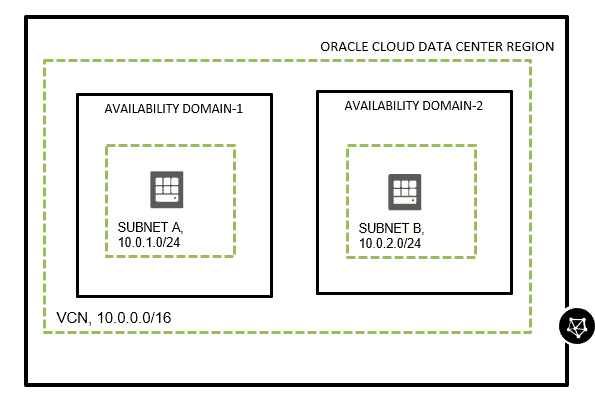
Note: Best Practices says always use the larger CIDR value for you subnet as once subnet is created you cannot change the CIDR value.
Hope you find this useful and have a clear understanding of IP Addresses allocation in 1 -node & 2-node DB System in Oracle Cloud Infrastructure.
Stay tuned for my upcoming blogs in Database in OCI
Related/Further Readings
- Oracle Cloud Infrastructure: Database Offerings
- Role of Oracle DBA in Cloud: Transition from DBA to Cloud DBA
- DBA To Cloud DBA Training (OCI): Step By Step Activity Guides/Hands-On Lab Exercise
Next Task For You
If you want to take your career to the next level by switching your role from that of DBA To Cloud DBA even if you are a beginner, then I would like to invite you to Join my FREE Masterclass on DBA To Cloud DBA: What, Why & How to Learn.
Click on the image below to Register For FREE Masterclass.


![Microsoft Agentic AI Business Solutions Architect [AB-100] | K21 Academy](https://test.k21academy.com/wp-content/uploads/2025/11/Microsoft-Agentic-AI-Business-Solutions-Architect-AB-100-Exam-Overview1.png)


