




This Post Covers javax net ssl SSLException Received fatal alert protocol_version error while running schedule job IDCS Group Lookup Reconciliation as a part of Oracle Identity Manager (OIM)/Oracle Identity Governance (OIG), Integration with Oracle Identity Cloud Service (IDCS) from Oracle Identity Cloud Service (IDCS) Training. (for Free Master Class on Cloud Security Using Oracle IDCS: Career Path & What to Learn? )
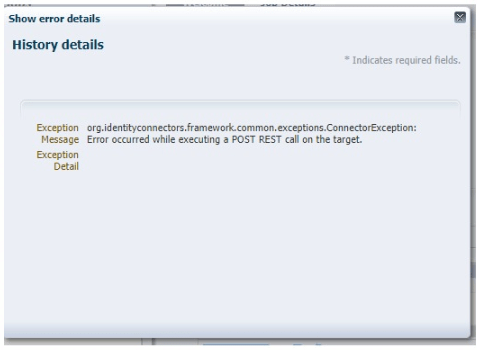
Error: occurred while executing a POST REST call on the target. org.identityconnectors.framework.common.exceptions.ConnectorException: Error occurred while executing a POST REST call on the target.
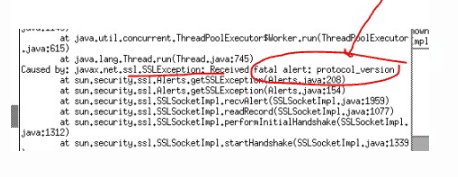
Caused by: javax.net.ssl.SSLException: Received fatal alert: protocol_version
If you are new to Secure Socket Layer (SSL), then I would suggest you check our previous post where we have covered in detail.
- SSL in WebLogic (CA, KeyStore, Identity & Trust Store): Things you must know – Part I Click Here
- SSL in WebLogic Server – Part II: Create KeyStore, generate CSR, Import CERT and configure KeyStore with WebLogic Click Here
If you want to know more about Oracle Identity Cloud Service (IDCS) check our previous post where we have covered in detail about Oracle Identity Cloud Serve ice (IDCS) Overview & Concepts
Issue:
Oracle Identity Manager (OIM) was integrated with Identity Cloud Service (IDCS) using the OIM IDCS connector Bundle 12.2.1.3 which was deployed into Connector Server 12.2.1.3.0.
While Running schedule job IDCS Group Lookup Reconciliation fails with javax net ssl SSLException: Received fatal alert protocol_version
Log Filename = $CONNECTOR_SERVER_HOME/logs/connectorserver0.log
————————————————–
May 14, 2019 5:49:44 AM org.identityconnectors.framework.server.impl.ConnectionListener processOperationRequest
SEVERE: Error occurred while executing a POST REST call on the target.
org.identityconnectors.framework.common.exceptions.ConnectorException: Error occurred while executing a POST REST call on the target.
at org.identityconnectors.restcommon.ClientHandler.executeRequest(ClientHandler.java:256)
at org.identityconnectors.restcommon.auth.impl.OAuthClientCredentials.getAuthHeaders(OAuthClientCredentials.java:123)
at org.identityconnectors.restcommon.ClientHandler.getAuthenticationHeaders(ClientHandler.java:97)
at org.identityconnectors.genericscim.GenericSCIMConnection.<init>(GenericSCIMConnection.java:79)
at org.identityconnectors.genericscim.GenericSCIMConnector.init(GenericSCIMConnector.java:209)
at org.identityconnectors.framework.impl.api.local.operations.ConnectorAPIOperationRunnerProxy.invoke(ConnectorAPIOperationRunnerProxy.java:89)
at com.sun.proxy.$Proxy5.search(Unknown Source)
at sun.reflect.NativeMethodAccessorImpl.invoke0(Native Method)
at sun.reflect.NativeMethodAccessorImpl.invoke(NativeMethodAccessorImpl.java:57)
at sun.reflect.DelegatingMethodAccessorImpl.invoke(DelegatingMethodAccessorImpl.java:43)
at java.lang.reflect.Method.invoke(Method.java:606)
at org.identityconnectors.framework.impl.api.local.operations.ThreadClassLoaderManagerProxy.invoke(ThreadClassLoaderManagerProxy.java:107)
at com.sun.proxy.$Proxy5.search(Unknown Source)
at org.identityconnectors.framework.server.impl.ConnectionProcessor.processOperationRequest(ConnectionProcessor.java:287)
at org.identityconnectors.framework.server.impl.ConnectionProcessor.processRequest(ConnectionProcessor.java:192)
at org.identityconnectors.framework.server.impl.ConnectionProcessor.run(ConnectionProcessor.java:121)
at java.util.concurrent.ThreadPoolExecutor.runWorker(ThreadPoolExecutor.java:1145)
at java.util.concurrent.ThreadPoolExecutor$Worker.run(ThreadPoolExecutor.java:615)
at java.lang.Thread.run(Thread.java:745)
Caused by: javax.net.ssl.SSLException: Received fatal alert protocol_version
at sun.security.ssl.Alerts.getSSLException(Alerts.java:208)
at sun.security.ssl.Alerts.getSSLException(Alerts.java:154)
at sun.security.ssl.SSLSocketImpl.recvAlert(SSLSocketImpl.java:1959)
at sun.security.ssl.SSLSocketImpl.readRecord(SSLSocketImpl.java:1077)
at sun.security.ssl.SSLSocketImpl.performInitialHandshake(SSLSocketImpl.java:1312)
at sun.security.ssl.SSLSocketImpl.startHandshake(SSLSocketImpl.java:1339)
at sun.security.ssl.SSLSocketImpl.startHandshake(SSLSocketImpl.java:1323)
at org.apache.http.conn.ssl.SSLConnectionSocketFactory.createLayeredSocket(SSLConnectionSocketFactory.java:394)
at org.apache.http.conn.ssl.SSLConnectionSocketFactory.connectSocket(SSLConnectionSocketFactory.java:353)
at org.apache.http.impl.conn.DefaultHttpClientConnectionOperator.connect(DefaultHttpClientConnectionOperator.java:141)
Root Cause:
The current version of java in use by the client is 1.7.0_60. TLS 1.2 was not automatically enabled until java 1.7.0_131
Reference: Click here
Prerequisites:
The Actual solution of this problem is Upgrade to Java 1.8 where TLS 1.2 is automatically enabled or Upgrading to 1.7.0_131 or greater should allow the TLS 1.2 to automatically work.
But before upgrading Java 1.8 or 1.7.0_131, you also need to make sure you have performed below points on your server:
- Check 1: Export the HTTPS public certificate (IDCS Public certificate)
- Check 2: Then, Check where to import OIM Trust Store
- Check 3: After checking location, Import IDCS Public Certificate into OIM Trust Store
- Check 4: Enable SSL as “True” in IDCS IT Resource Parameter
If you have not done the above steps then first follow our previous post about where we have covered all steps in detail like Export IDCS HTTPS public certificate and Import into OIM, Check where to import OIM Trust Store, Enable SSL as “True” in IDCS IT Resource Parameter click here
Troubleshooting:
You upgrade the Java to 1.8 or Upgrading to 1.7.0_131 or greater should allow the TLS 1.2 and then set the new JAVA Path and start connector server on new JAVA HOME.
High-level steps to Upgrade to Java 1.8
- Navigate to the JDK downloads page. Accept the license agreement and download the latest JDK 1.8 for Linux x64 (jdk-8uXXX-linux-x64.tar.gz)
- Move all the downloaded software to /stage/oracle/jdk (you can change this location)
- Launch a terminal, go to the location where you want to install JDK and enter the following command to install the JDK:
Example : cd /usr/java/ (in this location we will installed jdk)
tar -zxvpf /stage/oracle/jdk/jdk-8u211-linux-x64.tar.gz
- Then, Set the JAVA_HOME path and start the Connector Server on this new JDK path
export JAVA_HOME=/usr/java/jdk1.8.0_211/
export PATH=$JAVA_HOME/bin:$PATH
- Run Connector sever 12c , Go to $CONNECTOR_SERVER_HOME/bin
./connectorserver.sh /run (this will start connector server from console)
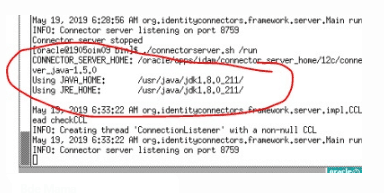
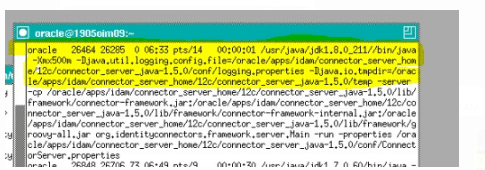
- Check JAVA version of the connector server if it’s showing in the same jdk1.8.0_211
ps -ef | grep java
Testing:
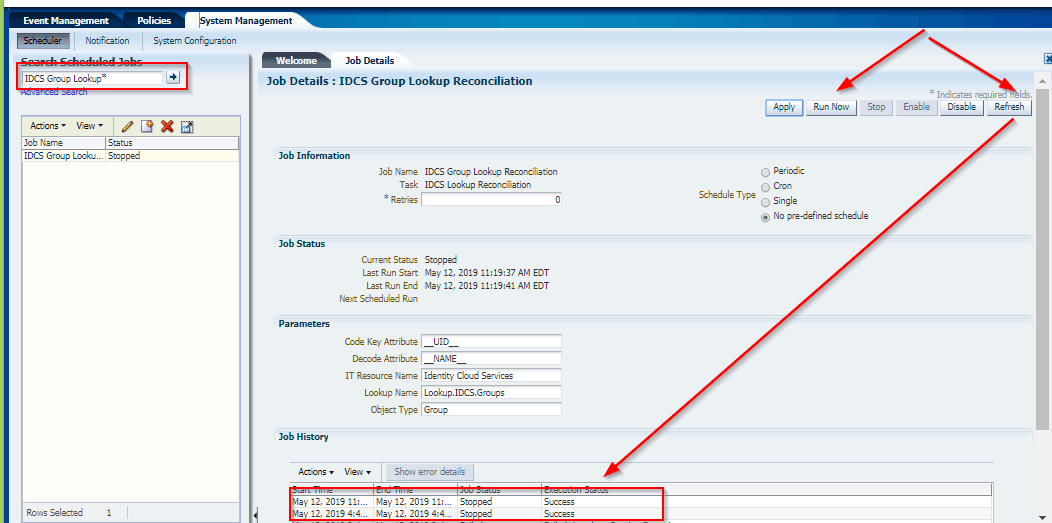
We could successfully run the Scheduled jobs in OIM/OIG.
This post is from our Oracle Identity Cloud Service (IDCS) training in which we have covered everything one should know about Oracle Identity Cloud Service like Architecture, Users & Groups Application, Branding, Auditing & Reports, Rest APIs, Adaptive security and much more.
Related Posts
- Cloud Security With Oracle Identity Cloud Service (IDCS) Click here
- Oracle Identity Cloud Service (IDCS): Step By Step Lab Activity Guide for Beginners Click here
- OIM/OIG – IDCS Connector Integration : [Troubleshooting] InvalidCredentialException: HTTP 401 Error : User not authorized to execute service Click here
- OIM/OIG – IDCS Integration : [Solved] javax.net.ssl.SSLHandshakeException : PKIX Path Building Failed Click here
- Oracle Identity Cloud Service (IDCS) Overview & Concepts Click here
- Cloud Security Using Identity Cloud Service Click here
- High-level Steps to Protecting an On-premises Application with IDCS by Using WebGate Click Here
References:
- “javax net ssl SSLException: Received fatal alert protocol_version” Error (Doc ID 2195947.1)
- ODTU error – protocol_version (Doc ID 2540821.1)
- When invoking icCnSrpSetupPublicService/Participant web service, getting Error getting response: javax net ssl SSLException: Received fatal alert protocol_version (Doc ID 2494077.1)
- E-REN: REN Server Window Stays in Queued Status and DSTGNT Log Shows Message – Java exception thrown: javax net ssl SSLException: Received fatal alert protocol_version (Doc ID 2276732.1)
- Orders Are Stopped Flowing Into Order Management System Integrated With Jagged Peak with “javax net ssl SSLException: Received fatal alert protocol_version” Error (Doc ID 2195947.1)
Next Task for You
Download our FREE Guide i.e., 7 Docs Must Read to Become Expert in Cloud Security With Oracle Identity Cloud Service (IDCS).
Click on the image below to Download the Guide:


![Microsoft Agentic AI Business Solutions Architect [AB-100] | K21 Academy](https://test.k21academy.com/wp-content/uploads/2025/11/Microsoft-Agentic-AI-Business-Solutions-Architect-AB-100-Exam-Overview1.png)


