
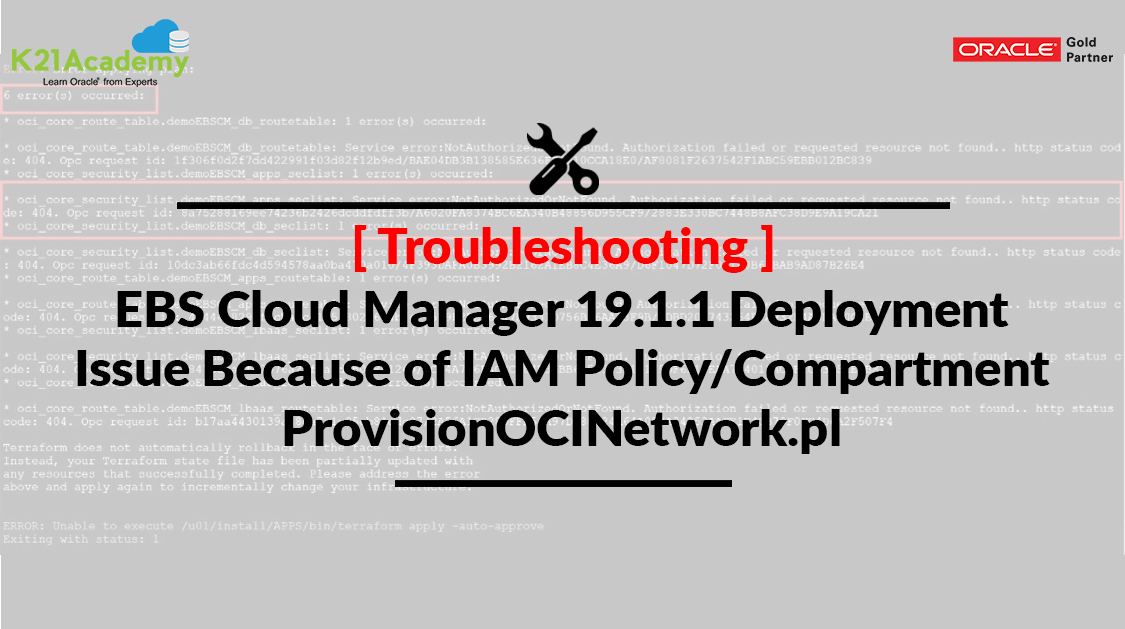



Oracle has updated the Doc ID: 2434500.1 with the new Policy for the Root Compartment.
Without the “Allow group netadmin-grp to inspect compartments in tenancy” policy, the ProvisionOCINetwork.pl script would fail while validating compartment IDs provided by the Network Administrator.
This post covers an Error encountered while Deploying EBS Cloud Manager 19.1.1 as part of our Hands-On-Lab Exercise for Module 4 (Provision EBS Using EBS Cloud Manager Tool) from our training Build, Manage & Migrate EBS (R12) On Oracle Cloud (OCI) (for free masterclass register here) and the workaround used.
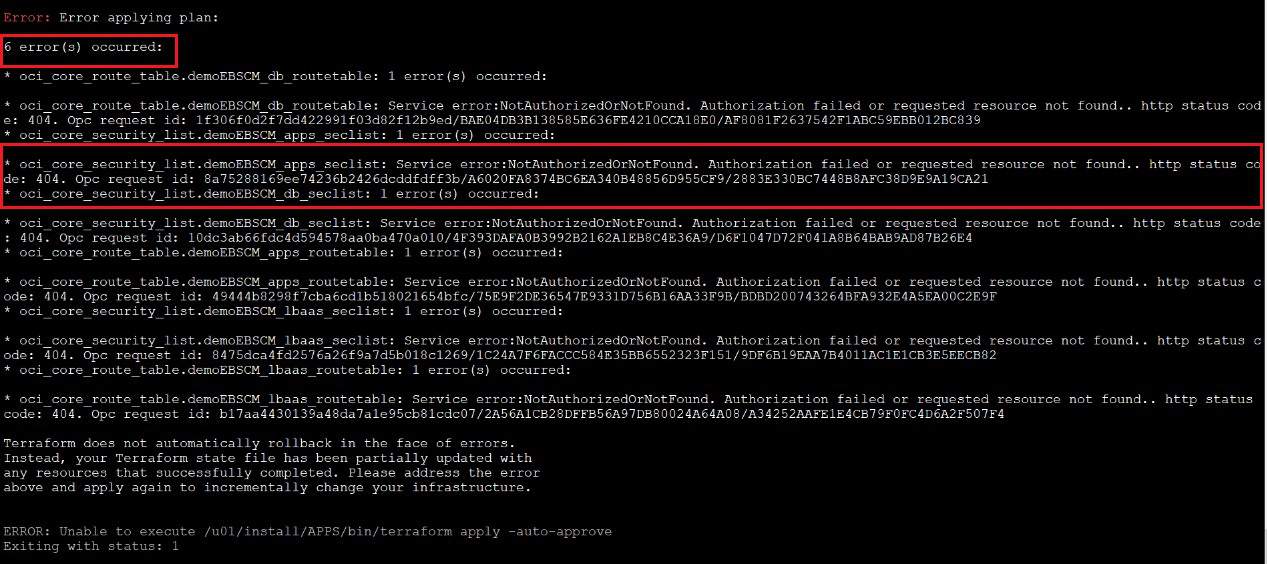
Error:
Oci_core_route_table. demoEBSCM_apps_route_table: Service error:NotAuthorizedOrNotFound. Authorization failed or requested resource not found.. http status code: 404
Oci_core_security_list. demoEBSCM_apps_seclist: Service error:NotAuthorizedOrNotFound. Authorization failed or requested resource not found.. http status code: 404
The issue we have faced While performing the steps to Create the Network for the Oracle EBS Environments while running below script:
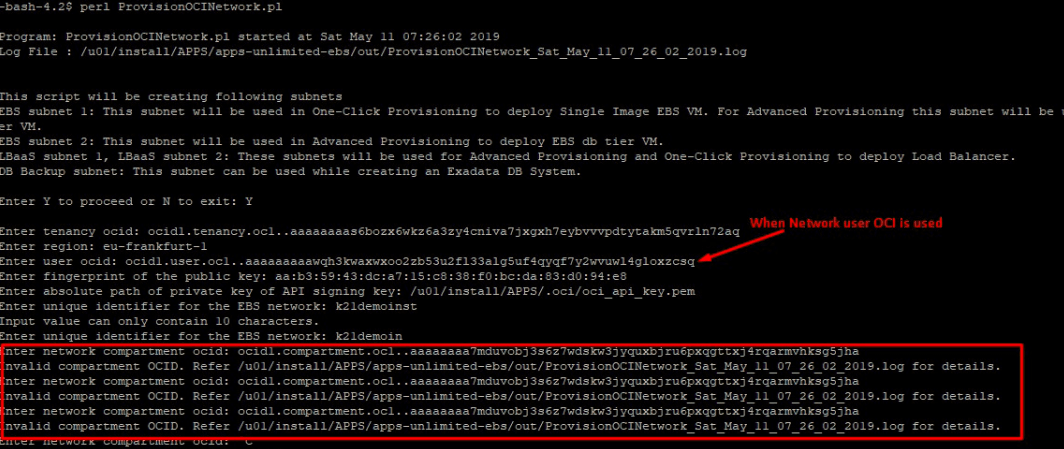
perl ProvisionOCINetwork.pl
Before the Oracle E-Business Suite Cloud Manager can be used to provision environments, a network and associated network profiles must be created. This Script creates two Profiles, one for One-Click Provisioning & another for Advance Provisioning & all the network resources (Subnet, Route Table, Security List) for these profiles.
Before moving into the Issue & its workaround, Lets first understand what is EBS Cloud Manager
What is EBS Cloud Manager?
As an Oracle Apps DBA, EBS Architect, it is important for you to know about EBS Cloud Manager.
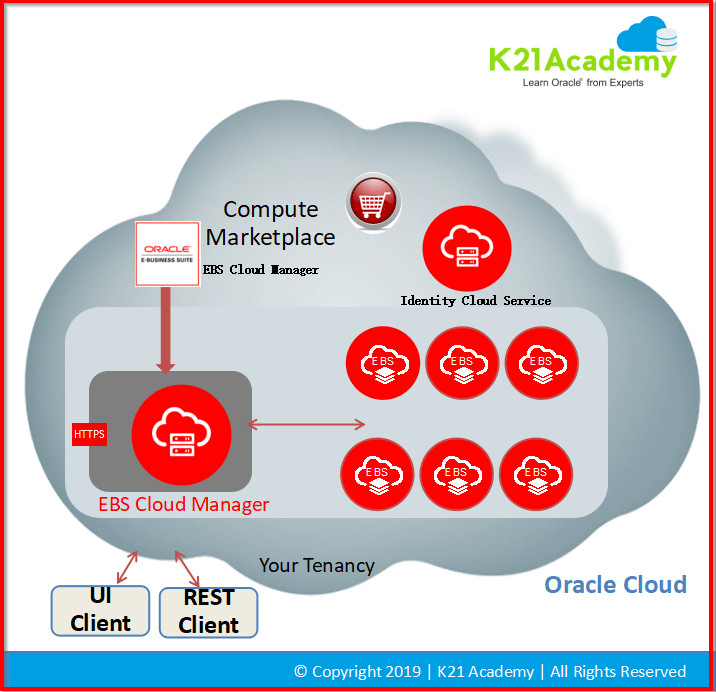
EBS CLoud Manager is a Tool (Virtual Machine) that centrally manages all your EBS Environments on the cloud.
Using EBS Cloud Manager you can do:
- Environment Deployment
- One-Click provisioning with pre-populated deployment options (Single Node, Demo)
- Advanced provisioning with user-selected deployment options
- Lift and Shift Migration to OCI from on-premises backup
- Lifecycle management
- Clone the environment
- Delete the environment
- Separation of Duties: Multiple Compartment, groups, and Network Profiles
- Backup & Recovery
- TDE for Compute DB instance
- More use cases in pipeline like Adding additional node, HA & DR
if you are working on Oracle E-Bussiness Suite R12 it is important for you to know how Oracle EBS is Deployed on Oracle Cloud Infrastructure (OCI) check here
Separation of Duties in EBS Cloud Manager
As we all know now in 19.1.1 concept of Compartment is implemented broadly and with the same Segregation of Duties with various administrators can be achieved.
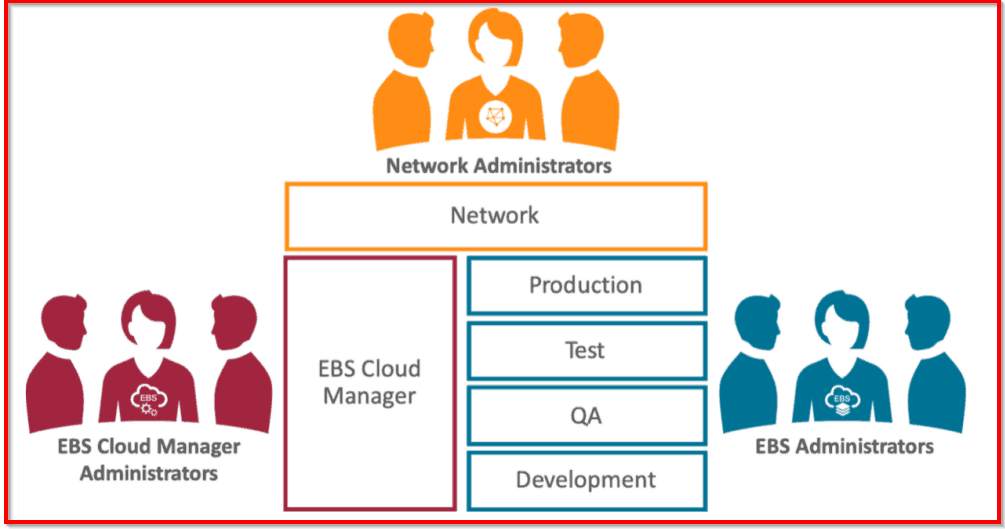
With the latest release (19.1.1) Oracle has introduced a Separation of Duties, which means you have 3 different roles, you will define the appropriate privileges & permissions & then the responsible team will pick the task accordingly
Note: To know more about EBS Cloud Manager: New Release 19.1.1 Separation Of Duties, click here
So during the Setup, we have created 3 users
- Network Administrator (network.admin)- One who manages all network resources and components in network components
- Cloud Manager Administrator (ebscm.admin)– One who manages Cloud Manager and maintain it.
- EBS Administrator (ebstest.admin)– One who manages EBS instances on Cloud Manager.
Policy Creation
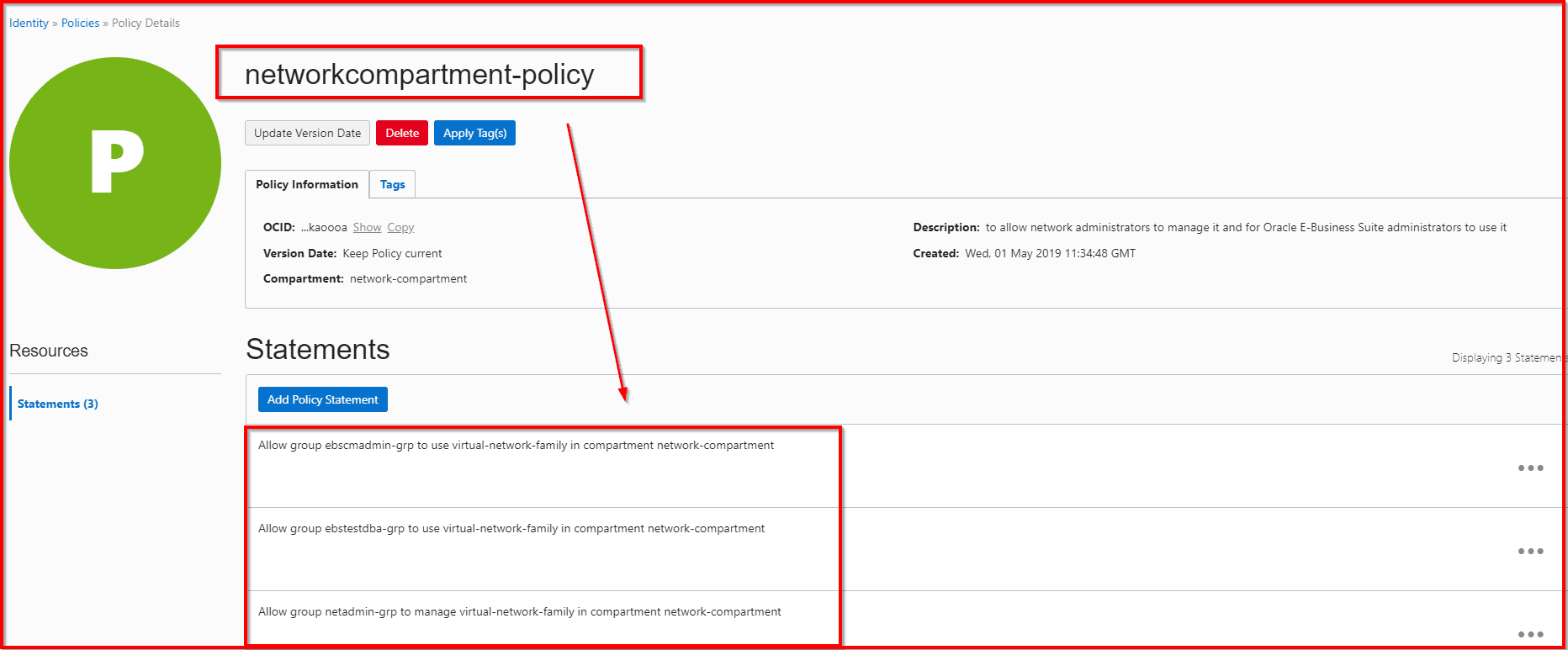
Now when we go during the setup we create policies as per the role so we give privileges to the Network Administrator for creating Network resources in Network Compartment and other users will have only privileges to use these resources and not to alter or create a new one.
Let’s understand about Policy
What is Policy?
A policy specifies who can access which Oracle Cloud Infrastructure Resources (Compute, VCN, Object Storage, Database, etc). A policy allows a group to work in certain ways with specific types of resources under a particular compartment
- Policies are comprised of one or more statements.
- It specifies which groups can access, what resources. Also, it plays a role in the level of access users have in a particular group.
- Policy, attached to a group defines who can access what under a Tenancy or Compartment.
ISSUE
While performing the steps to Create the Network for the Oracle EBS Environments
Once we complete the setup then towards the end we need to create Network resources in Network compartment for deploying Oracle EBS instances.
We need to run the script for the same:

It takes parameter:
- Enter tenancy ocid: ocid1.tenancy.oc1..aaaaaaaas6bozx6wkz6a3zy4cniva7jxgxh7eybvvvpdtytakm5qvrln72aq
- Enter region: eu-frankfurt-1
- Enter user ocid: ocid1.user.oc1..aaaaaaaaawqh3kwaxwxoo2zb53u2fl33alg5uf4qyqf7y2wvuwl4gloxzcsq
- Enter fingerprint of the public key: aa:b3:59:43:dc:a7:15:c8:38:f0:bc:da:83:d0:94:e8
- Enter absolute path of private key of API signing key: /u01/install/APPS/.oci/oci_api_key.pem
- Enter unique identifier for the EBS network: ebsdemo
- Enter network compartment ocid: ocid1.compartment.oc1..aaaaaaaa7mduvobj3s6z7wdskw3jyquxbjru6pxqgttxj4rqarmvhksg5jha
Now when we give all the required details at the end it says :
Oci_core_security_list. demoEBSCM_apps_seclist: Service error:NotAuthorizedOrNotFound. Authorization failed or requested resource not found.. http status code: 404
CAUSE
If we analyze the error it means that EBS Cloud Admin user will not be able to create Network resource because it has got privilege only to Use and not to Create.
ISSUE 2
Looking at that when we used network admin user as the creation of network resources is Network administrator responsibility so we use OCID of network user but with that, the network compartment was not recognized at all and it leads to below issue:
FIX
So, for the FIX,
We added one rule in the policy for the Root Compartment Policy which allows Network Group (netadmin-grp) to inspect Compartments in TENANCY
“Allow group netadmin-grp to inspect compartments in tenancy”
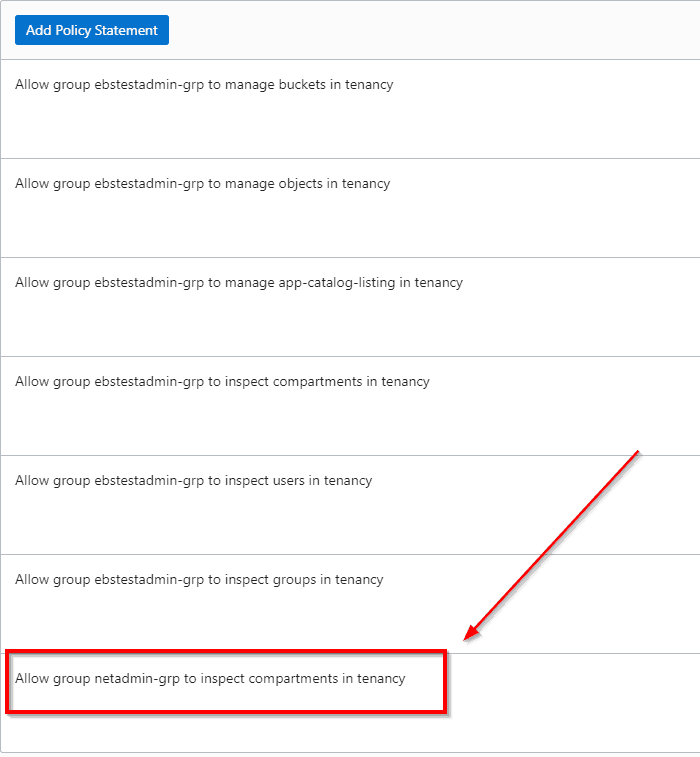
And thus when we ran the Network Provisioning script it went successful.


Well, this is the FIX for running ProvisionOCINetwork.pl script without Fail.
Related/References
- 2434500.1 Deploying Oracle E-Business Suite Cloud Manager on Oracle Cloud Infrastructure
- 2434008.1 Managing the Oracle E-Business Suite Cloud Manager Virtual Machine
- Oracle Cloud: Create VCN, Subnet, Firewall (Security List), IGW, DRG: Step By Step
- [Video] Oracle EBS R12 on Cloud For Beginners: 7 Things You Must Know
- April 2019 EBS Cloud Manager Updates
- Oracle EBS (R12) on Cloud (OCI) Beginners: 15 Things Apps DBAs Must Know
- [Video] Role of Oracle Apps DBA (EBS) R12 On Cloud
- Restrict Root Compartment Access with Oracle Cloud Infrastructure Policies
Next Task For You
Join our FREE Masterclass on Build, manage & Migrate EBS R12 to Cloud For Beginners. Click on the image below to register for FREE


![Microsoft Agentic AI Business Solutions Architect [AB-100] | K21 Academy](https://test.k21academy.com/wp-content/uploads/2025/11/Microsoft-Agentic-AI-Business-Solutions-Architect-AB-100-Exam-Overview1.png)


