




This post covers one issue that our trainee faced while running Purge Concurrent Request and/or Manager Data.
This Data program ‘Purge Concurrent Request and/or Manager Data‘ to purge:
- Request log files,
- Concurrent manager log files,
- Report output files from product directories maintained by the operating system and Application Object Library tables
If you are looking for Concurrent Managers : Overview & Concepts Oracle EBS R12 for Apps DBAs then check here
To resolve this error ‘APP-FND-01564: ORACLE error 8102 in request’ while running Purge Concurrent Request and/or Manager Data.” follow the steps mentioned below:
Issue
While running Purge Concurrent Request and/or Manager Data as
1. Login as SYSADMIN -> Responsibility System Administrator
2. Run Concurrent Program “Purge Concurrent Request and/or Manager Data”
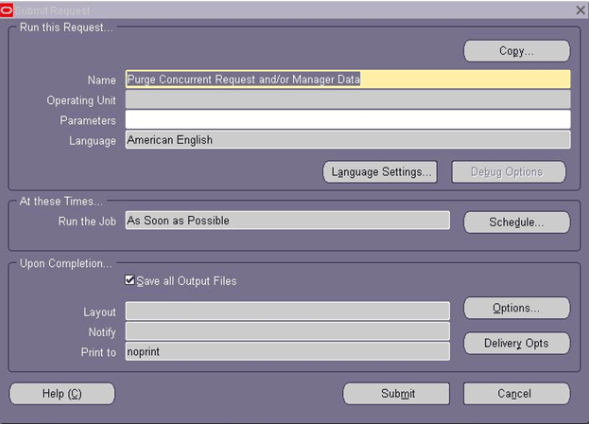
Error in logs:
$APPLCSF/$APPLLOG
+—————————————————————————+
Application Object Library: Version : 12.0.0
Copyright (c) 1979, 1999, Oracle Corporation. All rights reserved.
FNDCPPUR module: Purge Concurrent Request and/or Manager Data
+—————————————————————————+
Current system time is 27-DEC-2018 10:38:00
+—————————————————————————+
APP-FND-01564: ORACLE error 8102 in request
Cause: request failed due to ORA-08102: index key not found, obj# 34563, file 25, block 24555 (2).
The SQL statement being executed at the time of the error was: and was executed from the file.
+—————————————————————————+
Start of log messages from FND_FILE
+—————————————————————————+
+—————————————————————————+
End of log messages from FND_FILE
+—————————————————————————+
+—————————————————————————+
Executing request completion options…
Finished executing request completion options.
+—————————————————————————+
Concurrent request completed
Current system time is 27-DEC-2018 10:40:47
Cause
The issue is caused by a mismatch between the key(s) stored in the index and the values stored in the table, because of corruption.
Solution
Please run the following steps
SQL> select owner,object_name, object_type from dba_objects where object_id=34563;
OWNER OBJECT_NAME OBJECT_TYPE
—————————— ———————————-
APPLSYS FND_CONCURRENT_REQUESTS_N1 INDEX
SQL> Analyze Index APPLSYS.FND_CONCURRENT_REQUESTS_N1 validate structure online;
Index analyzed.
SQL> select dbms_metadata.get_ddl(‘INDEX’,’FND_CONCURRENT_REQUESTS_N1′,’APPLSYS’) from dual;
DBMS_METADATA.GET_DDL(‘INDEX’,’FND_CONCURRENT_REQUESTS_N1′,’APPLSYS’)
——————————————————————————–
CREATE INDEX “APPLSYS”.”FND_CONCURRENT_REQUESTS_N1″ ON “APPLSYS”.”FND_CONCURR
SQL> select TABLE_NAME,INDEX_NAME,COLUMN_NAME,COLUMN_POSITION from dba_ind_columns where TABLE_NAME in (‘FND_CONCURRENT_REQUESTS’) order by 1,2,COLUMN_POSITION;
ALTER INDEX APPLSYS.FND_CONCURRENT_REQUESTS_N1 rebuild online;
ALTER INDEX APPLSYS.FND_CONCURRENT_REQUESTS_N2 rebuild online;
ALTER INDEX APPLSYS.FND_CONCURRENT_REQUESTS_N3 rebuild online;
ALTER INDEX APPLSYS.FND_CONCURRENT_REQUESTS_N4 rebuild online;
ALTER INDEX APPLSYS.FND_CONCURRENT_REQUESTS_N5 rebuild online;
ALTER INDEX APPLSYS.FND_CONCURRENT_REQUESTS_N6 rebuild online;
ALTER INDEX APPLSYS.FND_CONCURRENT_REQUESTS_N7 rebuild online;
ALTER INDEX APPLSYS.FND_CONCURRENT_REQUESTS_N8 rebuild online;
ALTER INDEX APPLSYS.FND_CONCURRENT_REQUESTS_N9 rebuild online;
ALTER INDEX APPLSYS.FND_CONCURRENT_REQUESTS_N10 rebuild online;
ALTER INDEX APPLSYS.FND_CONCURRENT_REQUESTS_N11 rebuild online;
ALTER INDEX APPLSYS.FND_CONCURRENT_REQUESTS_U1 rebuild online;
Related/Further Readings
- [Troubleshooting] Concurrent Manager: System Hold, Fix Manager Before Resetting Counters
- Troubleshoot/Debug Long Running Concurrent Request in Oracle EBS (R12/11i)
- Concurrent Processing – FNDCPPUR APP-FND-01564 ORA-08102 – Unable to Purge Concurrent Request Records and Request Log/Output Files (Doc ID 730617.1)
- Concurrent Processing – How To Run the Purge Concurrent Request FNDCPPUR, Which Tables Are Purged, And Known Issues Like Files Are Not Deleted From File System (Doc ID 822368.1)
- Oracle AppsDBA (R12): Step by step Activity Guides
This post is from our Oracle Apps DBA (R12.2) Training, in which we cover Architecture & Changes in Oracle E-Business Suite R12.2, Staging & Installation, File System & Important Files in R12.2, Start/Stop, Patching, AD Administration, Cloning, Concurrent Managers, AutoConfig, Password Management, and Troubleshooting and much more
Next Task For You
We cover Oracle E-Business R12.2 Architecture & concepts in our Oracle Apps DBA For Beginners Training along with the Installation, Patching, Cloning, and Troubleshooting and also, Database upgrade to 19c and much more including the hands-on labs you must perform to upgrade your skills and get a good job with a high package.
Begin your journey towards becoming an Apps DBA by joining our FREE Masterclass on How To Learn Oracle Apps DBA (R12) & It’s New Features.


![Microsoft Agentic AI Business Solutions Architect [AB-100] | K21 Academy](https://test.k21academy.com/wp-content/uploads/2025/11/Microsoft-Agentic-AI-Business-Solutions-Architect-AB-100-Exam-Overview1.png)


