



This post is Part 3 from my FREE 5 Part Video Series On Networking in Oracle’s Gen 2 Cloud for beginners in which I have covered how to create VCN, Subnet (Public & Private), Internet Gateway (IGW), Security List (Ingress & Egress) & Dynamic Routing Gateway (DRG).
If you haven’t watched part 2 or completed task given in the second video, then I suggest you to first check the Part 2, where I have covered 3 Ways to Connect to Oracle Cloud
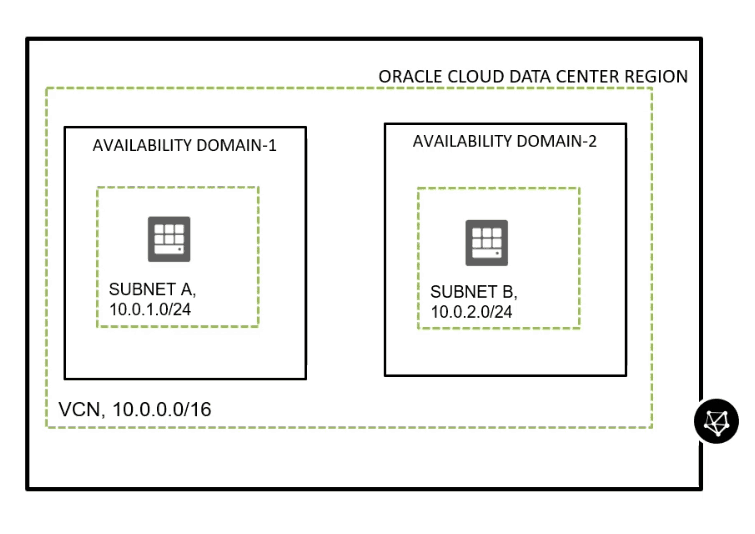
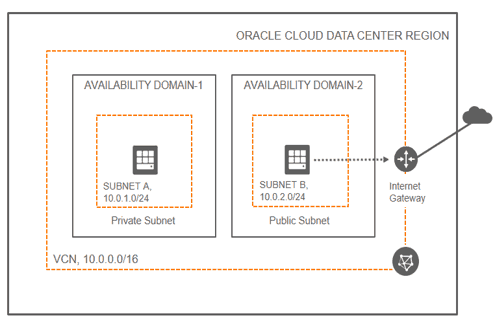
Virtual Cloud Network (VCN) & Subnet
- The first thing you design when you plan to deploy an application on Premise or Cloud is to define the Network.
- VCN is the bigger Network in which you deploy environment like TEST, DEV & UAT
- Within each of these environments, you define Database Tier, Application Tier, Web or DMZ Tier.
- This is where VCN & Subnet comes into the picture, so one way of setting this in the cloud is that create one VCN per environment and then break this bigger VCN in smaller Subnet (each Subnet hosting specific Tiers)
Security List
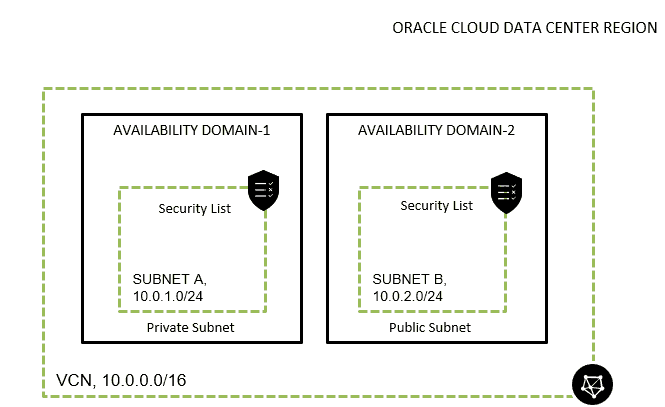
- When you go from 1 Subnet to another or 1 Network to another these are protected by Firewall and in Oracle Cloud Terms we call Security List
- if you want network traffic from application tier to database tier then in Database Subnet allow port 1521
Check out: our blog on Oracle Security Zones in OCI
Dynamic Routing Gateway (DRG)
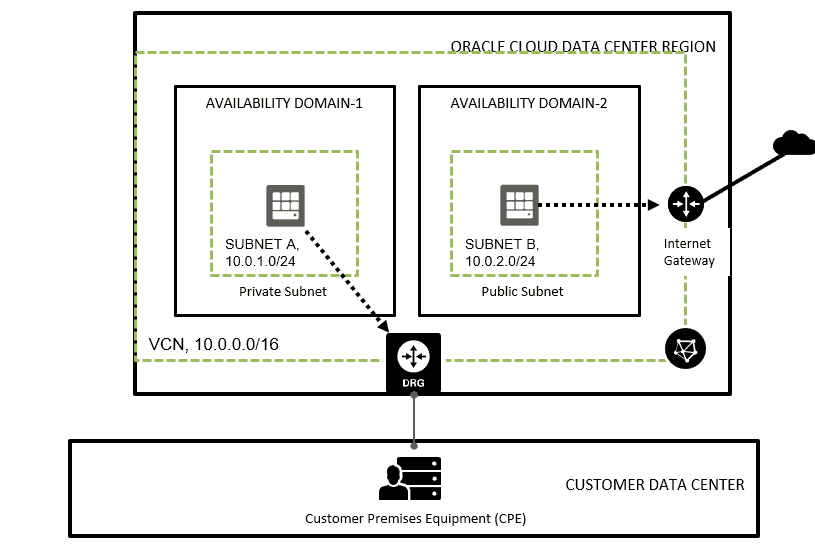
- let’s assume you want to connect VCN in Oracle Cloud with On-Premise Network using IP Sec VPN Tunnel or FastConnect (as discussed in Part 2 of this video series ) then DRG will be configured at the cloud side of the VPN tunnel
- If you would like to connect VCN in One Region to VCN in another Region then you use Dynamic Routing Gateway
 Internet Gateway (IGW)
- You can think of an Internet Gateway as a Virtual Router connecting the edge of the cloud network with the public internet.
- Traffic that originates in your VCN and is destined for a public IP address outside the VCN goes through the Internet Gateway.
Sneak Peak of Next Video!
In my next video, I’ll be covering What are 2 Types of
Quiz Question
Can you configure Public Load Balancer in one AD alone?
Leave your answer in the comment and I’ll answer this in the next video
Action Plan For You
- Log in to Oracle Cloud Trial Account that you created in Part 1 of this series
- Create a Network (VCN) this is the first thing you do before you perform any task using CIDR 10.0.0.0/16
-
– 10.0.1.0 / 24 (Private) for hosting Database
– 10.0.2.0 / 24 (Private) for hosting Application
– 10.0.3.0 / 24 & 10.0.4.0 / 24 (Public) for hosting Public Load Balancer. -
– To allow port 1521 from Application Tier 10.0.2.0 / 24 to Database Tier 10.0.1.0 / 2
– To Allow Application 8000 from 2 Subnets to Application Tier
Begin Your Cloud Journey
Begin your journey towards becoming an Oracle Cloud Expert and earn a lot more in 2024 by joining our FREE CLASS. You will also know more about the Roles and Responsibilities, Job opportunities for OCI Architects, Admins in the market, and what to study Including Hands-On labs you must perform to get the Higher Paying jobs.
Click on the below image to Register for Our FREE Class on MASTERING ORACLE CLOUD FOR DBAs, APPs DBAs, ARCHITECTS & SYS ADMINS


![Microsoft Agentic AI Business Solutions Architect [AB-100] | K21 Academy](https://test.k21academy.com/wp-content/uploads/2025/11/Microsoft-Agentic-AI-Business-Solutions-Architect-AB-100-Exam-Overview1.png)


