





Welcome to the world of Amazon CodeCatalyst! If you’re a developer or an aspiring programmer looking for ways to sharpen your coding skills and gain real-world experience, then you’ve come to the right place. Amazon CodeCatalyst – from its features and benefits to how it works and why it matters whether you’re curious about its offerings or ready to dive in headfirst.
This blog post will provide all the basic information regarding CodeCatalyst.
- What is Amazon CodeCatalyst?
- Benefits of Using AWS CodeCatalyst
- Features of Amazon CodeCatalyst
- How to Get Started with AWS CodeCatalyst
- Alternatives to AWS CodeCatalyst
- Pricing of CodeCatalyst
- Conclusion
- FAQs
What is Amazon CodeCatalyst?
Amazon CodeCatalyst is a cloud-based development tool that enables developers to rapidly iterate on code and improve their development productivity. It provides an integrated development environment (IDE) with built-in support for AWS Lambda functions, Amazon DynamoDB tables, and Amazon Simple Storage Service (Amazon S3) buckets. CodeCatalyst also includes a number of features to help developers manage their development processes, such as a project template repository, a code editor with syntax highlighting, and a debug console.
 CodeCatalyst resources are organized within projects, which are organized inside spaces. CodeCatalyst delivers language- or tool-based project blueprints to assist teams in getting started quickly. When you construct a project from a project blueprint, it includes resources like a source repository with sample code, build scripts, deployment activities, virtual servers or serverless resources, and so on. Administrators of space and projects can control who has access to create, view, and change project resources.
Benefits of Using AWS CodeCatalyst
CodeCatalyst is Amazon’s tool for developing and managing serverless applications. It provides a number of benefits for developers, including the ability to:
- Develop and deploy serverless applications quickly and easily
- Manage serverless applications using a simple, easy-to-use interface
- Monitor and troubleshoot serverless applications in real time
- Scale serverless applications automatically to meet the demand
Using CodeCatalyst can help you get the most out of your serverless development experience.

Features of Amazon CodeCatalyst
CodeCatalyst is a cloud-based IDE that makes it easy for developers to create, test and deploy AWS Lambda functions. It provides a graphical interface for creating and editing Lambda functions, as well as a console for testing and debugging. CodeCatalyst also includes a library of pre-built functions and templates to help you get started quickly. Some of its features are:
- It provides blueprints that contain source code and service configurations for common use cases, such as web applications, data analytics, machine learning, etc.
- It integrates with AWS services and tools, such as AWS CloudFormation, AWS CodeCommit, AWS CodeBuild, AWS CodeDeploy, AWS CodePipeline, etc.
- It offers a cloud-based development environment that lets you write, run, and debug code from any browser.
- It supports multiple programming languages, such as Python, Java, Node.js, etc.
- It enables collaboration among developers with features such as code sharing, live editing, chat, etc.

How to Get Started with AWS CodeCatalyst
If you’re looking to get started with Amazon CodeCatalyst, here’s a comprehensive guide to help you get started. CodeCatalyst is a continuous delivery service for developers that makes it easy to deploy code changes quickly and efficiently. With CodeCatalyst, you can automatically translate code changes into ready-to-deploy packages, eliminating the need for manual packaging and deployment processes.
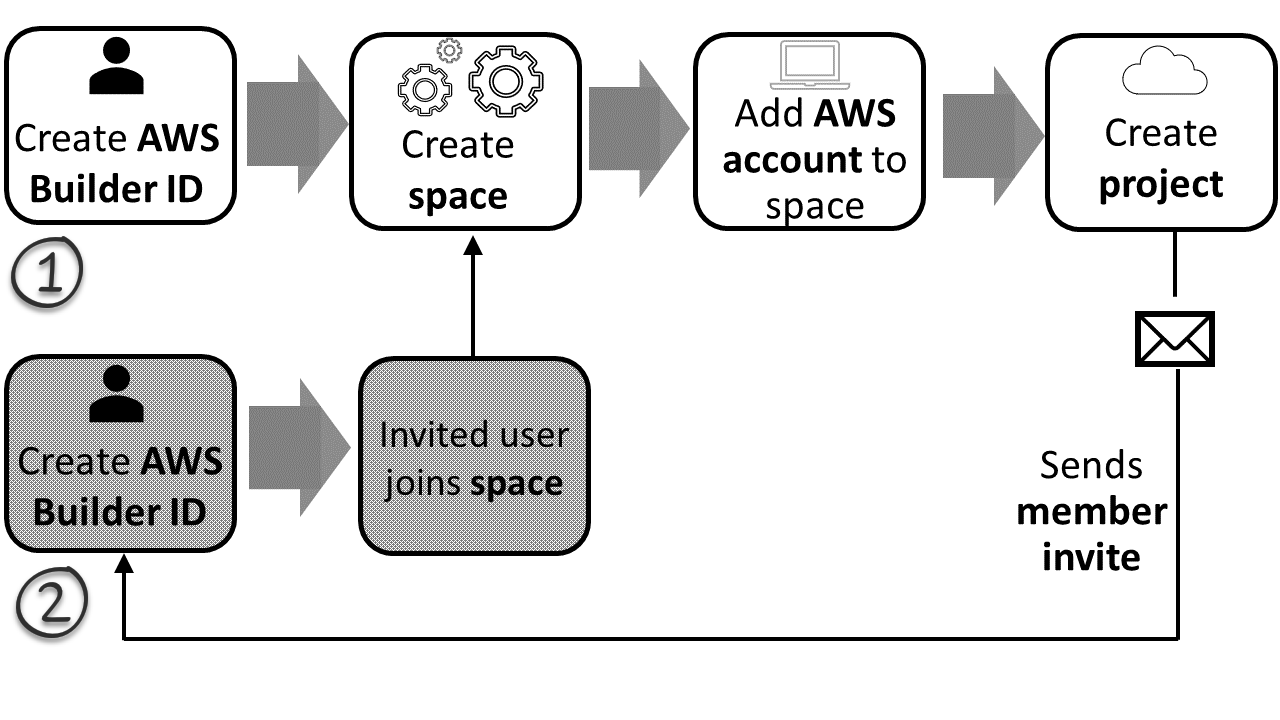 Getting started with Amazon CodeCatalyst is simple. First, create an account (Builder ID) and log in to the CodeCatalyst console. Next, create a new project by clicking on the “Create Project” button. Enter a project name and description, then select a repository provider (e.g., GitHub) and choose a repository containing your code. Finally, click on the “Create Project” button to create your project.
Once your project has been created, you can add files and directories to it by clicking on the “Add File” or “Add Directory” buttons. To deploy your code changes, simply click on the “Deploy” button and select the environment (e.g., development or production) where you want to deploy your code changes. That’s it! Your code changes will be deployed automatically and efficiently without any manual intervention required.
Alternatives to AWS CodeCatalyst
There are a few alternatives to Amazon CodeCatalyst worth considering. These include:
- Google Cloud Code: Google’s cloud IDE offers similar features to Amazon CodeCatalyst.
- Microsoft Visual Studio Code: A popular code editor that has extensions for working with cloud services.
- Eclipse Che: An open-source project that provides a cloud IDE platform.
Each of these options has its own strengths and weaknesses, so be sure to evaluate them carefully before making a decision.
Pricing of CodeCatalyst
With the AWS Free Tier, you can get 2,000 build minutes, 60 Dev Environment hours, 10 GB of source storage, and 64 GB total Dev Environment storage for free.

Conclusion
Amazon CodeCatalyst is an incredibly powerful tool that developers can use to build, debug and deploy applications quickly and easily. With its ability to rapidly develop complex applications, it’s no wonder why so many businesses are looking to take advantage of this revolutionary platform. This guide has provided a comprehensive overview of all the features available in Amazon CodeCatalyst so that you can make the most out of your development projects. With its advanced capabilities, it’s clear that Amazon CodeCatalyst will be revolutionizing application development for years to come!
Frequently Asked Questions
Are there any prerequisites get started with Amazon CodeCatalyst?
You can sign up for a free AWS account. Once you have an AWS account, you can access Amazon CodeCatalyst from the AWS Management Console. You can also use the AWS Free Tier to try out Amazon CodeCatalyst for free for 12 months
How does Amazon CodeCatalyst integrate with other AWS services to optimize my development workflow?
Amazon CodeCatalyst integrates with other AWS services and tools to optimize your development workflow. For example: It uses AWS CloudFormation to provision and configure AWS resources for your projects based on the blueprints you choose, AWS CodeCommit to store and manage your source code in a secure and scalable repository, AWS CodeBuild to compile, test, and package your code in a fully managed environment.
Can Amazon CodeCatalyst be used for both web and mobile app development?
yes, Amazon CodeCatalyst can be used for both web and mobile app development. It provides blueprints for different types of applications, such as web applications, data analytics, machine learning, etc.
How secure is Amazon CodeCatalyst, and what measures does it take to protect my code and data?
Amazon CodeCatalyst is secure and takes various measures to protect your code and data. Some of these measures are: It follows the shared responsibility model of AWS, where AWS is responsible for protecting the infrastructure that runs AWS services in the cloud, and you are responsible for securing your data and applications within the cloud. It uses AWS (IAM) and encrypts your code and data at rest and in transit using AWS (KMS) and AWS (ACM).
What resources and support are available for developers new to Amazon CodeCatalyst?
The Amazon CodeCatalyst forum, where you can ask questions, share feedback, and connect with other CodeCatalyst users and experts. The AWS Support Center, where you can create a case, chat with an AWS representative, or access other AWS support resources.
Related Links/References
- AWS DOP-C02 Exam Guide
- Overview of Amazon Web Services & Concepts
- AWS Management Console Walkthrough
- AWS Using CodePipeline (Case Study)
- How to create a free tier account in AWS
- AWS Certified Solutions Architect Associate SAA-C03 Exam
- AWS Certified DevOps Engineer – Professional DOP-C02 Exam
Next Task For You
Begin your journey towards becoming an AWS Certified DevOps Engineer Professional by checking our FREE CLASS. Click on the below image to register for our FREE CLASS.


![Microsoft Agentic AI Business Solutions Architect [AB-100] | K21 Academy](https://test.k21academy.com/wp-content/uploads/2025/11/Microsoft-Agentic-AI-Business-Solutions-Architect-AB-100-Exam-Overview1.png)



