



In this post we cover solution for the issue ‘libnnz10.so missing when executing ggsci on Linux’, one of the common issue/query that we get frequently from our trainees.
We have noticed as per our experience during training, there are some of the common queries/issues faced by trainees while they are supporting the Goldengate environment or setting up the new environment.
Hence we have come up with a blog series on those common issues/questions and resolution. Here is the fifth Query:
Check here for the fourth query, Extract/Replicat Abended- OGG-02091:Operation not supported? Get answer from here
Issue:
While initializing the GGSCI prompt for Oracle GoldenGate, encountered below error
Error:
./ggsci: error while loading shared libraries: libnnz11.so: cannot open shared object file: No such file or directory
Reason:
This error is encountered as ggsci is unable to locate lib files which are available under database ORACLE_HOME.
Resolution:
There are two ways to resolve this error. You can follow either ways.
- By setting the LD_LIBRARY_PATH in the environment
- By creating the soft links for the missing Library Files
Note: Always setting the LD_LIBRARY_PATH is good instead of creating the soft links. Because we need not to worry about any other library files which is required in future work.
1. Set the LD_LIBRARY_PATH
Set the Oracle database environment before initializing ggsci. Or set LD_LIBRARY_PATH to point to lib directory under database ORACLE_HOME
2. Create Soft links for missing library files
- Go to the GoldenGate Home
- Create the soft links as
[oracle@ogg1 ogg]$ ln -s $ORACLE_HOME/lib/libnnz11.so libnnz11.so
[oracle@ogg1 ogg]$
[oracle@ogg1 ogg]$ ln -s $ORACLE_HOME/lib/libclntsh.so.11.1 libclntsh.so.11.1
Note: When using 64bit, change the lib path (lib32 to lib64) above to the appropriate one.
- Check whether GGSCI Prompt is working fine
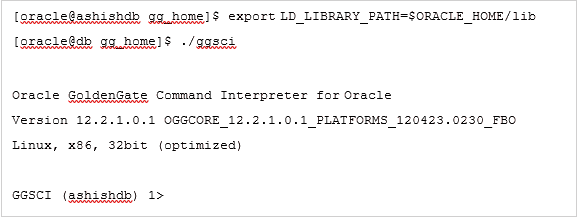
Now you should be able to access the ggsci prompt without any issues.
Related/Further Reading:
- Oracle GoldenGate 12c Overview & Components: Manager | Extract | Collector | Replicat | Data Pump
- Oracle GoldenGate 12c: Download & Installation
- Oracle GoldenGate 12c : Troubleshooting using LogDump Utility
- Oracle GoldenGate 12c: Step by step Activity Guides
- Oracle GoldenGate 12c Administration
This post is from our Oracle GoldenGate 12c Administration Training, in which we cover Architecture, Installation, Configuring & Preparing the Environment, DML Replication – Online Change Synchronization, Initial Load, Zero Downtime Migration & Upgrading using GoldenGate, Oracle GoldenGate Security, Performance of Oracle GoldenGate and Troubleshooting and much more.
Check out this post which covers Overview & Components of Oracle GoldenGate (software for real-time data integration and replication in heterogeneous IT Systems).
Next Task For You
Want to move ahead in your career and want to get a higher Earning Job?
Get 7+ Courses for DBAs & Apps DBA in a bundle program and learn from the Industry’s best Experts


![Microsoft Agentic AI Business Solutions Architect [AB-100] | K21 Academy](https://test.k21academy.com/wp-content/uploads/2025/11/Microsoft-Agentic-AI-Business-Solutions-Architect-AB-100-Exam-Overview1.png)


