





Azure Virtual Machines (VMs) offer a flexible and cost-effective way to deploy and run your applications in the cloud. With VMs, you can choose from a wide range of pre-configured virtual machine images or create your own custom images, and you only pay for the resources you use. However, if you’re not careful, VM costs can quickly add up. In this blog post, we’ll share some tips to help you save money when using Azure Virtual Machines by covering following :
- What is Azure Virtual Machines ?
- Tips for saving costs with Azure Virtual Machines:
- Choose the Right VM Size
- Use Reserved Instances
- Use Low-Priority VMs for Batch Workloads
- Use Auto-Shutdown
- Use Azure Hybrid Benefit
- Use Azure Spot VMs
- Use Azure Disk Encryption
- Use Azure Backup
- Use Azure Cost Management
- Use Resource Groups to Manage Costs
- Use Azure Cost Management Budgets
- Use Azure Spot Instances
- Use Azure Reservations
What is Azure Virtual Machines?
Azure Virtual Machines (VMs) are a key infrastructure service provided by Microsoft Azure. They are a cloud-based implementation of a virtual computer that can run applications and perform tasks, just like a physical computer. They are highly scalable and flexible, enabling organizations to rapidly deploy and manage computing resources without the need for physical hardware.
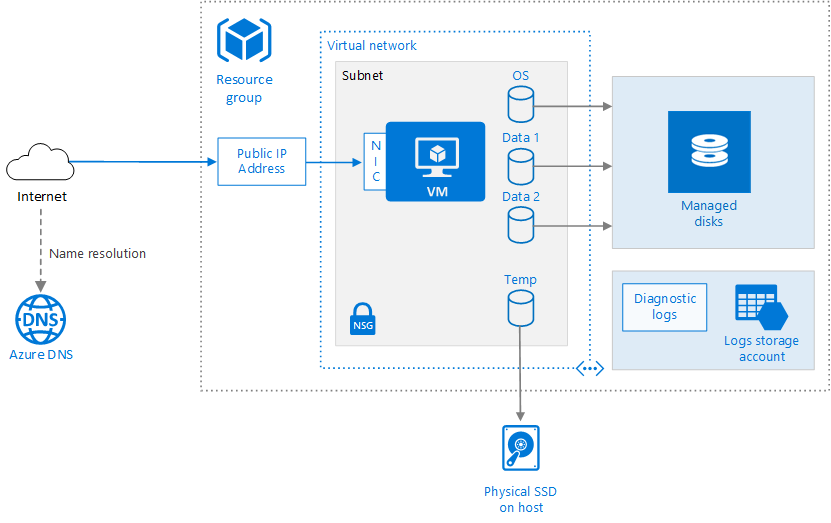
Azure VMs are built on top of the Azure infrastructure and use a pay-as-you-go pricing model, allowing users to only pay for the resources they consume. This makes them a cost-effective solution for organizations of all sizes, as it eliminates the need for large upfront investments in physical hardware.
Azure VMs offer high levels of security and compliance, with features like encryption at rest, network security groups, and Azure Security Center. They also integrate seamlessly with other Azure services, such as Azure Storage, Azure Backup, and Azure Site Recovery, making it easy to build comprehensive solutions in the cloud.
Tips for saving costs with Azure Virtual Machines
Azure provides a variety of cost-saving options to help you optimize your Virtual Machines spending. By taking advantage of these options, you can maximize your cost savings while still meeting your computing needs.
Choose the Right VM Size
One of the most important decisions you’ll make when deploying an Azure VM is selecting the right VM size. The size of your VM determines the number of CPU cores, amount of memory, and storage capacity. Azure offers a wide range of VM sizes to choose from, so it’s important to select the right one for your workload.

If you overprovision your VMs, you’ll end up paying for resources you don’t need. On the other hand, if you underprovision, you may experience performance issues. To find the right VM size, consider the following factors:
- CPU requirements: The number of cores you need will depend on the processing power required by your workload.
- Memory requirements: The amount of memory you need will depend on the size of your dataset and the memory requirements of your applications.
- Storage requirements: The amount of storage you need will depend on the size of your data and the I/O performance required by your applications.
Azure provides a VM size calculator that can help you choose the right VM size based on your workload requirements.
Use Reserved Instances

If you’re running VMs for a long period, consider using Reserved Instances to save money. Reserved Instances provide a significant discount (up to 72%) on the hourly rate of a VM in exchange for a commitment to use the VM for a specified period (one or three years). By using Reserved Instances, you can save money on VM costs without sacrificing performance or functionality.
Use Low-Priority VMs for Batch Workloads
If you have batch workloads that can run at any time, consider using Low-Priority VMs to save money. Low-Priority VMs are available at a significantly lower price than regular VMs, but they can be interrupted if Azure needs the capacity for other workloads. You can use the Azure Batch service to manage Low-Priority VMs and ensure that your batch jobs complete even if some VMs are interrupted.
Use Auto-Shutdown

If you have VMs that are only needed during certain hours of the day, consider using Auto-Shutdown to save money. Auto-Shutdown is a feature that allows you to automatically shut down VMs at a specified time each day. By shutting down VMs when they’re not in use, you can save money on VM costs.
Use Azure Hybrid Benefit
If you have existing licenses for Windows Server or SQL Server, you can save money by using Azure Hybrid Benefit. Azure Hybrid Benefit allows you to use your existing licenses in Azure and get a discount on the VM costs. You can use Azure Hybrid Benefit for Windows Server VMs, SQL Server VMs, and Azure Dev/Test VMs.
Use Azure Spot VMs

Azure Spot VMs are similar to Low-Priority VMs, but they’re available at an even lower price. They are priced based on the available capacity in Azure, so the price can vary over time. They can be interrupted at any time, so they’re not suitable for all workloads. However, if you have workloads that can tolerate interruptions, Azure Spot VMs can be a cost-effective option.
Use Azure Disk Encryption
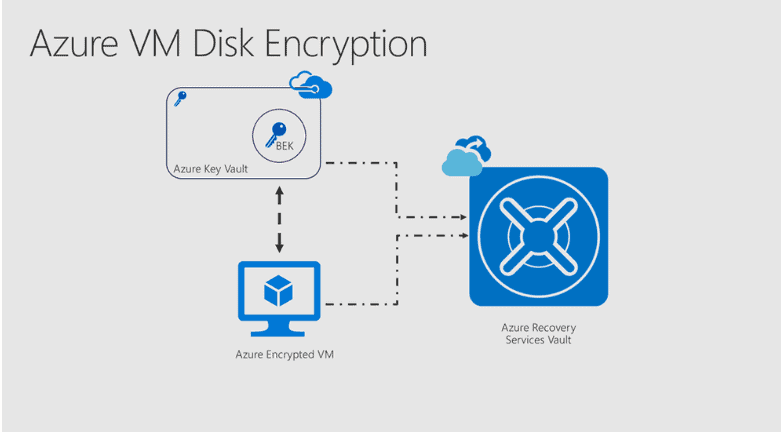
If you’re storing sensitive data in your VMs, consider using Azure Disk Encryption to encrypt your virtual disks
Azure Disk Encryption is a free feature that allows you to encrypt the disks of your VMs using industry-standard encryption algorithms. By encrypting your virtual disks, you can protect your data from unauthorized access and ensure that it remains confidential.
Use Azure Backup
If you’re running critical workloads on your VMs, consider using Azure Backup to protect your data. Azure Backup is a cloud-based backup and recovery solution that allows you to back up your VMs and restore them in the event of a disaster. By using Azure Backup, you can protect your data against accidental deletion, hardware failure, and other disasters.
Also read our blog post on : Azure Backup
Use Azure Cost Management

To optimize your VM costs, use Azure Cost Management. Azure Cost Management is a free tool that allows you to monitor and manage your Azure spending. With Azure Cost Management, you can track your VM costs, identify areas where you can save money, and set up alerts to notify you when your spending exceeds your budget.
Use Resource Groups to Manage Costs
Resource Groups in Azure allow you to organize and manage your resources, including VMs, in a logical manner. By grouping your resources into Resource Groups, you can apply policies, permissions, and cost management to them collectively. For example, you can use Resource Groups to apply tags to your VMs and track their usage and costs.
Use Azure Cost Management Budgets
Azure Cost Management Budgets allow you to set spending limits on your Azure subscriptions and receive alerts when your spending exceeds those limits. By using Cost Management Budgets, you can proactively monitor your spending and avoid unexpected charges. You can set up budgets based on different criteria, such as subscription, resource group, or resource type.
Use Azure Spot Instances
Azure Spot Instances are similar to Azure Spot VMs but allow you to use the excess capacity of Azure virtual machines as opposed to Azure compute infrastructure. They allow you to run your workloads at a very low cost by offering up to a 90% discount on the regular VM pricing. Spot Instances are best suited for workloads that can handle interruptions, such as batch processing or test environments.
Use Azure Reservations

Azure Reservations allow you to prepay for your Azure resources and save up to 72% on your VM costs. By reserving your VMs, you can lock in a discounted price for a one-year or three-year term. Azure Reservations are available for VMs, SQL Databases, and Cosmos DB, among other Azure resources.
Conclusion
In conclusion, these additional tips can help you save costs with Azure Virtual Machines. By using Azure Dev/Test pricing, Resource Groups, Azure Cost Management Budgets, Azure Spot Instances, Azure Hybrid Benefit for Linux, and Azure Reservations, you can optimize your Azure spending and achieve cost savings.
FAQs
What is the most efficient way to save costs on virtual machines when they are not in use?
To save cost when VM is not in use, simply deallocate the VM if you have to use that VM again. If VM will not be used in future then simply delete the VM and its dependent resources
How do I reduce Azure licensing cost?
To reduce licensing cost you can follow few strategies:
- Azure Hybrid Benefit: Take advantage of Azure Hybrid Benefit to apply your existing on-premises licenses to Azure virtual machines.
- Reserved Instances: Purchase Azure Reserved Instances for your long-term workloads. RIs provide substantial discounts compared to pay-as-you-go pricing
- Azure Spot VMs:Utilize Azure Spot VMs for non-critical workloads or batch processing tasks. Spot VMs offer significantly discounted prices compared to regular VMs
- Right-sizing: Continuously evaluate and right-size your Azure resources, including virtual machines. Choose the appropriate VM size based on your workload requirements to avoid overprovisioning and unnecessary costs
- Resource Optimization:Monitor and optimize your resource usage regularly. Identify and address underutilized resources, such as virtual machines running at low CPU or memory utilization, and consider resizing or decommissioning them to reduce costs
- Azure Cost Management and Billing:Leverage Azure Cost Management and Billing tools to gain visibility into your Azure usage and costs. Set up budget alerts, analyze cost trends, and identify areas where you can optimize spending.
What is the cheapest VM in Azure?
The cost factor depends on factors such as the VM size, region, and usage. The cheapest VM in Azure is typically one of the General Purpose or Burstable VM series. Some of the cheapest instances are: B1s, B1ms, D2as V5. Also note that these are low size VM so choose according to your usage
References/Related
- Azure Networking: A Brief Introduction for Beginners
- Microsoft Azure Solution Architect [AZ-303/AZ-304]: Everything You Need To Know
- [AZ-303] Microsoft Azure Architect Technologies Certification Exam: Everything You Need To Know
- [AZ-900] Microsoft Azure Fundamentals Certification Exam: Everything You Must Know
- [AZ-104] Microsoft Azure Administrator Certification Exam: Everything You Need To Know
- Exam AZ-305: Azure Solutions Architect Expert Certification
- [AZ-104] Region, Availability Zone, Availability Sets, and Fault Domain Update Domain In Microsoft Azure
- Virtual Machine Scale Set (VMSS) In Microsoft Azure
Next Task For You
In this blog, we discussed Azure Information Protection; if you want to know more about Microsoft Azure Security Technologies and certification. Click on the below image and Register for our FREE CLASS Now!


![Microsoft Agentic AI Business Solutions Architect [AB-100] | K21 Academy](https://test.k21academy.com/wp-content/uploads/2025/11/Microsoft-Agentic-AI-Business-Solutions-Architect-AB-100-Exam-Overview1.png)



