





In today’s interconnected world, data breaches can have serious consequences. With Azure Key Vault, you can store and manage your most sensitive information in a secure and compliant manner.
In this blog, we’ll explore the following listed below and how it can be used to protect your organization’s data.
- What is Azure Key Vault?
- Components of Azure Key Vault
- Features of Azure Key Vault
- Best Practices for Using Azure Key Vault
- Benefits
- How to use Azure Key Vault
What is Azure Key Vault?
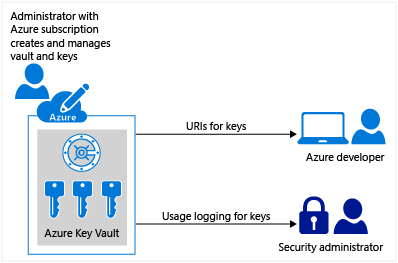
Azure Key Vault is a cloud-based service provided by Microsoft Azure that helps safeguard cryptographic keys and secrets used by applications and services. It provides secure storage for keys, passwords, and certificates that are essential to access resources in the cloud. It helps to control and manage access to keys and secrets, which are critical components for securing data in the cloud.
Components
Azure Key Vault is composed of three primary components:
- Keys: Azure Key Vault allows you to store and manage cryptographic keys. These keys can be used to encrypt and decrypt data, and also to authenticate users and services.
- Secrets: Azure Key Vault also provides secure storage for sensitive information, such as passwords, connection strings, and API keys. You can use these secrets in your applications without exposing them directly.
- Certificates: Azure Key Vault allows you to manage and store certificates used for authentication and encryption.
Features of Azure Key Vault
It offers a range of features that enable users to manage cryptographic keys, secrets, and certificates securely. Some of these features include:
Secure storage and management
- Offers a secure and centralized location for storing and managing cryptographic keys, secrets, and certificates. This ensures that sensitive data is protected from unauthorized access, theft, or misuse.
Key management
- Allows users to generate, store, and manage cryptographic keys used for encrypting and decrypting data. These keys can be created and managed through the Azure portal, PowerShell, or Azure CLI.
Secret management
- Enables users to securely store and manage application secrets, such as passwords, connection strings, and API keys. These secrets can be accessed by authorized applications and services without exposing them to unauthorized users.
Certificate management
- Enables users to manage digital certificates used for authentication and encryption purposes. Users can upload and manage certificates using the Azure portal, PowerShell, or Azure CLI.
Access control
- Provides a range of access control features that enable users to manage who has access to their cryptographic assets. This includes role-based access control (RBAC), which allows users to assign roles to users and groups based on their job functions.
Audit logging
- Logs all operations performed on cryptographic assets, providing a comprehensive audit trail for compliance and security purposes.
Also, Read our Blog Post on Microsoft Azure Security Technologies Certification
Benefits

Azure Key Vault offers a range of benefits to businesses and organizations, including:
Enhanced security
- Provides a secure and centralized location for managing cryptographic assets, reducing the risk of unauthorized access, theft, or misuse.
Improved compliance
- Enables users to manage cryptographic assets by industry standards and regulatory requirements, such as HIPAA, GDPR, and PCI DSS.
Increased productivity
- Automates the management of cryptographic assets, reducing the need for manual processes and enabling users to focus on more strategic tasks.
Cost savings
- Eliminates the need for businesses and organizations to invest in their key management infrastructure, reducing costs associated with hardware, software, and maintenance.
Best Practices for Using Azure Key Vault
Here are some best practices for using Azure Key Vault:
- Use Azure Key Vault for Secrets Management: Use it to store and manage secrets, such as connection strings, API keys, and passwords.
- Use Managed Identity: Use managed identity to authenticate to Azure Key Vault instead of using a shared access signature (SAS) token or key.
- Use Access Policies: Use access policies to control access to your keys and secrets. You can assign access to individual users or groups of users.
- Rotate Keys and Secrets Regularly: Rotate your cryptographic keys and secrets regularly to maintain the security of your system.
- Enable Auditing: Enable auditing to track who has accessed your keys and secrets.
- Enable Soft Delete: Enable soft delete to recover deleted keys and secrets within a specified time frame.
- Use Encryption: Use encryption to protect data in transit and at rest. Azure Key Vault provides encryption capabilities to help protect your data.
How to use Azure Key Vault
To use Azure Key Vault, you will need an Azure subscription and the necessary permissions to create and manage resources.
Step 1: Create a Key Vault
To create a new Key Vault, follow these steps:
- Log in to the Azure portal.
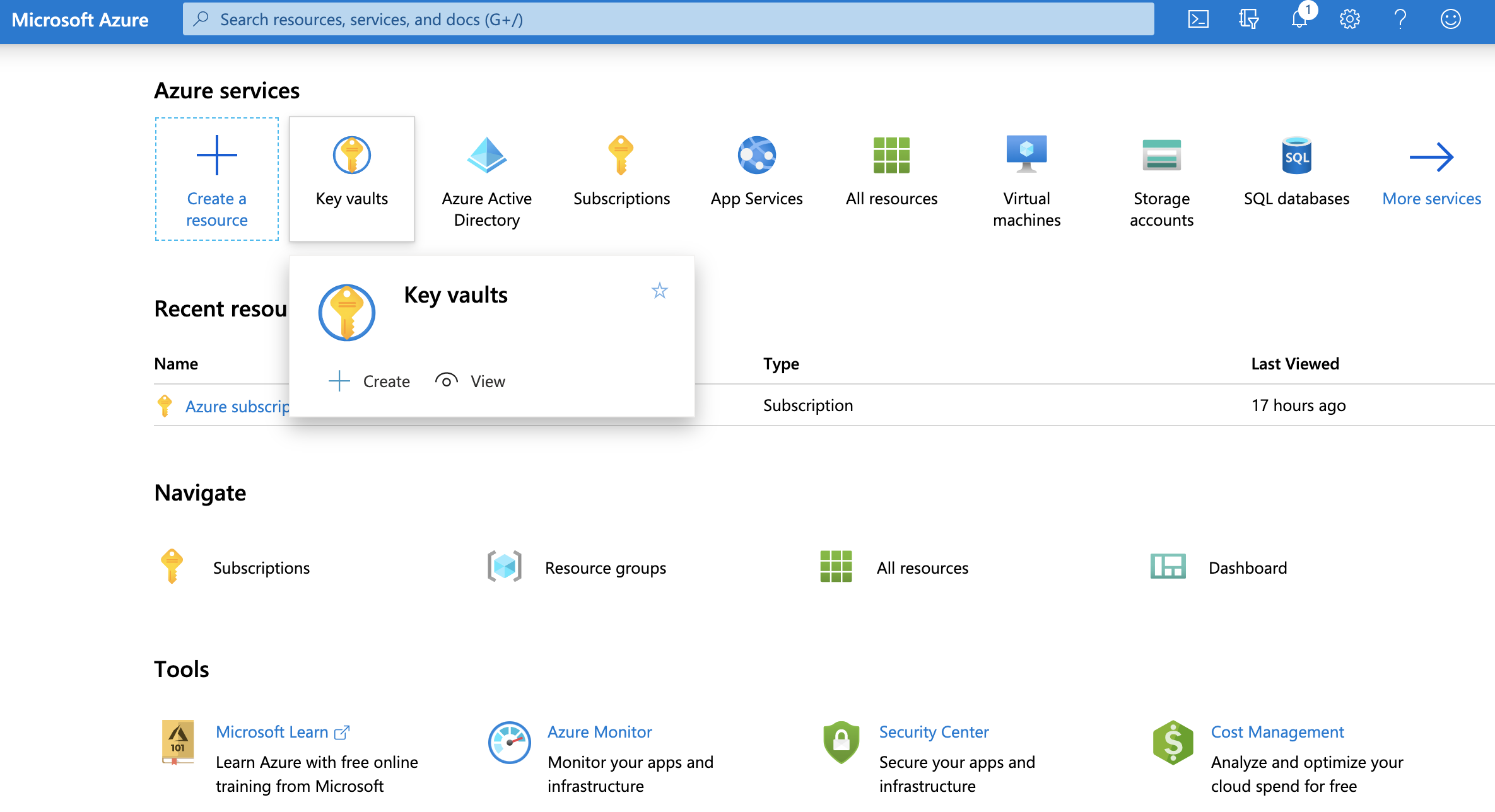
- Click on the “Create a resource” button.
- Select “Key Vault” from the list of available services.
- Enter a unique name for your Key Vault and select your preferred subscription, resource group, and region.
- Choose your preferred pricing tier and configure advanced settings as required.
- Click on the “Create” button to create your new Key Vault.

Step 2: Create and manage cryptographic assets
Once you have created your Key Vault, you can start creating and managing cryptographic assets, such as keys, secrets, and certificates. This can be done using the Azure portal, PowerShell, or Azure CLI.
To create a new cryptographic asset, follow these steps:
- Log in to the Azure portal.
- Navigate to your Key Vault.
- Select the type of cryptographic asset you want to create (e.g., keys, secrets, or certificates).

- Click on the “Create” button and follow the prompts to configure the asset’s settings (e.g., name, algorithm, expiration date, etc.).

- Once you have configured the asset, click on the “Create” button to create it.
To manage existing cryptographic assets, follow these steps:
- Log in to the Azure portal.
- Navigate to your Key Vault.
- Select the type of cryptographic asset you want to manage (e.g., keys, secrets, or certificates).
- Select the asset you want to manage from the list.
- Use the available options to manage the asset (e.g., view properties, rotate keys, revoke certificates, etc.).
 Step 3: Manage access to Key Vault
Azure Key Vault provides a range of access control features that enable users to manage who has access to their cryptographic assets. This includes role-based access control (RBAC), which allows users to assign roles to users and groups based on their job functions.
To manage access to your Key Vault, follow these steps:
- Log in to the Azure portal.
- Navigate to your Key Vault.
- Click on the “Access policies” tab.
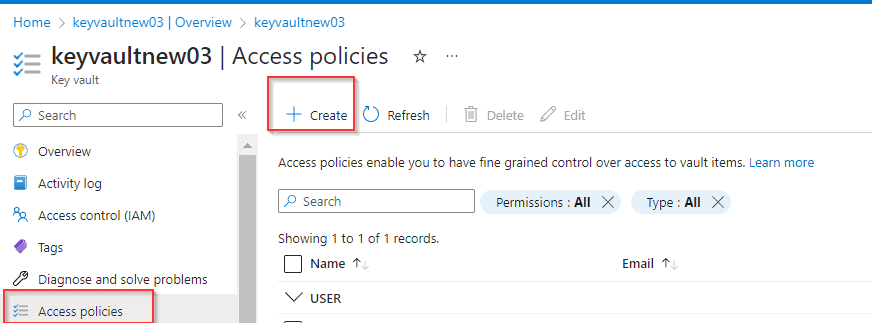
- Click on the “Add Access Policy” button.
- Select the role you want to assign (e.g., key vault contributor, key vault reader, etc.).

- Select the user or group you want to assign the role to.
- Click on the “Add” button to save the access policy.
Step 4: Monitor and audit Key Vault activity
Azure Key Vault logs all operations performed on cryptographic assets, providing a comprehensive audit trail for compliance and security purposes. Users can view and analyze these logs using Azure Monitor and Azure Log Analytics.
To monitor and audit activity in your Key Vault, follow these steps:
- Log in to the Azure portal.
- Navigate to your Key Vault.
- Click on the “Monitoring” tab.

- View the available charts and logs to monitor activity in your Key Vault.
- Use Azure Log Analytics to analyze and query logs for deeper insights into Key Vault activity.

Conclusion
Azure Key Vault is a powerful cloud-based service that enables users to securely store and manage cryptographic keys, secrets, and certificates. With its robust security features, compliance capabilities, and automation capabilities, it also provides a centralized and secure location for managing cryptographic assets, enabling businesses and organizations to protect their sensitive data and applications.
References/Related
- Microsoft Azure Security Technologies Certification
- Microsoft Azure Security Technologies: Step By Step Activity Guides
- Introduction to Azure Sentinel and Steps to Setup
- What is Azure Backup?- Features, Benefits, Tools & Real-life Examples
- Azure Site Recovery: Benefits, Working, Features, and Implementation
- Top 10 Best Practices for Azure Security
- Azure Firewall vs Azure Network Security Groups (NSG)
- Azure Security vs AWS Security
- What is Azure security?
Next Task For You
Begin your journey toward Mastering Azure Cloud and landing high-paying jobs. Just click on the register now button on the below image to register for a Free Class on Mastering Azure Cloud: How to Build In-Demand Skills and Land High-Paying Jobs. This class will help you understand better, so you can choose the right career path and get a higher paying job.


![Microsoft Agentic AI Business Solutions Architect [AB-100] | K21 Academy](https://test.k21academy.com/wp-content/uploads/2025/11/Microsoft-Agentic-AI-Business-Solutions-Architect-AB-100-Exam-Overview1.png)



