





Azure Information Protection is a powerful solution for organizations that need to protect their sensitive data. With its easy-to-use features and comprehensive protection capabilities, it can help organizations to stay secure and compliant with industry regulations.
In this blog, we will discuss the following aspects of Azure Information Protection :
What is Azure Information Protection?
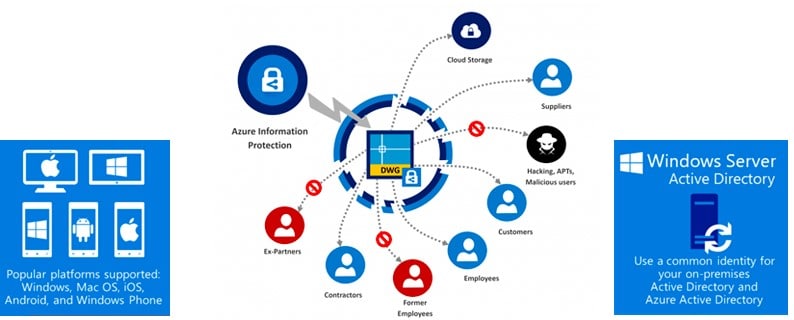
- Azure Information Protection (AIP) is a cloud-based tool provided by Microsoft that helps organizations protect their sensitive data. It allows organizations to classify and label their data based on its sensitivity, and apply protection policies to it. These policies can include options such as encryption, rights management, and access controls.
- AIP helps organizations classify their data based on how sensitive it is, such as confidential, internal, or public.
Once classified, organizations can label their data based on the level of protection required, such as encryption or access controls. This helps ensure that the appropriate level of protection is applied to their sensitive data. - Azure Information Protection provides a range of protection options to help organizations keep their data secure. These include encryption, rights management, and access controls. With these features, organizations can control who has access to their sensitive data and what they can do with it.
- It also provides tracking and auditing features to help organizations monitor their data and ensure compliance with regulations and policies. By providing these features, AIP helps organizations keep their sensitive data secure and maintain compliance with regulations and policies.
Comparison with other Azure Tools
- One of the primary differences between Azure Information Protection and other Azure tools is that Azure Information Protection is specifically focused on data protection.
- Other Azure tools, such as Microsoft Defender for Cloud, and Azure Active Directory, are designed to provide broader security capabilities for the Azure platform as a whole.
Azure Information Protection, on the other hand, is explicitly focused on helping organizations protect their sensitive data. - Another difference between Azure Information Protection and other Azure tools is that AIP provides more granular control over data protection.
- While other Azure tools provide general security policies, allow organizations to classify and label their data based on its sensitivity, and apply specific protection policies based on that classification.
- Azure Information Protection also integrates well with other Azure tools and services. For example, AIP integrates with Azure Active Directory to provide identity and access management capabilities. Azure Information Protection also integrates with other Microsoft applications, such as Office 365, to provide comprehensive data protection across the Microsoft ecosystem.
Key Features :
Some key features of Azure Information Protection include:
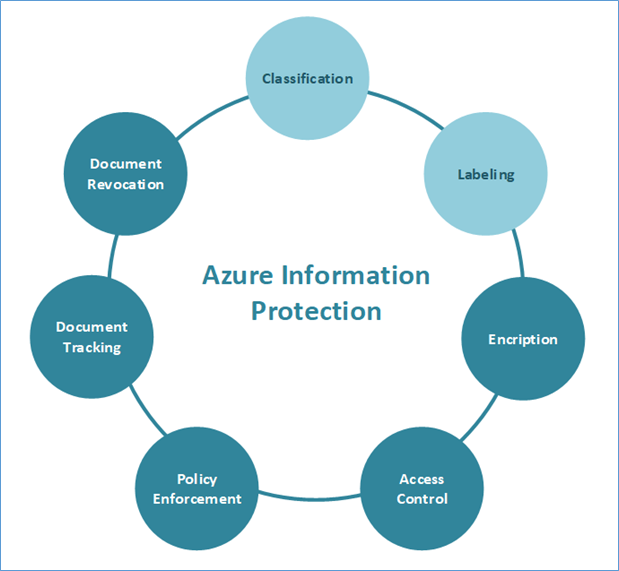
- Data classification and labeling: AIP enables organizations to classify and label their sensitive data based on its sensitivity level, such as confidential, internal, or public. This helps ensure that employees and stakeholders handle the data appropriately.
- Information protection: AIP protects data at rest, in transit, and in use by applying rights management to the data. This ensures that only authorized individuals can access the data and that it cannot be leaked, stolen, or misused.
- Integration with Microsoft services: AIP integrates seamlessly with other Microsoft services such as Office 365, SharePoint, and Exchange. This allows for consistent protection and labeling of data across all Microsoft platforms.
- Third-party integration: AIP also supports integration with third-party applications, including non-Microsoft applications, through the use of software development kits (SDKs) and application programming interfaces (APIs).
- Reporting and auditing: AIP provides detailed reporting and auditing capabilities, allowing organizations to track and monitor data access and usage. This helps ensure compliance with regulatory requirements and internal policies.
- Easy deployment and management: AIP is easy to deploy and manage, with a user-friendly interface and central management console. It also supports automated policies to simplify the process of data classification and protection.
Conclusion
In conclusion, Azure Information Protection is a powerful tool for protecting sensitive data and ensuring compliance with data protection regulations. Its comprehensive set of features and integrations make it a top choice for organizations looking to secure their data in the cloud. By using AIP, you can ensure that your organization’s sensitive data is protected and that you remain compliant with regulatory requirements.
Frequently Asked Questions(FAQs)
Q1. What are the 4 Azure Information Protection AIP sensitivity settings?
Azure Information Protection (AIP) sensitivity settings allow you to classify and protect sensitive information in your organization. There are four sensitivity settings available:
- Confidential: This setting is used for information that is highly sensitive and should be protected from unauthorized access.
- Internal: This setting is used for information that is sensitive but not as sensitive as confidential information.
- Public: This setting is used for information that is not sensitive and can be shared with anyone.
- No classification: This setting is used for information that has not been classified.
Q2. What is the name of Azure information protection process?
Azure Information Protection (AIP) is a unified information protection solution that helps you classify, protect, and discover sensitive information across your organization. AIP uses classification labels to identify sensitive information and then uses Azure Rights Management (Azure RMS) to protect that information
Q3. Where is the Azure information protection?
Azure Information Protection (AIP) is a cloud-based solution provided by Microsoft and is part of the Microsoft Information Protection (MIP) suite of products. It is available as a service within the Microsoft 365 and Azure platforms.
References/Related
- Microsoft Azure Security Technologies Certification
- Microsoft Azure Security Technologies: Step By Step Activity Guides
- Introduction to Azure Sentinel and Steps to Setup
- What is Azure Backup?- Features, Benefits, Tools & Real-life Examples
- Azure Site Recovery: Benefits, Working, Features, and Implementation
- Top 10 Best Practices for Azure Security
- Azure Firewall vs Azure Network Security Groups (NSG)
- Azure Security vs AWS Security
- What is Azure security?
Next Task For You
Begin your journey toward Mastering Azure Cloud and landing high-paying jobs. Just click on the register now button on the below image to register for a Free Class on Mastering Azure Cloud: How to Build In-Demand Skills and Land High-Paying Jobs. This class will help you understand better, so you can choose the right career path and get a higher paying job.


![Microsoft Agentic AI Business Solutions Architect [AB-100] | K21 Academy](https://test.k21academy.com/wp-content/uploads/2025/11/Microsoft-Agentic-AI-Business-Solutions-Architect-AB-100-Exam-Overview1.png)



