Azure Site Recovery is a cloud-based disaster recovery service offered by Microsoft that provides businesses with a cost-effective and efficient solution for recovering from unplanned disruptions. By replicating critical workloads and data to Azure, Azure Site Recovery helps organizations ensure business continuity in the event of a disaster.
In this blog, we will discuss the following :
What is ASR in Azure?
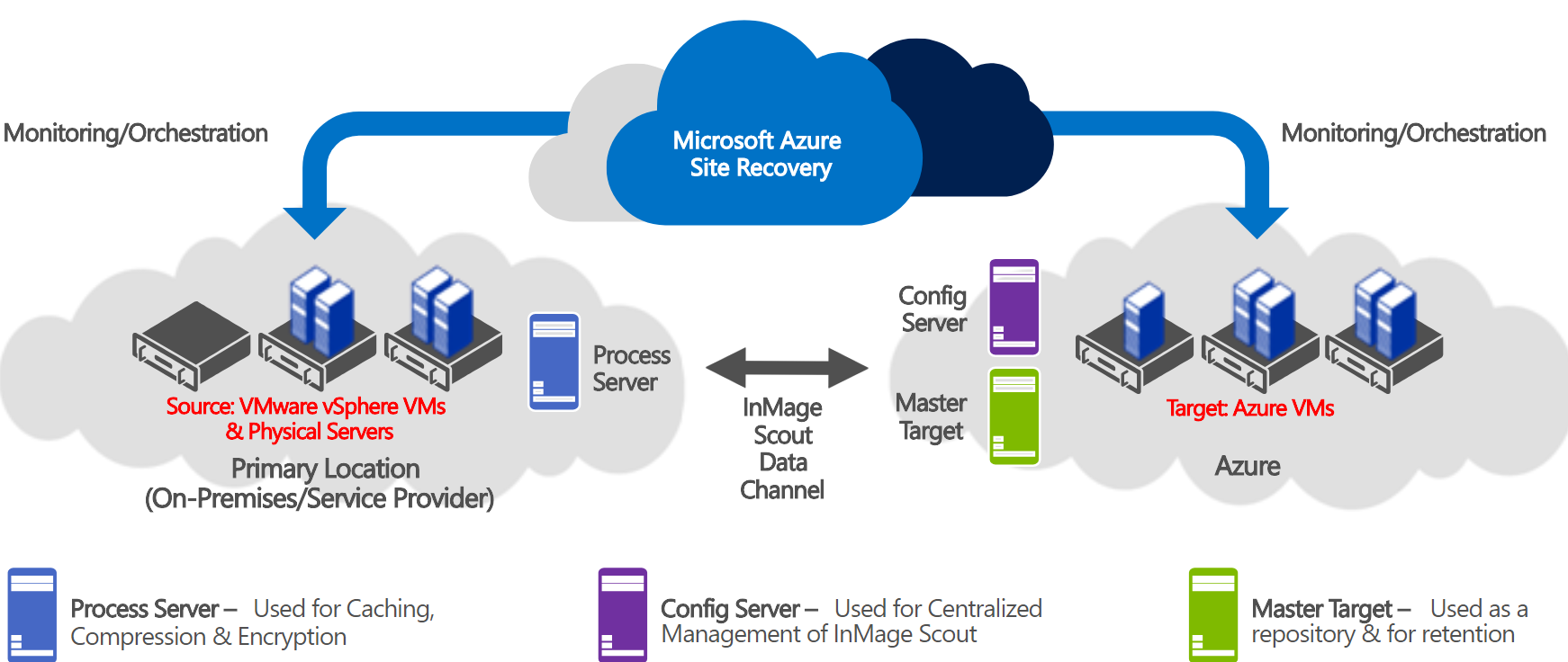
Azure Site Recovery (ASR) is Azure’s DRaaS for cloud and hybrid cloud architectures. The system closely copies the data to make sure the different data is in sync. Azure Site Recovery’s application-consistent snapshot feature ensures data availability after failover. The service allows customers to use Azure as a disaster recovery center on a pay-as-you-go basis without investing in additional infrastructure.
Benefits of Azure Site Recovery
- Business Continuity: Azure helps businesses minimize the impact of unexpected disruptions by providing a reliable failover solution for critical workloads and data.
- Cost-effective: With Azure Site Recovery, businesses can avoid the high cost of maintaining a secondary data center for disaster recovery. By leveraging Azure as a disaster recovery site, businesses only pay for the resources they consume during a failover event.
- Scalability: Azure Site Recovery can easily scale to meet the needs of any size business. As a cloud-based service, it provides businesses with the flexibility to scale up or down depending on their requirements.
- Rapid Recovery: Azure Site Recovery can quickly recover critical workloads and data in the event of a disaster. The service can replicate workloads to Azure and bring them online in a matter of minutes.
- Automated Failover: Azure Site Recovery provides businesses with automated failover capabilities that ensure that critical workloads and data are always available in the event of a disaster.
How Azure Site Recovery Works
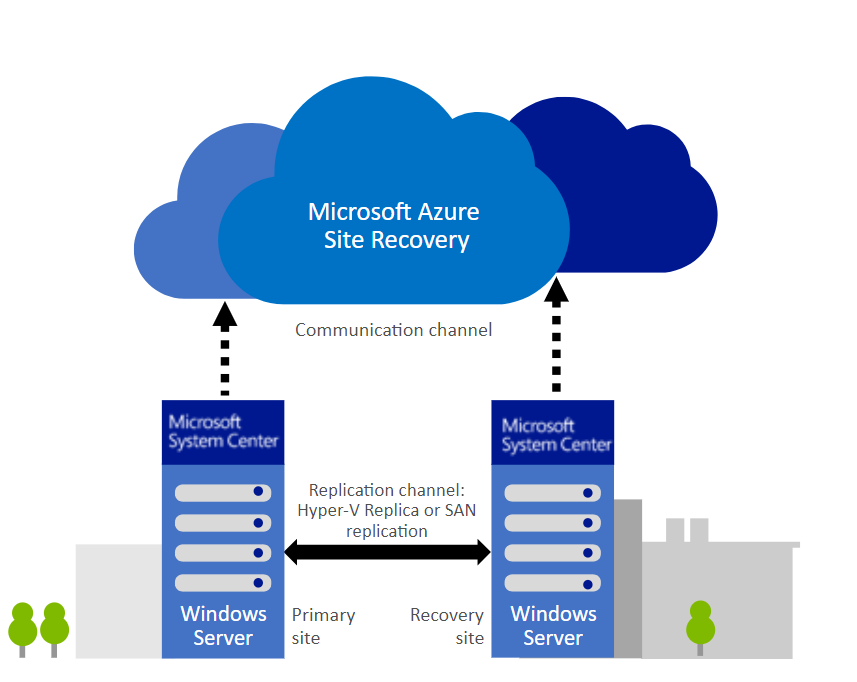
- Azure Site Recovery works by replicating critical workloads and data to Azure, which serves as a secondary data center for disaster recovery. When a disaster occurs, businesses can initiate a failover to Azure, which brings the replicated workloads and data online to the cloud.
- The service is designed to support a variety of workloads, including virtual machines, physical servers, and even Linux workloads. Azure Site Recovery provides businesses with the flexibility to replicate their workloads to Azure using either continuous replication or scheduled replication.
- Continuous replication ensures that changes to critical workloads and data are replicated in near real-time to Azure. This ensures that businesses can quickly recover from a disaster with minimal data loss.
- Scheduled replication provides businesses with the flexibility to replicate workloads and data on a schedule that meets their needs. This approach is useful for businesses that have specific recovery point objectives (RPOs) that they need to meet.
Key Features and Capabilities
- Replication to Azure: It provides businesses with the ability to replicate their critical workloads and data to Azure, which serves as a secondary data center for disaster recovery.
- Automated Failover: It provides businesses with automated failover capabilities that ensure that critical workloads and data are always available in the event of a disaster.
- Testing and Validation: It provides businesses with the ability to test and validate their disaster recovery plans before a disaster occurs. This ensures that businesses are prepared and can quickly recover in the event of a disaster.
- Multi-VM Application Consistency: It provides businesses with the ability to replicate multi-VM applications and ensure that they are recovered in a consistent state.
- Application-level Recovery: It provides businesses with the ability to recover critical applications, including SQL Server, SharePoint, and Exchange, in a matter of minutes.
Implementation
Implementing Azure Site Recovery involves several steps. Here’s an overview of the process:
1. Create an Azure Site Recovery vault:
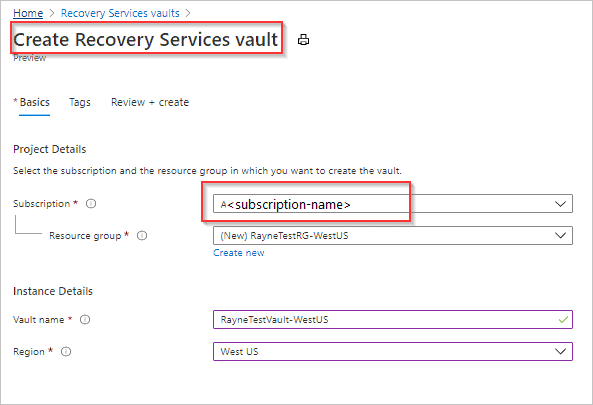
The first step is to create an Azure Site Recovery vault in your Azure subscription. The vault serves as a central location for managing and monitoring disaster recovery operations.
2. Prepare your on-premises environment:
Before you can begin replicating your on-premises virtual machines to Azure, you need to prepare your environment by installing the Azure Site Recovery Provider and configuring the replication settings.
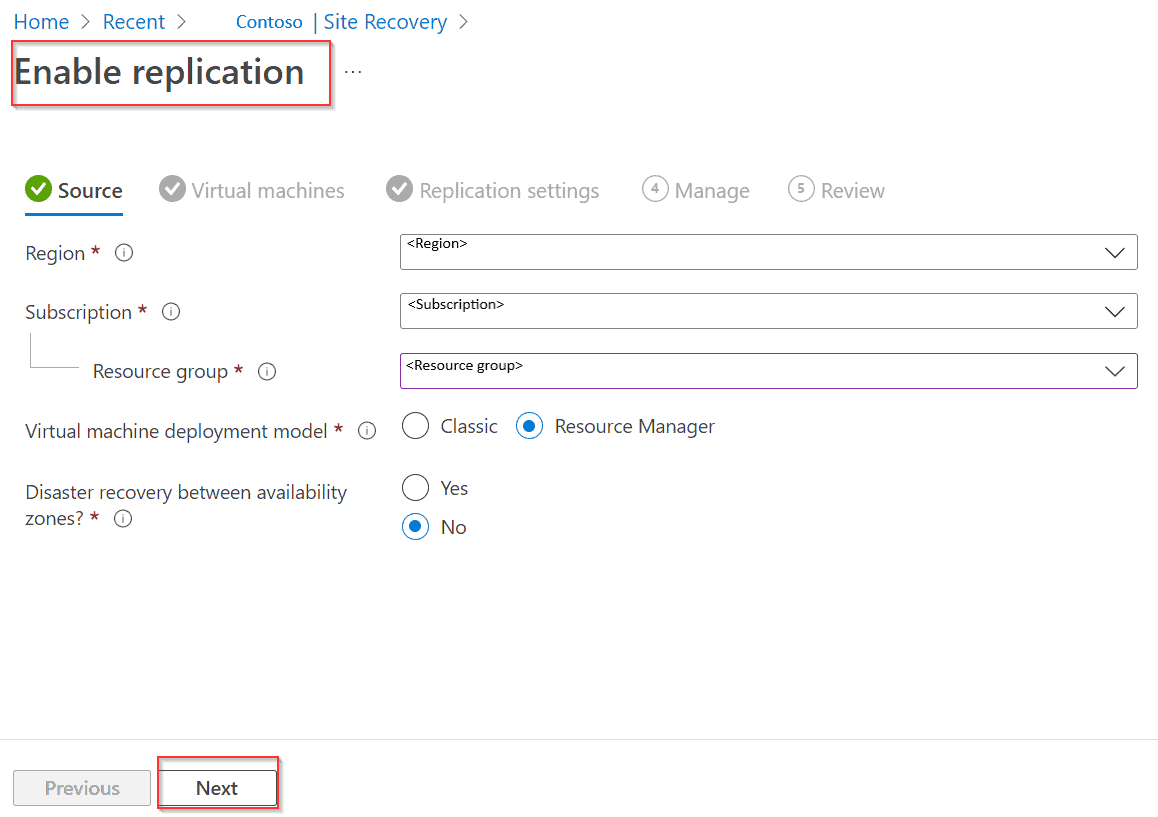
3. Configure replication:
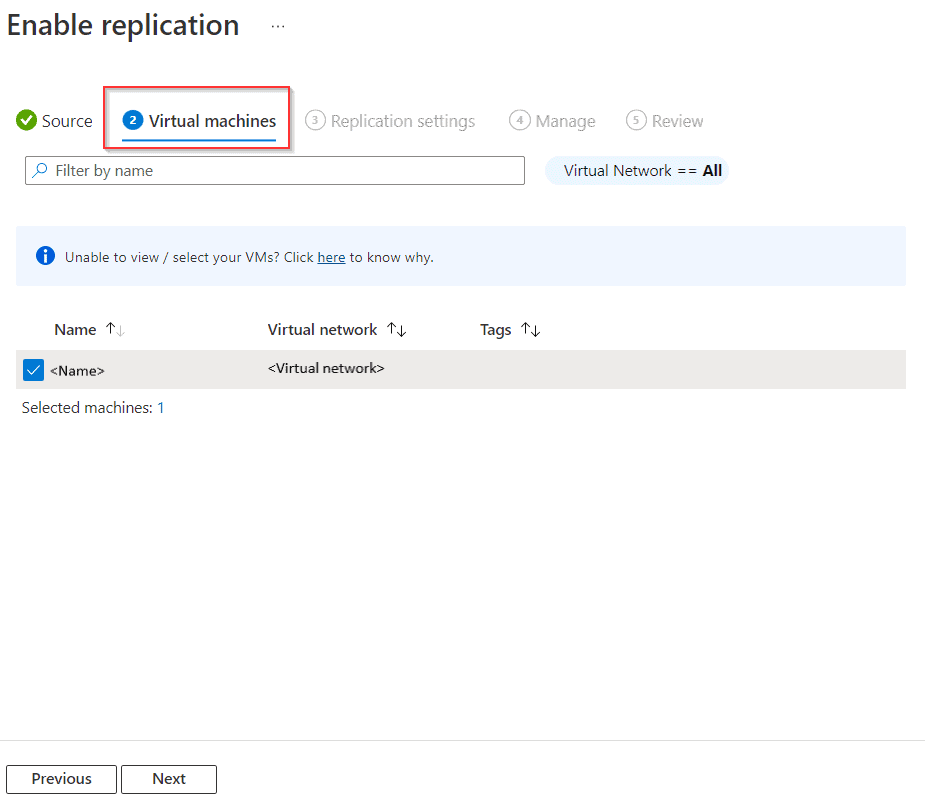
Once you have installed the Site Recovery Provider, you need to configure replication settings, including the virtual machines that you want to replicate, the replication frequency, and the target Azure region.
4. Test the replication:
After you have configured replication, it is important to test the process to ensure that it works as expected. You can do this by initiating a test failover, which simulates a disaster recovery scenario without impacting the production environment.
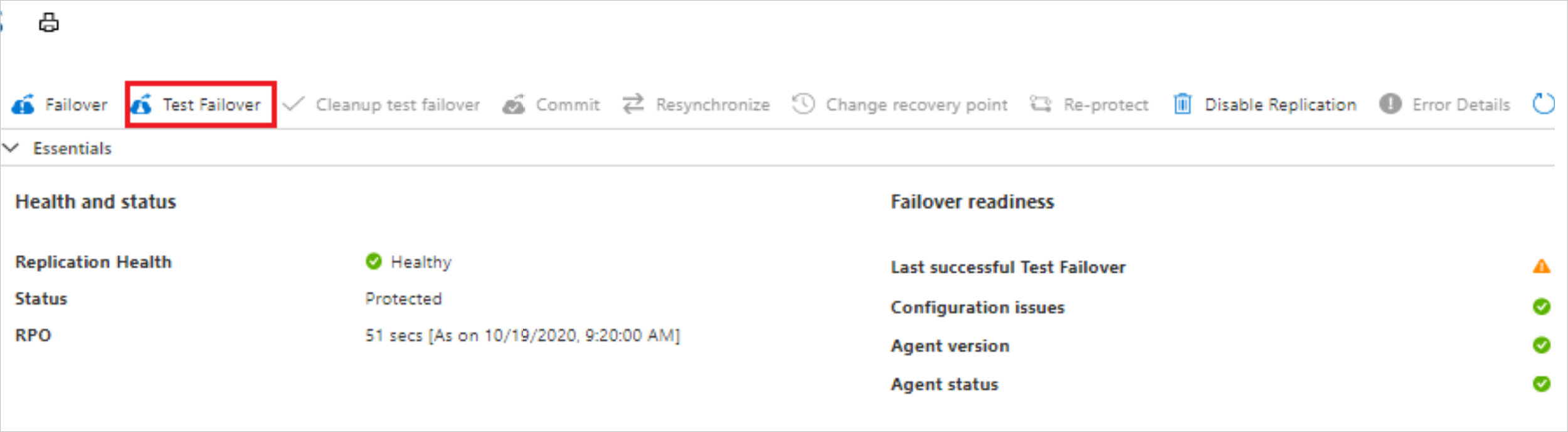
5. Enable disaster recovery:
Once you have tested the replication process, you can enable disaster recovery by initiating a failover. This switches your production environment to the replicated virtual machines in Azure, ensuring that your applications and data remain available in the event of a disaster.
6. Monitor and manage the disaster recovery environment:
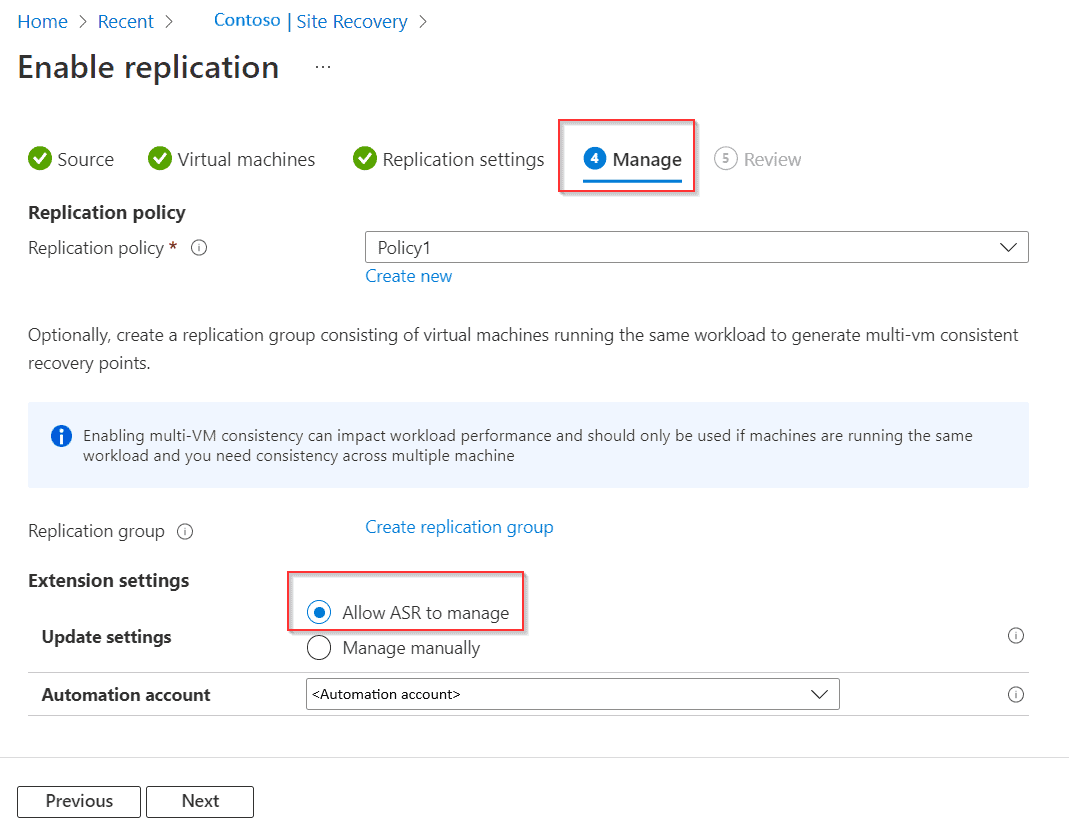
Finally, it is important to monitor and manage your disaster recovery environment on an ongoing basis. This includes monitoring replication health, managing failover settings, and performing regular disaster recovery drills to ensure that your environment is fully prepared for a disaster.
Replicate Data to the Cloud With ASR
Use Azure Site Recovery (ASR) to restore data to the cloud, including setting up Azure resources, preparing your on-premises site, adjusting replication settings, enabling machine replication, measuring failure and damage recovery, monitoring and managing redundancy and failure and failure. when needed.
1. Set up Azure resources:
Create an Azure Recovery Services vault as the management basis for the ASR.
Configure a virtual network in Azure to connect the on-premises environment to Azure.
2.Prepare the local environment:
Install the ASR Provider software on the local computer.
Set the configuration server to manage replication.
3. Configure replication settings:
Create protection groups to define which computers and their locations are replicated.
Frequency defines the replication policy, including storage and return targets.
4. Open the printer:
Select a virtual machine or physical server to replicate.
Specify replication settings such as target Azure region, storage account, and virtual network.
5. Failover and Disaster Recovery Test:
Check for redundancy by performing a failover test.
Provide regular disaster recovery training to prepare for adverse events.
6. Monitoring and Managing Replication:
Monitor replication health, health, and alerts generated by the ASR.
A recovery plan has been developed to define actions during the failure, including steps after the failure.
7. Failover and Failback:
To start a replicated machine in Azure in the event of a disaster or planned migration, initiate a failover.
After the issue is resolved, fail over from Azure on-premises service.
Conclusion
Azure Site Recovery is a powerful disaster recovery solution that can help businesses minimize the impact of unexpected disruptions. By replicating critical workloads and data to Azure, businesses can ensure business continuity and rapidly recover from a disaster. With its automated failover capabilities, cost-effective pricing, and scalability, which is why this is an excellent choice for businesses of any size.
This can help you to minimize downtime and ensure that your business can continue to operate even if your primary site is unavailable.
Azure Site Recovery supports a wide range of workloads including virtual machines (VMs), physical servers, and even entire data centers. It offers flexible replication options, including continuous replication for near-zero data loss and scheduled replication for cost-effective protection of less critical workloads. It also supports both one-way and bi-directional replication, so you can replicate workloads in both directions between two sites.
Frequently Asked Questions
Which of the following is benefits of Azure site Recovery?
Azure Site Recovery offers ease of deployment, cost effectiveness, and dependability. Deploy replication, failover, and recovery processes through Site Recovery to help keep your applications running during planned and unplanned outages.
What is the maximum retention of Azure site Recovery?
You can enter any value from 0-15 (in days) to configure retention period for a replication policy and once used during replication, recovery points will be retained accordingly for that duration. In addition to this, you can enable the application-consistent recovery points if required. By default, this is disabled.
Does Azure site recovery provide fault tolerance or disaster recovery?
Azure Site Recovery provides resilience and disaster recovery for apps and workloads running on on-premises machines, or Azure IaaS VMs. Site Recovery orchestrates replication, and handles failover to Azure when outages occur.
What type of replication is Azure Site Recovery?
Site Recovery provides continuous replication for Azure VMs and VMware VMs, and replication frequency as low as 30 seconds for Hyper-V. You can reduce RTO further by integrating with Azure Traffic Manager. You can replicate using recovery points with application-consistent snapshots.
References/Related
- Microsoft Azure Security Technologies: Step By Step Activity Guides
- Introduction to Azure Sentinel and Steps to Setup
- Microsoft Azure Security Technologies Certification
- Top 10 best practices for Azure Security
- Azure Firewall vs Azure Network Security Groups (NSG)
- Azure Security vs AWS Security
- What is Azure security?
Next Task For You
Begin your journey toward Mastering Azure Cloud and landing high-paying jobs. Just click on the register now button on the below image to register for a Free Class on Mastering Azure Cloud: How to Build In-Demand Skills and Land High-Paying Jobs. This class will help you understand better, so you can choose the right career path and get a higher paying job.


![Microsoft Agentic AI Business Solutions Architect [AB-100] | K21 Academy](https://test.k21academy.com/wp-content/uploads/2025/11/Microsoft-Agentic-AI-Business-Solutions-Architect-AB-100-Exam-Overview1.png)