





In this blog we will understand how to enable parallelism in Azure DevOps account. Using the method provided you can get free parallelism request and also understand what it parallelism.
What is inside the blog:
- Parallelism in Azure DevOps
- Why do you need to enable Parallelism in Azure DevOps?
- What is a parallel job in Azure DevOps?
- Different Types of Parallel Jobs
- Steps to Enable Parallelism in Azure DevOps
- FAQs
Parallelism in Azure DevOps
In Azure DevOps, parallelism refers to the ability to run many processes or activities concurrently within a development or release pipeline. This feature enables developers to divide complex operations into smaller, independent parts that can run concurrently on different agents or resources.
Azure DevOps enhances the efficiency of continuous integration and deployment workflows by using parallelism, hence accelerating total build and release timelines. This method is especially beneficial for large projects since it allows for faster feedback on code changes and improves the scalability and speed of software development pipelines housed on the Azure DevOps platform.
Why do you need to enable Parallelism in Azure DevOps?
The ability to enable parallelism in Azure DevOps is critical for streamlining development and release workflows. Developers can use parallel processing to efficiently disperse workloads by allowing tasks to be executed concurrently across several agents or environments. This not only minimizes the time required for complex build and deployment procedures, but it also takes advantage of cloud resources’ scalability.
Parallelism is especially important when dealing with large codebases, allowing developers to leverage the power of parallel builds and executions for faster feedback loops and higher throughput. This method improves resource efficiency, reduces bottlenecks, and supports a more responsive and adaptive continuous integration and continuous deployment (CI/CD) ecosystem within Azure DevOps.
What is a parallel job in Azure DevOps?
A parallel job in Azure DevOps refers to the concurrent execution of numerous activities or stages inside a pipeline stage. A job represents a single unit of work, and enabling parallel tasks allows these units to run on distinct agents or virtual machines at the same time. This simultaneous execution is advantageous for improving the efficiency of the build or release process and shortening the total pipeline completion time.
The ability to construct parallel jobs inside a stage in Azure DevOps allows developers to break down large workflows into smaller, independent tasks that may be done concurrently. This strategy improves resource utilization, speeds up feedback cycles, and helps to a more streamlined and responsive continuous integration and continuous deployment (CI/CD) pipeline.
Different Types of Parallel Jobs
- Microsoft Hosted parallel Job : Microsoft Hosted Parallel Jobs in Azure DevOps are Microsoft-provided execution environments that execute concurrently on cloud-based agents. They provide a scalable and user-friendly method for parallelizing jobs in CI/CD pipelines without requiring users to manage underlying infrastructure.
- Self Hosted Parallel Job : In Azure DevOps, self-hosted parallel jobs conduct concurrent tasks on user-managed agents, allowing for greater control of the execution environment. Users can configure and manage their own build or deployment agents on their infrastructure, giving them control over resources and dependencies.
Steps to Enable Parallelism in Azure DevOps
1. Create & Configure a Project
We need to create a project first as while filling out parallelism request form it requires a project link.
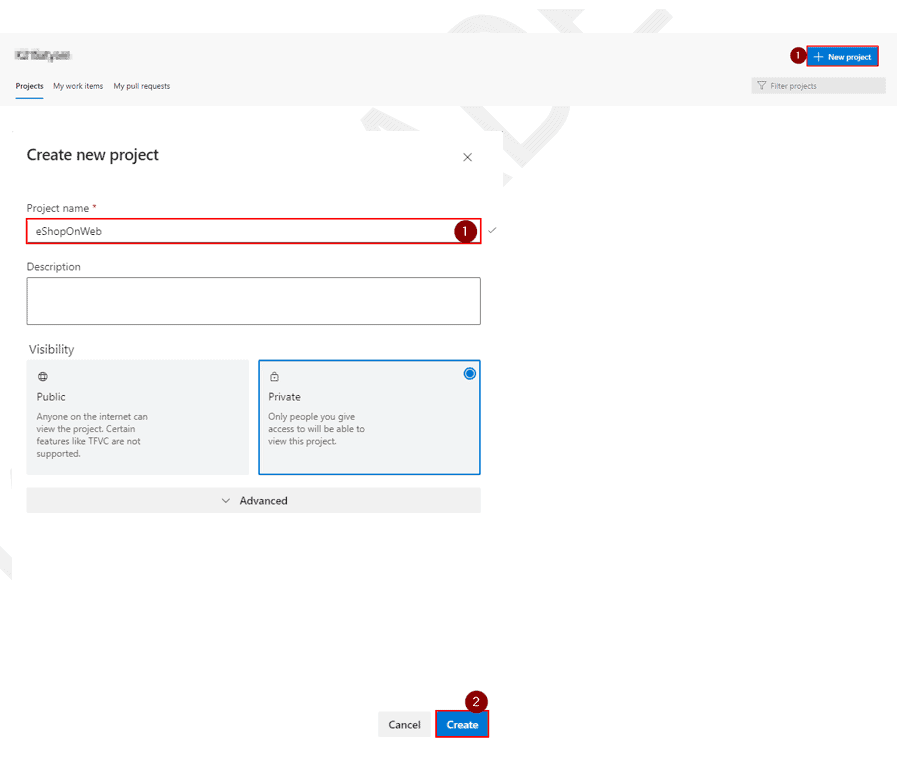
On your lab computer, in a browser window open your Azure DevOps organization. Click on New Project. Give your project the name eShopOnWeb and leave the other fields with defaults. Click on Create.
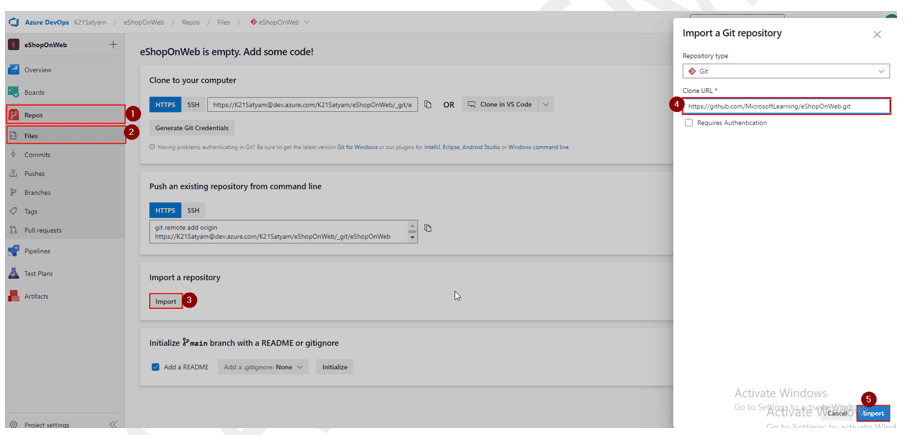
 We need to Import code into our code into the project. On your lab computer, in a browser window open your Azure DevOps organization and the previously created eShopOnWeb project. Click on Repos>Files , Import a Repository. Select Import. On the Import a Git Repository window, paste the following URL https://github.com/MicrosoftLearning/eShopOnWeb.git and click Import

2. Request for Parallelism in Azure DevOps
You need to visit this website https://aka.ms/azpipelines-parallelism-request and fill the form as described below
You get a form something like this :

NOTE: If you choose public project then two additional section is added in this form. These additional section will be as: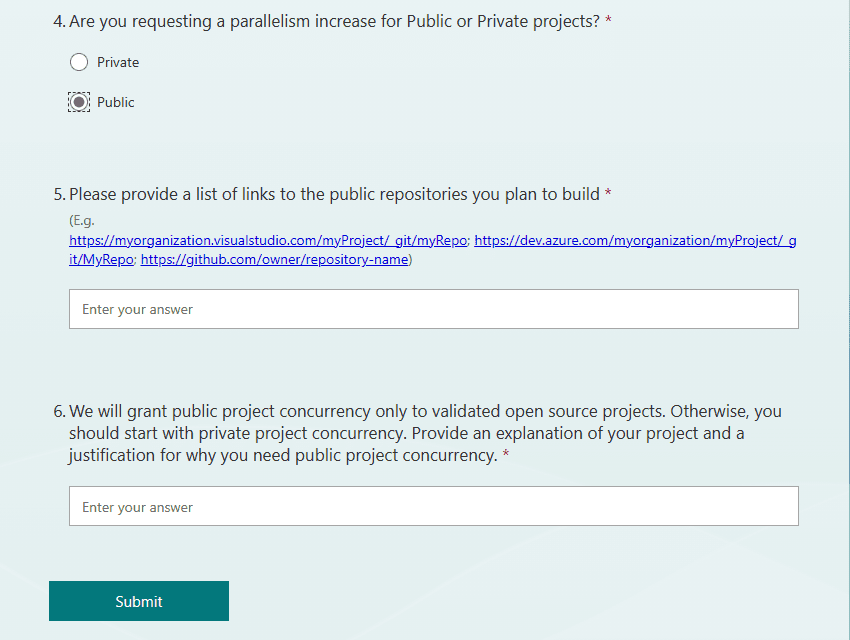
FAQs
Q1.) How do you fix no hosted parallelism has been purchased or granted?
To fix the issue You need to fill the parallelism for as provided above and wait for 2-3 working days for parallelism to be granted for your account
Q2.) How do I fill Azure DevOps parallelism request?
To fill the request visit https://aka.ms/azpipelines-parallelism-request . Fill the details as asked in the form, for betterment fill the form once with private projects and again with public project option selected.
Q3.) What is parallelism request in Azure?
In Azure, parallelism refers to the ability to perform multiple tasks or operations simultaneously. Parallelism can be applied to various types of workloads, such as compute, storage, and networking.
Q4.) What are the types of parallelism?
The type of parallelism are :
- Compute parallelism: It refers to the ability to run multiple instances of a workload simultaneously, allowing for increased performance and scalability.
- Storage parallelism: It refers to the ability to perform multiple operations on a storage system simultaneously, such as reading or writing data.
- Networking parallelism: It refers to the ability to handle multiple network connections simultaneously, such as handling multiple incoming requests.
Related/References
- [AZ-400] Microsoft Azure DevOps Certification Exam: Everything You Need To Know
- [AZ-400] Azure DevOps For Beginners
- [AZ-400] Azure DevOps Certification Path
- [AZ-400] Roles And Responsibilities As An Azure DevOps Engineer
- Using Azure Key Vault Secrets In A Pipeline
- CI/CD Pipeline | Continuous Integration | Continuous Deployment
- [AZ-104] Microsoft Azure Administrator Training: Step By Step Activity Guides/Hands-On Lab Exercise
Next Task For You
Begin your journey toward Mastering Azure Cloud and landing high-paying jobs. Just click on the register now button on the below image to register for a Free Class on Mastering Azure Cloud: How to Build In-Demand Skills and Land High-Paying Jobs. This class will help you understand better, so you can choose the right career path and get a higher paying job.


![Microsoft Agentic AI Business Solutions Architect [AB-100] | K21 Academy](https://test.k21academy.com/wp-content/uploads/2025/11/Microsoft-Agentic-AI-Business-Solutions-Architect-AB-100-Exam-Overview1.png)



