This post covers solutions for the issue while trying to access Oracle forms in Oracle E-Business Suite (R12.2) & how to troubleshoot it with a complete solution.
So let’s first understand about Oracle Forms, it can be configured in two modes: servlet and socket.
In servlet mode, a Java servlet (called the Forms Listener servlet) manages the communication between the Forms Java client and the OracleAS Forms services. In socket mode, the desktop clients access the Forms server directly.
To know more about Oracle Forms check our post Oracle Apps R12 Forms: Servlet or Socket
Issue:
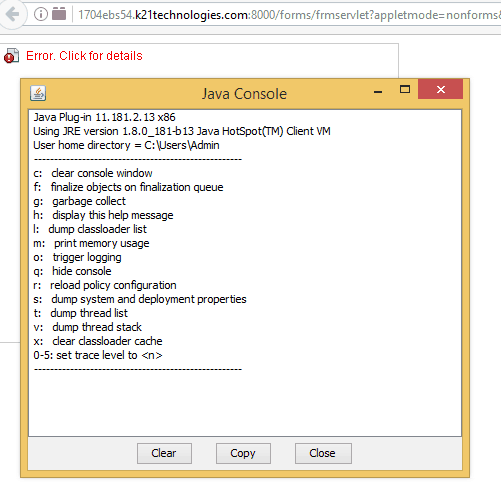
We were trying to access System Administrator -> Define Profile Options but Java plugins were not working due to which forms are not opening:
Note: Apps 12 is based on Forms 10g and is configured to run in servlet mode by default.
Also check: Steps to download EBS R12 software from Edelivery Oracle site
Fix:
1. Copy the URL that you are unable to open. In our case 1704ebs54.k21technologies.com:8000
2. Open the Control panel, then search for Java and click on that.

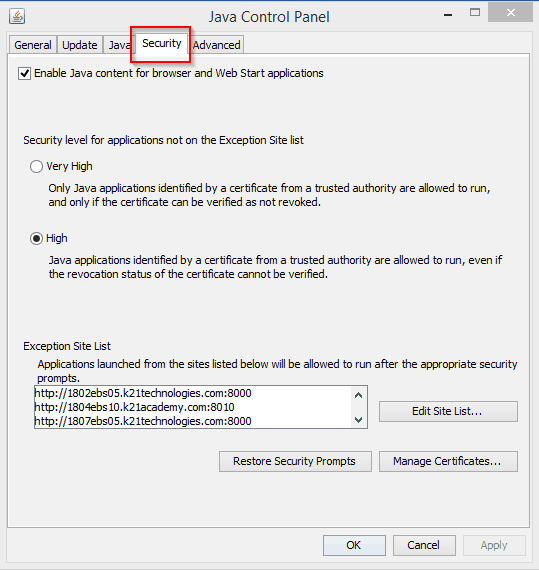
3. Click on Security
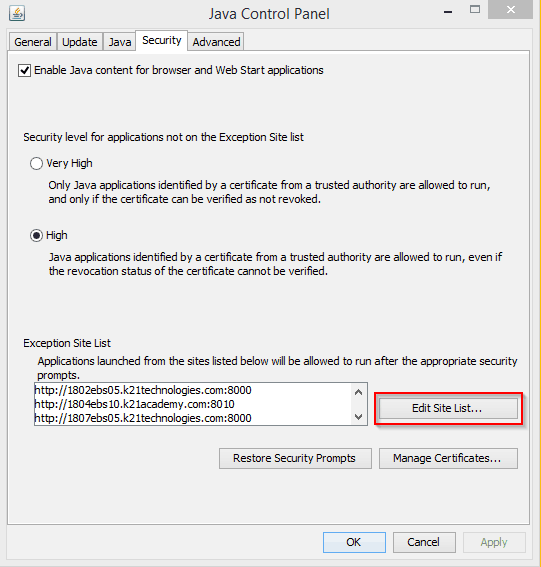
4. Click the “Edit Site List…”
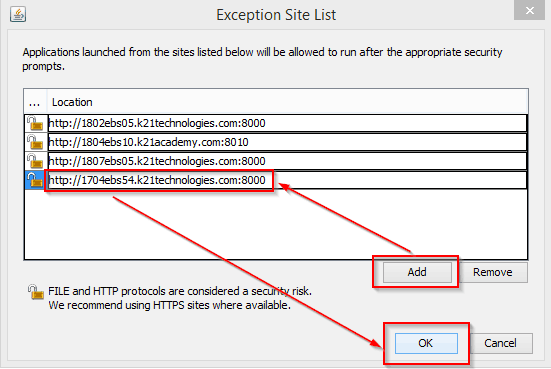
5. Click on Add and Paste the URL into the “Location” text box then click OK
 6. Click continue on below screen
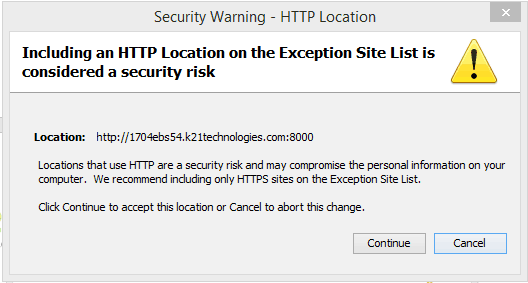 7. Click OK on Java Control Panel and reload the page.
Also read: ADOP (R12.2 Online Patching) in Oracle EBS (R12) FAQ
If You Are On Window 10.
For Windows 10 with IE 11
- JRE 1.8.0_51 (64-bit) and higher
- JRE 1.7.0_85 (64-bit) and higher
Disable Smart Screen
- Follow website (https://www.zerodollartips.com/enable-or-disable-smartscreen-on-windows-10/) for instructions on how to disable Smart Screen in Windows 10
- If this didn’t work for you, go on to the next suggestion.
Enable App Side-loading
- Open up the Settings app, and navigate to Update & Security > For Developers
- Toggle Side-load apps
- If this doesn’t work, go on to the final suggestion
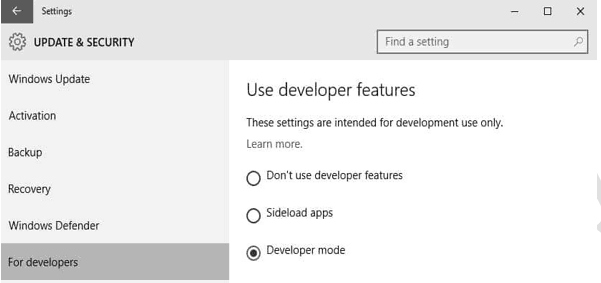
If you still unable to access then please do check the following
First of all, having so many versions of Java will cause issues with Oracle Forms, our suggestion would be is to reduce the Java to just one, say JRE 1.8.0_21 and uninstall the rest, it is always better to install only the 32 bit Java versions unless you have other application compatibility issues.
In case of IE error, carry out the same action plan which we did for adding security in JRE1.8 as well, that will solve the issue, please note that a restart of the browser is required for the changes to propagate.
Also, if you are using Firefox then, Firefox version greater than V52.0 which doesn’t support Oracle forms, so kindly uninstalls Firefox and then install a 32-bit Firefox of version 49 or 50. This will ensure that the forms are opened properly in Firefox.
After performing the above steps we were able to access Oracle Forms successfully without any issue.
This post is from our Oracle Apps DBA (R12.2) Training, in which we cover Architecture & Changes in Oracle E-Business Suite R12.2, Staging & Installation, File System & Important Files in R12.2, Start/Stop, Patching, AD Administration, Cloning, Concurrent Managers, AutoConfig, Password Management, and Troubleshooting and much more
Related/Further Readings
- [Troubleshooting] Forms Issue: FRM-92050 failed to connect to server:forms/servlet
- Oracle E-Business Suite (EBS) 12.2.9 Now Available & Its Upgrade Steps
- Steps to download Oracle E-Business Suite R12 Software
- Oracle AppsDBA (R12.2) Training: Step by Step Activity Guides/Hands-On Lab Exercise
- Oracle AppsDBA (R12.2): Install | Patch | Clone | Maintain
- Concurrent Managers: Overview & Concepts In Oracle EBS R12
- How to Change Apps/Applsys & sysadmin Schema Passwords in Oracle EBS R12.2 : Step by Step
- [Video] Online Patching (ADOP) In Oracle EBS R12.2
Next Task For You
We cover Oracle E-Business R12.2 Architecture & concepts in our Oracle Apps DBA For Beginners Training along with the Installation, Patching, Cloning, and Troubleshooting and also, Database upgrade to 19c and much more including the hands-on labs you must perform to upgrade your skills and get a good job with a high package.
Begin your journey towards becoming an Apps DBA by joining our FREE Masterclass on How To Learn Oracle Apps DBA (R12) & It’s New Features.


![Microsoft Agentic AI Business Solutions Architect [AB-100] | K21 Academy](https://test.k21academy.com/wp-content/uploads/2025/11/Microsoft-Agentic-AI-Business-Solutions-Architect-AB-100-Exam-Overview1.png)