





AWS Fargate, an AWS Elastic Container Service (ECS) and AWS Elastic Kubernetes Service compatible serverless compute engine for containers (EKS). In order to run Docker containers without having to manage servers or clusters, use Fargate AWS, a compute engine for Amazon ECS.
 In this blog, we’ll discuss the following topics one by one:
- Need for Fargate AWS
- Working on Fargate AWS
- AWS Fargate Platform Versions
- Fargate Launch Type
- Benefits of AWS Fargate
- What are the limitations of using AWS Fargate?
- Amazon EC2 or Amazon Fargate – Which one to choose?
- Frequently Asked Questions
Introduction to AWS Fargate
There is no need to scale, provision, or configure clusters of virtual machines to run containers with Fargate AWS. You are not required to select server types or how they communicate with one another. You only need to concentrate on developing and designing an application rather than managing the infrastructure that supports it.
Amazon ECS also has two modes: Fargate Launch Type and EC2 Launch Type. Fargate Launch Type allows you to package your application in containers, specify memory or CPU requirements, define IAM or networking policies, and finally launch your application. EC2 allows applications to run smoothly on customized cloud instances.
Fargate will always launch and scale compute resources to match the container requirements, preventing over-provisioning and ensuring you aren’t paying for resources you aren’t using.
 Need for Fargate AWS
When container services were not available, users would run their applications on virtual machines. They used EC2 instances to deploy applications in the AWS cloud. They packaged their application with the operating system into what is known as an Amazon Machine Image (AMI) and then ran it on an AWS EC2 Instance.
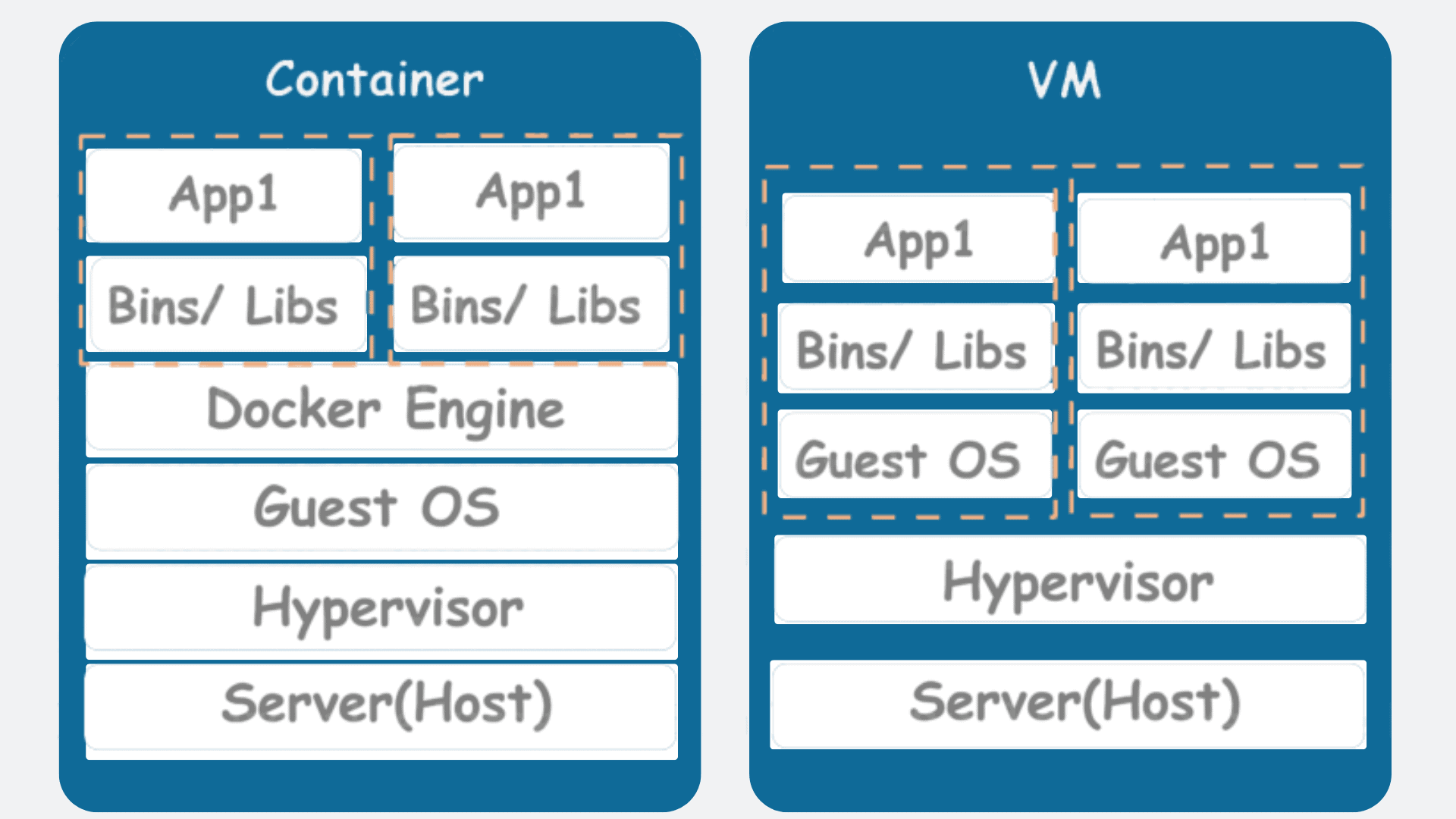
Then Docker introduced containers, and people began to deploy their applications on them. Containers resemble virtual machines. One significant distinction is that, unlike virtual machines, containers share the host system’s kernel with other containers. The illustration below will make things more clear.
Working on AWS Fargate
Before we look at how Fargate AWS works, let’s go over some general terms that you may come across when working with Fargate AWS .
- Container: A Docker Container is a standardized software development unit that contains everything your software application requires to run code, runtime, system tools, system libraries, and so on.
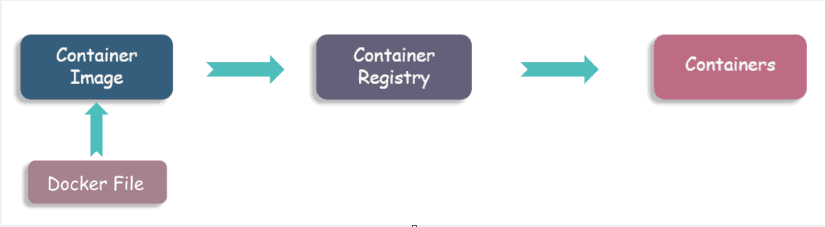
- Container Image: Images are typically created from a docker file, which is a plain text file that specifies all of the container’s components. These images are saved in a registry and can be downloaded and run in the container.
- Task Definitions: The task definition is a JSON-formatted text file that describes one or more containers in your application. Consider it a blueprint for your application.
- Task: A task is a cluster-level instantiation of a task definition. You can choose how many tasks will run on your cluster.
- Clusters: A cluster is essentially the logical grouping of resources required by your application. Amazon ECS manages your cluster resources if you use the Fargate launch type with tasks within clusters.
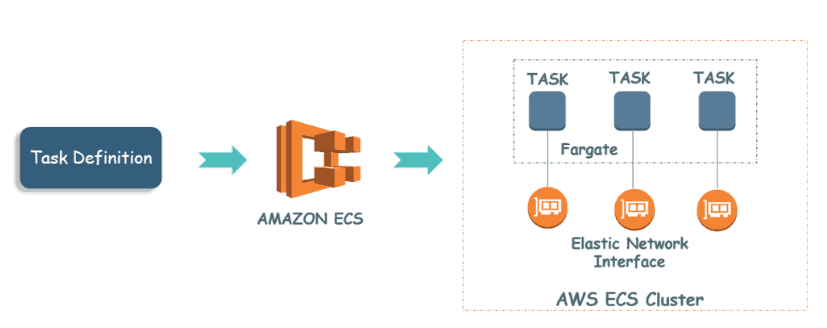 We are now ready to move forward. The diagram below illustrates how to deploy your application on ECS using Fargate AWS.
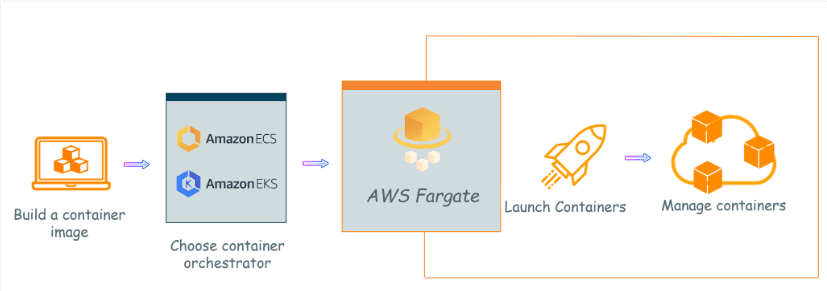
You must first create a container image that is appropriate for your application and then store it in a registry. Then you select an Amazon ECS or Amazon EKS container orchestration service and assign resources to your application.
After that, you must create a cluster to group all of the assigned resources. When you select the Fargate launch type, this is what happens. Fargate AWS will now launch and run all of your containers. It manages all of your underlying infrastructure and clusters.
AWS Fargate Platform Versions
- The Fargate platform version refers to the task infrastructure runtime environments, which are a combination of the container runtime version and the kernel version.
- When specifying a platform version, you can specify a specific version, such as 1.4.0, or LATEST. If your services require scaling after being deployed and running, additional tasks are instantiated using the same version as the parent deployment.
- You can update your service, change the platform version, and force a new deployment when a new platform version is released. Your tasks are replaced with the most recent version by doing this.
Fargate AWS Launch Type
When using this mode, the user only needs to take a few steps before launching the application. The procedures are as follows:
- Containerize the application that the user has created.
- Specify the CPU and memory requirements.
- Establish IAM and networking policies.
- Start the application.
When using the Fargate launch type to run tasks and services, the user must first perform the following operations before launching the application:
- Containers are used to package the application.
- The CPU and memory requirements are specified.
- Policies for networking and IAM are defined.
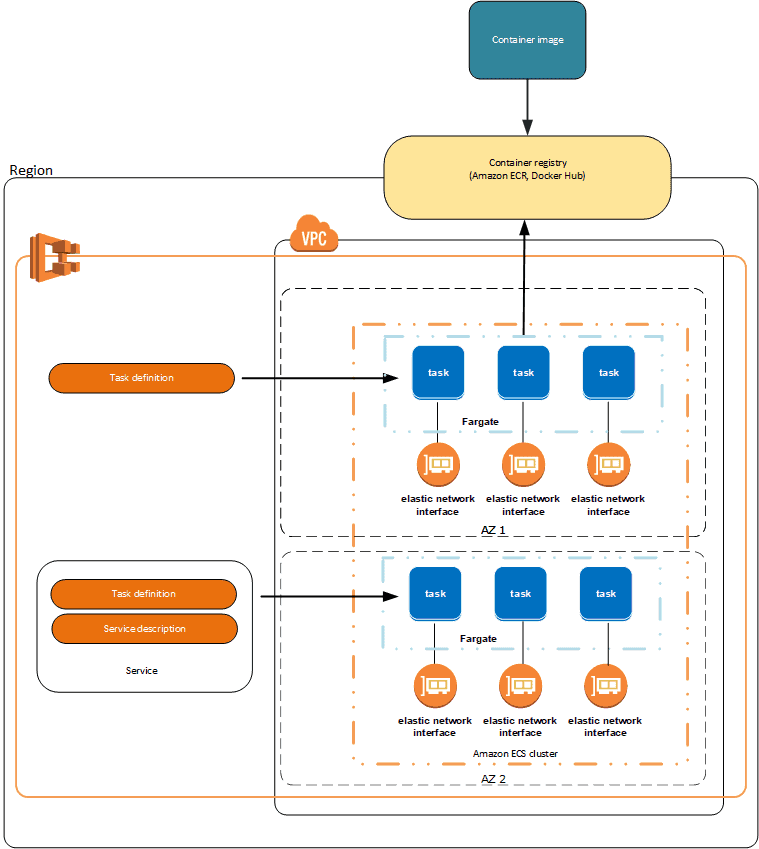
When creating a Fargate task, make sure the network mode is set to ‘awsvpc’. This network mode ‘awsvpc’ ensures that each task has its own elastic network interface.
Benefits of AWS Fargate
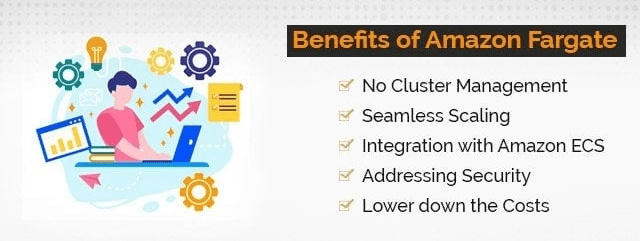
1. No Cluster management- With Fargate, you only need to think about containers and concentrate on building and running your app. It does away with the need to manage a cluster of Amazon EC2 Instances.
2. Seamless Scaling – You are not required to provision compute resources for container apps. Once the application requirements, such as CPU usage or memory, have been defined,
3. Integration with Amazon ECS- You only need to define application requirements, CPU and memory requirements, IAM or networking policies required by each container, and upload everything to Amazon ECS.
4. Addressing Security- AWS completely removes control of the underlying infrastructure, and there is no mechanism in place to secure container deployments. This is the primary reason why businesses continue to deploy containers in dedicated virtual machines.
5. Lower the Costs- Fargate AWS manages infrastructure while also lowering overall application costs. Most container deployments today take place on dedicated virtual machines. The reason for this is that dedicated virtual machines can be easily secured.
What are the limitations of using AWS Fargate?
1. Limited control: AWS Fargate gives you less control over the underlying infrastructure than if you were to manage your own servers or clusters. For example, you cannot choose the specific type of instance that your containers will run on. This can be a limitation if you have specific requirements for your workloads.
2. Not all workloads are supported: AWS Fargate is not supported for all workloads, such as those that require high-performance computing or specialized hardware. If you have a workload that requires a lot of resources, you may be better off managing your own servers or clusters.
3. Pricing: AWS Fargate can be more expensive than managing your own servers or clusters for workloads that require a lot of resources. This is because AWS Fargate charges you for the CPU and memory resources that your containers use, even if they are not in use. If you have a workload that is CPU- or memory-intensive, you may be able to save money by managing your own servers or clusters.
4. Portability: Fargate is not portable to other cloud providers. This means that if you decide to move your workloads to another cloud provider, you will not be able to use Fargate.
Amazon EC2 Or AWS Fargate – Which one to choose?
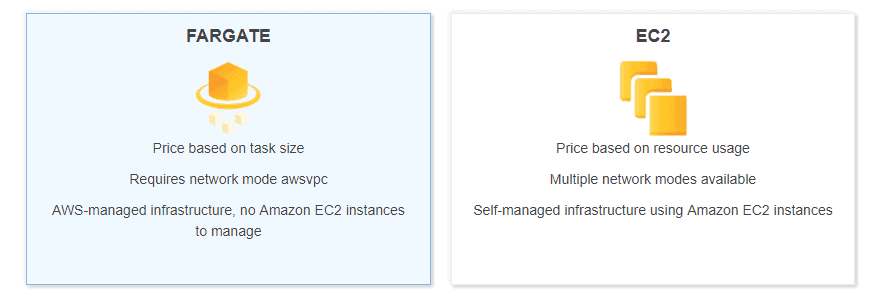
These are the two major models for running containers on AWS. Amazon EC2 manages or deploys your own EC2 instances to effectively run applications. Fargate AWS allows you to run containers without the need for EC2 instances. Both are excellent methods for managing or scaling your containers in a dependable manner, but deciding which service to use is always a difficult task.
 In this section, we will assist you in making the best decision possible by thoroughly understanding both services based on various parameters. Pricing as well as Use Cases
Pricing
Billing for the EC2 Launch type is based on the cost of the underlying EC2 instances. It enables you to optimize the process by utilizing billing models such as spot instances or reserved instances, among others. However, it is your responsibility to ensure that containers are densely packed into instances in order to reap the greatest benefits; otherwise, it will be a waste of money.
Billing for Fargate AWS Launch Type is based on CPU or memory requirements per second. You only pay for what your task consumes; there is no need to pay for an EC2 instance that is idle.
Use Cases
Here are several scenarios that will explain when you should use the EC2 or Fargate services for application deployment.
- If the workload is consistent in terms of CPU or memory requirements and you want to optimize for cost, consider running a cluster of reserved EC2 instances or spot instances. You only need to maintain and optimize this cluster.
- Managing a large cluster of EC2 instances is generally more difficult, and you must ensure that all instances are properly patched, secured, and updated with the latest version of Docker. Fargate is the best option if you don’t want to get into instance management.
- If the workload is light, with high traffic during the day and low traffic at night, then Fargate AWS is the best option. You can scale down a tiny container at night to save money and then scale it back up during the day when infrastructure requirements are higher.
Frequently Asked Questions
What is AWS fargate vs Lambda?
Fargate is a Container as a Service (CaaS) offering, whereas AWS Lambda is a Function as a Service (FaaS) (FaaS offering). As a result, Lambda functions do not always need to be packaged into containers, which makes it easier to get started with Lambda. Fargate, on the other hand, is the way to go if you have containerized applications.
What is the pricing of Fargate AWS?
There are no upfront fees with Amazon Fargate, and you only pay for the resources that you use. You are charged based on the amount of vCPU and memory resources used by your containerized applications.
Can I run my Arm-based applications on AWS Fargate?
Yes. Using multi-architecture or Arm-compatible container images from Amazon Elastic Container Registry, Fargate AWS enables you to run your Arm-based apps (Amazon ECR).
Can I use my existing Microsoft Windows License with Fargate AWS?
Customers don’t need to manage the underlying compute instances operating in Fargate because Fargate is a serverless computing engine. Because of this, Fargate will handle your Windows OS licenses; this service is included in the Fargate fee.
Is fargate better than lambda?
Fargate is still quicker than ECS and Lambda even though it still takes longer to start up. This is mostly because Fargate needs to wait for the ECS clusters underneath to wake up. When a function is run, AWS Lambda immediately starts spinning up storage and computing resources
Related Links/References
- AWS Certified Solutions Architect Associate SAA-C03 Exam details
- AWS Free Tier Limits
- AWS Free Tier Account Details
- AWS Shield | DDoS Attacks | AWS Shield Pricing: Overview
- AWS Virtual Private Network (AWS VPN): Everything You need to Know
- AWS Data Pipeline
- Top 6 AWS Training Courses & Certifications
- AWS For Testers And AWS Quality Assurance (QA)
- Azure DevOps Vs AWS DevOps – Difference & Pricing Overview
- AWS S3 | Amazon Simple Storage Service Bucket : Complete Overview
Next Task For You
Begin your journey towards an AWS Cloud by joining our FREE Informative Class on Amazon Cloud Free Class by clicking on the below image.


![Microsoft Agentic AI Business Solutions Architect [AB-100] | K21 Academy](https://test.k21academy.com/wp-content/uploads/2025/11/Microsoft-Agentic-AI-Business-Solutions-Architect-AB-100-Exam-Overview1.png)



