





AWS Cloud migration is a game-changing approach that helps companies upgrade, scale, and save expenses in their IT infrastructure. Organizations can guarantee a smooth transfer while attaining operational efficiency and long-term business success by utilizing AWS’s organized migration methods, tools, and best practices. By ensuring that businesses optimize AWS’s advantages while maintaining security, performance, and compliance, this architecture offers a solid basis for cloud adoption.

This blog post gives a walkthrough of the Step-By-Step Activity Guides of the AWS Migration training program that you must perform to learn this course.
Here’s a quick sneak-peak of how to start learning by doing Hands-on.
List of Labs that we include in Our training AWS Migration.
- AWS Cloud Migration: Strategies & Best Practices
- AWS Basic Labs
- Intermediate labs for AWS
- AWS Migration-Specific Hands-on Labs
- Migrating an on-premises VM machine to the AWS environment
- Migrating a source DB, which will be from outside the AWS environment to target AWS RDS Aurora DB in the side AWS environment
- Speeding up a large-scale data migration to S3 by enabling S3 Acceleration
- Confirming how much data migration has been speeded up via a tool
- Migrating a monolithic application to AWS and then breaking it into microservices
- AWS Migration Projects
- Frequently Asked Questions (FAQs)
AWS Cloud Migration: Strategies & Best Practices
AWS cloud migration follows a structured process starting with an assessment of current infrastructure, cost analysis (TCO), security, and compliance needs. This phase ensures proper planning and strategy selection for a seamless transition.
1. AWS Migration Strategies (7 Rs)
AWS provides seven key migration strategies to align with business objectives:
- Rehost (Lift & Shift): Move applications to AWS with minimal changes.
- Relocate: Shift workloads to AWS without reconfiguration (e.g., VMware Cloud on AWS).
- Replatform: Optimize workloads by using AWS-managed services (e.g., Amazon RDS).
- Repurchase: Replace legacy apps with AWS-based SaaS solutions.
- Refactor: Modify apps to be cloud-native using AWS Lambda, Aurora, etc.
- Retain: Keep certain workloads on-premises due to compliance or business needs.
- Retire: Decommission unused or obsolete applications.
 2. AWS Migration Tools & Services
AWS provides specialized tools for automating and managing migrations, including:
- AWS Application Migration Service (for rehosting workloads).
- AWS Database Migration Service (DMS) (for minimal downtime database migration).
- VMware Cloud on AWS (for VMware workload migration).
- SAP & Oracle on AWS (for enterprise applications).

3. Migration Execution & Optimization
After migration, organizations must optimize costs, enhance security, and improve performance. Key areas include:
- Cost Optimization: Right-sizing resources and using AWS auto-scaling.
- Application Performance: Continuous monitoring via AWS CloudWatch.
- Operational Efficiency: Automating processes with AWS DevOps tools.
Hands-on Guides & Project:
Lab 01: Create an AWS Free Trial Account
Embark on your AWS journey by setting up a free trial account. This hands-on lab guides you through the initial steps of creating an AWS account, giving you access to a plethora of cloud services to experiment and build with.
Amazon Web Services (AWS) is providing a free trial account for 12 months to new subscribers to get hands-on experience with all the services that AWS provides. Amazon is giving us a number of different services that we can use, with some limitations, to get hands-on practice and gain more knowledge on AWS Cloud services as well as regular business use.
With the AWS Free Tier account, all the services offered have limited usage limits on what we can use without being charged. Here, we will look at how to register for an AWS FREE Tier Account.
To learn how to create a free AWS account, check our Step-by-step blog, How To Create AWS Free Tier Account

Lab 02: CloudWatch – Create Billing Alarm & Service Limits
Dive into CloudWatch, AWS’s monitoring service. This lab focuses on setting up billing alarms to manage costs effectively and keeping an eye on service limits to ensure your applications run smoothly within defined boundaries.
AWS billing notifications can be enabled using Amazon CloudWatch. CloudWatch is an Amazon Web Services service that monitors all of your AWS account activity. CloudWatch, in addition to billing notifications, provides infrastructure for monitoring apps, logs, metrics collection, and other service metadata, as well as detecting activity in your AWS account usage.
AWS CloudWatch offers a number of metrics through which you can set your alarms. For example, you may set an alarm to warn you when a running instance’s CPU or memory utilization exceeds 90% or when the invoice amount exceeds $100. We get 10 alarms and 1,000 email notifications each month with an AWS free tier account.
Check out our blog on AWS Free Tier Account Services for more information.
Lab 3: Create & Connect to Windows EC2 Machine
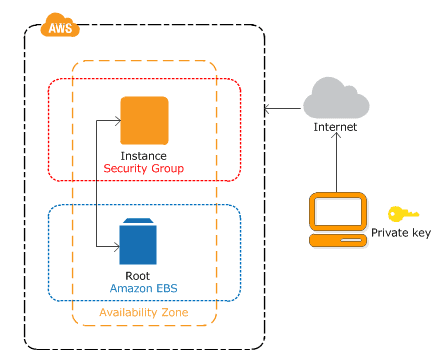
In order to launch instances running a variety of operating systems, load them up with your own desired application environment, control network access permissions, and execute the image on as many or as few computers as you like, you can utilize the console interfaces provided by Amazon EC2.
In this activity guide, you will learn how to create and connect to a Windows EC2 Instance Machine.
Lab 4: Create & Connect to Linux EC2 Machine
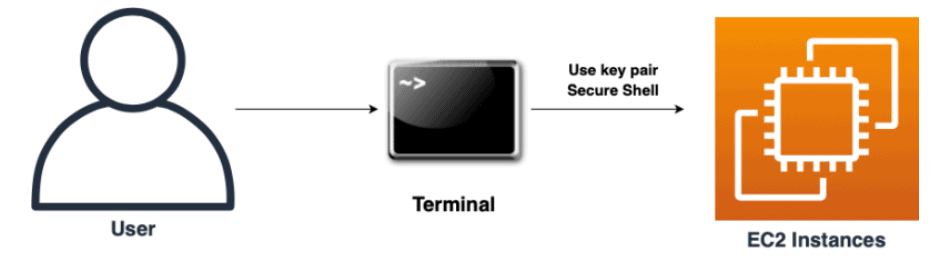
A virtual server in Amazon’s EC2 for running applications on the Amazon Web Services infrastructure is known as an Amazon EC2 instance. To meet the needs of users, Amazon offers various types of instances with varying configurations of CPU, memory, storage, and networking resources.
In this activity guide, you will learn how to create and connect to an AWS Linux EC2 Instance.
Lab 5: AWS Identity & Access Management(IAM)
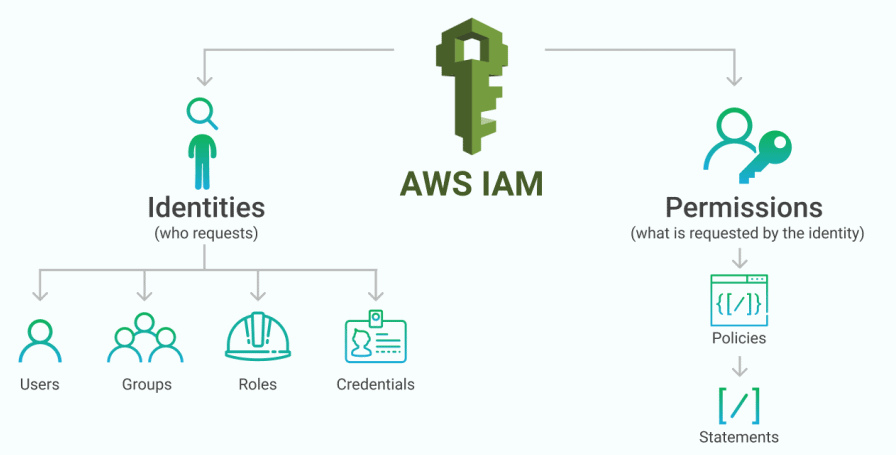
AWS Identity and Access Management (IAM) is an AWS service that allows you to securely control access to AWS resources. You can use the IAM service to manage a user who has been authenticated (signed in) and authorized (has permission) to use a service/resource.
When you create an AWS account for the first time, you start with a single sign-in identity that has full access to all AWS services/resources in the account. This identity is known as the AWS Root user, and it can be accessed by logging in with the email address and password you used to create the account. We strongly advise you not to use the root user for any daily tasks, including administrative ones. Instead, use your root user only to create the IAM user and for billing purposes, then securely lock away your root account credentials and use that account for only a few service management tasks.
In this activity guide, You will learn how to create an IAM user, role, and Group and attach policies to it.
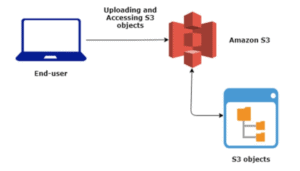
Activity Guide 6: Create S3 Bucket, Upload & Access a File, And Host a Website
Amazon Simple Storage Service is an object storage service that provides your data with scalability, durability, data availability, and performance. This means that customers of all sizes and industries can use S3 to store and protect any amount of data for a variety of use cases, including mobile apps, backup and restore, website hosting, archiving, enterprise applications, IoT devices, and big data analytics. Amazon S3 is a service that offers simple management tools to help you organize your data and configure fine-grained access controls to meet your specific business, organizational, and compliance needs.
Amazon S3 is built to last for 99.999999999% (11 9’s) and stores data for millions of applications for businesses all over the world.
In this activity guide, You’ll learn how to make a bucket, upload and access files, and host your static website on Amazon S3.
Activity Guide 7: Network Load Balancer
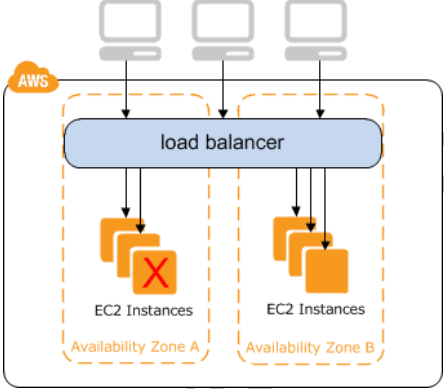
Elastic Load Balancing automatically distributes incoming traffic across multiple targets in multiple Availability Zones, including Amazon EC2 instances, containers, IP addresses, and Lambda functions, and ensures that only healthy targets receive traffic. Elastic Load Balancing can balance traffic across a Region by routing it to healthy targets in different Availability Zones.
In this activity guide, you will learn how to create and test a Network load balancer.
Check our blog on AWS Elastic Load Balancing.
Activity Guide 8: Configuring Load Balancer and Autoscaling on EC2 Instances
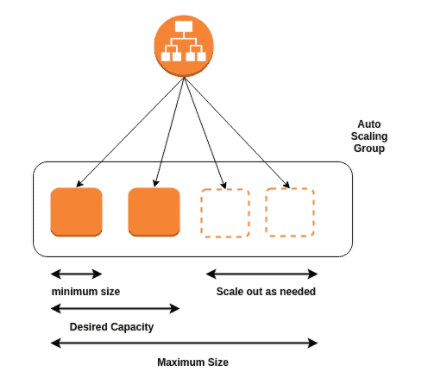
Auto Scaling monitors your applications and adjusts capacity automatically to maintain consistent, predictable performance at the lowest possible cost. Setting up application scaling for multiple resources across multiple services in minutes is simple with AWS Auto Scaling.
Elastic Load Balancing distributes incoming application traffic automatically across multiple targets, such as Amazon EC2 instances, containers, IP addresses, and Lambda functions. It can handle varying application traffic loads in a single Availability Zone or across multiple Availability Zones.
In this activity guide, We will go over step-by-step instructions for creating an Elastic Load Balancer ELB & Auto Scaling group to create a system that can handle traffic variations.
Activity Guide 9: Create a Custom Virtual Private Cloud
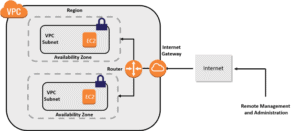
Amazon Virtual Private Cloud (Amazon VPC) is an AWS service that allows you to configure a logically separate section of the AWS cloud where you can launch your AWS resources in a virtual network of your choosing. You have complete control over your VPC environment, including the ability to choose your own IP address range, create your own subnets, and configure route tables and network gateways.
In this activity guide, you will learn about how to create a VPC, subnet, Internet gateway, and NAT gateway and what is the purpose of creating these resources.
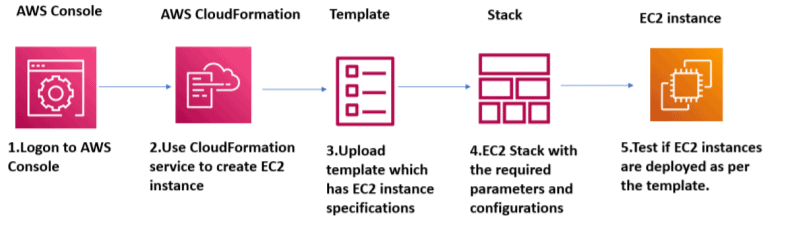
Activity Guide 10: Create and Update Stacks Using CloudFormation
In this activity guide, you will learn how to create and update the CloudFormation stacks.
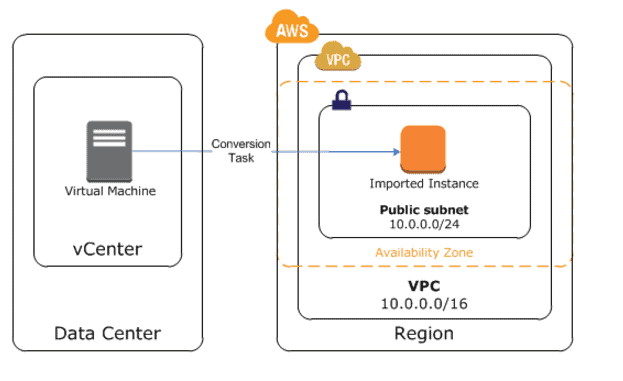
Activity Guide 11: Migrating an on-premises VM machine to the AWS environment
The primary migration service recommended for lift-and-shift migrations to AWS is the AWS Application Migration Service (AWS MGN). Customers who are currently using Server Migration Service (SMS) are encouraged to migrate to Application Migration Service in the future.
The Application Migration Service simplifies and expedites your cloud migration. It enables you to quickly realize the benefits of migrating applications to the cloud with minimal changes and downtime.
In this activity guide, you will learn how to Migrate an on-premises VM machine to the AWS environment
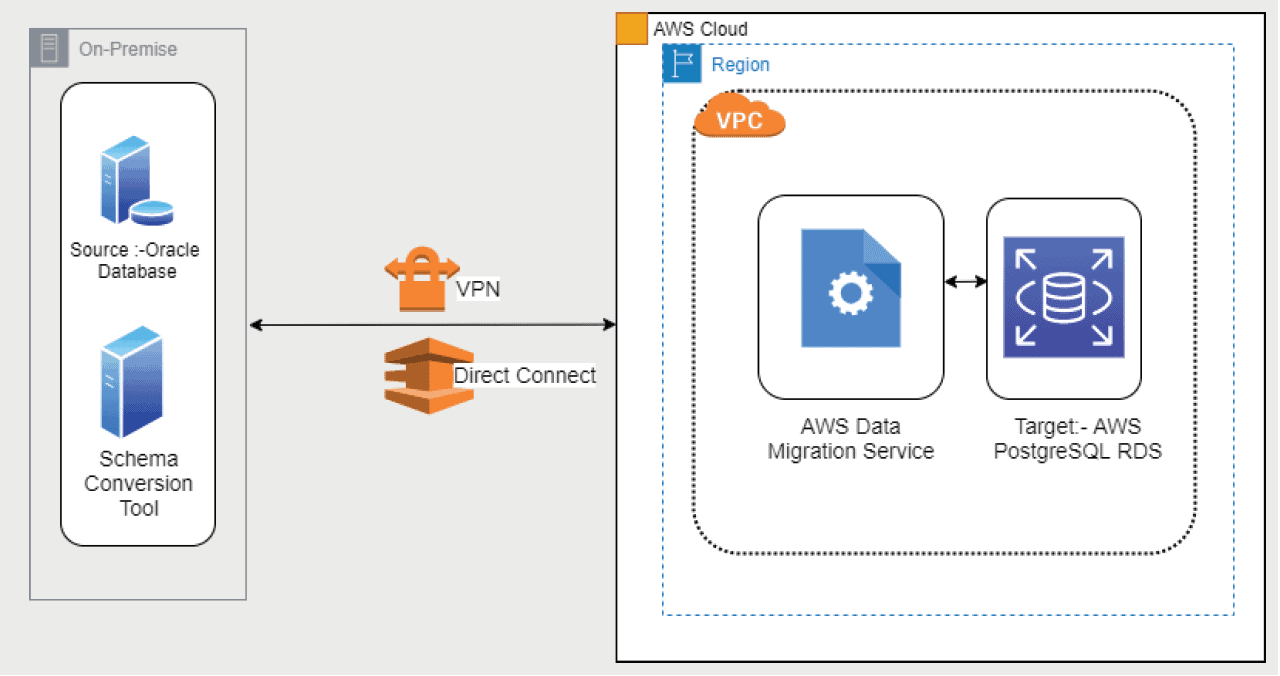
Activity Guide 12: Migrating a source DB, which will be from outside the AWS environment to target AWS RDS Aurora DB in the side AWS environment
AWS Database Migration Service (AWS DMS) is a cloud service that simplifies the migration of relational databases, data warehouses, NoSQL databases, and other data stores. You can use AWS DMS to migrate your data into the AWS Cloud or between cloud and on-premises configurations.
You can use AWS DMS to perform one-time migrations as well as replicate ongoing changes to keep sources and targets in sync.
In this activity guide, you will learn how to Migrate a source DB (outside AWS Environment) to AWS RDS Aurora DB.
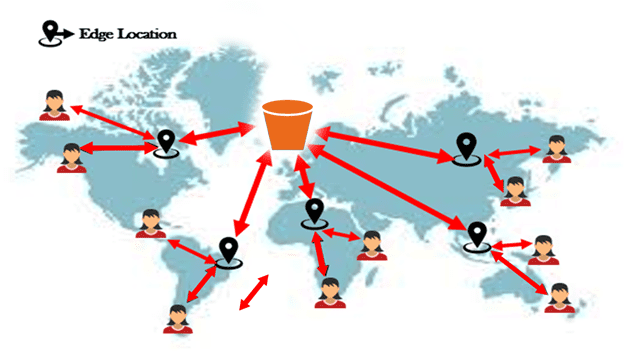
Activity Guide 13: Speeding up a large-scale data migration to S3 by enabling S3 Acceleration
For long-distance transfers of larger objects, Amazon S3 Transfer Acceleration can accelerate content transfers to and from Amazon S3 by up to 50-500%. Customers with widely used web or mobile applications, or applications hosted far from their S3 bucket, may experience long and variable upload and download speeds over the Internet.
In this activity guide, you will learn how to enable S3 Acceleration.
Activity Guide 14: Confirming how much data migration has been speeded up via a tool
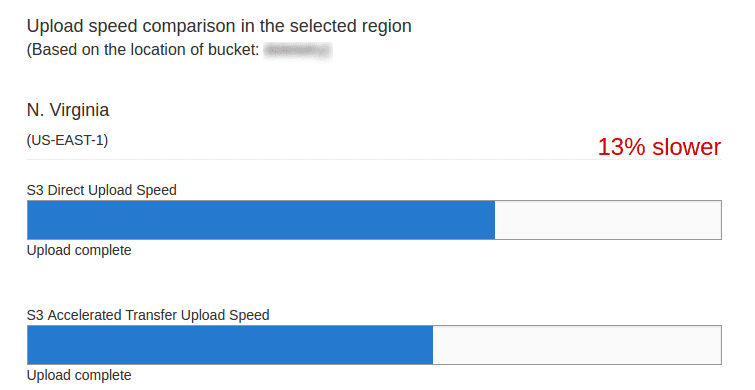
To compare accelerated and non-accelerated upload speeds across Amazon S3 Regions, use the Amazon S3 Transfer Acceleration Speed Comparison tool. The Speed Comparison tool transfers a file from your browser to various Amazon S3 Regions with and without Transfer Acceleration.
In this activity guide, you will learn how much your data is speeded up via an Amazon S3 Transfer Acceleration Speed Comparison tool.
Project 1: Deploy 3-Tier Web Application
This project involves deploying a scalable and secure 3-tier web application architecture on AWS. It separates the presentation, logic, and data layers, ensuring efficient management, high availability, and improved security. You will utilize AWS services like EC2, RDS, and ELB to implement the solution. This project also focuses on managing traffic, user authentication, and database connections.

Project 2: Migration from on-prem to AWS
In this project, you will migrate an existing on-premises infrastructure to AWS. This includes rehosting applications, databases, and services to the cloud, and optimizing them for performance, cost-efficiency, and scalability. You’ll assess the current environment, select the best migration strategy (e.g., lift-and-shift), and handle potential challenges like data consistency and downtime. After migration, you will implement monitoring and scaling strategies for cloud resources.
 Project 3: Migration: Monolithic To Microservices
This project focuses on breaking down a monolithic application into microservices hosted on AWS. It involves re-architecting the system for improved scalability, fault tolerance, and continuous delivery using cloud-native services. You’ll refactor the application to use containerization (e.g., Docker) and orchestrate them using AWS services like ECS or EKS. The project also includes implementing CI/CD pipelines for faster deployments and better management of microservices.

 Frequently Asked Questions (FAQs)
How do the hands-on labs help me prepare for real-world AWS Migration challenges?
The hands-on labs provide practical experience by simulating real-world AWS migration scenarios. You'll gain exposure to tools like AWS Migration Hub, DMS, and Snowball, learning how to handle complex migration processes, reduce downtime, and ensure security during the migration of applications and data to AWS.
Do I need prior experience with AWS to start learning about migrations?
While prior experience with AWS can be helpful, it is not required. This course is designed to walk you through the basics of AWS and the migration process, making it suitable for both beginners and experienced professionals. You'll learn the essential concepts and tools needed for a successful migration.
What are the prerequisites to start with AWS Migration labs and projects?
The basic prerequisites include an understanding of cloud computing concepts and a general familiarity with AWS services. Familiarity with virtualization, networking, and databases can be helpful, but all necessary foundational concepts will be covered in the course.
Can I perform these AWS Migration labs if I'm new to AWS and cloud computing?
Yes, the labs are designed to be beginner-friendly. You'll start with foundational knowledge about AWS and migration processes, and gradually progress to more advanced scenarios. By following the structured labs, you will gain hands-on experience regardless of your prior experience with AWS.
Who is this AWS Migration course suitable for?
This course is ideal for IT professionals, cloud architects, and migration specialists who wish to specialize in AWS migration. It is also suitable for anyone seeking to enhance their cloud migration skills, including developers, system administrators, and database administrators looking to gain expertise in AWS migration.
Why should I migrate to AWS?
Migrating to AWS provides benefits like scalability, flexibility, and cost-efficiency, allowing businesses to scale up or down quickly. Additionally, AWS offers high availability, advanced AI/ML services, and big data tools for modernizing applications and improving business operations.
What AWS tools can I use for migration?
AWS offers various tools such as AWS Migration Hub, Database Migration Service (DMS), Application Migration Service, and AWS Snowball for securely and efficiently migrating workloads, databases, and large data sets to AWS Cloud with minimal downtime.
How do I optimize costs after migration?
To optimize costs post-migration, use AWS Cost Explorer to track usage and identify inefficiencies. Consider Reserved Instances and Savings Plans for long-term cost reduction and ensure right-sizing of resources based on actual workloads to avoid over-provisioning.
How do I ensure security during migration?
To ensure security during migration, implement best practices such as using AWS Identity and Access Management (IAM) for access control, encryption for data protection, and secure VPC configurations. Additionally, use AWS Security Hub to continuously monitor for compliance and security threats throughout the migration process.
Related Links/References:
- 5 Steps for a Cost-efficient Migration to AWS Cloud
- Top 10 Must-Have AWS Cloud Migration Tools
- AWS Database Migration Service: Everything You Need To Know
- Application Migration to AWS & Its 6 Phases
- AWS Server Migration Service
- AWS Database Migration Service
- AWS Training and Certification
- Top 100+ AWS Interview Questions
Next Task For You
Begin your journey towards an AWS Cloud by joining our FREE Informative Class on Amazon Cloud Free Class by clicking on the below image.


![Microsoft Agentic AI Business Solutions Architect [AB-100] | K21 Academy](https://test.k21academy.com/wp-content/uploads/2025/11/Microsoft-Agentic-AI-Business-Solutions-Architect-AB-100-Exam-Overview1.png)



