





I am going to cover everything you must know about Microsoft Entra Connect(Previously Azure AD connect) which is an important topic for the Microsoft Azure Solution Architect Certification exam. Microsoft Entra Connect synchronizes on-premises Active Directory identities with Microsoft Entra ID, enabling hybrid identity environments. Microsoft Entra Connect Health monitors your on-premises identity infrastructure in real-time to maintain a reliable connection to cloud services.
In this Blog, we are going to cover:
- What is Microsoft Entra Connect?
- How does Microsoft Entra Connect work?
- What types of data can the tool sync?
- How frequently is data synchronized?
- Features provided by Microsoft Entra Connect
- What is the need to use Microsoft Entra Connect?
- What is Microsoft Entra Connect Health?
- Why use Microsoft Entra Connect Health?
- FAQ’s
What is Microsoft Entra Connect?
Microsoft Entra Connect is a Microsoft tool that assists organizations with hybrid IT environments. It comes free with your Azure subscription. It has many features, such as federation integration and health monitoring. Today, however, we’ll concentrate on its most well-known feature: synchronization.
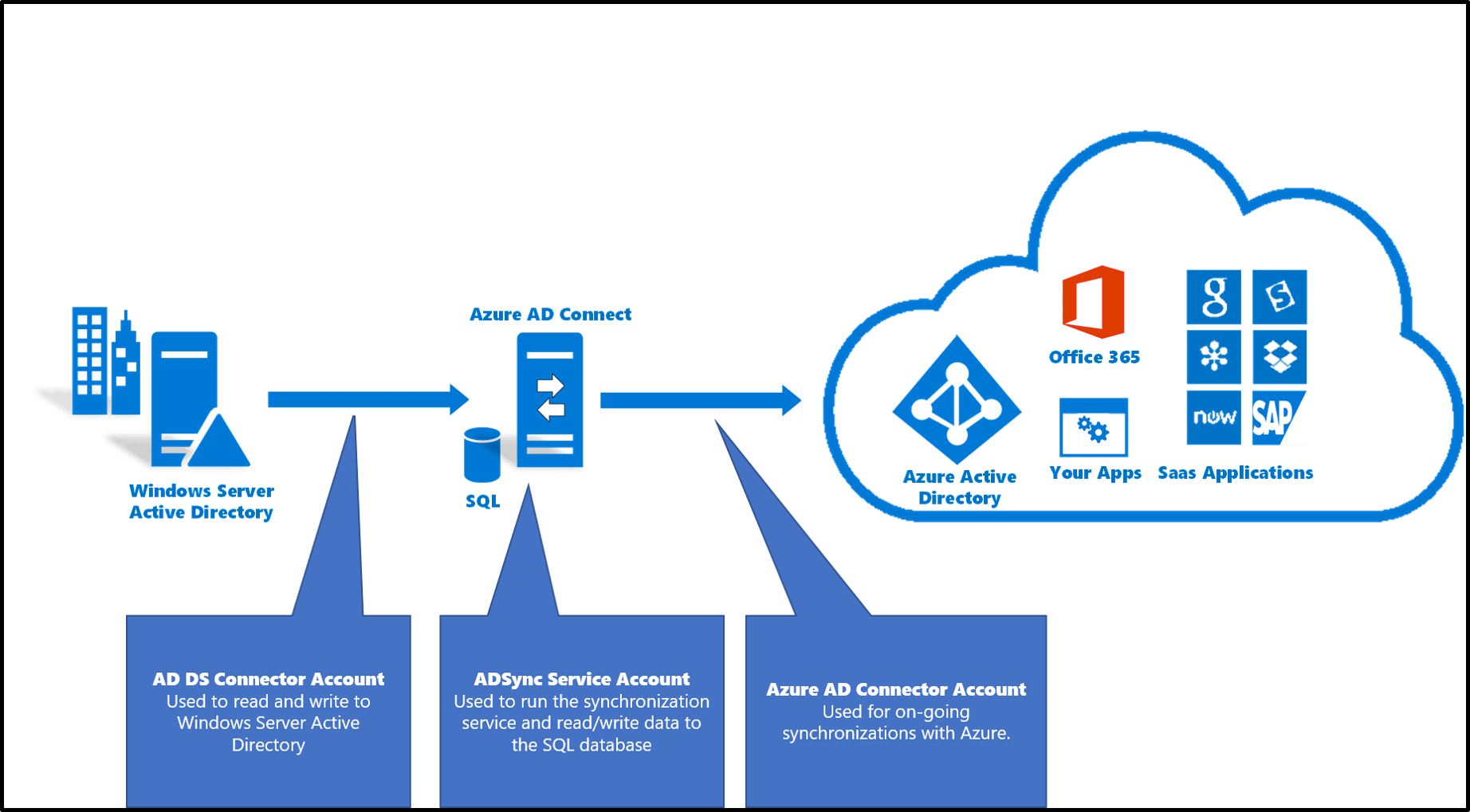
Simply put, AD Connect allows organizations to synchronize identity data between their on-premises Active Directory environment and Microsoft Entra ID. Users can then use the same credentials to access on-premises applications as well as cloud services like Microsoft 365.It is a tool for connecting on-premises identity infrastructure to Microsoft Entra ID. The wizard deploys and configures the connection’s prerequisites and components, such as sync and sign on. Microsoft Entra Connect incorporates functionality previously released as DirSync and Microsoft Entra ID Sync.
How does Microsoft Entra Connect work?
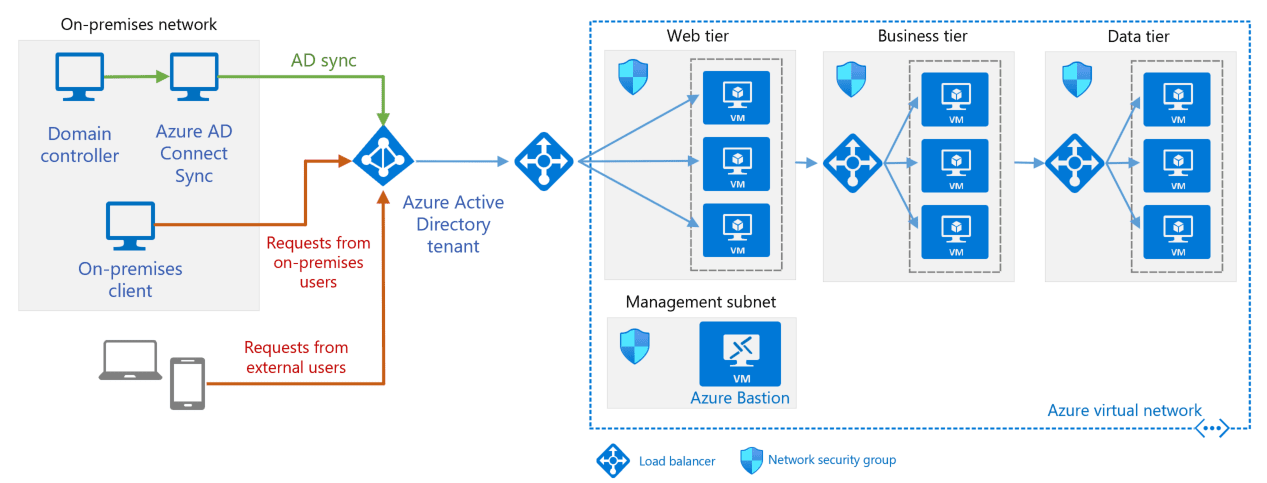
You install the application on a domain-joined server in your on-premises data center. The default installation option is Express Settings, which is used for the most common scenario: synchronizing data between a single on-premises forest with one or more domains and a single Microsoft Entra ID tenant. If you have multiple forests or Microsoft Entra ID tenants, look into the other topologies that Microsoft supports.
The sync is only one way by default: from on-premises AD to Microsoft Entra ID. You can, however, use the writeback function to sync changes from Microsoft Entra ID to your on-premises AD. For example, if a user changes their password using the Microsoft Entra ID self-service password management function, the password is automatically updated in the on-premises AD.
What types of data can the tool sync?
Microsoft Entra Connect can synchronize your on-premises AD’s user accounts, groups, and credential hashes. Most user account attributes, including the User Principal Name (UPN) and security identifier (SID), are synchronized.
The following objects and attributes, however, are NOT synchronized:
- Any objects and attributes that you specifically exclude from the sync
- Group Policy Objects (GPOs)
- Computer objects for computers connected to the on-premises AD environment
- Organization unit (OU) structures
How frequently is data synchronized?
A scheduler manages the synchronization. A sync task is scheduled to run every 30 minutes by default.
You can use PowerShell to:
- Examine the scheduler’s configuration and make changes as needed.
- Force a sync.
- Stop a running sync task or even temporarily disable the scheduler (for example, so that you can modify the configuration of Azure AD Connect).
Features provided by Microsoft Entra Connect:
- Password hash synchronization– A sign-in method that syncs a hash of an on-premises AD user’s password with Microsoft Entra ID.
- Pass-through authentication– A sign-in method that allows users to use the same password on-premises and in the cloud while avoiding the additional infrastructure required in a federated environment.
- Federation integration– Federation is an optional component of Microsoft Entra Connect that can be used to set up a hybrid environment with an on-premises AD FS infrastructure. It also offers AD FS management features such as certificate renewal and the deployment of additional AD FS servers.
- Synchronization– In charge of creating users, groups, and other objects. Additionally, ensure that the identity information for your on-premises users and groups matches that of the cloud. Password hashes are also included in this synchronization.
- Health Monitoring– Microsoft Entra connect Health can provide robust monitoring and provide a central location in the Azure portal to view this activity.

Important Note : Microsoft Entra Connect Health for Sync necessitates the use of Microsoft Entra Connect Sync V2. You must upgrade to the latest version if you are still using Microsoft Entra Connect V1. Microsoft Entra Connect V1 will be phased out on August 31, 2022. In December 2022, Microsoft Entra Connect Health for Sync will no longer be compatible with Microsoft Entra Connect V1.
What is the need to use Connect Microsoft Entra ID?
- Integrating your on-premises directories with Microsoft Entra ID increases user productivity by providing a single identity for accessing both cloud and on-premises resources. Users and organizations can benefit from the following:
- Users can access on-premises applications as well as cloud services such as Microsoft 365 using a single identity.
- A single tool to simplify the deployment of synchronization and sign-in.
- Provides the most up-to-date capabilities for your scenarios. Microsoft Entra Connect supersedes previous versions of identity integration tools like DirSync and Microsoft Entra ID Sync.
What is Microsoft Entra Connect Health?
Microsoft Entra Connect Health monitors your on-premises identity infrastructure in real time. It allows you to keep a consistent connection to Microsoft 365 and Microsoft Online Services. This dependability is achieved by enabling monitoring of your key identity components. It also makes the key information about these components easily accessible.
Microsoft Entra Connect Health monitors your on-premises identity infrastructure in real time. It enables you to maintain a consistent connection to Microsoft 365 and Microsoft Online Services. This dependability is achieved by enabling monitoring of your key identity components. It also makes key information about these components easily accessible.

Why use Microsoft Entra Connect Health?
When you authenticate with Microsoft Entra ID, your users are more productive because they have a single identity to access both cloud and on-premises resources. Keeping the environment stable so that users can access these resources becomes a challenge. Microsoft Entra Connect Health monitors and gains insights into your on-premises identity infrastructure, ensuring its dependability. It is as simple as installing an agent on each of your on-premises identity servers.
Microsoft Entra Connect Health for AD FS supports AD FS 2.0 on Windows Server 2008 R2, Windows Server 2012, Windows Server 2012 R2, and Windows Server 2016. It also supports monitoring the AD FS proxy or web application proxy servers that provide authentication for extranet access. Microsoft Entra Connect Health for AD FS provides a set of key capabilities with an easy and quick installation of the Health Agent.
| Key Benefits | Best Practices |
|---|---|
| Enhanced security | Extranet lockout trends Failed sign-ins report In privacy compliant Get alerted on all critical ADFS system issues |
| Server configuration and availability | Performance and connectivity Regular maintenance |
| Easy to deploy and manage | Agent auto upgrade to the latest Data available in portal within minutes |
| Rich usage metrics | Top applications usage Network locations and TCP connection Token requests per server |
| Great user experience | Dashboard fashion from Microsoft Entra admin center Alerts through emails |
FAQ’s
Q1. What is the difference between Microsoft Entra Connect and Microsoft Entra Connect Sync?
Ans. Microsoft Entra Connect is the overarching term for the suite of tools used to synchronize on-premises Active Directory with Microsoft Entra ID, while Microsoft Entra Connect Sync is the specific component responsible for the actual synchronization process.
Q2. What is the purpose of Microsoft Entra Connect?
Ans. It synchronizes on-premises Active Directory identities with Microsoft Entra ID, enabling single sign-on capabilities.
Q3. Is Microsoft Entra ID free to use?
Ans. Microsoft Entra ID, has a free edition that provides user and group management, on-premises directory synchronization, basic reports, self-service password change for cloud users, and single sign-on across Azure, Microsoft 365, and many popular SaaS apps. The free edition is included with a subscription of a commercial online service such as Azure, Microsoft 365, Dynamics 365, Intune, or Power Platform.
Q4. What are the three main parts of Microsoft Entra connect?
Ans. It is comprised of three primary components: synchronization services, the optional Active Directory Federation Services component, and the Microsoft Entra Connect Health monitoring component. Synchronization is in charge of the creation of users, groups, and other objects.
Q5. How do I access Microsoft Entra Connect?
Ans. To access it, download it from the Microsoft download page and install it on your server. Launch the application and follow the configuration wizard to set up synchronization between your on-premises Active Directory and Microsoft Entra ID.
References/Related
- AZ-305: Azure Solutions Architect Certification Overview
- Activity Guides/Hands-on Lab & Projects
- Microsoft Azure Core Services For Beginners
- Virtual Networks In Microsoft Azure: VNet Peering, ExpressRoute, VPN Gateway
- Azure ExpressRoute Vs Azure VPN Gateway
Next Task For You
Begin your journey toward Mastering Azure Cloud and landing high-paying jobs. Just click on the register now button on the below image to register for a Free Class on Mastering Azure Cloud: How to Build In-Demand Skills and Land High-Paying Jobs. This class will help you understand better, so you can choose the right career path and get a higher paying job.


![Microsoft Agentic AI Business Solutions Architect [AB-100] | K21 Academy](https://test.k21academy.com/wp-content/uploads/2025/11/Microsoft-Agentic-AI-Business-Solutions-Architect-AB-100-Exam-Overview1.png)



