





In this post, we have covered how to Improve the performance of a database and multiplying its performance significantly.
Performance tuning is also known as the “Black Art” and anybody that possesses this art is no less than a DB wizard. But it ain’t no Art it is just keeping the data in a database in such a way that the queries that are run on it consume the least processing power and time.
We have progressed tremendously in hardware and software but there is still much room to improve the efficiency by customizing their settings and configuration for the database and the DBMS.
(Note: If you are just starting out or new to DataBase Performance tuning then I would suggest you check our previous post on Introduction to Performance Tuning In Oracle Database)
Hardware Tuning
Improving Hardware, Software can improve performance significantly, using fast storage solution like SSD or using the storage in RAID configuration can improve I/O speed.
In the digital era, of technology the data is huge and the task of managing it becoming complex, many advancements have been made, hardware used now is capable of handling multiple queries at the same time and the DB structure is optimized to improve performance and to take advantage of all the high-end hardware and software.
DBMS Tuning

Tuning the DBMS means configuring the memory and processing resources of the computer in the DBMS. Usually, this is done by configuring the DBMS, but the resources involved are shared with the host system.
Setting the recovery interval (time needed to restore the state of data to a particular point in time), assigning parallelism (the breaking up of work from a single query into tasks assigned to different processing resources), and network protocols used to communicate.
Memory allocation for data, execution plans & procedure cache. It is much faster to access data in memory than on storage, so maintaining the cache of data improves performance. Caching execution plans and procedures reduces recompilation time. It is important to have more and faster memory, leaving enough for other processes and the OS to eliminate excessive paging of memory to storage.
Processing resources are assigned to specific activities to improve concurrency. On a server with ten processors, Eight could be reserved for the DBMS so that processing resources for the database are always available and DBMS could even use all the ten processors when an extra processor is free.
Automation can also be used to improve performance. Machine learning is used to learn and evaluate the performance under various workloads and apply changes when required.
Also read: Database statistics on AWR Report.
Query Optimisation
Query Optimisation is usually the fastest way to get the best performance out of the SQL server. Usually, this is the most used to improve the performance, as it does not have any downtime and the DBA could easily replace the old SQL queries with the new well-optimized SQL queries.
Improving poorly written queries and indexes that are inefficient. Even the minutest change can have a dramatic impact on the database performance.
Improving Indexes
Indexes are data structures can improve the speed of retrieval operations on a database. Creating indexes is very important steps for performance tuning. Useful indexes provide rapid lookups and help you locate the data with fewer disk I/O operations and consuming less system resource.
It is very important to analyze the type of queries and its frequency before you create efficient indexes. Indexing the major searching and ordering columns. However, indexing may even hinder the performance if the tables are constantly loaded with INSERT, UPDATE, and DELETE.
Transaction log in a heavily used database grows rapidly. Transaction logs must be removed to make room for future entries. Frequent transaction log backups are small and only interrupt database activity for a short period only.
Avoid using SELECT *
You can try to include the required columns that you need. A query will always run faster when there are fewer data to retrieve.
for Example, you can use — 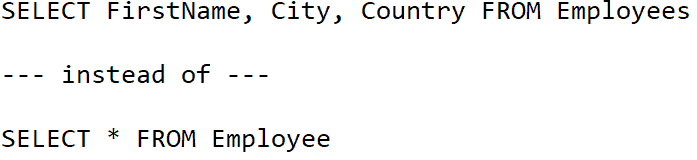
Avoid Coding Loops
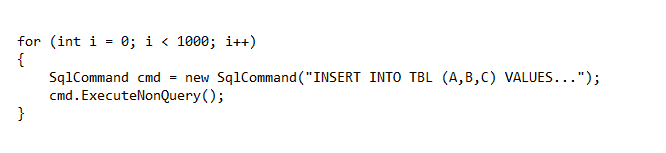
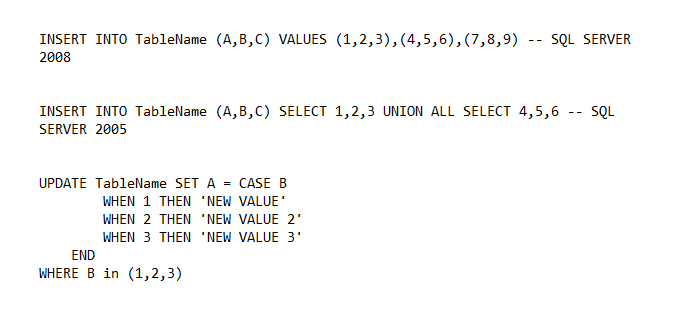
For best performance, you should avoid loops in your code. Instead, you can modify the code by using a unique INSERT or UPDATE statement.
 Don’t Shrink Data Files
Shrinking data files may negatively impact the performance of an SQL Server. Shrinking process can get very distasteful at times. It also causes fragmentation, which results in the poor performance of the subsequent queries.
At times shrinking a file might be absolutely necessary. However, you mustn’t forget to analyze its impact on performance before trying.
We hope this helps while writing queries or processes and will aide you for performance tuning in SQL Server. However, always remember to evaluate each situation separately and decide which method works best for your database.
Process
The performance tuning process centers around four main steps:
- Identify – pick the correct SQL statement to tune and avoid wasting your time.
- Gather – gather the proper information that will help you make the best tuning decisions.
- Tune – tune the SQL statement based on the gathered information.
- Monitor – ensure the SQL statement is tuned and stays tuned. Monitoring also helps you understand the exact benefits achieved. This step also starts the process over again and helps you identify the next project.
Please stay tuned for our coming post on performance Tuning we will be covering how to Identify – Which SQL to Tune
These are just a glimpse of some of the factor which needs to be taken care of while considering the performance of your database.
You will get to know all of this and deep-dive into each concept related to Performance Tuning once you will get enrolled in our Performance Tuning On-Premise & Cloud
Another question, which might come to your mind, What are all the things you will get when you enrolled!!
We are glad to tell you that:
Things you will get!!
- Live Instructor-led Online Interactive Sessions
- FREE unlimited retake for next 1 Years
- FREE On-Job Support for next 1 Years
- Training Material Presentation with Hands-on Lab Exercises mentioned
- Recording of Live Interactive Session for Lifetime Access
- 100% Money Back Guarantee (If you attend sessions, practice and don’t get results, We’ll do full REFUND, check our Refund Policy
Now it’s your turn to post your doubts in the comment section and let us know where you are facing challenges in Performance Tuning
Related/Further Readings
- Oracle Database Performance Tuning Guide
- Introduction to Performance Tuning In Oracle Database
- Database Performance Tuning On-Premise & Cloud: Step by Step Hands-On Lab Exercise
- Database Performance Tuning: On-Premise & Cloud Training
- Performance Tuning Process
- Oracle AWR Report
Next Task
Want to move ahead in your career and want to get a higher Earning Job?
Get 7+ Courses for DBAs & Apps DBA in a bundle program and learn from the Industry’s best Experts.


![Microsoft Agentic AI Business Solutions Architect [AB-100] | K21 Academy](https://test.k21academy.com/wp-content/uploads/2025/11/Microsoft-Agentic-AI-Business-Solutions-Architect-AB-100-Exam-Overview1.png)



