In this blog, we’ll explore the key features of Azure Functions, its benefits, and walk through a detailed step-by-step implementation to help you get started with serverless computing in Azure.
Topics we’ll cover:
1. Azure Functions
2. Uses Of Azure Functions
3. Implementing Azure Function
What is Azure Functions?
Azure Functions App is a serverless compute service in Microsoft Azure that allows you to run your code without the need to manage infrastructure. With event-driven architecture, it enables automated scaling, helping you build efficient and cost-effective applications. Whether you’re processing data, handling web requests, or running scheduled tasks, Azure Functions provides the flexibility and reliability you need.
Traditional application development demands a consideration of the underlying IT infrastructure. For cloud computing, an IT team must create, monitor, and pay for cloud computing instances — regardless of how much work that instance actually does for the business.
The idea behind serverless computing, also known as function as a service, is to eliminate those infrastructure considerations for the user. With serverless, a user can simply create and upload code, and then define the triggers or events that will execute the code. Triggers can come from a wide range of sources, including another user’s application or other cloud services, such as databases and event and notification hubs.
Once a trigger or event occurs, it is the cloud provider’s responsibility to load the code into a suitable execution environment, run the code and then release the compute resources. There are still servers involved, but the user no longer needs to provision or manage compute instances. In addition, rather than pay for those compute instances and other associated resources each month, users pay for serverless computing based on the amount of time a function runs in a given billing cycle. 
Features Of Azure Functions App
Azure Functions provides the ability to execute code in response to various triggers, such as HTTP requests, database changes, or messages from queues. Key features include:
- Multiple Language Support: Build functions using languages like C#, JavaScript, Python, Java, and PowerShell.
- Built-in Integrations: Seamlessly integrate with other Azure services like Azure Storage, Service Bus, and Event Grid.
- Automatic Scaling: Azure Functions automatically scales based on demand, ensuring that your application can handle increasing workloads without manual intervention.
- Event-Driven Execution: Functions are triggered by events from other services, enabling the creation of highly dynamic, responsive applications.
Implementing Azure Functions App
1. In the Azure portal, click on Create a resource. (Please make sure you have a subscription before doing all this. If you created a free account for the first time, you’ll already have a FREE TRIAL subscription for 1 month).
2. Now, click on the Azure Function App option to create one.

3. Now, fill in all the details such as resource group, name of the function app, publishing option, runtime stack which is the language, version of the runtime stack, and the region to deploy the app. Then click on Next: hosting.

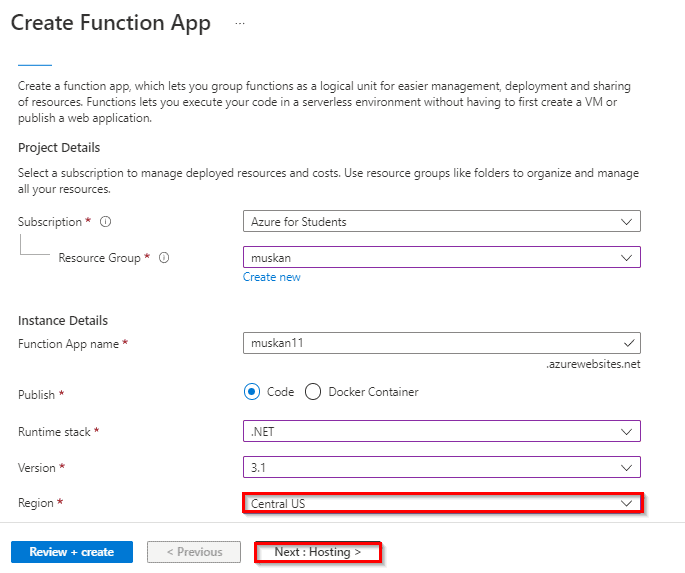

4. Then click on Next: Monitoring if you don’t want to make any changes in the service plan. Then click on Review + create.

5. Now, click on Create.

6. Now, click on Go to the resource. Then click on the Functions option in the Overview of your Functions App.

7. Then click on the Add option present there. After that, a window will open on the right, and select the HTTP trigger option present there.


8. Then in the new window give a new name to your function if you want and then change the authorization level to anonymous for this demo.

 9. Then click on Create Function. After that, a new HTTP trigger will be created. Select the option of Get File URL and then click on the copy to clipboard button to copy the URL.


10. Then paste the URL that you copied in a new tab and pass a parameter in that by adding “name=Your_Name” at the end of the URL as shown below. Then hit Enter. You’ll be treated with a message saying that the HTTP trigger function is executed successfully.

11. Now, if you go back to the previous tab where your HTTP trigger function was created and click on Code+Test and then Logs. Then, there you’ll be able to see that your trigger function executed successfully.

Best Practice for Azure Functions
To ensure optimal performance and scalability, follow these best practices when working with Azure Functions:
-
Use Durable Functions for Long-Running Tasks: For tasks that involve multiple steps or need to wait for external inputs (e.g., waiting for a response from an API), use Durable Functions.
-
Optimize Code for Performance: Ensure that your code is optimized to minimize execution time and avoid unnecessary operations.
-
Use Application Insights for Monitoring: Enable Application Insights to track the performance of your functions in real-time and identify any bottlenecks or errors.
-
Secure Your Functions: Use Managed Identity to authenticate Azure Functions and avoid hard-coding secrets or credentials.
-
Consider Cold Start: While Azure Functions scale automatically, they may experience a slight delay (cold start) when they are triggered for the first time after being idle for a while. Optimize for scenarios where low latency is critical.
Conclusion
We are able to Started a PowerShell session in Azure Cloud Shell. Created a resource group and an Azure-managed disk by using Azure PowerShell. Configured the managed disk by using Azure PowerShell.
Frequently Asked Questions
In which situation should you use an Azure function app?
Azure Functions are best suited for smaller apps have events that can work independently of other websites. Some of the common azure functions are sending emails, starting backup, order processing, task scheduling such as database cleanup, sending notifications, messages, and IoT data processing.
Can an Azure function app have multiple functions?
As part of your solution, you likely develop and publish multiple functions. These functions are often combined into a single function app, but they can also run in separate function apps
Is Azure function app an API?
No, while Azure Functions can be used to create APIs, it's not an API itself. An Azure Function App is a serverless computing service that allows you to run code without managing servers. You can use Functions to create APIs by exposing them as HTTP triggers, but the Function App itself is the underlying platform that executes your code.
How many requests can a function app handle?
A single function app only scales out to a maximum of 200 instances
When should the Azure Functions be used?
Azure Functions should be used when you need to run code without managing infrastructure, and when your code is triggered by events like HTTP requests, timers, or messages.
Related Reference
- [AZ-104] Microsoft Azure Administrator Training: Step By Step Activity Guides/Hands-On Lab Exercise
- Azure Storage Accounts Overview & Steps To Create
- Azure Blob Storage: Features, Usage, And Steps to Create
Next Task For You
Begin your journey toward becoming a Microsoft Azure Administrator [AZ-104] by joining our FREE Class. We strongly recommend gaining knowledge from AZ-104 in order to be an effective Azure Administrator. Our course covers the AZ 104 certification. Click on the below image to register for the Free Class NOW!


![Microsoft Agentic AI Business Solutions Architect [AB-100] | K21 Academy](https://test.k21academy.com/wp-content/uploads/2025/11/Microsoft-Agentic-AI-Business-Solutions-Architect-AB-100-Exam-Overview1.png)