What is AWS CloudFront | How does AWS CloudFront Works | Use Cases | Benefits | CloudFront with S3 | Security | Pricing | Global Accelerator Vs CloudFront
AWS CloudFront is a fully managed, high-performance content delivery network (CDN) that accelerates the delivery of static, dynamic, and streaming web content to end users.
With low latency and high transfer rates, while operating in a developer-friendly environment, Amazon CloudFront is a quick content delivery network (CDN) solution that securely sends data, videos, applications, and APIs to consumers across the world.
AWS CloudFront
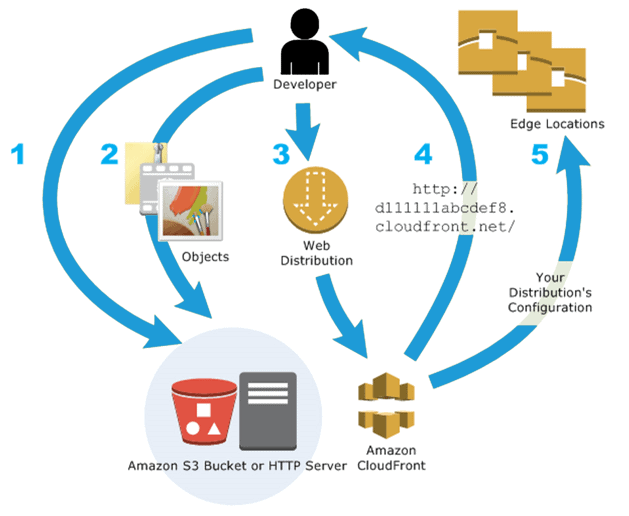
It is a worldwide dispersed network of Amazon Web Services that safely and quickly deliver software, SDKs, movies, and other forms of material to consumers. It offers organizations and web application developers an easy and affordable method of disseminating data with low latency and high data transmission speeds. By sending each user request to the closest edge site that can best provide the material, it expedites the delivery of content and produces the least latency (time delay).
How Does AWS CloudFront Work?
The following steps describe how CloudFront delivers content:
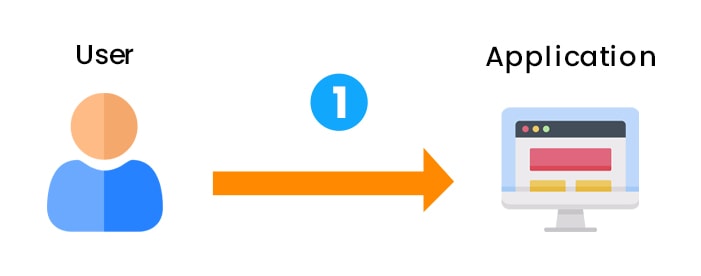
Step 1: The client visits a website and requests that a file is downloaded (like an image file).
Step 2: The DNS now routes the client request to the nearest edge location via CloudFront to serve the user request.
Step 3: It searches for the requested cache file at the edge location. When a file is found, CloudFront sends it to the user.
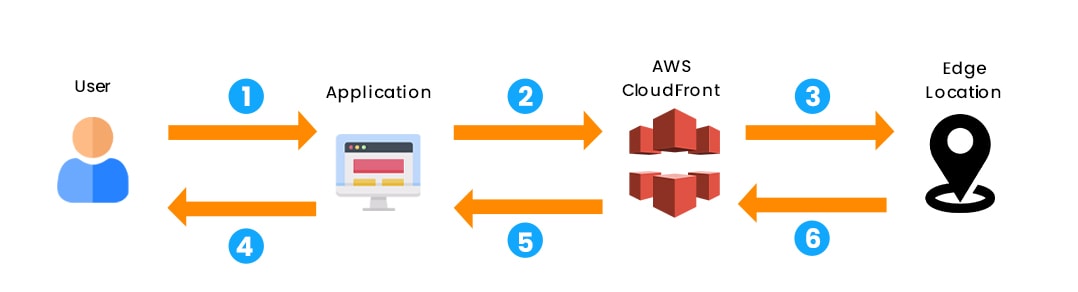
Step 4: If the file is not found, CloudFront compares the requirements to the specifications and shares it with the appropriate server.
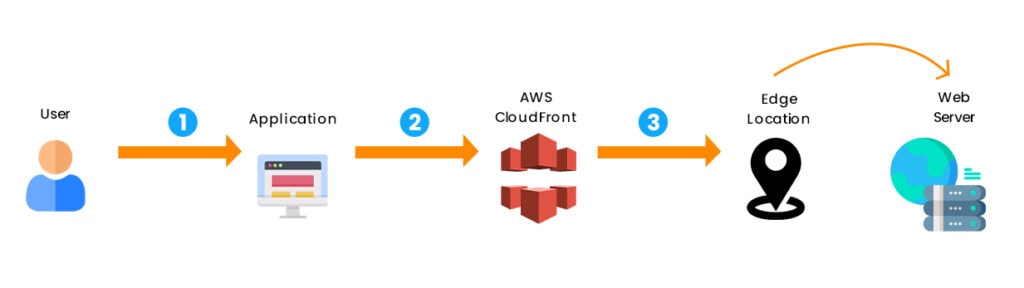
Step 5: The web server sends the files back to the CloudFront edge location in response to the request.
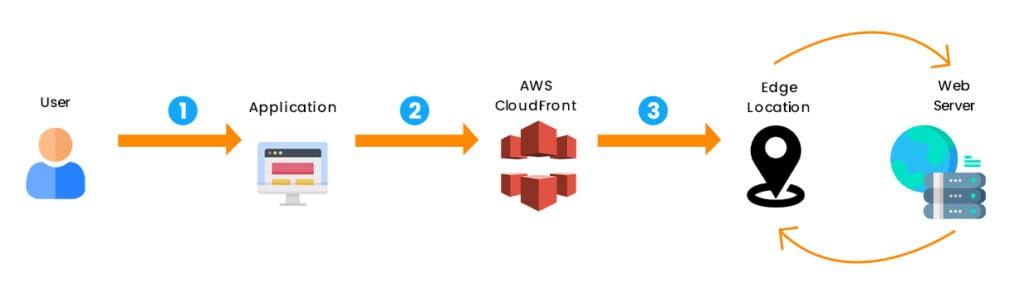
Step 6: When CloudFront receives the file, it immediately shares it with the client and adds it to the edge location.
Benefits of AWS CloudFront
- It is easy to use and guarantees increased productivity.
- It improves reliability and availability by storing copies of objects in multiple edge locations worldwide.
- Because of the ‘Content Privacy’ feature, it has a high level of security.
- The HTTP or HTTPS protocols are used for rapidly delivering content.
- It has the most advanced security features, including field-level encryption and HTTPS support.
Read: Top 13 Reasons to Why Learn AWS
Use Cases of AWS CloudFront
1. Delivering static website material much faster: Static content (including photos, style sheets, JavaScript, and other similar items) can be delivered to readers all around the world much faster. You may utilize it to give your website visitors a quick, secure, and dependable experience by utilizing the AWS backbone network and CloudFront edge servers.
An Amazon S3 bucket is a straightforward method for storing and delivering static content. Using S3 in conjunction with CloudFront has several benefits, including using Origin Access Identity (Oeasily AI) to restrict access to your S3 easily.
2. Serve video on demand or live video streaming: It provides various options for streaming your media to global viewers, including pre-recorded files and live events.
- It can stream video on demand (VOD) to any device in standard formats such as MPEG DASH, Apple HLS, Microsoft Smooth Streaming, and CMAF.
- To reduce the load on your origin server when broadcasting a live stream, you can cache media fragments at the edge. Multiple requests for the manifest file that delivers the fragments in the correct order can be combined.
3. During the system processing, encrypt specific fields: When you configure HTTPS with CloudFront, you have secure end-to-end connections to the origin servers. Field-level encryption, in addition to HTTPS security, allows you to safeguard specific data throughout system processing so that only selected programs at your origin can see it. Add a public key to CloudFront and specify the set of fields to be encrypted with the key to enable field-level encryption.
4. Customize on the fly: Running serverless code at the edge opens up new avenues for customizing content and experiences for viewers while reducing leasing Lambda@Edge with CloudFront, allowing you to customize the content that CloudFront delivers in a variety of ways. When your origin server is down for maintenance, you can return a custom error message so that viewers do not see a generic HTTP error message.

AWS CloudFront with S3
- The content from an S3 bucket can be distributed using it.
- The advantages of using CloudFront over S3 are as follows:
- CloudFront data transfer can be more cost-effective if the objects are frequently accessed because CloudFront data transfer is much lower than the price for S3 data transfer at higher usage.
- Because the objects are stored closer to the users, downloads are faster with CloudFront than with S3 alone.
- Because public read permissions must be granted to S3 origin objects, they are accessible from S3 and CloudFront.
- Even though CloudFront does not reveal the underlying S3 URL, the user will be aware of it if it is shared directly or used by applications.
- It would be necessary to prevent users from having direct access to the S3 objects when using CloudFront signed URLs or signed cookies to provide access to them.
- The Origin Access Identity (OAI) can be used to prevent users from directly accessing S3 objects.
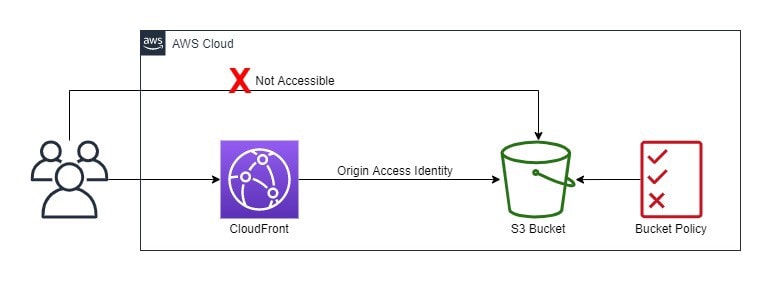
- The distribution can be associated with an origin access identity, a particular CloudFront user.
- S3 bucket/object permissions must be set only to allow access to the Origin Access Identity.
- When users access the object through CloudFront, the OAI retrieves the content on their behalf, whereas direct access to the S3 object is restricted.
Read: Top 50 AWS Interview Questions
Security for AWS CloudFront
- It supports Encryption in Transit and can be configured to require viewers to use HTTPS to request files, ensuring that connections are encrypted when CloudFront communicates with viewers.
- It offers encryption at Rest.
- Restricting content access
- To restrict access for specific users, use signed URLs or cookies.
- Create a web access control list (web ACL) with AWS WAF web ACLs to restrict access to your content.
- Geo-restriction, also known as geoblocking, prevents users in specific geographic locations from accessing content served by a CloudFront distribution.
- To prevent users from using the file’s direct URL, restrict access to content in S3 buckets using origin access identity – OAI.
AWS CloudFront Pricing
Charges for CloudFront are calculated based on actual usage in four areas:
- Outbound Internet Data Transfer
- Charges are assessed based on the amount of data transferred from CloudFront edge locations, measured in gigabytes (GB).
- Data transfers from AWS origin (e.g., S3, EC2, etc.) to CloudFront are no longer charged. This applies to data transfers from all AWS regions to global CloudFront edge locations.
- Requests made via HTTP/HTTPS
- The total number of HTTP/HTTPS requests for the content.
- Invalidation Requests
- Invalidation request per path
- The URL (or multiple URLs if the path contains a wildcard character) of the object you want to invalidate from the CloudFront cache is represented by a path listed in the invalidation request.
- Dedicated Internet Protocol (IP) Custom SSL certificates that are linked to a CloudFront distribution
- $600 per month, pro-rated by the hour, for each custom SSL certificate associated with one or more CloudFront distributions that use the Dedicated IP version of custom SSL certificate support.
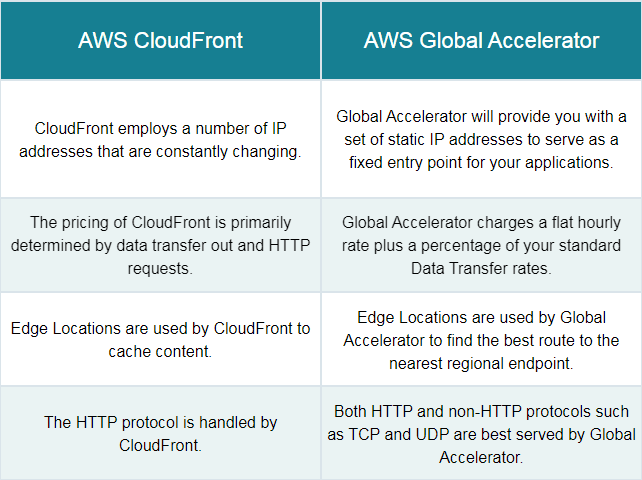
AWS Global Accelerator vs Amazon CloudFront
Related Links/References
- AWS Free Tier Limits
- AWS Free Tier Account Details
- Overview of Amazon Web Services & Concepts
- How to create a free tier account in AWS
- AWS Certified Solutions Architect Associate SAA-CO3
- Storage – Amazon Elastic Compute Cloud – AWS Documentation
- Amazon Elastic File System User Guide
- AWS Management Console Walkthrough
Next Task For You
Begin your journey towards an AWS Cloud by joining our FREE Informative Class on Amazon Cloud Free Class by clicking on the below image.


![Microsoft Agentic AI Business Solutions Architect [AB-100] | K21 Academy](https://test.k21academy.com/wp-content/uploads/2025/11/Microsoft-Agentic-AI-Business-Solutions-Architect-AB-100-Exam-Overview1.png)