





Kubernetes (K8s) relies heavily on etcd, a distributed key-value store that serves as the backing store for all cluster data. From managing cluster states to handling configurations, etcd plays a crucial role in ensuring the stability of the Kubernetes cluster. Ensuring that you can backup and restore etcd is essential for cluster recovery and disaster recovery scenarios. In this blog, we will explore how to efficiently perform etcd backup and restore in a Kubernetes environment, ensuring the resiliency of your cluster.
In this blog post, we are going to cover the following topics:
- What is Etcd?
- Kubernetes and Etcd
- Prerequisites
- Installing and Placing Etcd Binaries
- Find K8s Manifest Location
- How to backup the Etcd & Restore it
- Scenarios & Use Cases
- Conclusion
What is Etcd?
Etcd is a distributed key-value store that Kubernetes uses to store all the data related to the state of the cluster. This includes the cluster’s configuration, node information, pod states, service details, and secrets. In simple terms, etcd is the brain of your Kubernetes cluster, keeping track of everything.
Why Backup Etcd?
A healthy etcd store is essential to a functioning Kubernetes cluster. If etcd data becomes corrupted or is lost, the entire Kubernetes cluster could be rendered inoperable. Therefore, it’s critical to back up etcd regularly. Backups allow you to restore the cluster to a previous healthy state if something goes wrong, such as:
- Accidental deletion of critical data
- Hardware failures
- Network issues that cause split-brain situations
Pre Requisite
Make sure you have a K8s cluster deployed already.
Learn How To Setup A Three Node Kubernetes Cluster For CKA
Installing and Placing Etcd Binaries
Users mostly interact with etcd by putting or getting the value of a key. We do that by using etcdctl, a command line tool for interacting with etcd server. In this section, we are downloading the etcd binaries so that we have the etcdctl tool with us to interact.
1) Create a temporary directory & download the ETCD binaries.
$ mkdir -p /tmp/etcd && cd /tmp/etcd
$ curl -s https://api.github.com/repos/etcd-io/etcd/releases/latest | grep browser_download_url | grep linux-amd64 | cut -d '"' -f 4 | wget -qi -

2) Unzip the compressed binaries:
$ tar xvf *.tar.gz
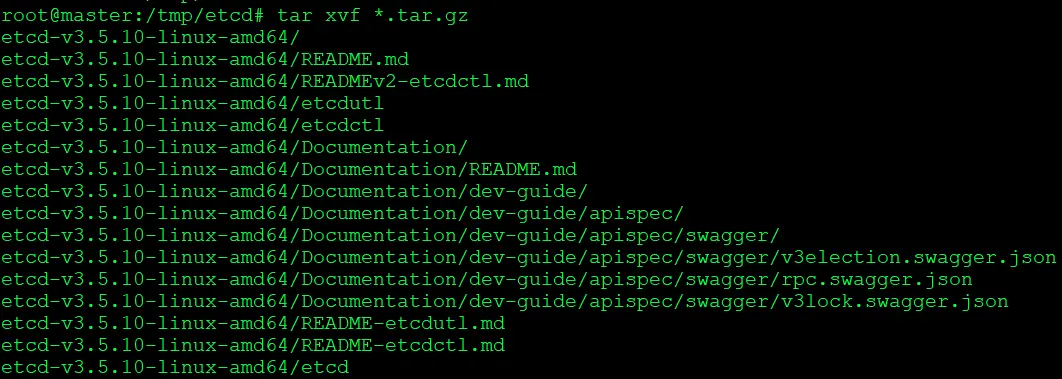
3. Move the etcd folder to /local/bin/ makes the etcd binary globally accessible on your system, simplifying the process of running etcd commands.
$ cd etcd-*/
$ mv etcd* /usr/local/bin/
$ cd ~
$ rm -rf /tmp/etcd

Find K8s Manifest Location
In Cluster we can check manifest default location with the help of the kubelet config file.
$ cat /var/lib/kubelet/config.yaml
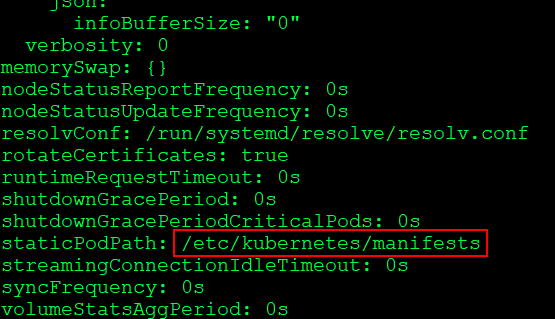
With this Manifest location, you can check the Kubernetes static pods location and find Api-server and ETCD pod location then under these pods you can check certificate file and data-dir location.
How to backup the Etcd & Restore it
The etcd server is the only stateful component of the Kubernetes cluster. Kuberenetes stores all API objects and settings on the etcd server.
Backing up this storage is enough to restore the Kubernetes cluster’s state completely.
Taking Snapshot and Verifying it:
1) Check backup Command flag which you need to include in the command
$ ETCDCTL_API=3 etcdctl snapshot backup -h
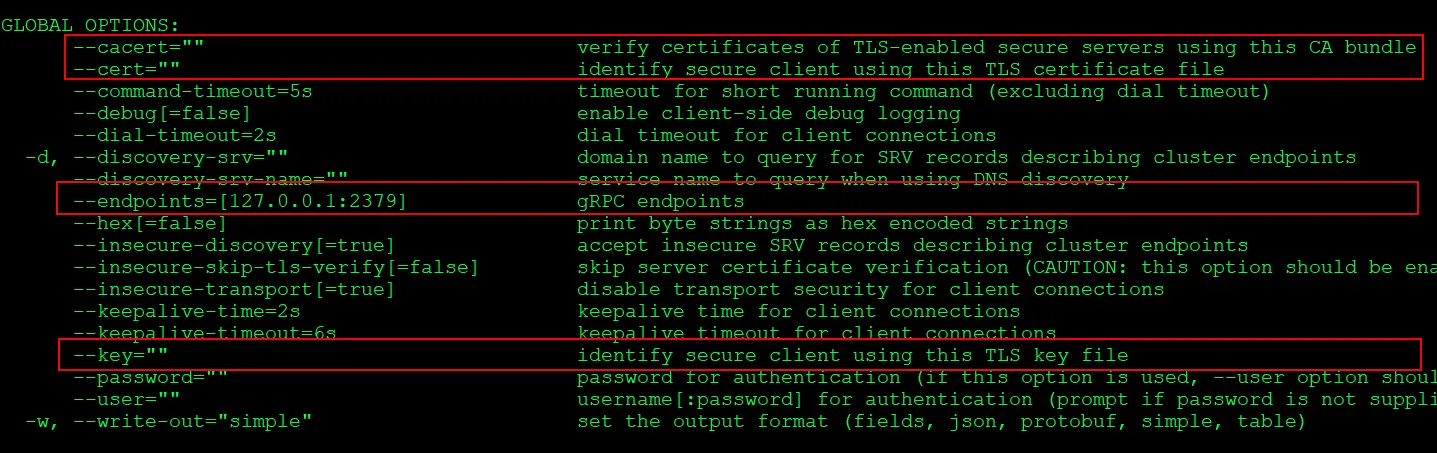
2) Take a snapshot of the etcd datastore using etcdctl:
$ ETCDCTL_API=3 etcdctl snapshot save snapshot.db --cacert /etc/kubernetes/pki/etcd/ca.crt --cert /etc/kubernetes/pki/etcd/server.crt --key /etc/kubernetes/pki/etcd/server.key
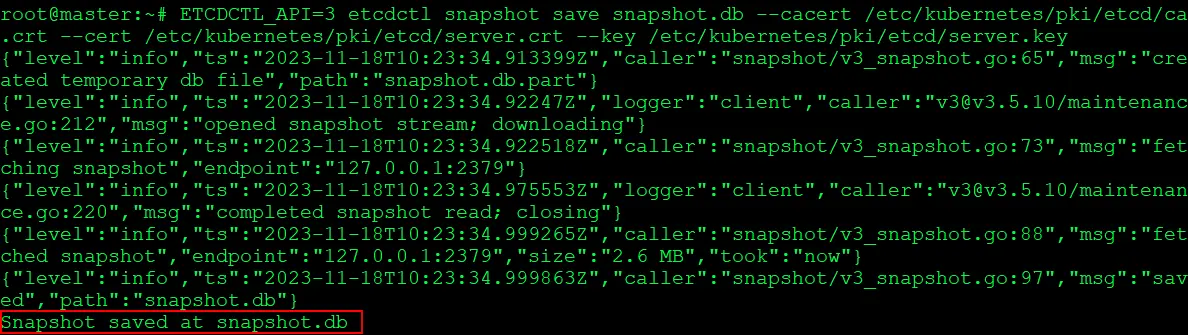
3) View that the snapshot was successful:
$ ETCDCTL_API=3 etcdctl snapshot status --write-out=table snapshot.db

Note: Important Note: If you are backing up and restoring the cluster do not run the status command after the backup this might temper the backup due to this restore process might fail.
Always make a Backup to avoid data loss:
Make a compressed copy of everything in the etcd directory, including all files and folders, certificates, key files, and anything else in that folder.
$ tar -zcvf etcd.tar.gz /etc/kubernetes/pki/etcd
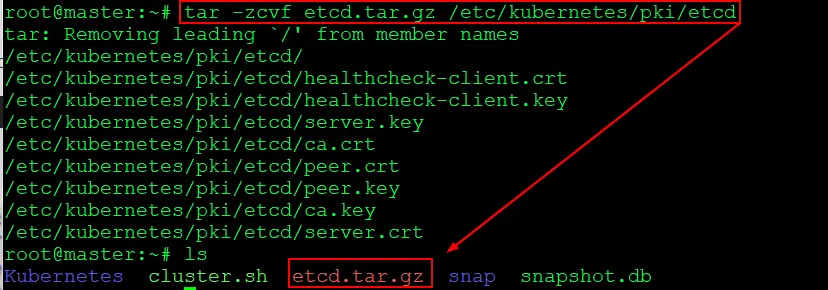
In this step, we compressed all the files stored in the etcd folder and kept them as a backup.
Restoring Etcd From Snapshot & Verify:
1) Check the present state of the cluster which is stored in present snapshot taken in above task:
$ kubectl get all
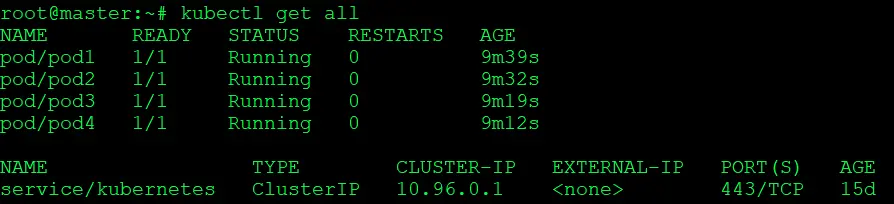
2) To verify, we will now create a pod. Since the new pod is not present in the snapshot, it will not be available when we restore the content using the restore command.
$ kubectl run testing-restore --image=nginx
$ kubectl get pods
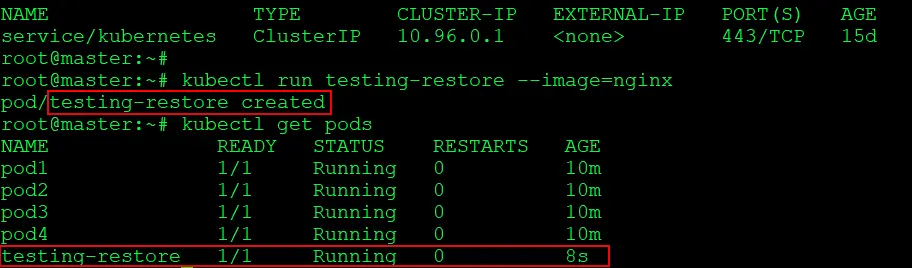
3) Check restore Command flag which you need to include in command
$ ETCDCTL_API=3 etcdctl snapshot restore -h
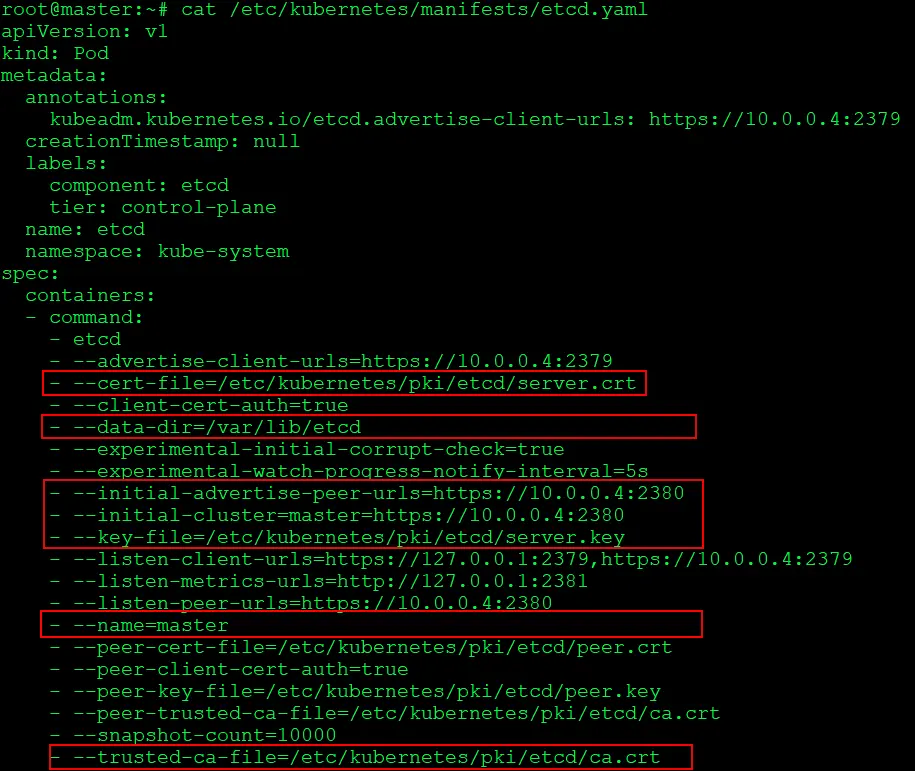
4) To restore we will have to first delete the present ETCD content. So lets look into and grab all the details we need for the restore command to execute
$ cat /etc/kubernetes/manifests/etcd.yaml
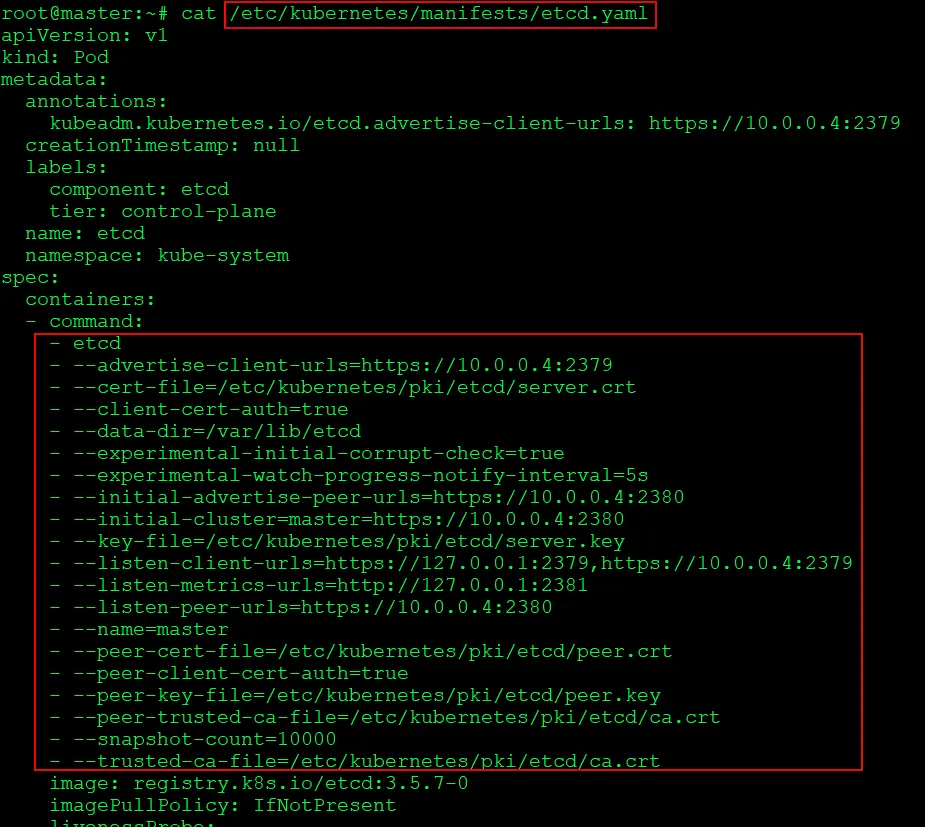
5) Will delete the present content of ETCD and execute the restore command
$ rm -rf /var/lib/etcd
$ ETCDCTL_API=3 etcdctl snapshot restore snapshot.db --endpoints=https://127.0.0.1:2379 --cacert=/etc/kubernetes/pki/etcd/ca.crt --cert=/etc/kubernetes/pki/etcd/server.crt --key=/etc/kubernetes/pki/etcd/server.key --name=kubeadm-master --data-dir=/var/lib/etcd --initial-cluster=kubeadmmaster=https://10.0.0.4:2380 --initial-cluster-token=etcd-cluster-1 --initial-advertise-peerurls=https://10.0.0.4:2380
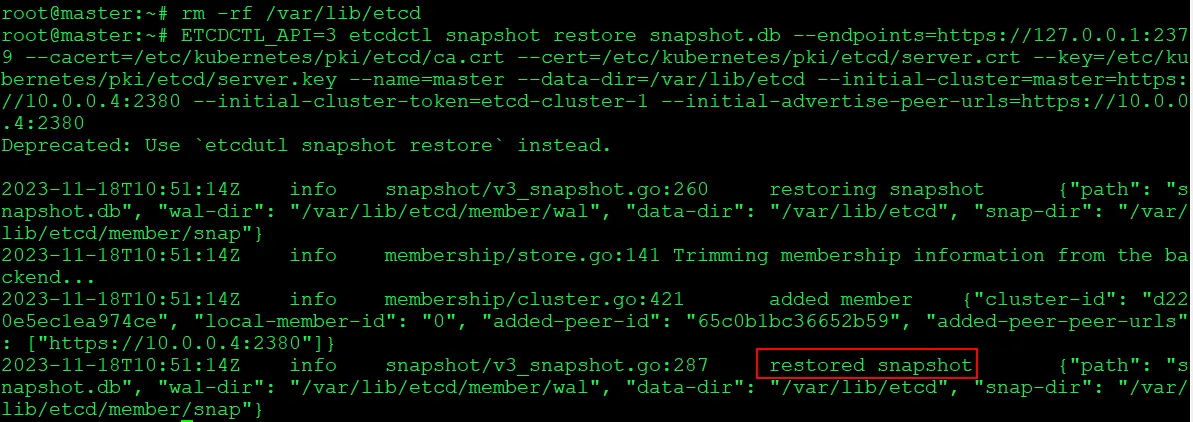
6) Verify that the cluster is back to status of which we had taken the snapshot
$ kubectl get pods
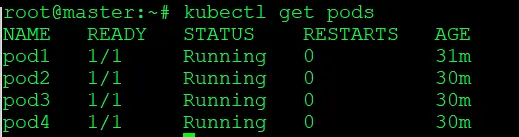
Here, you can verify that the ‘testing-restore’ pod is not present because it was not saved in the snapshot.db, The rest of the data saved in snapshot.db has been successfully restored.
Congratulations! We are now successfully done with the backup & restoration process of our ETCD cluster in Kubernetes.
Scenarios & Use Cases:
- Prevent Data Loss:
- Regular backups to avoid accidental data deletion or misconfigurations.
- Disaster Recovery:
- Off-site backups for recovering from catastrophic etcd cluster failures.
- Cluster Migration:
- Backup before migrating, restore on the new cluster for a seamless transition.
- Rollback to Stable State:
- Use backups to revert the cluster to a stable state after faulty changes.
- Testing & Development:
- Snapshot before testing changes; restore if issues arise.
Conclusion
For a single control plane arrangement, a Kubernetes cluster with infrequent API server changes is a fantastic alternative. Backups of the etcd cluster on a regular basis will reduce the time frame for potential data loss.
Frequently Asked Questions
What is etcd?
etcd is a distributed key-value store that is often used as the primary data store for distributed systems, particularly in Kubernetes clusters. It is designed for reliability and fault-tolerance and is a crucial component in many container orchestration platforms.
Why is backing up etcd important?
etcd stores the configuration data of a cluster, including metadata about the state of the cluster and the data needed for distributed coordination. Backing up etcd is essential to ensure data recovery in case of accidental data loss, hardware failures, or other disasters.
How often should I perform etcd backups?
The frequency of etcd backups depends on factors like the rate of data changes and the criticality of the system. In production environments, it's common to schedule regular backups, such as daily or hourly, to minimize data loss in the event of a failure.
Can I automate the etcd backup process?
Yes, the etcd backup process can be automated using scripts and scheduling tools. You can create a script that runs the etcdctl snapshot save command and use a tool like cron (on Linux) or Task Scheduler (on Windows) to schedule regular backups.
What precautions should I take during the etcd restore process?
Before restoring from a backup, ensure that you have a good understanding of the etcd cluster's state. It's important to stop the etcd service, perform the restore, and then restart etcd. Additionally, verify the integrity of your backup files.
Related/References
- Visit our YouTube channel “K21Academy”
- Certified Kubernetes Administrator (CKA) Certification Exam
- (CKA) Certification: Step By Step Activity Guides/Hands-On Lab Exercise & Learning Path
- Certified Kubernetes Application Developer (CKAD) Certification Exam
- (CKAD) Certification: Step By Step Activity Guides/Hands-On Lab Exercise & Learning Path
- Create AKS Cluster: A Complete Step-by-Step Guide
- Container (Docker) vs Virtual Machines (VM): What Is The Difference?
- How To Setup A Three Node Kubernetes Cluster For CKA: Step By Step
- CKA/CKAD Exam Questions & Answers 2022
Join FREE Masterclass of Kubernetes
Discover the Power of Kubernetes, Docker & DevOps – Join Our Free Masterclass. Unlock the secrets of Kubernetes, Docker, and DevOps in our exclusive, no-cost masterclass. Take the first step towards building highly sought-after skills and securing lucrative job opportunities. Click on the below image to Register Our FREE Masterclass Now!


![Microsoft Agentic AI Business Solutions Architect [AB-100] | K21 Academy](https://test.k21academy.com/wp-content/uploads/2025/11/Microsoft-Agentic-AI-Business-Solutions-Architect-AB-100-Exam-Overview1.png)



