



Customers can use Azure AD Connect to enable a “Single-Sign-On” (or SSO) experience for their users in a variety of ways. I believe it is critical to understand the differences between these options so that when you deploy Azure AD Connect into customer environments, you can select the best solution for the business.
Single Sign-On is an experience in which a single logon event (such as logging into your local workstation) automatically qualifies you for login to other, disparate systems (for example, Office 365)–in other words, you have all the tokens, exchanges, and mechanisms in place just from your primary login event. From the user’s point of view, after signing in to the local Active Directory network on their workstation with a corporate email address, they may then open a web browser, navigate to https://mail.office365.com, and be automatically signed into their Office 365 mailbox without having to provide credentials again. This is, in a sense, a “true” SSO experience.
There are three primary methods we can use to achieve “true” SSO:
- Active Directory Federated Services
- Pass-Through Authentication with Seamless Single Sign-On enabled
- Password Hash Synchronization with Seamless Single Sign-On enabled
Active Directory Federated Services
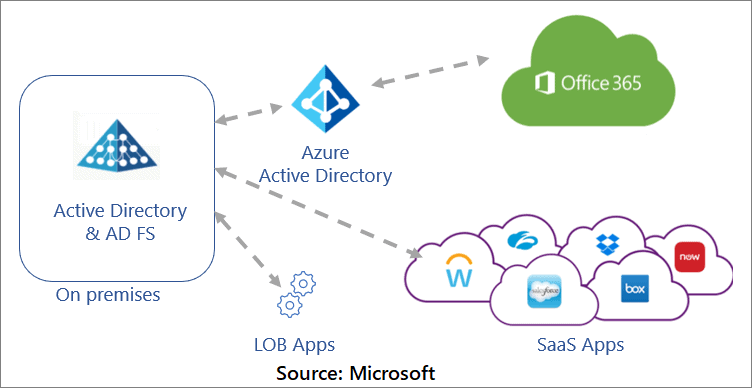
By securely sharing digital identity and entitlement rights across security and enterprise boundaries, Active Directory Federation Service (AD FS) enables Federated Identity and Access Management. AD FS extends the ability to use single sign-on functionality available within a single security or enterprise boundary to Internet-facing applications in order to provide customers, partners, and suppliers with a streamlined user experience when accessing an organization’s web-based applications.
Pass-Through Authentication with Seamless SSO
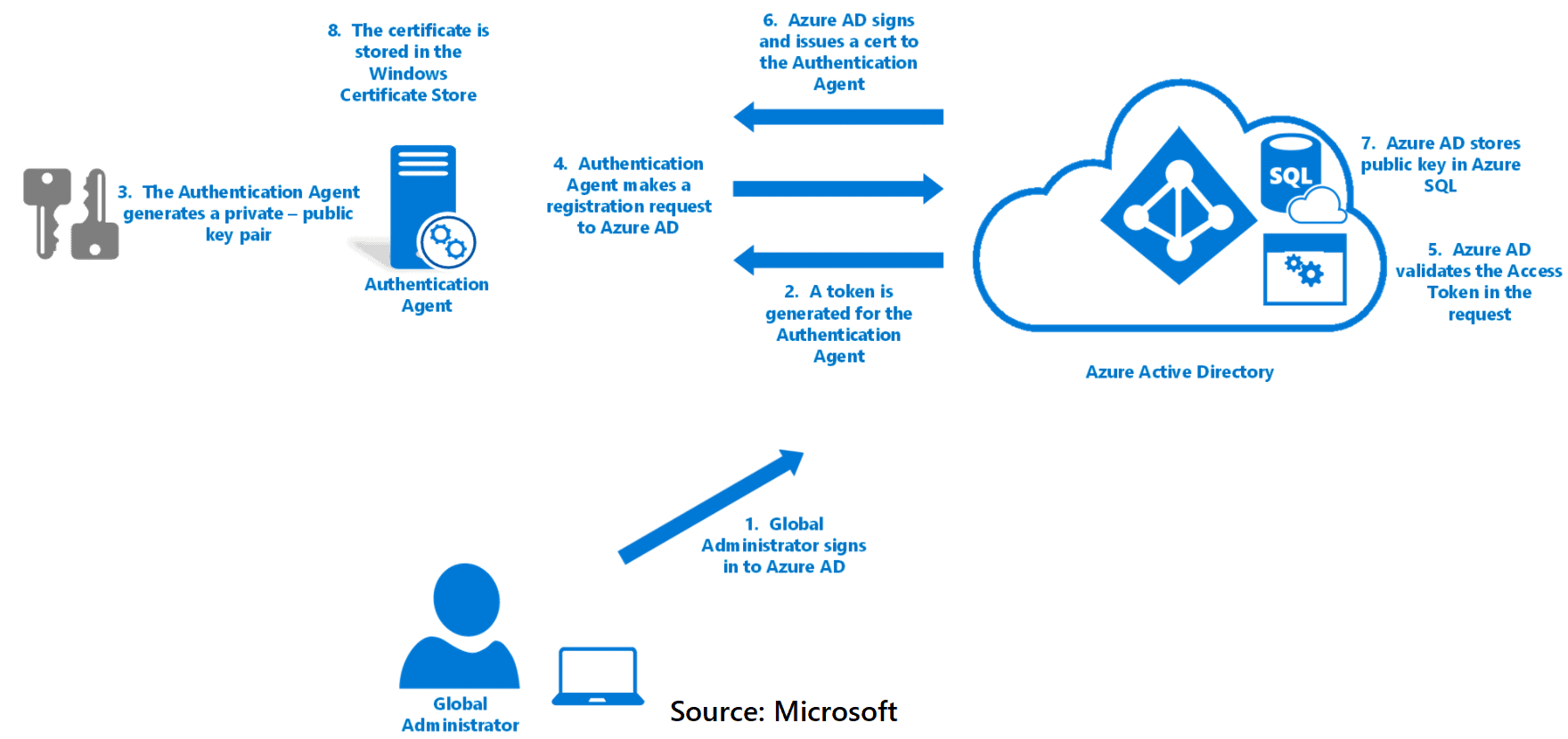
PTA, or Pass-Through Authentication, is the simplified cousin of AD FS. It works in ways that are both similar and dissimilar to the previous solution.
As with AD FS, it means that all logins rely on the local Active Directory for authentication and sign-in–we still have that vexing dependency. However, because cloud authentication occurs through the local Azure AD Connect service and does not necessitate a complex AD FS server infrastructure or SSL certificates, it may be preferable in some scenarios. You’d still want the redundant ISP connections, but there are no other requirements. As a result, if you face the challenge of keeping passwords and authentication events on-premises, and the customer also wants to reduce complexity with a smaller on-premises footprint, PTA is your best option (be sure to also enable SSO in the AAD Connect configuration wizard when choosing this option).
 Password Hash Sync with Seamless SSO
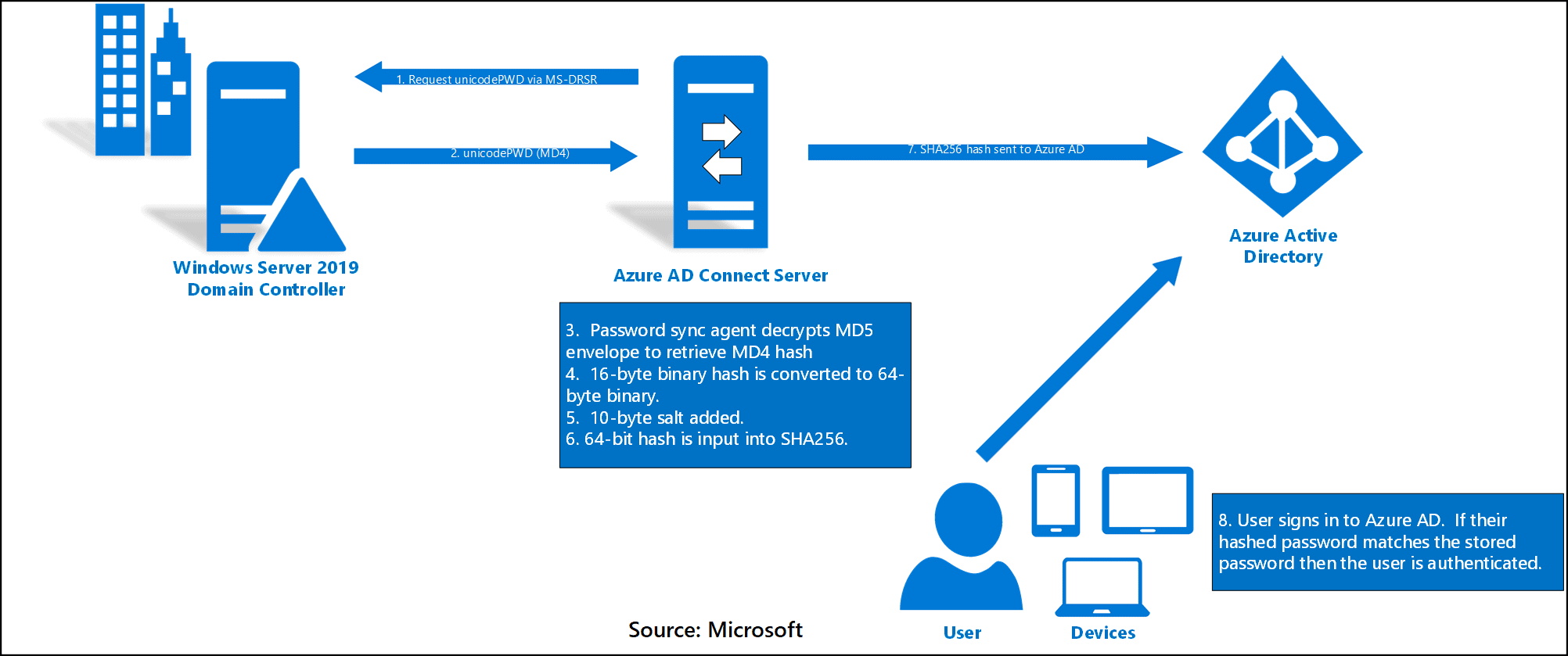
This is the configuration I recommend for the majority of small businesses that do not have any special compliance requirements. There is no on-premises dependency in this model–authentication occurs both on-premises and in Azure AD. Local AD passwords are salted, hashed, and synchronized to Azure AD using password hash synchronization. You can also enable the Seamless Single Sign-On option, and corporate desktop users (Windows 7 and up) will enjoy the same SSO benefits (there will not be further credential prompts to use Outlook, OWA, other apps, etc.). What’s the best part? Users can continue working in their cloud apps even if their local on-premises systems or internet connection are down.
If you already have PHS but haven’t enabled Seamless Single-Sign-On, you won’t be able to enjoy the “true” SSO experience. However, getting this up and running is very simple; see here for step-by-step instructions. You can also enable password write-back for self-service password resets.
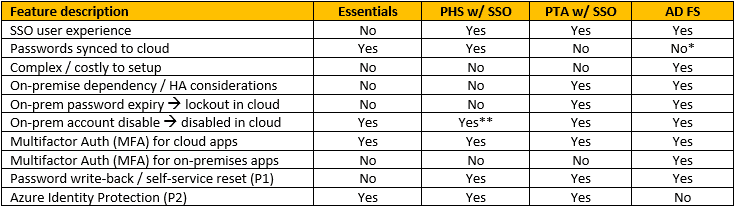
There may be other differences, but these are the most noticeable and important to small businesses. For your convenience, I’ve summarised all of these points in this table:
There has been a growing trend to get rid of ADFS among many organizations. Reasons vary, there are still scenarios where ADFS is extremely good such as single sign-on with 3rd party applications. When considering to replace O365 relying party trust and ADFS alternative solutions are:
- Pass-through authentication (PTA) with Seamless SSO
- Password Hash Sync (PHS) with Seamless SSO
- Both above without Seamless SSO
Take into account that there are scenarios where PTA or PHS with SSO might have issues:
- PTA doesn’t support detection of leaked credentials
- Azure AD Domain Services needs PHS to work, so if using only PTA AAD DS is not supported
- PTA is not integrated with AAD Connect Health
Summary
As you can see, an organization looking for a hybrid identity solution from Microsoft Azure has several options. It is critical to understand the problem you are attempting to solve before deciding on which solution (or solutions) to consider. While all three hybrid identity authentication methods provide single sign-on capabilities, other factors must be considered. A company that wants a simple implementation with fewer moving parts should consider using the password hash sync method. However, a highly secure organisation that wishes to keep all authentication on-premises may wish to consider federation or pass-through authentication.
References/Related
- Azure Migrate And Cloud Migration Strategy
- AZ 305: Microsoft Azure Solutions Architect Expert: Step By Step Activity Guides (Hands-On Labs)
- Core Cloud Service: Azure Compute Options
- Exam AZ-305: Azure Solutions Architect Expert Certification
Next Task For You
Begin your journey toward Mastering Azure Cloud and landing high-paying jobs. Just click on the register now button on the below image to register for a Free Class on Mastering Azure Cloud: How to Build In-Demand Skills and Land High-Paying Jobs. This class will help you understand better, so you can choose the right career path and get a higher paying job.


![Microsoft Agentic AI Business Solutions Architect [AB-100] | K21 Academy](https://test.k21academy.com/wp-content/uploads/2025/11/Microsoft-Agentic-AI-Business-Solutions-Architect-AB-100-Exam-Overview1.png)


