



As the remote work trend grows, Azure Virtual Desktop (AVD) is rapidly becoming the go-to solution for businesses looking for secure, scalable, and cost-effective virtual desktop infrastructure (VDI). Whether you’re managing a hybrid workforce or fully remote teams, AVD simplifies deployment, enhances security, and reduces operational costs. In this post, we’ll dive into the core benefits, pricing, and how to become an AVD Specialist.
The following sections have been covered in this blog:
- What is Azure Virtual Desktop (AVD)? Key Benefits for Businesses
- Why Azure Virtual Desktop (AVD) is Essential for Remote Work
- 5 Key Benefits of Azure Virtual Desktop for Enterprises
- Requirements for AVD
- Azure Virtual Desktop key management tasks
- How Much Does Azure Virtual Desktop (AVD) Cost?
- How to be an Azure AVD Specialist?
- FAQ
What is Azure Virtual Desktop (AVD)? Key Benefits for Businesses
Azure Virtual Desktop or AVD is a set of technologies from Microsoft Azure that enables IT professionals and Managed Service Providers (MSPs) to create Windows 10 virtual desktops in Azure. It is fast becoming the solution of choice for organisations looking for a reliable, secure and cost-efficient solution to remote working.
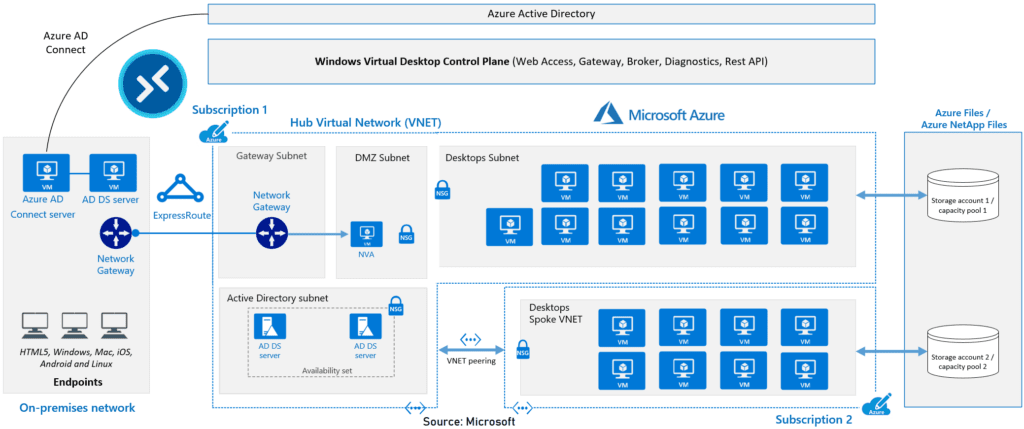
Here’s what you can do when you run Azure Virtual Desktop on Azure:
- Set up a multi-session Windows 10 deployment that delivers a full Windows 10 with scalability
- Virtualize Microsoft 365 Apps for enterprise and optimize it to run in multi-user virtual scenarios
- Provide Windows 7 virtual desktops with free Extended Security Updates
- Bring your existing Remote Desktop Services (RDS) and Windows Server desktops and apps to any computer
- Manage Windows 10, Windows Server, and Windows 7 desktops and apps with a unified management experience
Related Readings: Virtual Network (VNet) Peering in Azure
Why Azure Virtual Desktop (AVD) is Essential for Remote Work
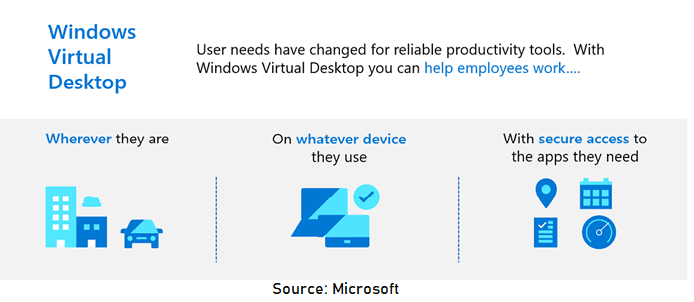
AVD enables companies to provide their employees with consistent desktop experiences, whether working from home, customer sites, or the office. For example, a global consulting firm can use AVD to deploy remote desktops, ensuring all employees have access to business-critical apps securely from any device.
- Your staff need to work remotely: Your team need to be able to work from home, when travelling, on customer sites or in the office and have the same user experience wherever they are. You need to manage and secure access to company data and applications.
- Simple security management: When you have contractors or part-time staff that need access to information, security can become a concern.
- You have an occasional need for PCs: Azure WVD makes it possible to deploy virtual PCs when you need them. As your needs change, you can add or remove virtual desktops to meet the needs of your workforce.
- You need different types of PCs for different teams in the business: You can deploy different virtual desktops to different user groups.
Related Readings: How to create and connect Windows Virtual Machine in Azure
5 Key Benefits of Azure Virtual Desktop for Enterprises
- Session Hosts: You pay for the virtual machines that run your users’ desktops and apps. Costs vary by VM size and region, and you’re only charged while these VMs are running.
- Domain Controller: Required for managing user access. Many organizations use Azure Active Directory Domain Services for simplicity.
- Storage: User profiles are stored centrally (using FSLogix), so users see the same desktop and data no matter which session host they connect to. Storage costs depend on the amount and type of storage you use.
- Licensing: To use AVD, users need eligible Microsoft 365 or Windows licenses. If you want to provide Microsoft Office, ensure your license supports Shared Computer Activation.
- Networking: Network traffic between users and AVD contributes to overall infrastructure costs.
| Cost Component | Description |
|---|---|
| User Access Rights | Included with eligible Microsoft 365/Windows licenses, or per-user fee for external users |
| Session Hosts | Pay for VMs by the hour; costs vary by size, type, and region |
| Storage | Pay for user profile storage and data disks |
| Domain Controller | Azure AD Domain Services or self-managed VM |
| Licensing | Microsoft 365/Windows, Office with Shared Computer Activation, FSLogix |
| Networking | Charges based on outbound data transfer |
Related Readings: Microsoft Entra ID: Everything You Need To Know
Requirements for AVD
Your infrastructure needs the following things to support Windows Virtual Desktop:
- An Azure Active Directory
- A Windows Server Active Directory in sync with Azure Active Directory. You can configure this with one of the following:
- Azure AD Connect (for hybrid organizations)
- Azure AD Domain Services (for hybrid or cloud organizations)
- An Azure subscription that contains a virtual network that either contains or is connected to the Windows Server Active Directory
Related Readings: Microsoft Entra Connect & Connect Health : Overview
Azure Virtual Desktop key management tasks
- Administer Group Policy
- Manage images
- Update your desktops and applications or deploy new applications
- Validate updates before users access them
- Add or remove session hosts from the host pool
- Create new host pools
- Monitor and receive alerts for the environment
- Backup the environment
How Much Does Azure Virtual Desktop (AVD) Cost?
Azure Virtual Desktop (AVD) pricing is flexible and depends on several key factors:
- Session Hosts: You pay for the virtual machines that run your users’ desktops and apps. Costs vary by VM size and region, and you’re only charged while these VMs are running.
- Domain Controller: Required for managing user access. Many organizations use Azure Active Directory Domain Services for simplicity.
- Storage: User profiles are stored centrally (using FSLogix), so users see the same desktop and data no matter which session host they connect to. Storage costs depend on the amount and type of storage you use.
- Licensing: To use AVD, users need eligible Microsoft 365 or Windows licenses. If you want to provide Microsoft Office, ensure your license supports Shared Computer Activation.
Related Readings: Microsoft Azure Storage Account: A Comprehensive Guide
How to Become an Azure Virtual Desktop Specialist
If you want to become an Azure Virtual Desktop (AVD) Specialist, the first step is to earn the Azure Virtual Desktop Specialty Certification (Exam AZ-140). Here’s how you can get started:
- Learn the Fundamentals: Understand the architecture of AVD and how it integrates with Azure.
- Get Hands-On: Set up a test environment on your Azure subscription to experience managing session hosts, users, and storage.
- Practice for AZ-140: Focus on topics like VDI deployment, multi-session configurations, and security management.
- Join the Community: Participate in the AVD Tech Community for real-time tips and updates.
Conclusion:
Azure Virtual Desktop (AVD) is transforming how businesses manage remote work by providing flexible, scalable, and cost-effective solutions. Whether you’re deploying desktops for hybrid teams or simplifying IT management, AVD offers the tools needed for modern organizations. Become an AVD Specialist today and take advantage of the booming cloud workforce demand!
Frequently Asked Questions (FAQ’s)
1. What is the difference between AVD and traditional Virtual Desktop Infrastructure (VDI)?
Answer: AVD runs on Azure cloud infrastructure, providing scalability and flexibility, whereas traditional VDI typically requires on-premise hardware and management.
2. Can I use my existing Microsoft 365 license with AVD?
Answer: Yes, you can use Microsoft 365 with Shared Computer Activation on **Azure Virtual Desktop**. This helps cut costs by enabling multi-session access
3. What is the minimum internet speed required for AVD?
Answer: Microsoft recommends 50–150 kbps per user for typical office work, depending on the workload.
References/Related
- Case Study: Deploy A Container Instance In Azure Using The Azure Portal
- Azure Storage Account [Official Microsoft]
- Core Cloud Service: Azure Compute Options
- Exam AZ-305: Azure Solutions Architect Expert Certification
Next Task For You
Begin your journey toward Mastering Azure Cloud and landing high-paying jobs. Just click on the register now button on the below image to register for a Free Class on Mastering Azure Cloud: How to Build In-Demand Skills and Land High-Paying Jobs. This class will help you understand better, so you can choose the right career path and get a higher paying job.


![Microsoft Agentic AI Business Solutions Architect [AB-100] | K21 Academy](https://test.k21academy.com/wp-content/uploads/2025/11/Microsoft-Agentic-AI-Business-Solutions-Architect-AB-100-Exam-Overview1.png)


