



In this blog, I’ll cover some valuable insights, including Q&As and valuable links, from Day 8 of our recent Cloud Security for Azure, AWS, Google Cloud, and Oracle live class, where we discussed Key Vaults, Databox and Database Security, we also did hands-on Lab-10 & Lab-11 of our 18+ hands-on extensive labs in the live session.
On Day 7 in the previous week, we discussed Storage Security.
So, here are some of the Q&As asked during the Live session from Module 3: Secure Data and Application.
Azure Key Vault
Azure Key Vault is a cloud service for storing and accessing secrets in a secure manner. Anything you want to restrict access to, such as API keys, passwords, certificates, or cryptographic keys, is a secret.

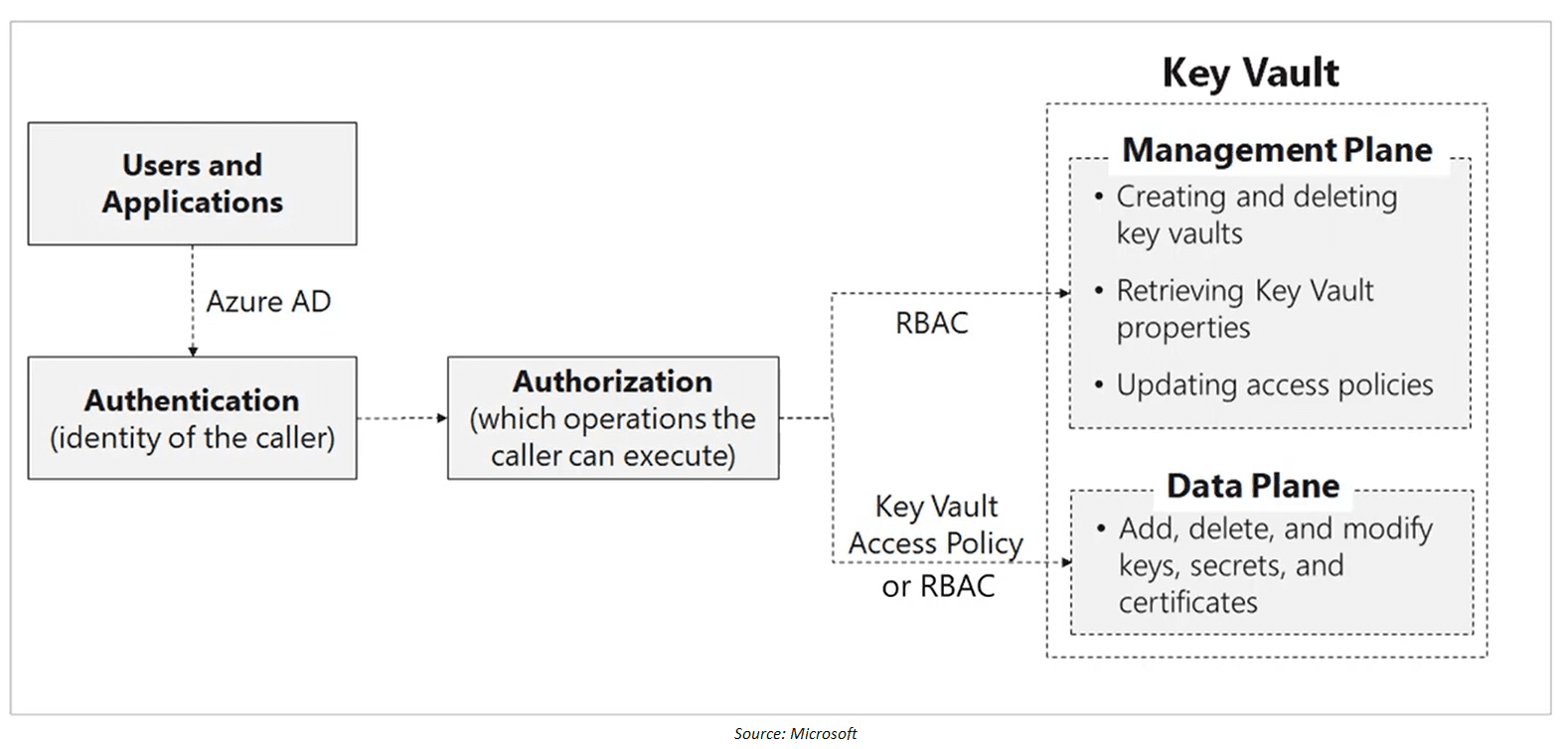
Access to Key Vault is controlled through two interfaces, i.e. Management Plane and Data Plane. Management Plane uses the RBAC roles, whereas Data-Plane uses Key Vault Access Policy. The idea is even if you are a contributor/owner to the Key Vault and don’t have an access policy assigned to your identity, you will not be able to access the data (Keys, Secrets, Certificates, etc.)
To protect data flowing between Azure Key Vault and clients, the Transport Layer Security (TLS) protocol is enforced. Clients and Azure Key Vault negotiate a TLS connection. Strong authentication, message privacy, and integrity (allowing detection of message tampering, interception, and forging), interoperability, algorithm flexibility, and ease of implementation and use are all features of TLS.
PFS (Perfect Forward Secrecy) uses unique keys to safeguard connections between customers’ client systems and Microsoft cloud services. Connections also employ 2,048-bit RSA-based encryption keys. This combination makes intercepting and gaining access to data in transit challenges.
Q1. What are Microsoft Azure Key Vault’s requirements?
Ans. The following are the requirement for Azure Key Vault:
- You must have a Microsoft Azure account that is active.
- Either the Free or HSM (paid) subscription option must have been selected.
- PowerShell for Azure must be installed.
>Know more about Key Vault
Data Box
When busy networks aren’t an option, Data Box devices make it simple to move data to Azure. When time, network availability, or pricing are constraints, use standard copy programmes like Robocopy to move huge amounts of data to Azure. According to NIST Special Publication 800-88 revision 1 standards, all data is AES-encrypted, and the devices are wiped clean after upload.

- Data Box: Standard NAS protocols and common copy tools are used by this ruggedized device with a 100-TB capacity. For added security, it uses AES 256-bit encryption.
- Data Box Disk: 128-bit encryption is available on our 8-TB SSD with a USB/SATA interface. It comes in bundles of up to five for a total of 40 TB, so you can customise it to your needs.
- Data Box Heavy: This self-contained, ruggedized gadget is capable of transporting 1 PB of data to the cloud.
- Data Box Gateway: Data Box Gateway is a virtual appliance that also transmits data to and from Azure.
Q2. What is the maximum quantity of data that Data Box can transport in a single session?
Ans. The raw capacity of the Data Box is 100 TB, whereas the useable capacity is 80 TB. You can transfer up to 80 TB of data with Data Box. You’ll need to order more devices to transfer more data.
Q3. What is the procedure for obtaining Data Box?
Ans. Sign in to the Azure site and create a Data Box order to acquire Azure Data Box. Provide your contact information as well as information on how you’d want to be notified. Data Box is mailed to you within 10 days of placing an order, depending on availability.
>Know more about Data Box
Database Security
As we all know authentication is a process of proving the user who they claim to be. Azure AD authentication supports the following authentication methods:
- Azure AD cloud-only identities
- Azure AD hybrid identities that support:
- Cloud authentication with two options coupled with seamless single sign-on (SSO)
- Azure AD password hash authentication
- Azure AD pass-through authentication
- Federated authentication
- Cloud authentication with two options coupled with seamless single sign-on (SSO)
We have seen in great detail how and when we will be needing what for example when we should use password hash, SSO, federation and all. For a recap visit the Day-3 session.
Authentication For Azure SQL
Two forms of authentication are supported by Azure SQL Database and SQL Managed Instance:

SQL authentication:
- SQL authentication refers to a user’s login and password authentication while connecting to an Azure SQL Database or Azure SQL Managed Instance. When the server is created, a server admin login with a username and password must be given. A server admin can use these credentials to log in as the database owner to any database on that server or instance. The server administrator can then establish extra SQL logins and users, allowing users to connect using username and password.
Azure Active Directory authentication:
- Administrators can use Azure AD authentication to manage the identities and rights of database users as well as other Azure services from a single location. This involves password storage minimization and the implementation of centralised password rotation procedures.
SQL Database Firewall
To access a database server, you must specify one or more server-level IP firewall rules that enable your access to the Azure SQL level Database. By default, the firewall denies all access to the SQL Database. You can also specify which ranges of IP from the internet is allowed and whether they can attempt to connect to the SQL Database or not. To selectively grant access to one of your Databases, you must create a Database level rule for that.

Database Auditing
Auditing for SQL Database tracks database events and writes them to an audit log in your Azure storage account, log analytics workspace or event hubs. Auditing also helps you to maintain regulatory compliance and understand Database activity.

Q4. What are the benefits of SQL Database Auditing?
Ans. The benefits are as follow:
- Keep a record of the events you’ve chosen. You can specify audit categories for database actions.
- Database action should be reported. To get started quickly with activity and event reporting, you can use pre-configured reports and a dashboard.
- Examine reports. Suspicious incidents, strange activities, and trends can all be found.
Q5. What is the limitation of auditing?
Ans. The following are the limitation of auditing:
- Premium storage is currently not supported.
- Hierarchical namespace for Azure Data Lake Storage Gen2 storage account is currently not supported.
- Enabling auditing on a paused Azure Synapse is not supported. To enable auditing, resume Azure Synapse.
- Auditing for Azure Synapse SQL pools supports default audit action groups only.
Data Discovery and Classification
It is built into Azure SQL Database. It provides advanced capabilities for discovering, classifying, labelling and reporting the sensitive data in your Databases. It helps you to meet standards for data privacy and requirement for regulatory compliance. Also, it helps in security scenarios such as monitoring, auditing and alert etc.

Q6. What are the roles that can read the data classification of a database?
Ans. The following are the roles that can read the data classification of a database
- Owner
- Reader
- Contributor
- SQL Security Manager
- User Access Administrator
Q7. What are the roles that can modify the data classification of a database?
Ans. The following are the roles that can modify the data classification of a database
- Owner
- Contributor
- SQL Security Manager
Vulnerability Assessment
It is an easy to configure service that can discover track and help you to remediate potential Database vulnerabilities.

We can use it to improve your database security proactively. This is a part of ADS (Advance Database Security). It also includes actionable steps to improve your security. It can help you meet the compliance requirement, meet database standards, monitor a dynamic database environment where changes are difficult to track. In short, it is a scanning service that is built into Azure AQL Database.
Advanced Threat Protection
Advanced threat protection is used for the detention of SQL Injection, Data Exfiltration, Unsafe Action, Brute Force, Anomalous Client Login. Advanced Threat Protection integrates with Azure Security Centre to detect and respond to potential threats as they occur.
We will learn about it when we will be discussing Azure Security Centre in our next blog.
Dynamic Data Masking
Customers can define how much sensitive data to reveal with minimal impact on the application layer with dynamic data masking, which helps prevent unwanted access to sensitive data. It’s a policy-based security feature that hides sensitive data in a query’s return set over defined database fields while the data in the database remains unchanged.

Dynamic data masking policy
- SQL users excluded from masking – Unmasked data in SQL query results for a collection of SQL users or Azure AD identities. Administrators are always excluded from masking, and they see the original data without any masking.
- Masking rules – A set of rules that specify which fields should be masked and how they should be masked. A database schema name, table name, and column name can all be used to define the designated fields.
- Masking functions – A set of approaches for controlling data exposure in various contexts.
Transparent Data Encryption
SQL Server, Azure SQL Database, and Azure Synapse Analytics data files are encrypted via Transparent Data Encryption (TDE). Encrypting data at rest is the term for this type of encryption.

Data and log files are encrypted and decrypted in real-time by TDE. A database encryption key is used to encrypt the data (DEK). The key is stored in the database boot record for recovery purposes. A symmetric key is the DEK. It’s protected by either a certificate stored in the server’s master database or an asymmetric key protected by an EKM module.
Always Encrypted
Always Encrypted is a feature designed to secure sensitive data stored in Azure SQL Database or SQL Server databases, such as credit card numbers or national identification numbers (for example, U.S. social security numbers). Clients can encrypt sensitive data within client apps and never give the encryption keys to the Database Engine with Always Encrypted (SQL Database or SQL Server). As a result, Always Encrypted creates a barrier between those who own the data and should have access to it and those who administer it but should not have access to it.

>Know more about Always Encrypt
Quiz Time (Sample Exam Questions)!
Explanation: The Archive Tire is supported only in LRS, GRS, and RA-GRS3. To know more click supported tier
Feedback

Related/References
- Visit our Youtube channel to know more
- [Recap] Day 7: Secure Data and Application in Cloud
- [Recap] Day 6: Implement Platform Protection In Cloud Part – III
- Microsoft Azure Security Technologies Certification
- Azure Security Center [AZ-500]: Everything You Should Know
- Top 10 best practices for Azure Security in 2021
- [AZ-500] All about Azure Active Directory
Next Task For You
To get more clarity on what to expect in the training program, I recommend you to attend the FREE Class I’m holding this weekend! This FREE class will help you to understand what the training program looks like and give will you a clear vision to plan your career ahead!
Join me in the FREE Session and fast track your success!
Click on the below image and Register for our FREE CLASS Now!


![Microsoft Agentic AI Business Solutions Architect [AB-100] | K21 Academy](https://test.k21academy.com/wp-content/uploads/2025/11/Microsoft-Agentic-AI-Business-Solutions-Architect-AB-100-Exam-Overview1.png)


