



In this blog, we are going to share some quick tips including Q/A and useful links from Day 4 of our previously launched new batch of Oracle Cloud Infrastructure Architect Associate.
The previous week, In Day 3 session we covered the Overview of Compute, Compute shapes: Bare Metal, Virtual Machine, Dedicated VM Host, Compute instance, Connect to Compute instance, Lifecycle of Compute instance, Compute Service Images, Console connection, OS Management Service(OSMS).
And in this week’s Day 4 Live Session, we have continued with Module 5: Storage. We have covered:
- Storage Service Overview
- Storage types
- Detach a Block volume
- Object storage
- File storage
- Data Transfer service
- Storage gateway
We also covered hands-on Lab 7 & Lab 8 out of our 15+ hands-on labs.
So, here are some of the Q/A’s asked during the Live session from Module 5: Storage.
Oracle Cloud Infrastructure(OCI) Architect
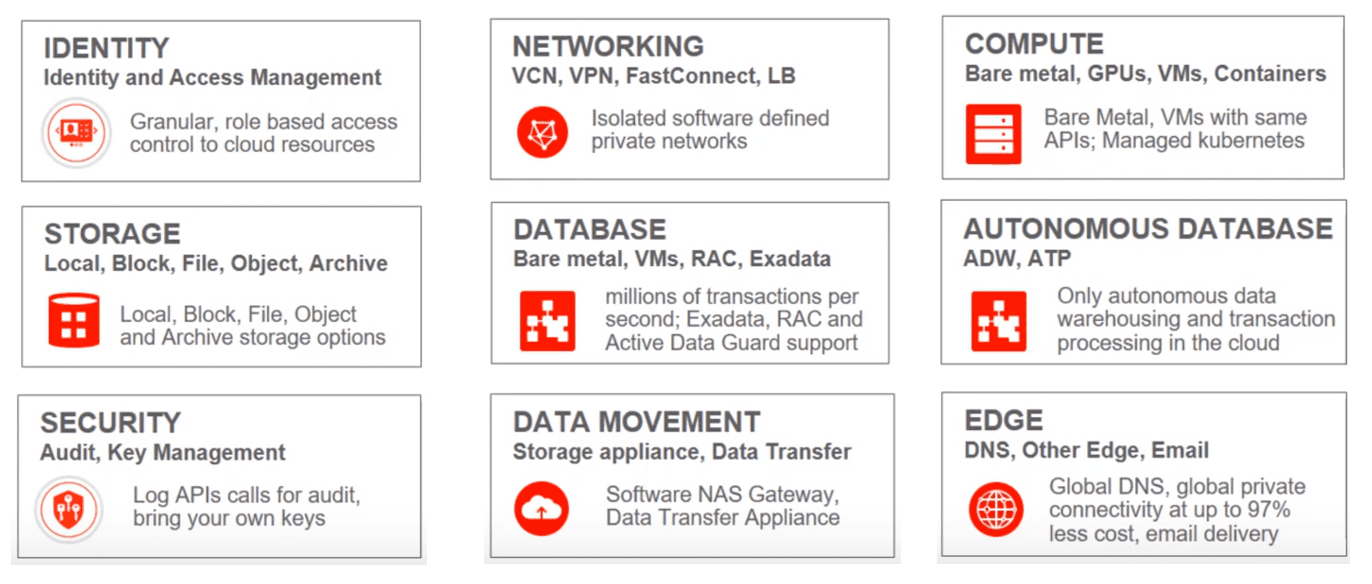
An Oracle Cloud Infrastructure(OCI) Architect is responsible for implementing, monitoring, and maintaining Oracle Cloud solutions, including major services related to Compute, Storage, Networking, Database and Security.
Overview of Storage
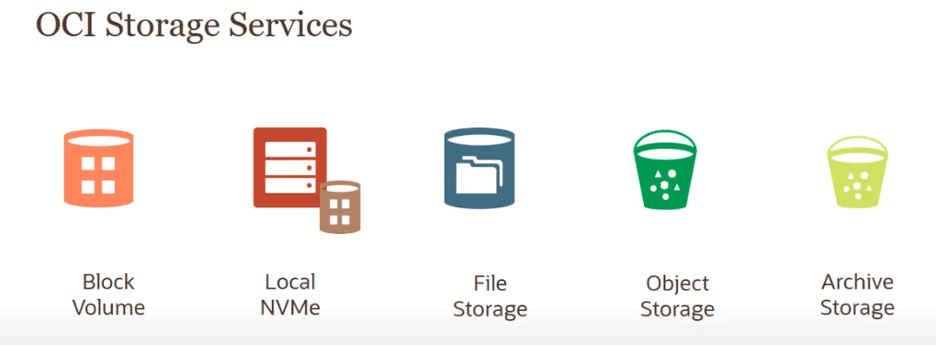
Storage is one of the 5 pillars on which OCI is built. Data like transactional data, Compute images, backup of databases, OS, Data from compute instances, etc. are stored in the storage service of OCI.
Also Check: Our blog post on OCI Shielded Instances.
Local NVMe
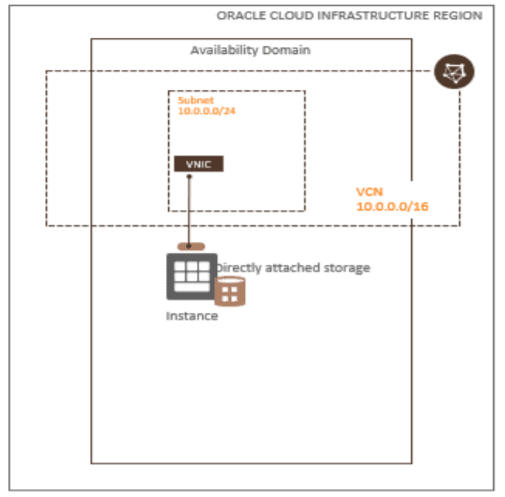
Non-Volatile Memory Express is a protocol for accessing non-volatile storage media attached via a PCI Express bus. It has direct access and full control of local storage using high-performance NVMe drives. DenseIO instance shapes include locally attached NVMe devices.
Local NVMe is the Best choice for workloads with extremely demanding IO such as Big Data and HPC processing. OCI uses NVMe (Non-Volatile Memory Express) interface for very high performance.
Also Read: Our blog post on oci tenancy.
Block Volume
- Hard drive in a server except the hard drive happens to be installed in a remote chassis.
- Data is typically stored on the device in fixed-sized blocks (e.g. 512 Bytes).
- It is Accessed by the operating system as a mounted drive volume.
- Applications/file systems decide how blocks are combined and accessed.
- You can place any kind of file system on block-level storage. E.g., Windows uses NTFS; VMware uses VMFS.
- Commonly deployed in Storage Area Network (SAN) storage.
Q1. What is the usage of Block Volume?
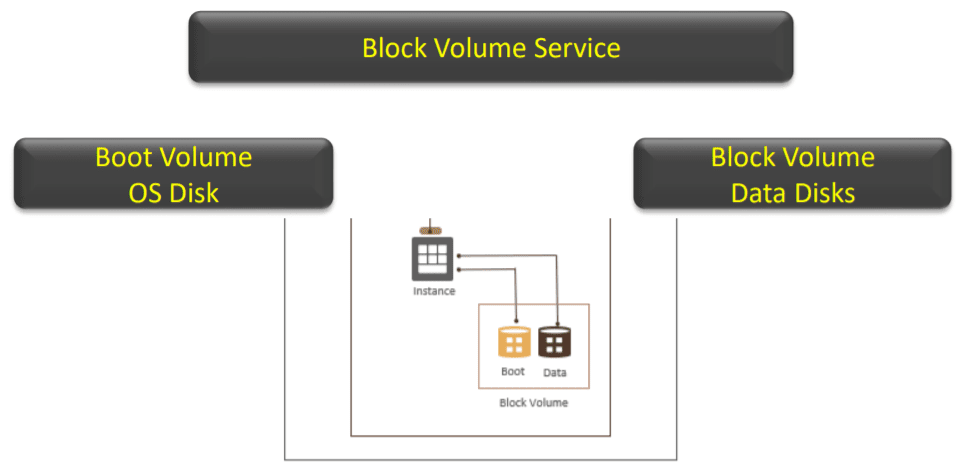
Ans: There are 2 usage of Block Volume:
- Expanding Instance’s Storage: You can create block storage volume and attach it to Instance. Instance Scaling: When you terminate the instance, you can keep the associated boot volume and use this boot volume to create a new instance with a different instance type and shape
- Persistent & Durable Storage: Block Volume can be detached from one instance and attached to another instance and data will be retained until you reformat or delete the volume
Q2. Can you explain briefly about Auto-Tune Performance in OCI?
Ans: Auto-Tune Performance is an automatic adjustment of a block volume or boot volume’s elastic performance setting to optimize performance.
It enables the auto-tune performance for detached volume, the Block Volume service starts the performance adjustment to Lower Cost after 14 days and enables the auto-tune performance of an attached volume, the Block Volume service starts the performance adjustment to Lower Cost 14 days after you detach the volume.
Clone a detached volume with the auto-tune performance feature enabled, the Block Volume service starts the performance adjustment to Lower Cost after 14 days.
Also Check: Our blog post on Oracle Cloud Infrastructure Fundamentals.
Detach Block Volume
When an instance no longer requires a block volume, you can disconnect and then detach it from the instance without any loss of data. When you attach the same volume to another instance or to the same instance, DO NOT FORMAT the disk volume. Otherwise, you will lose all the data on the volume itself is no longer needed, you can delete the block volume & You cannot undo a delete operation. Any data on a volume will be permanently deleted once the volume is deleted.
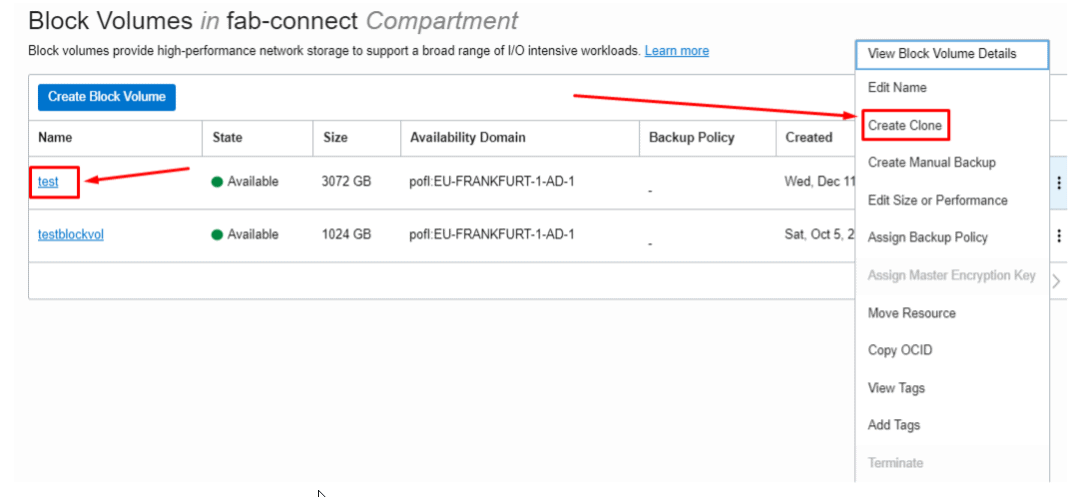
Q3. Can we do a clone of Block volume?
Ans: Yes we can do a clone of block volume.
- A block volume cloning feature that creates a point-in-time direct disk to disk deep copy of a source volume without a backup.
- A clone can only be created in the same AD with no need of detaching the source volume before cloning it. Volume Cloning and Backup operation are mutually exclusive operations.
- A clone can be attached and used as the regular volume when its lifecycle state changes from ”PROVISIONING” to “AVAILABLE”, usually within seconds (At this time, the data is being copied in the background).
- You can clone a volume without detaching from the running instance. You can change the size of block volume when cloning. Volume Clone is within the same region or availability domain for tenancy but not across regions.
Object Storage
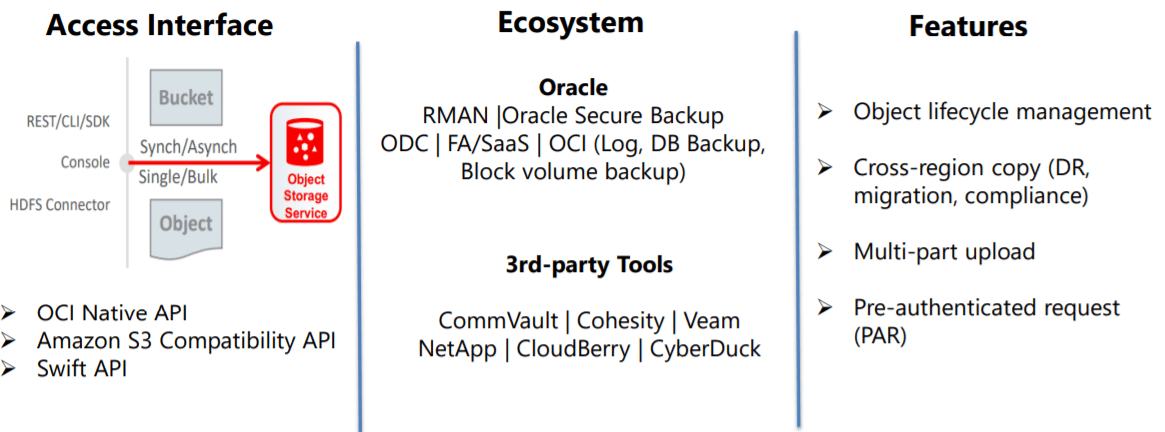
The Oracle Cloud Infrastructure Object Storage service is an internet-scale, high-performance storage platform that offers reliable and cost-efficient data durability with Object Storage, you can safely and securely store or retrieve data directly from the internet or from within the cloud platform.
Q4. What is the feature of the Object storage services?
Ans: Features of Object storage:
- Consistency: When retrieved objects always serve the most recent copies of data.
- Durability: Multiple copies of data stored across multiple AD and Data detection and auto repair.
- Performance: Compute and Object storage are co-located in the same network.
- Custom Metadata: We can define metadata as a key-value pair.
- Encryption: 256-bit Advanced Encryption Standard to encrypt Object Data.
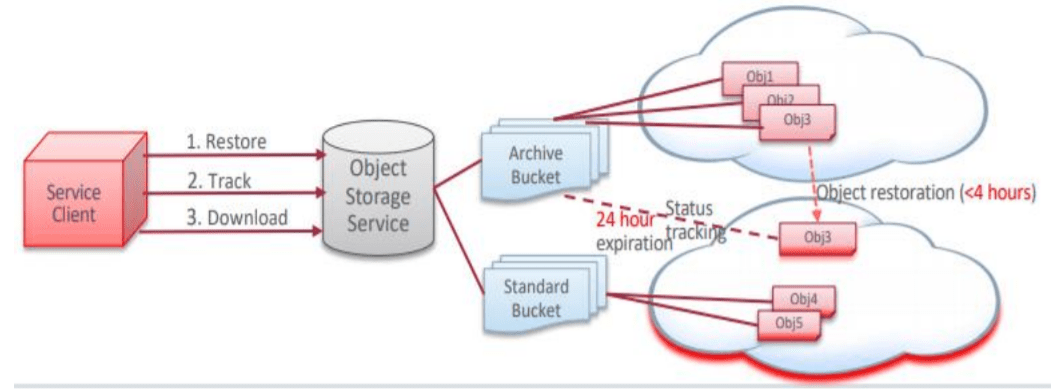
Q5. What is the difference between Object storage standards and Object Storage Archive?
Ans: Standard Storage Tier (Hot) provides Fast, immediate, and frequent access and Serves the most recent copy of the data when retrieved. Data retrieval is instantaneous. Standard buckets can’t be downgraded to archive storage.
Archive Storage Tier (Cold) provides Seldom or rarely accessed data but must be retained and preserved for long periods of time. The minimum retention requirement for Archive Storage is 90 days. Objects can’t be downloaded directly, they need to be restored before download. Archive Bucket can’t be upgraded to a Standard storage tier and Data retrieval is not instantaneous, Time To First Byte (TTFB) after Archive Storage restore request is made: 4 Hours.
File Storage Service
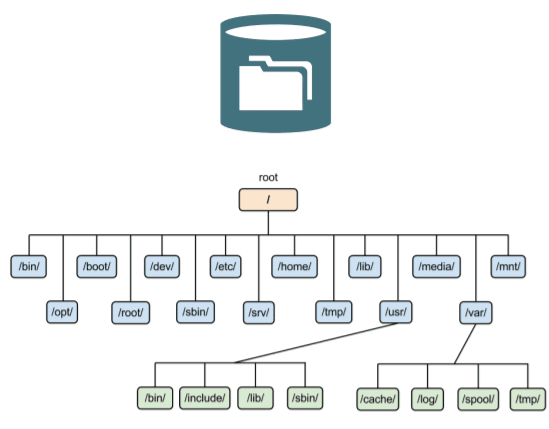
File Storage Service is a hierarchical collection of documents organized into named directories which are themselves structured files. it is distributed file standards – NFS and SMB.
It is a shared file system storage for compute instances and allows the creation, deletion, reading, writing, sharing, and locking. it provides access over the network.
Q6. What is an FSS snapshot?
Ans: Snapshots provide a read-only, space-efficient, point-in-time backup of a file system. Snapshots are created under the root folder of the file system, in a hidden directory named .snapshot.
You can take up to 10,000 snapshots per file system & restore a file within the snapshot, or an entire snapshot using the cp or rsync command $ cp -r .snapshot/snapshot_name/* destination_directory_name. If nothing has changed within the target file system and you take a snapshot, it does not consume any additional storage.
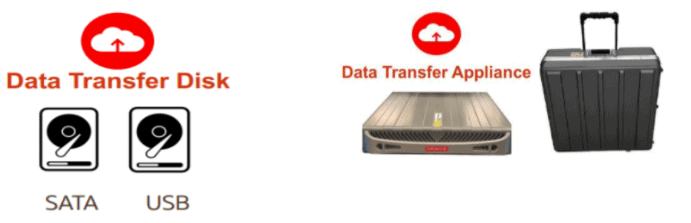
Data Transfer Service
Storage Gateway
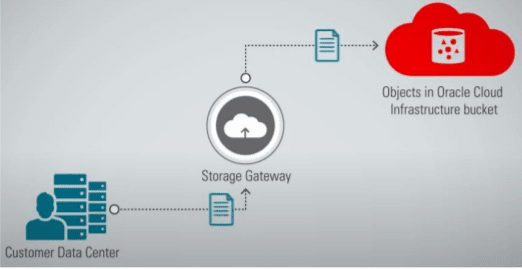
Storage Gateway is a cloud storage gateway that lets you connect your on-premises applications with Oracle Cloud Infrastructure. Applications can interact with Oracle Cloud Infrastructure Object storage through standard NFSv4 protocols.
Applications that can write data to an NFS target can also write data to the Oracle Cloud Infrastructure Object Storage. It Performs the NFS to REST API translation to interact with Oracle Cloud Infrastructure Object Storage. It Integrated Cloud Transfer and synchronization – Cloud Sync.
Quiz Time (Sample Exam Questions)!
Related/References
- FREE MasterClass On How To Become Oracle Certified Cloud Architect [1Z0-1072] in 8 Weeks
- Oracle Cloud Infrastructure (OCI) Architect (1z0-1072)Live Training
- [Recap]Day 1: Identity and Access Management [Oracle Cloud Infrastructure Architect Associate] [1Z0-1072]
- [Recap]Day 2: Networking Concepts and Overview [Oracle Cloud Infrastructure Architect Associate] [1Z0-1072]
- [Recap] Day 3: Compute Services [Oracle Cloud Infrastructure] [1Z0-1072]
Begin Your Cloud Journey
Begin your journey towards becoming a Certified Oracle Cloud Infrastructure Architect and earning a lot more in 2022 by joining our FREE CLASS. You will also know more about the Roles and Responsibilities, Job opportunities for OCI Architects in the market, and what to study Including Hands-On labs you must perform to clear the Oracle Cloud Architect Associate Certification (OCI) certification exam by registering for our FREE Masterclass.
Click on the below image to Register Our FREE Class on Master Oracle Cloud (OCI) and Get a Higher Paying Job!


![Microsoft Agentic AI Business Solutions Architect [AB-100] | K21 Academy](https://test.k21academy.com/wp-content/uploads/2025/11/Microsoft-Agentic-AI-Business-Solutions-Architect-AB-100-Exam-Overview1.png)


