



In this blog, you will see Blue-Green Deployment in azure, Here I have covered various important aspects which will help you to understand the Implementation of Blue-Green Deployment in Azure in more detail.
Firstly let’s see what is Blue-Green Deployment and why it is needed?
When you are deploying a new change into production, the associated deployment should be in a predictable manner. In simple terms, this means no disruption and zero downtime! In case you do encounter a problem or a bottleneck, the deployment strategy should include a quick rollback.
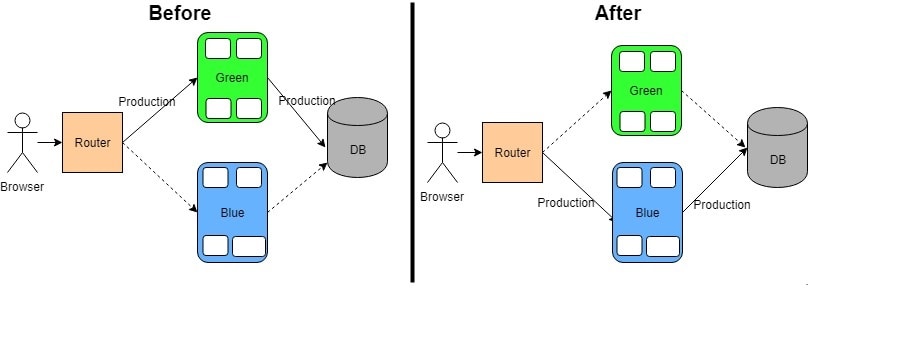
The safe strategy can be achieved by working with two identical infrastructures – the “green” environment hosting the current production and the “blue” environment with the new changes.
Blue-Green Deployment
Blue-green deployment is a technique that reduces downtime and risk by running two identical production environments called Blue and Green.
At any time, only one of the environments is live, with the live environment serving all production traffic. For this example, Blue is currently live and Green is idle. As you prepare a new version of your software, deployment and the final stage of testing takes place in an environment that is not live: in this example, Green. Once you have deployed and fully tested the software in Green, you switch the router so all incoming requests now go to Green instead of Blue. Green is now live, and Blue is idle.
This technique can eliminate downtime due to app deployment. In addition, blue-green deployment reduces risk: if something unexpected happens with your new version on Green, you can immediately roll back to the last version by switching back to Blue.
Also Check: Our blog post on Azure Service Bus.
Blue-Green Deployment in Azure
In Azure, different processes are available for implementing the Blue-Green strategy with two environments.
-
Azure App Service Deployment slots – For Web Apps, Azure App Service Deployment Slots provide an easy way to implement Blue-Green deployments.
-
Azure Traffic Manager – Many Customers leverage Traffic Manager is to make their software deployments smoother with minimal impact to their users by implementing a Blue-Green deployment process using Traffic Manager’s weighted round-robin routing method.
- Using an Application Gateway with two backend pools and a routing rule – Have two backend resource pools with one as a stage pool and another one as a prod pool. Add stage VMSS to stage pool, prod VMSS to prod pool and have one routing rule in the app gateway. Depending on the need to use stage or prod VMSS, this rule will be changed to point to the appropriate backend address pool.
Also Check: What is Blob Storage?
Blue-Green Deployment Using Azure App Service Deployment Slots
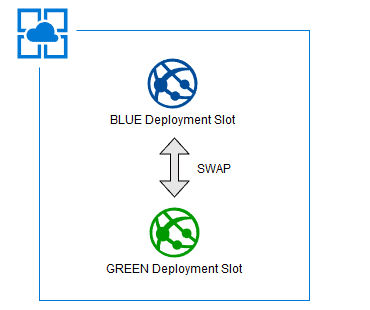
Slots are an amazing feature of Azure app services. By default, the existing slot in-app service is called the “Production” slot and creating a new slot of the existing app service(Production slot) will be always mapped to the production slot. Your live app always resides in the Production slot. New Slot is a different environment exposed via a different endpoint for a given app service.
In simple words, a staging slot is another web application, which sits inside in main web app service. It will have its own endpoint, configurations, connection string, extensions, etc.
➝Read more about the Azure App Service.
In order to achieve this model, there are few steps we need to complete. Below are the steps to complete the Blue-Green Slot Deployment:-
Step 1) Create Staging Slot
In this step, you will create a staging slot using Azure Portal or Azure Functions or Powershell Scripts
- On Azure Portal, Go to your app service.
- Under Deployment, Go to Deployment Slots.
- On Top icons, click on Add Slot.
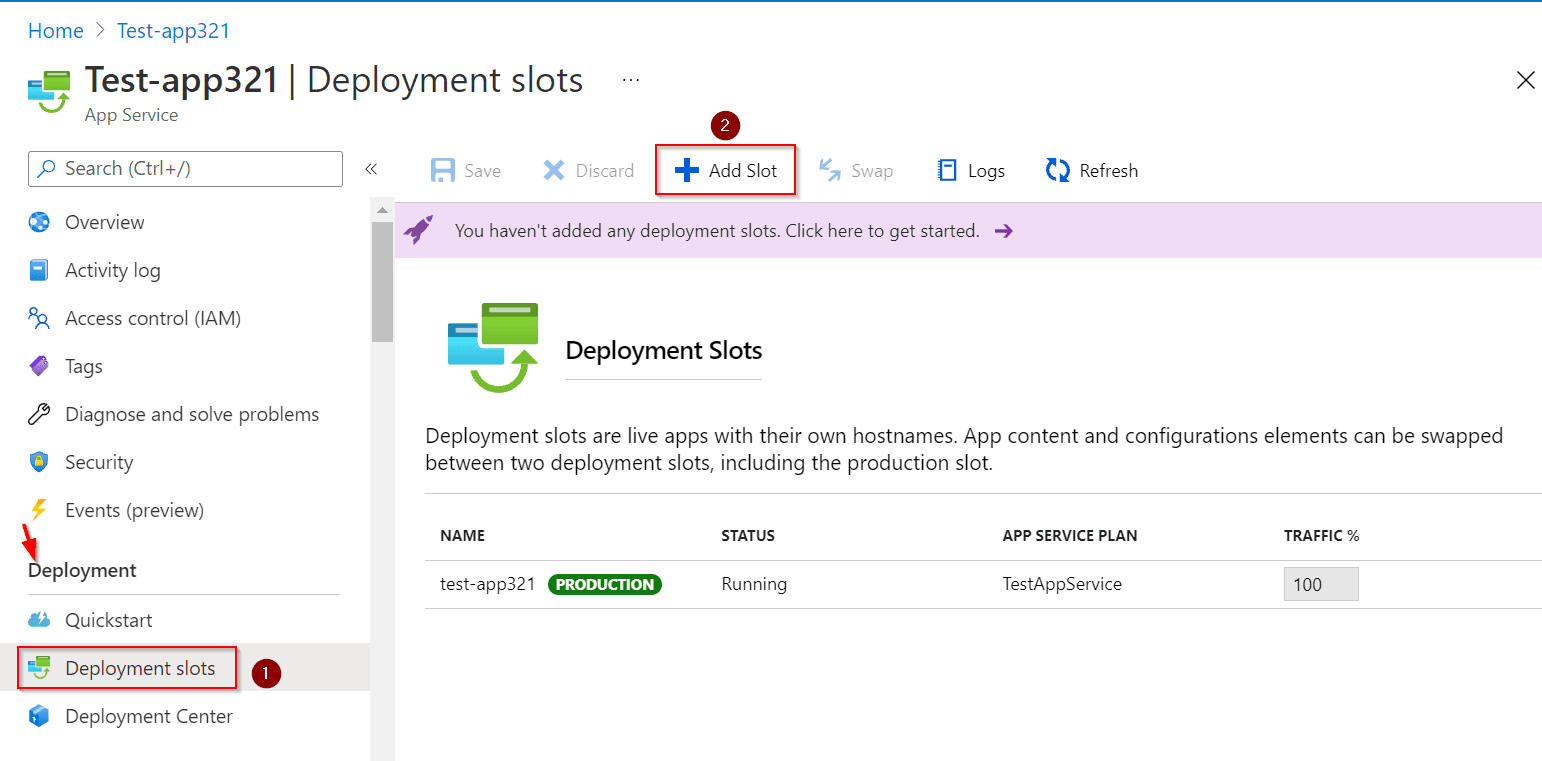 The new model will be opened on the side, enter “StagingEnvi” as Name and select Clone settings from option to your app service name(or another desired existing slot to copy from).
- On the Bottom of the model, page click on Add.
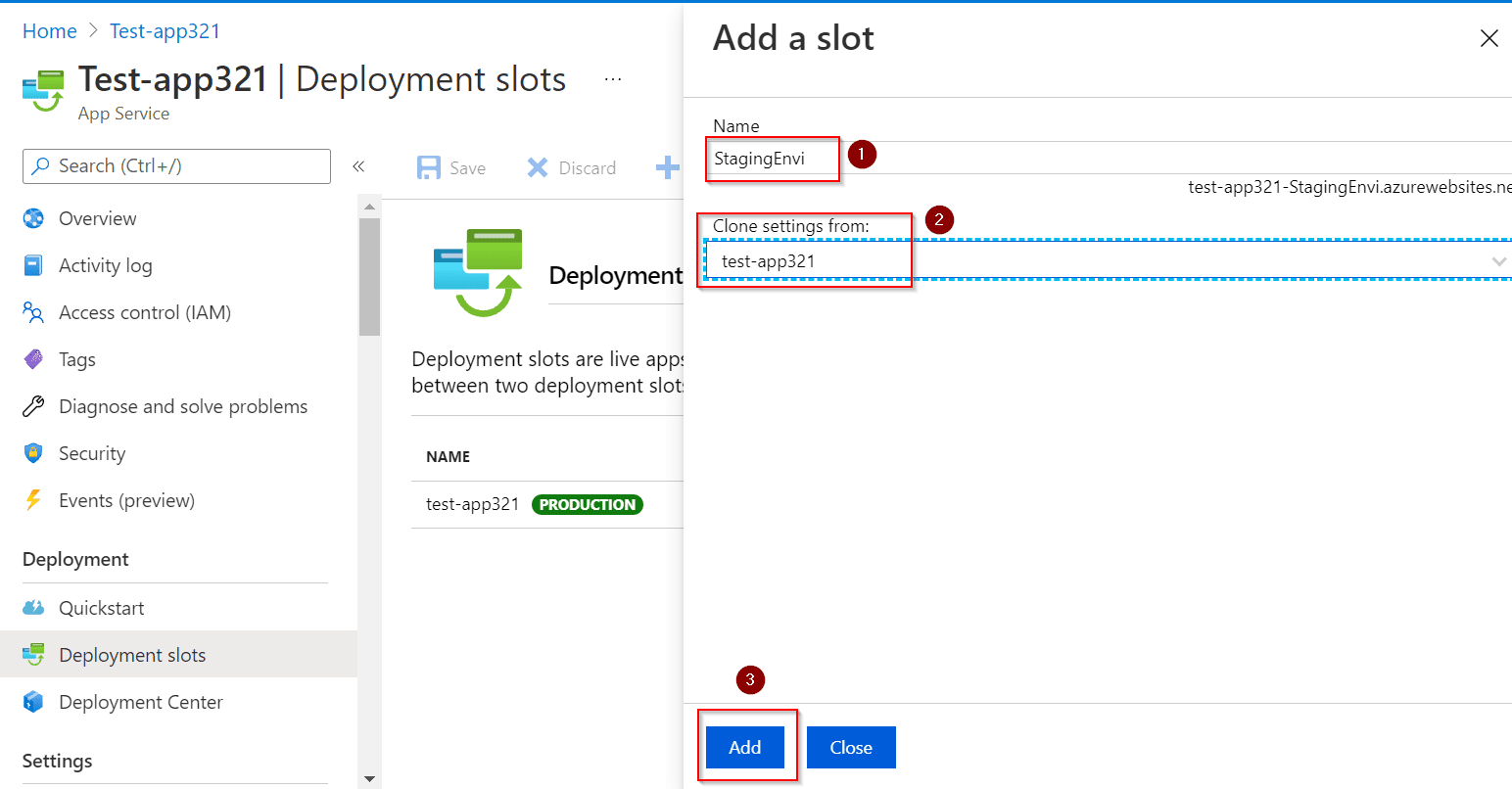
- You should see a Staging slot with 0% traffic.
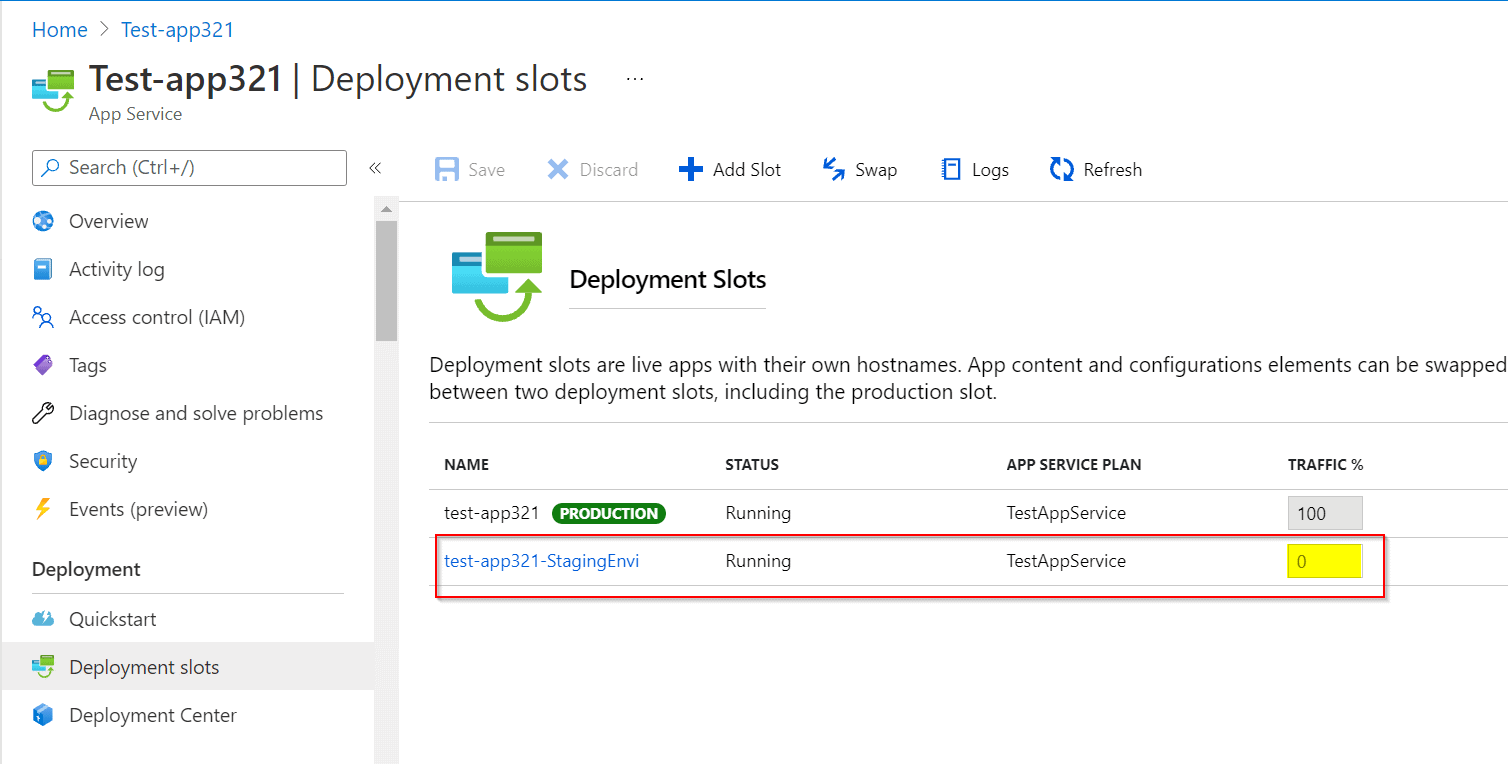
Note: But there are many settings that aren’t swapped like Publishing endpoints, Custom domain names, Non-public certificates and TLS/SSL settings, Scale settings, WebJobs schedulers, IP restrictions, Always-On, Diagnostic log settings, Cross-origin resource sharing (CORS).
But you can add those setting before it swaps the slots so that you have some settings and configurations for both slots.
Step 2) Deploy the latest version on Staging Slot
In this step, you will deploy the latest version of code in the Staging Slot. It’s not necessary to be the latest version, whatever the current required version that needs to be in production. There are many ways to deploy to Staging Slot in Azure.
Refer to this link for Continuous deployment to Azure App Service.
Step 3) Test Staging Slot web app service
In this step, you will test Staging Slot before it swaps and becomes the production slot. Ideally, you will be testing the webserver and some common API calls to warm up the site before it goes live.
Step 4) Swap Slots
In this step, you are confident that the staging slot is ready to be deployed as production and become live to customers. In order to do that we can swap it in the azure portal or use PowerShell scripts.
- Under Deployment, selection Go to Deployment Slot, On top icons, click on the Swap button.
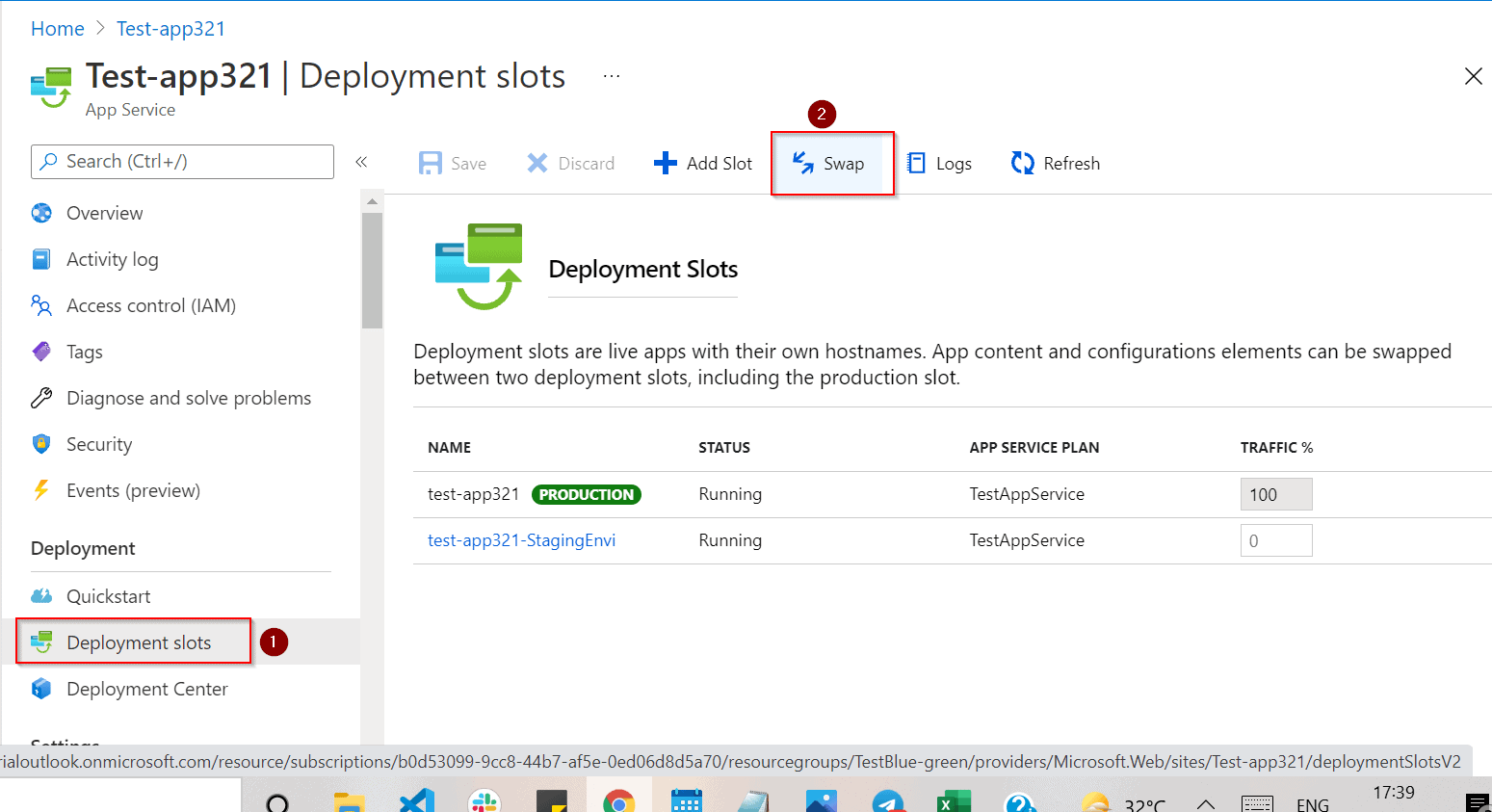
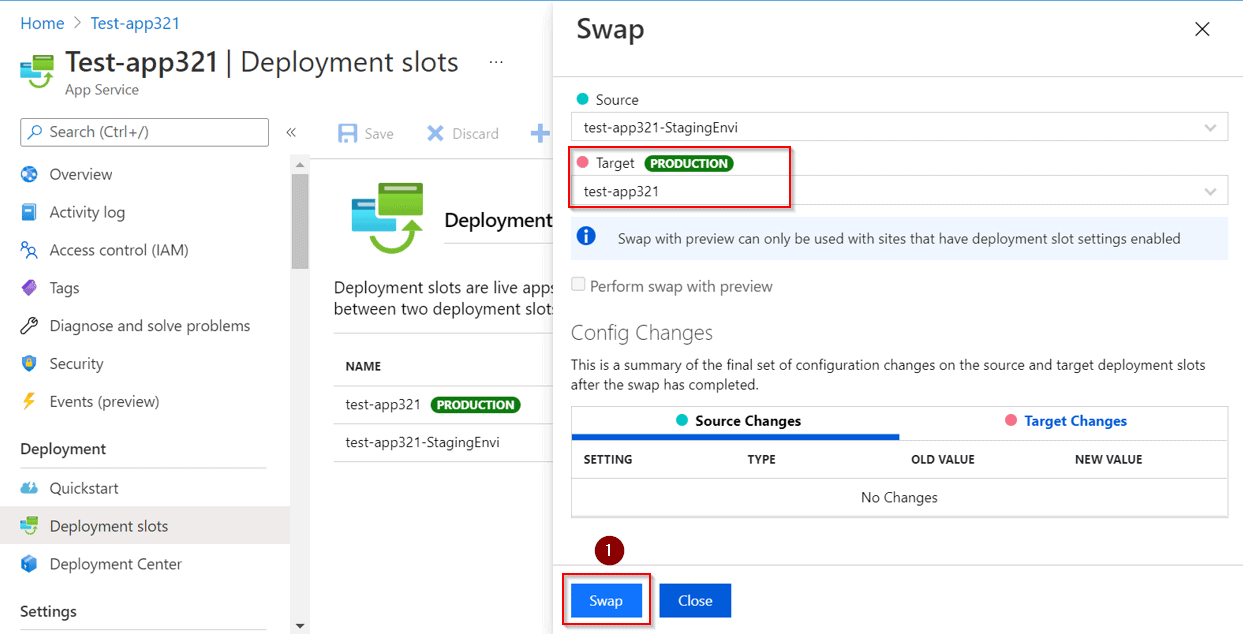
- This will load the new model to swap and show any config changes between two slots. By default, the source is selected as a Staging slot and the target is the Production Slot.
- Click on the Swap button at the bottom of the model.
- You will see that Staging will become Production and Production will be Staging.
Step 5) Stop Staging Slot
This step is performed to Stop the Staging slot to clear any residue and also for a clear picture of the azure app service.
- Click on Staging Slot under Deployment Slots
- This will open up a new app service of Staging Slot and Click on the Stop Button of app service
- Confirm dialogue will open up for confirmation and click on Yes
- This will stop Staging Slot.
Advantages:
- Slots are free! No extra hidden fees.
- After swap operation, if the changes aren’t as you expect, you can perform rollback which is swapping back without any downtime.
- Slot Deployment feature is zero-downtime deployments.
- You can test the feature on the staging slot before it swap!
- The staging instance is warmed up to reduce any latency for HTTP-triggered loads. It is warmed up before it goes live.
Limitations:
- You have to reinstall any site extensions that were previously installed in the App Service.
- App Service needs to be in the Standard or Premium App Service plan mode.
Conclusion:
In this Blog we see what is Blue-Green Deployment, ways to implement it in azure and Step-by-Step Blue-Green Deployment Using Azure App Service Deployment Slots.
Frequently Asked Questions
How would users be affected during a Blue-Green Deployment?
Blue green deployment is an application release model that gradually transfers user traffic from a previous version of an app or microservice to a nearly identical new release—both of which are running in production.
Is there any downtime in Blue-Green Deployment?
Blue/green deployments provide releases with near zero-downtime and rollback capabilities. The fundamental idea behind blue/green deployment is to shift traffic between two identical environments that are running different versions of your application.
How does rollback deployment happen in blue-green?
When deployment fails or critical bugs are identified, a rollback to the green environment will be initiated. Once the bugs are fixed the version is re-deployed to the blue environment and the traffic is rerouted back the moment it is stable.
References/Related
- Case Study: Deploy A Container Instance In Azure Using The Azure Portal
- Azure Storage Account [Official Microsoft]
- Tips To Prepare Exam AZ-304: Microsoft Azure Architect Design
- Core Cloud Service: Azure Compute Options
- [Recap] Day 8: Manage Workloads in Azure [Azure Solutions Architect] [AZ-303/304]
- Exam AZ-305: Azure Solutions Architect Expert Certification
Next Task For You
Begin your journey toward Mastering Azure Cloud and landing high-paying jobs. Just click on the register now button on the below image to register for a Free Class on Mastering Azure Cloud: How to Build In-Demand Skills and Land High-Paying Jobs. This class will help you understand better, so you can choose the right career path and get a higher paying job.


![Microsoft Agentic AI Business Solutions Architect [AB-100] | K21 Academy](https://test.k21academy.com/wp-content/uploads/2025/11/Microsoft-Agentic-AI-Business-Solutions-Architect-AB-100-Exam-Overview1.png)


