In this blog, I am going to share some quick tips including Q&As and useful links from Day 2 of our recent batch of Cloud Security for Azure, AWS, Google Cloud & Oracle
In the Day 1 session, we learned about general cloud security concepts, such as why cloud security is important? Different aspects of cloud security and various cloud security models and leading cloud service providers.
We started with Module 1: Manage Identity and Access in this Day 2 Live Session. We talked about Azure Active Directory (Azure AD) and its features and the differences between Azure AD and AD DS. We also talked about Azure AD users, groups, and roles. Risk events, conditional access, access reviews, azure hierarchy, azure policy and RBAC.
So, here are some of the Q&As asked during the Live session from Module 1: Manage Identity and Access.
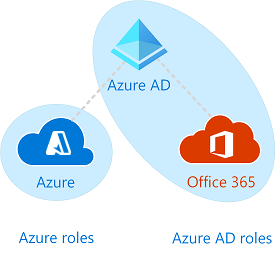
Q1. What’s the relationship between Azure AD, Microsoft 365, and Azure?
Azure Active Directory gives you a single identity and access to all web services. Whether you’re using Microsoft 365, Azure, Intune, or another service, we’ve got you covered.
User accounts in one or more Azure AD instances are created for all users that are set up to use web services. These accounts can be used to get free Azure AD features like cloud application access.
Enterprise Mobility + Security, a premium Azure AD service, complements other web services like Microsoft 365 and Azure by providing full enterprise-scale management and security solutions.
Azure Active Directory
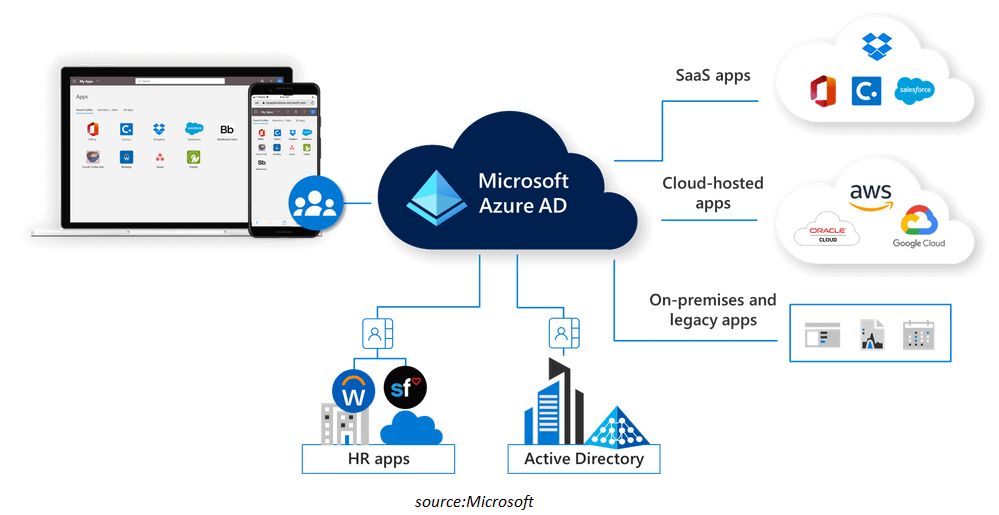
Azure Active Directory (Azure AD) is a Microsoft cloud-based identity and access management (Authenticating and Authorizing tool) service that enables your employees to sign in and access resources on the following sites:
Microsoft 365, the Azure portal, and a slew of other SaaS services are just a few examples.
Internal resources, such as an intranet and network apps, as well as cloud apps developed by your firm.
Management of applications: Manage on-premises and cloud apps, as well as single sign-on, the MyApps site, and any SaaS apps.
Authentication: You can be fairly granular with your authentication settings for improved security and control, whether it’s giving self-service password change or MFA requirements.
Identity management: Azure AD includes built-in governance tools that allow you to manage identity and access lifecycles and create privileged access conditions to keep your identity ecosystem healthy.
Azure AD vs ADDS
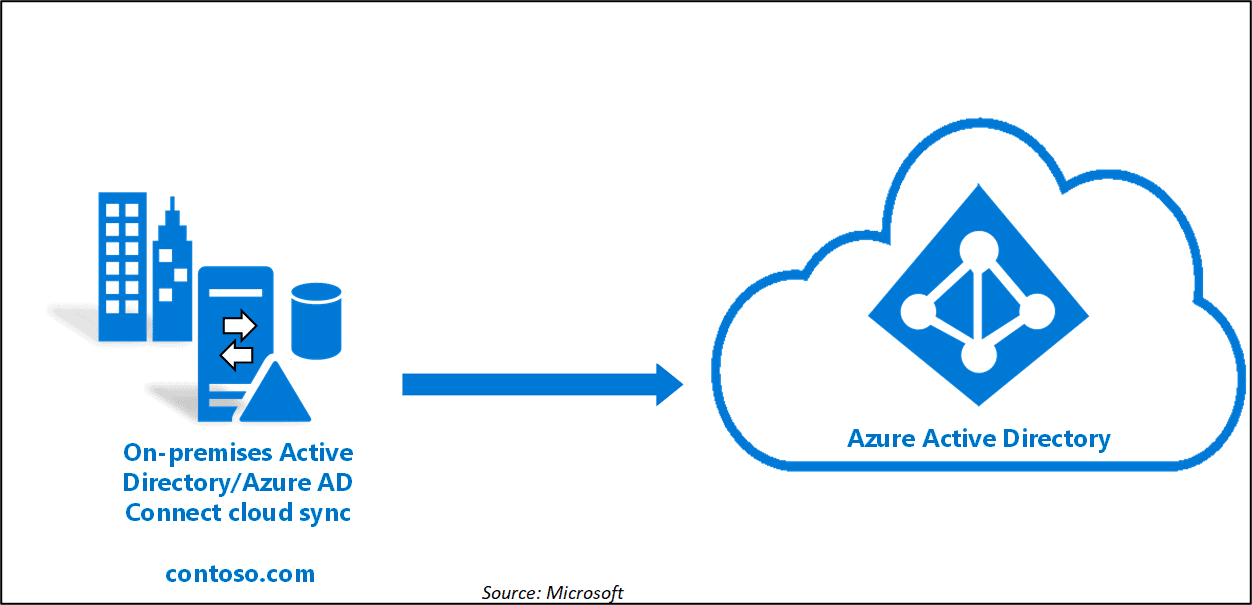
On-premises Active Directory has a hierarchical framework, unlike Azure AD, a cloud service that does not require infrastructure. In the below image, you can see that we have a concept of tenants in Azure AD, unlike forest, domains, and OU in ADDS (active directory domain services).
Azure AD Users and Groups
Users are those who make use of cloud computing services to store, manage, and access their computing resources from any location, at any time.
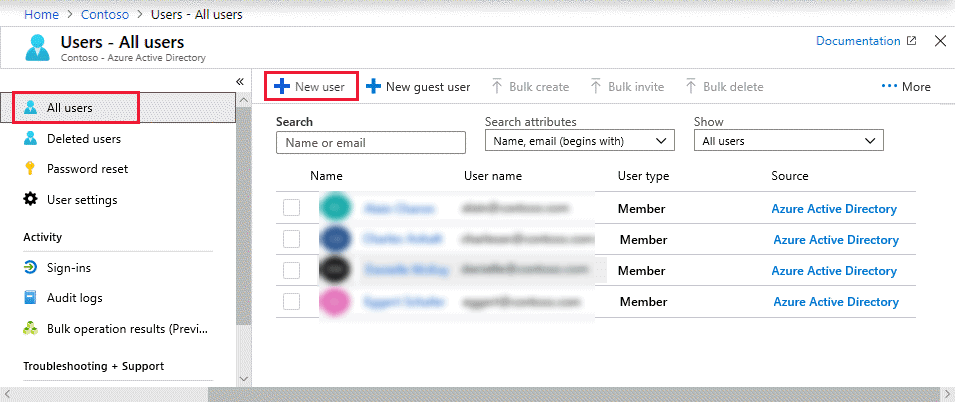
The Azure portal allows you to add new users manually. This is the simplest method for adding a small group of users. To do this action, you must have the User Administrator role.
An Azure AD group organizes users and makes managing permissions easier. Instead of needing to offer access permissions one by one, groups allow the resource owner (or Azure AD directory owner) to assign a set of permissions to all group members.
Roles of Azure AD
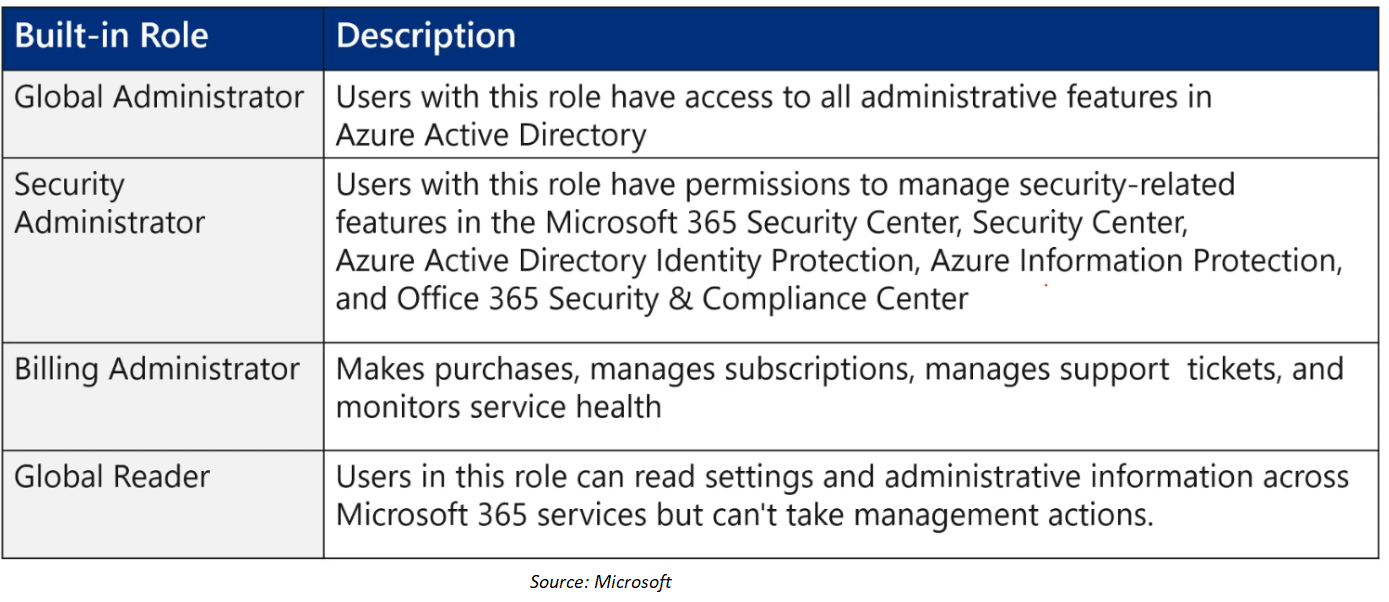
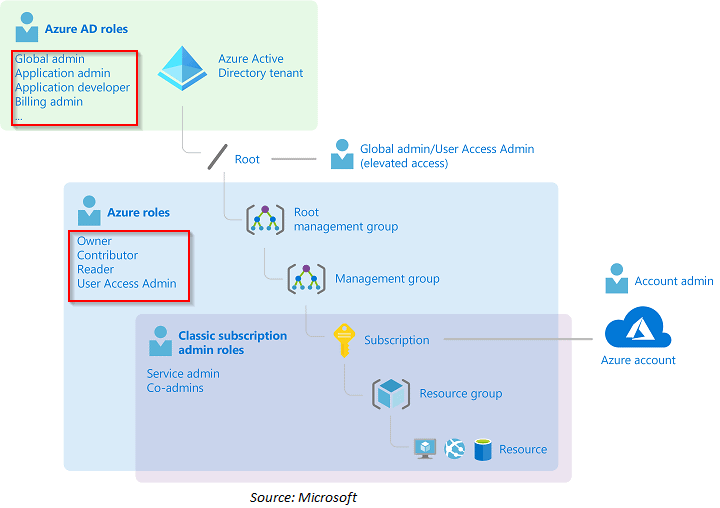
The term “role” refers to a person’s position on a team. You can choose a role in an organization based on your needs and responsibilities. Admins will usually assign you a role, and if you’re an admin, you should be familiar with the many roles available in Azure.
The following are some of the most important roles:
Q2. What are the differences between Owner and Global Administrator?
Ans. The Owner role for Azure resources is assigned to the individual who joins up for an Azure subscription by default. The Global Administrator role for the directory is assigned by default to the individual who registers up for an Azure subscription. All Azure AD directory functionalities are accessible to the Global Administrator.
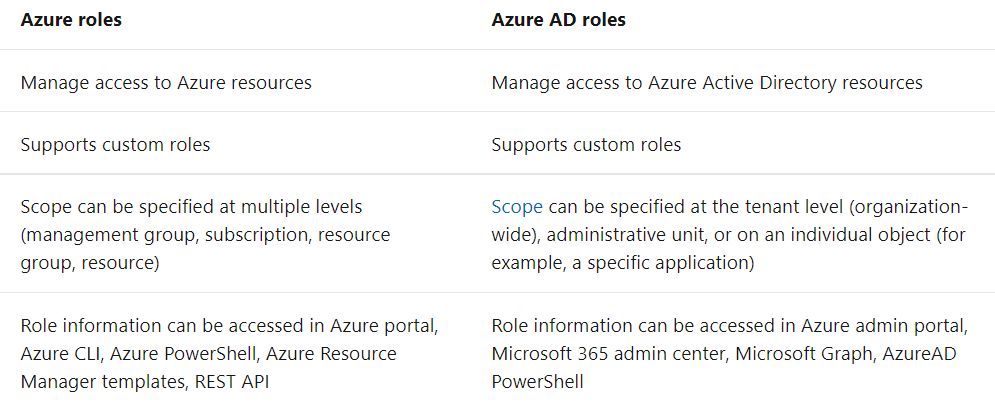
Q3. Differences between Azure roles and Azure AD roles.
Q4. Do Azure roles and Azure AD roles overlap?
Ans. By default, Azure roles and Azure AD roles do not overlap, although some Azure AD roles, such as the Global Administrator and User Administrator roles, do span Azure AD and Microsoft 365.
If a Global Administrator chooses the Access management for Azure resources to switch in the Azure portal to elevate their access, the Global Administrator will be granted the User Access Administrator position (an Azure role) on all subscriptions for a tenancy.
The User Access Administrator position allows the user to grant access to Azure resources to other users.
Q5. Does Azure AD help me manage my on-premises infrastructure?
Ans. Yes, Azure AD Connect Health is included in the Azure AD Premium edition. Azure AD Connect Health allows you to keep track of your on-premises identity infrastructure and synchronization services and obtain insight into them.
Azure AD Identity Protection
Identity Protection is a tool that allows organizations to accomplish three key tasks:
Automate the detection and remediation of identity-based risks.
Investigate risks using data in the portal.
Export risk detection data to your SIEM.
Q6. Why automation is important in security?
Ans. Each day, machine learning and heuristic systems provide risk scores for 18 billion login attempts for over 800 million distinct accounts, 300 million of which are discernibly done by adversaries (entities like criminal actors, hackers). This is a fair answer to why we need automation because manually, it is next to impossible to deal with this number of data.
Risk events
Each detected suspicious action is stored in a record called a risk event.
Identity Protection identifies risks of many types, including:
Anonymous IP address use
Atypical travel
Malware linked IP address
Unfamiliar sign-in properties
Leaked credentials
Password spray
and more.
The risk signals can trigger remediation efforts such as requiring users to: perform Azure AD Multi-Factor Authentication, reset their password using a self-service password reset, or blocking until an administrator takes action.
Q7. What is the difference between the “Activity from anonymous IP address” and “Anonymous IP address” detections?
Ans. Azure AD Identity Protection is the source of the “Anonymous IP address” detection, while MCAS is used for the “Activity from anonymous IP address” detection (Microsoft Cloud App Security). While they have similar names and there may be some overlap in these signals, their back-end detections are different.
Microsoft Cloud App Security natively integrates with leading Microsoft solutions and is designed with security professionals in mind. It provides simple deployment, centralized management, and innovative automation capabilities.
Risk Investigation
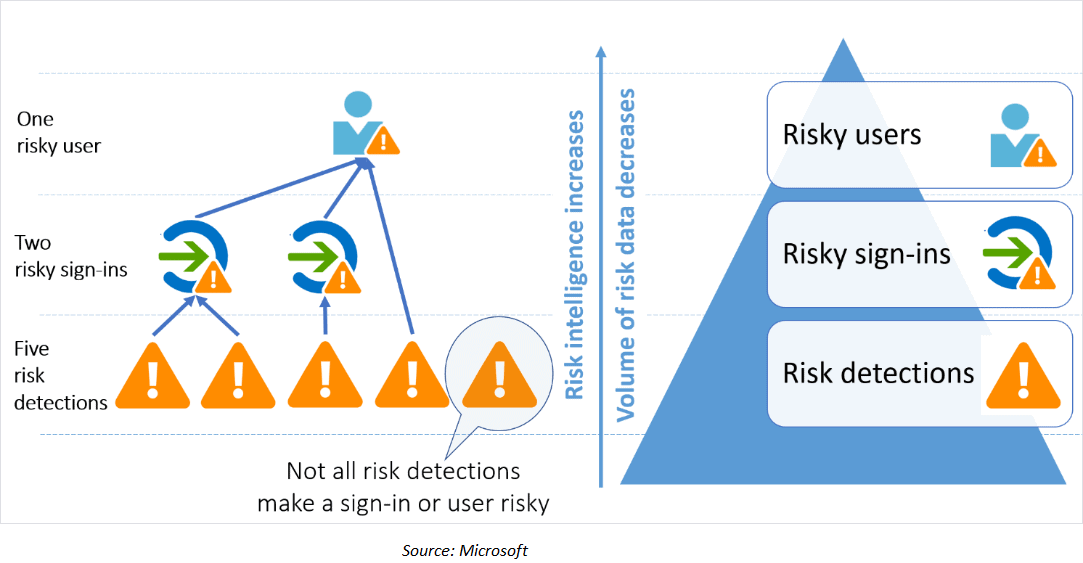
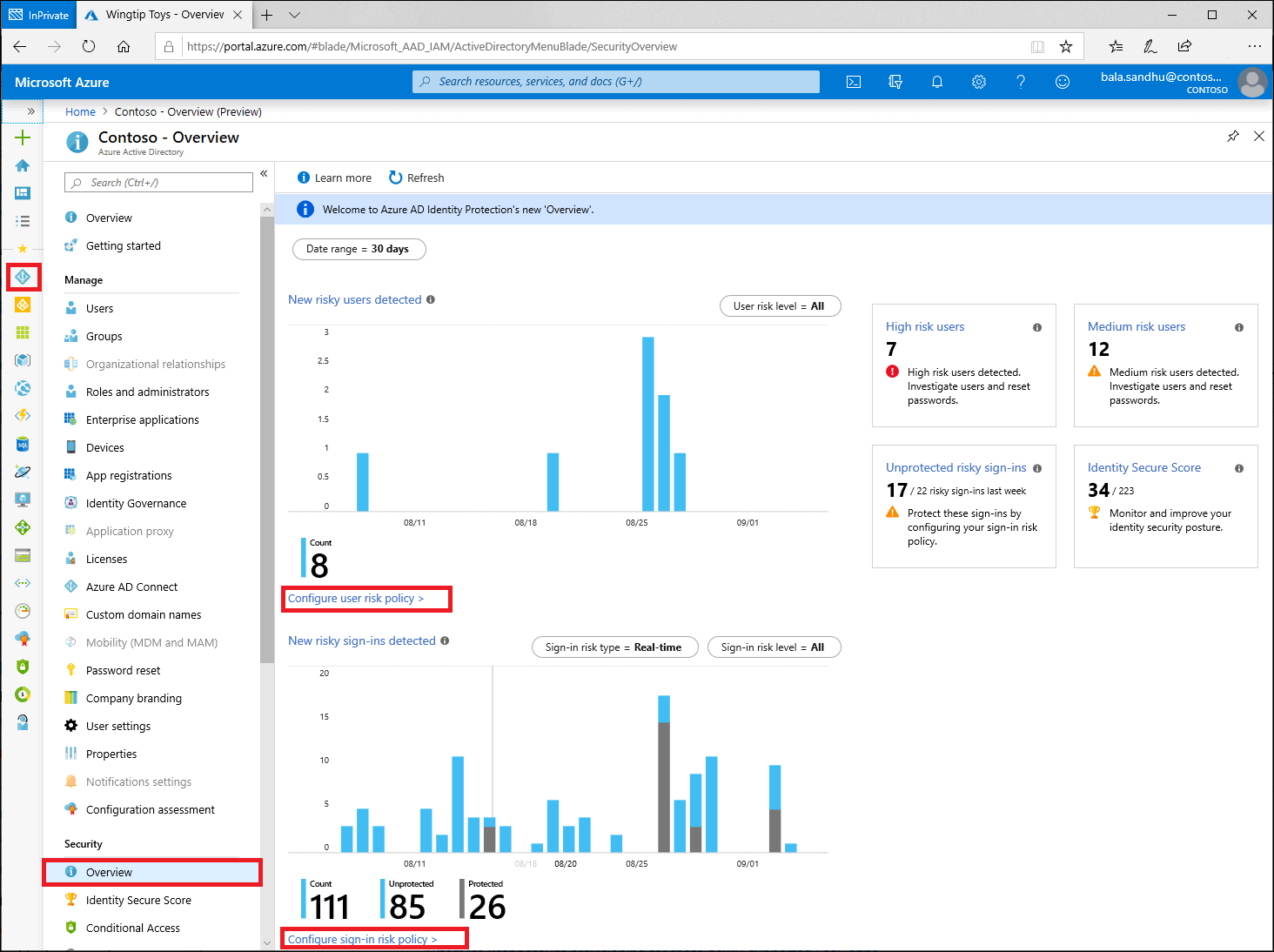
Administrators can review detections and take manual action on them if needed. There are three key reports that administrators use for investigations in Identity Protection:
Risky users
Risky sign-ins
Risk detections
Identity Protection categorizes risk into three tiers: low, medium, and high.
Q8. Why can’t I set my own risk levels for each risk detection?
Ans. Identity Protection risk levels are determined by the precision of detection and are aided by our supervised machine learning. Administrators can include/exclude specific individuals/groups from the User Risk and Sign-In Risk Policies to customize the experience users receive.
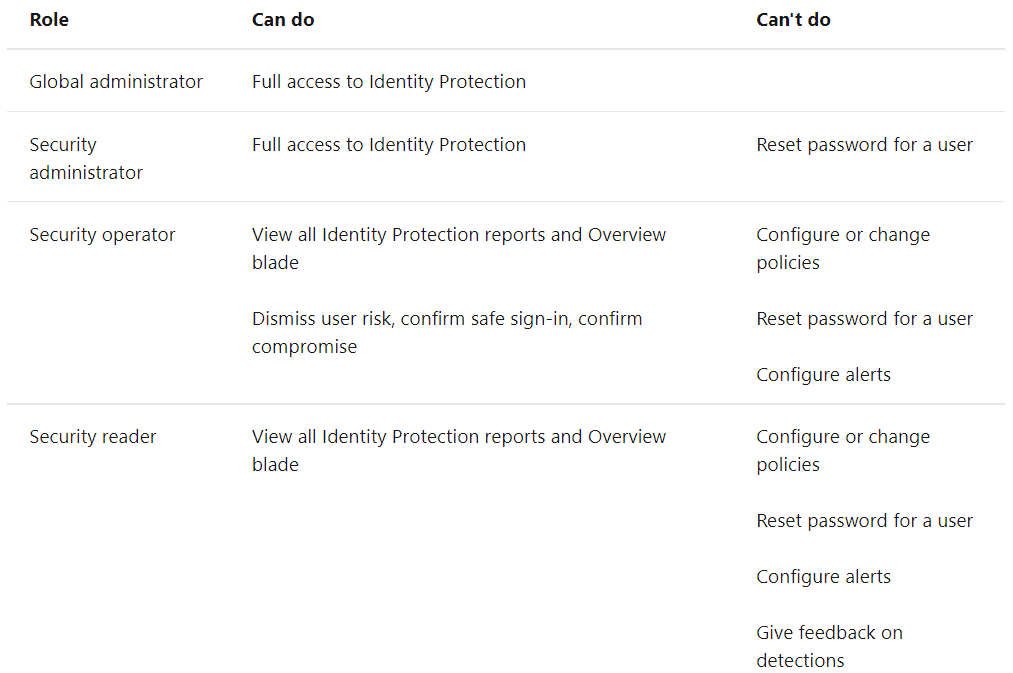
Identity Protection requires users to be a Security Reader, Security Operator, Security Administrator, Global Reader, or Global Administrator to access.
User risk policy & Sign-in risk
User risk is a calculation of the probability that an Identity has been compromised.
Admins can decide based on the risk score signal to enforce organizational requirements.
Admins can choose to block access, allow access or allow but required password change.
Admins can choose to respond automatically based on a specific user’s risk level.
Sign-in-risk represents the probability that even an authentication request isn’t authorized by the identity owner.
Applied to all browser traffic and sign-ins using modern authentication
Provides the condition (risk level) and action (block or allow)
Automatically responds to a specific risk level.
Azure Multifactor Authentication Concepts
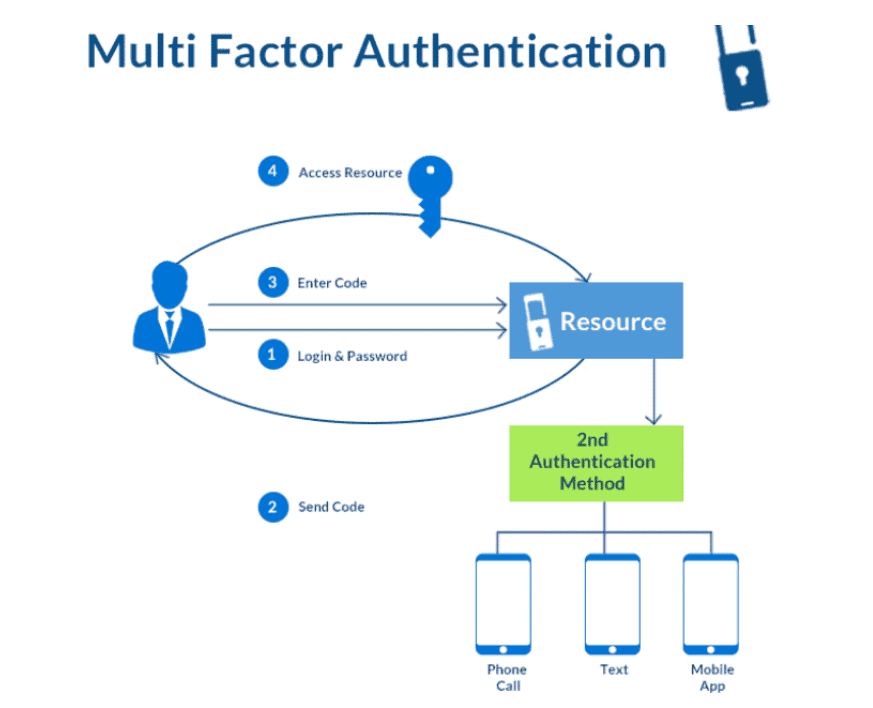
Multi-factor authentication is a method in which a person is asked for an additional form of identification during the sign-in process, such as entering a code on their phone or providing a fingerprint scan.
Two or more of the following authentication methods are required for Azure AD Multi-Factor Authentication to work:
Something you already know, such as a password.
Something you possess, such as a trusted device that is difficult to copy, such as a phone or a hardware key.
Biometrics, such as a fingerprint or a facial scan, is a way to identify who you are.
The following additional forms of verification can be used with Azure AD Multi-Factor Authentication:
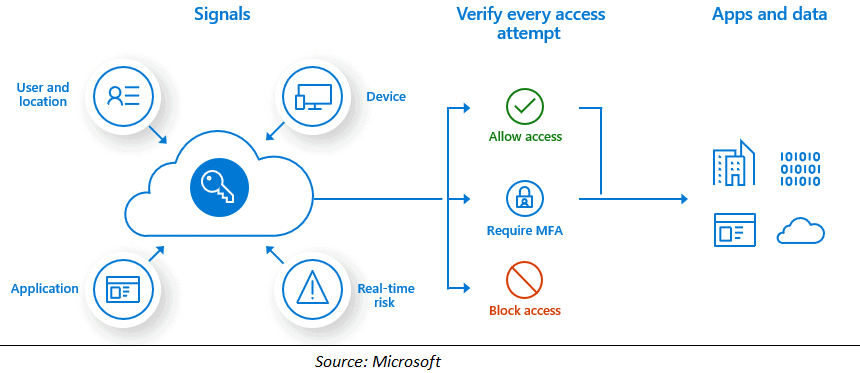
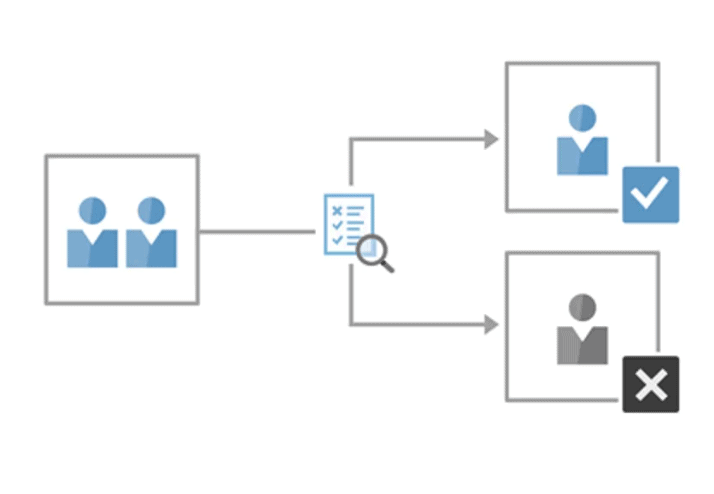
Conditional Access is the tool used by Azure Active Directory to make decisions, and enforce organizational policies.
At their most basic level, conditional access policies are if-then statements. A user must perform an action in order to gain access to a resource. For example, if a payroll manager wants to access the payroll program, he or she must use multi-factor authentication.
Access Review
Azure Active Directory (Azure AD) access reviews make it easier for businesses to manage group memberships, access to enterprise apps, and role assignments. User’s access can be checked on a regular basis to verify that only authorized individuals have access.
Q9. Why are access reviews important?
Ans. Azure Active Directory allows you to collaborate with both internal and external users. Users can join groups, invite guests, connect to cloud apps, and work remotely from their work or personal devices. The convenience of self-service has necessitated the development of better access management tools.
As new employees join, how do you ensure they have the access they need to be productive?
As people move teams or leave the company, how do you ensure that their old access is removed?
Excessive access rights can lead to compromises.
Azure Policy
Azure Policy helps to enforce organizational standards and to assess compliance at scale.
Azure Policy compares the properties of Azure resources to business rules to evaluate them. Policy definitions are business rules that are defined in JSON format.
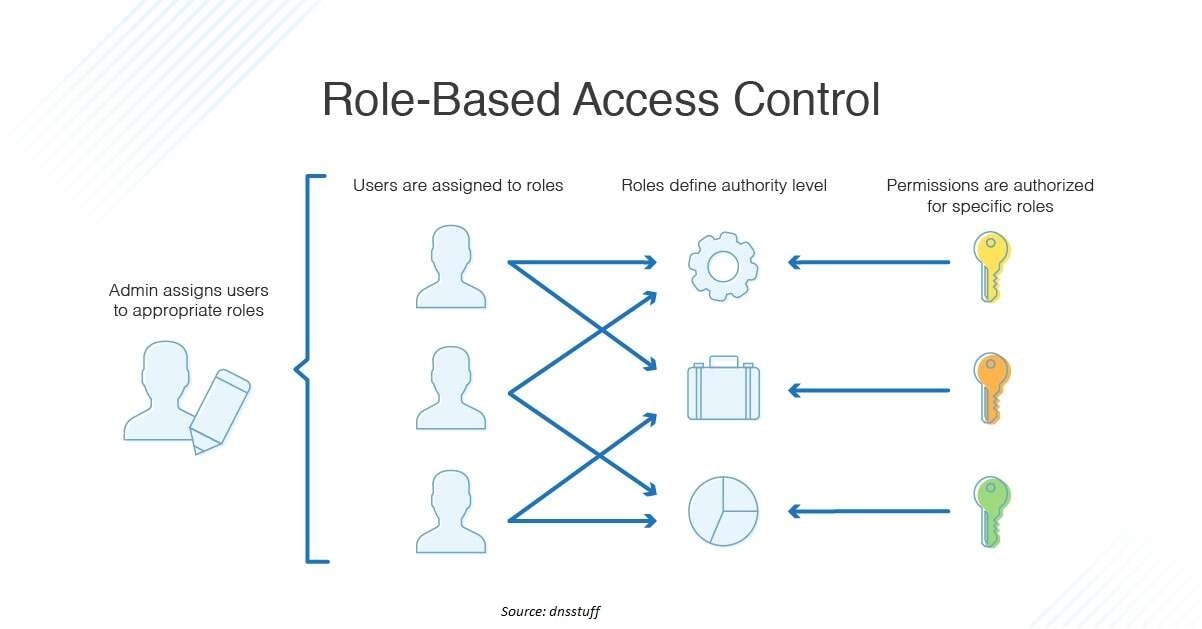
Azure RBAC (role-based access control) allows you to govern who has access to Azure resources, what they can do with them, and what areas they have access to.
Ans. Here are some examples of what Azure RBAC can be used for:
Allow one person to administer virtual machines and another to control virtual networks in a subscription.
Permit a DBA group to handle SQL databases that are part of a subscription.
Allow a person to control all virtual machines, websites, and subnets in a resource group.
Allow a resource group’s resources to be accessed by an application.
Role Assignments
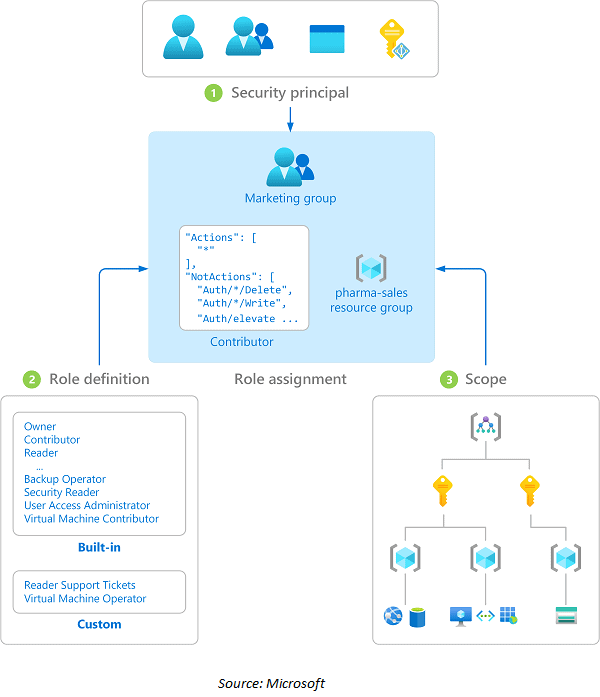
A role assignment is the process of granting access to a user, group, service principal, or managed identity at a specific scope by attaching a role definition to them.
Create a role assignment to grant access, and remove a role assignment to revoke access.
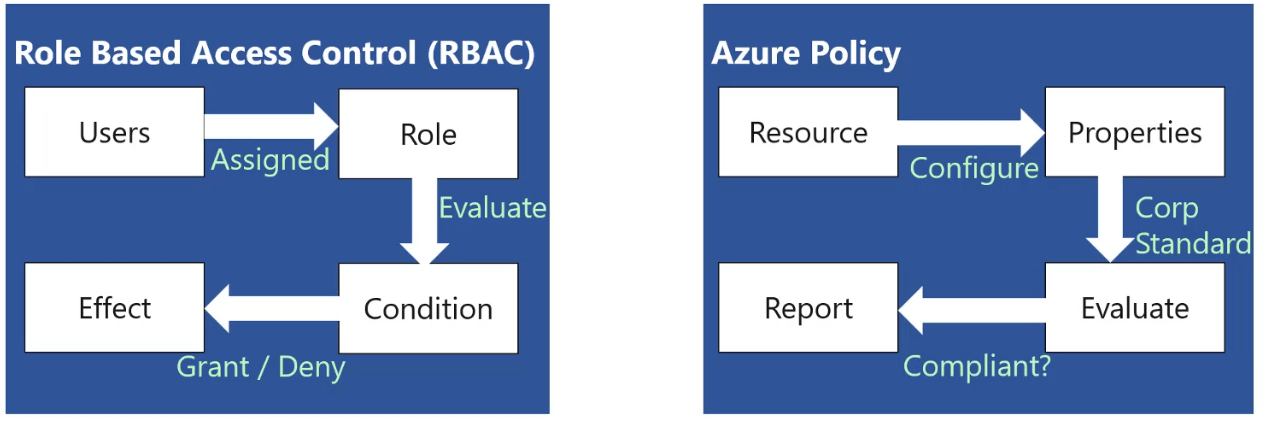
RBAC vs. Policy
Azure RBAC manages who has access to Azure resources, what area they have access to, and what they can do with those resources.
Azure Policy focuses on resource properties during deployment and for already existing resources.
With our Cloud Security For Azure, AWS, Google Cloud & Oracle training program, we cover 220+ sample exam questions to help you prepare for the certification like AZ-500.
Check out one of the questions and see if you can crack this…
Ques: You want to assign a network administrator role to one of your newly joined technical team members. Which Azure feature you will use to assign this role?
A. RBAC
B. Resource Group
C. Subscription
D. Policy
The correct answer will be revealed in next week’s blog.
Here is the answer to the question shared in the previous blog.
Ques: Your Company is planning to move to the cloud, and your biggest concern is security. Which cloud security approach you will adopt to meet security demand?
A. Shared Responsibility Model
B. Defense-In-Depth Model
C. Cloud-First Strategies
D. Multi-Factor Authentication.
Ans. B Explanation: Defense-In-Depth provides you with multiple layers of security. It is the highest one can provide. As your concern was the security at maximum, option B is the correct answer.
Feedback
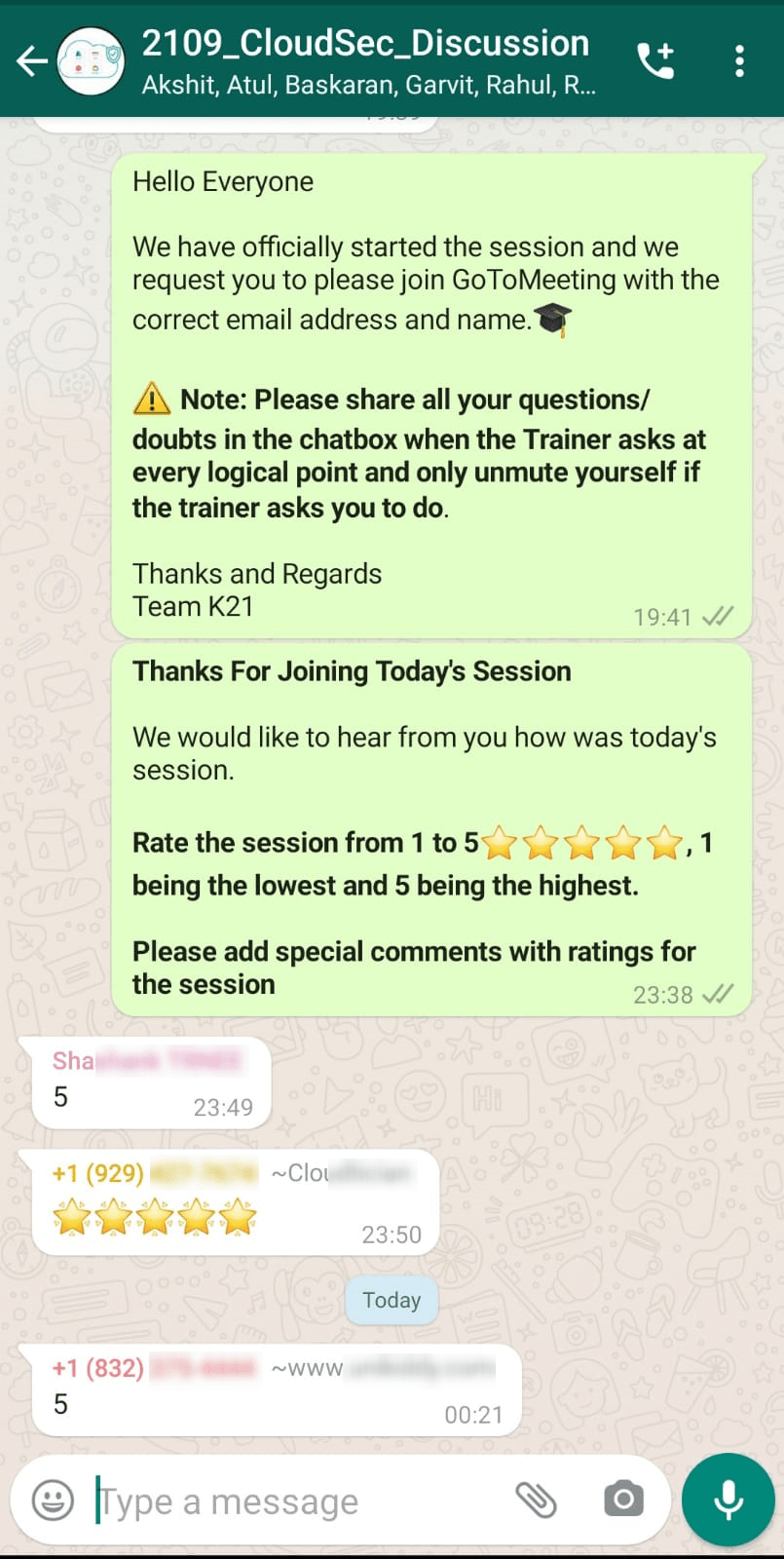
We always work on improving and being the best version of ourselves from previous sessions hence constantly ask for feedback from our attendees
Here’s the feedback that we received from our trainees who had attended the session…
To get more clarity on what to expect in the training program, I recommend you to attend the FREE Class I’m holding this weekend! This FREE class will help you to understand what the training program looks like and give will you a clear vision to plan your career ahead!
Join me in the FREE Session andfast track your success!
Click on the below image and Register for our FREE CLASS Now!
I started my IT career in 2000 as an Oracle DBA/Apps DBA. The first few years were tough (<$100/month), with very little growth.
In 2004, I moved to the UK. After working really hard, I landed a job that paid me £2700 per month.
In February 2005, I saw a job that was £450 per day, which was nearly 4 times of my then salary.








![Microsoft Agentic AI Business Solutions Architect [AB-100] | K21 Academy](https://test.k21academy.com/wp-content/uploads/2025/11/Microsoft-Agentic-AI-Business-Solutions-Architect-AB-100-Exam-Overview1.png)


