





Big data Hadoop skills are in high demand nowadays. For those you are new to this term, Big data means really a big data, it is a collection of large data sets that cannot be processed using traditional computing techniques and Hadoop is a software framework for storing and processing Big data. It is an open source tool build on Java platform and provides massive storage for any kind of data, enormous processing power and the ability to handle virtually limitless concurrent tasks or jobs.
So if you are planning your future in Big data Hadoop then you must be aware of the terms like Hadoop Distributed File System(HDFS), Cloudera Manager, Hive & Impala, Spark Architecture, Cluster Maintenance, Security, YARN etc. This post covers Hands-On Guides that you must perform to learn & become an expert in Big Data Hadoop Administration.
1. Activity Guide I: Hadoop Environment Setup
We will show you how you can operate your Hadoop cluster in all of the three supported modes with proper verification:
- Psuedo Cluster Setup: All daemons on a single machine. Not a cluster, just a quick setup with the low resource, useful for testing, checking program logic for developers and can be set up on low machines.
- Fully Distributed Non-HA Cluster Setup: It is a cluster but with single Namenode hence it is in SPOF (Single Point of Failure), meant for development.
- HA Setup: It is for production with 2 Namenodes, active and standby and can have switchover and failover.
2. Activity Guide II: Cloudera Manager Installation
First of all, you should be aware of how to Install and Configure the Cloudera Manager.
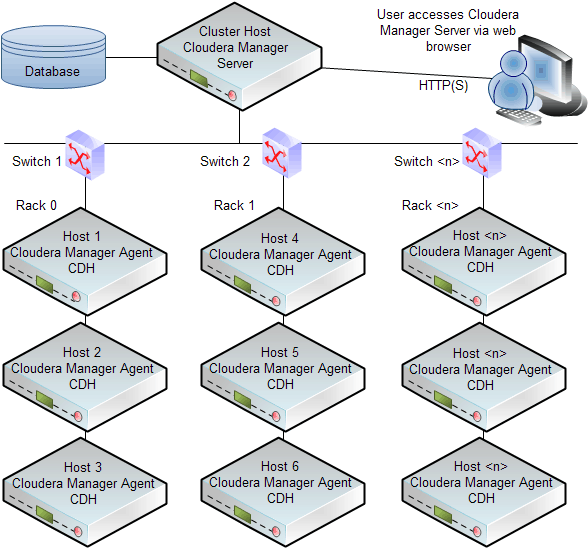
Cloudera Manager automates the installation and configuration of CDH and managed services on a cluster, requiring only that you have root SSH access to your cluster’s hosts, and access to the internet or a local repository with installation files for all these hosts. Cloudera Manager installation software consists of:
- A small self-executing Cloudera Manager installation program to install the Cloudera Manager Server and other packages in preparation for host installation.
- Cloudera Manager wizard for automating CDH and managed service installation and configuration on the cluster hosts. Cloudera Manager provides two methods for installing CDH and managed services: traditional packages (RPMs or Debian packages) or parcels. Parcels simplify the installation process and more importantly allows you to download, distribute, and activate new minor versions of CDH and managed services from within Cloudera Manager
The following illustrates a sample installation:
3. Activity Guide III: Cloudera Manager Console
Once you have gone through the installation process of Cloudera Manager, then you are ready to use & access the Cloudera Manager Console.
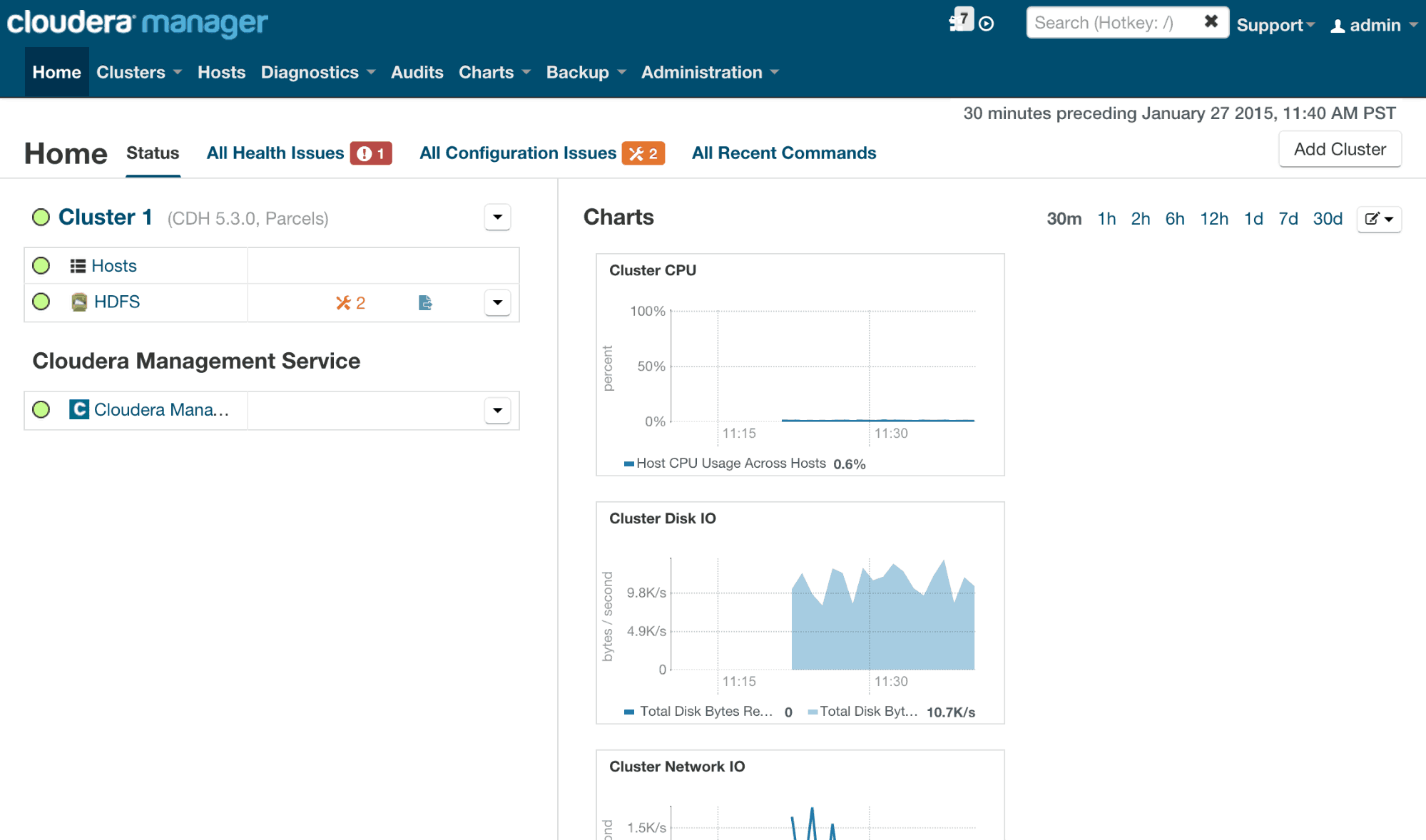
Cloudera Manager Admin Console is the web-based UI that you use to configure, manage, and monitor CDH.
If there are no services configured when you log into the Cloudera Manager Admin Console, the Cloudera Manager installation wizard displays. If services have been configured, the Cloudera Manager top navigation bar and Homepage display. In addition to a link to the Home page, the Cloudera Manager Admin Console top navigation bar provides the following features:
4. Activity Guide IV: Hive & Impala Flow & Logs
In this Activity Guide, You will get to learn the Process Flow and Logs of Hive & Impala.
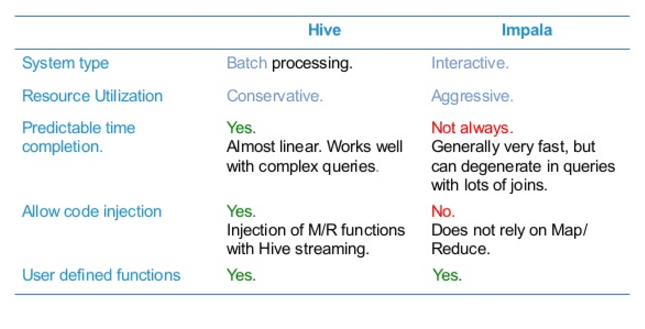
A major Impala goal is to make SQL-on-Hadoop operations fast and efficient enough to appeal to new categories of users and open up Hadoop to new types of use cases. Where practical, it makes use of existing Apache Hive infrastructure that many Hadoop users already have in place to perform long-running, batch-oriented SQL queries.
In particular, Impala keeps its table definitions in a traditional MySQL or PostgreSQL database known as the Metastore, the same database where Hive keeps this type of data. Thus, Impala can access tables defined or loaded by Hive, as long as all columns use Impala-supported data types, file formats, and compression codecs.
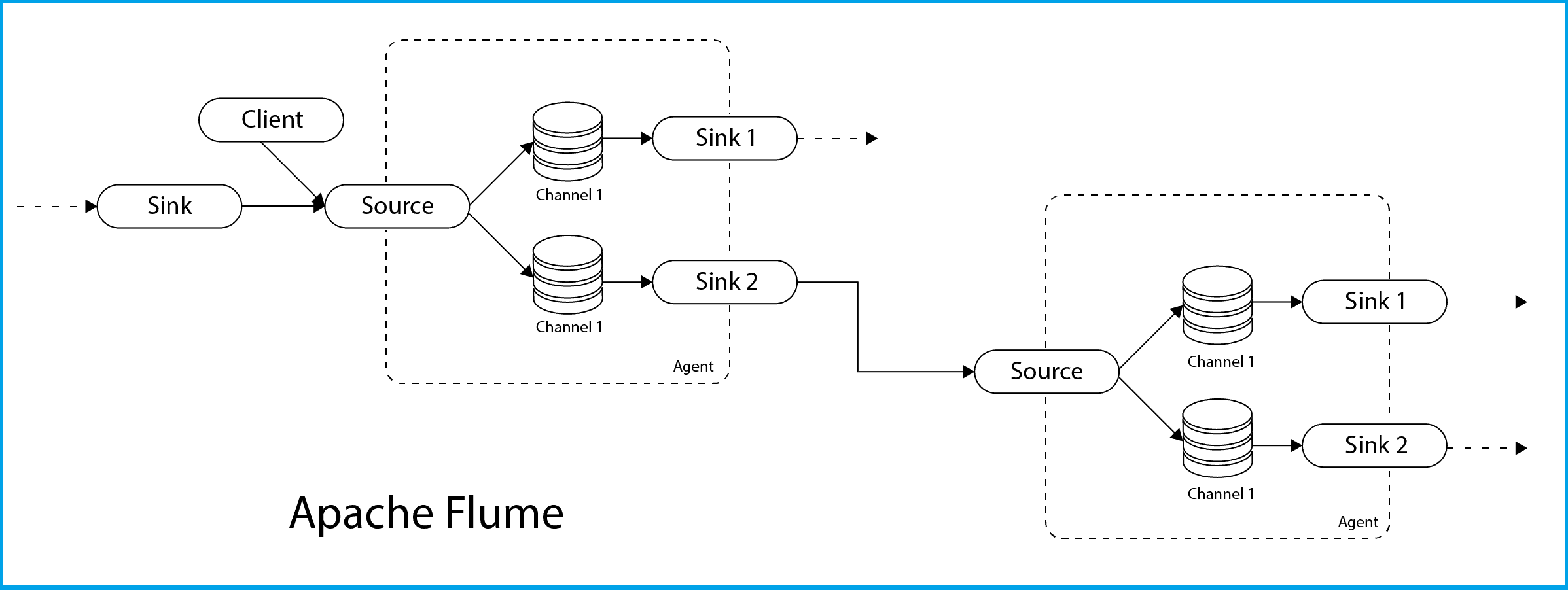
5. Activity Guide V: Data Ingestion Using Sqoop & Flume
The Next topic is the introduction on Sqoop & Flume, these tools are used for Data Ingestion from other external sources.
Apache Sqoop and Apache Flume are two popular open source tools for Hadoop that help organizations overcome the challenges encountered in data ingestion.
While working on Hadoop, there is always one question occurs that if both Sqoop and Flume are used to gather data from different sources and load them into HDFS so why we are using both of them.
- Sqoop: A common ingestion tool that is used to import data into Hadoop from any RDBMS. Sqoop provides an extensible Java-based framework that can be used to develop new Sqoop drivers to be used for importing data into Hadoop. Sqoop runs on a MapReduce framework on Hadoop, and can also be used to export data from Hadoop to relational databases.
- Flume: For streaming logs into Hadoop environment, Apache Flume is best service designed. Also for collecting and aggregating huge amounts of log data, Flume is a distributed and reliable service.
6. Activity Guide VI: Oozie & How it Works in Scheduling the JOBS.
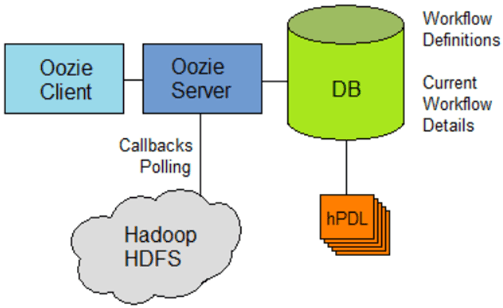
The next activity guide is to get an understanding of Oozie and the Job scheduler.
CDH, Cloudera’s open-source distribution of Apache Hadoop and related projects, includes a framework called Apache Oozie that can be used to design complex job workflows and coordinate them to occur at regular intervals. In this how-to, you’ll review a simple Oozie coordinator job, and learn how to schedule a recurring job in Hadoop.
7. Activity Guide VII: Cluster Maintenance: Directory Snapshots
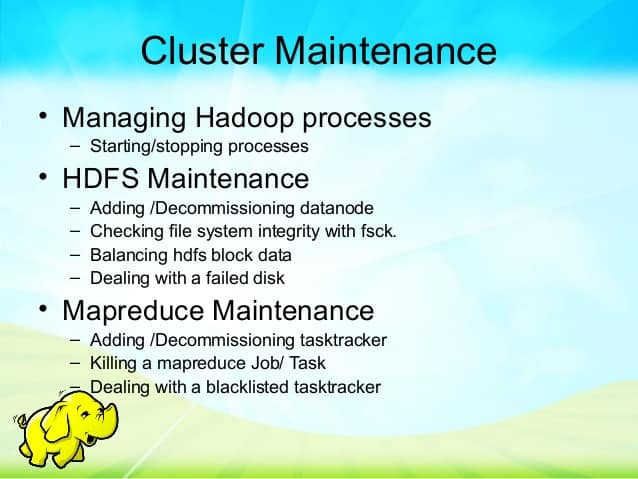
In this Activity guide, You will get to know about the Hadoop Clusters and Directory Snapshot to perform the steps for Adding and Removing Cluster Nodes.
Hadoop clusters require a moderate amount of day-to-day care and feeding in order to remain healthy and in optimal working condition. Maintenance tasks are usually performed in response to events: expanding the cluster, dealing with failures or errant jobs, managing logs, or upgrading software in a production environment.
Cloudera Manager supports both HBase and HDFS snapshots:
- HBase snapshots allow you to create point-in-time backups of tables without making data copies, and with minimal impact on RegionServers. HBase snapshots are supported for clusters running CDH 4.2 or later.
- HDFS snapshots allow you to create point-in-time backups of directories or the entire filesystem without actually cloning the data. These snapshots appear on the filesystem as read-only directories that can be accessed just like any other ordinary directories. HDFS snapshots are supported for clusters running CDH 5 or later. CDH 4 does not support snapshots for HDFS.
Cloudera Manager enables the creation of snapshot policies that define the directories or tables to be snapshotted, the intervals at which snapshots should be taken, and the number of snapshots that should be kept for each snapshot interval and lets you create, delete and restore snapshots manually with Cloudera Manager.
You can get all these Step by Step Activity Guides including Live Interactive Sessions (Theory) when you register for our Big Data Hadoop Administration Training
If you register for our course, You’ll also get:
- Live Instructor-led Online Interactive Sessions
- FREE unlimited retake for next 1 Years
- FREE On-Job Support for next 1 Years
- Training Material (Presentation + Videos) with Hands-on Lab Exercises mentioned
- Recording of Live Interactive Session for Lifetime Access
- 100% Money Back Guarantee (If you attend sessions, practice and don’t get results, We’ll do full REFUND, check our Refund Policy)
Have queries? Contact us at contact@k21academy.com or if you wish to speak then mail your phone number and country code and a convenient time to speak.
If you are looking for commonly asked interview questions for Big Data Hadoop Administration then just click below and get that in your inbox or join our Private Facebook Group dedicated to Big Data Hadoop Members Only


![Microsoft Agentic AI Business Solutions Architect [AB-100] | K21 Academy](https://test.k21academy.com/wp-content/uploads/2025/11/Microsoft-Agentic-AI-Business-Solutions-Architect-AB-100-Exam-Overview1.png)



