




Data types are the classification or categorization of data items. It represents the kind of value that tells what operations can be performed on a particular data. Since everything is an object in Python programming, data types are actually classes and variables are instances (object) of these classes.
In this blog, we are going to look at the built-in data types available in Python like integer, string, and data structures like lists, tuples, etc.
What is a Data Type?
A data type or simply a type is a property of data, that tells the language processor (compiler, interpreter) how we are going to use this data.
- Data types tell the meaning of data, how that data is going to store in memory and what different operations can be performed on it.
- In the Python programming language, if we have to store any value in a variable, then the data type role comes into play.
- When we are storing a value in a variable, we have to use the same types of data as the type of variable. Each value belongs to some data type in Python.
- Data type identifies the type of data which a variable can hold and the operations that can be performed on those data.
Built-in Data Types
Following are the standard or built-in data types of Python:
- Numeric
- Sequence Type
- Boolean
- Set
- Dictionary
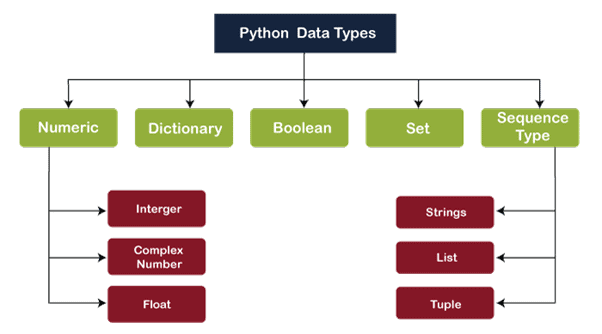
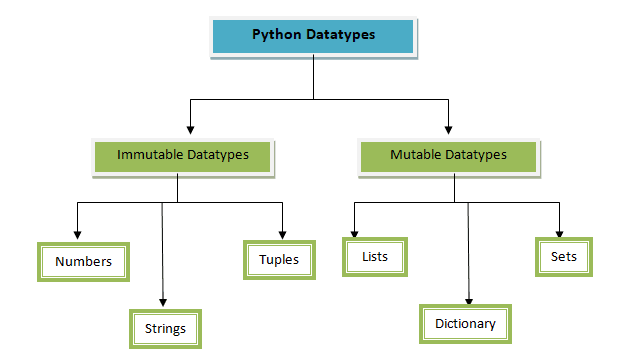
Further, these data types are divided into 2 specific categories: Mutable & Immutable.
Mutable Data Types
Data types in python where the value assigned to a variable can be changed are called mutable data types. In python we have the following mutable data types:
- Lists
- Sets
- Dictionaries
Immutable Data Types
Data types in python where the value assigned to a variable cannot be changed are called immutable data types. In python we have the following options:
- Numbers
- Tuples
- String
So let’s discuss each of these in detail and look at a few examples!
1.) Numeric Data Types
The numerical data type holds numerical value. In numerical data, there are 3 sub-types which are as follows:
- Integers
- Float
- Complex Numbers
1.1 Integers
- Integers are used to represent whole number values like 0, 243, 124859, etc.
- They do not have any fraction parts. In Python, they are represented by numeric values with no decimal point.
- They can be positive or negative. Positive numbers are represented with a + (plus) sign, and negative numbers are represented by the – (minus) sign.
- Integers in Python 3.x can be of any length, it is limited by the memory available. Python provides a single data type integer to store an integer, whether big or small.
- This value is represented by int class.
##var1 is an integer variable

var1=21
type(var1)

1.2 Float
To declare the variables in a program that are to be used to stores decimal numbers, floating data type is used.
- The float data type is used to represent decimal point values.
- These numbers can be positive or negative.
- Floating points variables represent real numbers that are used for measurable quantities like distance, area, temperature, etc., and typically have a fractional part.
- Floating numbers represent machine-level double precision floating point numbers (15 digit precision).
- They are slower than integer operations.
##var2 is a floating type variable

var2 = 5.75
type(var2)

1.3 Complex Numbers
Complex numbers are used to represent imaginary values. Imaginary values are denoted with ‘j’ at the end of the number.
- A complex number is a composite quantity made of two parts -: the Real part and the Imaginary part. Both of which are represented internally as Float values (floating-point numbers).
- A complex number consists of both real and imaginary components.
- In complex numbers, A + Bj. where A is a real number and B is an imaginary part. j is used for denoting the imaginary part.
##var3 is a complex data type variable

var3 = 6+5j
type(var3)

##output: <class 'complex'>

var3.real  ##output:6.0
var3.imag  ##output:5.0
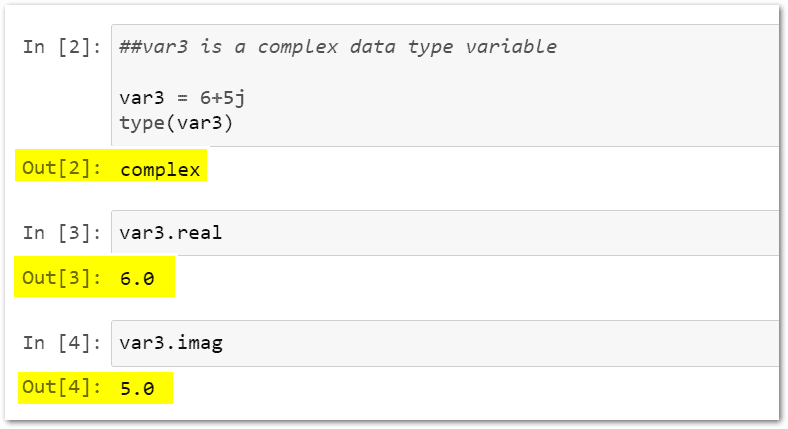
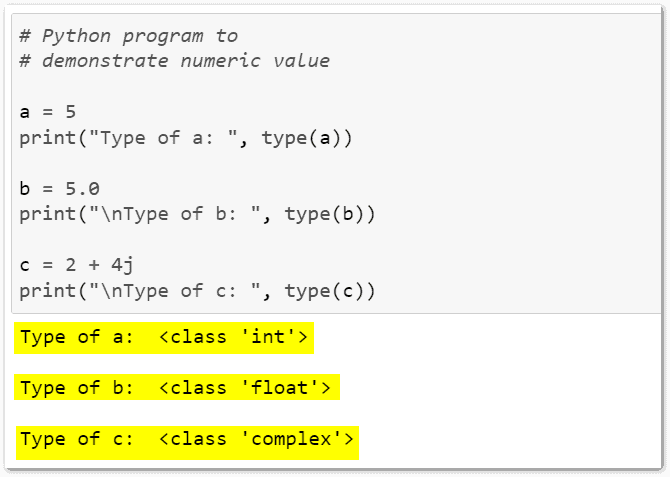
Note: To check the type of any variable data type, we can use the type() function. It will return the type of the mentioned variable data type.
# Python program to
# demonstrate numeric value

a = 5
print("Type of a: ", type(a))

b = 5.0
print("\nType of b: ", type(b))

c = 2 + 4j
print("\nType of c: ", type(c))
2.) Sequence Data Types
In Python, a sequence is the ordered collection of similar or different data types. Sequences allow storing multiple values in an organized and efficient fashion. There are several sequence types in Python –
- String
- List
- Tuple
2.1 String
When we provide information to the user, then the information is always represented as a group of characters, the group of characters is called String.
- A string is the Group of characters. These characters may be digits alphabets or special characters including spaces.
- A string data type lets you hold string data like any number, of valid characters into a set of quotation (” “) marks.
- A string can hold any type of known character like letters, numbers, and special characters.
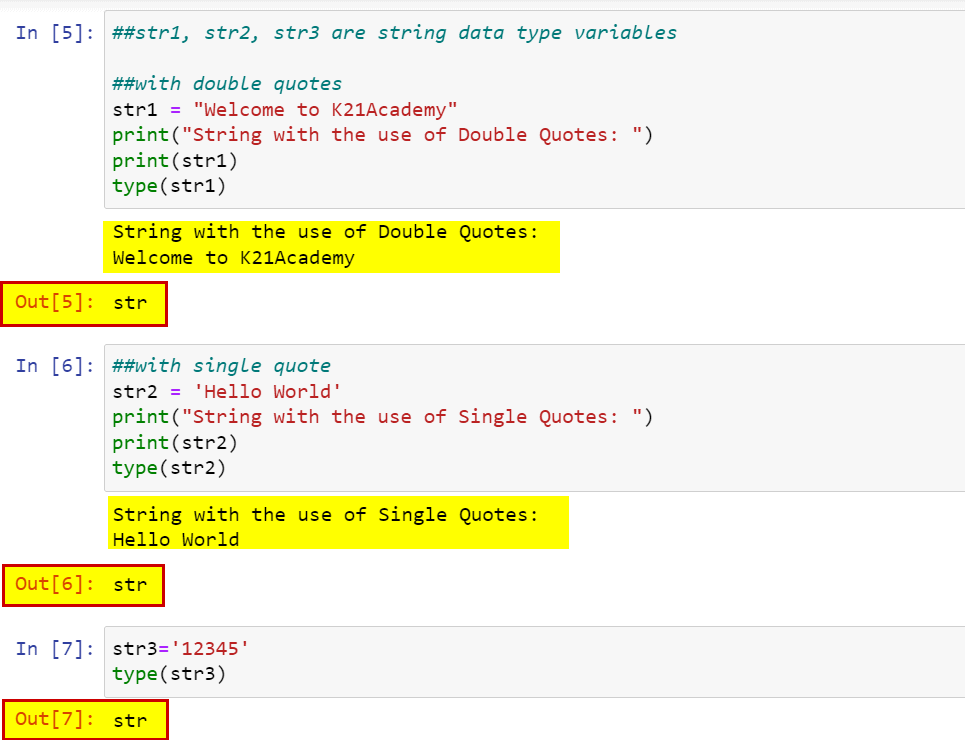
##str1, str2, str3 are string data type variables

##with double quotes
str1 = "Welcome to K21Academy"
print("String with the use of Double Quotes: ")
print(str1)  ##output: String with the use of Double Quotes: Welcome to K21Academy
type(str1)   ##output: <class 'str'>

##with single quote
str2 = 'Hello World'
print("String with the use of Single Quotes: ")
print(str2)  ##output: String with the use of Single Quotes: hello World
type(str2)   ##output: <class 'str'>

str3='12345'
type(str3)  ##output: <class 'str'>
2.2 List
- A list is a python compound data type. It can have different data types of data inside it.
- Lists can be changed/modified/mutate. This means List is a Mutable Data type.
- A list in python represents a comma-separated value of any datatype between the square bracket.
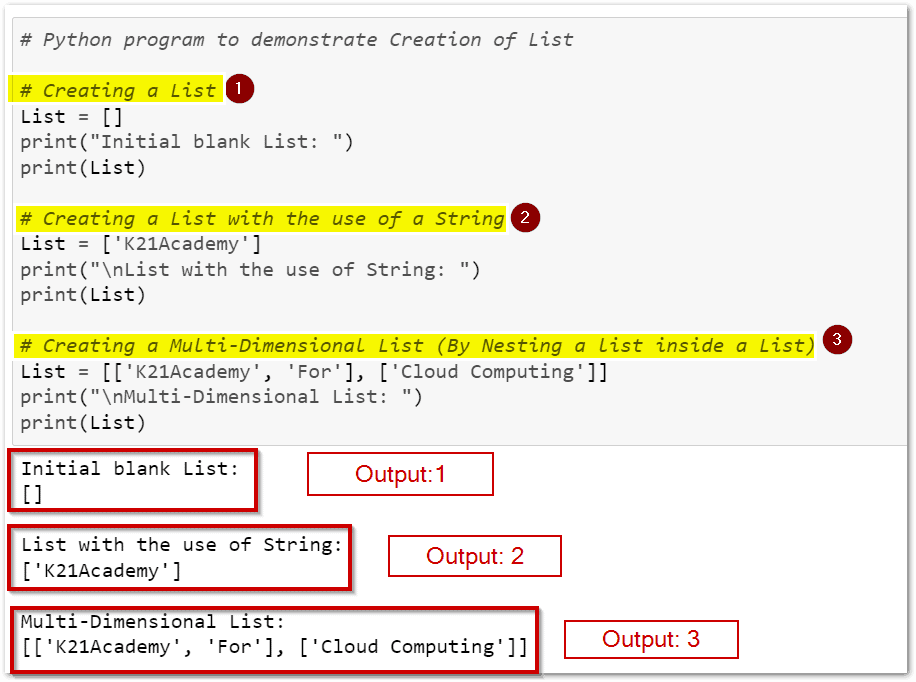
# Python program to demonstrate Creation of List

# Creating a List
List = []
print("Initial blank List: ")
print(List)

# Creating a List with the use of a String
List = ['K21Academy']
print("\nList with the use of String: ")
print(List)

# Creating a Multi-Dimensional List (By Nesting a list inside a List)
List = [['K21Academy', 'For'], ['Cloud Computing']]
print("\nMulti-Dimensional List: ")
print(List)
2.3 Tuples
A tuple is a sequence of items separated by commas and items are enclosed in parenthesis { ‘(‘ and ‘)’}. This is unlike the list, where values are enclosed in square brackets {‘[‘, ‘]’}
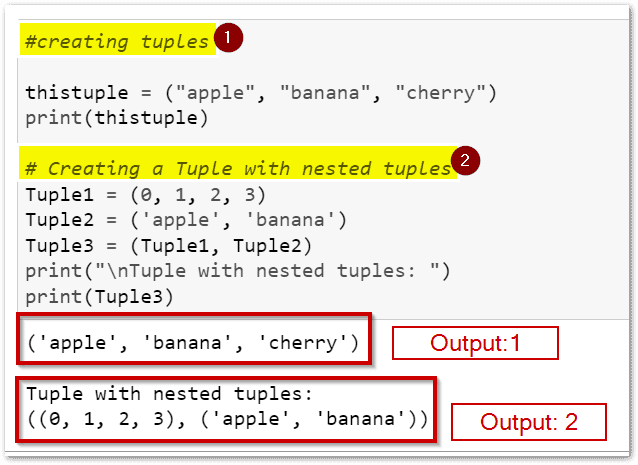
#creating tuples

thistuple = ("apple", "banana", "cherry")
print(thistuple)

# Creating a Tuple with nested tuples
Tuple1 = (0, 1, 2, 3)
Tuple2 = ('apple', 'banana')
Tuple3 = (Tuple1, Tuple2)
print("\nTuple with nested tuples: ")
print(Tuple3)
3.) Boolean
- It represents the value only in True and False.
- The boolean type is a subtype of plain integers.
- True and False behave like (1) and (0).
- When the user types bool(0) or bool(1), Then Python will return a value False and True respectively. bool(0) will always give False. Any number other than 0, weather +ve or -ve will give True if passed inside bool().
- There is no conversion between the Boolean Data Type and Integer Data Type.
- We can directly use the Boolean value True/False in any kind of conditional statement.
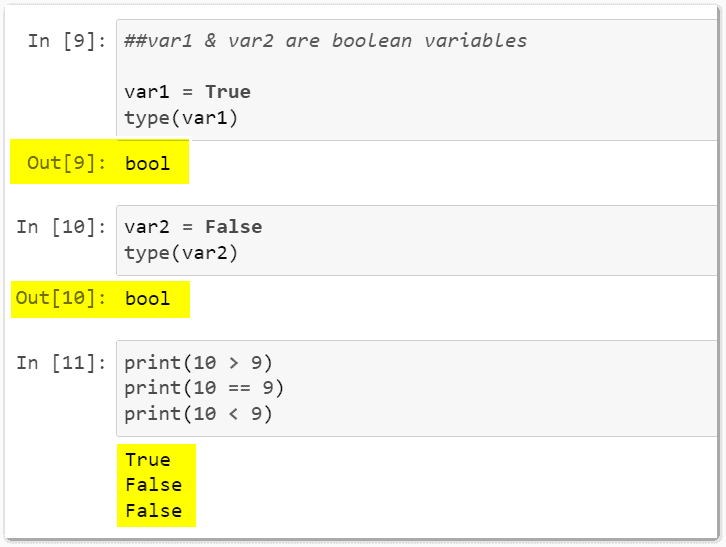
##var1 & var2 are boolean variables

var1 = True
type(var1)

var2 = False
type(var2)

##Example

print(10 > 9)
print(10 == 9)
print(10 < 9)
4.) Set
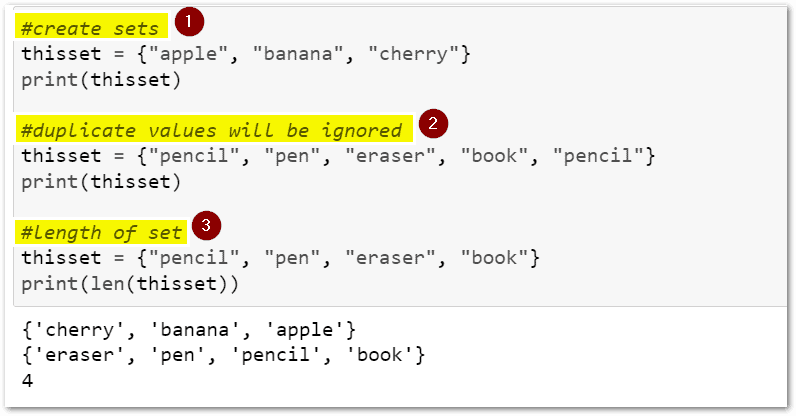
A set is a collection that is unordered, it does not have any indexes as well. To declare a set in python we use curly brackets.
A set does not have any duplicate values, even though it will not show any errors while declaring the set, the output will only have the distinct values.
To access the values in a set we can either loop through the set, or use a membership operator to find a particular value.
#create sets
thisset = {"apple", "banana", "cherry"}
print(thisset)

#duplicate values will be ignored
thisset = {"pencil", "pen", "eraser", "book", "pencil"}
print(thisset)

#length of set
thisset = {"pencil", "pen", "eraser", "book"}
print(len(thisset))
5.) Dictionary
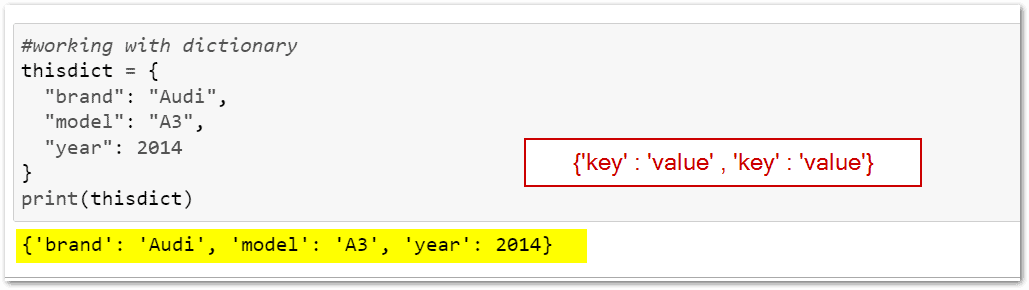
A dictionary is just like any other collection array in python. But they have key-value pairs. A dictionary is unordered and changeable. We use the keys to access the items from a dictionary. To declare a dictionary, we use curly brackets.
#working with dictionary
thisdict = {
  "brand": "Audi",
  "model": "A3",
  "year": 2014
}
print(thisdict)
How can you specify a data type using constructor functions in Python?
In Python, constructor functions like `int()`, `float()`, `str()`, etc., are used to specify data types. For example, `int(“42”)` converts the string `”42″` into an integer, and `str(100)` converts an integer into a string.
Python Double
In Python, double is not a distinct data type. Instead, Python uses float to represent floating-point numbers, which are the equivalent of doubles in other programming languages like C++ or Java. A float in Python is a 64-bit IEEE 754 floating-point number, capable of handling large and small values, both positive and negative, with decimals. You can define a float by simply assigning a number with a decimal point, like 3.14. To perform operations on floats, Python supports arithmetic and mathematical functions, including built-in methods like round(), abs(), and pow(). Here’s an Example :
x = 3.14159
y = 2.71828
result = x + y
print(result)
Long Integers in Python
In Python, long integers are automatically handled as int type, which can store arbitrarily large numbers without overflow. This flexibility is a result of Python’s dynamic typing, allowing integers to grow as large as the memory allows. Unlike other languages that require special handling for large numbers (e.g., long in Java or C++), Python’s int seamlessly adapts to the size of the integer. This makes Python ideal for applications requiring precise, large-scale numeric computations, such as cryptography, scientific computing, or data analysis, where handling long integers is essential.
Slice Data Type on Python
In Python, the slice data type is used to extract a portion of a sequence such as a list, tuple, or string. The slice syntax is sequence[start:stop:step], where:
startis the index to begin the slice (inclusive).stopis the index to end the slice (exclusive).stepdefines the stride or increment between elements.
For example, my_list[1:5:2] returns elements starting from index 1 up to index 5 with a step of 2. Omitting parameters results in default values: start as 0, stop as the sequence length, and step as 1. This functionality is essential for efficient data manipulation and analysis in Python.
Related References
- Visit our YouTube channel “K21Academy”
- Python For Beginners: Overview, Features & Career Opportunities
- An Introduction To Python For Microsoft Azure Data Scientist | DP-100
- Python For Data Science: Why, How & Libraries Used
- Data Scientists vs Data Engineers vs Data Analyst
Next Task: Enhance Your Azure AI/ML Skills


![Microsoft Agentic AI Business Solutions Architect [AB-100] | K21 Academy](https://test.k21academy.com/wp-content/uploads/2025/11/Microsoft-Agentic-AI-Business-Solutions-Architect-AB-100-Exam-Overview1.png)