





This post covers GL Translation Process in EBS (R12). If you are new with General Ledger Process then reading this post will help you in understanding the process better.
Translation converts balances from your functional currency to a foreign currency, you can translate both actual and budget balances. If you have average balance processing enabled the system can translate average balances as well.
Financial Accounting Standards Board, Statement 52, issued in December 1981, provides the guidance on booking/ consolidating the balances in foreign currencies. Monetary assets are to be translated at current exchange rates while non-monetary assets to be translated at historical rates. Simply put, the Balance Sheet items are to be translated at current rates whereas the P&L items are translated at historical/ period average rates.
Cumulative Translation Adjustment (CTA) accounts for the difference in the translated balances on P&L and Balance Sheet items arising out of using two different sets of rates.
How to achieve Translation and Cumulative Translation Adjustment entries in EBS R12?
Setup Translation options for your ledger –0
General Ledger > Setup > Accounting Setup Manager > Ledger Definitions > Currency Translation Options
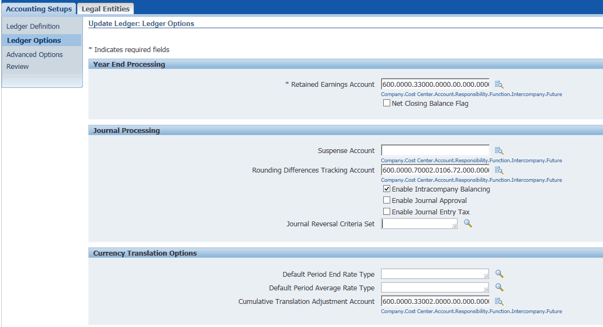
Provide the Default Period End Rate Type – This is the currency exchange rate which will be used for translating the Balance sheet accounts – viz. Assets, Liabilities etc.
Provide the Default Period Average rate type – This is the currency exchange rate which will be used for translating the P&L accounts – viz. Expenses, Income etc.
Cumulative Translation Adjustment Account – This is the accounting code combination provided for CTA account. Any differences arising out of translation for Balance sheet accounts and P&L accounts owing to a difference in average rate and period end rates will be posted to this particular account.
Once the Translation Options are defined, define and run Translation.
General Ledger > Currency > Translation
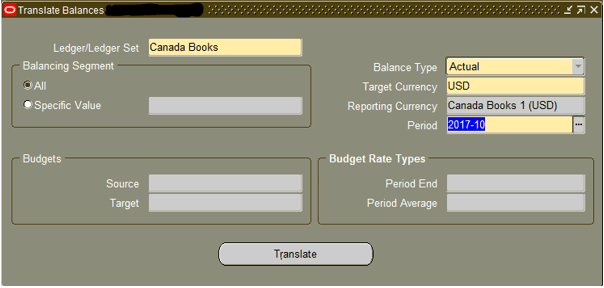
Provide the Ledger/ Ledger Set for which the balances have to be translated.
Balancing segment – Select All or a specific Balancing segment Values (BSV) for the Ledger for which Translation is to be defined. In a normal business case scenario, you would want to translate all your balancing segments for translation.
Balance Type – Select Actual if you want to translate actual trial balance to a foreign currency. In case you want to translate your budget to a foreign currency, select the Balance Type as Budget.
Target Currency – This is the foreign currency to which ledger balances have to be translated to. This cannot be the same as the functional currency of your ledger.
Reporting Currency is automatically defined based on the Target currency selected. Please note, the system also defines a reporting currency ledger once you run the translation.
Period – Provide the GL period of the ledger for which balances have to be translated.
In case, the balances to be translated are of a Budget type, the source and target budget and the Period End and Period average Budget Rate types provide the Budgetary balances translation options.
Click on Translate. A program will be spawned in the background. Wait for the successful completion of the program.
Once, the program was successfully completed, run the “Trial Balance – Translation” program to check the translated balances of the ledger in target currency. You may check the Ledger Definition to query the reporting currency ledger defined as a result of the translation.
The system will also create a journal entry for translation.
Accounting Entries
For simplicity perspective, consider our financial statements have balances as following in two accounts arising out of sales transactions –
Debtors 100 Dr
Sales 100 Cr
Let’s say the functional currency of the ledger is OMR. Please note, the above amounts are GL balances and may not be out of one single transaction.
Also, assume the period end exchange rate is 2.5 USD = 1 OMR. Also, the average rate for the given period is 3.0 USD = 1.0 OMR.
When the above trial balance is translated at period end, as per SFAS52, the Debtors account (a balance sheet account) will be translated at the period end rate of 2.5, whereas, the Sales account (a P&L account) will be translated at the period average rate of 3.0 USD.
Thus, the translated balances would appear as follows:

Thus, a debit entry in the translated trial balance will appear in CTA account, owing to the difference in the current rate and the historical rate being used for translation of Balance sheet and P&L accounts.
Reference:
This post is from our Oracle Financial Functional Training, in which we cover General Ledger (GL), Account Payables (AP), Account Receivables (AR), Sub-Ledger Accounting, Fixed Assets, Cash Management and much more.
Next Task For You
Click on the image below to download your FREE Guide, Oracle EBS (R12) Financial Functional Interview Question, & Learn More.


![Microsoft Agentic AI Business Solutions Architect [AB-100] | K21 Academy](https://test.k21academy.com/wp-content/uploads/2025/11/Microsoft-Agentic-AI-Business-Solutions-Architect-AB-100-Exam-Overview1.png)



