



Azure Load Balancer
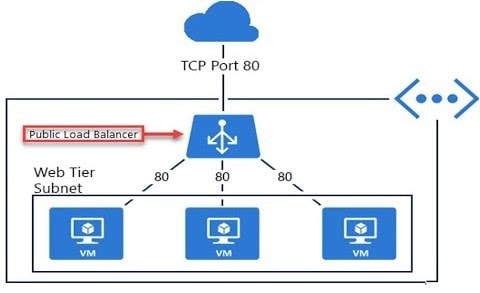
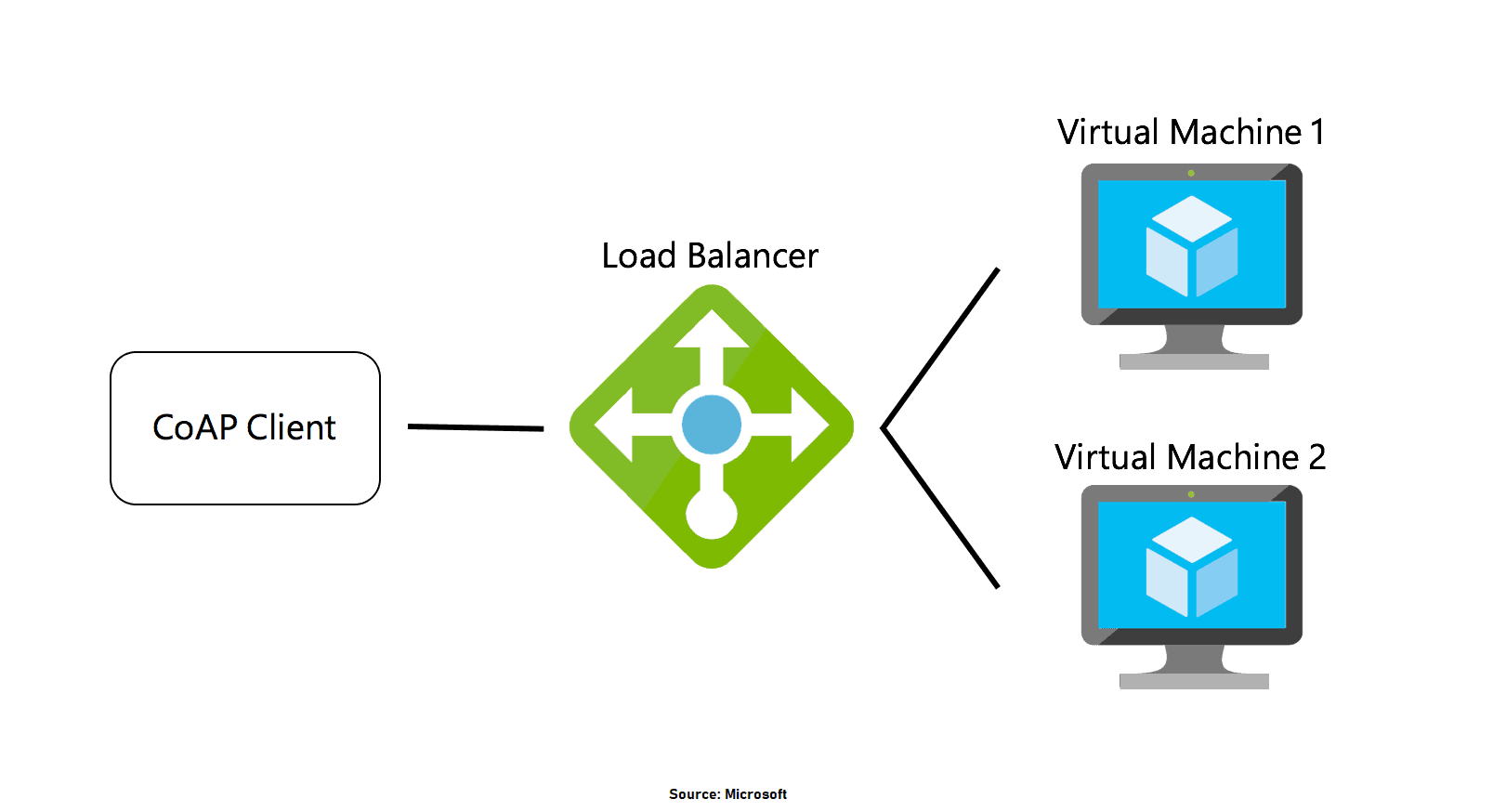
Azure load balancer allows you to distribute traffic to your backend virtual machines. An Azure load balancer provides high availability for your application. The Azure load balancer is a fully managed service itself.
In Azure, you can create two types of the load balancer
- Public load balancer
- Internal/ private load balancer
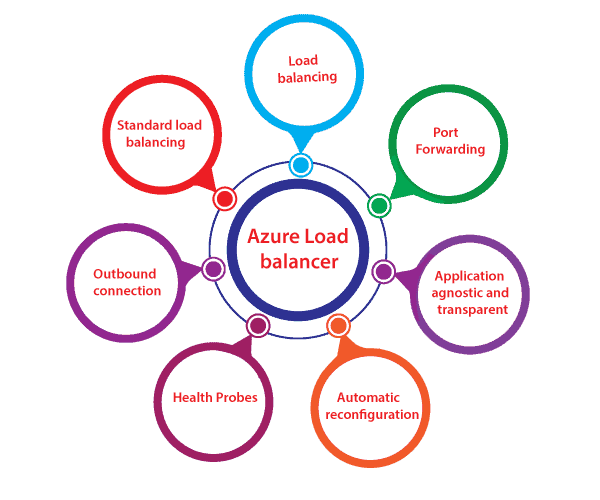
Features Of Azure Load Balancer
- Load Balancing: Azure load balancer uses a 5-tuple hash that contains source IP, source port, destination IP, destination port, and protocol.
- Outbound connection: All the outbound flows from a private IP address inside our virtual network to public IP addresses on the Internet can be translated to a frontend IP of the load balancer.
- Automatic reconfiguration: The load balancer can reconfigure itself when it scales up or down instances based on conditions.
- Health probes: It can configure a health probe to determine the health of the instances in the backend pool.
- Port forwarding: The load balancer supports port forwarding ability if we have a pool of web servers, and we don’t want to attach a public IP address for every web server in that pool.
Q1: Azure Load balancers are software load balancers?
Ans: Yes, these load balancers are software load balancers that provide high availability by distributing incoming traffic among healthy VMs.
Q2: Is there a way to implement the public-facing Load Balancer highly available?
Ans: No, It’s already highly available. Because load balancers are deployed in three zones by Microsoft itself, So no need for any modification.
Also Check: Our blog post on Azure Serverless Computing.
Azure Application Gateway
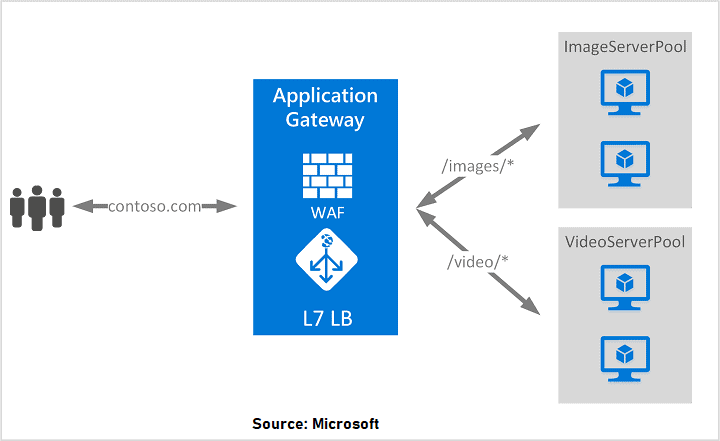
Azure Application Gateway provides an Azure load balancer on the transport level for applying Routing Rules for supporting load balancing and traffic management.
It supports secure socket layer termination security, which makes a more secure way of load balancing and supports HTTP-based load balancing, and creates sessions based on cookies.
Q3: What protocols does Application Gateway support?
Ans: Application Gateway supports HTTP, HTTPS, HTTP/2, and WebSocket.
Q4: Can the availability zone be implemented for the backend pool in Application Gateway?
Ans: Yes, You can choose a single zone or multiple zones where Application Gateway instances are deployed, making it more resilient to zone failure. The backend pool for applications can be similarly distributed across availability zones.
Web Application Firewall
WAF provides centralized protection of your web applications from common exploits and vulnerabilities. Web applications are increasingly targeted by malicious attacks that exploit commonly known vulnerabilities. These can be taken care of by using WAF.
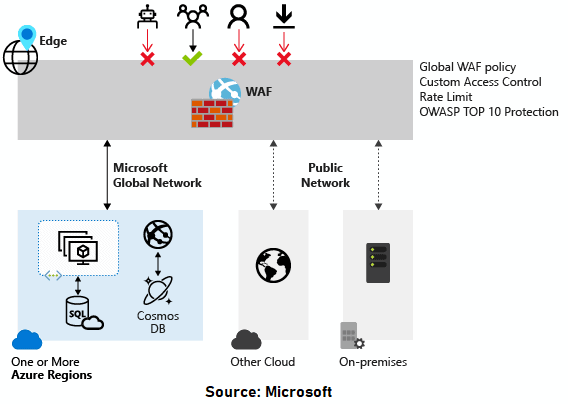
Q5: Does WAF support DDoS protection?
Ans: Yes, You can enable DDoS protection on the virtual network where the application gateway is deployed. This setting ensures that the Azure DDoS Protection service protects the application gateway virtual IP (VIP).
Azure Firewall
Azure Firewall is a controlled security utility that defends your Azure Virtual Network resources. It comes with high availability and unlimited cloud scalability. You don’t have to deploy additional infrastructure for high availability like two firewalls or three firewalls, and no need for the load balancer.
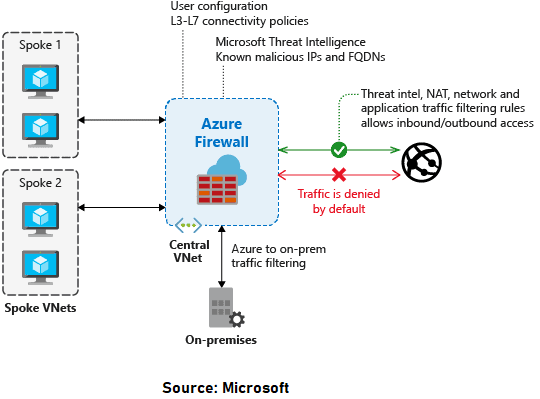
Q6: What is the difference between Application Gateway WAF and Azure Firewall?
Ans: The Web Application Firewall (WAF) is a feature of Application Gateway that provides centralized inbound protection of your web applications from common exploits and vulnerabilities. Azure Firewall provides inbound protection for non-HTTP/S protocols (for example, RDP, SSH, FTP), outbound network-level protection for all ports and protocols, and application-level protection for outbound HTTP/S.
Azure Front Door
AFD is a service that offers a single global entry point for customers accessing web apps, APIs, content, and cloud services. It offers services over Web applications, VM, APIs’, Cloud services, Data. Also, it provides a global infrastructure for building, managing, and provide security. It’s a kind of a global load balancer.
Read More: Azure Front Door
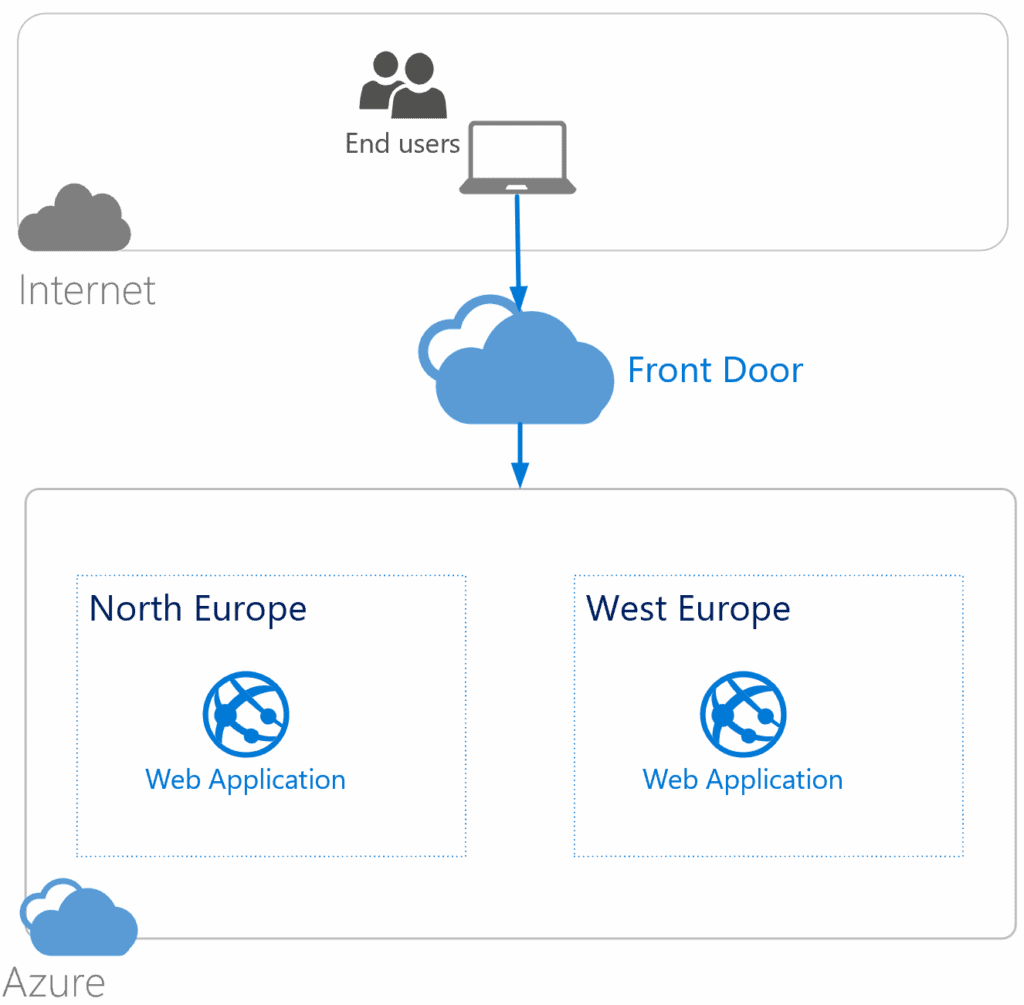
Q7: What is the difference between Azure Front Door and Azure Application Gateway?
Ans: While both Front Door and Application Gateway are layer 7 (HTTP/HTTPS) load balancers, the primary difference is that Front Door is a global service, whereas Application Gateway is a regional service.
Azure Traffic Manager
This allows you to regulate the distribution of user traffic by using DNS to direct requests to the most appropriate service endpoint supported on a traffic-routing method. Azure traffic manager selects an endpoint based on the configured routing method. It supports a variety of traffic-routing methods to suit different application needs.
Read More: Azure Traffic Manager
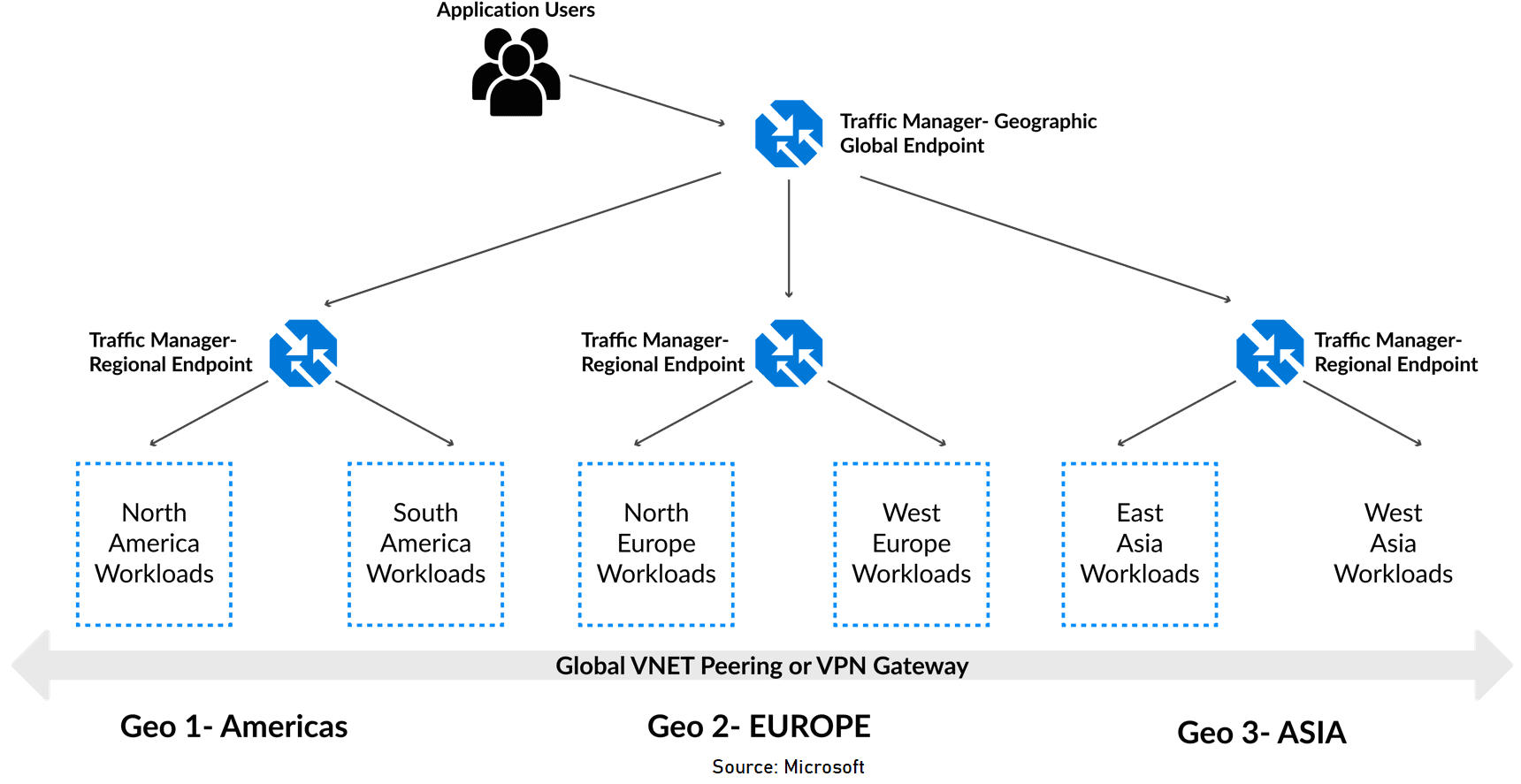
Q8: How does the traffic manager determine where a user is querying from?
Ans: Traffic Manager looks at the source IP of the query (this most likely is a local DNS resolver doing the querying on behalf of the user) and uses an internal IP to region map to determine the location.
Content delivery network
That service allows efficient delivery of web content to users by leveraging a distributed network of servers. CDNs store cached content on edge servers located close to end users, reducing latency and improving performance .
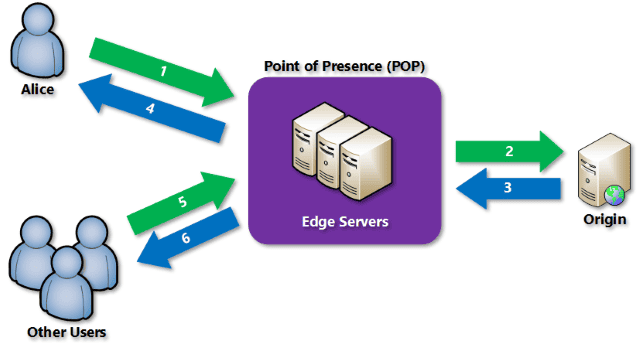
Azure CDN offers developers a global solution for rapidly delivering high-bandwidth content by caching it at strategically placed physical nodes worldwide. It can accelerate both static and dynamic content delivery, optimizing the performance of applications and reducing the load on origin servers.
Key features and benefits of using Azure CDN include:
1. Better performance and improved user experience: Azure CDN helps deliver web content with lower latency, reducing the round-trip requests required to load content for end users. This leads to a faster and more responsive experience.
2. Scalability for handling high loads: Azure CDN enables large scaling to handle instantaneous high loads, such as during product launch events, by distributing user requests and serving content directly from edge servers.
3. Distribution of user requests: With Azure CDN, user requests get served directly from edge servers, reducing the traffic sent to the origin server. This helps optimize resource usage and improves overall application performance.
4. Content caching and acceleration: Azure CDN caches static content on edge servers, allowing subsequent users to request the same content directly from the cache. This caching process results in faster delivery and improved responsiveness.
To use Azure CDN, you must have at least one Azure subscription and create a CDN end-written CDN profile. CDN profiles can be customized with specific content delivery behavior and access configurations. You can organize your CDN endpoints using multiple profiles based on internet domain, web application, or other criteria.
Azure CDN integrates with various Azure services, including Azure Blob Storage, Azure Web Apps, Azure Cloud Services, and publicly accessible web servers. It has features such as dynamic site acceleration, caching policies, HTTPS custom write support, data compression controls, and geo-filtering.
When using Azure CDN, it’s important to consider the limitations of each Azure subscription regarding the number of CDN profiles, endpoints, and custom domains. Understanding Azure CDN’s pricing structure is also crucial to optimize cost and performance.
In addition to Azure CDN, Azure also provides other services like Azure Front Door, which combines CDN capabilities with global load balancing, SSL/TLS termination, and application layer routing to enhance the delivery of web applications .
Network Security Groups(NSG)
Network Security Group in Azure acts like a firewall at the network level. It filters the traffic passing through Azure Resources in a virtual network. NSG is a group of security rules that defines the priority, source or destination, protocol, direction, port range, and action. Using these rules, NSG allows or denies inbound and outbound traffic.
See More: Network Security Groups
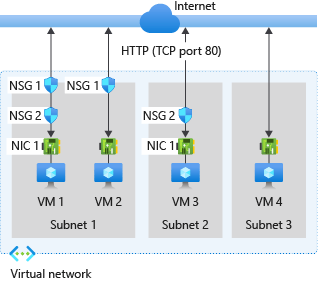
Q9: What is the limit for NSG rules per Network Security Group?
Ans: The Maximum limit for NSG rules per one Network Security Group is 1000.
See More: Networking Limits
Application Security Groups
Application Security Groups help manage the security of Virtual Machines by grouping them according to the applications that run on them. This help manage the security of Virtual Machines by grouping them according to the app that run on them. It is a feature that allows the application-centric use of Network Security Groups.
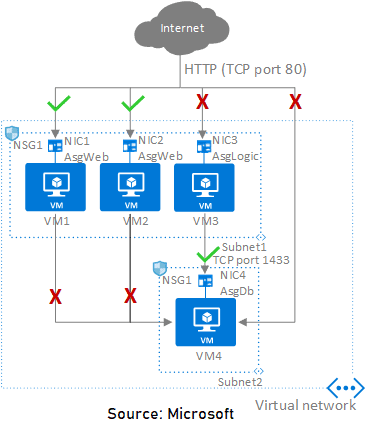
Q10: What is the difference between Network Security Groups(NSG) and Application Security Groups(ASG)?
Ans: Network Security Group is used to enforce and control the network traffic, whereas Application Security Group is an object reference within a Network Security Group. NSGs can be associated at the subnets level or individual network interfaces (NIC) attached to VMs. ASG Controls the inbound and outbound traffic at the network interface level.
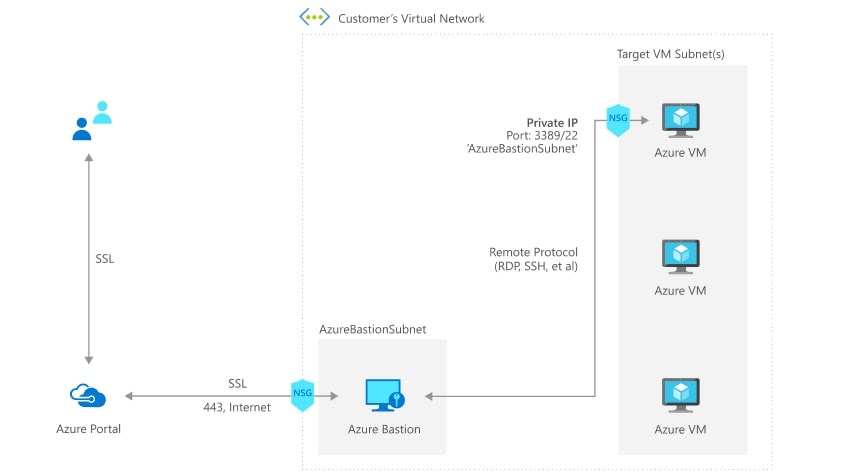
Q11: Can we customize the bastion host?
Ans: No, you are not allowed to do any customization on the bastion host. Also, it is a (Platform as a Service)PAAS service. If you want to do customization, Pick a jump-server.
Q12: Do we need to enable a dedicated subnet only for AZ Bastion? or can we also use the IPs for other purposes?
Ans: We need a separate subnet for AZ Bastion, and we have some guidelines for that subnet which are:
- The subnet must be named AzureBastionSubnet.
- The subnet must be at least /27 or larger.
Quiz Time (Sample Exam Questions)!
With our Microsoft Azure Solutions Architect training program, we cover 220+ [AZ-305] sample exam questions to help you prepare for the certification AZ-305.
Note: Download the 25 Sample ExamQuestions of Microsoft Azure Solutions Architect from here.
Check out one of the questions and see if you can crack this…
Ques: You are designing an Azure solution. The solution must meet the following requirements:
- Distribute traffic to different pools of dedicated virtual machines (VMs) based on rules.
- Provide SSL offloading capabilities.
Now, you need to recommend a solution to distribute network traffic. Which technology would you recommend?
A. Azure Traffic Manager
B. Azure Firewall rules
C. Azure Application Gateway
D. Azure Load Balancer
The right answer will be revealed in next week’s blog.
Here is the answer to the question shared last week.
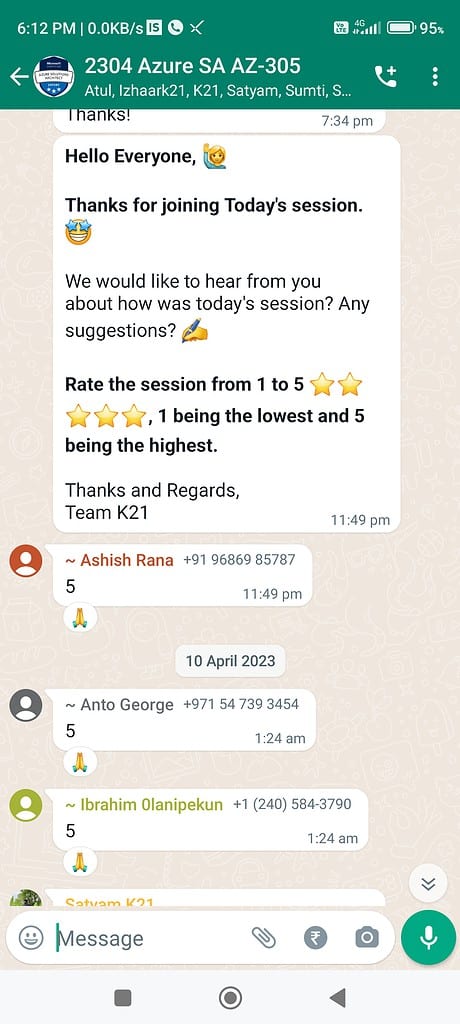
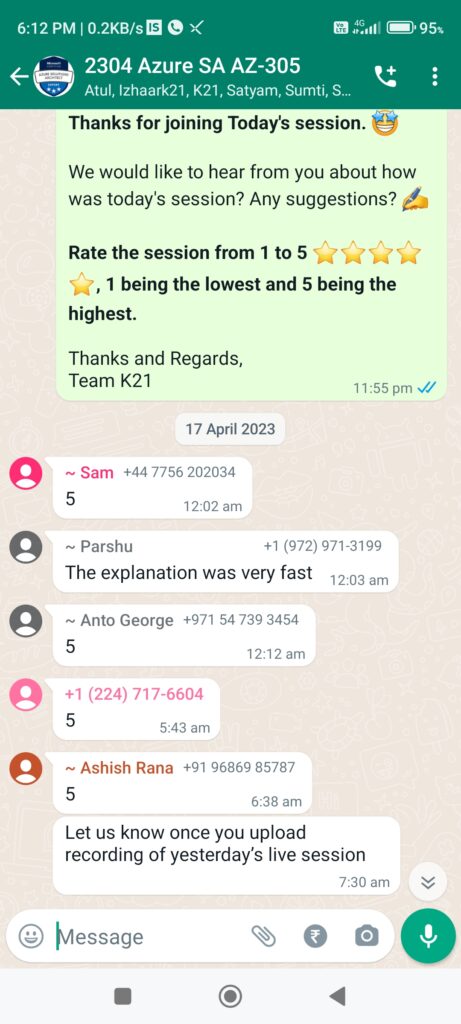
Feedback For Azure Solutions Architect Day 4 Training
We always work on improving and being the best version of ourselves from the previous session hence constantly ask feedback from our attendees.
Here’s the feedback that we received from our trainees who had attended the session…
- Here 2106 is in YYMM format, represents the trainees from the batch of June 2021.
Related/References
- Design Authentication and Authorization Solutions [Microsoft Azure Solutions Architect Expert] [AZ-305]: [Recap] Day 1
- Design a governance solution & Networking:[Microsoft Azure Solutions Architect Expert] [AZ-305] [Recap] Day 2
- Design a network infrastructure solution: Microsoft Azure Solutions Architect Expert [AZ-305]: [Recap] Day 3
- Top 10 Best Practices for Azure Security in 2021
- Tips To Prepare Exam AZ-304: Microsoft Azure Architect Design
- Exam AZ-305: Azure Solutions Architect Expert Certification
Next Task For You
Begin your journey toward Mastering Azure Cloud and landing high-paying jobs. Just click on the register now button on the below image to register for a Free Class on Mastering Azure Cloud: How to Build In-Demand Skills and Land High-Paying Jobs. This class will help you understand better, so you can choose the right career path and get a higher paying job.


![Microsoft Agentic AI Business Solutions Architect [AB-100] | K21 Academy](https://test.k21academy.com/wp-content/uploads/2025/11/Microsoft-Agentic-AI-Business-Solutions-Architect-AB-100-Exam-Overview1.png)


