This blog post will go through some quick tips, including Q/A and related blog posts on the topics that we covered in the Azure DevOps Engineer Day 4 Live Session, which will help you gain a better understanding and make it easier for you to learn the Azure DevOps Engineer, clear the [AZ400] Certification & get a better-paid job.
This week’s Day 4 Live Session started with Module 4:Implement Continuous Integration, Module 5: Implementing Application Infrastructure, where we have covered topics like Managing Application Config & Secrets, Managing Code Quality & Security Policies.
The previous week, In Azure DevOps Engineer Live Session Day 3 session, we got an overview of Azure DevOps Engineer covering topics from Module 3-Implement Dependency Management, Module 4: Implement Continuous Integration, where we covered topics like Git hub Action, Container Image, Azure Container Instance, Azure Container Registry, AKS, Kubectl, Pull Request.
A week before, In Azure DevOps Engineer Live Session Day 2 Session, we got an overview of What is Azure pipeline?, Azure DevOps Security:, What is defense in depth model?, Layers of defense in depth, Source Control, Azure Repos, Branching, Pull Request, Feature Branch, Git Branching Workflow, GitHook, Branch Lock.
Two weeks before, In Azure DevOps Engineer Live Session Day 1 Session, we got an overview of DevOps, DevOps as a Job Role, Components that form DevOps, Types of Teams in DevOps Organizations, Types of DevOps Projects, Azure DevOps Work Items, What is Azure DevOps?, Features of Azure DevOps?, Azure Boards?, Azure Repos?, Microsoft hosted agent, Self hosted agent, Why Organizations choose DevOps?,
Git hub Action
GitHub Actions is a feature provided by GitHub, a web-based hosting service for version control using Git. However, Azure is a cloud computing platform offered by Microsoft. While GitHub Actions and Azure are separate services, they can be integrated to enable continuous integration and deployment (CI/CD) workflows.
Azure provides a service called Azure Pipelines, which is a CI/CD platform that allows you to build, test, and deploy applications. GitHub Actions can be used as a trigger for Azure Pipelines, allowing you to automate your CI/CD workflows directly from your GitHub repository.
Container Image
Animageboxisalightweight,standalone,completepackagethatcontainseverythingneededtorunthesoftware,includingcode,runtime,libraries,andtools. It is a portable and self-sufficient unit that can be deployed consistently across different computing environments, such as development machines, testing environments, and production servers. Container images are used in containerization technologies, such as Docker, to create and run containers. Containers provide an isolated and consistent environment for software applications to run, ensuring that the application behaves the same regardless of the underlying infrastructure.
Azure Container Instance
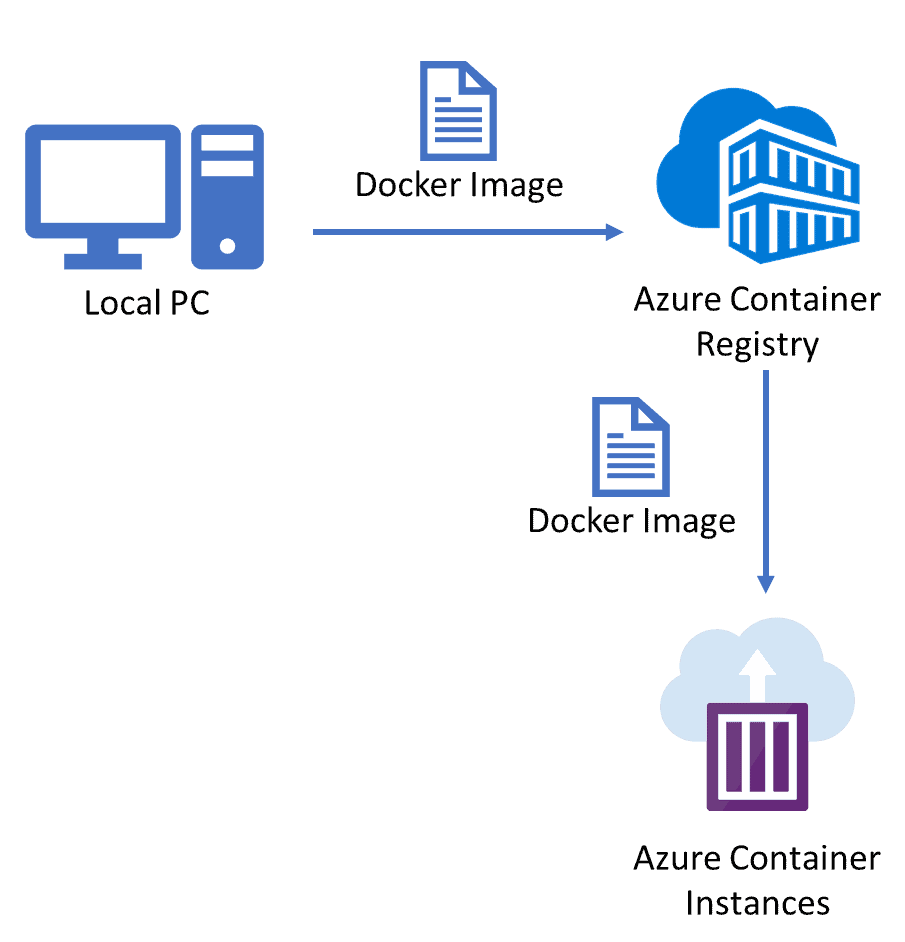
AzureContainerInstances(ACI)isanautomatedcontainerizationsolutionpoweredbyMicrosoftAzure.Itallowsyoutouseandruncontainerswithouthavingtomanagetheunderlyingprocesses. ACI is designed to provide a lightweight and fast way to run containers in the cloud, offering a great balance between ease of use and flexibility.
Here are some key features and characteristics of Azure Container Instances:
Quick deployment: ACI enables you to deploy containers in seconds, as it abstracts away the complexities of infrastructure provisioning and management. You can focus on deploying your application or microservice without worrying about the underlying infrastructure.
Seamless integration: ACI integrates well with other Azure services, such as Azure Virtual Network, Azure Monitor, Azure Container Registry, and Azure Kubernetes Service (AKS). This integration allows you to build complex and scalable applications using a combination of services.
Pay-as-you-go pricing: ACI follows a consumption-based pricing model, where you pay only for the resources used by your containers. You are billed based on the CPU and memory allocated to your containers, as well as the duration of their execution.
Flexibility: ACI supports both Linux and Windows containers, allowing you to run a wide range of applications. You can also choose the required amount of CPU cores and memory for your containers, based on your application’s needs.
Scaling and isolation: ACI provides automatic scaling capabilities, allowing you to scale your container instances up or down based on demand. Each container instance runs in isolation, ensuring that your applications are secure and isolated from each other.
Networking: ACI provides options for network configuration, such as assigning a public IP address, connecting to a virtual network, or using private endpoints for increased security. You can also control traffic flow using Azure Load Balancer or Azure Application Gateway.
Monitoring and diagnostics: ACI integrates with Azure Monitor, which allows you to collect logs, metrics, and performance data for your containers. You can set up alerts and monitor the health and performance of your container instances.
Azure Container Registry
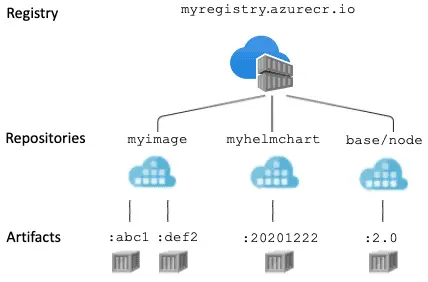
It allows you to store and manage your Docker container images in a secure and scalable manner. ACR is tightly integrated with other Azure services, making it easy to deploy and manage containerized applications using Azure Kubernetes Service (AKS) or other container orchestration platforms.
Here are some key features and functionalities of Azure Container Registry:
Private Registry: ACR provides a private repository to store your container images, ensuring they are securely accessible only to authorized users.
Scalability and Availability: ACR is designed to handle large-scale container deployments and can automatically scale based on demand. It ensures high availability with multiple replicas of your images stored in different regions.
Integration with Azure Services: ACR seamlessly integrates with other Azure services, such as Azure Kubernetes Service (AKS), Azure DevOps, and Azure Functions, allowing you to build end-to-end container-based solutions.
Role-Based Access Control (RBAC): ACR allows you to control access to your container registry using Azure Active Directory (AAD) and RBAC. You can grant different levels of permissions to users and groups to manage image repositories.
Webhooks and Event-based Automation: ACR supports web hooks, which allow you to trigger events or actions whenever a container image is pushed or updated. This feature enables automation in your CI/CD pipelines or other workflows.
Geo-replication: ACR supports geo-replication, which allows you to replicate your container images to multiple regions for better availability and faster image pulls in different geographical locations.
Content Trust and Security: ACR supports Docker Content Trust (Notary), which enables image signing and verification. This ensures the authenticity and integrity of your container images, providing an additional layer of security.
Monitoring and Insights: ACR integrates with Azure Monitor, enabling you to monitor and analyze metrics, logs, and diagnostic information related to your container registry and images.
AKS
AKS stands for Azure Kubernetes Service. It is a managed container orchestration service provided by Microsoft Azure. AKS simplifies the deployment, management, and scaling of containerized applications using Kubernetes, an open-source container orchestration platform. With AKS, you can create, configure, and manage Kubernetes clusters in Azure without having to manage the underlying infrastructure. It handles tasks such as server provisioning, cluster upgrades, and monitoring, allowing you to focus on deploying and managing your applications.
Kubectl : kubectl is a command-line tool used to interact with Kubernetes clusters. It allows you to manage and control Kubernetes resources, deploy applications, inspect cluster status, and perform various administrative tasks.
Pull Request
When you ask the Admins or the repo owner to add the changes you have committed in your branch into the main branch or the default branch.
Allow you to tell others regarding changes you have pushed to a branch in an already present repository on GitHub or any other platform.
Once a pull request opens, you’ll be able to discuss and review any suggested changes made by the collaborators and add follow-up commits before your changes merged in the default branch.
Question 2: What is the difference between Clone and Pull?
Answer: git clone is how you get a local copy of an existing repository to work on. It’s usually only used once for a given repository unless you want to have multiple working copies of it around. git pull (or git fetch + git merge) is how you update that local copy with new commits from the remote repository. If you are collaborating with others, it is a command that you will run frequently.
Question 3: It would be good to create a pull request in a new branch and then commit changes, then merge.
Answer: Yes, it would be good if you create a new branch, make some changes, commit them, and then merge it into the master branch. By following this strategy, we are not interrupting the original flow of the code because sometimes, when we make any changes, it’s possible that the changes might not be correct.
Question 4: We forked the repository, but our pull request is not going to change the original repository of the calculator app; it will get merged with the master of fork, right?
Answer:
Yes, whatever changes were done in the repo after forking it from the original repo are local changes in your new branch.
No changes are done to the master branch of the original repo until you commit those changes and make a pull request for allowing the changes to be merged in the master branch of the original repo.
Question 5: Can I delete branches in Azure Repos?
Answer: Yes, Azure Repos allows you to delete a branch. Before you delete, you must ensure you have the appropriate permission to manage the branch. Also, you can restore the deleted branch within the specified time limit.
Question 6: What is triggering the pipeline when I do an update to my code?
Answer: You can configure Webhooks to run your pipeline (Triggering the build) automatically. Webhooks can be added to GitHub. Webhooks are automated messages sent from apps when something happens. They have a message—or payload—and are sent to a unique URL—essentially the app’s phone number or address. Webhooks are almost always faster than polling and require less work on your end.
Question 7: What are readme badges?
Answer: Adding badges to your readme an at-a-glance peek into the status of your project. You can show the status of your build using readme badges.
Azure Pipelines
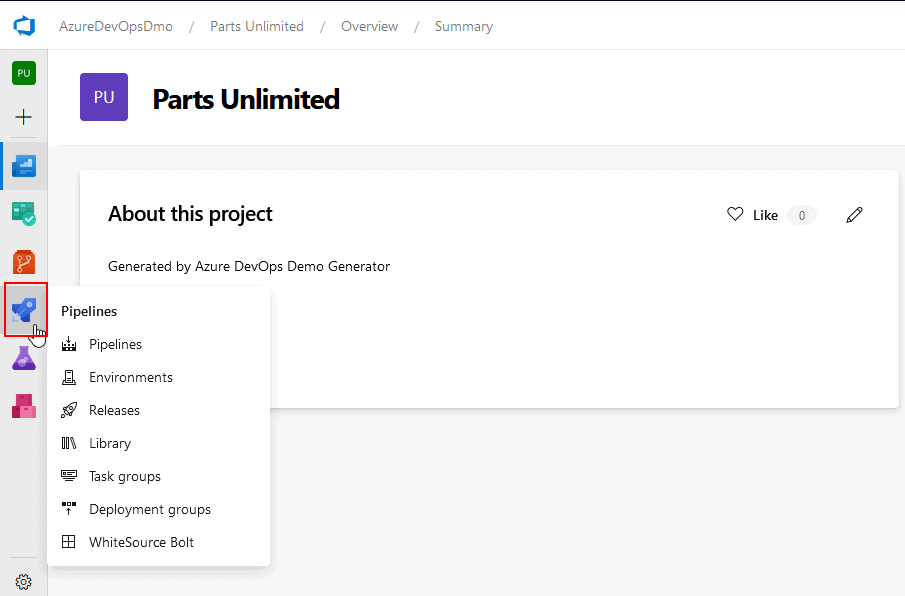
Azure Pipeline is a cloud service that we can use to build and test our code project automatically. The Azure pipeline has a lot of capabilities such as continuous integration and continuous delivery to regularly and consistently test and builds our code and ship to any target.
Answer: Azure Pipeline is a cloud service that we can use to build and test our code project automatically. The Azure pipeline has a lot of capabilities such as continuous integration and continuous delivery to test and build our code and ship to any target regularly and consistently. There are 2 types of Pipeline:
Build Pipelines
These provide you with the functionality required to build and compile your application code using a host of pre-defined build tasks. The ability to link your Build Pipelines with either GitHub or Azure Git Repositories means you use CI to automatically trigger your builds and report their status on every commit, pull request, or merge.
Releases Pipelines
Release pipelines are very similar to build pipelines however are for deploying your applications to your servers. Release pipelines can still be created using the GUI (and exported to YAML if required). Creating release pipelines is a very intuitive, user-friendly drag and drop process, and within a few minutes, you can be deploying your applications to your servers with minimal, if any, coding.
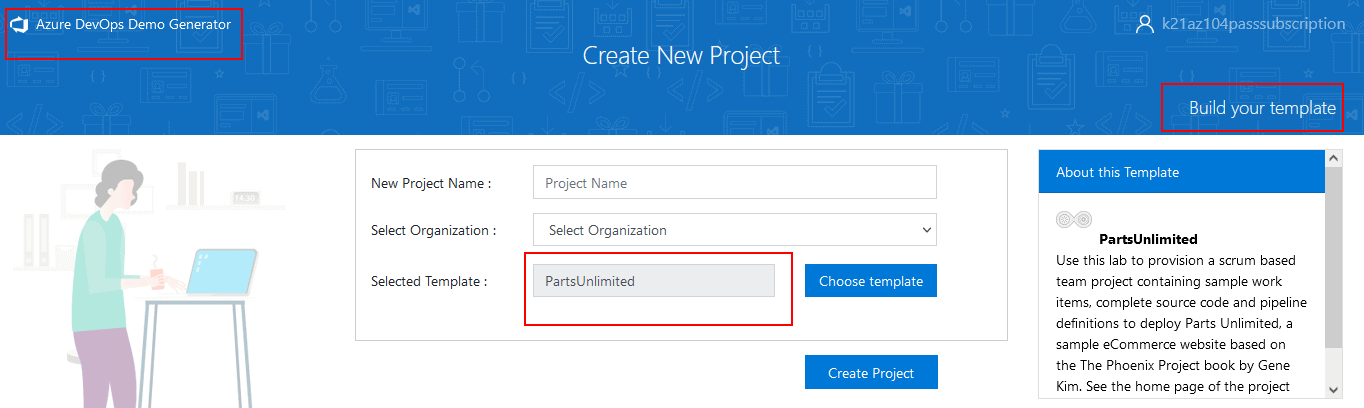
Question 9: What does the Azure DevOps Demo Generator do?
Answer: Azure DevOps Demo Generator helps you create team projects on your Azure DevOps Organization with sample content that includes source code, work items, iterations, service endpoints, build and release definitions based on the template you choose during the configuration.
Technical Debt in DevOps
It is the set of problems in a development effort that make forward progress on customer value inefficient. it saps productivity by making code hard to understand, fragile, time-consuming to change, difficult to validate, and creates unplanned work that blocks progress. Unless they are managed, technical debt can accumulate and hurt the overall quality of the software and the productivity of the development team in the long term.
SonarQube is an open-source platform for continuous inspection of code quality to perform automatic reviews with static analysis of code to:
Detect Bugs
Code Smells
Security Vulnerabilities
Centralize Quality
Managing Technical Debt with Sonar Cloud
SonarCloud is the leading online service for Code Quality & Security. It is totally free for open-source projects and supports all major programming languages, including C#, VB .Net, JavaScript, TypeScript, C/C++, and many more. If your code is a closed source, SonarCloud also offers a paid plan to run private analyses.
The Azure DevOps extension for Sonarcloud provides build tasks that you can add to your build definition. You’ll benefit from automated detection of bugs and vulnerabilities across all branches and Pull Request. SonarCloud explains all coding issues in detail, giving you a chance to fix your code before even merging and deploying, all the while learning best practices along the way. At the project level, you’ll also get a dedicated widget that tracks the overall health of your application.
Question 10: Why can’t we run sonar cloud on a private project?
Answer: By default, Sonar cloud can run on public repositories for free. In order to run a private repository, a paid license must be obtained.
Question 11: What is Service Principal in Azure?
Answer: An Azure service principal is an identity created for use with applications, hosted services, and automated tools to access Azure resources. This access is restricted by the roles assigned to the service principal, giving you control over which resources can be accessed and at which level.
Check out one of the questions and see if you can crack this…
Question- A company wants to store NuGet packages that are created by the internal development team. These packages need to be streamed to different departments. Each department must have its own container for consuming the NuGet packages.
Which of the following would you use for storing the NuGet packages?
A. Azure Repository
B. Azure Artifacts
C. Azure Logic Apps
D. Azure Functions
The right answer will be revealed in my next week’s email.
Here is the answer to the question shared last week (Scroll down at the end of this post for the question).
Question- Which of the following can be applied to ensure that the application does not get promoted to the next stage in the pipeline if it has active bugs assigned to it?
A. Creating a trigger
B. Creating a deployment gate
C. Creating a pre-deployment approval
D. Creating a post-deployment approval
Answer: C
Explanation:
You can create an approval just before the deployment. It will ensure that all bugs are resolved before the deployment proceeds. Options A and D are incorrect since we need to have an approval process in place. Option D is incorrect since the approval needs to be before the deployment.
Begin your journey toward Mastering Azure Cloud and landing high-paying jobs. Just click on the register now button on the below image to register for a Free Class on Mastering Azure Cloud: How to Build In-Demand Skills and Land High-Paying Jobs. This class will help you understand better, so you can choose the right career path and get a higher paying job.
I started my IT career in 2000 as an Oracle DBA/Apps DBA. The first few years were tough (<$100/month), with very little growth.
In 2004, I moved to the UK. After working really hard, I landed a job that paid me £2700 per month.
In February 2005, I saw a job that was £450 per day, which was nearly 4 times of my then salary.




 Here are some key features and characteristics of Azure Container Instances:
  AKS
AKS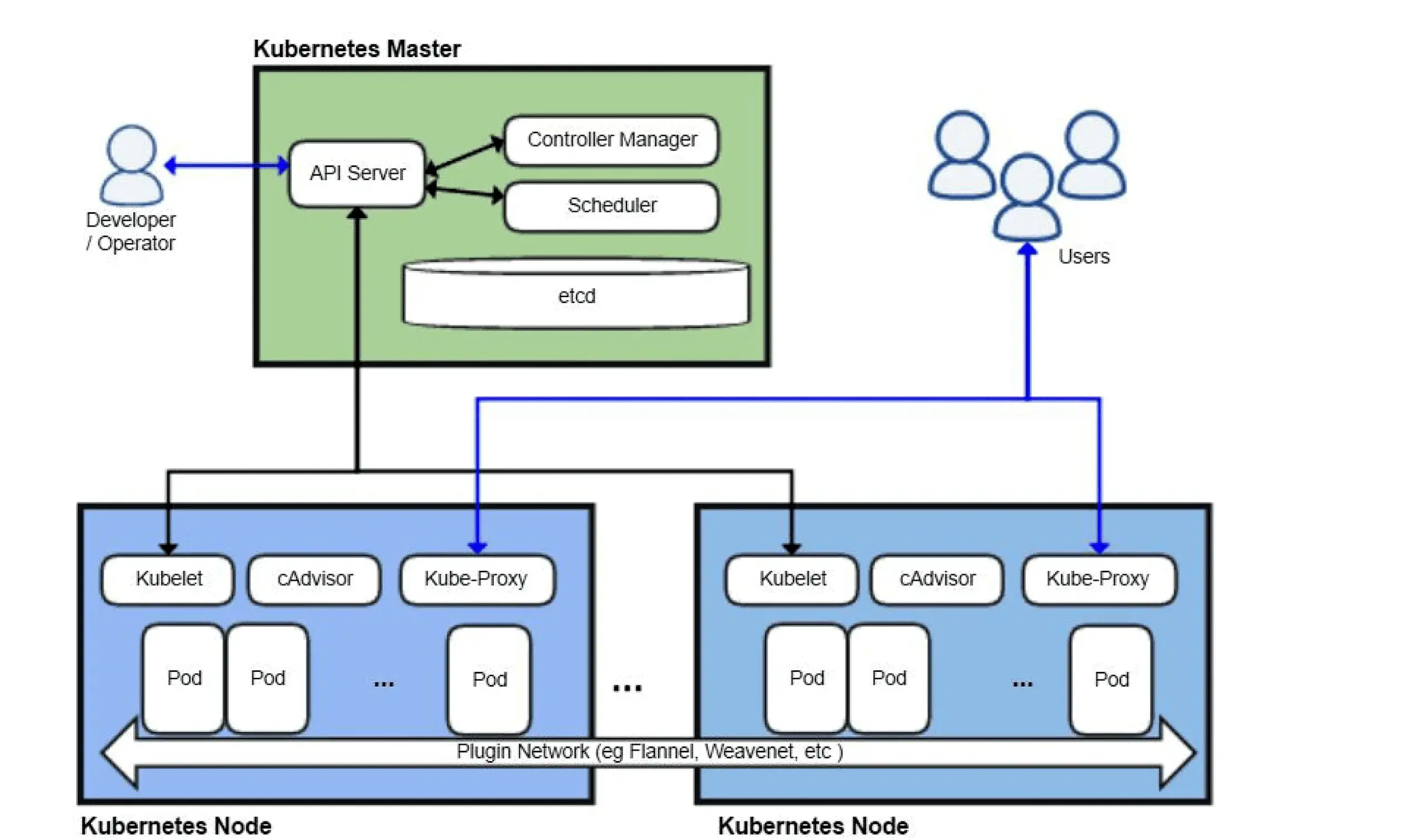 Pull Request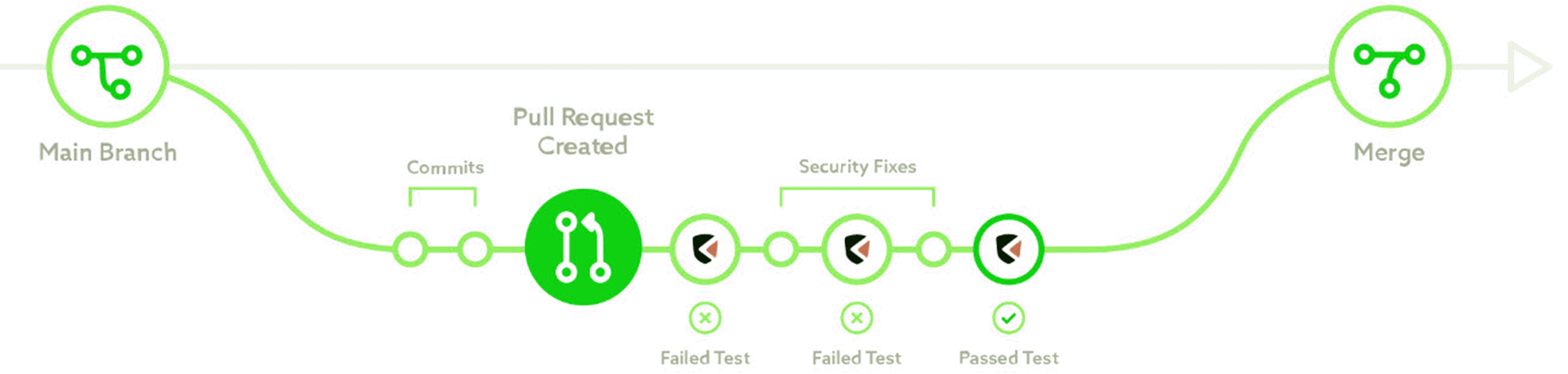
 Question 8: What is the Azure Pipeline?
 Technical Debt in DevOps

![Microsoft Agentic AI Business Solutions Architect [AB-100] | K21 Academy](https://test.k21academy.com/wp-content/uploads/2025/11/Microsoft-Agentic-AI-Business-Solutions-Architect-AB-100-Exam-Overview1.png)


