




In this blog, we are going to cover Apache Spark Architecture Fundamentals which is an open-source computing framework and a unified analytics engine for a large amount of data processing and machine learning.
Apache Spark Architecture is not only used for real-time processing but it is also used for batch processing and it can give you a hundred times faster performance than the traditional map-reduce which comes around with Hadoop.
Topics we’ll cover:
- What are Spark Architecture Fundamentals
- What is Azure Databricks Spark Cluster
- How to Create Cluster.
- Understanding the Architecture of Spark job.
- Jobs and Stages in Spark Architecture
- Cluster Management in Spark Architecture
What is Spark Architecture Fundamentals
Spark Architecture or Apache Spark is a parallel processing framework that supports in-memory processing to boost the performance of big-data analytical applications and the Apache Spark core engine of which its resources are managed by YARN. In simple words, Spark Architecture is known for its speed and efficiency. The key features it possesses are:
- It processes data faster which saves time in reading and writing operations.
- It allows real-time streaming that makes it really used technology in today’s big data world.
NOTE: YARN is a sort of resource manager which is basically used to manage resources for your Spark Architecture.
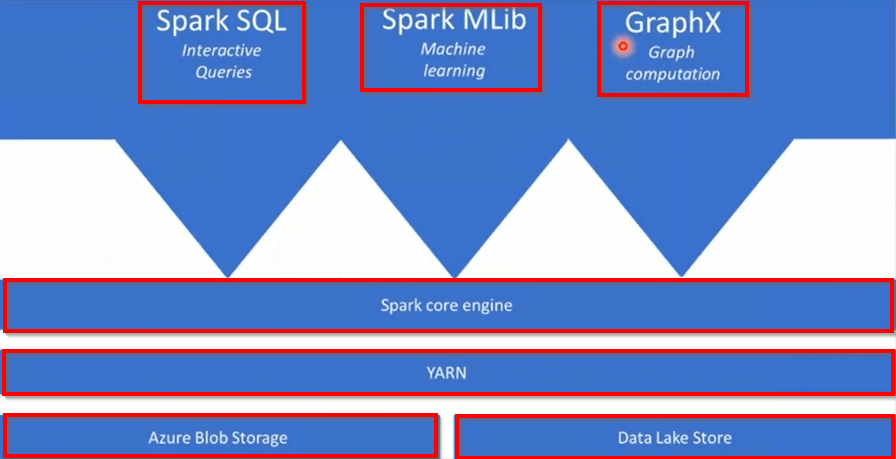
NOTE: In the Spark core engine different functions are at the top of the Azure Spark Core Engine that you add as your analytics require. Some examples are Spark SQL, Spark MLlib, GraphX.
Spark Architecture is based on two important abstractions i.e Resilient Distributed Dataset(RDD) and Directed Acyclic Graph(DAG)
Understanding DAG Operations in Spark
In the realm of Apache Spark, a Directed Acyclic Graph (DAG) plays a crucial role in how tasks are executed efficiently.
What is a DAG?
A DAG is a structured graph consisting of nodes and edges. Here, nodes represent partitions of data, while edges signify the transformations applied to this data. The term “directed” implies that the data flow has a specific direction, and “acyclic” means it doesn’t loop back on itself.
How does it operate within Spark?
- Sequence of Computations: In Spark, when you perform actions or transformations on data, these are initially represented as a series of operations. Instead of executing each operation immediately, Spark constructs a DAG of these operations.
- Lazy Evaluation: This DAG forms an execution plan that is assessed and optimized before actual computation. Spark’s lazy evaluation means transformations are not computed at once but are stacked until an action is invoked. This allows Spark to optimize the execution plan by, for example, combining transformations.
- Fault Tolerance: The DAG structure contributes to fault tolerance. If a node fails during computation, Spark can recompute only the partition of data that was lost, using the relations represented by the DAG, rather than redoing the entire operation.
- Optimized Execution: The DAG allows Spark to rearrange the computational tasks efficiently. By knowing the dependencies and transformations, Spark can execute stages in parallel, optimize resource allocation, and perform pipelining of operations.
- Task Scheduling: Once the DAG is constructed and optimized, Spark divides it into a set of stages with task sets that are scheduled for execution. Each stage in the DAG can be executed in parallel across the available executors.
In essence, the DAG ensures that Spark‘s execution of tasks is performed efficiently, with optimizations for speed and resource management integrated at each step. It’s a pivotal mechanism that underpins the robust performance of Apache Spark in data processing tasks.
Understanding the Components of RDD: Resilient, Distributed, Dataset
RDD, or Resilient Distributed Dataset, is a fundamental concept in Apache Spark that stands for three core attributes. Let’s delve into what each term signifies:
Resilient
- Fault Tolerance: RDDs are designed to automatically recover from errors or failures. If a node in the cluster fails, the data lost can be recomputed from its lineage graph, ensuring data integrity.
- Efficient Recovery: Through a process known as lineage, RDDs can recompute only the lost part of data, making recovery efficient without significantly disrupting processes.
Distributed
- Scalability Across Nodes: Data is split across various nodes within a cluster, allowing for parallel processing. This distribution enhances both speed and efficiency since tasks can leverage multiple machines.
- Load Balancing: Workloads are spread evenly across nodes to prevent bottlenecks, ensuring optimal use of resources and improved performance.
Dataset
- Logical Grouping of Data: RDDs represent a dataset in a logical structure, allowing users to manipulate large amounts of data with a single, unified interface.
- Transformations and Actions: Through RDDs, you can perform a variety of transformations (like map and filter) and actions (such as count and collect) to manipulate and analyze data seamlessly.
By understanding these components, one can appreciate how RDDs leverage the power of parallel computing to handle big data efficiently.
Also Read: Our blog post on Azure Synapse.
What Is Azure Databricks Spark Cluster
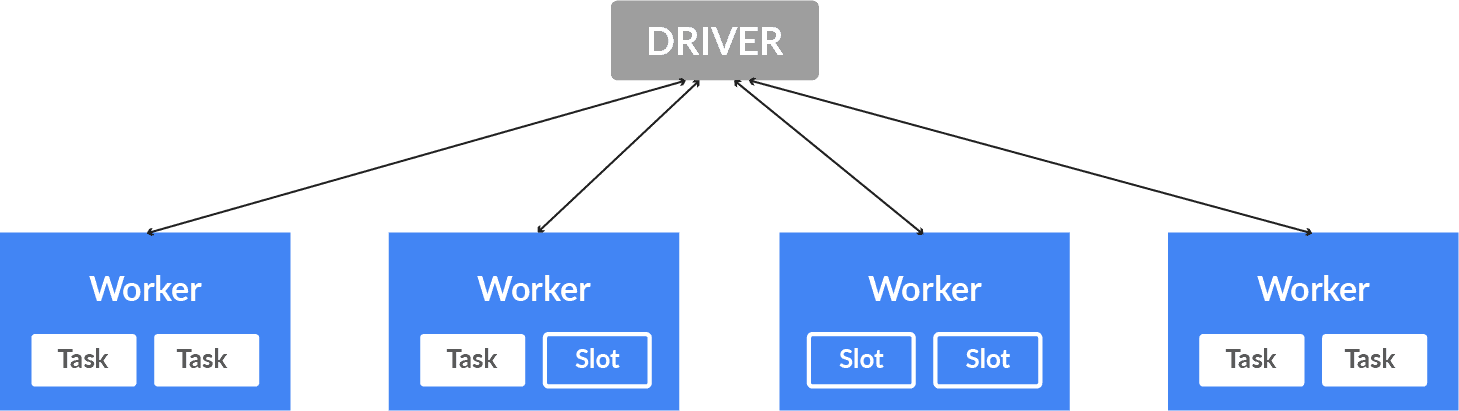
Azure Databricks is basically an Apache Spark-based big-data analytics platform optimized for Microsoft Azure cloud services. It manages and launches Apache Spark clusters in your Azure subscription. It provides Automated Cluster Management. After we combine the data bricks with the Microsoft cloud service i.e Microsoft Azure we get our Azure Data Bricks Service. Now, Apache Spark Clusters are the group of computers that are performed as a single computer and handles the execution of various commands issued from notebooks. Apache Spark uses a master-worker type architecture which basically can have a master process and worker processes that can run across multiple machines.
In the Master node, you have the driver program that drives the application so the code you write behaves like a driver program. Inside the driver program, the first thing we do is create a Spark context. Assuming Spark context could be a gateway to all or any spark functionality at an identical database connection. Worker nodes are the slave nodes whose job is to basically execute the tasks.
Also Check: Our blog post on Azure Data Lake.
How To Create Cluster
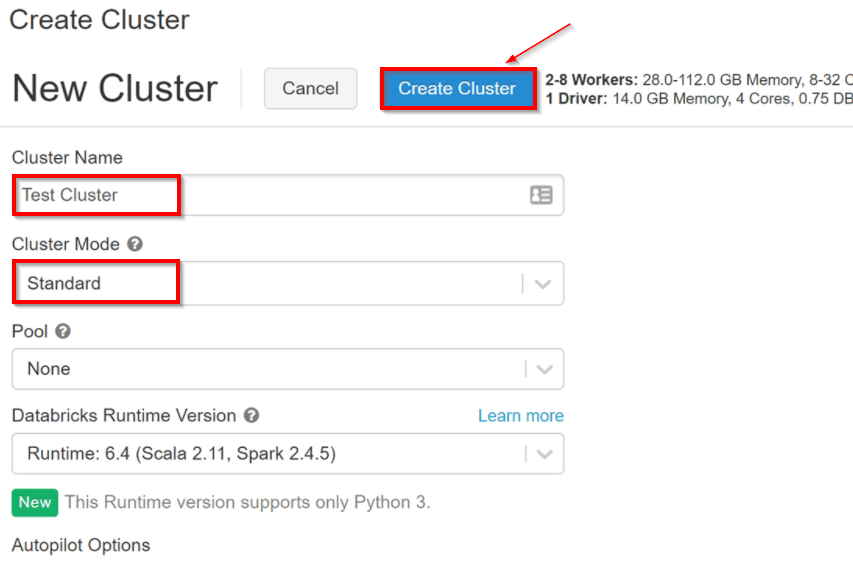
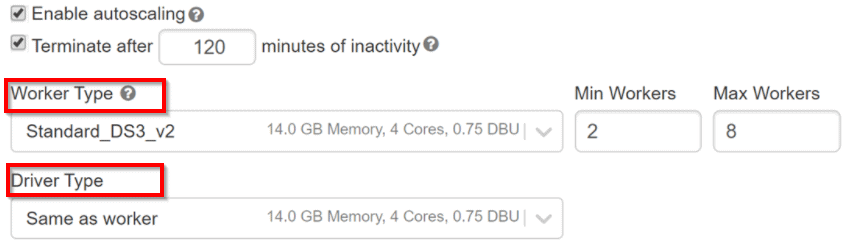
Now let’s have a look after you created the Azure Databricks services, as an Azure resource a Databricks appliance is deployed in your subscription. For using both the Worker nodes and Driver nodes you should specify the types and sizes of the Virtual Machine(VMs) at the time of cluster creation, but Azure Databricks manages all others aspects.
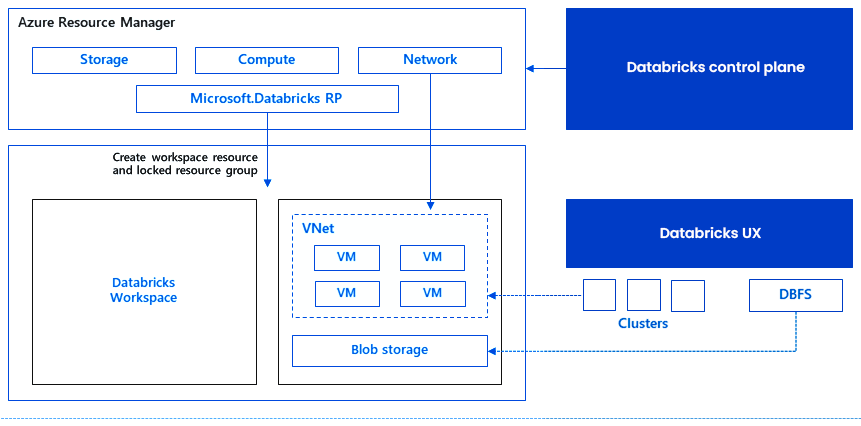
Inside, Azure Kubernetes Service(AKS) is a fully managed service that offers serverless continuous integration and deployment experience and is used to run the Azure Databricks data plan and control plan through containers that are running on the latest generation of Azure hardware. When the services of the managed resource group are ready then you will be able to manage the Databricks cluster by the Azure Databricks AI and by auto-scaling and auto-termination.
Also Check: Our blog post on Azure Data Factory Interview Questions.
Architecture Of Spark Job
Before we dive deeper, let us summarize the fundamentals of Spark Architecture.
As we know that Spark is a distributed computing environment and the unit of distribution is a Spark Cluster, so in every Cluster, there is a driver and more than one executor. When work is submitted to the cluster and the cluster is split into as many independent jobs as needed and this is how work is distributed across the Cluster’s node. Then the jobs are subdivided into tasks and further, the job is partitioned into more than one partition and these are the partitions that are the unit of work for each slot. Therefore partitions may need to be shared over the network.
Components Of Spark Architecture
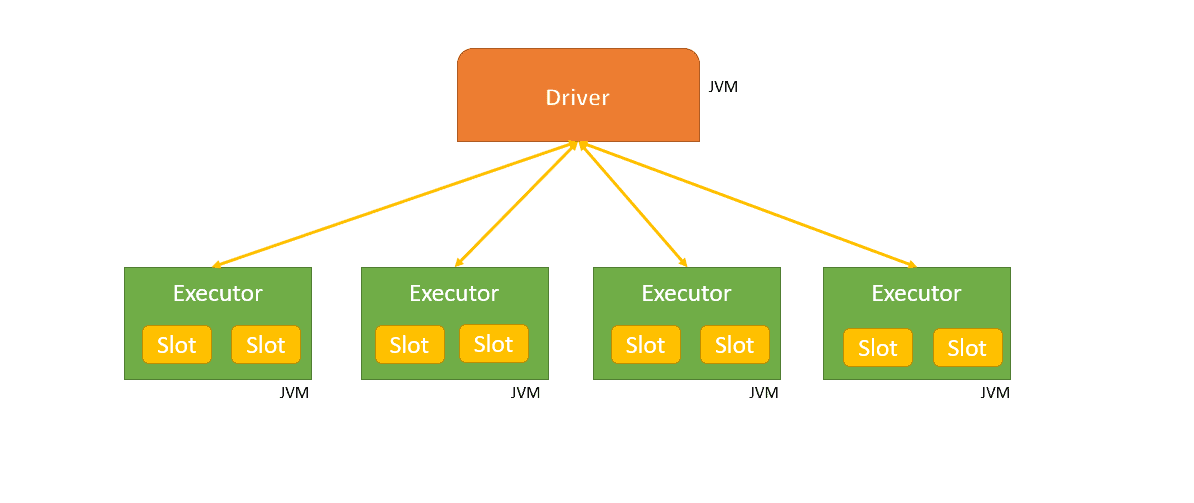
In the above diagram, each executor has 2 slots available. Here the Driver is the Java Virtual Machine(JVM) in which the application runs. Parallelization is done at two levels first is the Executor and the second is Slot. Each Executor node has slots and is logical execution for running tasks in parallel. So the Driver sends tasks to the respected slots on the executors when work is to be executed.
How Does an Executor Handle Data Within a Spark Application?
In a Spark application, an executor plays a crucial role in managing data processing and storage. Here’s how it operates:
- Initiation on Worker Nodes: Each executor is initiated as a process on a worker node, ensuring that the application leverages distributed computing resources efficiently.
- Task Execution and Data Management: Executors are responsible for running tasks assigned to them. They are designed to store data either in memory for rapid access or on disk for more permanent storage. This dual capability allows executors to balance speed and resource availability, optimizing performance.
- Data Interaction: Executors actively interact with external data sources. They read data inputs required for processing and write outputs back to these sources, maintaining a seamless flow of information in and out of the Spark environment.
- Application-Specific Allocation: Each Spark application initializes its own set of executors. This ensures tasks are completed in isolation from other running applications, preventing resource conflicts and optimizing application performance.
Overall, executors act as the backbone of a Spark application’s data handling, facilitating effective task management and data processing across distributed nodes.
1.) Jobs And Stages In Spark Architecture
A Job is a parallel computation consisting of multiple tasks and each distributed action is a job. A group of tasks that can be executed to perform the same task on multiple executors represents Stage. Each job gets broken into sets of tasks that depend on each other.
2.) Cluster Management In Spark Architecture
The resources provided to all the worker nodes as per their needs and operate all nodes accordingly is Cluster Manager i.e Cluster Manager is a mode where we can run Spark.
Apache Spark supports three types of Cluster Managers.
- Standalone Cluster Manager
- Hadoop YARN
- Apache Mesos
Q. What is a Standalone Scheduler in Spark?
Ans: The Standalone Scheduler is a built-in cluster manager for Apache Spark. It allows you to create a Spark cluster from scratch by deploying Spark on a group of computers, even if they don’t have any pre-existing cluster management software installed.
Key Features:
- Simplicity: It is easy to set up and ideal for small to medium-sized deployments where simplicity is key.
- Deployment: You can run Spark on a collection of machines that are completely dedicated to the task. This ensures that resources are effectively managed without the need to rely on other external systems like Apache Hadoop YARN or Apache Mesos.
How It Works:
- Cluster Creation: The Standalone Scheduler transforms separate machines into a Spark cluster, assigning roles such as master and worker nodes.
- Resource Management: It manages and allocates resources (CPU, memory) across these nodes in a straightforward manner.
- Job Scheduling: It schedules and coordinates Spark jobs, ensuring that tasks are distributed efficiently across the cluster.
Benefits:
- Cost-Effective: Perfect for environments where other resource-intensive tools aren’t necessary.
- Flexibility: Offers flexibility for developers to scale up as needs grow, without the initial complexity of incorporating additional systems.
In essence, the Standalone Scheduler offers a streamlined way to leverage Spark’s powerful processing capabilities by managing resources effectively within a self-contained Spark environment.
Azure Databricks builds the capabilities of Spark by providing fully managed Spark clusters that include a platform for powering Spark-based applications.
Related/References
- Microsoft Certified Azure Data Engineer Associate | DP 203 | Step By Step Activity Guides (Hands-On Labs)
- Exam DP-203: Data Engineering on Microsoft Azure
- Azure Data Lake For Beginners: All you Need To Know
Next Task For You
In our Azure Data Engineer training program, we will cover 28 Hands-On Labs. If you want to begin your journey towards becoming a Microsoft Certified: Azure Data Engineer Associate by checking out our FREE CLASS.


![Microsoft Agentic AI Business Solutions Architect [AB-100] | K21 Academy](https://test.k21academy.com/wp-content/uploads/2025/11/Microsoft-Agentic-AI-Business-Solutions-Architect-AB-100-Exam-Overview1.png)