
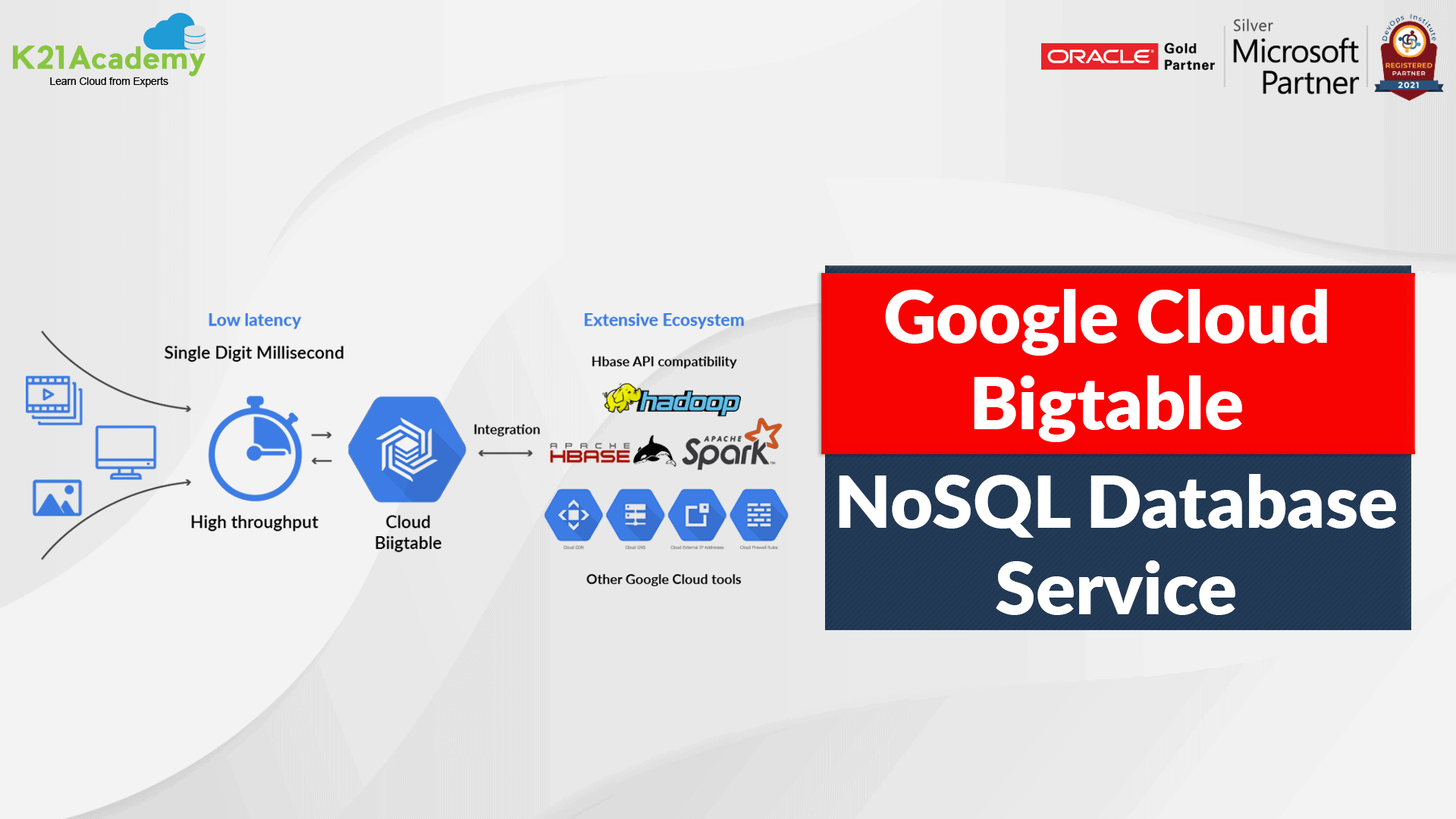



Cloud Bigtable is a fully managed, NoSQL database service offered by Google Cloud Platform (GCP). It is designed to handle massive amounts of structured and semi-structured data, with high throughput and low latency. It is used by many Google products such as Gmail, Google Search, and Google Analytics.
If you are thinking of “building an application that needs low latency and high throughput” and is confused about which database can be used that can scale for many reads and writes, then Cloud Bigtable is the right option for you!
Overview of Bigtable
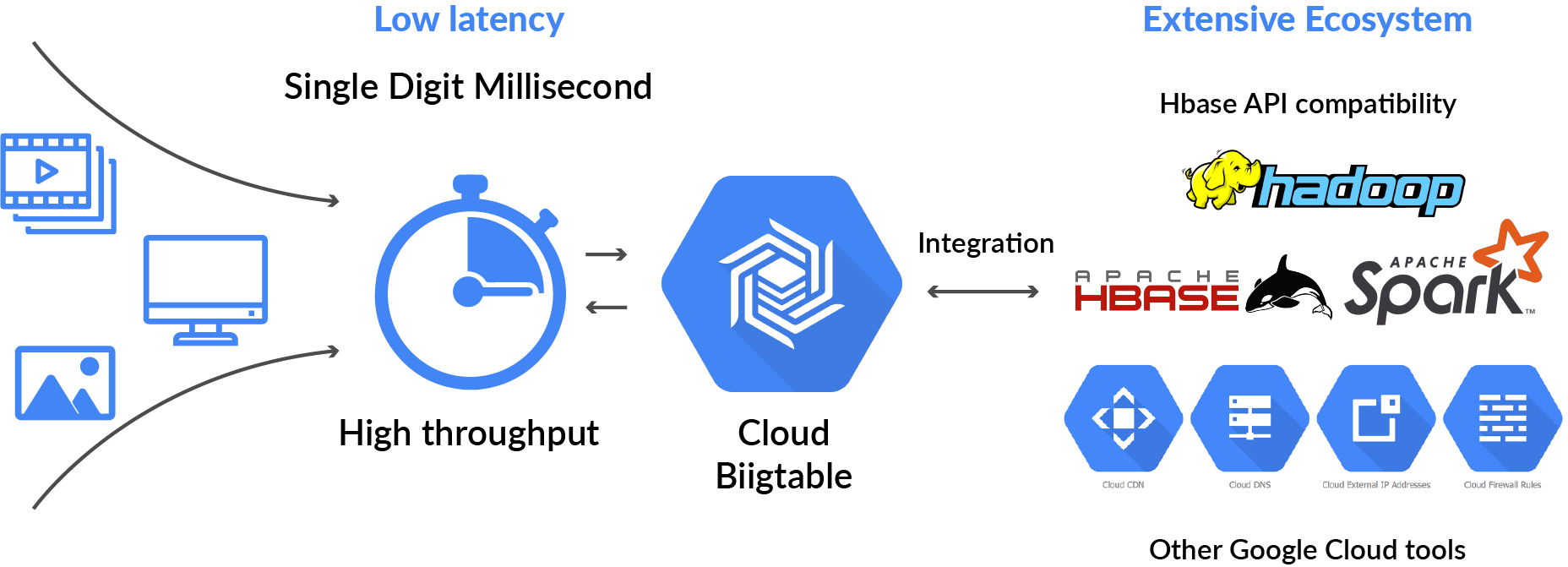
- Cloud Bigtable is a fully managed wide-column NoSQL database that scales to petabyte-scale.
- It is optimised for low latency, large numbers of reads and writes, and for maintaining performance at scale.
- Bigtable supports the open-source HBase API standard to simplify integration with the Apache ecosystem,, including HBase, Beam, Hadoop, and Spark.
- It also integrates with the Google Cloud ecosystem/tools like Memorystore, BigQuery, Dataproc, Dataflow, and many more.
Cloud Bigtable: NoSQL Database Service
NoSQL, or “not only SQL,” refers to a type of database that is designed to handle unstructured or semi-structured data, which can be difficult to manage using traditional relational databases. Unlike relational databases, which store data in tables with predefined schemas, NoSQL databases like Cloud Bigtable store data in a more flexible and scalable way, often using key-value pairs or document-based storage.
Cloud Bigtable is particularly well-suited for managing large amounts of data with high read and write throughput requirements. It is often used by companies that need to manage massive amounts of data, such as in the fields of finance, telecommunications, and social media. With its ability to scale horizontally by adding more nodes to a cluster, Cloud Bigtable can handle virtually any amount of data with low latency and high availability.
Cloud Bigtable Features

- Scalability: Cloud Bigtable is designed to scale horizontally, so you can add more nodes to your cluster to increase capacity and performance.
- High Performance: It provides low-latency reads and writes for your data, making it ideal for applications that require fast access to data.
- Integrated with other GCP Services: Cloud Bigtable integrates with many other GCP services such as Cloud Dataflow, Cloud Dataproc, and Cloud Pub/Sub.
- Fully Managed: Cloud Bigtable is fully managed, meaning that Google takes care of the infrastructure, so you can focus on developing your applications.
- Data is by default encrypted with Google-managed encryption keys. But if there are any specific compliance and regulatory requirements and customers need to manage their keys, then CMEK is also supported.
- Bigtable backups let you save a copy of a table’s schema and data and then restore from the backup to a new table later.
- Offers Seamless scaling and replication
- Fast and performant
- High throughput at low latency
- Cluster resizing without downtime
Also, Check Our blog post on Google Certified Professional Cloud Architect.
Bigtable Applications
Bigtable is ideal for applications that need very high throughput and scalability for key/value data, where each value is typically no larger than 10 MB. Bigtable also excels as a storage engine for batch MapReduce operations, stream processing/analytics, and machine-learning applications.
You can use Bigtable to store and query all of the following types of data:
- Time-series data, such as CPU and memory usage over time for multiple servers.
- Marketing data, such as purchase histories and customer preferences.
- Financial data, such as transaction histories, stock prices, and currency exchange rates.
- Internet of Things data, such as usage reports from energy meters and home appliances.
- Graph data, such as information about how users are connected.

Also, Read Our blog post on Google Compute Engine.
Architecture
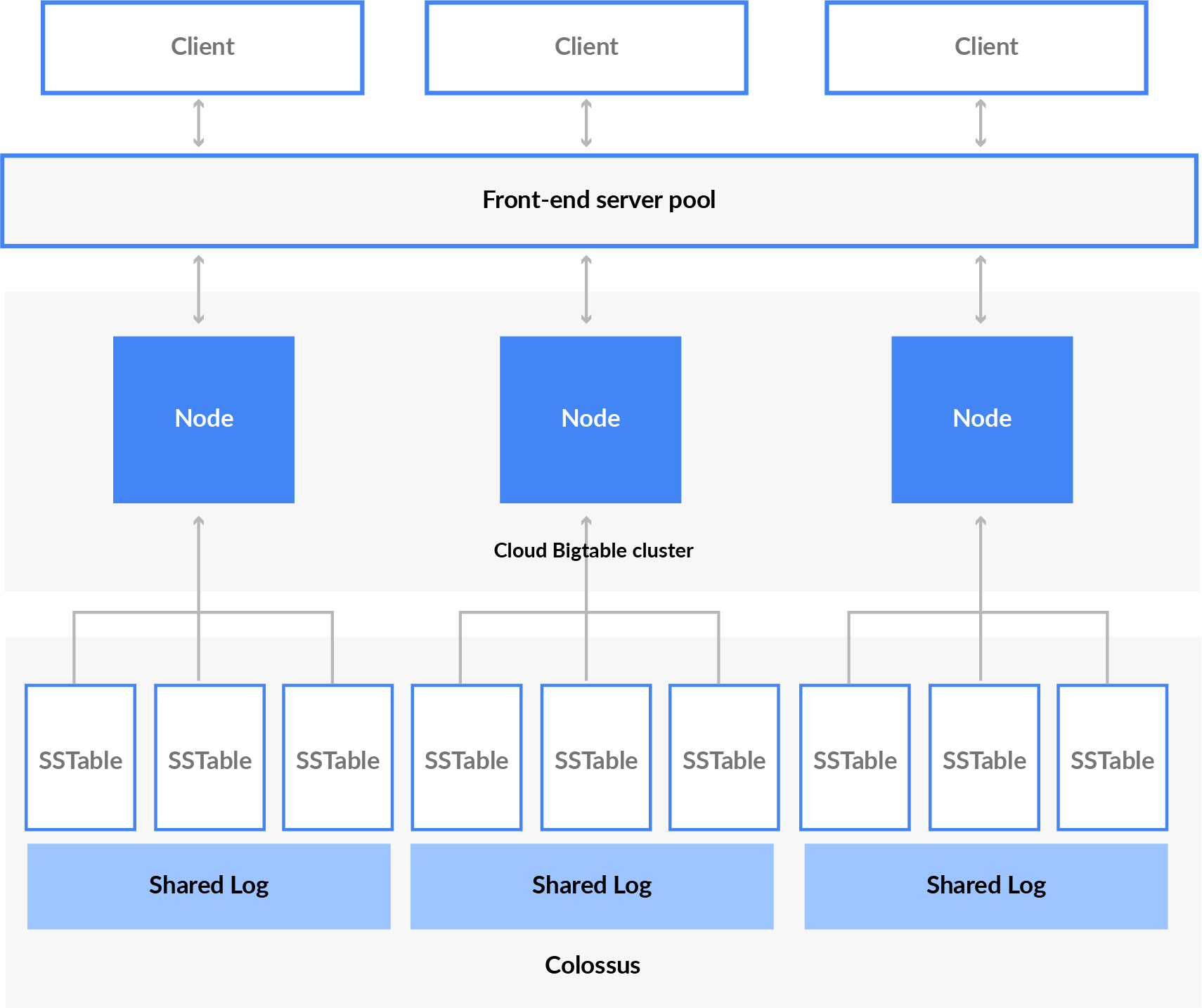
- The client request is served by the front-end server pool,, which routes the read/write request to the BigTable cluster evenly,, which in turn reads/writes the data to a block of the contagious row,, also known as a tablet.
- Nodes are instance that belongs to the Bigtable cluster and handles a subset of the request if one node is doing a heavy task,, that’s called hot-spotting.
- More nodes can be added to increase the traffic load.
- Tablets are stored in Colossus (google file system) in SSTable format, which is persistent. BigTable nodes don’t store any data; instead, they only have pointers to each tablet that are stored on colossus.
- Apart from SSTables, writes are also written to shared log to increase durability.
Also Check: How to learn GCP Cloud.
Bigtable Storage Model
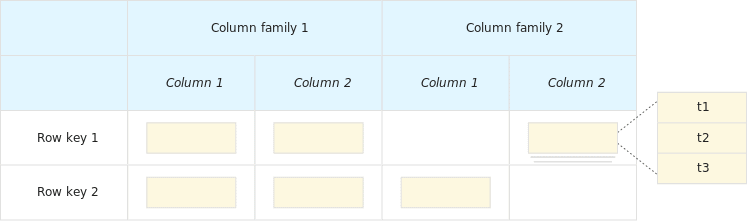
The Bigtable storage model is a distributed, sparse, multidimensional sorted map. It is designed to handle massive amounts of structured and semi-structured data with low latency and high throughput. In the Bigtable storage model, data is organized into tables, which are composed of rows and columns. Each row in a table is identified by a unique row key, and each column is identified by a column family and a column qualifier.
One of the key advantages of the Bigtable storage model is its ability to handle large-scale data sets with high read and write throughput requirements. Additionally, it is intended to be fault-tolerant and highly available, with data being duplicated throughout a cluster’s many nodes. Because of this, it is an excellent option for use cases requiring instant access to massive amounts of data, such as financial trading systems, social networking platforms, and online gaming applications.
Bigtable stores data in massively scalable tables, each of which is a sorted key/value map.
- The table is composed of rows that describe a single entity and columns containing the individual values for each row.
- Every individual row is indexed by a single row key, and columns related to one another are grouped into a column family. Columns are identified by a combination of the column family and a column qualifier (a unique name within the column family).
- Each row/column intersection can contain multiple cells,, which contain a unique timestamped version of the data for that particular row and column. Each cell in a given row and column has a unique timestamp generally denoted by (t).
- Storing multiple cells in a column provides a record of how the stored data for that row and column has changed over time.
Use-Cases Of Cloud Bigtable
1.) Financial Analysis
Users/Companies can build models based on historical behavior, continuously update fraud patterns, and compare real-time transactions. They can also store and consolidate market data, trade activities, and other data like social and transactional.
Financial institutions require high-performance databases that can handle large amounts of data and provide real-time access to that data. Cloud Bigtable can be used for applications such as fraud detection, risk analysis, and trading platforms
2.) IoT
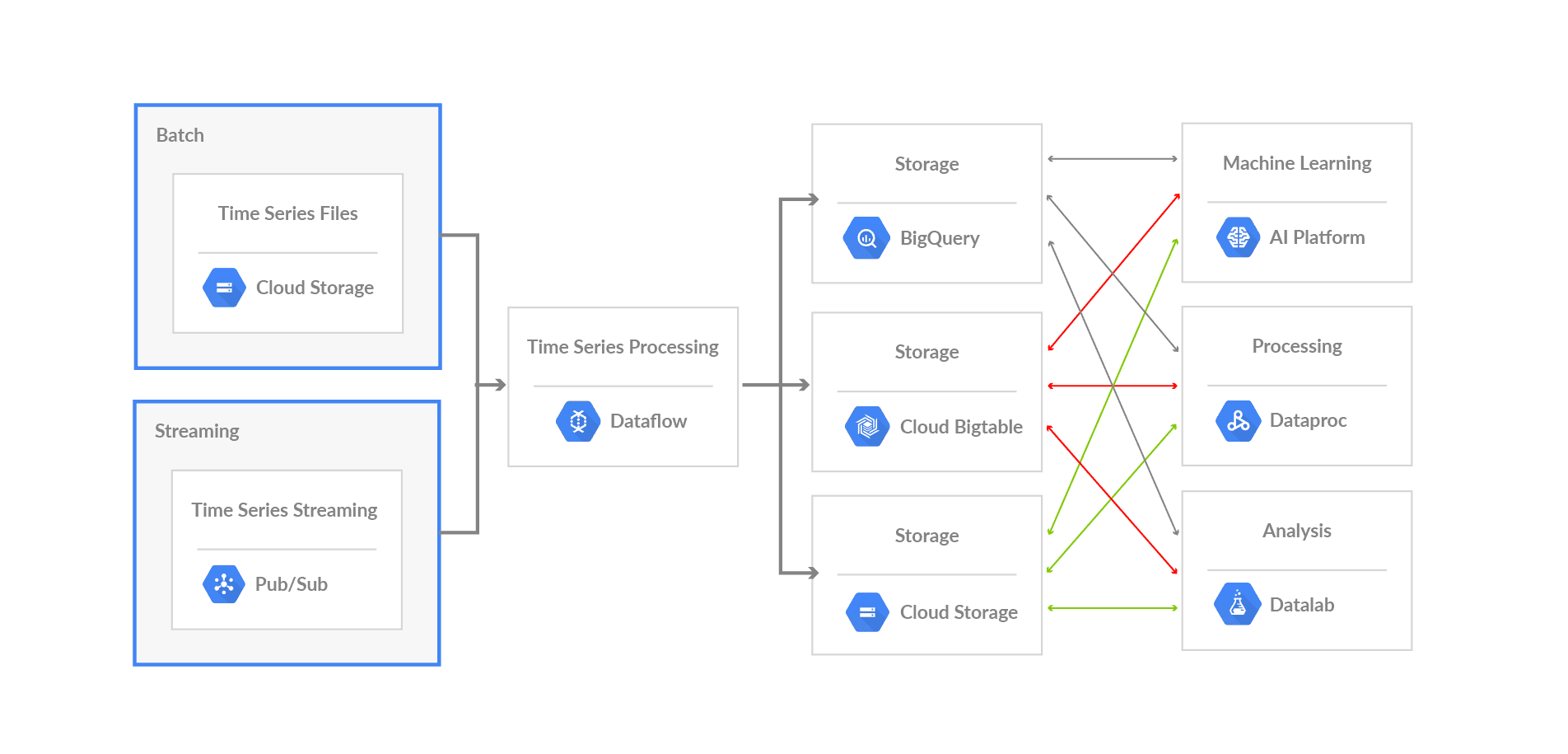
Ingest and analyze large volumes of time series data from sensors in real-time, matching the high speeds of IoT data to track normal and abnormal behaviour. Enable customers to build dashboards and drive analytics on their data in real time.
3.) AdTech
Ad tech platforms often require the ability to store and retrieve vast amounts of data in real-time, including user profiles, ad impressions, and performance metrics. Cloud Bigtable can be used to provide the high-speed data processing and low-latency access that ad tech platforms require.
4.) Social media
Social media platforms generate vast amounts of data, including user profiles, posts, and interactions. Cloud Bigtable can handle the high write and read throughput requirements of these systems, while also providing low latency access to the data.
5.) Gaming
Online gaming platforms generate a large amount of data, including player data, game logs, and user-generated content. Cloud Bigtable can handle the high write and read throughput requirements of these systems, while also providing low latency access to the data.
Bigtable vs BigQuery
One of the most common questions asked during the live sessions is how Bigtable differs from BigQuery? So, here is the answer to this question.
Cloud Bigtable is a NoSQL database service that is designed to handle massive amounts of structured and semi-structured data, with high throughput and low latency. It is optimized for handling real-time, high-speed data, such as time-series data and streaming data. It is a highly scalable, fully managed service that provides low-latency reads and writes for your data. Cloud Bigtable is ideal for use cases that require high write and read performance, such as IoT applications, financial trading systems, and ad tech platforms.
At a high level, Bigtable is a NoSQL wide-column database optimized for low latency, large numbers of reads and writes, and maintaining performance at scale. So if high throughput and low latency at scale are not priorities for you, then another NoSQL database like Firestore might be a better fit.
On the other hand, BigQuery is a fully-managed, serverless, cloud data warehouse service that is designed to handle large amounts of structured and semi-structured data for analysis. It is a highly scalable, cost-effective service that allows users to store and analyze large datasets using SQL-like queries. BigQuery is optimized for handling complex, ad-hoc queries on large datasets, and it can handle data from a variety of sources. It is ideal for use cases that require ad-hoc analysis and data exploration, such as business intelligence, data warehousing, and data science. BigQuery is an enterprise data warehouse for large amounts of structured relational data optimized for large-scale, ad-hoc SQL-based analysis and reporting, making it best suited for gaining organizational insights. BigQuery can be used to analyze data from Cloud Bigtable as well.
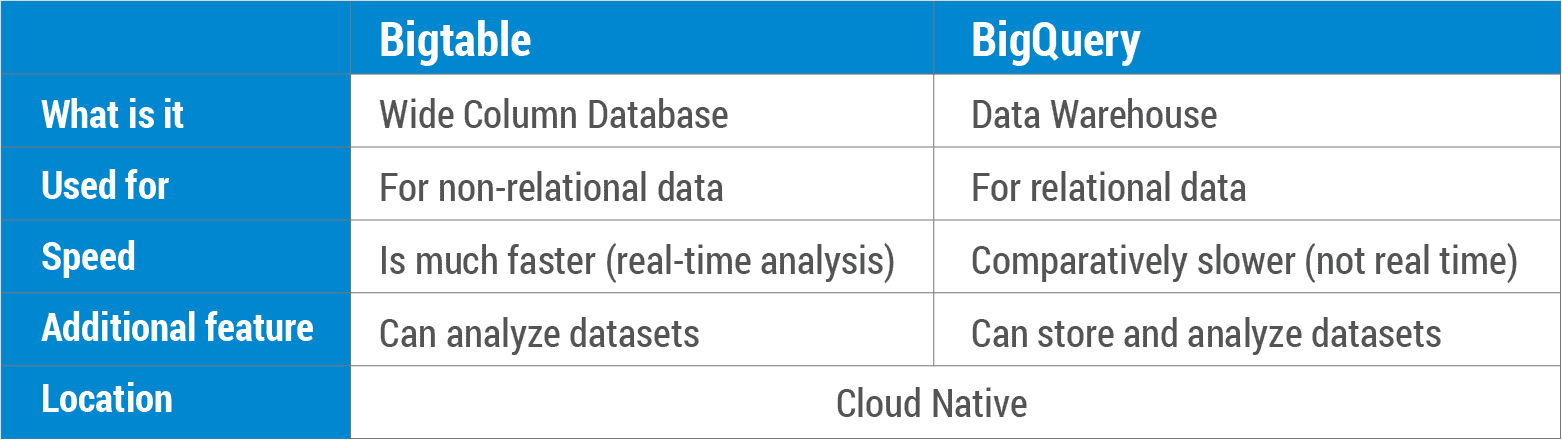
The following table further helps bring out the contrast between the two Google services.
Conclusion
Bigtable is a database of choice for use cases that require a specific amount of scale or throughput with strict latency requirements, such as IoT, AdTech, FinTech, gaming, and ML-based personalizations. Users can ingest 100s of thousands of events per second from websites or IoT devices through Cloud Pub/Sub, process them in Dataflow, and send them to Cloud Bigtable.
FAQ’S
How do you migrate data to Cloud Bigtable?
You can migrate data to Cloud Bigtable using the Cloud Bigtable HBase client or the Cloud Bigtable dataflow connector.
How does Cloud Bigtable handle security and data privacy?
Cloud Bigtable handles security and data privacy by providing authentication and authorization controls, encryption at rest and in transit, and support for compliance certifications such as HIPAA, SOC 2, and PCI DSS.
What is the pricing model for Cloud Bigtable?
Cloud Bigtable pricing is based on the amount of storage used, the amount of data processed, and the number of nodes in the cluster. There are no upfront costs or termination fees, and pricing is based on a pay-as-you-go model.
How does Cloud Bigtable handle scalability and performance?
Cloud Bigtable handles scalability and performance by automatically distributing data across multiple nodes, allowing users to increase or decrease the number of nodes in the cluster, and providing features such as load balancing and automatic node repair. This allows Cloud Bigtable to handle massive amounts of data with high read and write throughput while maintaining low latency.
Related References
- GCP Professional Cloud Architect: Everything You Need To Know
- Google Professional Cloud Architect: Step-By-Step Hands-On Guide
- Google Cloud Free Account: Steps to Register for Free Trial Account
- Google Cloud Services & Tools
- Google Cloud Platform Console Walkthrough
- Beginners Guide To Google Cloud Compute Services
- Deploying An Application To A GKE Cluster
Next Task For You
If you are also interested and want to know more about the Google Professional Cloud Architect certification, register for our Free Class.


![Microsoft Agentic AI Business Solutions Architect [AB-100] | K21 Academy](https://test.k21academy.com/wp-content/uploads/2025/11/Microsoft-Agentic-AI-Business-Solutions-Architect-AB-100-Exam-Overview1.png)


